Skip to content
  • MySensors
  • OpenHardware.io
  • Categories
  • Recent
  • Tags
  • Popular
Skins
  • Light
  • Brite
  • Cerulean
  • Cosmo
  • Flatly
  • Journal
  • Litera
  • Lumen
  • Lux
  • Materia
  • Minty
  • Morph
  • Pulse
  • Sandstone
  • Simplex
  • Sketchy
  • Spacelab
  • United
  • Yeti
  • Zephyr
  • Dark
  • Cyborg
  • Darkly
  • Quartz
  • Slate
  • Solar
  • Superhero
  • Vapor

  • Default (No Skin)
  • No Skin
Collapse
Brand Logo
  1. Home
  2. Controllers
  3. Domoticz
  4. Open/closed instead of on/off, Payload

Open/closed instead of on/off, Payload

Scheduled Pinned Locked Moved Domoticz
14 Posts 4 Posters 6.6k Views 3 Watching
  • Oldest to Newest
  • Newest to Oldest
  • Most Votes
Reply
  • Reply as topic
Log in to reply
This topic has been deleted. Only users with topic management privileges can see it.
  • P Offline
    P Offline
    popunonkok
    wrote on last edited by
    #1

    Hi

    I have trouble finding the right info about switch type for a door reed switch.

    I have a node that detects door state and lock state.
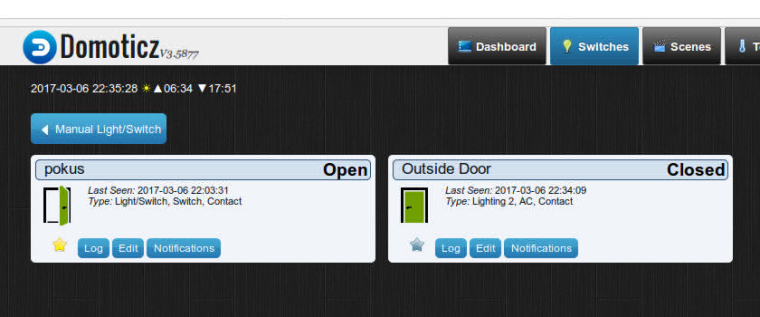
    However they both shows up in Domoticz as on/off, not open closed.

    But in many Mysensors/Domoticz screenshots I see logs that has the words open/Closed instead.

    I thought Iwould find the info here.
    https://www.mysensors.org/download/serial_api_20
    But that did not help.

    So where do I find info on this subject?

    This could also be a Domoticz question but I havent found a Switchtype in there that helps me with this.

    mfalkviddM Boots33B 2 Replies Last reply
    0
    • P popunonkok

      Hi

      I have trouble finding the right info about switch type for a door reed switch.

      I have a node that detects door state and lock state.
      However they both shows up in Domoticz as on/off, not open closed.

      But in many Mysensors/Domoticz screenshots I see logs that has the words open/Closed instead.

      I thought Iwould find the info here.
      https://www.mysensors.org/download/serial_api_20
      But that did not help.

      So where do I find info on this subject?

      This could also be a Domoticz question but I havent found a Switchtype in there that helps me with this.

      mfalkviddM Offline
      mfalkviddM Offline
      mfalkvidd
      Mod
      wrote on last edited by
      #2

      @popunonkok I think you need to present the sensor as S_DOOR. See https://www.mysensors.org/download/serial_api_20#presentation
      That's what the door/window/button example uses.

      1 Reply Last reply
      1
      • P popunonkok

        Hi

        I have trouble finding the right info about switch type for a door reed switch.

        I have a node that detects door state and lock state.
        However they both shows up in Domoticz as on/off, not open closed.

        But in many Mysensors/Domoticz screenshots I see logs that has the words open/Closed instead.

        I thought Iwould find the info here.
        https://www.mysensors.org/download/serial_api_20
        But that did not help.

        So where do I find info on this subject?

        This could also be a Domoticz question but I havent found a Switchtype in there that helps me with this.

        Boots33B Offline
        Boots33B Offline
        Boots33
        Hero Member
        wrote on last edited by Boots33
        #3

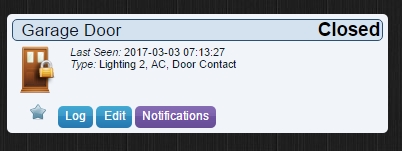
        @popunonkok as @mfalkvidd has said you should use S_DOOR you may also need to change the switch type in Domiticz

        go to the switches panel and locate the switch you want to change. Click on its edit button
        0_1488492755485_door.jpg

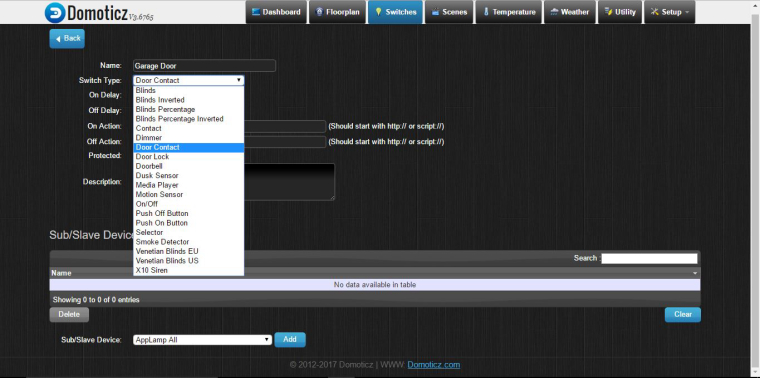
        When you are in the edit screen for that switch you can change its type by clicking the drop down list. In this project I use a reed switch to see if the garage door is closed and I used Door Contact for the type. Make sure you click save before you exit the edit screen.
        0_1488493013832_edit.jpg

        1 Reply Last reply
        1
        • P Offline
          P Offline
          popunonkok
          wrote on last edited by
          #4

          HMmmm...

          I have presented the Switch as s_door.

            present(PRIMARY_CHILD_ID, S_DOOR);
          

          My Message looks like this:

          MyMessage msg(PRIMARY_CHILD_ID, V_TRIPPED);
          

          I sould have written this in my first post but it was a quick post, sorry about that.

          However, in Domotics i don't get Door Contact as Switch type, only Contact.
          When I chose Contact, it says Open/Close but then I dont get to choose Icon, it only shows to arrows.
          So to chose Contact kind of solved my problem but I like my Door Icon. =)

          I see that @Boots33 uses V3.6765. I guess thats a Beta. I only uses Stable versions so the latest is v 3.5877

          I Guess that it could be a new switch type but I would guess not. The strange thing is that I see that the switchtype Contact is not avalible on @Boots33 screen shot.

          Thanks anyway for both answers.

          K Boots33B 2 Replies Last reply
          0
          • P popunonkok

            HMmmm...

            I have presented the Switch as s_door.

              present(PRIMARY_CHILD_ID, S_DOOR);
            

            My Message looks like this:

            MyMessage msg(PRIMARY_CHILD_ID, V_TRIPPED);
            

            I sould have written this in my first post but it was a quick post, sorry about that.

            However, in Domotics i don't get Door Contact as Switch type, only Contact.
            When I chose Contact, it says Open/Close but then I dont get to choose Icon, it only shows to arrows.
            So to chose Contact kind of solved my problem but I like my Door Icon. =)

            I see that @Boots33 uses V3.6765. I guess thats a Beta. I only uses Stable versions so the latest is v 3.5877

            I Guess that it could be a new switch type but I would guess not. The strange thing is that I see that the switchtype Contact is not avalible on @Boots33 screen shot.

            Thanks anyway for both answers.

            K Offline
            K Offline
            kimot
            wrote on last edited by
            #5

            @popunonkok
            You can define your own icons in Domoticz.

            https://www.domoticz.com/wiki/Custom_icons_for_webinterface

            1 Reply Last reply
            0
            • P popunonkok

              HMmmm...

              I have presented the Switch as s_door.

                present(PRIMARY_CHILD_ID, S_DOOR);
              

              My Message looks like this:

              MyMessage msg(PRIMARY_CHILD_ID, V_TRIPPED);
              

              I sould have written this in my first post but it was a quick post, sorry about that.

              However, in Domotics i don't get Door Contact as Switch type, only Contact.
              When I chose Contact, it says Open/Close but then I dont get to choose Icon, it only shows to arrows.
              So to chose Contact kind of solved my problem but I like my Door Icon. =)

              I see that @Boots33 uses V3.6765. I guess thats a Beta. I only uses Stable versions so the latest is v 3.5877

              I Guess that it could be a new switch type but I would guess not. The strange thing is that I see that the switchtype Contact is not avalible on @Boots33 screen shot.

              Thanks anyway for both answers.

              Boots33B Offline
              Boots33B Offline
              Boots33
              Hero Member
              wrote on last edited by Boots33
              #6

              @popunonkok said in Open/closed instead of on/off, Payload:

              However, in Domotics i don't get Door Contact as Switch type, only Contact.
              When I chose Contact, it says Open/Close but then
              So to chose Contact kind of solved my problem but I like my Door Icon. =)

              I see that @Boots33 uses V3.6765. I guess thats a Beta. I only uses Stable versions so the latest is v 3.5877

              I Guess that it could be a new switch type but I would guess not.

              Could be because I am on the Beta I suppose. although the project I linked to is nearly 12 months old and I am pretty sure I had the door icon from the start. Is there any other Domoticz users that can confirm if they have the same menu as me. I could have selected some custom icons I guess but I can't remember doing that.

              I dont get to choose Icon, it only shows to arrows.

              When I select Door Contact I do not get to choose the icon either. it just uses the door icon

              The strange thing is that I see that the switchtype Contact is not avalible on @Boots33 screen shot.

              There is a Contact type 2 positions up from door contact on my menu.

              This may be best chased down on the Domoticz forum

              1 Reply Last reply
              0
              • P Offline
                P Offline
                popunonkok
                wrote on last edited by
                #7

                @kimot
                Im using custom icon for my door, however, you can't use custom icon for the switchtype contact. At least not on v3.5877

                @Boots33
                Sorry didn't see the Contact type 2 positions up.
                I see that the Door Contact has a lock on its icon. How does it look when your pysical door is open? Just gray?

                Boots33B K 2 Replies Last reply
                0
                • P popunonkok

                  @kimot
                  Im using custom icon for my door, however, you can't use custom icon for the switchtype contact. At least not on v3.5877

                  @Boots33
                  Sorry didn't see the Contact type 2 positions up.
                  I see that the Door Contact has a lock on its icon. How does it look when your pysical door is open? Just gray?

                  Boots33B Offline
                  Boots33B Offline
                  Boots33
                  Hero Member
                  wrote on last edited by
                  #8

                  @popunonkok Like this

                  0_1488612357340_Screenshot (47).jpg

                  1 Reply Last reply
                  0
                  • P Offline
                    P Offline
                    popunonkok
                    wrote on last edited by
                    #9

                    @Boots33
                    One more question: The closed door with a lock symbol. Is that door just closed or closed AND locked?

                    I will probably wait with this main question since it seems to be related to an beta update.

                    Boots33B K 2 Replies Last reply
                    0
                    • P popunonkok

                      @Boots33
                      One more question: The closed door with a lock symbol. Is that door just closed or closed AND locked?

                      I will probably wait with this main question since it seems to be related to an beta update.

                      Boots33B Offline
                      Boots33B Offline
                      Boots33
                      Hero Member
                      wrote on last edited by
                      #10

                      @popunonkok The closed door with lock is what it shows for a closed door. As far as i know there is no way to indicate just closed without the lock. Just the two icons for open and closed. Why they chose to put a lock on it I am not sure

                      1 Reply Last reply
                      0
                      • P popunonkok

                        @Boots33
                        One more question: The closed door with a lock symbol. Is that door just closed or closed AND locked?

                        I will probably wait with this main question since it seems to be related to an beta update.

                        K Offline
                        K Offline
                        kimot
                        wrote on last edited by
                        #11

                        @popunonkok
                        You can choose "Door Lock" switch type and change icons for this switch.
                        I think, it is possible change any icons in domoticz.
                        Simply go to "www/images" folder, load your own icons and rename it to door48open.png and door48.png.
                        Or do the same for contact48.png etc.
                        I will try it when I come at home.

                        Boots33B 1 Reply Last reply
                        0
                        • K kimot

                          @popunonkok
                          You can choose "Door Lock" switch type and change icons for this switch.
                          I think, it is possible change any icons in domoticz.
                          Simply go to "www/images" folder, load your own icons and rename it to door48open.png and door48.png.
                          Or do the same for contact48.png etc.
                          I will try it when I come at home.

                          Boots33B Offline
                          Boots33B Offline
                          Boots33
                          Hero Member
                          wrote on last edited by
                          #12

                          @kimot can you confirm that you have Door contact and Door Lock types available from your drop down menu? Are you on a stable release or a Beta of Domoticz

                          K 1 Reply Last reply
                          0
                          • Boots33B Boots33

                            @kimot can you confirm that you have Door contact and Door Lock types available from your drop down menu? Are you on a stable release or a Beta of Domoticz

                            K Offline
                            K Offline
                            kimot
                            wrote on last edited by
                            #13

                            @Boots33
                            "Door Lock" only. I am using stable releases.

                            1 Reply Last reply
                            0
                            • P popunonkok

                              @kimot
                              Im using custom icon for my door, however, you can't use custom icon for the switchtype contact. At least not on v3.5877

                              @Boots33
                              Sorry didn't see the Contact type 2 positions up.
                              I see that the Door Contact has a lock on its icon. How does it look when your pysical door is open? Just gray?

                              K Offline
                              K Offline
                              kimot
                              wrote on last edited by
                              #14

                              @popunonkok

                              0_1488836984223_other_icons.jpg

                              1 Reply Last reply
                              0

                              Hello! It looks like you're interested in this conversation, but you don't have an account yet.

                              Getting fed up of having to scroll through the same posts each visit? When you register for an account, you'll always come back to exactly where you were before, and choose to be notified of new replies (either via email, or push notification). You'll also be able to save bookmarks and upvote posts to show your appreciation to other community members.

                              With your input, this post could be even better 💗

                              Register Login
                              Reply
                              • Reply as topic
                              Log in to reply
                              • Oldest to Newest
                              • Newest to Oldest
                              • Most Votes


                              8

                              Online

                              12.0k

                              Users

                              11.2k

                              Topics

                              113.4k

                              Posts


                              Copyright 2025 TBD   |   Forum Guidelines   |   Privacy Policy   |   Terms of Service
                              • Login

                              • Don't have an account? Register

                              • Login or register to search.
                              • First post
                                Last post
                              0
                              • MySensors
                              • OpenHardware.io
                              • Categories
                              • Recent
                              • Tags
                              • Popular