Skip to content
  • MySensors
  • OpenHardware.io
  • Categories
  • Recent
  • Tags
  • Popular
Skins
  • Light
  • Brite
  • Cerulean
  • Cosmo
  • Flatly
  • Journal
  • Litera
  • Lumen
  • Lux
  • Materia
  • Minty
  • Morph
  • Pulse
  • Sandstone
  • Simplex
  • Sketchy
  • Spacelab
  • United
  • Yeti
  • Zephyr
  • Dark
  • Cyborg
  • Darkly
  • Quartz
  • Slate
  • Solar
  • Superhero
  • Vapor

  • Default (No Skin)
  • No Skin
Collapse
Brand Logo
  1. Home
  2. Troubleshooting
  3. Sensebender Gateway with W5100 trouble

Sensebender Gateway with W5100 trouble

Scheduled Pinned Locked Moved Troubleshooting
4 Posts 3 Posters 1.4k Views 3 Watching
  • Oldest to Newest
  • Newest to Oldest
  • Most Votes
Reply
  • Reply as topic
Log in to reply
This topic has been deleted. Only users with topic management privileges can see it.
  • alexsh1A Offline
    alexsh1A Offline
    alexsh1
    wrote on last edited by alexsh1
    #1

    Hi all,

    I have the Sensebender Gateway working fine with the default serial sketch.
    However, as soon as I load, the W5100 ethernet default sketch, I cannot get it to work. There are no messages in the terminal. The only way to force messages in the terminal is to take out the nrf24l01+ , connect the GW to the computer and insert the nrf24l01+ into the socket while running the terminal. I have the following message:

    0;255;3;0;9;TSM:FAIL:RE-INIT
    0;255;3;0;9;TSM:INIT
    0;255;3;0;9;!TSM:INIT:TSP FAIL
    0;255;3;0;9;TSM:FAIL:CNT=2
    0;255;3;0;9;TSM:FAIL:PDT
    0;255;3;0;9;TSM:FAIL:RE-INIT
    0;255;3;0;9;TSM:INIT
    0;255;3;0;9;TSM:INIT:TSP OK
    0;255;3;0;9;TSM:INIT:GW MODE
    0;255;3;0;9;TSM:READY:ID=0,PAR=0,DIS=0
    0;255;3;0;9;MCO:REG:NOT NEEDED
    IP: 0.0.0.0
    0;255;3;0;9;MCO:BGN:STP
    0;255;3;0;9;MCO:BGN:INIT OK,TSP=1
    

    This is very strange as I set IP to 10.1.1.120.
    When I connect the ethernet cable, I can ping 10.1.1.120, but the GW does not work

    Can anyone help please?

    1 Reply Last reply
    0
    • gohanG Offline
      gohanG Offline
      gohan
      Mod
      wrote on last edited by
      #2

      Sorry if I ask, but what pins did you use to connect the W5100 and the nrf24 radio?

      alexsh1A 1 Reply Last reply
      0
      • gohanG gohan

        Sorry if I ask, but what pins did you use to connect the W5100 and the nrf24 radio?

        alexsh1A Offline
        alexsh1A Offline
        alexsh1
        wrote on last edited by alexsh1
        #3

        @gohan

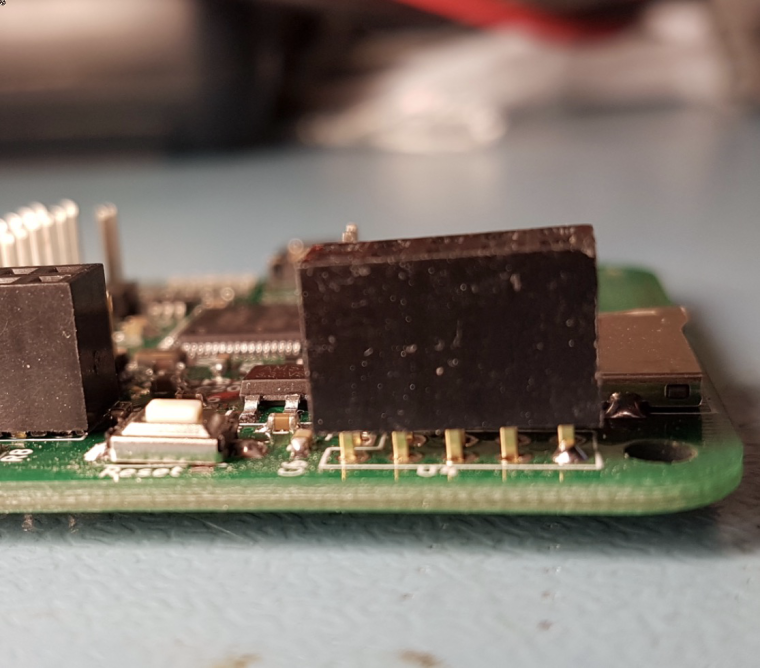
        There is only one 10 pins socket - this is for W5100
        0_1494433385299_IMG_4962.PNG

        1 Reply Last reply
        0
        • A Offline
          A Offline
          andy5211d
          wrote on last edited by andy5211d
          #4

          Hi I have exactly the same problem but now using the latest IDE environment and MySensors build. Did you manage to find out what was causing the issue? In my set-up seems like the ethernet module is not communication with the rest of the hardware.

          Fixed. The IDE was using the incorrect Ethernet library after a clean install of the Arduino IDE.

          1 Reply Last reply
          0
          Reply
          • Reply as topic
          Log in to reply
          • Oldest to Newest
          • Newest to Oldest
          • Most Votes


          20

          Online

          11.7k

          Users

          11.2k

          Topics

          113.1k

          Posts


          Copyright 2025 TBD   |   Forum Guidelines   |   Privacy Policy   |   Terms of Service
          • Login

          • Don't have an account? Register

          • Login or register to search.
          • First post
            Last post
          0
          • MySensors
          • OpenHardware.io
          • Categories
          • Recent
          • Tags
          • Popular