Skip to content
  • MySensors
  • OpenHardware.io
  • Categories
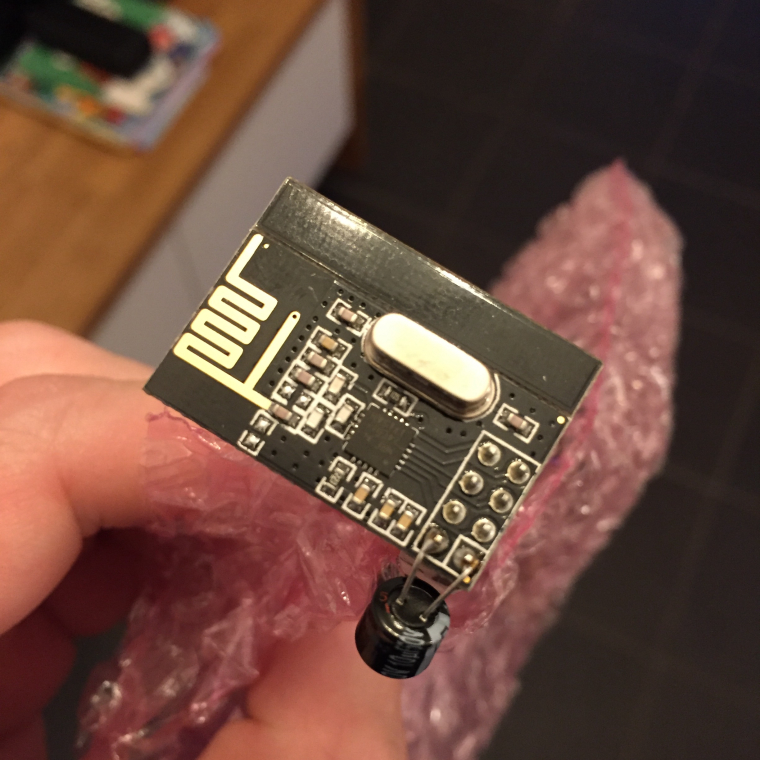
  • Recent
  • Tags
  • Popular
Skins
  • Light
  • Brite
  • Cerulean
  • Cosmo
  • Flatly
  • Journal
  • Litera
  • Lumen
  • Lux
  • Materia
  • Minty
  • Morph
  • Pulse
  • Sandstone
  • Simplex
  • Sketchy
  • Spacelab
  • United
  • Yeti
  • Zephyr
  • Dark
  • Cyborg
  • Darkly
  • Quartz
  • Slate
  • Solar
  • Superhero
  • Vapor

  • Default (No Skin)
  • No Skin
Collapse
Brand Logo
  1. Home
  2. Troubleshooting
  3. Problems with sensor node

Problems with sensor node

Scheduled Pinned Locked Moved Troubleshooting
12 Posts 3 Posters 2.2k Views 3 Watching
  • Oldest to Newest
  • Newest to Oldest
  • Most Votes
Reply
  • Reply as topic
Log in to reply
This topic has been deleted. Only users with topic management privileges can see it.
  • henninneH Offline
    henninneH Offline
    henninne
    wrote on last edited by
    #1

    Hi,

    I'm trying to get my first sensor node to work, but the only thing that comes out of the serial monitor is this:

    0 MCO:BGN:INIT NODE,CP=RNNNA--,VER=2.1.1
    3 TSM:INIT
    4 TSF:WUR:MS=0
    11 !TSM:INIT:TSP FAIL
    12 TSM:FAIL:CNT=1
    14 TSM:FAIL:PDT
    10016 TSM:FAIL:RE-INIT
    10018 TSM:INIT
    10024 !TSM:INIT:TSP FAIL
    10028 TSM:FAIL:CNT=2
    10029 TSM:FAIL:PDT
    20032 TSM:FAIL:RE-INIT
    20034 TSM:INIT
    20040 !TSM:INIT:TSP FAIL
    20043 TSM:FAIL:CNT=3
    20044 TSM:FAIL:PDT
    

    Can anyone tell me what this means?
    I have check the wiring a million times, used different Aduino nanos (clones) and radio modules(nrf24), used decoupling capacitors and powered the radio from a different supply, but still the same :angry:

    Please give me some tips!

    1 Reply Last reply
    0
    • gohanG Offline
      gohanG Offline
      gohan
      Mod
      wrote on last edited by
      #2

      bad nrf24 modules? I've been there too with cheap stuff

      henninneH 1 Reply Last reply
      0
      • gohanG gohan

        bad nrf24 modules? I've been there too with cheap stuff

        henninneH Offline
        henninneH Offline
        henninne
        wrote on last edited by
        #3

        @gohan

        Ok, Thanks for the tip, but I testes 3 different radios, even from two different sellers. Tips on where can I buy a good one?

        1 Reply Last reply
        0
        • gohanG Offline
          gohanG Offline
          gohan
          Mod
          wrote on last edited by
          #4

          I ordered some from https://www.aliexpress.com/store/2077046 but they are still on the way.

          Can you post a picture of the modules you got?

          1 Reply Last reply
          0
          • henninneH Offline
            henninneH Offline
            henninne
            wrote on last edited by
            #5

            I bought from eBay, some from the UK and some from Germany. I will try to take a picture

            1 Reply Last reply
            0
            • henninneH Offline
              henninneH Offline
              henninne
              wrote on last edited by
              #6

              0_1506963316553_0BEAAD94-3EE9-46D0-BF1B-D679E032B35F.jpeg

              1 Reply Last reply
              0
              • M Offline
                M Offline
                manutremo
                wrote on last edited by
                #7

                @henninne said in Problems with sensor node:

                It might be many different things but definetely related to the radio... The modules should at least initialize unless they are completely fried. Another thing is getting them to "talk" to each other but that's another story. Check that everything is connected correctly, the wires are correct, etc. You may also post your sketch ad a photo of your hardware and connections in case we can see something weird...

                You may also try to start simpler, by using some test example from some of the multiple libraries around, especially on GitHub, like this one.

                In terms of itnerpreting the log, you can use the incredibly useful log parser here.

                Additional troubleshooting: here.

                1 Reply Last reply
                0
                • gohanG Offline
                  gohanG Offline
                  gohan
                  Mod
                  wrote on last edited by
                  #8

                  According to log there is no communication with the chip, so either bad wiring/power or chip fried

                  1 Reply Last reply
                  1
                  • M Offline
                    M Offline
                    manutremo
                    wrote on last edited by
                    #9

                    I've had nrf24 modules of all sorts, even the blob type, and had to go through many many problems until i got them working. But all of them except for 2 were able to initialize. Of the two that didn't, one of them I fried it myself by connecting it incorrectly, and the other one had a broken track so that the MISO pin was not reaching the corresponding pin on the nrf24 chip.

                    So while I agree that from the provided information this looks like a bad wiring or a fried chip, the fact that he has tried 3 different radios from different sellers seems to infer that it might still be worth trying to help the OP go through some troubleshooting - which in turn is how most of us have learnt most of what we know today while building our first sensors.

                    By the way henninne - you have replaced the arduino board and the radio... have you tried completely replacing all the wires? I've found some of them that were not correctly crimped (even though bought "ready to use") and causing false contacts.

                    1 Reply Last reply
                    1
                    • henninneH Offline
                      henninneH Offline
                      henninne
                      wrote on last edited by
                      #10

                      @manutremo said in Problems with sensor node:

                      OP

                      Ok guys, thanks for all the tips so far. I checked again all wiring and tested the connection with a multimeter and yes, it looks like one of the "ready to use" cables was faulty. So I removed the crimp cables and soldered on wires and now it looks like it works at least. Now I only have the node connected to the PC (gateway is not available), so does this serial monitor print look correct? I have loaded some simple Door/window sensor sketch, why isn't the digital pin state show up in the serial monitor? Does it have to be connected to the gateway?

                      0 MCO:BGN:INIT NODE,CP=RNNNA--,VER=2.1.1
                      3 TSM:INIT
                      4 TSF:WUR:MS=0
                      11 TSM:INIT:TSP OK
                      12 TSM:FPAR
                      15 TSF:MSG:SEND,255-255-255-255,s=255,c=3,t=7,pt=0,l=0,sg=0,ft=0,st=OK:
                      2022 !TSM:FPAR:NO REPLY
                      2024 TSM:FPAR
                      2026 TSF:MSG:SEND,255-255-255-255,s=255,c=3,t=7,pt=0,l=0,sg=0,ft=0,st=OK:
                      4034 !TSM:FPAR:NO REPLY
                      4036 TSM:FPAR
                      4038 TSF:MSG:SEND,255-255-255-255,s=255,c=3,t=7,pt=0,l=0,sg=0,ft=0,st=OK:
                      6046 !TSM:FPAR:NO REPLY
                      6048 TSM:FPAR
                      6050 TSF:MSG:SEND,255-255-255-255,s=255,c=3,t=7,pt=0,l=0,sg=0,ft=0,st=OK:
                      8058 !TSM:FPAR:FAIL
                      8059 TSM:FAIL:CNT=1
                      8061 TSM:FAIL:PDT
                      18065 TSM:FAIL:RE-INIT
                      18067 TSM:INIT
                      18074 TSM:INIT:TSP OK
                      18076 TSM:FPAR
                      18078 TSF:MSG:SEND,255-255-255-255,s=255,c=3,t=7,pt=0,l=0,sg=0,ft=0,st=OK:
                      20086 !TSM:FPAR:NO REPLY
                      20088 TSM:FPAR
                      20090 TSF:MSG:SEND,255-255-255-255,s=255,c=3,t=7,pt=0,l=0,sg=0,ft=0,st=OK:
                      22099 !TSM:FPAR:NO REPLY
                      22102 TSM:FPAR
                      22104 TSF:MSG:SEND,255-255-255-255,s=255,c=3,t=7,pt=0,l=0,sg=0,ft=0,st=OK:
                      24112 !TSM:FPAR:NO REPLY
                      24114 TSM:FPAR
                      24116 TSF:MSG:SEND,255-255-255-255,s=255,c=3,t=7,pt=0,l=0,sg=0,ft=0,st=OK:
                      26124 !TSM:FPAR:FAIL
                      26125 TSM:FAIL:CNT=2
                      26127 TSM:FAIL:PDT
                      36130 TSM:FAIL:RE-INIT
                      36132 TSM:INIT
                      36140 TSM:INIT:TSP OK
                      36142 TSM:FPAR
                      36144 TSF:MSG:SEND,255-255-255-255,s=255,c=3,t=7,pt=0,l=0,sg=0,ft=0,st=OK:
                      38152 !TSM:FPAR:NO REPLY
                      38154 TSM:FPAR
                      38156 TSF:MSG:SEND,255-255-255-255,s=255,c=3,t=7,pt=0,l=0,sg=0,ft=0,st=OK:
                      40164 !TSM:FPAR:NO REPLY
                      40166 TSM:FPAR
                      40168 TSF:MSG:SEND,255-255-255-255,s=255,c=3,t=7,pt=0,l=0,sg=0,ft=0,st=OK:
                      42176 !TSM:FPAR:NO REPLY
                      42178 TSM:FPAR
                      42180 TSF:MSG:SEND,255-255-255-255,s=255,c=3,t=7,pt=0,l=0,sg=0,ft=0,st=OK:
                      44188 !TSM:FPAR:FAIL
                      44189 TSM:FAIL:CNT=3
                      44191 TSM:FAIL:PDT
                      54194 TSM:FAIL:RE-INIT
                      54196 TSM:INIT
                      54203 TSM:INIT:TSP OK
                      54205 TSM:FPAR
                      54207 TSF:MSG:SEND,255-255-255-255,s=255,c=3,t=7,pt=0,l=0,sg=0,ft=0,st=OK:
                      56215 !TSM:FPAR:NO REPLY
                      56217 TSM:FPAR
                      56219 TSF:MSG:SEND,255-255-255-255,s=255,c=3,t=7,pt=0,l=0,sg=0,ft=0,st=OK:
                      58227 !TSM:FPAR:NO REPLY
                      58229 TSM:FPAR
                      58231 TSF:MSG:SEND,255-255-255-255,s=255,c=3,t=7,pt=0,l=0,sg=0,ft=0,st=OK:
                      60239 !TSM:FPAR:NO REPLY
                      60241 TSM:FPAR
                      60243 TSF:MSG:SEND,255-255-255-255,s=255,c=3,t=7,pt=0,l=0,sg=0,ft=0,st=OK:
                      62252 !TSM:FPAR:FAIL
                      62253 TSM:FAIL:CNT=4
                      62255 TSM:FAIL:PDT
                      72258 TSM:FAIL:RE-INIT
                      72260 TSM:INIT
                      72267 TSM:INIT:TSP OK
                      72269 TSM:FPAR
                      72271 TSF:MSG:SEND,255-255-255-255,s=255,c=3,t=7,pt=0,l=0,sg=0,ft=0,st=OK:
                      74280 !TSM:FPAR:NO REPLY
                      74283 TSM:FPAR
                      74285 TSF:MSG:SEND,255-255-255-255,s=255,c=3,t=7,pt=0,l=0,sg=0,ft=0,st=OK:
                      76293 !TSM:FPAR:NO REPLY
                      76295 TSM:FPAR
                      76297 TSF:MSG:SEND,255-255-255-255,s=255,c=3,t=7,pt=0,l=0,sg=0,ft=0,st=OK:
                      78305 !TSM:FPAR:NO REPLY
                      78307 TSM:FPAR
                      78309 TSF:MSG:SEND,255-255-255-255,s=255,c=3,t=7,pt=0,l=0,sg=0,ft=0,st=OK:
                      
                      1 Reply Last reply
                      0
                      • gohanG Offline
                        gohanG Offline
                        gohan
                        Mod
                        wrote on last edited by gohan
                        #11

                        That is correct. When the node is not connected to gateway, the rest of the code is not executed until the connection is established. If you look into examples there is a MockMysensor sketch that you can use to simulate some nodes sending data

                        henninneH 1 Reply Last reply
                        0
                        • gohanG gohan

                          That is correct. When the node is not connected to gateway, the rest of the code is not executed until the connection is established. If you look into examples there is a MockMysensor sketch that you can use to simulate some nodes sending data
                          henninneH Offline
                          henninneH Offline
                          henninne
                          wrote on last edited by
                          #12

                          @gohan

                          Cool thanks! Then I will try when I have the gateway available.

                          1 Reply Last reply
                          0
                          Reply
                          • Reply as topic
                          Log in to reply
                          • Oldest to Newest
                          • Newest to Oldest
                          • Most Votes


                          26

                          Online

                          11.7k

                          Users

                          11.2k

                          Topics

                          113.1k

                          Posts


                          Copyright 2025 TBD   |   Forum Guidelines   |   Privacy Policy   |   Terms of Service
                          • Login

                          • Don't have an account? Register

                          • Login or register to search.
                          • First post
                            Last post
                          0
                          • MySensors
                          • OpenHardware.io
                          • Categories
                          • Recent
                          • Tags
                          • Popular