Skip to content
  • MySensors
  • OpenHardware.io
  • Categories
  • Recent
  • Tags
  • Popular
Skins
  • Light
  • Brite
  • Cerulean
  • Cosmo
  • Flatly
  • Journal
  • Litera
  • Lumen
  • Lux
  • Materia
  • Minty
  • Morph
  • Pulse
  • Sandstone
  • Simplex
  • Sketchy
  • Spacelab
  • United
  • Yeti
  • Zephyr
  • Dark
  • Cyborg
  • Darkly
  • Quartz
  • Slate
  • Solar
  • Superhero
  • Vapor

  • Default (No Skin)
  • No Skin
Collapse
Brand Logo
  1. Home
  2. Development
  3. Debug to a sd-card module?

Debug to a sd-card module?

Scheduled Pinned Locked Moved Development
28 Posts 8 Posters 6.3k Views 10 Watching
  • Oldest to Newest
  • Newest to Oldest
  • Most Votes
Reply
  • Reply as topic
Log in to reply
This topic has been deleted. Only users with topic management privileges can see it.
  • kisse66K kisse66

    There's also OpenLog. Haven't tested yet, but just got one (China clone for about $4, Sparkfun $14.95). It's about the size of microSD card and logs all serial input. Spec says "2mA idle, 6mA at maximum recording rate" which means something like 2 weeks with 2xAA. One issue might be voltage, it says 3.3 - 12V input, don't know if it works unmodified with less, i.e. without step-up.

    I might also like to use the BT you included in your version.

    YveauxY Offline
    YveauxY Offline
    Yveaux
    Mod
    wrote on last edited by
    #18

    @kisse66 said in Debug to a sd-card module?:

    OpenLog

    Nice find! Thanks!

    http://yveaux.blogspot.nl

    1 Reply Last reply
    0
    • sundberg84S Offline
      sundberg84S Offline
      sundberg84
      Hardware Contributor
      wrote on last edited by sundberg84
      #19

      I'm actually using openlog for the software. Will post more info later. It's tested and open source so instead of reinventing the wheel Im trying to develop that code further for my module...

      And then you will have Bluetooth and booster+ voltage regulator as well 👍

      Specs with the sd card.module (without LEDs) are the same for my module so 2 weeks minimum are still the goal.

      Controller: Proxmox VM - Home Assistant
      MySensors GW: Arduino Uno - W5100 Ethernet, Gw Shield Nrf24l01+ 2,4Ghz
      MySensors GW: Arduino Uno - Gw Shield RFM69, 433mhz
      RFLink GW - Arduino Mega + RFLink Shield, 433mhz

      1 Reply Last reply
      0
      • sundberg84S Offline
        sundberg84S Offline
        sundberg84
        Hardware Contributor
        wrote on last edited by
        #20

        Coming along nice... some small bugs to kill but project alive and almost finished!
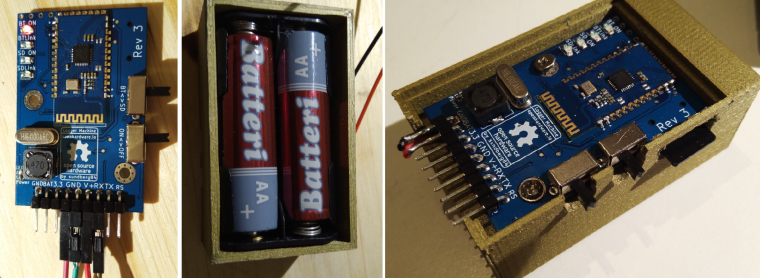
        0_1506883200108_Image.jpg

        Controller: Proxmox VM - Home Assistant
        MySensors GW: Arduino Uno - W5100 Ethernet, Gw Shield Nrf24l01+ 2,4Ghz
        MySensors GW: Arduino Uno - Gw Shield RFM69, 433mhz
        RFLink GW - Arduino Mega + RFLink Shield, 433mhz

        1 Reply Last reply
        2
        • sundberg84S Offline
          sundberg84S Offline
          sundberg84
          Hardware Contributor
          wrote on last edited by
          #21

          I have a hardware question for you!

          Problem:
          I need to protect the input of the bluetooth modules RX line (and also keep the ttl logic levels withing MIN/MAX as well)
          In the same time I want to be able to read data from both battery devices (say 2.0v) to 5v devices.
          @ 2.0 V you are way to close to a floating level which makes me a bit uncomfortable and @ 5v I will destroy the 3.3v input on the bluettoth module....

          A classic logic level converter should work for 5v to 3.3v, but I want to make one circuit that can handle also 2.0v to 3.3v - anyone that has an idea? I have ordered some Logic Level transistors to test... but if anyone can point me in any direction to create such a gate i would be happy...

          Controller: Proxmox VM - Home Assistant
          MySensors GW: Arduino Uno - W5100 Ethernet, Gw Shield Nrf24l01+ 2,4Ghz
          MySensors GW: Arduino Uno - Gw Shield RFM69, 433mhz
          RFLink GW - Arduino Mega + RFLink Shield, 433mhz

          1 Reply Last reply
          0
          • NeverDieN Offline
            NeverDieN Offline
            NeverDie
            Hero Member
            wrote on last edited by NeverDie
            #22

            I just noticed this thread, so sorry for jumping in late. However, regarding the OP, I use this:
            https://www.openhardware.io/view/273/ESP-LINK-ESP8266-WeMos-D1-Mini-Adapter-Board
            or, more lately, this:
            https://www.openhardware.io/view/443/nRF52832-ESP-LINK-Shield-for-ESP8266-Wemos-D1-Mini

            It's better than logging to an SD card, because you can see in real-time what is happening. Just open a putty terminal to the node and watch or come back later (anytime) to see what happened. With a lot of serial terminals, like Termite for instance, you can easily timestamp the serial output as well. Or, if you're only interested in seeing what's happened relatively recently, you can check directly by connecting directly to the node's serial console webpage. The nice thing too is that it all "just works." :) No extra coding required.

            sundberg84S 1 Reply Last reply
            0
            • NeverDieN NeverDie

              I just noticed this thread, so sorry for jumping in late. However, regarding the OP, I use this:
              https://www.openhardware.io/view/273/ESP-LINK-ESP8266-WeMos-D1-Mini-Adapter-Board
              or, more lately, this:
              https://www.openhardware.io/view/443/nRF52832-ESP-LINK-Shield-for-ESP8266-Wemos-D1-Mini

              It's better than logging to an SD card, because you can see in real-time what is happening. Just open a putty terminal to the node and watch or come back later (anytime) to see what happened. With a lot of serial terminals, like Termite for instance, you can easily timestamp the serial output as well. Or, if you're only interested in seeing what's happened relatively recently, you can check directly by connecting directly to the node's serial console webpage. The nice thing too is that it all "just works." :) No extra coding required.

              sundberg84S Offline
              sundberg84S Offline
              sundberg84
              Hardware Contributor
              wrote on last edited by sundberg84
              #23

              @NeverDie - I have seen your projects and im sure they are very usefull, but as you can see above in the thread its been discussed with wifi/esp loggers. I looked at mentioned FTDI over Wifi.

              They have a great advantage in some areas but they do not fulfill my needs because I have nodes where I dont have wifi connection and they consume to much power to run on batteries for as long as i want.

              Just as the Wifi logger that just works, this module will be a one time upload and it will be able to write to a sd-card or Bluetooth (real time!) so no extra coding will be requiered here as well :)

              Controller: Proxmox VM - Home Assistant
              MySensors GW: Arduino Uno - W5100 Ethernet, Gw Shield Nrf24l01+ 2,4Ghz
              MySensors GW: Arduino Uno - Gw Shield RFM69, 433mhz
              RFLink GW - Arduino Mega + RFLink Shield, 433mhz

              1 Reply Last reply
              1
              • NeverDieN Offline
                NeverDieN Offline
                NeverDie
                Hero Member
                wrote on last edited by
                #24

                Are you getting adequate range out of it?

                sundberg84S 1 Reply Last reply
                0
                • NeverDieN NeverDie

                  Are you getting adequate range out of it?

                  sundberg84S Offline
                  sundberg84S Offline
                  sundberg84
                  Hardware Contributor
                  wrote on last edited by sundberg84
                  #25

                  @NeverDie - What do you mean with Range - for bluetooth?

                  My idea is to have one long term function and one short term, which is bluetooth. So for a "quick" look I would use the bluetooth module and for this I have not seen myself in need of alot of range. I wish to debug the node on-site and if there are errors I know why. I dont know the range exacly yet - but im sure its like normal bluetooth.

                  With the more long term logging Im going to leave the logger at the node-site and let it be for a while - and evaluate the logs later to understand what im facing.

                  Controller: Proxmox VM - Home Assistant
                  MySensors GW: Arduino Uno - W5100 Ethernet, Gw Shield Nrf24l01+ 2,4Ghz
                  MySensors GW: Arduino Uno - Gw Shield RFM69, 433mhz
                  RFLink GW - Arduino Mega + RFLink Shield, 433mhz

                  1 Reply Last reply
                  2
                  • NeverDieN Offline
                    NeverDieN Offline
                    NeverDie
                    Hero Member
                    wrote on last edited by NeverDie
                    #26

                    Not sure if it would matter to you or not, but the nRF51822-4 module is a very small and inexpensive module, and I would imagine it could be similarly programmed to behave the same as the bluetooth module you're using.

                    Nice project!

                    sundberg84S 1 Reply Last reply
                    1
                    • NeverDieN NeverDie

                      Not sure if it would matter to you or not, but the nRF51822-4 module is a very small and inexpensive module, and I would imagine it could be similarly programmed to behave the same as the bluetooth module you're using.

                      Nice project!

                      sundberg84S Offline
                      sundberg84S Offline
                      sundberg84
                      Hardware Contributor
                      wrote on last edited by
                      #27

                      @NeverDie didn't know! I will sure look into it. Thank you.

                      Controller: Proxmox VM - Home Assistant
                      MySensors GW: Arduino Uno - W5100 Ethernet, Gw Shield Nrf24l01+ 2,4Ghz
                      MySensors GW: Arduino Uno - Gw Shield RFM69, 433mhz
                      RFLink GW - Arduino Mega + RFLink Shield, 433mhz

                      1 Reply Last reply
                      0
                      • sundberg84S Offline
                        sundberg84S Offline
                        sundberg84
                        Hardware Contributor
                        wrote on last edited by
                        #28

                        Please use this thread for further discussion:

                        https://forum.mysensors.org/topic/8040/the-logger-machine-short-and-long-term-serial-logging

                        Controller: Proxmox VM - Home Assistant
                        MySensors GW: Arduino Uno - W5100 Ethernet, Gw Shield Nrf24l01+ 2,4Ghz
                        MySensors GW: Arduino Uno - Gw Shield RFM69, 433mhz
                        RFLink GW - Arduino Mega + RFLink Shield, 433mhz

                        1 Reply Last reply
                        0
                        Reply
                        • Reply as topic
                        Log in to reply
                        • Oldest to Newest
                        • Newest to Oldest
                        • Most Votes


                        13

                        Online

                        11.7k

                        Users

                        11.2k

                        Topics

                        113.1k

                        Posts


                        Copyright 2025 TBD   |   Forum Guidelines   |   Privacy Policy   |   Terms of Service
                        • Login

                        • Don't have an account? Register

                        • Login or register to search.
                        • First post
                          Last post
                        0
                        • MySensors
                        • OpenHardware.io
                        • Categories
                        • Recent
                        • Tags
                        • Popular