
Irrigation Controller (up to 16 valves with Shift Registers)
-
Hi All,
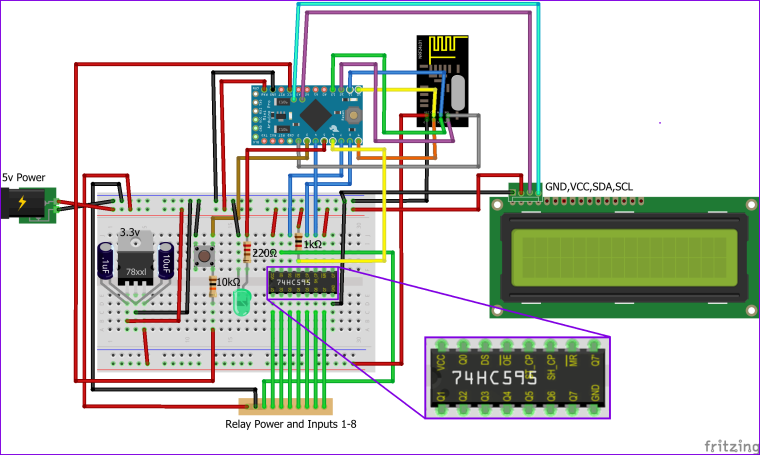
Does anyone have a schematic/wiring diagram for this (especially the shift register)?
I may be too old, but the Fritzing image on the build page isn't clear to me.
-
@dbemowsk Thanks, that clears it up.
I ended up going with a Mega with LCD Shield and used additional digital pins for the relays. I wanted to enable the IRQ buffering for the NRF radio and some LCDText devices to report back to Vera some status information. Sadly I had to use Strings as I struggled to get char[] arrays to work. Got a bit hard to fit onto the memory of the Pro Mini.
I needed 2 controllers for front and back, one with Master Valve setup. The back reticulation is an extension of front zone - so Vera makes sure the front controller supplies water when the back controller is active.

If there's interest I'll post the code, maybe someone with better skills than me could rewrite the String section - I don't know if I'll have issues with memory fragmentation yet. Only installed them today.
A big thank you to @petewill and @BulldogLowell for sharing their code and design.
-
@dbemowsk Thanks, that clears it up.
I ended up going with a Mega with LCD Shield and used additional digital pins for the relays. I wanted to enable the IRQ buffering for the NRF radio and some LCDText devices to report back to Vera some status information. Sadly I had to use Strings as I struggled to get char[] arrays to work. Got a bit hard to fit onto the memory of the Pro Mini.
I needed 2 controllers for front and back, one with Master Valve setup. The back reticulation is an extension of front zone - so Vera makes sure the front controller supplies water when the back controller is active.
If there's interest I'll post the code, maybe someone with better skills than me could rewrite the String section - I don't know if I'll have issues with memory fragmentation yet. Only installed them today.
A big thank you to @petewill and @BulldogLowell for sharing their code and design.
@Spanners So you are saying that you just used digital IO lines instead of using the shift register? BTW, I like the case, looks expensive. Do you use the 5 keys on the keypad shield for anything?
Vera Plus running UI7 with MySensors, Sonoffs and 1-Wire devices
Visit my website for more Bits, Bytes and Ramblings from me: http://dan.bemowski.info/ -
@Spanners So you are saying that you just used digital IO lines instead of using the shift register? BTW, I like the case, looks expensive. Do you use the 5 keys on the keypad shield for anything?
@dbemowsk yep, I left out the shift register and just used additional IO pins.
The case was AU$28 at a local electronics supplier, or AU$10 from ebay. IP66 rated, should keep the Arduino's safe from the elements.
The LCD keypad has a reset button (handy for reloading all valve changes) and a select button which I'm using to do the same thing as the external button in the original design (I still have the exterior button as well). The other buttons could be used for a local menu system or for dialling in a custom manual run time or something, but I haven't pursued it as I don't intend to physically touch them very often. :)
I've got a problem that'd developed with the front controller - almost like the button/interrupt is triggering whenever the relays are energised/de-energised. It's not consistent though and I'm betting its power related.
The whole unit is powered by a 12VDC adaptor. The relays are powered by a separate DC-DC 5V supply off that 12V, and the Mega takes 12V on VIN and powers the LCD and the radio.
-
Ok, found my issue - hopefully you guys can give me a suggestion on how to fix it.
It basically is the external button being triggered (immediate irrigation halt or starts running all zones after shutdown). And it's caused by the 24VAC power running through the relays.
If I shut down the 24VAC power it works great. If I unplug the external button (brown wire in picture just above the LED), I have no issues either.
I'm not using an external resistor for that switch (PIN 21 to GND) - do you think that would solve the issue with interference from the 24VAC? Or is there another solution to these types of issues?
  pinMode(waterButtonPin, INPUT_PULLUP);
  attachInterrupt(digitalPinToInterrupt(waterButtonPin), PushButton, LOW); //May need to change for your Arduino model
It seems a bit counterintuitive, because how would the 24VAC which is presumably creating a magnetic field and inductive current in brown wire result in it reading LOW?
-
Ok, found my issue - hopefully you guys can give me a suggestion on how to fix it.
It basically is the external button being triggered (immediate irrigation halt or starts running all zones after shutdown). And it's caused by the 24VAC power running through the relays.
If I shut down the 24VAC power it works great. If I unplug the external button (brown wire in picture just above the LED), I have no issues either.
I'm not using an external resistor for that switch (PIN 21 to GND) - do you think that would solve the issue with interference from the 24VAC? Or is there another solution to these types of issues?
  pinMode(waterButtonPin, INPUT_PULLUP);
  attachInterrupt(digitalPinToInterrupt(waterButtonPin), PushButton, LOW); //May need to change for your Arduino model
It seems a bit counterintuitive, because how would the 24VAC which is presumably creating a magnetic field and inductive current in brown wire result in it reading LOW?
@Spanners Do you in any way have one leg of the 24V supply connected to low voltage side? Possibly the ground?
@Spanners said in Irrigation Controller (up to 16 valves with Shift Registers):
If I shut down the 24VAC power it works great.
When you have the 24V connected, is it under any load? And, What does this brown wire connect?
Vera Plus running UI7 with MySensors, Sonoffs and 1-Wire devices
Visit my website for more Bits, Bytes and Ramblings from me: http://dan.bemowski.info/ -
@Spanners Do you in any way have one leg of the 24V supply connected to low voltage side? Possibly the ground?
@Spanners said in Irrigation Controller (up to 16 valves with Shift Registers):
If I shut down the 24VAC power it works great.
When you have the 24V connected, is it under any load? And, What does this brown wire connect?
The 24VAC is completely isolated - it connects to the relays to power solenoids only, common wire like @petewill shows in his video. The other connection for the 24VAC is to the common wire on the solenoids. There's no path from the 24VAC to the Arduino.
24VAC is only under load when a relay is active and powering a solenoid. It's when a relay opens or closes that the external button interrupt is triggered (about 80% of the time).
The brown wire is PIN 21 to the external button, the other side of the button is connected to GND. If that wire is disconnected, I don't see the issue - so it's like the start/stop of 24VAC current flow is creating enough magnetic action/induced current or something on the wire and PIN 21 to trigger the interrupt.
-
The 24VAC is completely isolated - it connects to the relays to power solenoids only, common wire like @petewill shows in his video. The other connection for the 24VAC is to the common wire on the solenoids. There's no path from the 24VAC to the Arduino.
24VAC is only under load when a relay is active and powering a solenoid. It's when a relay opens or closes that the external button interrupt is triggered (about 80% of the time).
The brown wire is PIN 21 to the external button, the other side of the button is connected to GND. If that wire is disconnected, I don't see the issue - so it's like the start/stop of 24VAC current flow is creating enough magnetic action/induced current or something on the wire and PIN 21 to trigger the interrupt.
@Spanners Does the arduino input for the switch (brown wire) have a pull up (or pull down depending on your use case) resistor on it? Something like this:
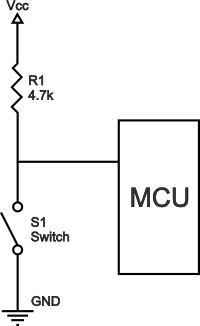
If the arduino input is left floating when the button is in an unpressed state, I suppose that induction could possibly cause enough fluctuation to cause it to trip that switch input. The arduino inputs are very sensitive and the brown wire may be acting like an antenna and picking up enough induced current from the 24v side to trip the input. The 24 volts used is typically AC which would affect something like that more than a DC voltage would, so when one of the relays turns on, then you have the AC current flowing which could easily be picked up by your brown wire (the antenna). When you disconnect the brown wire, there is no more antenna to sway the input. Read the first response to this guys question. Pull up/down resistors simply bias that input to a given state (high or low) when no expressed input is given (unpressed switch).Vera Plus running UI7 with MySensors, Sonoffs and 1-Wire devices
Visit my website for more Bits, Bytes and Ramblings from me: http://dan.bemowski.info/ -
@Spanners Does the arduino input for the switch (brown wire) have a pull up (or pull down depending on your use case) resistor on it? Something like this:
If the arduino input is left floating when the button is in an unpressed state, I suppose that induction could possibly cause enough fluctuation to cause it to trip that switch input. The arduino inputs are very sensitive and the brown wire may be acting like an antenna and picking up enough induced current from the 24v side to trip the input. The 24 volts used is typically AC which would affect something like that more than a DC voltage would, so when one of the relays turns on, then you have the AC current flowing which could easily be picked up by your brown wire (the antenna). When you disconnect the brown wire, there is no more antenna to sway the input. Read the first response to this guys question. Pull up/down resistors simply bias that input to a given state (high or low) when no expressed input is given (unpressed switch).@dbemowsk - you da man. Thanks for the help.
I was using the internal pull up on the Arduino and it wasn't enough to deal with the interference from the 24VAC. Added a 4.7k resistor to the switch with connection to Vcc as per your diagram and it's now working reliably.
Also needed to add a repeater node as the rear retic controller sits inside a garden feature that is made from 250mm thick limestone blocks. Comms were a little hit and miss.
-
-
Hi guys, I’m trying 2 days to compile this sketch for Domoticz. Still getting errors ones from library then from code...
Can someone share with me his working code for Domoticz in 2.0 version? Thanks a lot -
Hi @dbemowsk , Thanks for your reply. I had to reinstall Arduino IDE and all Libraries from my PC. I was fighting with „'POSITIVE' was not declared in this scope“ error, and installed over 6 Libraries for LCD. I got finally working the sketch for Vera from Mysensors/build, at least .
Unfortunately I’m not able to modify Sketch witch are guys using with Domoticz in this Topic.
Is there a way to get missing variables into Irrigation controller from domoticz or at least to set them manually in sketch? For me is enough one watering time for all valves. -
Hi @dbemowsk , Thanks for your reply. I had to reinstall Arduino IDE and all Libraries from my PC. I was fighting with „'POSITIVE' was not declared in this scope“ error, and installed over 6 Libraries for LCD. I got finally working the sketch for Vera from Mysensors/build, at least .
Unfortunately I’m not able to modify Sketch witch are guys using with Domoticz in this Topic.
Is there a way to get missing variables into Irrigation controller from domoticz or at least to set them manually in sketch? For me is enough one watering time for all valves.@mikee This was actually one of the reasons I switched from Domoticz to a Vera controller a couple years ago. The main issue at the time had to do with the use of V_VAR1 - V_VAR3 which is used to configure the valve names and the valve times. I wanted to have the ability to change the valve times.
For your situation though, you can modify your Zone names in the code by changing this bit:
// Name your Zones here or use Vera to edit them by adding a name in Variable3...
String valveNickName[17] = {
  "All Zones", "Zone 1", "Zone 2", "Zone 3", "Zone 4", "Zone 5", "Zone 6", "Zone 7", "Zone 8", "Zone 9", "Zone 10", "Zone 11", "Zone 12", "Zone 13", "Zone 14", "Zone 15", "Zone 16"
};
Depending on the number of zones you have, just change the names in quotes for Zone 1, Zone 2, etc... up to the number of valves that you have.
I have been told recently though that Domoticz now supports V_VAR(x), but I am not sure how to use it just yet.
-
Hi, my module works with 8 relays but when i try to expand to 16 relays i have an issue. The 2nd register heats up and the pro mini keep restarting / re-initializing. I think i have the wrong connections for the 2nd register. Can anyone help / share what the wiring for the 2nd register should be?
-
Hi, my module works with 8 relays but when i try to expand to 16 relays i have an issue. The 2nd register heats up and the pro mini keep restarting / re-initializing. I think i have the wrong connections for the 2nd register. Can anyone help / share what the wiring for the 2nd register should be?
-
@mfalkvidd Is this #3 of same question?
@zboblamont yes indeed.. If anyone can help @annujbhatia, please post in https://forum.mysensors.org/topic/9434/problem-with-2nd-register-heating instead of here, to keep all information in the same place.
-
I have the irrigation controller all setup and working. I have one problem though as soon as I power it up with 5 volts for the pro mini sometimes one sometimes all the relays come on. If I am not home the water runs all day is there a programing change or a wire change I need to make to stop this. I was using the old wire diagram without the pull up on pin 13 of the 74hc I changed to the new version and added the lines off code but it still does not help.
Hi @johnecy, know it has been a long time from your post, but I have implemented the script recently and am having the same issue that you mentined. please, how do you solve it?
@johnecy said in Irrigation Controller (up to 16 valves with Shift Registers):
I have the irrigation controller all setup and working. I have one problem though as soon as I power it up with 5 volts for the pro mini sometimes one sometimes all the relays come on. If I am not home the water runs all day is there a programing change or a wire change I need to make to stop this. I was using the old wire diagram without the pull up on pin 13 of the 74hc I changed to the new version and added the lines off code but it still does not help.
-
@mikee This was actually one of the reasons I switched from Domoticz to a Vera controller a couple years ago. The main issue at the time had to do with the use of V_VAR1 - V_VAR3 which is used to configure the valve names and the valve times. I wanted to have the ability to change the valve times.
For your situation though, you can modify your Zone names in the code by changing this bit:
// Name your Zones here or use Vera to edit them by adding a name in Variable3...
String valveNickName[17] = {
  "All Zones", "Zone 1", "Zone 2", "Zone 3", "Zone 4", "Zone 5", "Zone 6", "Zone 7", "Zone 8", "Zone 9", "Zone 10", "Zone 11", "Zone 12", "Zone 13", "Zone 14", "Zone 15", "Zone 16"
};
Depending on the number of zones you have, just change the names in quotes for Zone 1, Zone 2, etc... up to the number of valves that you have.
I have been told recently though that Domoticz now supports V_VAR(x), but I am not sure how to use it just yet.
-
Hello,
I have build the irrigation controler this weekend and just found out that there are some issues using this with domoticz.
Is there someone willing to share his customized code to get these zone and time variables working ?Thanks in advance,
Edwin
@edweather I had a lot of this working in Domoticz years ago. I have since switched to Vera, but here is a link to an old post I had on the subject.
https://forum.mysensors.org/topic/153/irrigation-controller-up-to-16-valves-with-shift-registers/216 -
@edweather I had a lot of this working in Domoticz years ago. I have since switched to Vera, but here is a link to an old post I had on the subject.
https://forum.mysensors.org/topic/153/irrigation-controller-up-to-16-valves-with-shift-registers/216





Hello! It looks like you're interested in this conversation, but you don't have an account yet.
Getting fed up of having to scroll through the same posts each visit? When you register for an account, you'll always come back to exactly where you were before, and choose to be notified of new replies (either via email, or push notification). You'll also be able to save bookmarks and upvote posts to show your appreciation to other community members.
With your input, this post could be even better 💗
Register Login