
No working window appaers after start.
-
I have successfully installed Mosquitto on a Raspberry Pi 3 B+ (Debian = stretch).
Here is the result on the Raspberry :
     pi@raspberrypi:~ $ mosquitto -v
     1559603778: mosquitto version 1.6.2 starting
     1559603778: Using default config.
     1559603778: Opening ipv4 listen socket on port 1883.
     1559603778: Error: Address already in use
     pi@raspberrypi:~ $
Apparently runs the program but no working window appears on the screen.
What am I doing wrong?
Jack DG
-
@mslv129jdg said in No working window appaers after start.:
Error: Address already in use
I do not use Mosquito, but maybe it is already running automatically after RPI starts?
-
Thank you for your efforts.
Apparently it doesn't matter that the port is already in use.
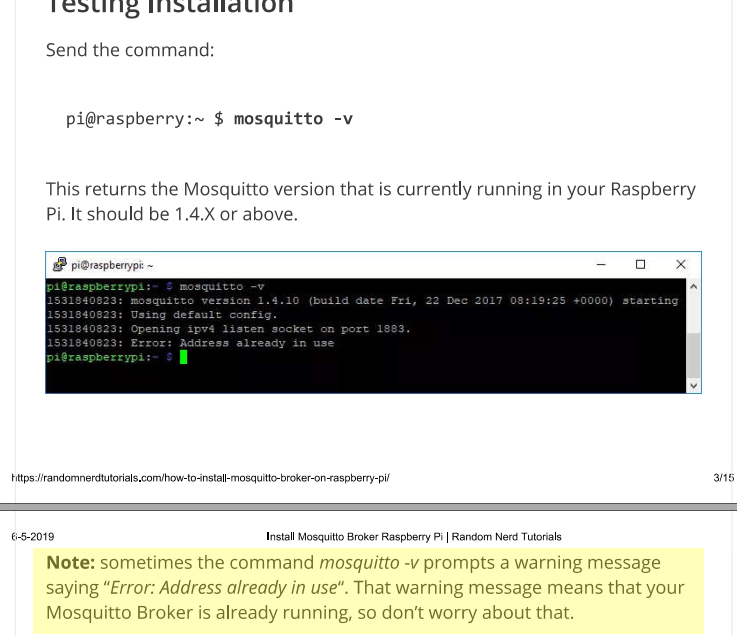
Can this help you?
https://randomnerdtutorials.com/how-to-install-mosquitto-broker-on-raspberry-pi/I can't find a forum for Mosquitto users either.
Greetings.
JackDG
-
Thank you for your efforts.
Apparently it doesn't matter that the port is already in use.
Can this help you?
https://randomnerdtutorials.com/how-to-install-mosquitto-broker-on-raspberry-pi/I can't find a forum for Mosquitto users either.
Greetings.
JackDG
mosquitto -v #start in verbose mode
If your mosquito is already running, you cannot start it again.
First stop it:
sudo service mosquitto stop
sudo systemctl stop mosquitto.service
And then try your:
mosquitto -v -
Tanks Kimot,
I do what you says and this what happen not more.
pi@raspberrypi:~ $ sudo service mosquitto stop
pi@raspberrypi:~ $ sudo systemctl stop mosquitto.service
pi@raspberrypi:~ $ mosquitto -v
1559686190: mosquitto version 1.6.2 starting
1559686190: Using default config.
1559686190: Opening ipv4 listen socket on port 1883.
1559686190: Opening ipv6 listen socket on port 1883. -
Tanks Kimot,
I do what you says and this what happen not more.
pi@raspberrypi:~ $ sudo service mosquitto stop
pi@raspberrypi:~ $ sudo systemctl stop mosquitto.service
pi@raspberrypi:~ $ mosquitto -v
1559686190: mosquitto version 1.6.2 starting
1559686190: Using default config.
1559686190: Opening ipv4 listen socket on port 1883.
1559686190: Opening ipv6 listen socket on port 1883.@mslv129jdg How do you have installed mosquitto? if you have installed it with the standard
sudo apt install mosquitto mosquitto-clientsthen, the server starts automatically when you boot your Pi.
Mosquitto is a server program so it is normal that you don't see any new window. See this if you want to know how to test your MQTT server.
-
I just uninstall mosquitto... with sudo apt-get purge --remove mosquitto*
The first time i install with :
sudo wget http://repo.mosquitto.org/debian/mosquitto-repo.gpg.key
sudo apt-key add mosquitto-repo.gpg.key
cd /etc/apt/sources.list.d/
sudo wget http://repo.mosquitto.org/debian/mosquitto-stretch.list
sudo apt-get update
sudo apt-get install mosquittoI look and study your link.
-
Eureka...eureka... Mosquitto works....
Thanks to your contributions I have achieved what I wanted step by step.... for which I thank you.
Indeed Mosquitto has worked in the beginning but I am expecting an opening window.
Meanwhile, I have successfully send a message from the terminal window 1 to 2.
Thanks to all who have taken the trouble to look at my question and send me a possible solution.
See you later.
JackDG

Hello! It looks like you're interested in this conversation, but you don't have an account yet.
Getting fed up of having to scroll through the same posts each visit? When you register for an account, you'll always come back to exactly where you were before, and choose to be notified of new replies (either via email, or push notification). You'll also be able to save bookmarks and upvote posts to show your appreciation to other community members.
With your input, this post could be even better 💗
Register Login