[Tutorial] Raspberry Pi NRF24l01 direct connection
-
hi everybody
@hek are you going to support Rpi + rf24 direct connection? I were playing with https://github.com/mysensors/Raspberry a bit and works (I opened a pair of tickets) but needs to be updated.
I also think that PiGateway should support MQTT I have created PiGatewayMQTT (It's just a prototype).
What will be the future of https://github.com/mysensors/Raspberry repo? abandoned in favor of any kind of gateway-refactoring-branch ?thanks
-
(solved)
Hi. Thanks a lot for this implentation and the helpful posts here!I've got the gateway working with a tmp75 temperature sensor on an arduino. The nrf24 is sitting on the raspberry directly (CE pin 22), as a controller i'm using PiMatic. It works very nicely!
There is one small problem however. The PiGatewaySerial will only work if i have called PiGateway before (and closed it again). With working I mean picking up radio transmissions from my sensor node. Everything else seems normal (/dev/ttyPiGatewaySerial and radio details printout).
The details of both configurations might give a clue:
pi@raspberrypi ~/mysensors_rpi $ sudo ./PiGateway
Starting Gateway...
================ SPI Configuration ================
CSN Pin          = CE0 (PI Hardware Driven)
CE Pin           = Custom GPIO25
Clock Speed      = 8 Mhz
================ NRF Configuration ================
STATUS           = 0x0e RX_DR=0 TX_DS=0 MAX_RT=0 RX_P_NO=7 TX_FULL=0
RX_ADDR_P0-1     = 0xa8a8e1fc00 0xa8a8e1fc00
RX_ADDR_P2-5     = 0xff 0xc4 0xc5 0xc6
TX_ADDR          = 0xe7e7e7e7e7
RX_PW_P0-6       = 0x20 0x20 0x20 0x00 0x00 0x00
EN_AA            = 0x3b
EN_RXADDR        = 0x06
RF_CH            = 0x4c
RF_SETUP         = 0x23
CONFIG           = 0x0e
DYNPD/FEATURE    = 0x3f 0x06
Data Rate        = 250KBPS
Model            = nRF24L01+
CRC Length       = 16 bits
PA Power         = PA_LOW
[CALLBACK]0;0;3;0;14;Gateway startup complete.
read: 4-4-0 s=0,c=1,t=0,pt=7,l=5:22.9
[CALLBACK]4;0;1;0;0;22.9
read: 4-4-0 s=0,c=1,t=0,pt=7,l=5:22.9
after closing PiGateway and opening PiGatewaySerial i get this:
pi@raspberrypi ~/mysensors_rpi $ sudo ./PiGatewaySerial
Starting PiGatewaySerial...
Protocol version - 1.4
Created PTY '/dev/pts/3'
Gateway tty: /dev/ttyMySensorsGateway
================ SPI Configuration ================
CSN Pin          = CE0 (PI Hardware Driven)
CE Pin           = Custom GPIO22
Clock Speed      = 8 Mhz
================ NRF Configuration ================
STATUS           = 0x0e RX_DR=0 TX_DS=0 MAX_RT=0 RX_P_NO=7 TX_FULL=0
RX_ADDR_P0-1     = 0xa8a8e1fc00 0xa8a8e1fc00
RX_ADDR_P2-5     = 0xff 0xc4 0xc5 0xc6
TX_ADDR          = 0xe7e7e7e7e7
RX_PW_P0-6       = 0x20 0x20 0x20 0x00 0x00 0x00
EN_AA            = 0x3b
EN_RXADDR        = 0x06
RF_CH            = 0x4c
RF_SETUP         = 0x23
CONFIG           = 0x0e
DYNPD/FEATURE    = 0x3f 0x06
Data Rate        = 250KBPS
Model            = nRF24L01+
CRC Length       = 16 bits
PA Power         = PA_LOW
read: 4-4-0 s=0,c=1,t=0,pt=7,l=5:22.9
read: 4-4-0 s=0,c=1,t=0,pt=7,l=5:22.9
read: 4-4-0 s=0,c=1,t=0,pt=7,l=5:22.9
read: 4-4-0 s=0,c=1,t=0,pt=7,l=5:22.9
read: 4-4-0 s=0,c=1,t=0,pt=7,l=5:22.9
read: 4-4-0 s=0,c=1,t=0,pt=7,l=5:22.9
read: 4-4-0 s=0,c=1,t=0,pt=7,l=5:22.9
read: 4-4-0 s=0,c=1,t=0,pt=7,l=5:22.8
Notice how the CE pins of both SPI configurations are different!
I'm at the point that i want to daemonize the gateway. Which in fact i did, but the same problem persists. Before i hack the startup script to first run and close PiGateway before PiGatewaySerial, i was hoping that someone has an idea what i'm doing wrong.
Thanks in advance!
solved!
I have two RPIs (a Pi 2 B and a Pi B+), which both worked with the pyRF24 lib of TMRh20, so when i had a look in the source of the radio initialization of PiGatewaySerial and found this:#ifdef __PI_BPLUS gw = new MyGateway(RPI_BPLUS_GPIO_J8_15, RPI_BPLUS_GPIO_J8_24, BCM2835_SPI_SPEED_8MHZ, 1); #else gw = new MyGateway(RPI_V2_GPIO_P1_22, BCM2835_SPI_CS0, BCM2835_SPI_SPEED_8MHZ, 1); #endifWhen i changed it to:
#ifdef __PI_BPLUS
	gw = new MyGateway(RPI_V2_GPIO_P1_22, BCM2835_SPI_CS0, BCM2835_SPI_SPEED_8MHZ, 1);
#else
	gw = new MyGateway(RPI_V2_GPIO_P1_22, BCM2835_SPI_CS0, BCM2835_SPI_SPEED_8MHZ, 1);
#endif
and recompiled the gateways,it all started to work. After powerup everything runs :).
The Rpi that is connected now is the Pi 2 B. So i guess either i have my nrf25 wired differently then defined in this lib, or the precompiler was thinking i have a B+ connected. Or both.
I will find out when i get this also working on my B+. -
Hi all,
I just followed the guide in the 1ste post, but i'm not able to compile this correctly.
Here's the output:g++ -Wall -fPIC -Ofast -mfpu=vfp -mfloat-abi=hard -mtune=arm1176jzf-s -march=arm v6zk -D BCM2835_PERI_BASE=0x -c RF24.cpp gcc -Wall -fPIC -Ofast -mfpu=vfp -mfloat-abi=hard -mtune=arm1176jzf-s -march=arm v6zk -D BCM2835_PERI_BASE=0x -c bcm2835.c bcm2835.c: In function ‘bcm2835_init’: bcm2835.c:1207:28: error: invalid suffix "x" on integer constant bcm2835.c:1208:28: error: invalid suffix "x" on integer constant bcm2835.c:1209:28: error: invalid suffix "x" on integer constant bcm2835.c:1210:28: error: invalid suffix "x" on integer constant bcm2835.c:1211:28: error: invalid suffix "x" on integer constant bcm2835.c:1212:28: error: invalid suffix "x" on integer constant bcm2835.c:1213:28: error: invalid suffix "x" on integer constant bcm2835.c:1214:28: error: invalid suffix "x" on integer constant bcm2835.c:1228:83: error: invalid suffix "x" on integer constant bcm2835.c:1232:81: error: invalid suffix "x" on integer constant bcm2835.c:1236:81: error: invalid suffix "x" on integer constant bcm2835.c:1239:83: error: invalid suffix "x" on integer constant bcm2835.c:1242:83: error: invalid suffix "x" on integer constant bcm2835.c:1246:83: error: invalid suffix "x" on integer constant bcm2835.c:1249:83: error: invalid suffix "x" on integer constant bcm2835.c:1253:79: error: invalid suffix "x" on integer constant Makefile:52: recept voor doel 'bcm2835.o' is mislukt make: *** [bcm2835.o] Fout 1 g++ -c -o MyGateway.o MyGateway.cpp -Wall -Ofast -mfpu=vfp -lpthread -g -D__Raspberry_Pi -mfloat-abi=hard -mtune=arm1176jzf-s -D_TTY_NAME=\"/dev/ttyMySensorsGateway\" -D_TTY_GROUPNAME=\"tty\" -march=armv6zk -I. -Ilibrf24-bcm/ g++ -c -o MySensor.o MySensor.cpp -Wall -Ofast -mfpu=vfp -lpthread -g -D__Raspberry_Pi -mfloat-abi=hard -mtune=arm1176jzf-s -D_TTY_NAME=\"/dev/ttyMySensorsGateway\" -D_TTY_GROUPNAME=\"tty\" -march=armv6zk -I. -Ilibrf24-bcm/ g++ -c -o MyMessage.o MyMessage.cpp -Wall -Ofast -mfpu=vfp -lpthread -g -D__Raspberry_Pi -mfloat-abi=hard -mtune=arm1176jzf-s -D_TTY_NAME=\"/dev/ttyMySensorsGateway\" -D_TTY_GROUPNAME=\"tty\" -march=armv6zk -I. -Ilibrf24-bcm/ g++ -c -o PiEEPROM.o PiEEPROM.cpp -Wall -Ofast -mfpu=vfp -lpthread -g -D__Raspberry_Pi -mfloat-abi=hard -mtune=arm1176jzf-s -D_TTY_NAME=\"/dev/ttyMySensorsGateway\" -D_TTY_GROUPNAME=\"tty\" -march=armv6zk -I. -Ilibrf24-bcm/ g++ -c -o PiGateway.o PiGateway.cpp -Wall -Ofast -mfpu=vfp -lpthread -g -D__Raspberry_Pi -mfloat-abi=hard -mtune=arm1176jzf-s -D_TTY_NAME=\"/dev/ttyMySensorsGateway\" -D_TTY_GROUPNAME=\"tty\" -march=armv6zk -I. -Ilibrf24-bcm/ g++ -o PiGateway MyGateway.o MySensor.o MyMessage.o PiEEPROM.o PiGateway.o -Wall -Ofast -mfpu=vfp -lpthread -g -D__Raspberry_Pi -mfloat-abi=hard -mtune=arm1176jzf-s -D_TTY_NAME=\"/dev/ttyMySensorsGateway\" -D_TTY_GROUPNAME=\"tty\" -march=ar mv6zk -I. -Ilibrf24-bcm/ -lrf24-bcm /usr/bin/ld: cannot find -lrf24-bcm collect2: ld returned 1 exit status Makefile:60: recept voor doel 'PiGateway' is mislukt make: *** [PiGateway] Fout 1 Done!I'm using the 2015-05-05-raspbian-wheezy version complete with:
rpi-update
apt-get update
apt-get upgrade
Can anyone tell me what is going wrong.
Thx in advance.
-
-
[EDIT] - I uploaded a script in the next post that does everything I explained below
I have installed MINImal raspBIAN which is a raspBIAN without a gui. So this should work for you guys.
First of all you have to
1. Undo your Overclock. If you have any. (SPI does not like Overclocked pi's)2. Enable SPI
Details:
On a normal raspbian image this can be done either on a fresh install (when you config your pi) or you can type in terminal
sudo raspi-config
From there you go into ADVANCED OPTIONS -> SPIOn a minimal image you don't have the luxury of raspi-config. You have to manually activate it.
(I already had it enabled but you can check)
(If you don't have sudo installed on your image just runapt-get install sudo)sudo nano /etc/modprobe.d/raspi-blacklist.confMake sure there IS a # before blacklist spi-bcm2708, so it looks like this…
#blacklist spi-bcm2708If there is no line like that, you can add it. It won't do any harm.
CTRL+O - Save
ENTER - Confirm
CTRL+X - Exitor
CTRL+X - Exit
y - I want to save the file
ENTER - ConfirmWe have to edit now the config.txt.
sudo nano /boot/config.txtadd this to the end of the line
dtparam=spi=onSave and exit.
Reboot your pi.
sudo rebootEnjoy using SPI. (Source)
3.Downloading the files
Details:
You have 2 options. wget and git-clone. I'll start with:
a. git-clone
If you don't have git-clone you need to install the git tools. (Yes, git is related to github)
sudo apt-get install gitAfter you installed git you simply navigate to the folder that you wish to install the program and type:
sudo git-clone https://github.com/mysensors/Raspberry.gitThis will download a zip, unarchive it and.. It does all the jobs for you.
b. wget
Some ppl are old-school and go the hard way or they just enjoy it done this way.
Navigate to the folder that you wish to install the program and type:
wget https://github.com/mysensors/Raspberry/archive/master.zip(this will download you the zip)Unzip the file
If you don't have unzip installed just type
sudo apt-get install unzipunzip master.zip -d /home/pi/Raspberry(you can specify any directory that you want instead of the /home/pi/Raspberry)4.Edit and compile what you downloaded
In the Raspberry folder you have some files and some folders.
The majority of ppl (including me) forget to complile the libs for the NRF24l01.
This is the library provided by [TMRH20]{http://tmrh20.github.io} (He has some interesting stuff there including an audio library for NRF24l01.)
Back to our stuff.
Go to the Raspberry folder then into librf24-bcm.
cd Raspberry/librf24-bcm/Type
makeGo back to the Raspberry folder
cd ..Type
make
5.Connecting the NRFMister TMRH20 tells us that we need to connect the NRF24l01 this way
PIN		NRF24L01	RPI				RPi -P1 Connector
1		GND			rpi-gnd			(25)
2		VCC			rpi-3v3			(17)
3		CE			rpi-gpio22		(15)
4		CSN			rpi-gpio8		(24)
5		SCK			rpi-sckl		(23)
6		MOSI		rpi-mosi		(19)
7		MISO		rpi-miso		(21)
8		IRQ			Not Connected
Connect everything like that except for the CE pin
Run the PiGatewaySerial
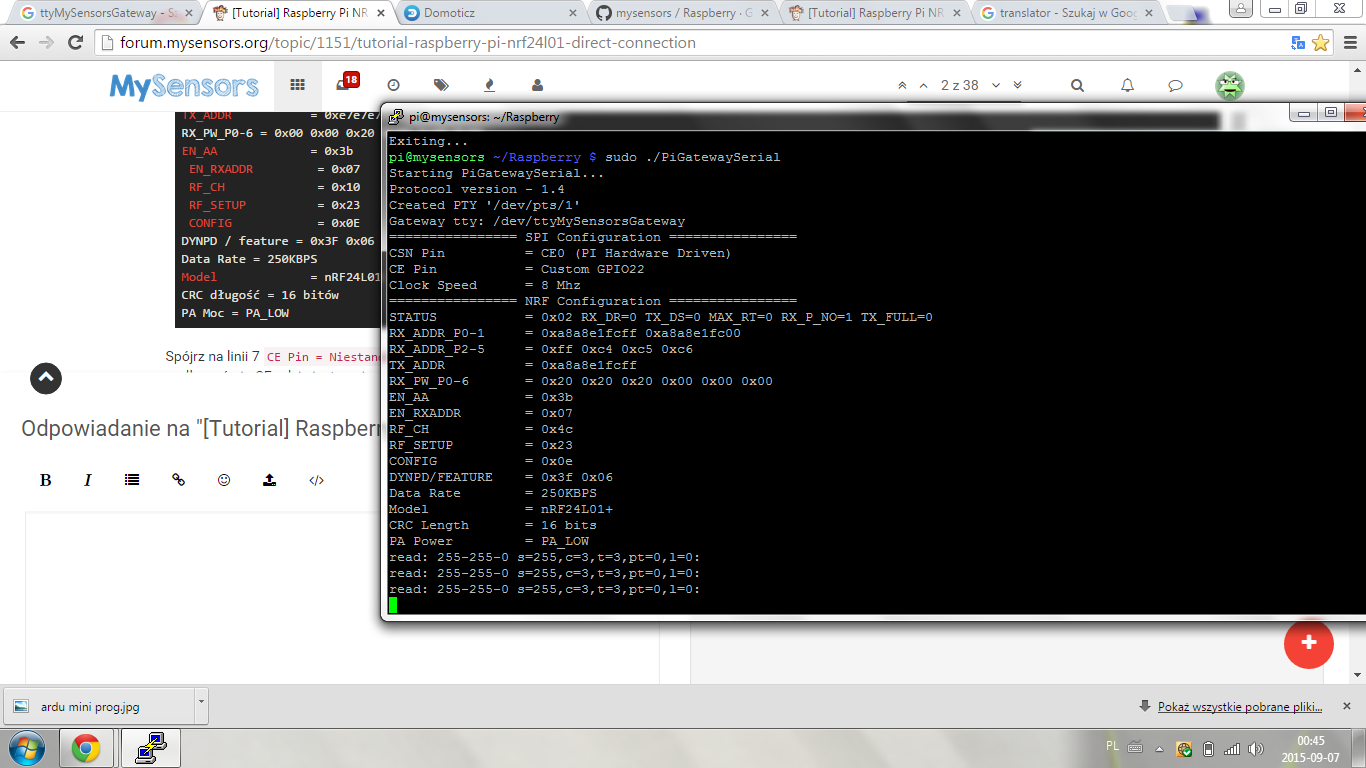
./PiGatewaySerialIt shoud prin something like this:
Starting PiGatewaySerial...
Protocol version - 1.4
Created PTY '/dev/pts/1'
Gateway tty: /dev/ttyMySensorsGateway
================ SPI Configuration ================
CSN Pin          = CE0 (PI Hardware Driven)
CE Pin           = Custom GPIO25
Clock Speed      = 8 Mhz
================ NRF Configuration ================
STATUS           = 0x0e RX_DR=0 TX_DS=0 MAX_RT=0 RX_P_NO=7 TX_FULL=0
RX_ADDR_P0-1     = 0xe7e7e7e7e7 0xc2c2c2c2c2
RX_ADDR_P2-5     = 0xff 0xc4 0xc5 0xc6
TX_ADDR          = 0xe7e7e7e7e7
RX_PW_P0-6       = 0x00 0x00 0x20 0x00 0x00 0x00
EN_AA            = 0x3b
EN_RXADDR        = 0x07
RF_CH            = 0x10
RF_SETUP         = 0x23
CONFIG           = 0x0e
DYNPD/FEATURE    = 0x3f 0x06
Data Rate        = 250KBPS
Model            = nRF24L01+
CRC Length       = 16 bits
PA Power         = PA_LOW
Look at line 7
CE Pin = Custom GPIO25
Connect the CE pin where it says you should.Here are some pictures with the GPIO connector on the rPi.
https://www.google.ro/search?q=raspberry+pi+gpio&tbm=isch@Vladut-Grecu - Thanks very much for the tutorial!! After a bit of trial and error I was able to get the Pi reading my two nodes with very good reliability.
I'm now trying to merge this RPi Direct Connection with the openHab With Serial Gateway that TimO was kind enough to post (http://forum.mysensors.org/topic/1194/tutorial-openhab-with-serial-gateway). I had openHab working well on the RPi using an Arduino nano serial gateway using that tutorial.
Running PiGatewaySerial in a terminal window yields the proper readings from the Arduino nodes but when I try to have openHab recognize the serial port "/dev/ttyMySensorsGateway" instead of the "/dev/ttyUSB99@115200" used in the openHab tutorial I get messages from openHab saying it could not open serial port '/dev/ttyMySensorsGateway'...
Just wondering if anyone else has tried to marry the two projects or has any suggestions. (Perhaps I should also post this in TimO's openHab thread...)
-
Hi I am a beginner
If I have something that's ok , I plugged in humidity and temperature sensor , and for what I have in front of ./PiGatewaySerial enter sudo ? ,
how to make the data visible in Domoticz please help -
whether in the / dev file must be named ttyMySensorsGeteway ? if so how it developed and what it should contain
-
Hi @hek
I know that a lot if going on regarding the MySensors 1.6 but I would like to know the plans for the repo mysensors/Raspberry?
Is there any plans to keep developing it of merging it with the main libraries?
I would like to be able to run the latest version on my Pi and I'm more than willing to help making it possible :)
Cheers
-
Hi @Daniel-Oliveira,
I've talked with @Anticimex and @thozza about it... We think it would be best to move the RPi build file and any eventual support libs into the main MySensors repo to keep it in sync with the rest .
Not sure if @thozza has begun working on some autoconf script or not (did you?). But I imagine he'd appreciate any help you can contribute with.
-
(solved)
Hi. Thanks a lot for this implentation and the helpful posts here!I've got the gateway working with a tmp75 temperature sensor on an arduino. The nrf24 is sitting on the raspberry directly (CE pin 22), as a controller i'm using PiMatic. It works very nicely!
There is one small problem however. The PiGatewaySerial will only work if i have called PiGateway before (and closed it again). With working I mean picking up radio transmissions from my sensor node. Everything else seems normal (/dev/ttyPiGatewaySerial and radio details printout).
The details of both configurations might give a clue:
pi@raspberrypi ~/mysensors_rpi $ sudo ./PiGateway
Starting Gateway...
================ SPI Configuration ================
CSN Pin          = CE0 (PI Hardware Driven)
CE Pin           = Custom GPIO25
Clock Speed      = 8 Mhz
================ NRF Configuration ================
STATUS           = 0x0e RX_DR=0 TX_DS=0 MAX_RT=0 RX_P_NO=7 TX_FULL=0
RX_ADDR_P0-1     = 0xa8a8e1fc00 0xa8a8e1fc00
RX_ADDR_P2-5     = 0xff 0xc4 0xc5 0xc6
TX_ADDR          = 0xe7e7e7e7e7
RX_PW_P0-6       = 0x20 0x20 0x20 0x00 0x00 0x00
EN_AA            = 0x3b
EN_RXADDR        = 0x06
RF_CH            = 0x4c
RF_SETUP         = 0x23
CONFIG           = 0x0e
DYNPD/FEATURE    = 0x3f 0x06
Data Rate        = 250KBPS
Model            = nRF24L01+
CRC Length       = 16 bits
PA Power         = PA_LOW
[CALLBACK]0;0;3;0;14;Gateway startup complete.
read: 4-4-0 s=0,c=1,t=0,pt=7,l=5:22.9
[CALLBACK]4;0;1;0;0;22.9
read: 4-4-0 s=0,c=1,t=0,pt=7,l=5:22.9
after closing PiGateway and opening PiGatewaySerial i get this:
pi@raspberrypi ~/mysensors_rpi $ sudo ./PiGatewaySerial
Starting PiGatewaySerial...
Protocol version - 1.4
Created PTY '/dev/pts/3'
Gateway tty: /dev/ttyMySensorsGateway
================ SPI Configuration ================
CSN Pin          = CE0 (PI Hardware Driven)
CE Pin           = Custom GPIO22
Clock Speed      = 8 Mhz
================ NRF Configuration ================
STATUS           = 0x0e RX_DR=0 TX_DS=0 MAX_RT=0 RX_P_NO=7 TX_FULL=0
RX_ADDR_P0-1     = 0xa8a8e1fc00 0xa8a8e1fc00
RX_ADDR_P2-5     = 0xff 0xc4 0xc5 0xc6
TX_ADDR          = 0xe7e7e7e7e7
RX_PW_P0-6       = 0x20 0x20 0x20 0x00 0x00 0x00
EN_AA            = 0x3b
EN_RXADDR        = 0x06
RF_CH            = 0x4c
RF_SETUP         = 0x23
CONFIG           = 0x0e
DYNPD/FEATURE    = 0x3f 0x06
Data Rate        = 250KBPS
Model            = nRF24L01+
CRC Length       = 16 bits
PA Power         = PA_LOW
read: 4-4-0 s=0,c=1,t=0,pt=7,l=5:22.9
read: 4-4-0 s=0,c=1,t=0,pt=7,l=5:22.9
read: 4-4-0 s=0,c=1,t=0,pt=7,l=5:22.9
read: 4-4-0 s=0,c=1,t=0,pt=7,l=5:22.9
read: 4-4-0 s=0,c=1,t=0,pt=7,l=5:22.9
read: 4-4-0 s=0,c=1,t=0,pt=7,l=5:22.9
read: 4-4-0 s=0,c=1,t=0,pt=7,l=5:22.9
read: 4-4-0 s=0,c=1,t=0,pt=7,l=5:22.8
Notice how the CE pins of both SPI configurations are different!
I'm at the point that i want to daemonize the gateway. Which in fact i did, but the same problem persists. Before i hack the startup script to first run and close PiGateway before PiGatewaySerial, i was hoping that someone has an idea what i'm doing wrong.
Thanks in advance!
solved!
I have two RPIs (a Pi 2 B and a Pi B+), which both worked with the pyRF24 lib of TMRh20, so when i had a look in the source of the radio initialization of PiGatewaySerial and found this:#ifdef __PI_BPLUS gw = new MyGateway(RPI_BPLUS_GPIO_J8_15, RPI_BPLUS_GPIO_J8_24, BCM2835_SPI_SPEED_8MHZ, 1); #else gw = new MyGateway(RPI_V2_GPIO_P1_22, BCM2835_SPI_CS0, BCM2835_SPI_SPEED_8MHZ, 1); #endifWhen i changed it to:
#ifdef __PI_BPLUS
	gw = new MyGateway(RPI_V2_GPIO_P1_22, BCM2835_SPI_CS0, BCM2835_SPI_SPEED_8MHZ, 1);
#else
	gw = new MyGateway(RPI_V2_GPIO_P1_22, BCM2835_SPI_CS0, BCM2835_SPI_SPEED_8MHZ, 1);
#endif
and recompiled the gateways,it all started to work. After powerup everything runs :).
The Rpi that is connected now is the Pi 2 B. So i guess either i have my nrf25 wired differently then defined in this lib, or the precompiler was thinking i have a B+ connected. Or both.
I will find out when i get this also working on my B+. -
I'am trying to get this working on my Raspberry Pi 2 B with Raspbian but when using the setup.sh command I get this error:
bcm2835.c: In function ‘bcm2835_init’:
bcm2835.c:1207:28: error: invalid suffix "x" on integer constant
bcm2835.c:1208:28: error: invalid suffix "x" on integer constant
bcm2835.c:1209:28: error: invalid suffix "x" on integer constant
bcm2835.c:1210:28: error: invalid suffix "x" on integer constant
bcm2835.c:1211:28: error: invalid suffix "x" on integer constant
bcm2835.c:1212:28: error: invalid suffix "x" on integer constant
bcm2835.c:1213:28: error: invalid suffix "x" on integer constant
bcm2835.c:1214:28: error: invalid suffix "x" on integer constant
bcm2835.c:1228:83: error: invalid suffix "x" on integer constant
bcm2835.c:1232:81: error: invalid suffix "x" on integer constant
bcm2835.c:1236:81: error: invalid suffix "x" on integer constant
bcm2835.c:1239:83: error: invalid suffix "x" on integer constant
bcm2835.c:1242:83: error: invalid suffix "x" on integer constant
bcm2835.c:1246:83: error: invalid suffix "x" on integer constant
bcm2835.c:1249:83: error: invalid suffix "x" on integer constant
bcm2835.c:1253:79: error: invalid suffix "x" on integer constant
Makefile:52: recipe for target 'bcm2835.o' failed
make: *** [bcm2835.o] Error 1Any idea what is going wrong? Thanks in advance!
-
I'am trying to get this working on my Raspberry Pi 2 B with Raspbian but when using the setup.sh command I get this error:
bcm2835.c: In function ‘bcm2835_init’:
bcm2835.c:1207:28: error: invalid suffix "x" on integer constant
bcm2835.c:1208:28: error: invalid suffix "x" on integer constant
bcm2835.c:1209:28: error: invalid suffix "x" on integer constant
bcm2835.c:1210:28: error: invalid suffix "x" on integer constant
bcm2835.c:1211:28: error: invalid suffix "x" on integer constant
bcm2835.c:1212:28: error: invalid suffix "x" on integer constant
bcm2835.c:1213:28: error: invalid suffix "x" on integer constant
bcm2835.c:1214:28: error: invalid suffix "x" on integer constant
bcm2835.c:1228:83: error: invalid suffix "x" on integer constant
bcm2835.c:1232:81: error: invalid suffix "x" on integer constant
bcm2835.c:1236:81: error: invalid suffix "x" on integer constant
bcm2835.c:1239:83: error: invalid suffix "x" on integer constant
bcm2835.c:1242:83: error: invalid suffix "x" on integer constant
bcm2835.c:1246:83: error: invalid suffix "x" on integer constant
bcm2835.c:1249:83: error: invalid suffix "x" on integer constant
bcm2835.c:1253:79: error: invalid suffix "x" on integer constant
Makefile:52: recipe for target 'bcm2835.o' failed
make: *** [bcm2835.o] Error 1Any idea what is going wrong? Thanks in advance!
-
Hello everyone! Great work here! I see this is still running the 1.4 protocol, is that right? I was able to get this working but only my temp sensors would respond. Anything where I had to send data wouldn't work.
Any chance of moving to 1.5 in the near future?
Thanks!