
Serial Gateway stopped working, SmartOutlet issues
-
Hi all,
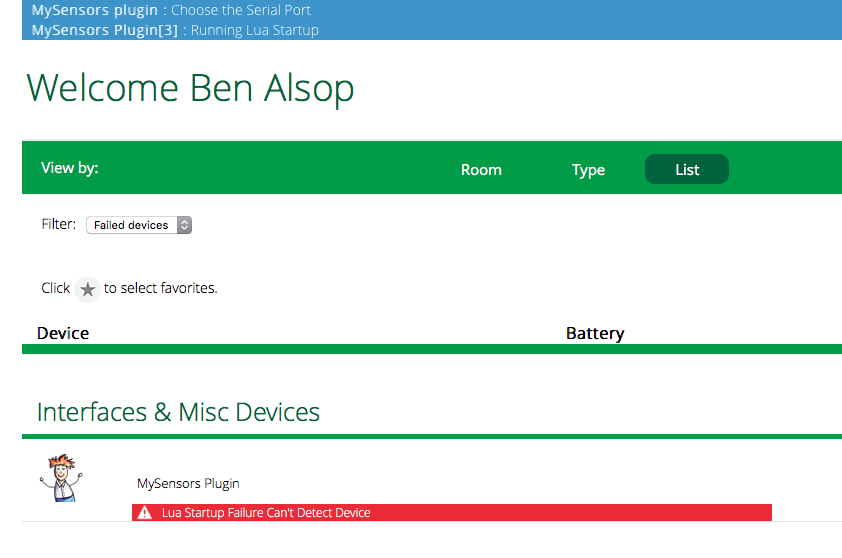
My serial gateway suddenly stopped working. There was a Vera firmware update today so wondering if that had something to do with it (I have VeraEdge). I am also in process of trying to install a new Smart Outlet I just built (Following Pete Will design to a tee). I installed it yesterday and there was only one device found (the relay) but I didn't realize that it hadn't found the node as well. It worked but was a little buggy (would not work from the main dashboard switch but if I clicked on the device the on/off switches on that page worked perfectly. I tried to solve that problem today by deleting the device and reincluding it (which is when the firmware update hit me). When I did the inclusion it only found the node (which is when I realized it should have found both devices - node and relay). Not having the relay device made it non-functional of course so I tried to do the process all over again and to my chagrin it would not find anything. In a last ditch effort I figured I'd power cycle the Vera but unplugging and plugging it back in. That's when my MySensors plugin/serial gateway stopped working. I get this message:
Thoughts on any of this? I'm a newbie so too many things going on at once for me to troubleshoot.
Any help is much appreciated.
Ben -
Hi all,
My serial gateway suddenly stopped working. There was a Vera firmware update today so wondering if that had something to do with it (I have VeraEdge). I am also in process of trying to install a new Smart Outlet I just built (Following Pete Will design to a tee). I installed it yesterday and there was only one device found (the relay) but I didn't realize that it hadn't found the node as well. It worked but was a little buggy (would not work from the main dashboard switch but if I clicked on the device the on/off switches on that page worked perfectly. I tried to solve that problem today by deleting the device and reincluding it (which is when the firmware update hit me). When I did the inclusion it only found the node (which is when I realized it should have found both devices - node and relay). Not having the relay device made it non-functional of course so I tried to do the process all over again and to my chagrin it would not find anything. In a last ditch effort I figured I'd power cycle the Vera but unplugging and plugging it back in. That's when my MySensors plugin/serial gateway stopped working. I get this message:
Thoughts on any of this? I'm a newbie so too many things going on at once for me to troubleshoot.
Any help is much appreciated.
Ben -
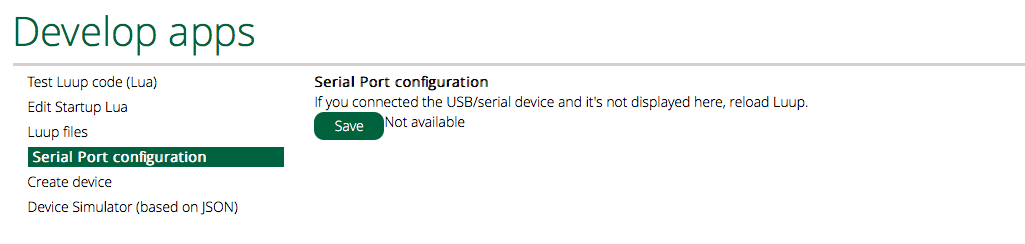
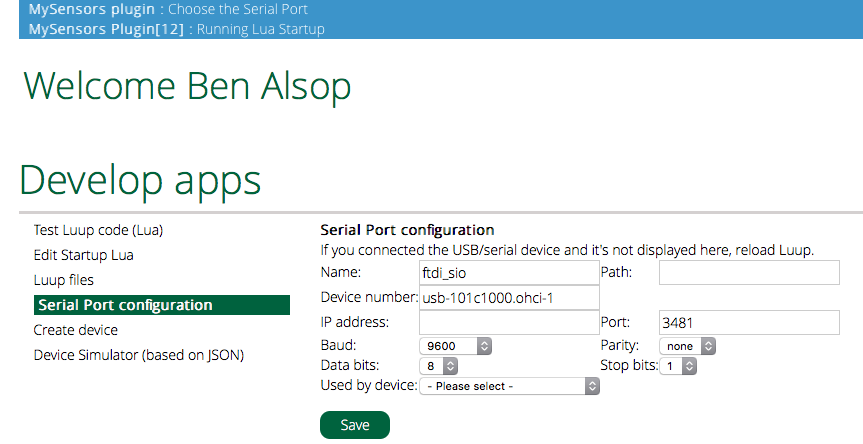
Thanks for the info but as a newbie it is not enough for me :-). This is the only place I see that looks appropriate but I don't see where I can edit any settings.
Is there a link that has more detail on where to go and what the setting should be? Should I just delete the gateway device and try to re-load it? -
Thanks for the info but as a newbie it is not enough for me :-). This is the only place I see that looks appropriate but I don't see where I can edit any settings.
Is there a link that has more detail on where to go and what the setting should be? Should I just delete the gateway device and try to re-load it? -
-
UGH!! Same problem with my smart outlet after all this crap. After trying to include it, the vera/gw finds the arduino node but not the relay, whereas yesterday it was the other way around (but at least it worked!). Anybody have thoughts on why my relay is not discoverable anymore but the node is???
-
UGH!! Same problem with my smart outlet after all this crap. After trying to include it, the vera/gw finds the arduino node but not the relay, whereas yesterday it was the other way around (but at least it worked!). Anybody have thoughts on why my relay is not discoverable anymore but the node is???

Hello! It looks like you're interested in this conversation, but you don't have an account yet.
Getting fed up of having to scroll through the same posts each visit? When you register for an account, you'll always come back to exactly where you were before, and choose to be notified of new replies (either via email, or push notification). You'll also be able to save bookmarks and upvote posts to show your appreciation to other community members.
With your input, this post could be even better 💗
Register Login