
UV Sensor ML8511
-
Well i have been searching for the code to work with my UV Sensor ML8511 over domoticz using mysensors off corse but i had no luck.
Tried to use the code over the build section for the UV Sensor but it does not work correctly whit the sensor i have.
Sow i have tried to make a working code, But i'm not a good programmer...At he time i'm posting this i don't now if it's working correctly because it's night at my place...
#include <SPI.h>
#include <MySensor.h>
#include <MySensor.h>
#include <SPI.h>

#define UV_SENSOR_ANALOG_PIN 0

#define CHILD_ID_UV 0

unsigned long SLEEP_TIME = 30*1000; // Sleep time between reads (in milliseconds)

MySensor gw;
MyMessage uvMsg(CHILD_ID_UV, V_UV);

float lastUV = -1;
unsigned long lastSend =0;

void setup()
{
  gw.begin(NULL, 9, true);

  // Send the sketch version information to the gateway and Controller
  gw.sendSketchInfo("UV Sensor", "3.0");

  // Register all sensors to gateway (they will be created as child devices)
  gw.present(CHILD_ID_UV, S_UV, "ML8511_UV");
}

void loop()
{
  gw.process();

  int uvLevel = averageAnalogRead(UV_SENSOR_ANALOG_PIN);
  unsigned long currentTime = millis();

  float outputVoltage = 5.0 * uvLevel/1024;
  float uvIntensity = mapfloat(outputVoltage, 0.99, 2.9, 0.0, 15.0);

  if ((uvIntensity != lastUV)||(currentTime-lastSend >= 5*60*1000))
  {
      lastSend=currentTime;
      gw.send(uvMsg.set(uvIntensity,2));
      lastUV = uvIntensity;
  }
  //delay(100);
}

//Takes an average of readings on a given pin
//Returns the average
int averageAnalogRead(int pinToRead)
{
  byte numberOfReadings = 8;
  unsigned int runningValue = 0;

  for(int x = 0 ; x < numberOfReadings ; x++)
    runningValue += analogRead(pinToRead);
  runningValue /= numberOfReadings;

  return(runningValue);

}

//The Arduino Map function but for floats
//From: http://forum.arduino.cc/index.php?topic=3922.0
float mapfloat(float x, float in_min, float in_max, float out_min, float out_max)
{
  return (x - in_min) * (out_max - out_min) / (in_max - in_min) + out_min;
}
Has you can seen i had adapted the code from the build area and other code i had found on the web.
Well if any one see erros in the code that i do believe it has, i do appreciate the help on fixing it and making this a perfect working code. -
@mrc-core said:
ML8511
Have you checked the wiring (from https://github.com/sparkfun/ML8511_Breakout/blob/master/firmware/MP8511_Read_Example/MP8511_Read_Example.ino):
Connect the following MP8511 breakout board to Arduino:
3.3V = 3.3V
OUT = A0
GND = GND
EN = 3.3V
3.3V = A1 -
-
I have done some changings to the code and corrected de 3.3V = A1 Pin that i did not had in the first code.
Onde day has passed with the changes and the result off this days is what you can see on the image below: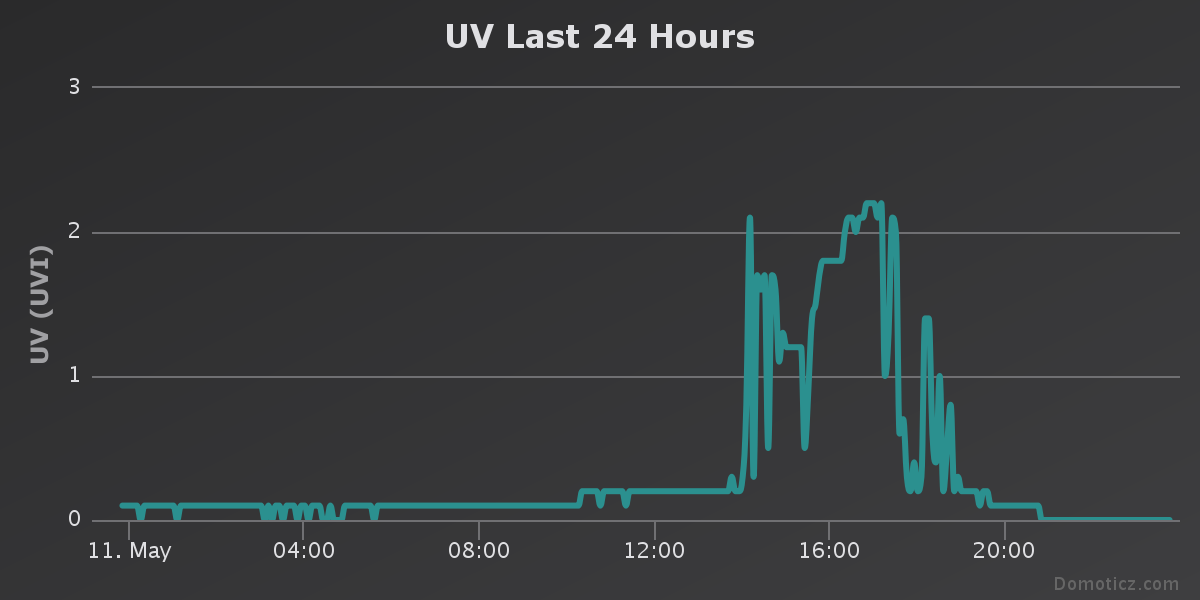
I dont now if this results are correct. I'm going to let the sensor outiside until the end of the week and see the results.
Does anyone in the forum have a UV sensor working? Is this chart correct ?? -
I have done some changings to the code and corrected de 3.3V = A1 Pin that i did not had in the first code.
Onde day has passed with the changes and the result off this days is what you can see on the image below:I dont now if this results are correct. I'm going to let the sensor outiside until the end of the week and see the results.
Does anyone in the forum have a UV sensor working? Is this chart correct ??@mrc-core looks like you are using Domoticz.. Look for the Weather Underground virtual hardware.
You can have WU report most of the weather related data from a station nearby. This includes UV measurement in a similar graph you have.
Or my opinion : It looks like a correct graph to me but will depend on your local sun intensity.
-
a quick question as I try to revive a node with UV sensor (a UVM-30A) : is there a simple way to simulate the UV after sundown which is the time I can test it ?
z-wave - Vera -> Domoticz
rfx - Domoticz <- MyDomoAtHome <- Imperihome
mysensors -> mysensors-gw -> Domoticz -
a quick question as I try to revive a node with UV sensor (a UVM-30A) : is there a simple way to simulate the UV after sundown which is the time I can test it ?
-
Ok i have now configured the Weather Underground virtual hardware let's see what will happen during the day off tomorrow.
For what i can seen the UV sensor is detecting the UV normally between 11h and 17h....
I'm going to make one new change on the code to introduce the reading s of the MP8511 voltage.And i'm going to change the location off the prototype in my house.
To test the UV sensor at night you can use a UV light.
-
-
@mrc-core said:
To test the UV sensor at night you can use a UV light.
does a halogen lamp does this ?
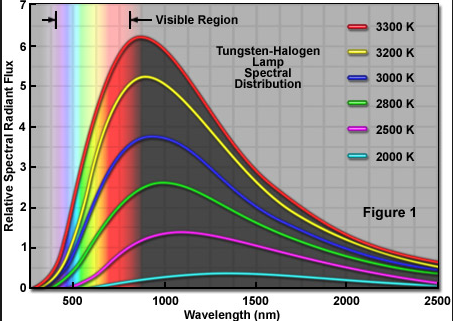
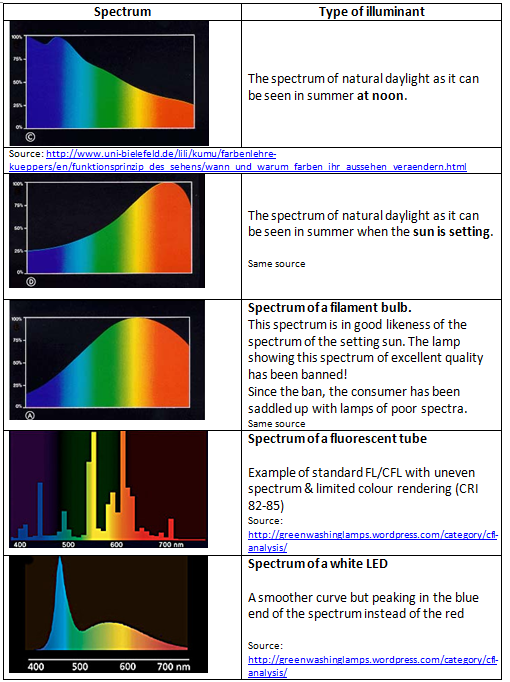
@epierre The spectrum of UV is between 10 en 400 nanometer. so in relation to the spectrum of UV:
and an excerpt from medical study:
"Halogen lamps emit significant levels of ultraviolet radiation and should be doped or covered with glass prior to use"
But in summary: not much
-
This is my new code for this sensor and reajusted to library 2.1.1
/** * The MySensors Arduino library handles the wireless radio link and protocol * between your home built sensors/actuators and HA controller of choice. * The sensors forms a self healing radio network with optional repeaters. Each * repeater and gateway builds a routing tables in EEPROM which keeps track of the * network topology allowing messages to be routed to nodes. * * Created by Henrik Ekblad <henrik.ekblad@mysensors.org> * Copyright (C) 2013-2015 Sensnology AB * Full contributor list: https://github.com/mysensors/Arduino/graphs/contributors * * Documentation: http://www.mysensors.org * Support Forum: http://forum.mysensors.org * * This program is free software; you can redistribute it and/or * modify it under the terms of the GNU General Public License * version 2 as published by the Free Software Foundation. * ******************************* * * REVISION HISTORY * Version 1.0 - epierre * Contribution: bulldoglowell, gizmocuz * * DESCRIPTION * Connect sensor ML8511 / Arduino: * * 3.3V = 3.3V * OUT = A0 * GND = GND * EN = 3.3V * Arduino 3.3V = Arduino A1 * * License: Attribution-NonCommercial-ShareAlike 3.0 Unported (CC BY-NC-SA 3.0) */ // Enable debug prints #define MY_DEBUG // Enable and select radio type attached #define MY_RADIO_NRF24 //#define MY_RADIO_RFM69 //#define MY_RS485 #include <SPI.h> #include <MySensors.h> #include <SPI.h> //Hardware pin definitions int REF_3V3 = A1; int UVOUT = A0; #define CHILD_ID_UV 0 unsigned long SLEEP_TIME = 30*1000; // Sleep time between reads (in milliseconds) MyMessage uvMsg(CHILD_ID_UV, V_UV); float lastUV = -1; unsigned long lastSend =0; void presentation() { // Send the sketch version information to the gateway and Controller sendSketchInfo("UV Sensor", "3.0"); // Register all sensors to gateway (they will be created as child devices) present(CHILD_ID_UV, S_UV, "ML8511_UV"); } void setup() { //gw.begin(NULL, 9, true); pinMode(UVOUT, INPUT); pinMode(REF_3V3, INPUT); } void loop() { int uvLevel = averageAnalogRead(UVOUT); int refLevel = averageAnalogRead(REF_3V3); unsigned long currentTime = millis(); //Use the 3.3V power pin as a reference to get a very accurate output value from sensor float outputVoltage = 3.3 / refLevel * uvLevel; //float outputVoltage = 5.0 * uvLevel/1024; float uvIntensity = mapfloat(outputVoltage, 0.99, 2.8, 0.0, 15.0); //Convert the voltage to a UV intensity level Serial.print("output: "); Serial.print(refLevel); Serial.print("ML8511 output: "); Serial.print(uvLevel); Serial.print(" / ML8511 voltage: "); Serial.print(outputVoltage); Serial.print(" / UV Intensity (mW/cm^2): "); Serial.print(uvIntensity); Serial.println(); if ((uvIntensity != lastUV)||(currentTime-lastSend >= 5*60*1000)) { lastSend=currentTime; send(uvMsg.set(uvIntensity,2)); lastUV = uvIntensity; } delay(100); } //Takes an average of readings on a given pin //Returns the average int averageAnalogRead(int pinToRead) { byte numberOfReadings = 8; unsigned int runningValue = 0; for(int x = 0 ; x < numberOfReadings ; x++) runningValue += analogRead(pinToRead); runningValue /= numberOfReadings; return(runningValue); } //The Arduino Map function but for floats //From: http://forum.arduino.cc/index.php?topic=3922.0 float mapfloat(float x, float in_min, float in_max, float out_min, float out_max) { return (x - in_min) * (out_max - out_min) / (in_max - in_min) + out_min; }``` -
This is my new code for this sensor and reajusted to library 2.1.1
/** * The MySensors Arduino library handles the wireless radio link and protocol * between your home built sensors/actuators and HA controller of choice. * The sensors forms a self healing radio network with optional repeaters. Each * repeater and gateway builds a routing tables in EEPROM which keeps track of the * network topology allowing messages to be routed to nodes. * * Created by Henrik Ekblad <henrik.ekblad@mysensors.org> * Copyright (C) 2013-2015 Sensnology AB * Full contributor list: https://github.com/mysensors/Arduino/graphs/contributors * * Documentation: http://www.mysensors.org * Support Forum: http://forum.mysensors.org * * This program is free software; you can redistribute it and/or * modify it under the terms of the GNU General Public License * version 2 as published by the Free Software Foundation. * ******************************* * * REVISION HISTORY * Version 1.0 - epierre * Contribution: bulldoglowell, gizmocuz * * DESCRIPTION * Connect sensor ML8511 / Arduino: * * 3.3V = 3.3V * OUT = A0 * GND = GND * EN = 3.3V * Arduino 3.3V = Arduino A1 * * License: Attribution-NonCommercial-ShareAlike 3.0 Unported (CC BY-NC-SA 3.0) */ // Enable debug prints #define MY_DEBUG // Enable and select radio type attached #define MY_RADIO_NRF24 //#define MY_RADIO_RFM69 //#define MY_RS485 #include <SPI.h> #include <MySensors.h> #include <SPI.h> //Hardware pin definitions int REF_3V3 = A1; int UVOUT = A0; #define CHILD_ID_UV 0 unsigned long SLEEP_TIME = 30*1000; // Sleep time between reads (in milliseconds) MyMessage uvMsg(CHILD_ID_UV, V_UV); float lastUV = -1; unsigned long lastSend =0; void presentation() { // Send the sketch version information to the gateway and Controller sendSketchInfo("UV Sensor", "3.0"); // Register all sensors to gateway (they will be created as child devices) present(CHILD_ID_UV, S_UV, "ML8511_UV"); } void setup() { //gw.begin(NULL, 9, true); pinMode(UVOUT, INPUT); pinMode(REF_3V3, INPUT); } void loop() { int uvLevel = averageAnalogRead(UVOUT); int refLevel = averageAnalogRead(REF_3V3); unsigned long currentTime = millis(); //Use the 3.3V power pin as a reference to get a very accurate output value from sensor float outputVoltage = 3.3 / refLevel * uvLevel; //float outputVoltage = 5.0 * uvLevel/1024; float uvIntensity = mapfloat(outputVoltage, 0.99, 2.8, 0.0, 15.0); //Convert the voltage to a UV intensity level Serial.print("output: "); Serial.print(refLevel); Serial.print("ML8511 output: "); Serial.print(uvLevel); Serial.print(" / ML8511 voltage: "); Serial.print(outputVoltage); Serial.print(" / UV Intensity (mW/cm^2): "); Serial.print(uvIntensity); Serial.println(); if ((uvIntensity != lastUV)||(currentTime-lastSend >= 5*60*1000)) { lastSend=currentTime; send(uvMsg.set(uvIntensity,2)); lastUV = uvIntensity; } delay(100); } //Takes an average of readings on a given pin //Returns the average int averageAnalogRead(int pinToRead) { byte numberOfReadings = 8; unsigned int runningValue = 0; for(int x = 0 ; x < numberOfReadings ; x++) runningValue += analogRead(pinToRead); runningValue /= numberOfReadings; return(runningValue); } //The Arduino Map function but for floats //From: http://forum.arduino.cc/index.php?topic=3922.0 float mapfloat(float x, float in_min, float in_max, float out_min, float out_max) { return (x - in_min) * (out_max - out_min) / (in_max - in_min) + out_min; }```@mrc-core Thanks for the code. The code works fine but I am seing the node reporting direct measurements to the gateway every single second, spamming the gateway.
Is there anything I can do to stop this behavior and transmit averages; in example - every minute or every 5 minutes?
Thanks in advance!
-
@mrc-core Thanks for the code. The code works fine but I am seing the node reporting direct measurements to the gateway every single second, spamming the gateway.
Is there anything I can do to stop this behavior and transmit averages; in example - every minute or every 5 minutes?
Thanks in advance!




Hello! It looks like you're interested in this conversation, but you don't have an account yet.
Getting fed up of having to scroll through the same posts each visit? When you register for an account, you'll always come back to exactly where you were before, and choose to be notified of new replies (either via email, or push notification). You'll also be able to save bookmarks and upvote posts to show your appreciation to other community members.
With your input, this post could be even better 💗
Register Login