Skip to content
  • MySensors
  • OpenHardware.io
  • Categories
  • Recent
  • Tags
  • Popular
Skins
  • Light
  • Brite
  • Cerulean
  • Cosmo
  • Flatly
  • Journal
  • Litera
  • Lumen
  • Lux
  • Materia
  • Minty
  • Morph
  • Pulse
  • Sandstone
  • Simplex
  • Sketchy
  • Spacelab
  • United
  • Yeti
  • Zephyr
  • Dark
  • Cyborg
  • Darkly
  • Quartz
  • Slate
  • Solar
  • Superhero
  • Vapor

  • Default (No Skin)
  • No Skin
Collapse
Brand Logo
  1. Home
  2. Hardware
  3. Relay turns on when input is LOW?!

Relay turns on when input is LOW?!

Scheduled Pinned Locked Moved Hardware
5 Posts 4 Posters 3.3k Views 3 Watching
  • Oldest to Newest
  • Newest to Oldest
  • Most Votes
Reply
  • Reply as topic
Log in to reply
This topic has been deleted. Only users with topic management privileges can see it.
  • dakkyD Offline
    dakkyD Offline
    dakky
    wrote on last edited by dakky
    #1

    The title says it all: I have connected a relay to my network and it switches power on (led on the relay lights up), when the input pin goes low and vice versa.

    Thats a little bit confusing, when switching off something in the controller UI and the device is switching on ;) and i don't think, that zwitching the state in the arduino code is the way to go :D

    any idea whats wrong here? Wiring is straight forward (vcc & gnd with corresponding pins on relay + D2 to I1 on the relay).

    The code is the the one from the examples (as far as I remember :D ).

    I inserted some debug statements to prevent stupid errors on my side ;)

        Serial.print("arduino pin: ");
        Serial.println(message.sensor + FIRST_DIGITAL_RELAY_OUTPUT);
        Serial.print("message.bool: ");
        Serial.println(message.getBool());
        digitalWrite(message.sensor + FIRST_DIGITAL_RELAY_OUTPUT, message.getBool() ? RELAY_ON : RELAY_OFF);
    

    =>

    arduino pin: 2
    message.bool: 1
    

    results in switched off relay.

    Thanks for helping

    EDIT: maybe "hardware" is the wrong section and "Troubleshooting" a better location ;) If thats the case: please move the thread if possible

    Controller: Raspberry Pi 2 :: Openhab2 :: with @TimO MySensors Binding
    Gateway: Arduino MEGA 2560 R3 :: W5100 :: Ethernet GW

    Software: MySensors 2.0development

    1 Reply Last reply
    0
    • mfalkviddM Offline
      mfalkviddM Offline
      mfalkvidd
      Mod
      wrote on last edited by
      #2

      I don't remember why this happens, but the simple solution is to switch the #defines for RELAY_ON and RELAY_OFF in the beginning of the sketch. The reason those are defined is to make it easy to switch them.

      1 Reply Last reply
      1
      • D Offline
        D Offline
        dbemowsk
        wrote on last edited by
        #3

        Not sure what kind of relay setup you are using, but are you using a pull-up or pull-down resistor on your data line? If you are using pull-up resistors, the data line is always high and needs to be pulled low to be active. Check that you are not using the internal pull-up resistors on your data line. For this you should use a pull-down resistor if your relay setup does not already have one.

        Vera Plus running UI7 with MySensors, Sonoffs and 1-Wire devices
        Visit my website for more Bits, Bytes and Ramblings from me: http://dan.bemowski.info/

        1 Reply Last reply
        0
        • Boots33B Offline
          Boots33B Offline
          Boots33
          Hero Member
          wrote on last edited by Boots33
          #4

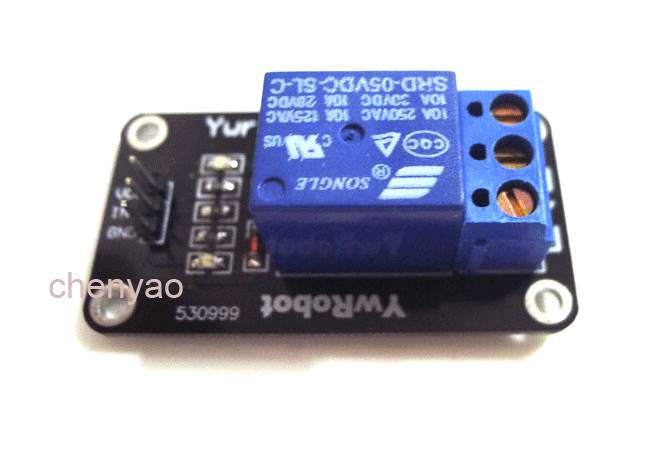
          If you are using a relay module similar to this one
          0_1465897251623_4-81.jpg

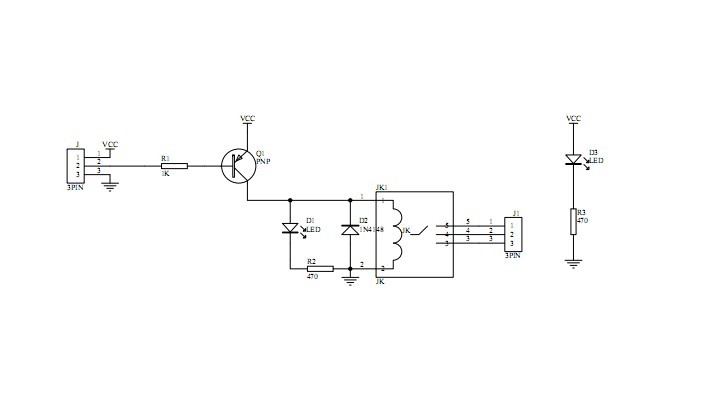
          They often use a PNP transistor to drive the relay. That means you will need to switch the arduino output low to turn on the relay, as you have discovered.

          As @mfalkvidd has said the simple fix may be to reverse the #defines

          Here is what the relay circuit would look like. They would also likely have a resistor from the transistor base to vcc to ensure the transistor turns off
          0_1465897544475_pnp driver.jpg

          1 Reply Last reply
          1
          • dakkyD Offline
            dakkyD Offline
            dakky
            wrote on last edited by
            #5

            Ah that explains it for me. Thanks for the dettailed answer. I will @mfalkvidd's and switch the defines. thank you all ;)

            Greetings

            Controller: Raspberry Pi 2 :: Openhab2 :: with @TimO MySensors Binding
            Gateway: Arduino MEGA 2560 R3 :: W5100 :: Ethernet GW

            Software: MySensors 2.0development

            1 Reply Last reply
            1

            Hello! It looks like you're interested in this conversation, but you don't have an account yet.

            Getting fed up of having to scroll through the same posts each visit? When you register for an account, you'll always come back to exactly where you were before, and choose to be notified of new replies (either via email, or push notification). You'll also be able to save bookmarks and upvote posts to show your appreciation to other community members.

            With your input, this post could be even better 💗

            Register Login
            Reply
            • Reply as topic
            Log in to reply
            • Oldest to Newest
            • Newest to Oldest
            • Most Votes


            14

            Online

            12.0k

            Users

            11.2k

            Topics

            113.4k

            Posts


            Copyright 2025 TBD   |   Forum Guidelines   |   Privacy Policy   |   Terms of Service
            • Login

            • Don't have an account? Register

            • Login or register to search.
            • First post
              Last post
            0
            • MySensors
            • OpenHardware.io
            • Categories
            • Recent
            • Tags
            • Popular