
Motion Sensor
-
So, during upgrading to 1.4, I am coming across some new issues. I know a lot of you have already solved them but I didn't see too much on the basic motion sensor, using this sketch:
#include <MySensor.h>
#include <SPI.h>

unsigned long SLEEP_TIME = 120000; // Sleep time between reports (in milliseconds)
#define DIGITAL_INPUT_SENSOR 3   // The digital input you attached your motion sensor.      (Only 2 and 3 generates interrupt!)
#define INTERRUPT DIGITAL_INPUT_SENSOR-2 // Usually the interrupt = pin -2 (on     uno/nano anyway)
#define CHILD_ID 1   // Id of the sensor child

MySensor gw;
// Initialize motion message
MyMessage msg(CHILD_ID, V_TRIPPED);

void setup()
{
  gw.begin();

  // Send the sketch version information to the gateway and Controller
  gw.sendSketchInfo("Motion Sensor", "1.0");

  pinMode(DIGITAL_INPUT_SENSOR, INPUT);      // sets the motion sensor digital pin as input
  // Register all sensors to gw (they will be created as child devices)
  gw.present(CHILD_ID, S_MOTION);

}

void loop()
{
  // Read digital motion value
  boolean tripped = digitalRead(DIGITAL_INPUT_SENSOR) == HIGH;

  Serial.println(tripped);
  gw.send(msg.set(tripped?"1":"0"));  // Send tripped value to gw

  // Sleep until interrupt comes in on motion sensor. Send update every two minute.
  gw.sleep(INTERRUPT,CHANGE, SLEEP_TIME);
}
The MySensors basic sketch called for sleep (which I don't care to have, as my Motion Sensors are mains powered) so I edited that part out.
I just had too much radio traffic (affecting the network) and I thought better if I only transmitted on a state change versus every half second and then once a minute, sending an update... relying on the hardware to determine the length of the alarm time:
/*
*
* Motion Sensor Version 1.1
*
* October 15, 2014
*
* Modified to transmit on state change versus every half second
* removed Sleep for mains-only device
* Updates gateway according to UPDATE_INTERVAL
*
*/
#include <MySensor.h>
#include <SPI.h>
//
#define DIGITAL_INPUT_SENSOR 3
#define CHILD_ID 1   // Id of the sensor child
#define UPDATE_INTERVAL 60000UL
#define DEBUG
//
boolean lastSensorState;
unsigned long lastUpdate;
//
MySensor gw;
MyMessage msg(CHILD_ID, V_TRIPPED);
//
void setup()
{
  gw.begin();
  Serial.begin(115200);
  gw.sendSketchInfo("MotionSensorMains", "1.1");
  pinMode(DIGITAL_INPUT_SENSOR, INPUT);
  gw.present(CHILD_ID, S_MOTION);
}
//
void loop()
{
  boolean sensorState = digitalRead(DIGITAL_INPUT_SENSOR);
  if (sensorState != lastSensorState)
  {
    #ifdef DEBUG
      digitalWrite(13,sensorState? HIGH : LOW);
      Serial.println(sensorState? "Tripped" : "Not Tripped");
    #endif
    gw.send(msg.set(sensorState?"1":"0"));  // Update gateway on change of state
    lastUpdate = millis(); // resets the update timer
  }
  lastSensorState = sensorState;
  updateStatus(UPDATE_INTERVAL);
}
//
void updateStatus(unsigned long updateInterval)
{
  if (millis() - lastUpdate >= updateInterval)
  {
    gw.send(msg.set(lastSensorState? "1" : "0"));
    #ifdef DEBUG
      digitalWrite(13,lastSensorState? HIGH : LOW);
      Serial.println(lastSensorState? "Tripped" : "Not Tripped");
    #endif
    lastUpdate = millis();
  }
}
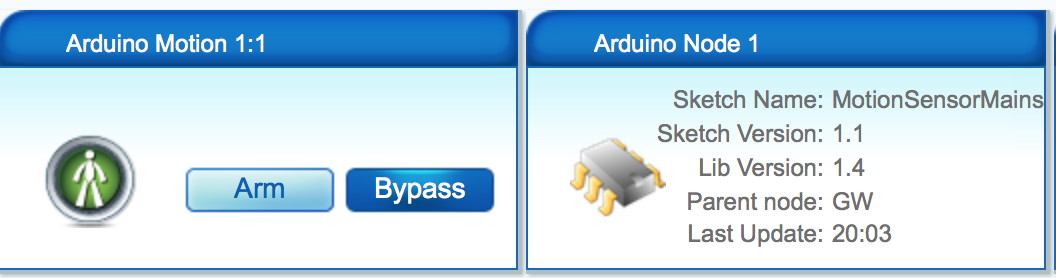
It seems to work much better, but I wonder if this is really what I want to do. The good part is that I can remotely see if the node is in communication with the sensor (last update time. But then I thought that it may be better to only report the change of state, so that I can remotely see the last time it was tripped (or un-tripped, actually).
Does anyone have preferences or ideas or suggestions on this? I know it seems quite trivial, but the network performance started me down this path, and I have to say that it is much improved with the new sketch.
-
-
I didn't realize how chatty the motion sensor node would be until I actually built one. I was surprised since I read everywhere that it had a 5s minimum delay / trigger time which I thought would be a safeguard against a flood of messages across the network. I now wonder if there are in fact different HC-SR501 modules with different delay / trigger settings? I've seen everything from 0.3-18s, 0.5-200s and 5-200s. At any rate, my node, at the minimum trimpot setting, would send damn near a few hundred messages in only a few seconds if I kept standing in front of the sensor.
Now, my concern here, from a battery standpoint, is how to best deal with this. Use the trimpot or implement some software solution that stops messages from being sent for a set time once it has been triggered. Which would be best from a battery saving standpoint? Does the HC-SR501 consume less power when using its own trigger delay? I don't quite get this.
-
I'd like to just send the change of state only, see a 1 when state changes to tripped and a zero when it changes to not-tripped. I trust that the sensor will output to the Arduino, but I'm not yet full of trust that the message gets sent and received, I guess.
-
in your exemple, it's in the loop function you have a bug... try to replace it with this :
void loop()
{
  boolean sensorState = digitalRead(DIGITAL_INPUT_SENSOR);
  if (sensorState != lastSensorState)
  {
    #ifdef DEBUG
      digitalWrite(13,sensorState? HIGH : LOW);
      Serial.println(sensorState? "Tripped" : "Not Tripped");
    #endif
    gw.send(msg.set(sensorState?"1":"0"));  // Update gateway on change of state
    lastSensorState = sensorState;
  }
}
It will send a message each time the value changes
-
it is not a bug.. I put in the minute by minute update in order to update the Vera device thusly, I can see if it is communicating on my Vera control panel or mobile app.
-
-
I was just looking for alternative approaches.


Hello! It looks like you're interested in this conversation, but you don't have an account yet.
Getting fed up of having to scroll through the same posts each visit? When you register for an account, you'll always come back to exactly where you were before, and choose to be notified of new replies (either via email, or push notification). You'll also be able to save bookmarks and upvote posts to show your appreciation to other community members.
With your input, this post could be even better 💗
Register Login