
How to include the battery measurement?
-
I am trying to build a sensor with a DHT22 and for now on a solar panel and a battery.
I want to see the battery level within Domoticz.
I cannot seem to merge both the battery sketch and the DHT sketch together.
Most of the times i get an error about a { being in a place where it should not belong.
I think i lost it :smiley: and i am going mad soon.
Also how to send the battery level to Domoticz? i tried the battery sketch alone and nothing happens.Most of the times i get an error about a { being in a place where it should not belong.
Its easier for us if you post the code so we can have a look if you want help :)
Also how to send the battery level to Domoticz?
Well, before 2.0 it was gw.sendBatteryLevel(batteryPcnt); and now it is sendBatteryLevel(batteryPcnt);
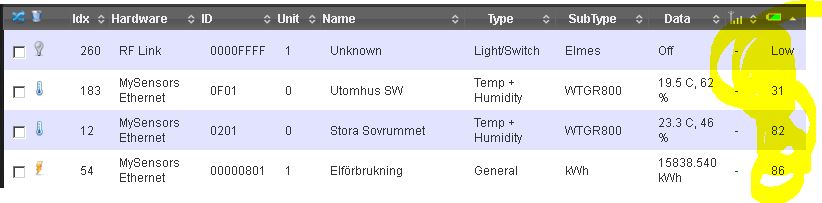
The battery% needs to be attached to a sensor - so it will be displayed in the deviced tab if you look at the device/sensor. -
-
sendBatteryLevel doesn't do anything.
I have modified it a bit and now i have some readings.
I will do a bit more playing to see where i will end.@tlpeter - it does, but it needs to be together with a sensor. You will find it in "devices".
-
-
-
I have the voltage part working and i think also the battery percentage with it.
I build the sketch like this. Can you have a little look?/** * The MySensors Arduino library handles the wireless radio link and protocol * between your home built sensors/actuators and HA controller of choice. * The sensors forms a self healing radio network with optional repeaters. Each * repeater and gateway builds a routing tables in EEPROM which keeps track of the * network topology allowing messages to be routed to nodes. * * Created by Henrik Ekblad <henrik.ekblad@mysensors.org> * Copyright (C) 2013-2015 Sensnology AB * Full contributor list: https://github.com/mysensors/Arduino/graphs/contributors * * Documentation: http://www.mysensors.org * Support Forum: http://forum.mysensors.org * * This program is free software; you can redistribute it and/or * modify it under the terms of the GNU General Public License * version 2 as published by the Free Software Foundation. * ******************************* * * DESCRIPTION * * This is an example that demonstrates how to report the battery level for a sensor * Instructions for measuring battery capacity on A0 are available here: * http://www.mysensors.org/build/battery * */ // Enable debug prints to serial monitor #define MY_DEBUG // Enable and select radio type attached #define MY_RADIO_NRF24 //#define MY_RADIO_RFM69 #include <SPI.h> #include <MySensors.h> #include <DHT.h> #define CHILD_ID_BATT 0 #define CHILD_ID_HUM 1 #define CHILD_ID_TEMP 2 #define DHT_DATA_PIN 3 // Set this to the pin you connected the DHT's data pin to int BATTERY_SENSE_PIN = A0; // select the input pin for the battery sense point // Set this offset if the sensor has a permanent small offset to the real temperatures #define SENSOR_TEMP_OFFSET 0 static const uint64_t UPDATE_INTERVAL = 30000; // Force sending an update of the temperature after n sensor reads, so a controller showing the // timestamp of the last update doesn't show something like 3 hours in the unlikely case, that // the value didn't change since; // i.e. the sensor would force sending an update every UPDATE_INTERVAL*FORCE_UPDATE_N_READS [ms] static const uint8_t FORCE_UPDATE_N_READS = 10; //unsigned long SLEEP_TIME = 9000; // sleep time between reads (seconds * 1000 milliseconds) int oldBatteryPcnt = 0; float lastTemp; float lastHum; uint8_t nNoUpdatesTemp; uint8_t nNoUpdatesHum; boolean metric = true; MyMessage msgBatt(CHILD_ID_BATT, V_VOLTAGE); MyMessage msgHum(CHILD_ID_HUM, V_HUM); MyMessage msgTemp(CHILD_ID_TEMP, V_TEMP); DHT dht; void setup() { // use the 1.1 V internal reference #if defined(__AVR_ATmega2560__) analogReference(INTERNAL1V1); #else analogReference(INTERNAL); #endif //} { dht.setup(DHT_DATA_PIN); // set data pin of DHT sensor if (UPDATE_INTERVAL <= dht.getMinimumSamplingPeriod()) { Serial.println("Warning: UPDATE_INTERVAL is smaller than supported by the sensor!"); } // Sleep for the time of the minimum sampling period to give the sensor time to power up // (otherwise, timeout errors might occure for the first reading) sleep(dht.getMinimumSamplingPeriod()); } } void presentation() { // Send the sketch version information to the gateway and Controller sendSketchInfo("Battery Meter", "1.0"); present(CHILD_ID_BATT, S_MULTIMETER); wait(20); present(CHILD_ID_HUM, S_HUM); wait(20); present(CHILD_ID_TEMP, S_TEMP); wait(20); metric = getConfig().isMetric; } void loop() { // get the battery Voltage int sensorValue = analogRead(BATTERY_SENSE_PIN); #ifdef MY_DEBUG Serial.println(sensorValue); #endif // 1M, 470K divider across battery and using internal ADC ref of 1.1V // Sense point is bypassed with 0.1 uF cap to reduce noise at that point // ((1e6+470e3)/470e3)*1.1 = Vmax = 3.44 Volts // 3.44/1023 = Volts per bit = 0.003363075 int batteryPcnt = sensorValue / 10; #ifdef MY_DEBUG float batteryV = sensorValue * 0.003363075; Serial.print("Battery Voltage: "); Serial.print(batteryV); Serial.println(" V"); Serial.print("Battery percent: "); Serial.print(batteryPcnt); Serial.println(" %"); #endif if (oldBatteryPcnt != batteryPcnt) { // Power up radio after sleep send(msgBatt.set(batteryV, 1)); //sendBatteryLevel(batteryPcnt); oldBatteryPcnt = batteryPcnt; } { // Force reading sensor, so it works also after sleep() dht.readSensor(true); // Get temperature from DHT library float temperature = dht.getTemperature(); if (isnan(temperature)) { Serial.println("Failed reading temperature from DHT!"); } else if (temperature != lastTemp || nNoUpdatesTemp == FORCE_UPDATE_N_READS) { // Only send temperature if it changed since the last measurement or if we didn't send an update for n times lastTemp = temperature; if (!metric) { temperature = dht.toFahrenheit(temperature); } // Reset no updates counter nNoUpdatesTemp = 0; temperature += SENSOR_TEMP_OFFSET; send(msgTemp.set(temperature, 1)); #ifdef MY_DEBUG Serial.print("T: "); Serial.println(temperature); #endif } else { // Increase no update counter if the temperature stayed the same nNoUpdatesTemp++; } // Get humidity from DHT library float humidity = dht.getHumidity(); if (isnan(humidity)) { Serial.println("Failed reading humidity from DHT"); } else if (humidity != lastHum || nNoUpdatesHum == FORCE_UPDATE_N_READS) { // Only send humidity if it changed since the last measurement or if we didn't send an update for n times lastHum = humidity; // Reset no updates counter nNoUpdatesHum = 0; send(msgHum.set(humidity, 1)); #ifdef MY_DEBUG Serial.print("H: "); Serial.println(humidity); #endif } else { // Increase no update counter if the humidity stayed the same nNoUpdatesHum++; } //sleep(SLEEP_TIME); sleep(UPDATE_INTERVAL); }}``` -
I have the voltage part working and i think also the battery percentage with it.
I build the sketch like this. Can you have a little look?/** * The MySensors Arduino library handles the wireless radio link and protocol * between your home built sensors/actuators and HA controller of choice. * The sensors forms a self healing radio network with optional repeaters. Each * repeater and gateway builds a routing tables in EEPROM which keeps track of the * network topology allowing messages to be routed to nodes. * * Created by Henrik Ekblad <henrik.ekblad@mysensors.org> * Copyright (C) 2013-2015 Sensnology AB * Full contributor list: https://github.com/mysensors/Arduino/graphs/contributors * * Documentation: http://www.mysensors.org * Support Forum: http://forum.mysensors.org * * This program is free software; you can redistribute it and/or * modify it under the terms of the GNU General Public License * version 2 as published by the Free Software Foundation. * ******************************* * * DESCRIPTION * * This is an example that demonstrates how to report the battery level for a sensor * Instructions for measuring battery capacity on A0 are available here: * http://www.mysensors.org/build/battery * */ // Enable debug prints to serial monitor #define MY_DEBUG // Enable and select radio type attached #define MY_RADIO_NRF24 //#define MY_RADIO_RFM69 #include <SPI.h> #include <MySensors.h> #include <DHT.h> #define CHILD_ID_BATT 0 #define CHILD_ID_HUM 1 #define CHILD_ID_TEMP 2 #define DHT_DATA_PIN 3 // Set this to the pin you connected the DHT's data pin to int BATTERY_SENSE_PIN = A0; // select the input pin for the battery sense point // Set this offset if the sensor has a permanent small offset to the real temperatures #define SENSOR_TEMP_OFFSET 0 static const uint64_t UPDATE_INTERVAL = 30000; // Force sending an update of the temperature after n sensor reads, so a controller showing the // timestamp of the last update doesn't show something like 3 hours in the unlikely case, that // the value didn't change since; // i.e. the sensor would force sending an update every UPDATE_INTERVAL*FORCE_UPDATE_N_READS [ms] static const uint8_t FORCE_UPDATE_N_READS = 10; //unsigned long SLEEP_TIME = 9000; // sleep time between reads (seconds * 1000 milliseconds) int oldBatteryPcnt = 0; float lastTemp; float lastHum; uint8_t nNoUpdatesTemp; uint8_t nNoUpdatesHum; boolean metric = true; MyMessage msgBatt(CHILD_ID_BATT, V_VOLTAGE); MyMessage msgHum(CHILD_ID_HUM, V_HUM); MyMessage msgTemp(CHILD_ID_TEMP, V_TEMP); DHT dht; void setup() { // use the 1.1 V internal reference #if defined(__AVR_ATmega2560__) analogReference(INTERNAL1V1); #else analogReference(INTERNAL); #endif //} { dht.setup(DHT_DATA_PIN); // set data pin of DHT sensor if (UPDATE_INTERVAL <= dht.getMinimumSamplingPeriod()) { Serial.println("Warning: UPDATE_INTERVAL is smaller than supported by the sensor!"); } // Sleep for the time of the minimum sampling period to give the sensor time to power up // (otherwise, timeout errors might occure for the first reading) sleep(dht.getMinimumSamplingPeriod()); } } void presentation() { // Send the sketch version information to the gateway and Controller sendSketchInfo("Battery Meter", "1.0"); present(CHILD_ID_BATT, S_MULTIMETER); wait(20); present(CHILD_ID_HUM, S_HUM); wait(20); present(CHILD_ID_TEMP, S_TEMP); wait(20); metric = getConfig().isMetric; } void loop() { // get the battery Voltage int sensorValue = analogRead(BATTERY_SENSE_PIN); #ifdef MY_DEBUG Serial.println(sensorValue); #endif // 1M, 470K divider across battery and using internal ADC ref of 1.1V // Sense point is bypassed with 0.1 uF cap to reduce noise at that point // ((1e6+470e3)/470e3)*1.1 = Vmax = 3.44 Volts // 3.44/1023 = Volts per bit = 0.003363075 int batteryPcnt = sensorValue / 10; #ifdef MY_DEBUG float batteryV = sensorValue * 0.003363075; Serial.print("Battery Voltage: "); Serial.print(batteryV); Serial.println(" V"); Serial.print("Battery percent: "); Serial.print(batteryPcnt); Serial.println(" %"); #endif if (oldBatteryPcnt != batteryPcnt) { // Power up radio after sleep send(msgBatt.set(batteryV, 1)); //sendBatteryLevel(batteryPcnt); oldBatteryPcnt = batteryPcnt; } { // Force reading sensor, so it works also after sleep() dht.readSensor(true); // Get temperature from DHT library float temperature = dht.getTemperature(); if (isnan(temperature)) { Serial.println("Failed reading temperature from DHT!"); } else if (temperature != lastTemp || nNoUpdatesTemp == FORCE_UPDATE_N_READS) { // Only send temperature if it changed since the last measurement or if we didn't send an update for n times lastTemp = temperature; if (!metric) { temperature = dht.toFahrenheit(temperature); } // Reset no updates counter nNoUpdatesTemp = 0; temperature += SENSOR_TEMP_OFFSET; send(msgTemp.set(temperature, 1)); #ifdef MY_DEBUG Serial.print("T: "); Serial.println(temperature); #endif } else { // Increase no update counter if the temperature stayed the same nNoUpdatesTemp++; } // Get humidity from DHT library float humidity = dht.getHumidity(); if (isnan(humidity)) { Serial.println("Failed reading humidity from DHT"); } else if (humidity != lastHum || nNoUpdatesHum == FORCE_UPDATE_N_READS) { // Only send humidity if it changed since the last measurement or if we didn't send an update for n times lastHum = humidity; // Reset no updates counter nNoUpdatesHum = 0; send(msgHum.set(humidity, 1)); #ifdef MY_DEBUG Serial.print("H: "); Serial.println(humidity); #endif } else { // Increase no update counter if the humidity stayed the same nNoUpdatesHum++; } //sleep(SLEEP_TIME); sleep(UPDATE_INTERVAL); }}```@tlpeter - Im not a coding guy, but it looks good to me.
Myself i build my sketches, test and look at serial output and Domoticz output. When im happy with the result - i go for it.This is going to create two devices i think, one humidity/temp and one voltage. The batterypct and voltage will be seperated from humidity/temp i think even if they belong together. If you want the procentage in devices for the right device you just skip the voltage part.
-
-
I have voltage now and a percentage at the devices.
Hum and temp do work fine.
I only sucked all the juice out of the battery so it is charging now by the little solar panel.
I found out that 2,4V was really the lowest voltage that worked :smile:@tlpeter If you want to suck more juice out of the batteries use a DC-DC step up booster: https://www.mysensors.org/store/#regulators then you can go down to 0.9V :)
-
-
@tlpeter said:
if (oldBatteryPcnt != batteryPcnt) {
// Power up radio after sleep
send(msgBatt.set(batteryV, 1));
//sendBatteryLevel(batteryPcnt);
oldBatteryPcnt = batteryPcnt;
}Hi, This part should not have been updated
this part is icluded in the lib
So leave it like the exsample
if (oldBatteryPcnt != batteryPcnt) {
// Power up radio after sleep
sendBatteryLevel(batteryPcnt);
oldBatteryPcnt = batteryPcnt;
}For sending over your voltage you need one additional
send(msgBatt.set(batteryV, 1));
Good luck



Hello! It looks like you're interested in this conversation, but you don't have an account yet.
Getting fed up of having to scroll through the same posts each visit? When you register for an account, you'll always come back to exactly where you were before, and choose to be notified of new replies (either via email, or push notification). You'll also be able to save bookmarks and upvote posts to show your appreciation to other community members.
With your input, this post could be even better 💗
Register Login