Skip to content
  • MySensors
  • OpenHardware.io
  • Categories
  • Recent
  • Tags
  • Popular
Skins
  • Light
  • Brite
  • Cerulean
  • Cosmo
  • Flatly
  • Journal
  • Litera
  • Lumen
  • Lux
  • Materia
  • Minty
  • Morph
  • Pulse
  • Sandstone
  • Simplex
  • Sketchy
  • Spacelab
  • United
  • Yeti
  • Zephyr
  • Dark
  • Cyborg
  • Darkly
  • Quartz
  • Slate
  • Solar
  • Superhero
  • Vapor

  • Default (No Skin)
  • No Skin
Collapse
Brand Logo
  1. Home
  2. General Discussion
  3. New Homepage design

New Homepage design

Scheduled Pinned Locked Moved General Discussion
31 Posts 4 Posters 7.6k Views 4 Watching
  • Oldest to Newest
  • Newest to Oldest
  • Most Votes
Reply
  • Reply as topic
Log in to reply
This topic has been deleted. Only users with topic management privileges can see it.
  • H Offline
    H Offline
    hek
    Admin
    wrote on last edited by
    #21

    I could add some padding between the two lower sections.. just a sec, lets try it.

    1 Reply Last reply
    1
    • H Offline
      H Offline
      hek
      Admin
      wrote on last edited by
      #22

      5% padding added (not sure how much it helps on your screen though) and moved menu to the right.

      1 Reply Last reply
      1
      • cimba007C Offline
        cimba007C Offline
        cimba007
        wrote on last edited by cimba007
        #23

        I would be more happy with 10-15% but I think I can live with it. Would be even more awesome if this could be set as a "preference" on a per user basis .. but this would be too much to ask :)

        PS: Can u tell me where you have added the padding? (in the css file?!)

        1 Reply Last reply
        0
        • H Offline
          H Offline
          hek
          Admin
          wrote on last edited by
          #24

          10% och each side is way too much on smaller screens.

          You'll have to greasemonkey in your padding changes on the #content div.

          Or simply remove the width: 100% !important on it to get the old behaviour back (but that also affects the menu... which might not a problem for your screen size).

          cimba007C 1 Reply Last reply
          0
          • H hek

            10% och each side is way too much on smaller screens.

            You'll have to greasemonkey in your padding changes on the #content div.

            Or simply remove the width: 100% !important on it to get the old behaviour back (but that also affects the menu... which might not a problem for your screen size).

            cimba007C Offline
            cimba007C Offline
            cimba007
            wrote on last edited by
            #25

            @hek said:

            #content div

            Yep .. I am just heading for greasemonkey

            1 Reply Last reply
            0
            • cimba007C Offline
              cimba007C Offline
              cimba007
              wrote on last edited by
              #26

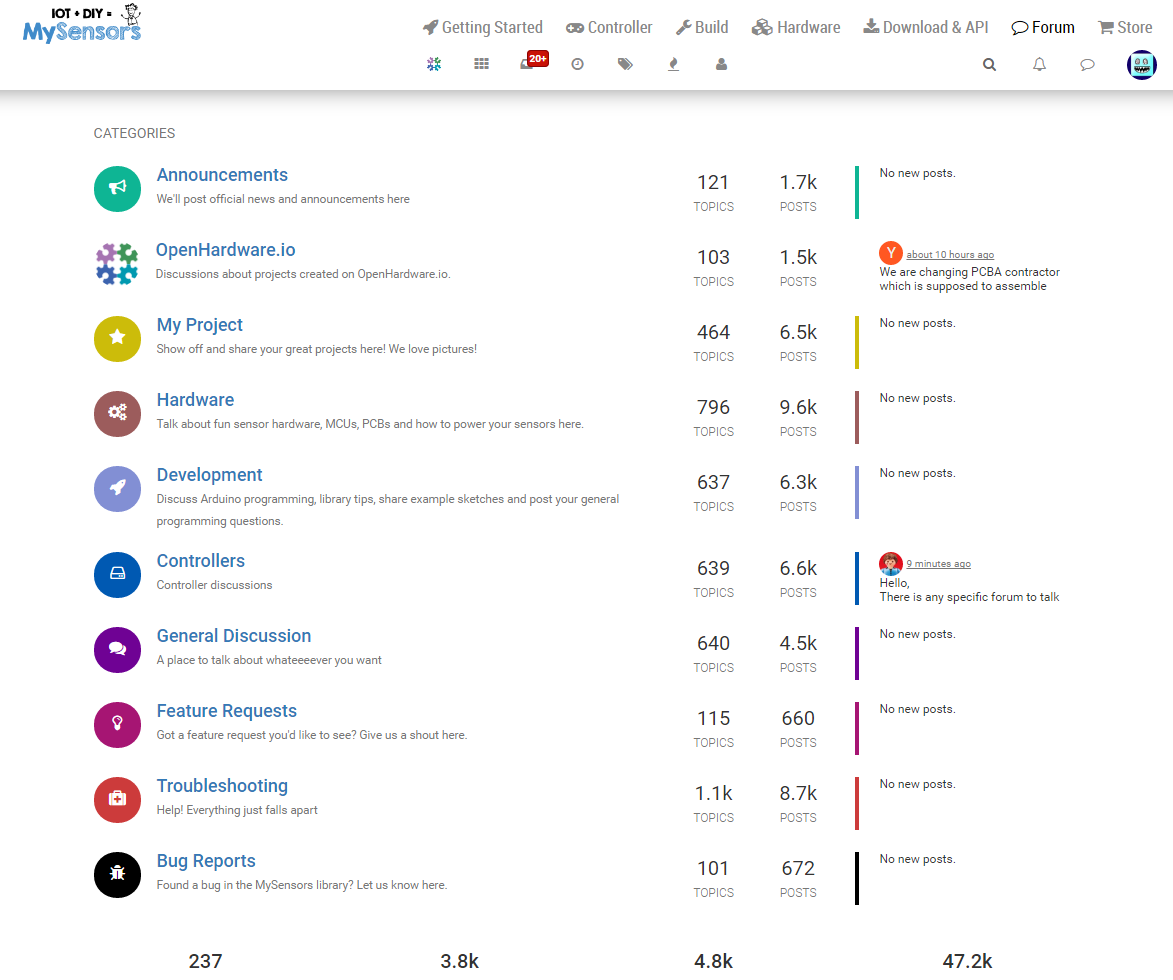
              0_1473714214844_upload-67990b46-8f96-44e7-9ecf-f795209acf1c

              This is just "balm for the eyes" .. I can absolutelty life with tinkering with greasemoneky ;-)

              A 1 Reply Last reply
              0
              • H Offline
                H Offline
                hek
                Admin
                wrote on last edited by
                #27

                Haha, have fun redesigning sites ;)

                1 Reply Last reply
                0
                • cimba007C cimba007

                  0_1473714214844_upload-67990b46-8f96-44e7-9ecf-f795209acf1c

                  This is just "balm for the eyes" .. I can absolutelty life with tinkering with greasemoneky ;-)

                  A Offline
                  A Offline
                  Anticimex
                  Contest Winner
                  wrote on last edited by
                  #28

                  @cimba007 @hek and it was much rejoicing

                  Do you feel secure today? No? Start requiring some signatures and feel better tomorrow ;)

                  1 Reply Last reply
                  0
                  • cimba007C Offline
                    cimba007C Offline
                    cimba007
                    wrote on last edited by
                    #29

                    Sorry for stirring up so you guys at this late hour .. but .. I only strive to improve mysensors (with my stupid comments and ideas :D) as I really like the library, the controller, the site ;-)

                    1 Reply Last reply
                    0
                    • H Offline
                      H Offline
                      hek
                      Admin
                      wrote on last edited by
                      #30

                      No problem, feedback is always appreciated!

                      1 Reply Last reply
                      0
                      • cimba007C Offline
                        cimba007C Offline
                        cimba007
                        wrote on last edited by cimba007
                        #31

                        Well .. overwriting an !important doesn't seem to be this easy .. :D

                        The best I could come up with:

                        // ==UserScript==
                        // @name         New Userscript
                        // @namespace    http://tampermonkey.net/
                        // @version      0.1
                        // @description  try to take over the world!
                        // @author       You
                        // @match        https://forum.mysensors.org/*
                        // @grant        none
                        // ==/UserScript==
                        
                        function addNewStyle(newStyle) {
                            var styleElement = document.getElementById('styles_js');
                            if (!styleElement) {
                                styleElement = document.createElement('style');
                                styleElement.type = 'text/css';
                                styleElement.id = 'styles_js';
                                document.getElementsByTagName('head')[0].appendChild(styleElement);
                            }
                            styleElement.appendChild(document.createTextNode(newStyle));
                        }
                        
                        (function() {
                            'use strict';
                            // Your code here...
                            addNewStyle('.container { width: 55% !important;}');
                            //$(".container").removeAttr("width");
                        })();

                        
                        1 Reply Last reply
                        0

                        Hello! It looks like you're interested in this conversation, but you don't have an account yet.

                        Getting fed up of having to scroll through the same posts each visit? When you register for an account, you'll always come back to exactly where you were before, and choose to be notified of new replies (either via email, or push notification). You'll also be able to save bookmarks and upvote posts to show your appreciation to other community members.

                        With your input, this post could be even better 💗

                        Register Login
                        Reply
                        • Reply as topic
                        Log in to reply
                        • Oldest to Newest
                        • Newest to Oldest
                        • Most Votes


                        13

                        Online

                        12.0k

                        Users

                        11.2k

                        Topics

                        113.4k

                        Posts


                        Copyright 2025 TBD   |   Forum Guidelines   |   Privacy Policy   |   Terms of Service
                        • Login

                        • Don't have an account? Register

                        • Login or register to search.
                        • First post
                          Last post
                        0
                        • MySensors
                        • OpenHardware.io
                        • Categories
                        • Recent
                        • Tags
                        • Popular