Skip to content
  • MySensors
  • OpenHardware.io
  • Categories
  • Recent
  • Tags
  • Popular
Skins
  • Light
  • Brite
  • Cerulean
  • Cosmo
  • Flatly
  • Journal
  • Litera
  • Lumen
  • Lux
  • Materia
  • Minty
  • Morph
  • Pulse
  • Sandstone
  • Simplex
  • Sketchy
  • Spacelab
  • United
  • Yeti
  • Zephyr
  • Dark
  • Cyborg
  • Darkly
  • Quartz
  • Slate
  • Solar
  • Superhero
  • Vapor

  • Default (No Skin)
  • No Skin
Collapse
Brand Logo
  1. Home
  2. My Project
  3. RGB LED strip

RGB LED strip

Scheduled Pinned Locked Moved My Project
70 Posts 22 Posters 33.3k Views 27 Watching
  • Oldest to Newest
  • Newest to Oldest
  • Most Votes
Reply
  • Reply as topic
Log in to reply
This topic has been deleted. Only users with topic management privileges can see it.
  • mickM mick

    Hey @maghac - just wondering how you got the 12V to your fitting? have you got a transformer in the ceiling above ? Regards, mick

    maghacM Offline
    maghacM Offline
    maghac
    wrote on last edited by
    #26

    @mick No, I have a separate 12V cable and a transformer from a regular wall outlet.

    mickM 1 Reply Last reply
    1
    • maghacM maghac

      @mick No, I have a separate 12V cable and a transformer from a regular wall outlet.

      mickM Offline
      mickM Offline
      mick
      wrote on last edited by
      #27

      @maghac Thanks for the reply, mate. The light looks great mounted up - very impressed!

      maghacM 1 Reply Last reply
      0
      • mickM mick

        @maghac Thanks for the reply, mate. The light looks great mounted up - very impressed!

        maghacM Offline
        maghacM Offline
        maghac
        wrote on last edited by
        #28

        @mick said in RGB LED strip:

        @maghac Thanks for the reply, mate. The light looks great mounted up - very impressed!

        Thanks! The "relax" program is actually quite nice since it changes colours so slowly so it takes a while before you notice it. A great way to impress your dinner guests :)

        1 Reply Last reply
        0
        • X Offline
          X Offline
          xypzo
          wrote on last edited by
          #29

          I dont know what went wrong, but RED is just always on. Yesterday in the breadboard it was ok. Today in the breadboard red was on. So i thought lets just solder it... Now I soldered it to a pcb, RED on all the time. This must be a ground issue, but where do i look?

          It is even red when just all the connections are off, 12v to raw and strip, then connect ground to arduino, BOOM red comes on...

          maghacM 1 Reply Last reply
          0
          • X xypzo

            I dont know what went wrong, but RED is just always on. Yesterday in the breadboard it was ok. Today in the breadboard red was on. So i thought lets just solder it... Now I soldered it to a pcb, RED on all the time. This must be a ground issue, but where do i look?

            It is even red when just all the connections are off, 12v to raw and strip, then connect ground to arduino, BOOM red comes on...

            maghacM Offline
            maghacM Offline
            maghac
            wrote on last edited by
            #30

            @xypzo Double check your connections, perhaps you're connecting to the wrong pin on the arduino? If you swap red and green, what happens then?

            X 1 Reply Last reply
            0
            • maghacM maghac

              @xypzo Double check your connections, perhaps you're connecting to the wrong pin on the arduino? If you swap red and green, what happens then?

              X Offline
              X Offline
              xypzo
              wrote on last edited by
              #31

              @maghac said in RGB LED strip:

              your connections, perhaps you're connecting to the wrong pin on the arduino

              Then green keeps on, so it should be a pin 6 problem, but i can't find it. Maybe I try a 10kohm resistor between gate and ground... Or IRFZ instead of IRLZ transistors.

              BTW, bought a LD362A ufo which works great with my controller, but i still want to win this battle!

              maghacM 1 Reply Last reply
              0
              • X xypzo

                @maghac said in RGB LED strip:

                your connections, perhaps you're connecting to the wrong pin on the arduino

                Then green keeps on, so it should be a pin 6 problem, but i can't find it. Maybe I try a 10kohm resistor between gate and ground... Or IRFZ instead of IRLZ transistors.

                BTW, bought a LD362A ufo which works great with my controller, but i still want to win this battle!

                maghacM Offline
                maghacM Offline
                maghac
                wrote on last edited by
                #32

                @xypzo said in RGB LED strip:

                @maghac said in RGB LED strip:

                your connections, perhaps you're connecting to the wrong pin on the arduino

                Then green keeps on, so it should be a pin 6 problem, but i can't find it. Maybe I try a 10kohm resistor between gate and ground... Or IRFZ instead of IRLZ transistors.

                BTW, bought a LD362A ufo which works great with my controller, but i still want to win this battle!

                You could try to use a different pin. Can't remember off the top of my head which pins are PWM capable though.

                I've had a couple of cheap arduino clones where some of the pins were not correctly soldered.

                X 1 Reply Last reply
                0
                • maghacM maghac

                  @xypzo said in RGB LED strip:

                  @maghac said in RGB LED strip:

                  your connections, perhaps you're connecting to the wrong pin on the arduino

                  Then green keeps on, so it should be a pin 6 problem, but i can't find it. Maybe I try a 10kohm resistor between gate and ground... Or IRFZ instead of IRLZ transistors.

                  BTW, bought a LD362A ufo which works great with my controller, but i still want to win this battle!

                  You could try to use a different pin. Can't remember off the top of my head which pins are PWM capable though.

                  I've had a couple of cheap arduino clones where some of the pins were not correctly soldered.

                  X Offline
                  X Offline
                  xypzo
                  wrote on last edited by
                  #33

                  @maghac The stupid thing, is that the day before, same setup, no red lights stayed on. It happened overnight!!! Maybe the mice did it! :')

                  maghacM 1 Reply Last reply
                  0
                  • X xypzo

                    @maghac The stupid thing, is that the day before, same setup, no red lights stayed on. It happened overnight!!! Maybe the mice did it! :')

                    maghacM Offline
                    maghacM Offline
                    maghac
                    wrote on last edited by
                    #34

                    @xypzo Gremlins! :)

                    1 Reply Last reply
                    0
                    • X Offline
                      X Offline
                      xypzo
                      wrote on last edited by
                      #35

                      what DID happen the day before, was that when i added more WHITE, at around 60% white the whole unit stopped responding to any inputs, it would just freeze in that color, until i removed the 12v power supply. Also strange! :)

                      1 Reply Last reply
                      0
                      • bgunnarbB Offline
                        bgunnarbB Offline
                        bgunnarb
                        wrote on last edited by
                        #36

                        Hi!
                        I'm doing some further development based on the sketch by @maghac and @DrJeff above and I have found two potential bugs that could create some unexpected behaviour.
                        The first is that if you have #DEFINE RELAX_SPEED 50 in the sketch and then set fadespeed (V_VAR1) to anything greater than 650 or so, you will get an overflow when you call the function init_fade (t, r, g, b ) since t is defined as int in init_fade.
                        fadespeed can be set between 0 and 2000 in the sketch. So then the resulting fadespeed could be anything, even negative.

                        init_fade(fadespeed * RELAX_SPEED,
                                        program_param_RELAX[program_cycle][0],
                                        program_param_RELAX[program_cycle][1],
                                        program_param_RELAX[program_cycle][2]);
                        

                        Also in this function there is a potential risk of a "divide by zero" crash since the input variable t is used as fade_step to divide in order to get the size of each step in the fade cycle.

                        void init_fade(int t, int r, int g, int b) {
                          Serial.print( "Init fade" );
                          light_mode = LIGHT_FADING;
                          target_r = r;
                          target_g = g;
                          target_b = b;
                          fade_step = t;
                          delta_r = (target_r - current_r) / float(fade_step);
                          delta_g = (target_g - current_g) / float(fade_step);
                          delta_b = (target_b - current_b) / float(fade_step);
                        }
                        

                        It might be that this function is never called with fadestep = t = 0 but since this is a value allowed in the input check of V_VAR1 nasty things may happen.
                        Part from this I am impressed by the sketch. Once I have debugged my own additions I will post the project here.

                        I have never been so busy since I retired!

                        maghacM 1 Reply Last reply
                        0
                        • bgunnarbB bgunnarb

                          Hi!
                          I'm doing some further development based on the sketch by @maghac and @DrJeff above and I have found two potential bugs that could create some unexpected behaviour.
                          The first is that if you have #DEFINE RELAX_SPEED 50 in the sketch and then set fadespeed (V_VAR1) to anything greater than 650 or so, you will get an overflow when you call the function init_fade (t, r, g, b ) since t is defined as int in init_fade.
                          fadespeed can be set between 0 and 2000 in the sketch. So then the resulting fadespeed could be anything, even negative.

                          init_fade(fadespeed * RELAX_SPEED,
                                          program_param_RELAX[program_cycle][0],
                                          program_param_RELAX[program_cycle][1],
                                          program_param_RELAX[program_cycle][2]);
                          

                          Also in this function there is a potential risk of a "divide by zero" crash since the input variable t is used as fade_step to divide in order to get the size of each step in the fade cycle.

                          void init_fade(int t, int r, int g, int b) {
                            Serial.print( "Init fade" );
                            light_mode = LIGHT_FADING;
                            target_r = r;
                            target_g = g;
                            target_b = b;
                            fade_step = t;
                            delta_r = (target_r - current_r) / float(fade_step);
                            delta_g = (target_g - current_g) / float(fade_step);
                            delta_b = (target_b - current_b) / float(fade_step);
                          }
                          

                          It might be that this function is never called with fadestep = t = 0 but since this is a value allowed in the input check of V_VAR1 nasty things may happen.
                          Part from this I am impressed by the sketch. Once I have debugged my own additions I will post the project here.

                          maghacM Offline
                          maghacM Offline
                          maghac
                          wrote on last edited by
                          #37

                          @bgunnarb Thanks. As program space is limited, I chose not to put too much effort in input data validation, instead relying on the controller to not submit incorrect values. Maybe a quick range check would not waste so many bytes though.

                          Right now I am however experiencing some strange behavior - I can turn the the lamp on and off and I can dim it, but I cannot change the color of the strip. Also, the RELAX program does not work but the ALARM program works fine. So there are some other bugs that need to be ironed out :)

                          1 Reply Last reply
                          0
                          • M moskovskiy82

                            After some investigating it wasn't a timer issue but a range issue with a node (it was hard to figure out). So went ahead and built another node with your code. But being lazy - just bought an rgb strip drive from aliexpress (too much soldering of mosfets for me).

                            It uses some RGBdriver.h library https://github.com/letsgoING/Libraries/tree/master/LEDStripDriver
                            fe
                            All i had to change was

                            void set_rgb(int r, int g, int b) {
                              Driver.begin();
                              Driver.SetColor(r, g, b);
                              Driver.end();
                            }
                            

                            And it worked. Except that fading/RELAX don't work out for me. Instead just get a flashing of white light. So i thought you might know some other parts must be adjusted as my arduino knowledge is not there yer

                            maghacM Offline
                            maghacM Offline
                            maghac
                            wrote on last edited by
                            #38

                            @moskovskiy82 said in RGB LED strip:

                            And it worked. Except that fading/RELAX don't work out for me. Instead just get a flashing of white light. So i thought you might know some other parts must be adjusted as my arduino knowledge is not there yer

                            That's the alarm program you are seeing. Perhaps it doesn't decode the incoming messages properly - I'll have to take a second look at the code.

                            1 Reply Last reply
                            0
                            • M Offline
                              M Offline
                              moskovskiy82
                              wrote on last edited by
                              #39

                              Thanks. Will await eagerly for v1.8 as it seems this is the only great RGB code left for mysensors

                              maghacM 1 Reply Last reply
                              1
                              • micahM Offline
                                micahM Offline
                                micah
                                wrote on last edited by
                                #40

                                @maghac Great project.

                                I've made something similar, Arduino Pro Mini 5v, 5m LED strip (non-addressable), nrf24L01+ and MOSTFETs

                                I know it took me awhile to find code examples, so I figured I would share my code incase it helps anyone else.

                                I use Domoticz as a controller. This code talks to:

                                • Switch - to control turning my color cycle fade effect on
                                • Dimmer - to control the speed of the color cycle fade effect
                                • RGB switch - to control having only a single color turned on and the brightness of the string.

                                Much of my code is standard stuff, using FastLED analogue, but I'm particularly proud of the brightness part, since I bashed my head against the keyboard several times trying to figure it out

                                //## INCLUDES ##
                                #define MY_DEBUG
                                #define MY_RADIO_NRF24
                                #define MY_NODE_ID 20
                                
                                #include <MySensors.h>
                                #include <SPI.h>
                                #include <FastLED.h>
                                
                                #define cID_RGB_SELECTOR 0
                                #define cID_CYCLE_EFFECT 1
                                #define cID_CYCLE_EFFECT_SPEED 2
                                
                                #define PIN_RED   5
                                #define PIN_GREEN 6
                                #define PIN_BLUE  3
                                
                                //## VARIABLES ##
                                // MySensors
                                #define MySensors_SketchName      "RGB LED Strip"
                                #define MySensors_SketchVersion   "v0.3"
                                MyMessage MySensors_MSG_Last_Color(cID_RGB_SELECTOR,V_VAR1);
                                MyMessage MySensors_MSG_RGB_Selector(cID_RGB_SELECTOR, V_LIGHT);
                                MyMessage MySeonsors_MSG_CYCLE_EFFECT(cID_CYCLE_EFFECT, V_LIGHT);
                                MyMessage MySensors_MSG_CYCLE_EFFECT_SPEED(cID_CYCLE_EFFECT_SPEED, V_DIMMER);
                                bool MySensors_RequestACK = false;
                                // Single color
                                int Solid_RGB_Active=0;
                                char Solid_RGB_Color[] = "000000";
                                uint16_t Solid_RGB_Brightness = 0xFF;
                                // Cycle effect
                                int Cycle_Effect_Active=0;
                                unsigned long Cycle_Effect_pMillis = 0;
                                long Cycle_Effect_Speed = 20;
                                static uint8_t Cycle_Effect_Current_Hue;
                                // Supporting
                                bool Status_Change = false;
                                bool Print_Debug = false;
                                
                                // ## Primary flow control
                                void setup() {
                                  Serial.begin(115200);
                                  while (!Serial) ;
                                  Serial.print("compiled: ");Serial.print(__DATE__);Serial.println(__TIME__);
                                
                                  pinMode(PIN_RED,   OUTPUT);
                                  pinMode(PIN_GREEN, OUTPUT);
                                  pinMode(PIN_BLUE,  OUTPUT);
                                
                                  Event_ColorTestBars();
                                
                                  request(cID_RGB_SELECTOR, V_VAR1);
                                  request(cID_RGB_SELECTOR, V_LIGHT);
                                  request(cID_CYCLE_EFFECT, V_LIGHT);
                                  request(cID_CYCLE_EFFECT_SPEED, V_DIMMER);
                                }
                                void loop() {
                                  if (Cycle_Effect_Active == 1){
                                    unsigned long currentMillis = millis();
                                    Event_RunCycleEffect(currentMillis);
                                  } else if (Status_Change){
                                    Status_Change = false;
                                      #ifdef MY_DEBUG
                                        if (Print_Debug) {Serial.println("STATUS CHANGE");}
                                      #endif
                                    if (Solid_RGB_Active == 0){
                                      Event_SetLEDColors( CRGB::Black );
                                    }else if (Solid_RGB_Active == 1){
                                      CHSV colorHSV = rgb2hsv_approximate(str2CRGB(Solid_RGB_Color));
                                      Event_SetLEDColors(CHSV(colorHSV.h, colorHSV.s, Solid_RGB_Brightness));
                                    }
                                  }
                                }
                                // ## MySensors Methods
                                void presentation()  {
                                  sendSketchInfo(MySensors_SketchName, MySensors_SketchVersion);
                                
                                  present(cID_RGB_SELECTOR, S_RGB_LIGHT, "RGB Color Selector", MySensors_RequestACK);
                                  present(cID_CYCLE_EFFECT, S_LIGHT, "RGB Cycle Effect", MySensors_RequestACK);
                                  present(cID_CYCLE_EFFECT_SPEED, S_DIMMER, "RGB Cycle Effect Speed", MySensors_RequestACK);
                                }
                                void receive(const MyMessage &message){
                                  #ifdef MY_DEBUG
                                    if (message.isAck()){
                                      Serial.println("Got ack from gateway");
                                    }
                                  #endif
                                  if (message.type == V_LIGHT){
                                    #ifdef MY_DEBUG
                                      if (Print_Debug) {Serial.println("message v_light");}
                                    #endif
                                    int current_Light_State = message.getString()[0] == '1';// Incoming on/off command sent from controller ("1" or "0")
                                    if (message.sensor==cID_CYCLE_EFFECT){// is Cycle Message
                                      if (current_Light_State==1){//turn cycle on
                                        Event_LightCycle(true, true, false);
                                        Event_SolidColor(false, false, true);
                                      } else {//turn cycle off
                                        Event_LightCycle(false, true, false);
                                        Event_SolidColor(false, false, true);
                                      }
                                    } else if (message.sensor==cID_RGB_SELECTOR){// is RGB Message
                                      if (current_Light_State==1){//turn RGB on
                                        Event_SolidColor(true, true, false);
                                        Event_LightCycle(false, false, true);
                                      } else {//turn RGB off
                                        Event_SolidColor(false, true, false);
                                        Event_LightCycle(false, false, true);
                                      }
                                    } else {
                                      #ifdef MY_DEBUG
                                        Serial.print("UNKNOWN Light - Message:");
                                        Serial.print(message.getString());
                                        Serial.print(" - Sensor:");
                                        Serial.println(message.sensor);
                                      #endif
                                    }
                                  } else if (message.type == V_RGB){
                                    #ifdef MY_DEBUG
                                      if (Print_Debug) {Serial.println("message v_rgb");}
                                    #endif
                                    String szMessage=message.getString();
                                    strcpy(Solid_RGB_Color, getValue(szMessage,'&',0).c_str());
                                    Solid_RGB_Active = 1;
                                  }else if (message.type == V_DIMMER) {// if DIMMER type, adjust brightness
                                    #ifdef MY_DEBUG
                                      if (Print_Debug) {Serial.println("message v_dimmer");}
                                    #endif
                                    if (message.sensor==cID_RGB_SELECTOR){// is single Message
                                      if (Solid_RGB_Active==1){//turn RGB on
                                        Event_SolidColor(true, true, false);
                                        Event_LightCycle(false, false, true);
                                      } else {//turn RGB off
                                        Event_SolidColor(false, true, false);
                                        Event_LightCycle(false, false, true);
                                      }
                                      Solid_RGB_Brightness = map(message.getLong(), 0, 100, 0, 255);
                                      CRGB colorRGB = str2CRGB(Solid_RGB_Color);
                                      CHSV colorHSV = rgb2hsv_approximate(colorRGB);
                                      colorHSV = CHSV(colorHSV.h, colorHSV.s, Solid_RGB_Brightness);
                                      Event_SetLEDColors(colorHSV);
                                      #ifdef MY_DEBUG
                                        if (Print_Debug) {
                                          Serial.print("colorHSV.h:");
                                          Serial.println(colorHSV.h);
                                          Serial.print("colorHSV.s:");
                                          Serial.println(colorHSV.s);
                                          Serial.print("colorHSV.v:");
                                          Serial.println(colorHSV.v);
                                        }
                                      #endif
                                      Event_SendLastColor();
                                    } else if (message.sensor==cID_CYCLE_EFFECT_SPEED){// is Speed dimmer Message
                                      Cycle_Effect_Speed = map(message.getLong(), 0, 100, 1, 202);
                                      #ifdef MY_DEBUG
                                        if (Print_Debug) {
                                          Serial.print("Cycle_Effect_Speed: ");
                                          Serial.println(Cycle_Effect_Speed);
                                        }
                                      #endif
                                    }
                                  }else if (message.type == V_STATUS) {           // if on/off type, toggle brightness
                                    #ifdef MY_DEBUG
                                      if (Print_Debug) {Serial.println("message v_status");}
                                    #endif
                                    Solid_RGB_Active = message.getInt();
                                    Cycle_Effect_Active = 0;
                                    if (Solid_RGB_Active == 0){
                                      if (Print_Debug) {Serial.println("Strip OFF");}
                                      Event_SetLEDColors( CRGB::Black );
                                    }else{
                                      if (Print_Debug) {Serial.println("Strip ON");}
                                      Event_SetLEDColors(strtol(Solid_RGB_Color, NULL, 16));
                                    }
                                    //Event_SendLastColor();
                                  }else if (message.type==V_VAR1) {            // color status
                                    String szMessage=message.getString();
                                    #ifdef MY_DEBUG
                                      if (Print_Debug) {
                                        Serial.println("message v_var1");
                                        Serial.println(szMessage);
                                      }
                                    #endif
                                    strcpy(Solid_RGB_Color, getValue(szMessage,'&',0).c_str());
                                    Solid_RGB_Active = 1;
                                    Cycle_Effect_Active = 0;
                                  }
                                  Status_Change = true;
                                }
                                // ## Events
                                void Event_LightCycle(bool t, bool s, bool u) {
                                  Cycle_Effect_Active = (t) ? 1 : 0;
                                  if (u){
                                    send(MySeonsors_MSG_CYCLE_EFFECT.set(Cycle_Effect_Active),MySensors_RequestACK);
                                  }
                                }
                                void Event_SolidColor(bool t, bool s, bool u) {
                                  Solid_RGB_Active = (t) ? 1 : 0;
                                  if (u){
                                    send(MySensors_MSG_RGB_Selector.set(Solid_RGB_Active),MySensors_RequestACK);
                                  }
                                }
                                void Event_SetLEDColors( const CRGB& rgb){
                                  analogWrite(PIN_RED,   rgb.r );
                                  analogWrite(PIN_GREEN, rgb.g );
                                  analogWrite(PIN_BLUE,  rgb.b );
                                }
                                void Event_SendLastColor(){
                                  String current_status=Solid_RGB_Color+String("&")+String(Solid_RGB_Brightness)+String("&")+String(Solid_RGB_Active);
                                  send(MySensors_MSG_Last_Color.set(current_status.c_str()),MySensors_RequestACK);
                                }
                                void Event_RunCycleEffect(unsigned long theMills){
                                  if (theMills - Cycle_Effect_pMillis >= Cycle_Effect_Speed){
                                    Cycle_Effect_pMillis = theMills;
                                    Cycle_Effect_Current_Hue = Cycle_Effect_Current_Hue + 1;
                                    Event_SetLEDColors( CHSV( Cycle_Effect_Current_Hue, 255, 255) );
                                  }
                                }
                                void Event_ColorTestBars(){// Event_ColorTestBars: flashes Red, then Green, then Blue, then Black. Helpful for diagnosing if you've mis-wired which is which.
                                  Event_SetLEDColors( CRGB::Red );   delay(500);
                                  Event_SetLEDColors( CRGB::Green ); delay(500);
                                  Event_SetLEDColors( CRGB::Blue );  delay(500);
                                  Event_SetLEDColors( CRGB::Black ); delay(500);
                                }
                                // ## Helper Functions
                                String getValue(String data, char separator, int index){
                                 int found = 0;
                                  int strIndex[] = {0, -1};
                                  int maxIndex = data.length()-1;
                                  for(int i=0; i<=maxIndex && found<=index; i++){
                                    if(data.charAt(i)==separator || i==maxIndex){
                                      found++;
                                      strIndex[0] = strIndex[1]+1;
                                      strIndex[1] = (i == maxIndex) ? i+1 : i;
                                    }
                                  }
                                  return found>index ? data.substring(strIndex[0], strIndex[1]) : "";
                                }
                                int x2i(char *s) {
                                  int x = 0;
                                  for(;;) {
                                    char c = *s;
                                    if (c >= '0' && c <= '9') {
                                      x *= 16;
                                      x += c - '0';
                                    }else if (c >= 'A' && c <= 'F') {
                                      x *= 16;
                                      x += (c - 'A') + 10;
                                    }else {
                                      break;
                                    }
                                    s++;
                                  }
                                  return x;
                                }
                                char* str2char(String command){
                                    if(command.length()!=0){
                                        char *p = const_cast<char*>(command.c_str());
                                        return p;
                                    }
                                }
                                CRGB str2CRGB(String s){
                                  String r = str2char(s.substring(0,2));
                                  String g = str2char(s.substring(2,4));
                                  String b = str2char(s.substring(4,6));
                                  uint8_t red = x2i(r.c_str());
                                  uint8_t green = x2i(g.c_str());
                                  uint8_t blue = x2i(b.c_str());
                                  #ifdef MY_DEBUG
                                    if (Print_Debug) {
                                      Serial.print("r:");
                                      Serial.println(r);
                                      Serial.print("g:");
                                      Serial.println(g);
                                      Serial.print("b:");
                                      Serial.println(b);
                                      Serial.print("red:");
                                      Serial.println(red);
                                      Serial.print("green:");
                                      Serial.println(green);
                                      Serial.print("blue:");
                                      Serial.println(blue);
                                    }
                                  #endif
                                  CRGB colorRGB = CRGB(red, green, blue);
                                  return colorRGB;
                                }
                                

                                Hopefully this proves useful to someone :)

                                1 Reply Last reply
                                2
                                • micahM Offline
                                  micahM Offline
                                  micah
                                  wrote on last edited by
                                  #41

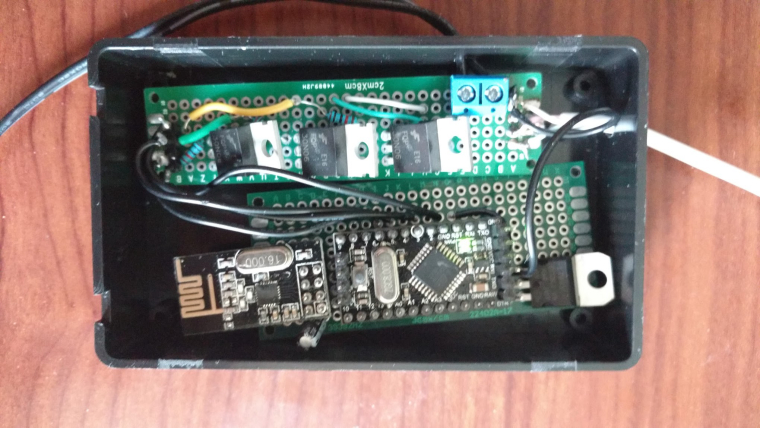
                                  Here is a photo of my actual device with the cover off

                                  0_1508763006582_IMG_20170317_175657100.jpg

                                  1 Reply Last reply
                                  1
                                  • M moskovskiy82

                                    Thanks. Will await eagerly for v1.8 as it seems this is the only great RGB code left for mysensors

                                    maghacM Offline
                                    maghacM Offline
                                    maghac
                                    wrote on last edited by
                                    #42

                                    @moskovskiy82 I'll see if I'll have time to work on it this week, I'll post an update when I have something.

                                    PlantexP maghacM 2 Replies Last reply
                                    0
                                    • maghacM maghac

                                      @moskovskiy82 I'll see if I'll have time to work on it this week, I'll post an update when I have something.

                                      PlantexP Offline
                                      PlantexP Offline
                                      Plantex
                                      wrote on last edited by
                                      #43

                                      @maghac

                                      Hello
                                      I need some help !

                                      I've ordered few IRLZ44N Mosfets to play with Dimmable LED Actuator project.
                                      Adafruit RGB LED stripe uses IRLB8721
                                      Could You please tell me if I could use mentioned IRLZ instead of IRLB in case of described RGB project ?

                                      Thank You in advance.

                                      1 Reply Last reply
                                      0
                                      • bgunnarbB Offline
                                        bgunnarbB Offline
                                        bgunnarb
                                        wrote on last edited by
                                        #44

                                        @Plantex
                                        In my opinion that should work just fine. The specs are fairly similar. I am using the IRLZ44N myself to drive a five meter long RGBW LED-strip and they do not get warm, even without a heat sink. Total current consumption at 24V is just above 2A when all LEDs are lit.
                                        Schematics below:
                                        0_1511539204888_LEDstrip_sch.pdf

                                        I have never been so busy since I retired!

                                        1 Reply Last reply
                                        0
                                        • T Offline
                                          T Offline
                                          Tinnyt
                                          wrote on last edited by
                                          #45

                                          Geat Work

                                          1 Reply Last reply
                                          0
                                          Reply
                                          • Reply as topic
                                          Log in to reply
                                          • Oldest to Newest
                                          • Newest to Oldest
                                          • Most Votes


                                          23

                                          Online

                                          11.7k

                                          Users

                                          11.2k

                                          Topics

                                          113.1k

                                          Posts


                                          Copyright 2025 TBD   |   Forum Guidelines   |   Privacy Policy   |   Terms of Service
                                          • Login

                                          • Don't have an account? Register

                                          • Login or register to search.
                                          • First post
                                            Last post
                                          0
                                          • MySensors
                                          • OpenHardware.io
                                          • Categories
                                          • Recent
                                          • Tags
                                          • Popular