
relay as a switch not as a button (domoticz)
-
-
Hi,
I need help for the 'relay Switch' code.
you can help with this code, I would like to use relay as a switch not as a button .
(I'm Italian, I'm sorry for the bad English).
thanks to you. -
@ago1980 Help us understand your question a little better. I am not sure what you mean by use the relay as a switch. What kind of switch?
-
-
Hi @ago1980 Is it the RelayWithButtonActuator sketch you are looking to modify so it can be used with a toggle switch instead of a push button?
-
@ago1980 You can find the relay with button sketch Here
That sketch uses a push button, to use that sketch with a toggle switch you should just need to make a couple of small changes in the loop part of the sketch.
void loop() { debouncer.update(); // Get the update value int value = debouncer.read(); /* if (value != oldValue && value==0) { send(msg.set(state?false:true), true); // Send new state and request ack back } oldValue = value; */ if (value != oldValue) { send(msg.set(state?false:true), true); // Send new state and request ack back oldValue = value; } } -
@ago1980 You can find the relay with button sketch Here
That sketch uses a push button, to use that sketch with a toggle switch you should just need to make a couple of small changes in the loop part of the sketch.
void loop() { debouncer.update(); // Get the update value int value = debouncer.read(); /* if (value != oldValue && value==0) { send(msg.set(state?false:true), true); // Send new state and request ack back } oldValue = value; */ if (value != oldValue) { send(msg.set(state?false:true), true); // Send new state and request ack back oldValue = value; } } -
-
-
I recently explained how to do this in this thread. https://forum.mysensors.org/topic/7849/relay-control-bistable-switch-instead-of-monostable/3
-
I recently explained how to do this in this thread. https://forum.mysensors.org/topic/7849/relay-control-bistable-switch-instead-of-monostable/3
-
@dbemowsk ok thanks clear code explanation, but I did not understand well what to do to hardware part.
-
@ago1980 So in the diagram below I show a wall switch and the push button switch that is normally used in this example. Simply remove the push button and attach the wall switch.
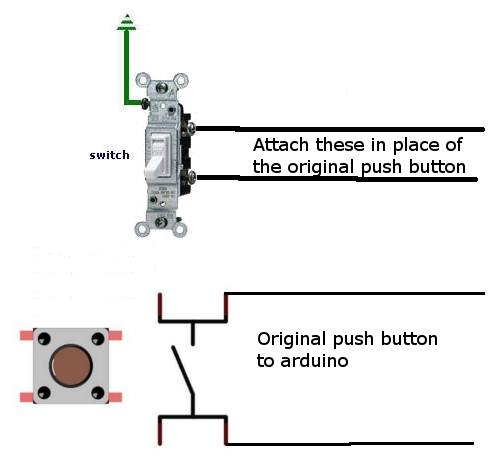
Does this clear up the confusion?
-
@dbemowsk So you just have to remove the button and put the switch on? or put the switch in parallel with the button?Thank you
-
@dbemowsk So you just have to remove the button and put the switch on? or put the switch in parallel with the button?Thank you
@ago1980 With the switch in place you don't want to run it in parallel with the button. When the switch is in the on position, the connection will be shorted in which case the push button would not work. This is the reason for the code change. It is to detect when the switch changed from off to on, or on to off.
-
-
I have a problem when the radio nrf24l01 loses contact with the gateway does not work the node, how can I do? thank you
@ago1980 DO you have a capacitor on the nRF radio? How far away from the gateway is the node? Is there anything in between the gateway and the node such as windows or walls? If it is really far from the gateway, you will probably need a repeater node in between.
-
@ago1980 DO you have a capacitor on the nRF radio? How far away from the gateway is the node? Is there anything in between the gateway and the node such as windows or walls? If it is really far from the gateway, you will probably need a repeater node in between.
-
@dbemowsk I mean if GATEWAY does not work for some problem the node does not work does not turn on light
-
@dbemowsk I mean if GATEWAY does not work for some problem the node does not work does not turn on light
@ago1980 said in relay as a switch not as a button (domoticz):
I mean if GATEWAY does not work for some problem the node does not work does not turn on light
The original sketch relies on an ack from the gateway to trigger the relay, so if the gateway is not available the relay state cannot be changed by the local switch or even the controller.
Under most circumstances it would be desirable to have the local switch function no matter what the state of the network is. To do this you will need to modify the sketch so it no longer relies on the ack to make the change.
In MySensors 2.1.1 by default a node will not boot through to the loop section of your sketch if it cannot find the gateway, so the first thing you need to do is force it to move on.
The line shown below will do just that. The number at the end is how long you want the node to wait for an uplink to be established before it will move on to the rest of your sketch. It is in milliseconds, so in the example below it will wait 5 seconds. This line needs to be inserted near the top of your sketch before the #include <MySensors.h> line.
#define MY_TRANSPORT_WAIT_READY_MS 5000
After adding that you will then need to change the sketch so it no longer relies on the ack to change the relay state. that is pretty straight forward and once done your relay will then be able to be switched by the local switch no mater what the uplink status is.
The next problem you will encounter is trying to keep your controller in sync with the local node. As you can now change the state of the relay without a connection to the controller it may loose its sync to the node. So you may find your controller thinks the relay is on when it is actually off. This is where it gets a little trickier so if it is important to you that the controller stays in sync you may need to experiment a bit to find what will give you the best results.
I have some examples of relay nodes that explore ways to switch locally and try to maintain sync with the controller.
The last sketch I posted there uses requestTime() to check to see if the controller is available and though there is a trade off in how quickly you can flick the switch back and forward it at least confirms that the controller is available. Other methods may only check for the gateways presence.Have a look you may find something of use.
Its a bit of an old post but some of these issues (using a toggle switch and making the switch always work) were also discussed in this post


Hello! It looks like you're interested in this conversation, but you don't have an account yet.
Getting fed up of having to scroll through the same posts each visit? When you register for an account, you'll always come back to exactly where you were before, and choose to be notified of new replies (either via email, or push notification). You'll also be able to save bookmarks and upvote posts to show your appreciation to other community members.
With your input, this post could be even better 💗
Register Login