Skip to content
  • MySensors
  • OpenHardware.io
  • Categories
  • Recent
  • Tags
  • Popular
Skins
  • Light
  • Brite
  • Cerulean
  • Cosmo
  • Flatly
  • Journal
  • Litera
  • Lumen
  • Lux
  • Materia
  • Minty
  • Morph
  • Pulse
  • Sandstone
  • Simplex
  • Sketchy
  • Spacelab
  • United
  • Yeti
  • Zephyr
  • Dark
  • Cyborg
  • Darkly
  • Quartz
  • Slate
  • Solar
  • Superhero
  • Vapor

  • Default (No Skin)
  • No Skin
Collapse
Brand Logo
  1. Home
  2. Hardware
  3. Please help! Arduino UNO + RFM69HW (TSM:INIT:TSP FAIL)

Please help! Arduino UNO + RFM69HW (TSM:INIT:TSP FAIL)

Scheduled Pinned Locked Moved Hardware
23 Posts 4 Posters 3.3k Views 3 Watching
  • Oldest to Newest
  • Newest to Oldest
  • Most Votes
Reply
  • Reply as topic
Log in to reply
This topic has been deleted. Only users with topic management privileges can see it.
  • vladimirV Offline
    vladimirV Offline
    vladimir
    wrote on last edited by
    #1

    Hello!
    Please help me understand the problem.

    My relay node is built on Arduino UNO + RFM69HW 868 mhz
    My gateway node is built on NodeMcu + RFM69HW 868 mhz
    Controller Openhab 2.2 (Openhabian + Raspberry Pi 3)
    MySensors library 2.2

    Here's what the port monitor shows:

    16 MCO:BGN:INIT REPEATER,CP=RRNRA---,VER=2.2.0
    26 MCO:BGN:BFR
    27 TSM:INIT
    28 TSF:WUR:MS=0
    80 !TSM:INIT:TSP FAIL
    81 TSM:FAIL:CNT=1
    83 TSM:FAIL:DIS
    84 TSF:TDI:TSL
    

    The code of my relay node:

    /**
     * The MySensors Arduino library handles the wireless radio link and protocol
     * between your home built sensors/actuators and HA controller of choice.
     * The sensors forms a self healing radio network with optional repeaters. Each
     * repeater and gateway builds a routing tables in EEPROM which keeps track of the
     * network topology allowing messages to be routed to nodes.
     *
     * Created by Henrik Ekblad <henrik.ekblad@mysensors.org>
     * Copyright (C) 2013-2015 Sensnology AB
     * Full contributor list: https://github.com/mysensors/Arduino/graphs/contributors
     *
     * Documentation: http://www.mysensors.org
     * Support Forum: http://forum.mysensors.org
     *
     * This program is free software; you can redistribute it and/or
     * modify it under the terms of the GNU General Public License
     * version 2 as published by the Free Software Foundation.
     *
     *******************************
     *
     * REVISION HISTORY
     * Version 1.0 - Henrik Ekblad
     *
     * DESCRIPTION
     * Example sketch showing how to control physical relays.
     * This example will remember relay state after power failure.
     * http://www.mysensors.org/build/relay
     */
    
    // Enable debug prints to serial monitor
    #define MY_DEBUG
    
    // Enable and select radio type attached
    //#define MY_RADIO_NRF24
    //#define MY_RADIO_NRF5_ESB
    #define MY_RADIO_RFM69
    //#define MY_RADIO_RFM95
    
    // Enable repeater functionality for this node
    #define MY_REPEATER_FEATURE
    
    #include <MySensors.h>
    
    #define RELAY_PIN 4  // Arduino Digital I/O pin number for first relay (second on pin+1 etc)
    #define NUMBER_OF_RELAYS 1 // Total number of attached relays
    #define RELAY_ON 1  // GPIO value to write to turn on attached relay
    #define RELAY_OFF 0 // GPIO value to write to turn off attached relay
    
    
    void before()
    {
    	for (int sensor=1, pin=RELAY_PIN; sensor<=NUMBER_OF_RELAYS; sensor++, pin++) {
    		// Then set relay pins in output mode
    		pinMode(pin, OUTPUT);
    		// Set relay to last known state (using eeprom storage)
    		digitalWrite(pin, loadState(sensor)?RELAY_ON:RELAY_OFF);
    	}
    }
    
    void setup()
    {
    
    }
    
    void presentation()
    {
    	// Send the sketch version information to the gateway and Controller
    	sendSketchInfo("Relay", "1.0");
    
    	for (int sensor=1, pin=RELAY_PIN; sensor<=NUMBER_OF_RELAYS; sensor++, pin++) {
    		// Register all sensors to gw (they will be created as child devices)
    		present(sensor, S_BINARY);
    	}
    }
    
    
    void loop()
    {
    
    }
    
    void receive(const MyMessage &message)
    {
    	// We only expect one type of message from controller. But we better check anyway.
    	if (message.type==V_STATUS) {
    		// Change relay state
    		digitalWrite(message.sensor-1+RELAY_PIN, message.getBool()?RELAY_ON:RELAY_OFF);
    		// Store state in eeprom
    		saveState(message.sensor, message.getBool());
    		// Write some debug info
    		Serial.print("Incoming change for sensor:");
    		Serial.print(message.sensor);
    		Serial.print(", New status: ");
    		Serial.println(message.getBool());
    	}
    }
    

    Photo of my relay node:
    My relay node
    Please tell me what I'm doing wrong and how to fix this problem?

    1 Reply Last reply
    0
    • scalzS Offline
      scalzS Offline
      scalz
      Hardware Contributor
      wrote on last edited by scalz
      #2

      Hello,

      A few things are wrong I think:

      • RFM69 'HW' variant needs this define in your relay sketch:
      #define MY_IS_RFM69HW
      

      you can check docs here ;) https://www.mysensors.org/download/sensor_api_20#configuration

      • RFM69 is not 5v tolerant on VCC, nor the spi bus. you're using a UNO, I understand you're using 3v, but UNO mcu is powered by 5v and outputs 5v signals on spi bus as (I think the 'not 5v tolerant' is in docs too. maybe we should highlight it
      1 Reply Last reply
      0
      • vladimirV Offline
        vladimirV Offline
        vladimir
        wrote on last edited by
        #3

        @scalz, many thanks for the reply and the desire to help!

        I understand what you are talking about, but for now I can figure out how to solve it.
        Perhaps you have ideas?

        Replace Arduino board with Pro Mini 3.3V?

        mfalkviddM 1 Reply Last reply
        0
        • vladimirV vladimir

          @scalz, many thanks for the reply and the desire to help!

          I understand what you are talking about, but for now I can figure out how to solve it.
          Perhaps you have ideas?

          Replace Arduino board with Pro Mini 3.3V?

          mfalkviddM Offline
          mfalkviddM Offline
          mfalkvidd
          Mod
          wrote on last edited by mfalkvidd
          #4

          @vladimir yes, either replace with a 3.3V board or use a level converter.

          vladimirV 1 Reply Last reply
          0
          • mfalkviddM mfalkvidd

            @vladimir yes, either replace with a 3.3V board or use a level converter.

            vladimirV Offline
            vladimirV Offline
            vladimir
            wrote on last edited by
            #5

            @mfalkvidd I'm not properly connected? In the photo above. He's turned over there.
            alt text

            1 Reply Last reply
            0
            • gohanG Offline
              gohanG Offline
              gohan
              Mod
              wrote on last edited by
              #6

              That is the voltage regulator like the one on the arduino that supplies the 3.3v pin, but the Arduino is using 5v also on the other GPIO pins and that usually could kill the RFM69 that should operate at 3.5V max on data pins

              vladimirV 1 Reply Last reply
              0
              • gohanG gohan

                That is the voltage regulator like the one on the arduino that supplies the 3.3v pin, but the Arduino is using 5v also on the other GPIO pins and that usually could kill the RFM69 that should operate at 3.5V max on data pins

                vladimirV Offline
                vladimirV Offline
                vladimir
                wrote on last edited by
                #7

                @gohan what regulator can you advise? Can you show an example?

                mfalkviddM 1 Reply Last reply
                0
                • gohanG Offline
                  gohanG Offline
                  gohan
                  Mod
                  wrote on last edited by
                  #8

                  search for "logic level shifter"

                  vladimirV 1 Reply Last reply
                  0
                  • vladimirV vladimir

                    @gohan what regulator can you advise? Can you show an example?

                    mfalkviddM Offline
                    mfalkviddM Offline
                    mfalkvidd
                    Mod
                    wrote on last edited by
                    #9

                    @vladimir the shopping guide at https://www.mysensors.org/build/connect_radio lists a logic level shifter.

                    vladimirV 1 Reply Last reply
                    0
                    • gohanG gohan

                      search for "logic level shifter"

                      vladimirV Offline
                      vladimirV Offline
                      vladimir
                      wrote on last edited by
                      #10

                      @gohan thank you very much for your help! :raised_hands:

                      1 Reply Last reply
                      0
                      • mfalkviddM mfalkvidd

                        @vladimir the shopping guide at https://www.mysensors.org/build/connect_radio lists a logic level shifter.

                        vladimirV Offline
                        vladimirV Offline
                        vladimir
                        wrote on last edited by
                        #11

                        @mfalkvidd thank you very much for your help! :+1: :v:

                        1 Reply Last reply
                        1
                        • gohanG Offline
                          gohanG Offline
                          gohan
                          Mod
                          wrote on last edited by
                          #12

                          I hope you didn't fry the rfm69, so in case you are still having problems with the level shifter connected try with another module

                          vladimirV 1 Reply Last reply
                          1
                          • gohanG gohan

                            I hope you didn't fry the rfm69, so in case you are still having problems with the level shifter connected try with another module

                            vladimirV Offline
                            vladimirV Offline
                            vladimir
                            wrote on last edited by
                            #13

                            @gohan I'm afraid that they suffered greatly during my experiments. I'll try with the new ones. Can you tell me how to connect the converter?

                            1 Reply Last reply
                            0
                            • mfalkviddM Offline
                              mfalkviddM Offline
                              mfalkvidd
                              Mod
                              wrote on last edited by mfalkvidd
                              #14

                              https://learn.sparkfun.com/tutorials/bi-directional-logic-level-converter-hookup-guide and https://learn.adafruit.com/neopixel-levelshifter/shifting-levels are pretty extensive guides

                              vladimirV 1 Reply Last reply
                              0
                              • mfalkviddM mfalkvidd

                                https://learn.sparkfun.com/tutorials/bi-directional-logic-level-converter-hookup-guide and https://learn.adafruit.com/neopixel-levelshifter/shifting-levels are pretty extensive guides

                                vladimirV Offline
                                vladimirV Offline
                                vladimir
                                wrote on last edited by
                                #15

                                @mfalkvidd Thank you! I hope I can figure it out. To regret, my knowledge of English is not very great. As I understand it, the connection scheme will be the most similar to this:
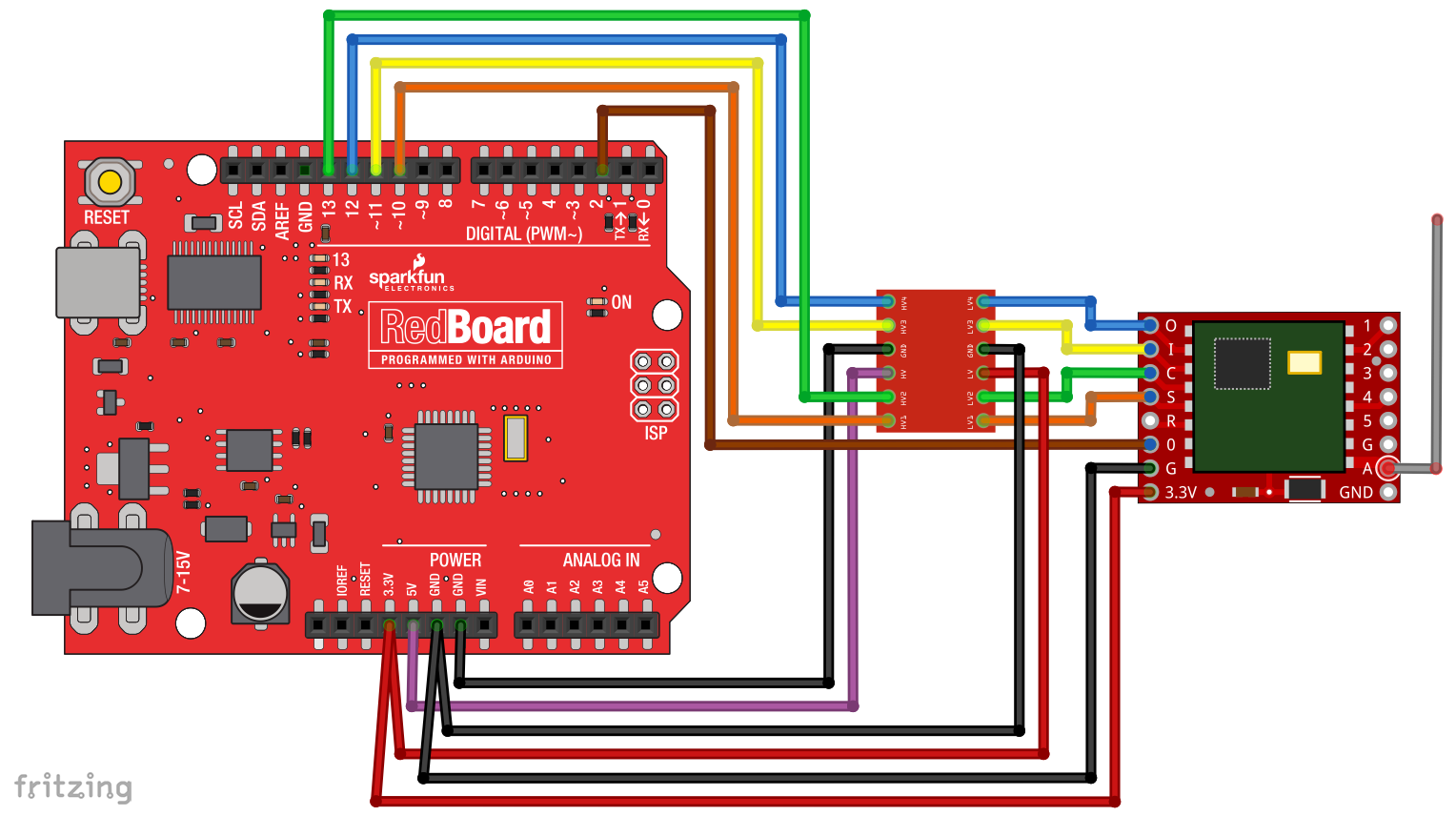
                                alt text
                                I'm right?

                                mfalkviddM 1 Reply Last reply
                                0
                                • vladimirV vladimir

                                  @mfalkvidd Thank you! I hope I can figure it out. To regret, my knowledge of English is not very great. As I understand it, the connection scheme will be the most similar to this:
                                  alt text
                                  I'm right?

                                  mfalkviddM Offline
                                  mfalkviddM Offline
                                  mfalkvidd
                                  Mod
                                  wrote on last edited by
                                  #16

                                  @vladimir yes, that looks great (except for the brown cable that doesn't go through the level shifter)

                                  vladimirV 1 Reply Last reply
                                  0
                                  • mfalkviddM mfalkvidd

                                    @vladimir yes, that looks great (except for the brown cable that doesn't go through the level shifter)

                                    vladimirV Offline
                                    vladimirV Offline
                                    vladimir
                                    wrote on last edited by
                                    #17

                                    @mfalkvidd So I do not like the converter for 4 channels?
                                    Here this is indicated by the link you gave me above
                                    alt text
                                    It will take 5? More precisely 8-channel version?

                                    mfalkviddM 1 Reply Last reply
                                    0
                                    • vladimirV vladimir

                                      @mfalkvidd So I do not like the converter for 4 channels?
                                      Here this is indicated by the link you gave me above
                                      alt text
                                      It will take 5? More precisely 8-channel version?

                                      mfalkviddM Offline
                                      mfalkviddM Offline
                                      mfalkvidd
                                      Mod
                                      wrote on last edited by mfalkvidd
                                      #18

                                      @vladimir you will need to shift all signals. You can use multiple 4x boards, or a bigger board.

                                      Edit: maybe miso and dio0 don't need to be shifted, since the Arduino only reads from it. But I am not 100% sure.

                                      vladimirV 1 Reply Last reply
                                      0
                                      • mfalkviddM mfalkvidd

                                        @vladimir you will need to shift all signals. You can use multiple 4x boards, or a bigger board.

                                        Edit: maybe miso and dio0 don't need to be shifted, since the Arduino only reads from it. But I am not 100% sure.

                                        vladimirV Offline
                                        vladimirV Offline
                                        vladimir
                                        wrote on last edited by
                                        #19

                                        @mfalkvidd Thank you! :raised_hands: I'll try tomorrow.

                                        1 Reply Last reply
                                        0
                                        • gohanG Offline
                                          gohanG Offline
                                          gohan
                                          Mod
                                          wrote on last edited by
                                          #20

                                          4ch is enough as the brown cable is the interrupt signal so it's just an input on the arduino

                                          vladimirV 1 Reply Last reply
                                          0
                                          Reply
                                          • Reply as topic
                                          Log in to reply
                                          • Oldest to Newest
                                          • Newest to Oldest
                                          • Most Votes


                                          18

                                          Online

                                          11.7k

                                          Users

                                          11.2k

                                          Topics

                                          113.1k

                                          Posts


                                          Copyright 2025 TBD   |   Forum Guidelines   |   Privacy Policy   |   Terms of Service
                                          • Login

                                          • Don't have an account? Register

                                          • Login or register to search.
                                          • First post
                                            Last post
                                          0
                                          • MySensors
                                          • OpenHardware.io
                                          • Categories
                                          • Recent
                                          • Tags
                                          • Popular