Skip to content
  • MySensors
  • OpenHardware.io
  • Categories
  • Recent
  • Tags
  • Popular
Skins
  • Light
  • Brite
  • Cerulean
  • Cosmo
  • Flatly
  • Journal
  • Litera
  • Lumen
  • Lux
  • Materia
  • Minty
  • Morph
  • Pulse
  • Sandstone
  • Simplex
  • Sketchy
  • Spacelab
  • United
  • Yeti
  • Zephyr
  • Dark
  • Cyborg
  • Darkly
  • Quartz
  • Slate
  • Solar
  • Superhero
  • Vapor

  • Default (No Skin)
  • No Skin
Collapse
Brand Logo
FotoFieberF

FotoFieber

@FotoFieber
Hardware Contributor
About
Posts
240
Topics
12
Shares
0
Groups
1
Followers
2
Following
1

Posts

Recent Best Controversial

  • Why IOYT matters...
    FotoFieberF FotoFieber

    My current home automation setup uses sensors with different technologies:

    • MySensors (with node-red and serial gateway)
    • zWave (with fhem)
    • Homematic (with homegear)
    • Netatmo
    • Buderus (oil-fired heating, with fhem)
    • Sonoff Dual (hacked, with MQTT)

    I have adapters for all of them to/from MQTT. With node-red I have written an abstraction layer for all of them, which is heavily inspired by the mysensors API.

    The most complex thing I have implemented, is a regulation for the floor heating. The regulation algorithm takes in account:

    • open windows
    • room temperature
    • time
    • lead temperature

    Every room has it's own regulation. But it is dependent mostly on the room temperature sensor. I have written some fuzzy logic but if to many of them fail, it will get cold inside.

    Tomorrow the old api of netatmo will not work anymore. It is the third time, I have written an adapter for my home automation setup. The new api doesn't really bring new functionality but I have to use it.

    So I made a decision to replace all this netatmo stuff with MySensors (https://forum.mysensors.org/topic/4355/mh-z14a-co2-sensor/5).

    It will be

    • cheaper
    • not dependent of the internet or the cloud
    • up to me to decide, when or if I want to change the api
    • fully open sourced
    • not only IOT, bur IOYT

    IOYT... what else?

    General Discussion

  • What did you build today (Pictures) ?
    FotoFieberF FotoFieber

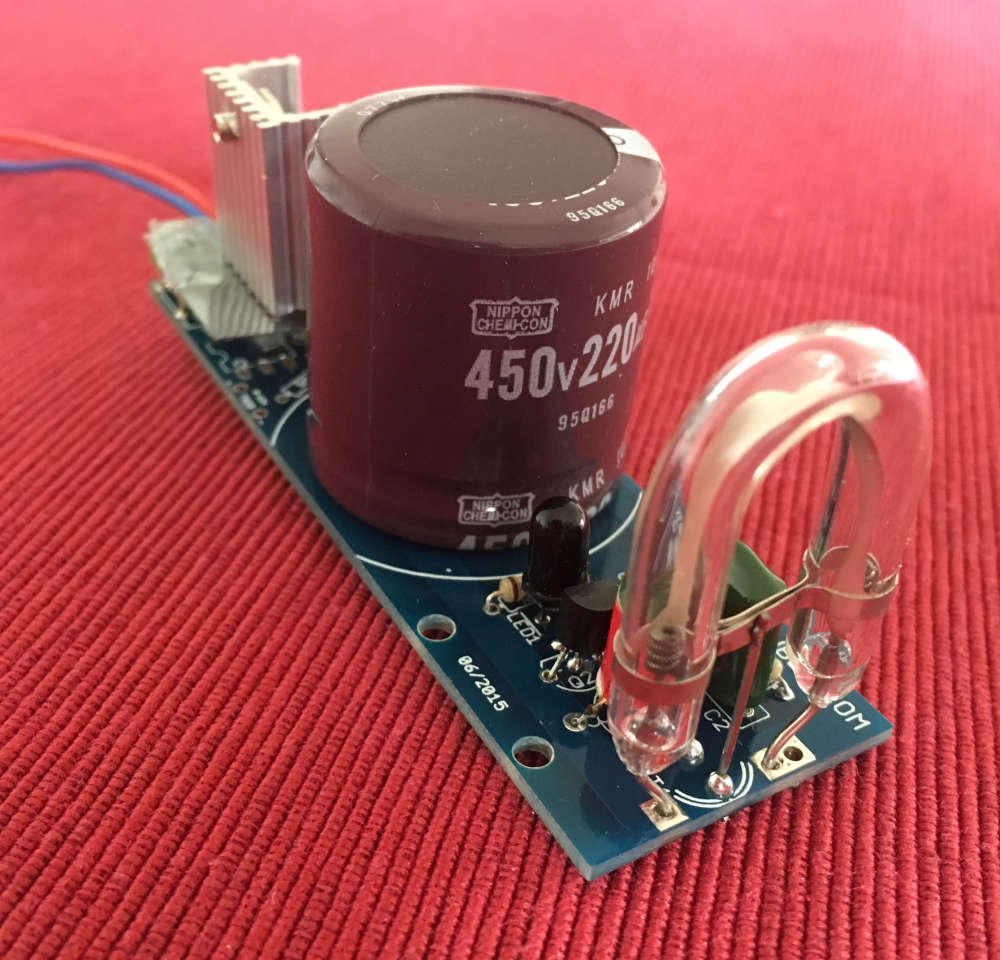
    Building a (xenon) flash to notify alarms. Flashes every 5 seconds if activated.
    0_1551620885559_IMG_3712.JPG

    General Discussion

  • Geiger Counter
    FotoFieberF FotoFieber

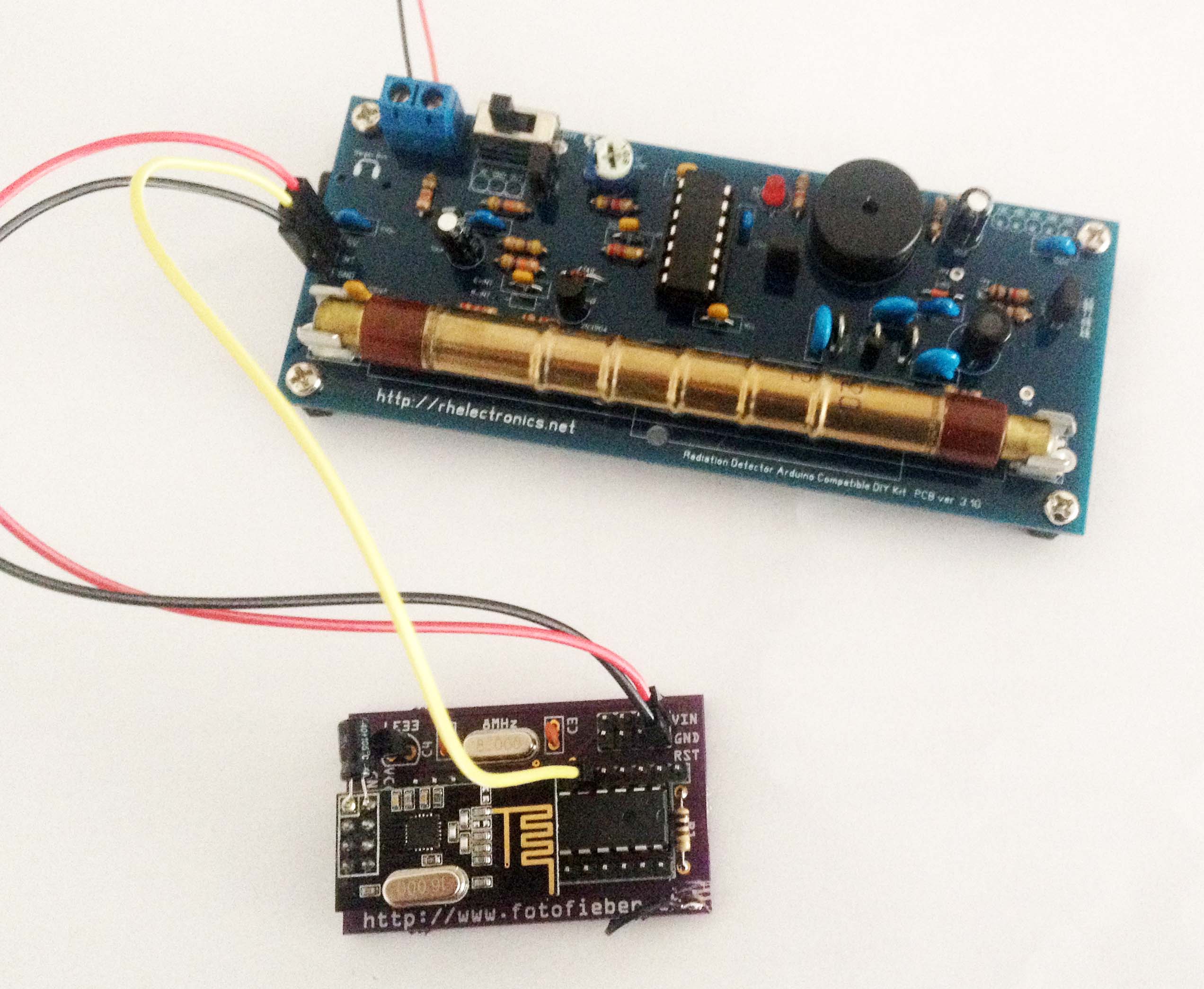
    As I live near a nuclear power plant, I thought it would be a good idea to have a radioactivity sensor:
    geiger.jpg
    Components used:

    Geiger Counter Kit:
    http://www.ebay.com/itm/321499888801?_trksid=p2057872.m2749.l2649&ssPageName=STRK%3AMEBIDX%3AIT

    An SBM-20 tube:
    http://www.ebay.com/itm/280865770387?_trksid=p2057872.m2749.l2649&ssPageName=STRK%3AMEBIDX%3AIT

    And MySensors with this sketch:

    #include <SPI.h>
    #include <MySensor.h>
    
    #define DIGITAL_INPUT_SENSOR 3   // The digital input you attached your motion sensor.  (Only 2 and 3 generates interrupt!)
    #define INTERRUPT DIGITAL_INPUT_SENSOR-2 // Usually the interrupt = pin -2 (on uno/nano anyway)
    #define CHILD_ID 1   // Id of the sensor child
    
    #define LOG_PERIOD 60000     //Logging period in milliseconds, recommended value 15000-60000.
    
    #define MAX_PERIOD 60000    //Maximum logging period
    
    unsigned long counts;             //variable for GM Tube events
    
    unsigned long cpm;                 //variable for CPM
    
    unsigned int multiplier;             //variable for calculation CPM in this sketch
    
    unsigned long previousMillis;      //variable for time measurement
    
    unsigned long timeReceived = 0;
    unsigned long timeRequested = 0;
    
    MySensor gw;
    // Initialize motion message
    MyMessage msg(CHILD_ID, V_VAR1);
    
    void setup()
    {
      wdt_enable(WDTO_8S);
      gw.begin();
    
      // Send the sketch version information to the gateway and Controller
      gw.sendSketchInfo("Geiger Sensor", "1.1");
    
      wdt_reset();
      // Register all sensors to gw (they will be created as child devices)
      gw.present(CHILD_ID, S_ARDUINO_NODE);
      
      // Geiger initialise
      counts = 0;
    
      cpm = 0;
    
      multiplier = MAX_PERIOD / LOG_PERIOD;      //calculating multiplier, depend on your log period
    
      pinMode(DIGITAL_INPUT_SENSOR, INPUT);      // sets the geiger sensor digital pin as input
    
      digitalWrite(DIGITAL_INPUT_SENSOR, HIGH);                                 // turn on internal pullup resistors, solder C-INT on the PCB
    
      attachInterrupt(1, tube_impulse, FALLING);  //define external interrupts
    
    }
    
    void loop()
    { 
      wdt_reset();
      unsigned long currentMillis = millis();
    
      if (currentMillis - previousMillis >= LOG_PERIOD) {
    
        cpm = counts * multiplier;
    
        gw.send(msg.set(cpm));
    
        counts = 0;
        previousMillis = currentMillis;
    
      }
    }
    
    
    void tube_impulse() {              //procedure for capturing events from Geiger Kit
    
      counts++;
    
    }


    I get cpm and in Node-Red I calculate microsievert/per hour:

    [{"id":"ba386057.845d3","type":"mqtt-broker","broker":"192.168.92.4","port":"1883","clientid":"NodeRed"},{"id":"75acf1fb.8a531","type":"mqtt in","name":"Geiger CPM","topic":"MyMQTT/48/1/V_VAR1","broker":"ba386057.845d3","x":146,"y":52,"z":"d1478aa9.2eb878","wires":[["d17bbe2a.2e844"]]},{"id":"d17bbe2a.2e844","type":"function","name":"Nach uSievert umrechnen","func":"cpm = msg.payload;\n\n// für SBM 20 Röhre\n// http://cs.stanford.edu/people/nick/geiger/\nusv = cpm * 0.0057;\n\nmsg.topic = 'NodeRed/Geiger/usv';\nmsg.payload = usv;\n\nreturn msg;","outputs":1,"valid":true,"x":377,"y":52,"z":"d1478aa9.2eb878","wires":[["c53927ba.3ac6d8"]]},{"id":"c53927ba.3ac6d8","type":"mqtt out","name":"","topic":"","qos":"","retain":"","broker":"ba386057.845d3","x":647,"y":52,"z":"d1478aa9.2eb878","wires":[]}]```
    My Project

  • What did you build today (Pictures) ?
    FotoFieberF FotoFieber

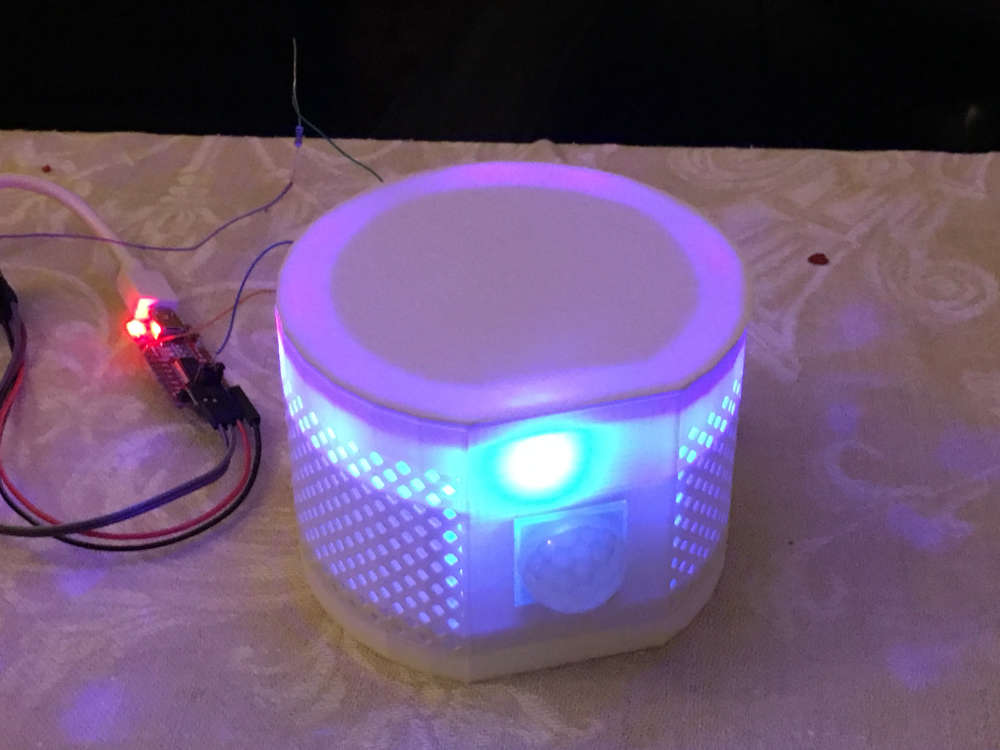
    Prototyping my netatmo replacement device. It has an led strip that can simulate a lighouse, a rainbow or a fireplace...
    (If not used only for fun, it should warn you, if there is too much CO2 in the air.)
    0_1558731422060_IMG_3858.JPG

    General Discussion

  • MH-Z14A CO2 sensor
    FotoFieberF FotoFieber

    The sensor is really simple to use, when attached via serial-ttl (3.3V) and powered with 5 volt.

    https://www.youtube.com/watch?v=Vk4oQpy98sc

    You get the values directly from the sensor and don't need to make calculations. Here is what I use:

    /*
       The MySensors Arduino library handles the wireless radio link and protocol
       between your home built sensors/actuators and HA controller of choice.
       The sensors forms a self healing radio network with optional repeaters. Each
       repeater and gateway builds a routing tables in EEPROM which keeps track of the
       network topology allowing messages to be routed to nodes.
    
       Created by Henrik Ekblad <henrik.ekblad@mysensors.org>
       Copyright (C) 2013-2015 Sensnology AB
       Full contributor list: https://github.com/mysensors/Arduino/graphs/contributors
    
       Documentation: http://www.mysensors.org
       Support Forum: http://forum.mysensors.org
    
       This program is free software; you can redistribute it and/or
       modify it under the terms of the GNU General Public License
       version 2 as published by the Free Software Foundation.
    
     *******************************
    
       DESCRIPTION
    
        MH-Z14 CO2 sensor via rx/tx serial
    
        */
    
    // Enable debug prints to serial monitor
    //#define MY_DEBUG
    
    // Enable and select radio type attached
    //#define MY_RADIO_NRF24
    
    #define MY_RADIO_RFM69
    #define MY_RFM69_FREQUENCY RF69_868MHZ
    #define MY_RFM69_NETWORKID 13
    #define MY_RFM69_ENABLE_ENCRYPTION
    #define MY_IS_RFM69HW
    
    #include <MySensors.h>
    #include <SoftwareSerial.h>
    #include <Wire.h>
    #include "Adafruit_HTU21DF.h"
    
    SoftwareSerial mySerial(A0, A1); // RX, TX соответственно
    
    Adafruit_HTU21DF htu = Adafruit_HTU21DF();
    
    byte cmd[9] = {0xFF, 0x01, 0x86, 0x00, 0x00, 0x00, 0x00, 0x00, 0x79};
    char response[9];
    
    #define CHILD_ID_AIQ 0
    #define CHILD_ID_TEMP  1
    #define CHILD_ID_HUM   2
    
    unsigned long SLEEP_TIME = 30 * 1000; // Sleep time between reads (in milliseconds)
    unsigned int TEMP_HUM_ROUNDS = 5; // wait 5 rounds for sending TEMP_HUM
    unsigned int loop_round = 0;
    boolean preheat = true;  // wait TEMP_HUM_ROUNDS for preheat
    
    int lastppm = 0;
    
    MyMessage msg(CHILD_ID_AIQ, V_LEVEL);
    MyMessage msg2(CHILD_ID_AIQ, V_UNIT_PREFIX);
    MyMessage msgHum(CHILD_ID_HUM, V_HUM);
    MyMessage msgTemp(CHILD_ID_TEMP, V_TEMP);
    
    boolean isMetric = true;
    
    void setup()
    {
      mySerial.begin(9600);
      isMetric = getConfig().isMetric;
    
      if (!htu.begin()) {
        Serial.println("Couldn't find sensor htu21!");
      }
    }
    
    void presentation() {
      // Send the sketch version information to the gateway and Controller
      sendSketchInfo("AIQ Sensor CO2 MH-Z14 Serial, HTU21 Temp Hum", "1.0");
    
      // Register all sensors to gateway (they will be created as child devices)
      present(CHILD_ID_AIQ, S_AIR_QUALITY);
      send(msg2.set("ppm"));
    
      present(CHILD_ID_TEMP, S_TEMP);
      present(CHILD_ID_HUM, S_HUM);
    }
    
    void loop() {
    
      mySerial.write(cmd, 9);
      mySerial.readBytes(response, 9);
      int responseHigh = (int) response[2];
      int responseLow = (int) response[3];
      int ppm = (256 * responseHigh) + responseLow;
    
      if ((loop_round == 0) || (abs(ppm - lastppm) >= 10)) {
        if (!preheat) {
          send(msg.set(ppm));
          lastppm = ppm;
        }
      }


      if (loop_round == 0) {
        float temp = htu.readTemperature();
        if (!isMetric) {
          temp = temp * 9 / 5 + 32; // convert to farenheit
        }
        send(msgTemp.set(temp, 1));
    
        float hum = htu.readHumidity();
        send(msgHum.set(hum, 1));
      }
    
      loop_round++;
      if (loop_round >= TEMP_HUM_ROUNDS) {
        loop_round = 0;
        preheat = false;
      }
    
      // Power down the radio.  Note that the radio will get powered back up
      // on the next write() call.
      sleep(SLEEP_TIME); //sleep for: sleepTime
    }
    
    Hardware

  • What did you build today (Pictures) ?
    FotoFieberF FotoFieber

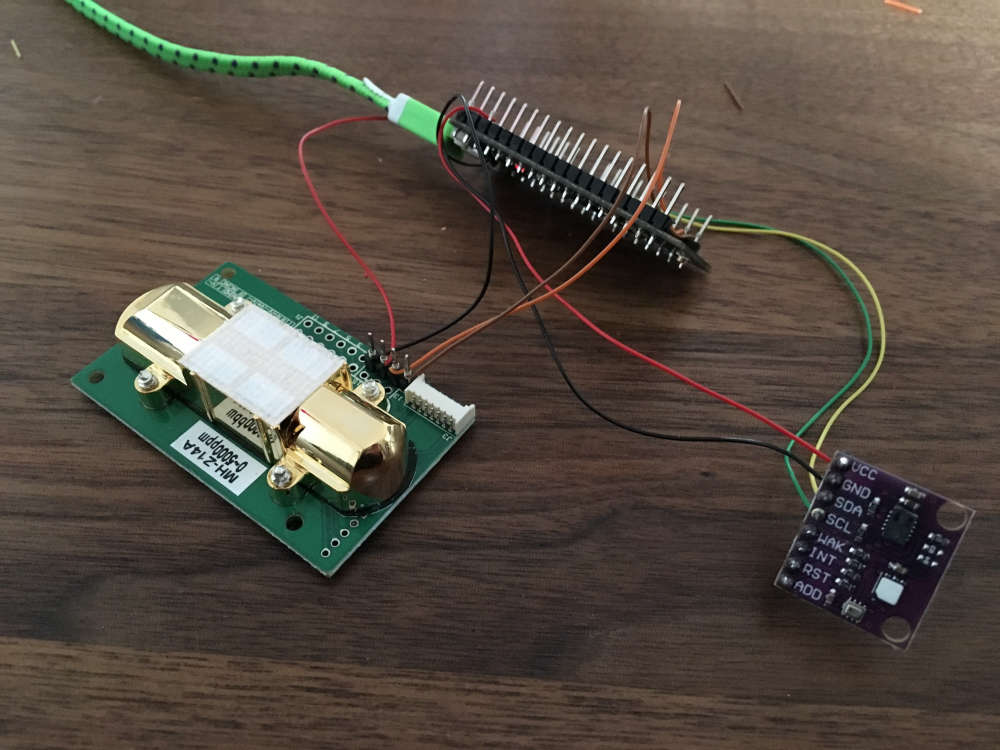
    Testing a CCS811 CO2 sensor. It seems to use less power then the MH-Z14A I am using now. The CCS811 may even run on battery. I will compare measurements of these two sensors with a Netatmo sensor. The sensors have to burn in for two days bevore I start the comparison.
    0_1554572353955_IMG_3788.JPG
    The CCS811 breakout board I use hast temp, hum and barometer sensors (and the CO2).

    General Discussion

  • 💬 Node RED
    FotoFieberF FotoFieber

    Here is my solution with support for generating node-ids, multiple controllers and a generic mapping to/from mqtt.

    0_1473669025539_nodered-mys.txt

    Announcements

  • PCB Boards for MySensors
    FotoFieberF FotoFieber

    Not keen on soldering SMD, I designed my own PCB.

    The PCB has a flexible design (use jumpers):

    • use with battery
    • use with 5 volt (and LE33 for NRF24L01+)
    • use with voltage stabilazitaion to 3.3V (LE33) for ATMEGA328P and NRF24l01+

    mysduino2.fzz

    OSH Park Link

    I am programming it with an ISP.

    Use a 8 MHz setup: select Lilypad/328p in the Arduino IDE and first burn the bootloader.

    Then I set fuses with mit usbtinyisp to not reset the eeprom with the upload of a sketch (no new node id)

    ./avrdude -C /Applications/Arduino.app/Contents/Java/hardware/tools/avr/etc/avrdude.conf -c usbtiny -p m328p -U hfuse:w:0xD2:m
    

    an enable low voltage usage with battery:

    ./avrdude -C /Applications/Arduino.app/Contents/Java/hardware/tools/avr/etc/avrdude.conf -c usbtiny -p m328p -U efuse:w:0x07:m
    
    Hardware

  • German users
    FotoFieberF FotoFieber

    https://forum.mysensors.org/topic/2258/german-speaking-members/15

    General Discussion

  • 💬 MySensors Contest 2017
    FotoFieberF FotoFieber

    Hmm, I have so many ideas and not much time.

    • a push mysensors notification for amazon echo (alexa)
    • maybe could be the same hardware as above: notify via voice about: window state, air quality, doorbell from mysensors...
    • nice nextion display showing information about my home and the weather forecast
    • doorbell sensor without additional power supply
    • ac detection without additional power supply
    • a mysensors serial mqtt controller for up to 3 gateways based on arduino due

    Or should I first finish my heating circuit regulation which does work for more than two months now without any problem but isn't mysensorized...

    Or should I invest in a blog explaining all the things I did and could help others? (i.e. how do I distinguish an arduino pro mini 16 MHz from a 8 MHz model or how do I connect different protocols ie zWave, mysensors, homematic, netatmo.....)

    Or should I invest more time in my job? :laughing:

    What about photography? I really like to take pictures with old cameras on film but have done this last time 2 years ago... :cry:

    Or should I paint my garage? It is really time to....

    What about tidy up my garage and all my electronic items I purchased with that many ideas in my mind?

    We don't talk about my family. I swear, they don't get to short.

    Maybe a 3d printing project with my 8 year old daughter?

    Sigh, life is to short...

    Announcements

  • MH-Z14A CO2 sensor
    FotoFieberF FotoFieber

    @korttoma
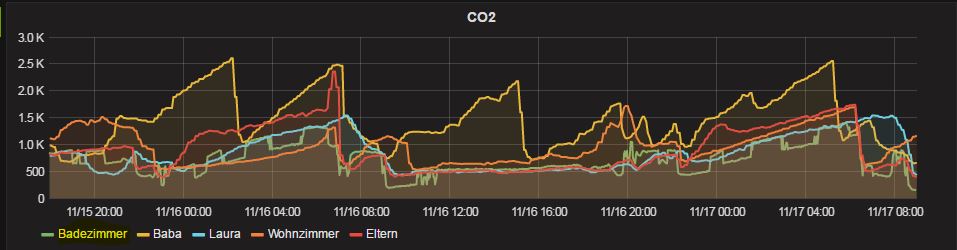
    It is working like a charme for me. Important is, to have 5V for voltage and 3.3 V on the logical level. Here is a graf, the green "Badezimmer" line is the mysensors sensor with MH-Z14A, the others are from netatmo. The mysensors sensor is in the bathroom and therefore it will have usually less CO2.

    0_1479399795680_co2.JPG

    Hardware

  • pro mini programming
    FotoFieberF FotoFieber

    According to the schematic
    https://www.arduino.cc/en/uploads/Main/Arduino-Pro-Mini-schematic.pdf
    the ftdi header is attached to vcc and is not regulated. High level of cpu is then 5V.

    According to the specs 2.7 up to 5.5 V should be ok @ 8 MHZ
    http://www.atmel.com/Images/Atmel-42735-8-bit-AVR-Microcontroller-ATmega328-328P_Summary.pdf

    I usually do it the other way round: use a 16Mhz pro mini @ 3.3 V to use RFM69 without level shifters. This is out of specification but working fine.

    Hardware

  • MQTT Request from a node
    FotoFieberF FotoFieber

    On my pi2 I have installed node-red and do all the 'wiring' of messages between different nodes there. Maybe this could be a solution for you too.

    Feature Requests

  • Node-Red as Controller
    FotoFieberF FotoFieber

    Here is my setup:

    • MyMQTT Client Gateway, OpenHAB, HomeMatic and node-red all connected to mosquitto
    • OpenHab configured to expose the internal bus to mosquitto
    • All glued together with node-red: the OpenHab Items have no mqtt binding, all messages are exchanged via the OpenHab internal bus.
    • Messages from any sensors are transformed in node-red to the destination (topic and payload)

    The advantage of this setup is:

    • OpenHab is only the GUI and doesn't need to know anything about the sensors
    • I can exchange any sensor/actuator without any change in OpenHab. I can even change from a netatmo device to a mysensor device or vice versa.

    I was thinking about replacing the MyMQTT Client Gateway with a Serial Gateway and node-red, but the gateway is stable since weeks.... never touch a running system. This would solve my biggest concern with the MyMQTT Client Gateway: it doesn't support encryption....

    Node-RED node-red

  • MQTT Client gateway
    FotoFieberF FotoFieber

    Thanks Norbert for the great work! Works very well with mosquitto.

    I added support for gw.requestTime(...); by modifying MyMQTTClient.cpp after the lines handling I_CONFIG)

      else if (msg.type == I_TIME)
      {
        txBlink(1);
        if (!sendRoute(
              build(msg, GATEWAY_ADDRESS, msg.sender, 255, C_INTERNAL,
                    I_TIME, 0).set(now())))
          errBlink(1);
      }
    

    Now I have a timebase for low power (deep standby) sensors.

    Next I will try to set the time on the gateway with a MQTT Message or NTP....

    Development

  • Battery based atmega328p sensor (no SMD)
    FotoFieberF FotoFieber

    I found a label FTDI on one picture of the PCB. 😀

    I encourage you to read articles about arduino on breadboard and dive deeper or buy complete solutions like the sensebender micro.

    Hardware

  • MQTT Request from a node
    FotoFieberF FotoFieber

    It is a prototype and not finished yet.

    I use a namespace for the different technologies for the MQTT Topic:
    MyMQTT for MySensors
    Netatmo for netatmo devices
    homegear for Homematic
    nodered for messages generated fom node-red
    openHAB for the openHAB eventbus

    Most of the wiring is defined in a hashtable. As this is more of a hack, I want to clean it up before I publish it.

    Here an example for an RGB Led (MySensors) wired to openhab colorpicker and a homematic wall switch. Note: the wiring is bidirectional, I see the RGB Color in openHAB of the MySensors LED independent of the method I used to set it and openHAB doesn't know anything about Homematic or MySensors. I can evan add another UI (openHAB 2?) and other switches (MySensors Motion or Lux nodes) and everything would be in sync.

    [{"id":"ba386057.845d3","type":"mqtt-broker","broker":"192.168.92.4","port":"1883","clientid":"NodeRed"},{"id":"c1a0dd11.3e5f2","type":"mqtt in","name":"RGB Colorpicker","topic":"openHAB/out/RGBLight/command","broker":"ba386057.845d3","x":152.33332061767578,"y":179.66666412353516,"z":"914d079b.6eb2f8","wires":[["46c3882f.b93c78","c1246f87.3edb9"]]},{"id":"1ab94043.e546c","type":"mqtt out","name":"MyRGBLed","topic":"MyMQTT/30/1/S_LIGHT_LEVEL","qos":"","retain":"","broker":"ba386057.845d3","x":617.3333231608073,"y":98.66666412353516,"z":"914d079b.6eb2f8","wires":[]},{"id":"46c3882f.b93c78","type":"function","name":"HSV convert","func":"if (msg.payload == 'OFF') {\n    msg.payload = 'RGB 0,0,0';\n    return msg;\n} \n\nif (msg.payload == 'ON') {\n    msg.payload = 'RGB 255,255,255';\n    return msg;\n} \n\n\nvar res = msg.payload.split(\",\");\n\nh = res[0];\ns = res[1];\nv = res[2];\n\nvar r, g, b;\n\tvar i;\n\tvar f, p, q, t;\n \n\t// Make sure our arguments stay in-range\n\th = Math.max(0, Math.min(360, h));\n\ts = Math.max(0, Math.min(100, s));\n\tv = Math.max(0, Math.min(100, v));\n \n\t// We accept saturation and value arguments from 0 to 100 because that's\n\t// how Photoshop represents those values. Internally, however, the\n\t// saturation and value are calculated from a range of 0 to 1. We make\n\t// That conversion here.\n\ts /= 100;\n\tv /= 100;\n \n\tif(s == 0) {\n\t\t// Achromatic (grey)\n\t\tr = g = b = v;\n\t\t\n\t} else\n\t{\n \n\th /= 60; // sector 0 to 5\n\ti = Math.floor(h);\n\tf = h - i; // factorial part of h\n\tp = v * (1 - s);\n\tq = v * (1 - s * f);\n\tt = v * (1 - s * (1 - f));\n \n\tswitch(i) {\n\t\tcase 0:\n\t\t\tr = v;\n\t\t\tg = t;\n\t\t\tb = p;\n\t\t\tbreak;\n \n\t\tcase 1:\n\t\t\tr = q;\n\t\t\tg = v;\n\t\t\tb = p;\n\t\t\tbreak;\n \n\t\tcase 2:\n\t\t\tr = p;\n\t\t\tg = v;\n\t\t\tb = t;\n\t\t\tbreak;\n \n\t\tcase 3:\n\t\t\tr = p;\n\t\t\tg = q;\n\t\t\tb = v;\n\t\t\tbreak;\n \n\t\tcase 4:\n\t\t\tr = t;\n\t\t\tg = p;\n\t\t\tb = v;\n\t\t\tbreak;\n \n\t\tdefault: // case 5:\n\t\t\tr = v;\n\t\t\tg = p;\n\t\t\tb = q;\n\t}\n\t\n\t}\n\tr = Math.round(r * 255);\n\tg = Math.round(g * 255);\n\tb = Math.round(b * 255);\n\t\n    //var erg = {hue:h,saturation:s,value:v, red:r, green:g, blue:b};\n    \n    msg.payload = 'RGB ' + r + ',' + g + ',' + b;\n\n\n\n\nreturn msg;","outputs":1,"valid":true,"x":395.3333231608073,"y":126.66666412353516,"z":"914d079b.6eb2f8","wires":[["1ab94043.e546c","c1246f87.3edb9"]]},{"id":"c1246f87.3edb9","type":"debug","name":"","active":true,"console":"false","complete":"false","x":621.3333129882812,"y":255.6666488647461,"z":"914d079b.6eb2f8","wires":[]},{"id":"e8effb31.171008","type":"mqtt in","name":"RGBLED Returncode Lichwert","topic":"MyMQTT/30/2/V_LIGHT_LEVEL","broker":"ba386057.845d3","x":195.99996948242188,"y":240.66665649414062,"z":"914d079b.6eb2f8","wires":[["a5d4d602.5a2b28"]]},{"id":"a5d4d602.5a2b28","type":"function","name":"RGB to HSV","func":"b = msg.payload % 256 ;\ng = ((msg.payload - b) / 256) % 256;\nr = (msg.payload - b - g*256) / 256 / 256;\n\n\t\n    r = r/255, g = g/255, b = b/255;\n    var max = Math.max(r, g, b), min = Math.min(r, g, b);\n    var h, s, v = max;\n\n    var d = max - min;\n    s = max == 0 ? 0 : d / max;\n\n    if(max == min){\n        h = 0; // achromatic\n    }else{\n        switch(max){\n            case r: h = (g - b) / d + (g < b ? 6 : 0); break;\n            case g: h = (b - r) / d + 2; break;\n            case b: h = (r - g) / d + 4; break;\n        }\n        h /= 6;\n    }\n\n    h *=360;\n    s*=100;\n    v*=100;\n\n\t\n// var erg = {hue:h,saturation:s,value:v, red:r, green:g, blue:b};\n    \nmsg.payload = h + ',' + s + ',' + v;\n\n\nreturn msg;","outputs":1,"valid":true,"x":505.3333231608073,"y":343.66666412353516,"z":"914d079b.6eb2f8","wires":[["c1246f87.3edb9","792d7484.86d28c"]]},{"id":"792d7484.86d28c","type":"mqtt out","name":"RGB in Openhab setzen","topic":"openHAB/in/RGBLight/state","qos":"","retain":"","broker":"ba386057.845d3","x":736.3333231608073,"y":339.66666412353516,"z":"914d079b.6eb2f8","wires":[]},{"id":"85a991b0.7a567","type":"mqtt in","name":"Laura Fernbedienung","topic":"homegear/1234-5678-9abc/event/10/#","broker":"ba386057.845d3","x":129,"y":36,"z":"914d079b.6eb2f8","wires":[["e913dcc9.16ec2","c1246f87.3edb9"]]},{"id":"e913dcc9.16ec2","type":"function","name":"Fernbedienung auf RGB Licht","func":"if (msg.payload != '[true]') return;\n\n\nif (msg.topic == 'homegear/1234-5678-9abc/event/10/1/PRESS_SHORT') {\n    msg.payload ='OFF';    \n} \nelse if (msg.topic == 'homegear/1234-5678-9abc/event/10/2/PRESS_SHORT') {\n    msg.payload = 'RGB 255,187,0';\n}\nelse if (msg.topic == 'homegear/1234-5678-9abc/event/10/3/PRESS_SHORT') {\n    msg.payload = 'RGB 255,0,0';\n}\nelse if (msg.topic == 'homegear/1234-5678-9abc/event/10/4/PRESS_SHORT') {\n    msg.payload = 'RGB 255,6,226';\n}\nelse if (msg.topic == 'homegear/1234-5678-9abc/event/10/5/PRESS_SHORT') {\n    msg.payload = 'RGB 177,10,255';\n}\nelse if (msg.topic == 'homegear/1234-5678-9abc/event/10/6/PRESS_SHORT') {\n    msg.payload = 'RGB 0,255,0';\n}\n\nreturn msg;","outputs":1,"valid":true,"x":388,"y":57,"z":"914d079b.6eb2f8","wires":[["1ab94043.e546c","c1246f87.3edb9"]]}]
    
    Feature Requests

  • Node-Red as Controller
    FotoFieberF FotoFieber

    Here my approach:

    
    [{"id":"ba386057.845d3","type":"mqtt-broker","broker":"192.168.92.4","port":"1883","clientid":"NodeRed"},{"id":"b5e4f17d.4a1b1","type":"function","name":"hanlde internal messages","func":"//msg.subTypeString = \"\";\n//msg.topic = \"internal respones\";\n\nif (msg.subTypeString == 'I_TIME')\n{\n    var payload = parseInt(new Date().getTime()/1000);\n\tvar command = context.global.MYS.T_INTERNAL; \n\tvar acknowledge = 0; // no ack\n\tvar type = context.global.MYS.I_TIME; // I_TIME\n\tmsg.payload = encode(msg.nodeId, msg.childSensorId, command, acknowledge, type, payload);\n    return msg;\n    \n}\nelse if  (msg.subTypeString == 'I_ID_REQUEST')\n{\n    msg.topic = \"I_ID_RESPONSE\";\n    msg.subTypeString = \"I_ID_RESPONSE\";\n    // 255;255;3;0;4;8 for ID 8\n    var command = context.global.MYS.T_INTERNAL;\n\tvar acknowledge = 0; // no ack\n\tvar type = context.global.MYS.I_ID_RESPONSE; // I_ID_RESPONSE\n\n\tif (context.global.mysnextid[msg.controller] === undefined) {\n\t    payload = context.global.MYS.MIN_NODEID;\n\t}    \n\telse\n\t{\n\t    payload = context.global.mysnextid[msg.controller];\n\t}\n\t\n    msg.payload = encode(msg.nodeId, msg.childSensorId, command, acknowledge, type, payload);\n    return msg; \n} \nelse if  (msg.subTypeString == 'I_INCLUSION_MODE')\n{\n    // not yet implemented\n}\n\nreturn;\n\nfunction encode(destination, sensor, command, acknowledge, type, payload) {\n\tvar msg = destination.toString(10) + \";\" + sensor.toString(10) + \";\" + command.toString(10) + \";\" + acknowledge.toString(10) + \";\" + type.toString(10) + \";\";\n\tif (command == 4) {\n\t\tfor (var i = 0; i < payload.length; i++) {\n\t\t\tif (payload[i] < 16)\n\t\t\t\tmsg += \"0\";\n\t\t\tmsg += payload[i].toString(16);\n\t\t}\n\t} else {\n\t\tmsg += payload;\n\t}\n\tmsg += '\\n';\n\treturn msg.toString();\n}\n","outputs":1,"noerr":0,"x":1655.916648864746,"y":536.4166927337646,"z":"9592163f.6a6de8","wires":[["4d15a037.b2ea6","266b87b3.d99478"]]},{"id":"e6ce260d.1931d8","type":"switch","name":"switch message type","property":"messageType","rules":[{"t":"eq","v":"0"},{"t":"eq","v":"1"},{"t":"eq","v":"2"},{"t":"eq","v":"3"},{"t":"eq","v":"4"}],"checkall":"true","outputs":5,"x":1220.166648864746,"y":175.5000171661377,"z":"9592163f.6a6de8","wires":[["8c663d73.7399c"],["4a1e5f84.b5e1a"],["7753f9a2.88ac08"],["1e4aa61b.e1b55a"],["60a0dde4.9f5f24"]]},{"id":"8c663d73.7399c","type":"function","name":"presentation","func":"msg.subTypeString = context.global.MYS.SString(msg.subType);\n\nmsg.topic = context.global.MYS.TOPIC_PREFIX + '/' + msg.controller + \"/\" + msg.nodeId + \"/\" + msg.childSensorId + \"/\" + msg.subTypeString;\n\nreturn msg;","outputs":1,"noerr":0,"x":1449.916648864746,"y":38.2499885559082,"z":"9592163f.6a6de8","wires":[["df9e131d.2061f","4d15a037.b2ea6"]]},{"id":"7753f9a2.88ac08","type":"function","name":"req","func":"msg.topic = \"req\";\nreturn msg;","outputs":1,"noerr":0,"x":1445.5000228881836,"y":175.7500057220459,"z":"9592163f.6a6de8","wires":[["4d15a037.b2ea6"]]},{"id":"1e4aa61b.e1b55a","type":"function","name":"internal","func":"msg.subTypeString = context.global.MYS.IString(msg.subType);\n\nmsg.topic = context.global.MYS.TOPIC_PREFIX + '/' + msg.controller + \"/\" + msg.nodeId + \"/\" + msg.childSensorId + \"/\" + msg.subTypeString;\n\nreturn msg;","outputs":1,"noerr":0,"x":1449.5000228881836,"y":226.0000057220459,"z":"9592163f.6a6de8","wires":[["df9e131d.2061f","4d15a037.b2ea6","b5e4f17d.4a1b1"]]},{"id":"60a0dde4.9f5f24","type":"function","name":"stream","func":"msg.topic = \"stream\";\nreturn msg;","outputs":1,"x":1457.5000228881836,"y":321.0000057220459,"z":"9592163f.6a6de8","wires":[[]]},{"id":"4d15a037.b2ea6","type":"debug","name":"debug","active":true,"console":"false","complete":"true","x":1806.7500267028809,"y":235.00000667572021,"z":"9592163f.6a6de8","wires":[]},{"id":"4a1e5f84.b5e1a","type":"function","name":"set","func":"msg.subTypeString = context.global.MYS.VString(msg.subType);\n\nmsg.topic = context.global.MYS.TOPIC_PREFIX + '/' + msg.controller + \"/\" + msg.nodeId + \"/\" + msg.childSensorId + \"/\" + msg.subTypeString;\n\n\nreturn msg;","outputs":1,"noerr":0,"x":1453.166648864746,"y":100.50000381469727,"z":"9592163f.6a6de8","wires":[["4d15a037.b2ea6","df9e131d.2061f"]]},{"id":"fc54bb91.03ab48","type":"debug","name":"","active":false,"console":"false","complete":"true","x":1179.9166259765625,"y":34.66668891906738,"z":"9592163f.6a6de8","wires":[]},{"id":"6aa2d9f6.955d28","type":"function","name":"Split GW Message","func":"\n    var tokens = msg.payload.split(\";\")\n    \n    msg.rawData = tokens;\n    if(tokens.length >= 6)\n    {\n        msg.nodeId = tokens[0];\n        msg.childSensorId = tokens[1];\n        msg.messageType = tokens[2];\n        msg.ack = tokens[3];\n        msg.subType = tokens[4];\n        msg.payload = tokens[5];\n        for (j=6; j<tokens.length; j++) \n            msg.payload = msg.payload + ';' + tokens[j];\n    }\n\nreturn msg;","outputs":1,"noerr":0,"x":984.6666488647461,"y":173.66664505004883,"z":"9592163f.6a6de8","wires":[["e6ce260d.1931d8","fc54bb91.03ab48","e0e76d62.1f189"]]},{"id":"df9e131d.2061f","type":"mqtt out","name":"Publish to MQTT","topic":"","qos":"","retain":"","broker":"ba386057.845d3","x":1819.9166526794434,"y":174.1666603088379,"z":"9592163f.6a6de8","wires":[]},{"id":"5f03c10e.a0fc4","type":"tcp request","server":"192.168.92.13","port":"5003","out":"char","splitc":"\\n","name":"MySWifi ESP8266 GW AES 13","x":376.6666946411133,"y":140.1666316986084,"z":"9592163f.6a6de8","wires":[["df1e322.f20e1d"]]},{"id":"e6d67f33.19298","type":"inject","name":"Startup","topic":"","payload":"","payloadType":"none","repeat":"","crontab":"","once":true,"x":106.25,"y":74.41665744781494,"z":"9592163f.6a6de8","wires":[["5f03c10e.a0fc4","64617800.9b9e88","c7d0d88b.382f28","56b9f6ab.a94608"]]},{"id":"ebcef3df.14311","type":"function","name":"ToString","func":"msg.payload = msg.payload.toString().replace(/[\\n\\r]/g, '');\n\nreturn msg;","outputs":1,"noerr":0,"x":790.1666946411133,"y":174.91669178009033,"z":"9592163f.6a6de8","wires":[["6aa2d9f6.955d28"]]},{"id":"31047fa6.cefb8","type":"catch","name":"","x":71,"y":642,"z":"9592163f.6a6de8","wires":[["3622f9b9.c9dd06"]]},{"id":"3622f9b9.c9dd06","type":"debug","name":"","active":false,"console":"false","complete":"true","x":216,"y":642,"z":"9592163f.6a6de8","wires":[]},{"id":"64617800.9b9e88","type":"function","name":"MYS Initialize","func":"function MySHelper() { \n\nMySHelper.prototype.TOPIC_PREFIX = \"MYS-NODERED\";\n\nMySHelper.prototype.MIN_NODEID = 10;\n\n\n// don't touch below :)\n    \nMySHelper.prototype.T_PRESENTATION                = 0;\nMySHelper.prototype.T_SET                         = 1;\nMySHelper.prototype.T_REQ                         = 2;\nMySHelper.prototype.T_INTERNAL                    = 3;\nMySHelper.prototype.T_STREAM                      = 4;\n\nMySHelper.prototype.I_BATTERY_LEVEL               = 0;\nMySHelper.prototype.I_TIME                        = 1;\nMySHelper.prototype.I_VERSION                     = 2;\nMySHelper.prototype.I_ID_REQUEST                  = 3;\nMySHelper.prototype.I_ID_RESPONSE                 = 4;\nMySHelper.prototype.I_INCLUSION_MODE              = 5;\nMySHelper.prototype.I_CONFIG                      = 6;\nMySHelper.prototype.I_PING                        = 7;\nMySHelper.prototype.I_PING_ACK                    = 8;\nMySHelper.prototype.I_LOG_MESSAGE                 = 9;\nMySHelper.prototype.I_CHILDREN                    = 10;\nMySHelper.prototype.I_SKETCH_NAME                 = 11;\nMySHelper.prototype.I_SKETCH_VERSION              = 12;\nMySHelper.prototype.I_REBOOT                      = 13;\nMySHelper.prototype.I_GATEWAY_READY               = 14;\nMySHelper.prototype.I_REQUEST_SIGNING             = 15;\nMySHelper.prototype.I_GET_NONCE                   = 16;\nMySHelper.prototype.I_GET_NONCE_RESPONSE          = 17;\nMySHelper.prototype.I_HEARTBEAT                   = 18;\nMySHelper.prototype.I_PRESENTATION                = 19;\n \nvar itype = {\nI_BATTERY_LEVEL:                    MySHelper.prototype.I_BATTERY_LEVEL,\nI_TIME:                             MySHelper.prototype.I_TIME,\nI_VERSION:                          MySHelper.prototype.I_VERSION,\nI_ID_REQUEST:                       MySHelper.prototype.I_ID_REQUEST,\nI_ID_RESPONSE:                      MySHelper.prototype.I_ID_RESPONSE,\nI_INCLUSION_MODE:                   MySHelper.prototype.I_INCLUSION_MODE,\nI_CONFIG:                           MySHelper.prototype.I_CONFIG,\nI_PING:                             MySHelper.prototype.I_PING,\nI_PING_ACK:                         MySHelper.prototype.I_PING_ACK,\nI_LOG_MESSAGE:                      MySHelper.prototype.I_LOG_MESSAGE,\nI_CHILDREN:                         MySHelper.prototype.I_CHILDREN,\nI_SKETCH_NAME:                      MySHelper.prototype.I_SKETCH_NAME,\nI_SKETCH_VERSION:                   MySHelper.prototype.I_SKETCH_VERSION,\nI_REBOOT:                           MySHelper.prototype.I_REBOOT,\nI_GATEWAY_READY:                    MySHelper.prototype.I_GATEWAY_READY,\nI_REQUEST_SIGNING:                  MySHelper.prototype.I_REQUEST_SIGNING,\nI_GET_NONCE:                        MySHelper.prototype.I_GET_NONCE,\nI_GET_NONCE_RESPONSE:               MySHelper.prototype.I_GET_NONCE_RESPONSE,\nI_HEARTBEAT:                        MySHelper.prototype.I_HEARTBEAT,\nI_PRESENTATION:                     MySHelper.prototype.I_PRESENTATION\n};\n\nMySHelper.prototype.IString = function(I_SUBTYPE) {\n    for (var prop in itype ) \n    if( itype[ prop ] === parseInt(I_SUBTYPE) )\n        return prop;\n};\n\nMySHelper.prototype.V_TEMP                = 0;\nMySHelper.prototype.V_HUM                 = 1;\nMySHelper.prototype.V_LIGHT               = 2;\nMySHelper.prototype.V_DIMMER              = 3;\nMySHelper.prototype.V_PRESSURE            = 4;\nMySHelper.prototype.V_FORECAST            = 5;\nMySHelper.prototype.V_RAIN                = 6;\nMySHelper.prototype.V_RAINRATE            = 7;\nMySHelper.prototype.V_WIND                = 8;\nMySHelper.prototype.V_GUST                = 9;\nMySHelper.prototype.V_DIRECTION           = 10;\nMySHelper.prototype.V_UV                  = 11;\nMySHelper.prototype.V_WEIGHT              = 12;\nMySHelper.prototype.V_DISTANCE            = 13;\nMySHelper.prototype.V_IMPEDANCE           = 14;\nMySHelper.prototype.V_ARMED               = 15;\nMySHelper.prototype.V_TRIPPED             = 16;\nMySHelper.prototype.V_WATT                = 17;\nMySHelper.prototype.V_KWH                 = 18;\nMySHelper.prototype.V_SCENE_ON            = 19;\nMySHelper.prototype.V_SCENE_OFF           = 20;\nMySHelper.prototype.V_HEATER              = 21;\nMySHelper.prototype.V_HEATER_SW           = 22;\nMySHelper.prototype.V_LIGHT_LEVEL         = 23;\nMySHelper.prototype.V_VAR1                = 24;\nMySHelper.prototype.V_VAR2                = 25;\nMySHelper.prototype.V_VAR3                = 26;\nMySHelper.prototype.V_VAR4                = 27;\nMySHelper.prototype.V_VAR5                = 28;\nMySHelper.prototype.V_UP                  = 29;\nMySHelper.prototype.V_DOWN                = 30;\nMySHelper.prototype.V_STOP                = 31;\nMySHelper.prototype.V_IR_SEND             = 32;\nMySHelper.prototype.V_IR_RECEIVE          = 33;\nMySHelper.prototype.V_FLOW                = 34;\nMySHelper.prototype.V_VOLUME              = 35;\nMySHelper.prototype.V_LOCK_STATUS         = 36;\nMySHelper.prototype.V_LEVEL               = 37; \nMySHelper.prototype.V_VOLTAGE             = 38; \nMySHelper.prototype.V_CURRENT             = 39; \nMySHelper.prototype.V_RGB                 = 40; \nMySHelper.prototype.V_RGBW                = 41;\nMySHelper.prototype.V_ID                  = 42;\nMySHelper.prototype.V_UNIT_PREFIX         = 43;\nMySHelper.prototype.V_HVAC_SETPOINT_COOL  = 44;\nMySHelper.prototype.V_HVAC_SETPOINT_HEAT  = 45;\nMySHelper.prototype.V_HVAC_FLOW_MODE      = 46;\nMySHelper.prototype.V_TEXT                = 47;\n\nvar vtype = {\nV_TEMP:              MySHelper.prototype.V_TEMP,\nV_HUM:               MySHelper.prototype.V_HUM,\nV_LIGHT:             MySHelper.prototype.V_LIGHT,\nV_DIMMER:            MySHelper.prototype.V_DIMMER,\nV_PRESSURE:          MySHelper.prototype.V_PRESSURE,\nV_FORECAST:          MySHelper.prototype.V_FORECAST,\nV_RAIN:              MySHelper.prototype.V_RAIN,\nV_RAINRATE:          MySHelper.prototype.V_RAINRATE,\nV_WIND:              MySHelper.prototype.V_WIND,\nV_GUST:              MySHelper.prototype.V_GUST,\nV_DIRECTION:         MySHelper.prototype.V_DIRECTION,\nV_UV:                MySHelper.prototype.V_UV,\nV_WEIGHT:            MySHelper.prototype.V_WEIGHT,\nV_DISTANCE:          MySHelper.prototype.V_DISTANCE,\nV_IMPEDANCE:         MySHelper.prototype.V_IMPEDANCE,\nV_ARMED:             MySHelper.prototype.V_ARMED,\nV_TRIPPED:           MySHelper.prototype.V_TRIPPED,\nV_WATT:              MySHelper.prototype.V_WATT,\nV_KWH:               MySHelper.prototype.V_KWH,\nV_SCENE_ON:          MySHelper.prototype.V_SCENE_ON,\nV_SCENE_OFF:         MySHelper.prototype.V_SCENE_OFF,\nV_HEATER:            MySHelper.prototype.V_HEATER,\nV_HEATER_SW:         MySHelper.prototype.V_HEATER_SW,\nV_LIGHT_LEVEL:       MySHelper.prototype.V_LIGHT_LEVEL,\nV_VAR1:              MySHelper.prototype.V_VAR1,\nV_VAR2:              MySHelper.prototype.V_VAR2,\nV_VAR3:              MySHelper.prototype.V_VAR3,\nV_VAR4:              MySHelper.prototype.V_VAR4,\nV_VAR5:              MySHelper.prototype.V_VAR5,\nV_UP:                MySHelper.prototype.V_UP,\nV_DOWN:              MySHelper.prototype.V_DOWN,\nV_STOP:              MySHelper.prototype.V_STOP,\nV_IR_SEND:           MySHelper.prototype.V_IR_SEND,\nV_IR_RECEIVE:        MySHelper.prototype.V_IR_RECEIVE,\nV_FLOW:              MySHelper.prototype.V_FLOW,\nV_VOLUME:            MySHelper.prototype.V_VOLUME,\nV_LOCK_STATUS:       MySHelper.prototype.V_LOCK_STATUS,\nV_LEVEL:             MySHelper.prototype.V_LEVEL,\nV_VOLTAGE:           MySHelper.prototype.V_VOLTAGE, \nV_CURRENT:           MySHelper.prototype.V_CURRENT,\nV_RGB:               MySHelper.prototype.V_RGB,\nV_RGBW:              MySHelper.prototype.V_RGBW,\nV_ID:                MySHelper.prototype.V_ID,\nV_UNIT_PREFIX:       MySHelper.prototype.V_UNIT_PREFIX,\nV_HVAC_SETPOINT_COOL:MySHelper.prototype.V_HVAC_SETPOINT_COOL,\nV_HVAC_SETPOINT_HEAT:MySHelper.prototype.V_HVAC_SETPOINT_HEAT,\nV_HVAC_FLOW_MODE:    MySHelper.prototype.V_HVAC_FLOW_MODE,\nV_TEXT:              MySHelper.prototype.V_TEXT\n};\n\n\n\nMySHelper.prototype.VString = function(V_SUBTYPE) {\n    for (var prop in vtype ) \n    if( vtype[ prop ] === parseInt(V_SUBTYPE) )\n        return prop;\n};\n    \n\nMySHelper.prototype.S_DOOR = 0; // Door sensor; V_TRIPPED; V_ARMED\nMySHelper.prototype.S_MOTION = 1;  // Motion sensor; V_TRIPPED; V_ARMED \nMySHelper.prototype.S_SMOKE = 2;  // Smoke sensor; V_TRIPPED; V_ARMED\nMySHelper.prototype.S_LIGHT = 3; // Binary light or relay; V_STATUS (or V_LIGHT); V_WATT\nMySHelper.prototype.S_BINARY = 3; // Binary light or relay; V_STATUS (or V_LIGHT); V_WATT (same as MySHelper.prototype.S_LIGHT)\nMySHelper.prototype.S_DIMMER = 4; // Dimmable light or fan device; V_STATUS (on/off); V_DIMMER (dimmer level 0-100); V_WATT\nMySHelper.prototype.S_COVER = 5; // Blinds or window cover; V_UP; V_DOWN; V_STOP; V_DIMMER (open/close to a percentage)\nMySHelper.prototype.S_TEMP = 6; // Temperature sensor; V_TEMP\nMySHelper.prototype.S_HUM = 7; // Humidity sensor; V_HUM\nMySHelper.prototype.S_BARO = 8; // Barometer sensor; V_PRESSURE; V_FORECAST\nMySHelper.prototype.S_WIND = 9; // Wind sensor; V_WIND; V_GUST\nMySHelper.prototype.S_RAIN = 10; // Rain sensor; V_RAIN; V_RAINRATE\nMySHelper.prototype.S_UV = 11; // Uv sensor; V_UV\nMySHelper.prototype.S_WEIGHT = 12; // Personal scale sensor; V_WEIGHT; V_IMPEDANCE\nMySHelper.prototype.S_POWER = 13; // Power meter; V_WATT; V_KWH\nMySHelper.prototype.S_HEATER = 14; // Header device; V_HVAC_SETPOINT_HEAT; V_HVAC_FLOW_STATE; V_TEMP\nMySHelper.prototype.S_DISTANCE = 15; // Distance sensor; V_DISTANCE\nMySHelper.prototype.S_LIGHT_LEVEL = 16; // Light level sensor; V_LIGHT_LEVEL (uncalibrated in percentage);  V_LEVEL (light level in lux)\nMySHelper.prototype.S_ARDUINO_NODE = 17 ; // Used (internally) for presenting a non-repeating Arduino node\nMySHelper.prototype.S_ARDUINO_REPEATER_NODE = 18; // Used (internally) for presenting a repeating Arduino node \nMySHelper.prototype.S_LOCK = 19; // Lock device; V_LOCK_STATUS\nMySHelper.prototype.S_IR = 20; // Ir device; V_IR_SEND; V_IR_RECEIVE\nMySHelper.prototype.S_WATER = 21; // Water meter; V_FLOW; V_VOLUME\nMySHelper.prototype.S_AIR_QUALITY = 22; // Air quality sensor; V_LEVEL\nMySHelper.prototype.S_CUSTOM = 23; // Custom sensor \nMySHelper.prototype.S_DUST = 24; // Dust sensor; V_LEVEL\nMySHelper.prototype.S_SCENE_CONTROLLER = 25; // Scene controller device; V_SCENE_ON; V_SCENE_OFF. \nMySHelper.prototype.S_RGB_LIGHT = 26; // RGB light. Send color component data using V_RGB. Also supports V_WATT \nMySHelper.prototype.S_RGBW_LIGHT = 27; // RGB light with an additional White component. Send data using V_RGBW. Also supports V_WATT\nMySHelper.prototype.S_COLOR_SENSOR = 28;  // Color sensor; send color information using V_RGB\nMySHelper.prototype.S_HVAC = 28; // Thermostat/HVAC device. V_HVAC_SETPOINT_HEAT; V_HVAC_SETPOINT_COLD; V_HVAC_FLOW_STATE; V_HVAC_FLOW_MODE; V_TEMP\nMySHelper.prototype.S_MULTIMETER = 29; // Multimeter device; V_VOLTAGE; V_CURRENT; V_IMPEDANCE \nMySHelper.prototype.S_SPRINKLER  = 30;  // Sprinkler; V_STATUS (turn on/off); V_TRIPPED (if fire detecting device)\nMySHelper.prototype.S_WATER_LEAK = 31; // Water leak sensor; V_TRIPPED; V_ARMED\nMySHelper.prototype.S_SOUND = 32; // Sound sensor; V_TRIPPED; V_ARMED; V_LEVEL (sound level in dB)\nMySHelper.prototype.S_VIBRATION = 33; // Vibration sensor; V_TRIPPED; V_ARMED; V_LEVEL (vibration in Hz)\nMySHelper.prototype.S_MOISTURE = 34; // Moisture sensor; V_TRIPPED; V_ARMED; V_LEVEL (water content or moisture in percentage?) \nMySHelper.prototype.S_INFO = 35; // LCD text device / Simple information device on controller; V_TEXT\nMySHelper.prototype.S_GAS = 36; // Gas meter; V_FLOW; V_VOLUME\nMySHelper.prototype.S_GPS = 37; // GPS Sensor; V_POSITION\n \nvar stype = {\nS_DOOR:                 MySHelper.prototype.S_DOOR, // Door sensor; V_TRIPPED; V_ARMED\nS_MOTION:               MySHelper.prototype.S_MOTION,  // Motion sensor; V_TRIPPED; V_ARMED \nS_SMOKE:                MySHelper.prototype.S_SMOKE,  // Smoke sensor; V_TRIPPED; V_ARMED\nS_LIGHT:                MySHelper.prototype.S_LIGHT, // Binary light or relay; V_STATUS (or V_LIGHT); V_WATT\nS_BINARY:               MySHelper.prototype.S_BINARY, // Binary light or relay; V_STATUS (or V_LIGHT); V_WATT (same as MySHelper.prototype.S_LIGHT)\nS_DIMMER:               MySHelper.prototype.S_DIMMER, // Dimmable light or fan device; V_STATUS (on/off); V_DIMMER (dimmer level 0-100); V_WATT\nS_COVER:                MySHelper.prototype.S_COVER, // Blinds or window cover; V_UP; V_DOWN; V_STOP; V_DIMMER (open/close to a percentage)\nS_TEMP:                 MySHelper.prototype.S_TEMP, // Temperature sensor; V_TEMP\nS_HUM:                  MySHelper.prototype.S_HUM, // Humidity sensor; V_HUM\nS_BARO:                 MySHelper.prototype.S_BARO, // Barometer sensor; V_PRESSURE; V_FORECAST\nS_WIND:                 MySHelper.prototype.S_WIND, // Wind sensor; V_WIND; V_GUST\nS_RAIN:                 MySHelper.prototype.S_RAIN, // Rain sensor; V_RAIN; V_RAINRATE\nS_UV:                   MySHelper.prototype.S_UV, // Uv sensor; V_UV\nS_WEIGHT:               MySHelper.prototype.S_WEIGHT, // Personal scale sensor; V_WEIGHT; V_IMPEDANCE\nS_POWER:                MySHelper.prototype.S_POWER, // Power meter; V_WATT; V_KWH\nS_HEATER:               MySHelper.prototype.S_HEATER, // Header device; V_HVAC_SETPOINT_HEAT; V_HVAC_FLOW_STATE; V_TEMP\nS_DISTANCE:             MySHelper.prototype.S_DISTANCE, // Distance sensor; V_DISTANCE\nS_LIGHT_LEVEL:          MySHelper.prototype.S_LIGHT_LEVEL, // Light level sensor; V_LIGHT_LEVEL (uncalibrated in percentage);  V_LEVEL (light level in lux)\nS_ARDUINO_NODE:         MySHelper.prototype.S_ARDUINO_NODE, // Used (internally) for presenting a non-repeating Arduino node\nS_ARDUINO_REPEATER_NODE:MySHelper.prototype.S_ARDUINO_REPEATER_NODE, // Used (internally) for presenting a repeating Arduino node \nS_LOCK:                 MySHelper.prototype.S_LOCK, // Lock device; V_LOCK_STATUS\nS_IR:                   MySHelper.prototype.S_IR, // Ir device; V_IR_SEND; V_IR_RECEIVE\nS_WATER:                MySHelper.prototype.S_WATER, // Water meter; V_FLOW; V_VOLUME\nS_AIR_QUALITY:          MySHelper.prototype.S_AIR_QUALITY, // Air quality sensor; V_LEVEL\nS_CUSTOM:               MySHelper.prototype.S_CUSTOM, // Custom sensor \nS_DUST:                 MySHelper.prototype.S_DUST, // Dust sensor; V_LEVEL\nS_SCENE_CONTROLLER:     MySHelper.prototype.S_SCENE_CONTROLLER, // Scene controller device; V_SCENE_ON; V_SCENE_OFF. \nS_RGB_LIGHT:            MySHelper.prototype.S_RGB_LIGHT, // RGB light. Send color component data using V_RGB. Also supports V_WATT \nS_RGBW_LIGHT:           MySHelper.prototype.S_RGBW_LIGHT, // RGB light with an additional White component. Send data using V_RGBW. Also supports V_WATT\nS_COLOR_SENSOR:         MySHelper.prototype.S_COLOR_SENSOR,  // Color sensor; send color information using V_RGB\nS_HVAC:                 MySHelper.prototype.S_HVAC, // Thermostat/HVAC device. V_HVAC_SETPOINT_HEAT; V_HVAC_SETPOINT_COLD; V_HVAC_FLOW_STATE; V_HVAC_FLOW_MODE; V_TEMP\nS_MULTIMETER:           MySHelper.prototype.S_MULTIMETER, // Multimeter device; V_VOLTAGE; V_CURRENT; V_IMPEDANCE \nS_SPRINKLER:            MySHelper.prototype.S_SPRINKLER,  // Sprinkler; V_STATUS (turn on/off); V_TRIPPED (if fire detecting device)\nS_WATER_LEAK:           MySHelper.prototype.S_WATER_LEAK, // Water leak sensor; V_TRIPPED; V_ARMED\nS_SOUND:                MySHelper.prototype.S_SOUND, // Sound sensor; V_TRIPPED; V_ARMED; V_LEVEL (sound level in dB)\nS_VIBRATION:            MySHelper.prototype.S_VIBRATION, // Vibration sensor; V_TRIPPED; V_ARMED; V_LEVEL (vibration in Hz)\nS_MOISTURE:             MySHelper.prototype.S_MOISTURE, // Moisture sensor; V_TRIPPED; V_ARMED; V_LEVEL (water content or moisture in percentage?) \nS_INFO:                 MySHelper.prototype.S_INFO, // LCD text device / Simple information device on controller; V_TEXT\nS_GAS:                  MySHelper.prototype.S_GAS, // Gas meter; V_FLOW; V_VOLUME\nS_GPS:                  MySHelper.prototype.S_GPS // GPS Sensor; V_POSITION\n};\n\nMySHelper.prototype.SString = function(S_SUBTYPE) {\n    for (var prop in stype ) \n    if( stype[ prop ] === parseInt(S_SUBTYPE) )\n        return prop;\n};    \n    \n}\n\n\nvar MySHelperObj = new MySHelper();\n\ncontext.global.MYS = MySHelperObj;\n\nreturn msg;","outputs":1,"noerr":0,"x":325.25,"y":59.00000190734863,"z":"9592163f.6a6de8","wires":[[]]},{"id":"df1e322.f20e1d","type":"function","name":"Set Controller 1","func":"msg.controller = 1\n\nreturn msg;","outputs":1,"noerr":0,"x":602.0000076293945,"y":140.50000190734863,"z":"9592163f.6a6de8","wires":[["ebcef3df.14311"]]},{"id":"266b87b3.d99478","type":"switch","name":"route to controller n","property":"controller","rules":[{"t":"eq","v":"1"},{"t":"eq","v":"2"},{"t":"eq","v":"3"},{"t":"eq","v":"4"}],"checkall":"false","outputs":4,"x":94,"y":207.25000381469727,"z":"9592163f.6a6de8","wires":[["5f03c10e.a0fc4"],["c7d0d88b.382f28"],[],[]]},{"id":"c7d0d88b.382f28","type":"tcp request","server":"192.168.92.14","port":"5003","out":"char","splitc":"\\n","name":"MySWifi ESP8266 GW AES 14","x":370.5,"y":217.25000381469727,"z":"9592163f.6a6de8","wires":[["c5f14d8f.3a0eb"]]},{"id":"c5f14d8f.3a0eb","type":"function","name":"Set Controller 2","func":"msg.controller = 2\n\nreturn msg;","outputs":1,"noerr":0,"x":597.5000076293945,"y":218.750018119812,"z":"9592163f.6a6de8","wires":[["ebcef3df.14311"]]},{"id":"56b9f6ab.a94608","type":"file in","name":"read store for next ids","filename":"mysids.dump","format":"utf8","x":346,"y":97,"z":"9592163f.6a6de8","wires":[["57db23d6.a824dc"]]},{"id":"e000bd09.1fff4","type":"debug","name":"Debug","active":true,"console":"false","complete":"true","x":785,"y":470,"z":"9592163f.6a6de8","wires":[]},{"id":"57db23d6.a824dc","type":"function","name":"store to context.global.mysnextid","func":"if (msg.payload === undefined) {\n          var mysnextid = {};\n\n        obj = mysnextid;  \n}\nelse \n{\ntry{\n        obj = JSON.parse(msg.payload);\n    }\n    catch(e){\n        \n        var mysnextid = {};\n\n        obj = mysnextid;\n        \n    }\n}    \n\ncontext.global.mysnextid = obj;\n\nmsg.payload = context.global.mysnextid;\n\nreturn msg;","outputs":1,"noerr":0,"x":591,"y":96,"z":"9592163f.6a6de8","wires":[[]]},{"id":"dfba7d69.20458","type":"file","name":"dump mysids","filename":"mysids.dump","appendNewline":true,"createDir":false,"overwriteFile":"true","x":1434,"y":375,"z":"9592163f.6a6de8","wires":[]},{"id":"25efb0d3.da105","type":"inject","name":"Test Backup","topic":"","payload":"","payloadType":"none","repeat":"","crontab":"","once":false,"x":209,"y":456,"z":"9592163f.6a6de8","wires":[["e7d998a7.182668"]]},{"id":"e7d998a7.182668","type":"function","name":"Show context.global.mysnextid","func":"msg.payload = JSON.stringify(context.global.mysnextid);\n\nreturn msg;","outputs":1,"noerr":0,"x":427,"y":453,"z":"9592163f.6a6de8","wires":[["e000bd09.1fff4"]]},{"id":"e0e76d62.1f189","type":"function","name":"handle nextids","func":"// increase nextid, if nodeid >= nextid \n\nif (msg.nodeid < 255)\n{\n    if (context.global.mysnextid[msg.controller] === undefined) {\n        context.global.mysnextid[msg.controller] = msg.nodeid+1;\n    }\n    \n    if (msg.nodeid >= context.global.mysnextid[msg.controller]) {\n       context.global.mysnextid[msg.controller] = msg.nodeid+1; \n    }\n    \n}\n\nreturn msg;","outputs":1,"noerr":0,"x":1223,"y":368,"z":"9592163f.6a6de8","wires":[["dfba7d69.20458"]]},{"id":"a7d335f6.582cc8","type":"inject","name":"Test GetNodeId","topic":"","payload":"255;0;3;0;3;","payloadType":"string","repeat":"","crontab":"","once":false,"x":456,"y":264,"z":"9592163f.6a6de8","wires":[["c5f14d8f.3a0eb"]]}]


    Features:

    • Publish states to mqtt
    • handle node-ids
    • support multiple ethernet conrollers
    • should be adoptable to serial controllers

    Restrictions:

    • read only, no values can be sent to nodes
    • you will find others :)
    Node-RED node-red

  • MQTT Client gateway
    FotoFieberF FotoFieber

    Added support for:

    • sketchinfo
    • sketchversion
    • time
    • batterylevel
    • dallas RTC and message to set time from outside

    https://github.com/FotoFieber/MySensors/tree/mqttclient/libraries/MySensors/examples/MQTTClientGateway

    Development

  • Are there any RFM69 shields for Arduino pro mini?
    FotoFieberF FotoFieber

    I love this one:
    https://www.openhardware.io/view/268/RFM69HW-interstitial-board-for-Pro-Mini-Temp-Humidity-sensor

    Hardware
  • Login

  • Don't have an account? Register

  • Login or register to search.
  • First post
    Last post
0
  • MySensors
  • OpenHardware.io
  • Categories
  • Recent
  • Tags
  • Popular