Skip to content
  • MySensors
  • OpenHardware.io
  • Categories
  • Recent
  • Tags
  • Popular
Skins
  • Light
  • Brite
  • Cerulean
  • Cosmo
  • Flatly
  • Journal
  • Litera
  • Lumen
  • Lux
  • Materia
  • Minty
  • Morph
  • Pulse
  • Sandstone
  • Simplex
  • Sketchy
  • Spacelab
  • United
  • Yeti
  • Zephyr
  • Dark
  • Cyborg
  • Darkly
  • Quartz
  • Slate
  • Solar
  • Superhero
  • Vapor

  • Default (No Skin)
  • No Skin
Collapse
Brand Logo
uncensoredU

uncensored

@uncensored
About
Posts
4
Topics
1
Shares
0
Groups
0
Followers
0
Following
0

Posts

Recent Best Controversial

  • Can't see devices in Domoticz(Newbie)
    uncensoredU uncensored

    got it, had to change symbol rate

    i gues there is something wrome with my sensor...

    Starting sensor (RNNNA-, 2.0.0)
    TSM:INIT
    TSM:RADIO:OK
    TSP:ASSIGNID:OK (ID=1)
    TSM:FPAR
    TSP:MSG:SEND 1-1-255-255 s=255,c=3,t=7,pt=0,l=0,sg=0,ft=0,st=bc:
    TSP:MSG:READ 0-0-1 s=255,c=3,t=8,pt=1,l=1,sg=0:0
    TSP:MSG:FPAR RES (ID=0, dist=0)
    TSP:MSG:PAR OK (ID=0, dist=1)
    TSM:FPAR:OK
    TSM:ID
    TSM:CHKID:OK (ID=1)
    TSM:UPL
    TSP:PING:SEND (dest=0)
    TSP:MSG:SEND 1-1-0-0 s=255,c=3,t=24,pt=1,l=1,sg=0,ft=0,st=ok:1
    TSP:MSG:READ 0-0-1 s=255,c=3,t=25,pt=1,l=1,sg=0:1
    TSP:MSG:PONG RECV (hops=1)
    TSP:CHKUPL:OK
    TSM:UPL:OK
    TSM:READY
    TSP:MSG:SEND 1-1-0-0 s=255,c=3,t=15,pt=6,l=2,sg=0,ft=0,st=ok:0100
    TSP:MSG:SEND 1-1-0-0 s=255,c=0,t=17,pt=0,l=5,sg=0,ft=0,st=ok:2.0.0
    TSP:MSG:SEND 1-1-0-0 s=255,c=3,t=6,pt=1,l=1,sg=0,ft=0,st=ok:0
    TSP:MSG:READ 0-0-1 s=255,c=3,t=6,pt=0,l=1,sg=0:M
    TSP:MSG:SEND 1-1-0-0 s=255,c=3,t=11,pt=0,l=22,sg=0,ft=0,st=ok:TemperatureAndHumidity
    TSP:MSG:SEND 1-1-0-0 s=255,c=3,t=12,pt=0,l=3,sg=0,ft=0,st=ok:1.1
    TSP:MSG:SEND 1-1-0-0 s=0,c=0,t=7,pt=0,l=0,sg=0,ft=0,st=ok:
    TSP:MSG:SEND 1-1-0-0 s=1,c=0,t=6,pt=0,l=0,sg=0,ft=0,st=ok:
    Request registration...
    TSP:MSG:SEND 1-1-0-0 s=255,c=3,t=26,pt=1,l=1,sg=0,ft=0,st=ok:2
    TSP:MSG:READ 0-0-1 s=255,c=3,t=27,pt=1,l=1,sg=0:1
    Node registration=1
    Init complete, id=1, parent=0, distance=1, registration=1
    Failed reading temperature from DHT!
    Failed reading humidity from DHT
    Failed reading temperature from DHT!
    Failed reading humidity from DHT
    
    Troubleshooting

  • Can't see devices in Domoticz(Newbie)
    uncensoredU uncensored

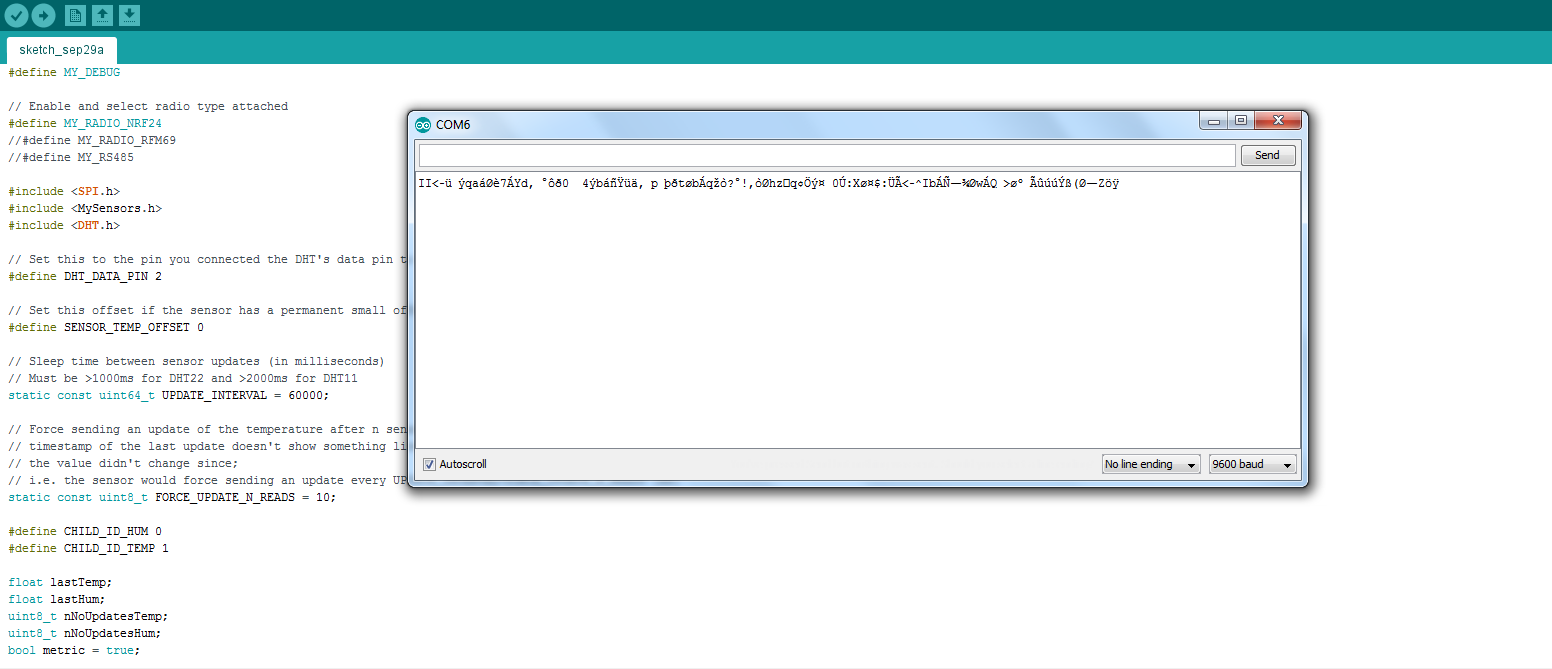
    Well... I did the arduino monitor but got something strange... Not at all what you have...

    0_1475238686452_Mysensors1.png

    And i just got the code from mysensors. only needed to download the DHT.h library, got it from mysensorsarduinoexamples zip file.

    Thank You for helping me. Must be frustrating helping a total newbie :sweat_smile:

    /**
     * The MySensors Arduino library handles the wireless radio link and protocol
     * between your home built sensors/actuators and HA controller of choice.
     * The sensors forms a self healing radio network with optional repeaters. Each
     * repeater and gateway builds a routing tables in EEPROM which keeps track of the
     * network topology allowing messages to be routed to nodes.
     *
     * Created by Henrik Ekblad <henrik.ekblad@mysensors.org>
     * Copyright (C) 2013-2015 Sensnology AB
     * Full contributor list: https://github.com/mysensors/Arduino/graphs/contributors
     *
     * Documentation: http://www.mysensors.org
     * Support Forum: http://forum.mysensors.org
     *
     * This program is free software; you can redistribute it and/or
     * modify it under the terms of the GNU General Public License
     * version 2 as published by the Free Software Foundation.
     *
     *******************************
     *
     * REVISION HISTORY
     * Version 1.0: Henrik EKblad
     * Version 1.1 - 2016-07-20: Converted to MySensors v2.0 and added various improvements - Torben Woltjen (mozzbozz)
     * 
     * DESCRIPTION
     * This sketch provides an example of how to implement a humidity/temperature
     * sensor using a DHT11/DHT-22.
     *  
     * For more information, please visit:
     * http://www.mysensors.org/build/humidity
     * 
     */
    
    // Enable debug prints
    #define MY_DEBUG
    
    // Enable and select radio type attached 
    #define MY_RADIO_NRF24
    //#define MY_RADIO_RFM69
    //#define MY_RS485
    
    #include <SPI.h>
    #include <MySensors.h>  
    #include <DHT.h>
    
    // Set this to the pin you connected the DHT's data pin to
    #define DHT_DATA_PIN 2
    
    // Set this offset if the sensor has a permanent small offset to the real temperatures
    #define SENSOR_TEMP_OFFSET 0
    
    // Sleep time between sensor updates (in milliseconds)
    // Must be >1000ms for DHT22 and >2000ms for DHT11
    static const uint64_t UPDATE_INTERVAL = 60000;
    
    // Force sending an update of the temperature after n sensor reads, so a controller showing the
    // timestamp of the last update doesn't show something like 3 hours in the unlikely case, that
    // the value didn't change since;
    // i.e. the sensor would force sending an update every UPDATE_INTERVAL*FORCE_UPDATE_N_READS [ms]
    static const uint8_t FORCE_UPDATE_N_READS = 10;
    
    #define CHILD_ID_HUM 0
    #define CHILD_ID_TEMP 1
    
    float lastTemp;
    float lastHum;
    uint8_t nNoUpdatesTemp;
    uint8_t nNoUpdatesHum;
    bool metric = true;
    
    MyMessage msgHum(CHILD_ID_HUM, V_HUM);
    MyMessage msgTemp(CHILD_ID_TEMP, V_TEMP);
    DHT dht;
    
    
    void presentation()  
    { 
      // Send the sketch version information to the gateway
      sendSketchInfo("TemperatureAndHumidity", "1.1");
    
      // Register all sensors to gw (they will be created as child devices)
      present(CHILD_ID_HUM, S_HUM);
      present(CHILD_ID_TEMP, S_TEMP);
    
      metric = getConfig().isMetric;
    }
    
    
    void setup()
    {
      dht.setup(DHT_DATA_PIN); // set data pin of DHT sensor
      if (UPDATE_INTERVAL <= dht.getMinimumSamplingPeriod()) {
        Serial.println("Warning: UPDATE_INTERVAL is smaller than supported by the sensor!");
      }
      // Sleep for the time of the minimum sampling period to give the sensor time to power up
      // (otherwise, timeout errors might occure for the first reading)
      sleep(dht.getMinimumSamplingPeriod());
    }
    
    
    void loop()      
    {  
      // Force reading sensor, so it works also after sleep()
      dht.readSensor(true);
    
      // Get temperature from DHT library
      float temperature = dht.getTemperature();
      if (isnan(temperature)) {
        Serial.println("Failed reading temperature from DHT!");
      } else if (temperature != lastTemp || nNoUpdatesTemp == FORCE_UPDATE_N_READS) {
        // Only send temperature if it changed since the last measurement or if we didn't send an update for n times
        lastTemp = temperature;
        if (!metric) {
          temperature = dht.toFahrenheit(temperature);
        }
        // Reset no updates counter
        nNoUpdatesTemp = 0;
        temperature += SENSOR_TEMP_OFFSET;
        send(msgTemp.set(temperature, 1));
    
        #ifdef MY_DEBUG
        Serial.print("T: ");
        Serial.println(temperature);
        #endif
      } else {
        // Increase no update counter if the temperature stayed the same
        nNoUpdatesTemp++;
      }
    
      // Get humidity from DHT library
      float humidity = dht.getHumidity();
      if (isnan(humidity)) {
        Serial.println("Failed reading humidity from DHT");
      } else if (humidity != lastHum || nNoUpdatesHum == FORCE_UPDATE_N_READS) {
        // Only send humidity if it changed since the last measurement or if we didn't send an update for n times
        lastHum = humidity;
        // Reset no updates counter
        nNoUpdatesHum = 0;
        send(msgHum.set(humidity, 1));
    
        #ifdef MY_DEBUG
        Serial.print("H: ");
        Serial.println(humidity);
        #endif
      } else {
        // Increase no update counter if the humidity stayed the same
        nNoUpdatesHum++;
      }
    
      // Sleep for a while to save energy
      sleep(UPDATE_INTERVAL); 
    }```
    Troubleshooting

  • Can't see devices in Domoticz(Newbie)
    uncensoredU uncensored

    well the only log i can find is the log of domoticz, don't know if you mean that. can you maybe tell me where i can find the serial log of the node?

    016-09-30 13:32:23.862 Domoticz V3.4834 (c)2012-2016 GizMoCuz
    2016-09-30 13:32:23.864 Build Hash: 8398125, Date: 2016-03-02 08:43:51
    2016-09-30 13:32:23.887 Sunrise: 07:43:00 SunSet:19:20:00
    2016-09-30 13:32:23.887 EventSystem: reset all events...
    2016-09-30 13:32:23.892 Active notification subsystems: (0/11)
    2016-09-30 13:32:23.893 WebServer(HTTP) started on address: :: with port 8080
    2016-09-30 13:32:24.136 WebServer(SSL) started on address: :: with port 443
    2016-09-30 13:32:24.137 Proxymanager started.
    2016-09-30 13:32:24.138 Starting shared server on: :::6144
    2016-09-30 13:32:24.139 TCPServer: shared server started...
    2016-09-30 13:32:24.139 RxQueue: queue worker started...
    2016-09-30 13:32:24.329 Incoming connection from: 127.0.0.1
    2016-09-30 13:32:26.147 EventSystem: reset all events...
    2016-09-30 13:32:26.149 EventSystem: reset all device statuses...
    2016-09-30 13:32:26.150 EventSystem: Started
    2016-09-30 13:32:27.194 MySensors: Using serial port: COM5
    2016-09-30 13:32:28.681 MySensors: Gateway Ready...
    2016-09-30 13:32:28.760 MySensors: Gateway Version: 2.0.0
    2016-09-30 13:33:03.650 MySensors: Node: 1, Sketch Name: TemperatureAndHumidity
    2016-09-30 13:33:03.660 MySensors: Node: 1, Sketch Version: 1.1

    strange thing is that he can't see my Temperature and Humidity sensor but only when i reboot the arduino of the sensor.

    Thank you for the fast reply!
    greetings,
    Nick

    Troubleshooting

  • Can't see devices in Domoticz(Newbie)
    uncensoredU uncensored

    Hi,

    I have a problem with seeing my nodes as devices in Domoticz.
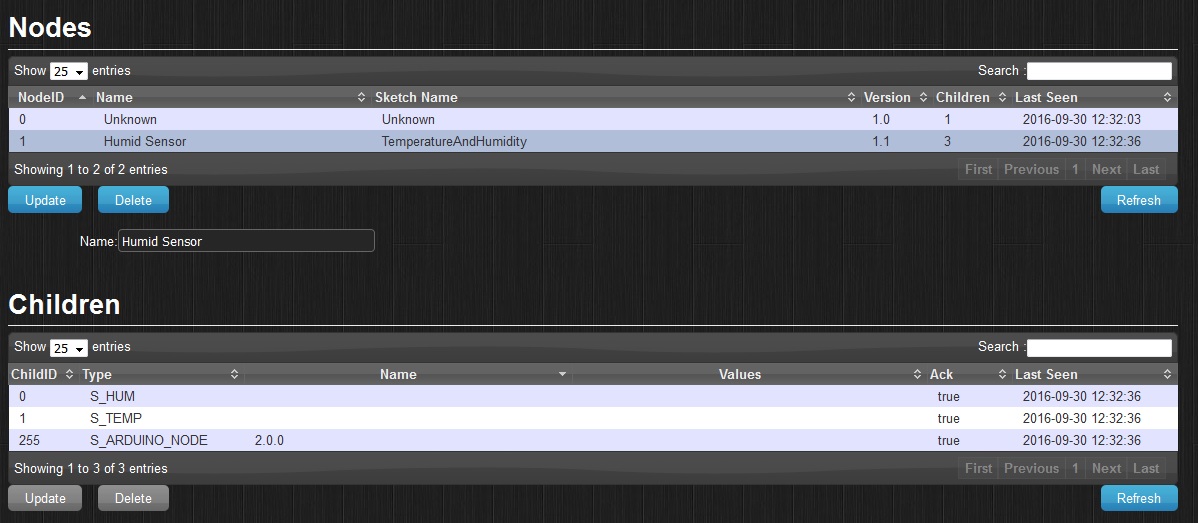
    I can see them in my hardware setup but not in my devices. Maybe I missed something?
    0_1475233439619_Mysensors.jpg

    Got a clone nano as gateway and a clone uno as sensor node just for testing. I'm going to run it on a rpi but for now it is on my laptop.

    I hope someone here can help me out.

    Thank you,
    Nick

    Troubleshooting
  • Login

  • Don't have an account? Register

  • Login or register to search.
  • First post
    Last post
0
  • MySensors
  • OpenHardware.io
  • Categories
  • Recent
  • Tags
  • Popular