
OH3 - MySensors Binding
-
@ncollins Thanks, really appreciate it :) Let me know if you need more info, here's the basic config I did:
- created a mqtt broker (not system broker) This thing is ONLINE
UID: mqtt:broker:mosquitto label: mosquitto thingTypeUID: mqtt:broker configuration: lwtQos: 0 publickeypin: true keepAlive: 60 clientid: 566e1af2-19c2-4596-904f-18b89c502e53 qos: 0 reconnectTime: 60000 host: localhost secure: false certificatepin: true lwtRetain: true enableDiscovery: true- created a MySensors MQTT Bridge with default settings (brokername = mosquitto)
UID: mysensors:bridge-mqtt:01d212b118
label: MySensors MQTT Gateway
thingTypeUID: mysensors:bridge-mqtt
configuration:
  networkSanCheckSendHeartbeat: false
  topicPublish: mygateway1-in
  networkSanCheckInterval: 3
  networkSanCheckSendHeartbeatFailAttempts: 10
  topicSubscribe: mygateway1-out
  networkSanCheckEnabled: false
  networkSanCheckConnectionFailAttempts: 3
  startupCheckEnabled: false
  brokerName: mosquitto
  imperial: false
  sendDelay: 100
Here's the logs:
09:59:32.973 [INFO ] [hab.event.ThingStatusInfoChangedEvent] - Thing 'mysensors:bridge-mqtt:01d212b118' changed from UNINITIALIZED to INITIALIZING
09:59:32.980 [DEBUG] [ensors.handler.MySensorsBridgeHandler] - Initialization of the MySensors bridge
09:59:32.994 [DEBUG] [sensors.factory.MySensorsCacheFactory] - Cache file: given_ids.cached not exist.
09:59:32.995 [DEBUG] [sensors.factory.MySensorsCacheFactory] - Cache file: given_ids.cached not exist. Default passed, creating it...
09:59:32.997 [DEBUG] [sensors.factory.MySensorsCacheFactory] - Writing on cache given_ids, content: []
09:59:32.998 [DEBUG] [sensors.factory.MySensorsCacheFactory] - Cache (given_ids) content: []
09:59:33.011 [DEBUG] [protocol.mqtt.MySensorsMqttConnection] - Enabling connection watchdog
09:59:33.015 [DEBUG] [ensors.handler.MySensorsBridgeHandler] - Initialization of the MySensors bridge DONE!
09:59:33.016 [DEBUG] [s.discovery.MySensorsDiscoveryService] - Starting MySensors discovery scan
09:59:33.022 [ERROR] [protocol.mqtt.MySensorsMqttConnection] - No connection to broker: mosquitto
09:59:33.027 [INFO ] [hab.event.ThingStatusInfoChangedEvent] - Thing 'mysensors:bridge-mqtt:01d212b118' changed from INITIALIZING to OFFLINE
09:59:33.027 [DEBUG] [sensors.factory.MySensorsCacheFactory] - Writing on cache given_ids, content: []
09:59:33.029 [ERROR] [protocol.mqtt.MySensorsMqttConnection] - Failed connecting to bridge...next retry in 10 seconds (Retry No.:0)
I tried different broker names (like
mqtt:broker:mosquitto, the clientid, different uid names, but the log always says the broker cannot be found. It maps to the following lines: linkI can provide more info if needed and try out debug versions of the binding if required.
-
@ncollins Thanks, really appreciate it :) Let me know if you need more info, here's the basic config I did:
- created a mqtt broker (not system broker) This thing is ONLINE
UID: mqtt:broker:mosquitto label: mosquitto thingTypeUID: mqtt:broker configuration: lwtQos: 0 publickeypin: true keepAlive: 60 clientid: 566e1af2-19c2-4596-904f-18b89c502e53 qos: 0 reconnectTime: 60000 host: localhost secure: false certificatepin: true lwtRetain: true enableDiscovery: true- created a MySensors MQTT Bridge with default settings (brokername = mosquitto)
UID: mysensors:bridge-mqtt:01d212b118
label: MySensors MQTT Gateway
thingTypeUID: mysensors:bridge-mqtt
configuration:
  networkSanCheckSendHeartbeat: false
  topicPublish: mygateway1-in
  networkSanCheckInterval: 3
  networkSanCheckSendHeartbeatFailAttempts: 10
  topicSubscribe: mygateway1-out
  networkSanCheckEnabled: false
  networkSanCheckConnectionFailAttempts: 3
  startupCheckEnabled: false
  brokerName: mosquitto
  imperial: false
  sendDelay: 100
Here's the logs:
09:59:32.973 [INFO ] [hab.event.ThingStatusInfoChangedEvent] - Thing 'mysensors:bridge-mqtt:01d212b118' changed from UNINITIALIZED to INITIALIZING
09:59:32.980 [DEBUG] [ensors.handler.MySensorsBridgeHandler] - Initialization of the MySensors bridge
09:59:32.994 [DEBUG] [sensors.factory.MySensorsCacheFactory] - Cache file: given_ids.cached not exist.
09:59:32.995 [DEBUG] [sensors.factory.MySensorsCacheFactory] - Cache file: given_ids.cached not exist. Default passed, creating it...
09:59:32.997 [DEBUG] [sensors.factory.MySensorsCacheFactory] - Writing on cache given_ids, content: []
09:59:32.998 [DEBUG] [sensors.factory.MySensorsCacheFactory] - Cache (given_ids) content: []
09:59:33.011 [DEBUG] [protocol.mqtt.MySensorsMqttConnection] - Enabling connection watchdog
09:59:33.015 [DEBUG] [ensors.handler.MySensorsBridgeHandler] - Initialization of the MySensors bridge DONE!
09:59:33.016 [DEBUG] [s.discovery.MySensorsDiscoveryService] - Starting MySensors discovery scan
09:59:33.022 [ERROR] [protocol.mqtt.MySensorsMqttConnection] - No connection to broker: mosquitto
09:59:33.027 [INFO ] [hab.event.ThingStatusInfoChangedEvent] - Thing 'mysensors:bridge-mqtt:01d212b118' changed from INITIALIZING to OFFLINE
09:59:33.027 [DEBUG] [sensors.factory.MySensorsCacheFactory] - Writing on cache given_ids, content: []
09:59:33.029 [ERROR] [protocol.mqtt.MySensorsMqttConnection] - Failed connecting to bridge...next retry in 10 seconds (Retry No.:0)
I tried different broker names (like
mqtt:broker:mosquitto, the clientid, different uid names, but the log always says the broker cannot be found. It maps to the following lines: linkI can provide more info if needed and try out debug versions of the binding if required.
Okay, now i tried to configure the
MQTT system broker connectionand this seems to work.- I set up the system broker and named it 'mosquitto'.
- in the MySensors MQTT bridge, as before, I used
mosquittoas Broker Name. Now the Broker Name could be resolved and the Thing is online.
10:12:55.086 [DEBUG] [ensors.handler.MySensorsBridgeHandler] - Initialization of the MySensors bridge
10:12:55.089 [DEBUG] [sensors.factory.MySensorsCacheFactory] - Cache file: given_ids.cached not exist.
10:12:55.091 [DEBUG] [sensors.factory.MySensorsCacheFactory] - Cache file: given_ids.cached not exist. Default passed, creating it...
10:12:55.094 [DEBUG] [sensors.factory.MySensorsCacheFactory] - Writing on cache given_ids, content: []
10:12:55.100 [DEBUG] [sensors.factory.MySensorsCacheFactory] - Cache (given_ids) content: []
10:12:55.103 [DEBUG] [protocol.mqtt.MySensorsMqttConnection] - Enabling connection watchdog
10:12:55.106 [DEBUG] [ensors.handler.MySensorsBridgeHandler] - Initialization of the MySensors bridge DONE!
10:12:55.108 [ERROR] [protocol.mqtt.MySensorsMqttConnection] - MQTT connection offline - Reason unknown
10:12:55.113 [DEBUG] [s.discovery.MySensorsDiscoveryService] - Starting MySensors discovery scan
10:12:55.117 [DEBUG] [protocol.mqtt.MySensorsMqttConnection] - Adding consumer for topic: mygateway1-out/+/+/+/+/+
10:12:55.127 [WARN ] [protocol.mqtt.MySensorsMqttConnection] - Skipping I_VERSION connection test, not recommended...
10:12:55.133 [INFO ] [hab.event.ThingStatusInfoChangedEvent] - Thing 'mysensors:bridge-mqtt:84dd4a387f' changed from INITIALIZING to ONLINE
10:12:55.133 [DEBUG] [sensors.factory.MySensorsCacheFactory] - Writing on cache given_ids, content: []
10:12:55.139 [INFO ] [protocol.mqtt.MySensorsMqttConnection] - Successfully connected to MySensors Bridge.
But
I'm having troubles with the MQTT system broker, it can't connect the broker instance.com.hivemq.client.mqtt.exceptions.ConnectionClosedException: java.io.IOException: Connection reset by peer Caused by: java.io.IOException: Connection reset by peer at sun.nio.ch.FileDispatcherImpl.read0(Native Method) ~[?:?] at sun.nio.ch.SocketDispatcher.read(SocketDispatcher.java:39) ~[?:?] at sun.nio.ch.IOUtil.readIntoNativeBuffer(IOUtil.java:276) ~[?:?] at sun.nio.ch.IOUtil.read(IOUtil.java:233) ~[?:?] at sun.nio.ch.IOUtil.read(IOUtil.java:223) ~[?:?] at sun.nio.ch.SocketChannelImpl.read(SocketChannelImpl.java:358) ~[?:?] at io.netty.buffer.PooledByteBuf.setBytes(PooledByteBuf.java:247) ~[bundleFile:4.1.42.Final] at io.netty.buffer.AbstractByteBuf.writeBytes(AbstractByteBuf.java:1147) ~[bundleFile:4.1.42.Final] at io.netty.channel.socket.nio.NioSocketChannel.doReadBytes(NioSocketChannel.java:347) ~[bundleFile:4.1.42.Final] at io.netty.channel.nio.AbstractNioByteChannel$NioByteUnsafe.read(AbstractNioByteChannel.java:148) [bundleFile:4.1.42.Final] at io.netty.channel.nio.NioEventLoop.processSelectedKey(NioEventLoop.java:700) [bundleFile:4.1.42.Final] at io.netty.channel.nio.NioEventLoop.processSelectedKeysOptimized(NioEventLoop.java:635) [bundleFile:4.1.42.Final] at io.netty.channel.nio.NioEventLoop.processSelectedKeys(NioEventLoop.java:552) [bundleFile:4.1.42.Final] at io.netty.channel.nio.NioEventLoop.run(NioEventLoop.java:514) [bundleFile:4.1.42.Final] at io.netty.util.concurrent.SingleThreadEventExecutor$6.run(SingleThreadEventExecutor.java:1044) [bundleFile:4.1.42.Final] at io.netty.util.internal.ThreadExecutorMap$2.run(ThreadExecutorMap.java:74) [bundleFile:4.1.42.Final] at io.netty.util.concurrent.FastThreadLocalRunnable.run(FastThreadLocalRunnable.java:30) [bundleFile:4.1.42.Final] at java.lang.Thread.run(Thread.java:834) [?:?]Since this seems more a OpenHAB/mosquitto issue I will dig into it myself.
Edit
TheMQTT System Brokerseems to be a concept from OH2, where a MQTT broker was shipped internally with OpenHAB and it seems to be broken in OH3 (OH Forum).This leaves me with the following conclusions:
- The MySensors binding configuration references the
MQTT system broker connection - With OH3, this MQTT System Broker is not working anymore.
I suppose the correct way of handling this issue is to make the MySensors binding reference a normal
MQTT Brokerbridge, not a System Broker bridge.
Anyone who knows what changes this would require? My guess is that it should be manageable -> Source Code -
Okay, now i tried to configure the
MQTT system broker connectionand this seems to work.- I set up the system broker and named it 'mosquitto'.
- in the MySensors MQTT bridge, as before, I used
mosquittoas Broker Name. Now the Broker Name could be resolved and the Thing is online.
10:12:55.086 [DEBUG] [ensors.handler.MySensorsBridgeHandler] - Initialization of the MySensors bridge
10:12:55.089 [DEBUG] [sensors.factory.MySensorsCacheFactory] - Cache file: given_ids.cached not exist.
10:12:55.091 [DEBUG] [sensors.factory.MySensorsCacheFactory] - Cache file: given_ids.cached not exist. Default passed, creating it...
10:12:55.094 [DEBUG] [sensors.factory.MySensorsCacheFactory] - Writing on cache given_ids, content: []
10:12:55.100 [DEBUG] [sensors.factory.MySensorsCacheFactory] - Cache (given_ids) content: []
10:12:55.103 [DEBUG] [protocol.mqtt.MySensorsMqttConnection] - Enabling connection watchdog
10:12:55.106 [DEBUG] [ensors.handler.MySensorsBridgeHandler] - Initialization of the MySensors bridge DONE!
10:12:55.108 [ERROR] [protocol.mqtt.MySensorsMqttConnection] - MQTT connection offline - Reason unknown
10:12:55.113 [DEBUG] [s.discovery.MySensorsDiscoveryService] - Starting MySensors discovery scan
10:12:55.117 [DEBUG] [protocol.mqtt.MySensorsMqttConnection] - Adding consumer for topic: mygateway1-out/+/+/+/+/+
10:12:55.127 [WARN ] [protocol.mqtt.MySensorsMqttConnection] - Skipping I_VERSION connection test, not recommended...
10:12:55.133 [INFO ] [hab.event.ThingStatusInfoChangedEvent] - Thing 'mysensors:bridge-mqtt:84dd4a387f' changed from INITIALIZING to ONLINE
10:12:55.133 [DEBUG] [sensors.factory.MySensorsCacheFactory] - Writing on cache given_ids, content: []
10:12:55.139 [INFO ] [protocol.mqtt.MySensorsMqttConnection] - Successfully connected to MySensors Bridge.
But
I'm having troubles with the MQTT system broker, it can't connect the broker instance.com.hivemq.client.mqtt.exceptions.ConnectionClosedException: java.io.IOException: Connection reset by peer Caused by: java.io.IOException: Connection reset by peer at sun.nio.ch.FileDispatcherImpl.read0(Native Method) ~[?:?] at sun.nio.ch.SocketDispatcher.read(SocketDispatcher.java:39) ~[?:?] at sun.nio.ch.IOUtil.readIntoNativeBuffer(IOUtil.java:276) ~[?:?] at sun.nio.ch.IOUtil.read(IOUtil.java:233) ~[?:?] at sun.nio.ch.IOUtil.read(IOUtil.java:223) ~[?:?] at sun.nio.ch.SocketChannelImpl.read(SocketChannelImpl.java:358) ~[?:?] at io.netty.buffer.PooledByteBuf.setBytes(PooledByteBuf.java:247) ~[bundleFile:4.1.42.Final] at io.netty.buffer.AbstractByteBuf.writeBytes(AbstractByteBuf.java:1147) ~[bundleFile:4.1.42.Final] at io.netty.channel.socket.nio.NioSocketChannel.doReadBytes(NioSocketChannel.java:347) ~[bundleFile:4.1.42.Final] at io.netty.channel.nio.AbstractNioByteChannel$NioByteUnsafe.read(AbstractNioByteChannel.java:148) [bundleFile:4.1.42.Final] at io.netty.channel.nio.NioEventLoop.processSelectedKey(NioEventLoop.java:700) [bundleFile:4.1.42.Final] at io.netty.channel.nio.NioEventLoop.processSelectedKeysOptimized(NioEventLoop.java:635) [bundleFile:4.1.42.Final] at io.netty.channel.nio.NioEventLoop.processSelectedKeys(NioEventLoop.java:552) [bundleFile:4.1.42.Final] at io.netty.channel.nio.NioEventLoop.run(NioEventLoop.java:514) [bundleFile:4.1.42.Final] at io.netty.util.concurrent.SingleThreadEventExecutor$6.run(SingleThreadEventExecutor.java:1044) [bundleFile:4.1.42.Final] at io.netty.util.internal.ThreadExecutorMap$2.run(ThreadExecutorMap.java:74) [bundleFile:4.1.42.Final] at io.netty.util.concurrent.FastThreadLocalRunnable.run(FastThreadLocalRunnable.java:30) [bundleFile:4.1.42.Final] at java.lang.Thread.run(Thread.java:834) [?:?]Since this seems more a OpenHAB/mosquitto issue I will dig into it myself.
Edit
TheMQTT System Brokerseems to be a concept from OH2, where a MQTT broker was shipped internally with OpenHAB and it seems to be broken in OH3 (OH Forum).This leaves me with the following conclusions:
- The MySensors binding configuration references the
MQTT system broker connection - With OH3, this MQTT System Broker is not working anymore.
I suppose the correct way of handling this issue is to make the MySensors binding reference a normal
MQTT Brokerbridge, not a System Broker bridge.
Anyone who knows what changes this would require? My guess is that it should be manageable -> Source Code@fabyte this is helpful.
My intuition says the embedded mqtt broker and the generic mqtt binding create the same "mqtt" connection service behind the scenes. I'm guessing the generic mqtt binding isn't registering its service by name, or it's registering it by some other key.
I'd like to get the mysensors addon to work with both mqtt brokers if possible.
-
@ncollins Yes, it looks like some resources are blocked or not resolved correctly when using the system broker.
But the system broker functionality comes with the mqtt binding itself. Here is a screen of the settings when I deleted the mqtt binding:
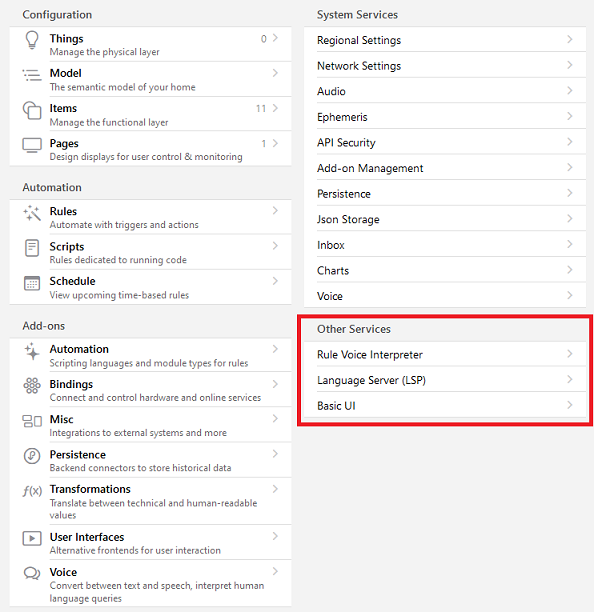
Also I never got the system broker working, even without defining a generic mqtt broker thing.
-
After reinstalling the mqtt bindung the MQTT System Broker connection now could be established - strange, that a reinstall was required since I did several OpenHAB system restarts and those didn't fix it.
Well, now the MySensors binding is working with the system broker:
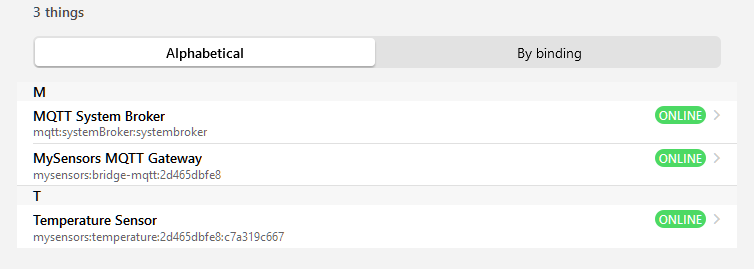
Here's a MySensors temperature item:

To sum up, here's what I did
- (manually) installed
MySensorsbinding - uninstalled
mqttbinding - installed
mqttbinding - set up the
MQTT system broker connection
4.1 setConnection Nametosystembroker
4.2 setBroker Hosttolocalhost(it's running on the same device)
4.3 Show advanced -> setBroker Portto1883since it was always using 8883 but I don't use a secure connection
(4.4 I didn't set a clientid, no user and no password) - set up the
MySensors MQTT Gatewaything
5.1 setBroker Nametosystembroker
- (manually) installed
-
After reinstalling the mqtt bindung the MQTT System Broker connection now could be established - strange, that a reinstall was required since I did several OpenHAB system restarts and those didn't fix it.
Well, now the MySensors binding is working with the system broker:
Here's a MySensors temperature item:
To sum up, here's what I did
- (manually) installed
MySensorsbinding - uninstalled
mqttbinding - installed
mqttbinding - set up the
MQTT system broker connection
4.1 setConnection Nametosystembroker
4.2 setBroker Hosttolocalhost(it's running on the same device)
4.3 Show advanced -> setBroker Portto1883since it was always using 8883 but I don't use a secure connection
(4.4 I didn't set a clientid, no user and no password) - set up the
MySensors MQTT Gatewaything
5.1 setBroker Nametosystembroker
@fabyte Nice work. I don't use mysensors-mqtt, but I do have a lot of tasmota devices using the generic mqtt binding.
I followed your directions to create system broker, then changed my existing mqtt broker connection to a "systemBroker" and referenced it by brokerid (Broker Name).
I had one other issue, the new system broker wouldn't start up. I had to manually add
secure="false"to /opt/openhab/userdata/config/org/openhab/mqttbroker.config .Maybe you can get away with toggling "Secure Connection?" a couple of times.
- (manually) installed
-
I just want you to know, that I'm still there, but out of time at the moment. My third child was born just recently and I don't have any time for the binding at the moment.
I'm really sorry you had to reverse engineer the binding to add your code. That's awfully wrong.
We need to create a new common base to continue the work on the binding.
I was not able to add the binding to the official repo because of the formal requirements from the Openhab Team. I'm sure these requirements are needed, but I'm no professional in java. I struggled mainly at the nonnull annotations that are needed. -
I just want you to know, that I'm still there, but out of time at the moment. My third child was born just recently and I don't have any time for the binding at the moment.
I'm really sorry you had to reverse engineer the binding to add your code. That's awfully wrong.
We need to create a new common base to continue the work on the binding.
I was not able to add the binding to the official repo because of the formal requirements from the Openhab Team. I'm sure these requirements are needed, but I'm no professional in java. I struggled mainly at the nonnull annotations that are needed.@TimO Congratulations on your child :clap:
I know it's an exciting time and definitely more important than developing a OH binding :grin:
Spending time with your family should always be number 1 priority and you can't blame anyone for taking time off from a internet community :) -
I just want you to know, that I'm still there, but out of time at the moment. My third child was born just recently and I don't have any time for the binding at the moment.
I'm really sorry you had to reverse engineer the binding to add your code. That's awfully wrong.
We need to create a new common base to continue the work on the binding.
I was not able to add the binding to the official repo because of the formal requirements from the Openhab Team. I'm sure these requirements are needed, but I'm no professional in java. I struggled mainly at the nonnull annotations that are needed.@TimO Congrats!
I've been looking some of the other addon-ons and your code actually looks a lot better than most. I think the base is pretty solid.
I'll take a look at the annotations, and maybe getting some more traditional unit tests in place.
If we get to a point where a merge is acceptable, maybe we can move the maintenance fork to the MySensors repo.
-
-
I have been trying to get MySensors working with OH3 for a few days now and have just stumbled upon this thread. How opportune!!!
I am just trying to get a temp/hum arduino nano with a NRF24L01 hooked up to PI400 with OH3 using this link:
https://www.smarthomeblog.net/diy-home-automation-sensors-first-node/
Since I am starting from scratch with a simple proof of concept there might be some easy testing to be done with my setup.
Do you have any suggestions for me?
Thanks!
-
I have been trying to get MySensors working with OH3 for a few days now and have just stumbled upon this thread. How opportune!!!
I am just trying to get a temp/hum arduino nano with a NRF24L01 hooked up to PI400 with OH3 using this link:
https://www.smarthomeblog.net/diy-home-automation-sensors-first-node/
Since I am starting from scratch with a simple proof of concept there might be some easy testing to be done with my setup.
Do you have any suggestions for me?
Thanks!
@haloway13 Glad to see you're diving in.
Have you set up your gateway yet? If not, try this https://www.mysensors.org/build/raspberry. I find it's easier to build and debug node with a working gateway.
-
@haloway13 Glad to see you're diving in.
Have you set up your gateway yet? If not, try this https://www.mysensors.org/build/raspberry. I find it's easier to build and debug node with a working gateway.
I believe so.
openhabian@openhabian:~/MySensors $ sudo ./bin/mysgw Feb 28 14:28:54 INFO Starting gateway... Feb 28 14:28:54 INFO Protocol version - 2.4.0-alpha Feb 28 14:28:54 DEBUG MCO:BGN:INIT GW,CP=RNNGL---,FQ=NA,REL=0,VER=2.4.0-alpha Feb 28 14:28:54 DEBUG TSF:LRT:OK Feb 28 14:28:54 DEBUG TSM:INIT Feb 28 14:28:54 DEBUG TSF:WUR:MS=0 Feb 28 14:28:54 DEBUG TSM:INIT:TSP OK Feb 28 14:28:54 DEBUG TSM:INIT:GW MODE Feb 28 14:28:54 DEBUG TSM:READY:ID=0,PAR=0,DIS=0 Feb 28 14:28:54 DEBUG MCO:REG:NOT NEEDED Feb 28 14:28:54 DEBUG MCO:BGN:STP Feb 28 14:28:54 DEBUG MCO:BGN:INIT OK,TSP=1 Feb 28 14:28:54 DEBUG GWT:RMQ:CONNECTING... Feb 28 14:28:54 DEBUG connected to 192.168.1.151 Feb 28 14:28:54 DEBUG GWT:RMQ:OK Feb 28 14:28:54 DEBUG GWT:TPS:TOPIC=mygateway1-out/0/255/0/0/18,MSG SENT Feb 28 14:28:54 DEBUG TSM:READY:NWD REQ Feb 28 14:28:54 DEBUG ?TSF:MSG:SEND,0-0-255-255,s=255,c=3,t=20,pt=0,l=0,sg=0,ft=0,st=OK: Feb 28 14:29:13 DEBUG TSF:MSG:READ,1-1-0,s=1,c=1,t=1,pt=7,l=5,sg=0:31.3 Feb 28 14:29:13 DEBUG GWT:TPS:TOPIC=mygateway1-out/1/1/1/0/1,MSG SENT Feb 28 14:29:23 DEBUG TSF:MSG:READ,1-1-0,s=1,c=1,t=1,pt=7,l=5,sg=0:31.4 Feb 28 14:29:23 DEBUG GWT:TPS:TOPIC=mygateway1-out/1/1/1/0/1,MSG SENT Feb 28 14:29:43 DEBUG TSF:MSG:READ,1-1-0,s=0,c=1,t=0,pt=7,l=5,sg=0:16.1 Feb 28 14:29:43 DEBUG GWT:TPS:TOPIC=mygateway1-out/1/0/1/0/0,MSG SENT -
I believe so.
openhabian@openhabian:~/MySensors $ sudo ./bin/mysgw Feb 28 14:28:54 INFO Starting gateway... Feb 28 14:28:54 INFO Protocol version - 2.4.0-alpha Feb 28 14:28:54 DEBUG MCO:BGN:INIT GW,CP=RNNGL---,FQ=NA,REL=0,VER=2.4.0-alpha Feb 28 14:28:54 DEBUG TSF:LRT:OK Feb 28 14:28:54 DEBUG TSM:INIT Feb 28 14:28:54 DEBUG TSF:WUR:MS=0 Feb 28 14:28:54 DEBUG TSM:INIT:TSP OK Feb 28 14:28:54 DEBUG TSM:INIT:GW MODE Feb 28 14:28:54 DEBUG TSM:READY:ID=0,PAR=0,DIS=0 Feb 28 14:28:54 DEBUG MCO:REG:NOT NEEDED Feb 28 14:28:54 DEBUG MCO:BGN:STP Feb 28 14:28:54 DEBUG MCO:BGN:INIT OK,TSP=1 Feb 28 14:28:54 DEBUG GWT:RMQ:CONNECTING... Feb 28 14:28:54 DEBUG connected to 192.168.1.151 Feb 28 14:28:54 DEBUG GWT:RMQ:OK Feb 28 14:28:54 DEBUG GWT:TPS:TOPIC=mygateway1-out/0/255/0/0/18,MSG SENT Feb 28 14:28:54 DEBUG TSM:READY:NWD REQ Feb 28 14:28:54 DEBUG ?TSF:MSG:SEND,0-0-255-255,s=255,c=3,t=20,pt=0,l=0,sg=0,ft=0,st=OK: Feb 28 14:29:13 DEBUG TSF:MSG:READ,1-1-0,s=1,c=1,t=1,pt=7,l=5,sg=0:31.3 Feb 28 14:29:13 DEBUG GWT:TPS:TOPIC=mygateway1-out/1/1/1/0/1,MSG SENT Feb 28 14:29:23 DEBUG TSF:MSG:READ,1-1-0,s=1,c=1,t=1,pt=7,l=5,sg=0:31.4 Feb 28 14:29:23 DEBUG GWT:TPS:TOPIC=mygateway1-out/1/1/1/0/1,MSG SENT Feb 28 14:29:43 DEBUG TSF:MSG:READ,1-1-0,s=0,c=1,t=0,pt=7,l=5,sg=0:16.1 Feb 28 14:29:43 DEBUG GWT:TPS:TOPIC=mygateway1-out/1/0/1/0/0,MSG SENT@haloway13 Looks good.
Next, I would get openhab ready for adding the mysensors addon. https://github.com/tobof/openhab2-addons/wiki/Installation
Via the openhab console run the following to install/activate the binding dependencies:
feature:install openhab-transport-serial
feature:install openhab-core-io-transport-mqtt
I recommend also settinglog:set DEBUG org.openhab.binding.mysensorsCreate a mqtt system connection in OpenHAB. Be sure to check advanced, and set the port.
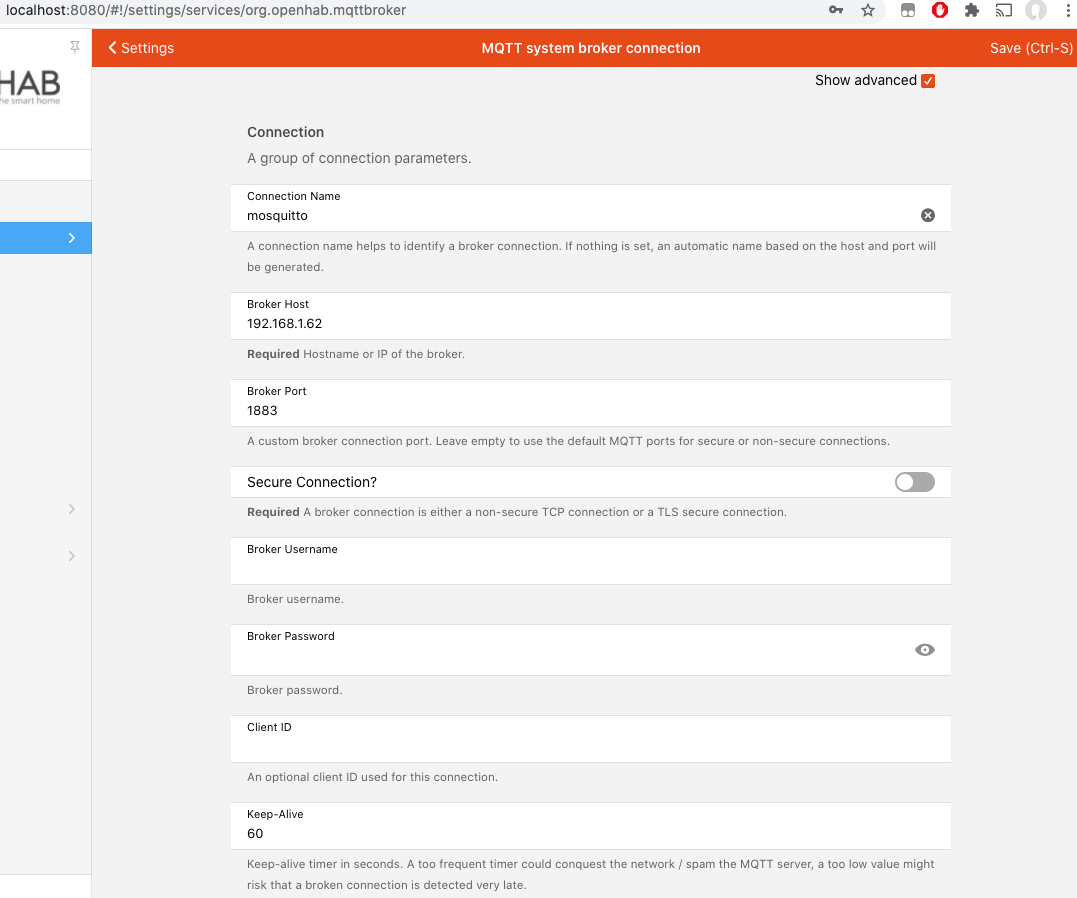
Then you can drop the org.openhab.binding.mysensors.jar into the addons folder and it should auto install. You can start with the binding linked above.
Once all of that is done, you can configure your first thing, which would be a MySensors MQTT Bridge. (you should disable "Enables the startup check", I believe there is a bug)
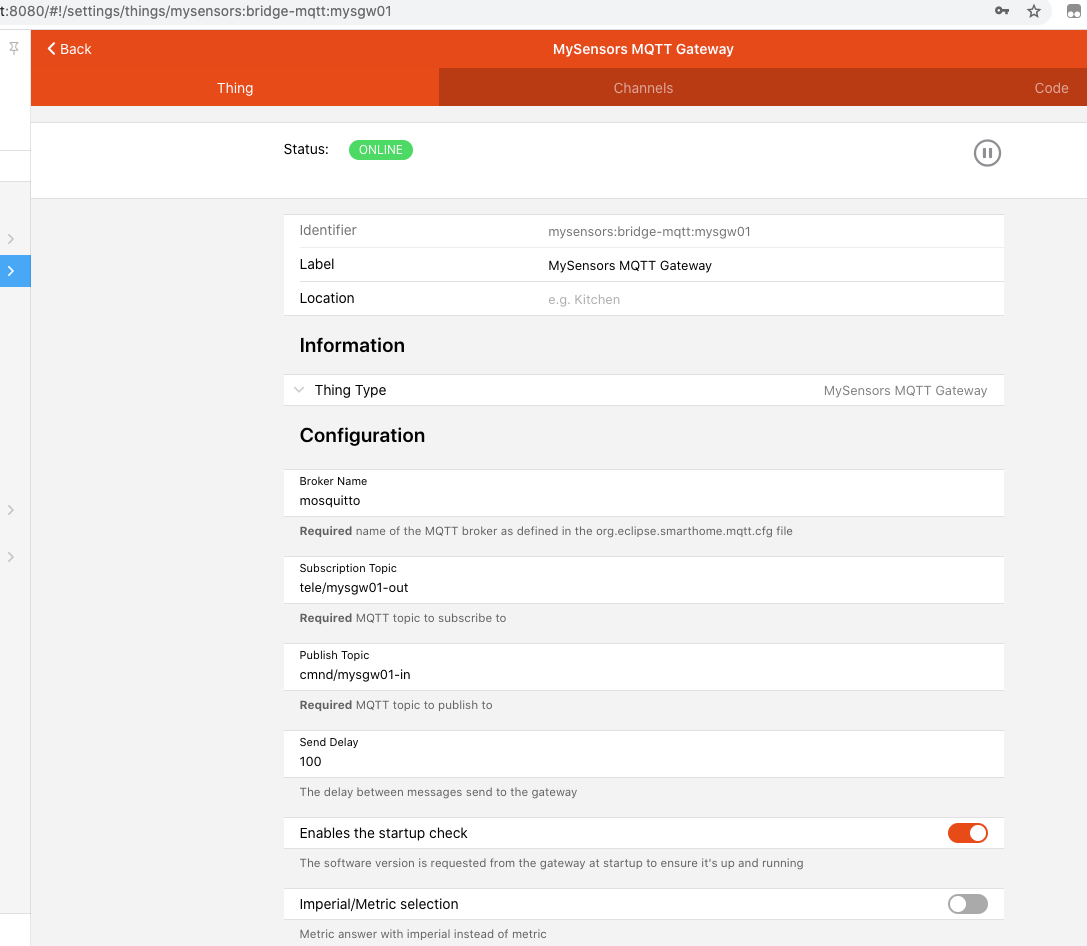
-
@haloway13 Looks good.
Next, I would get openhab ready for adding the mysensors addon. https://github.com/tobof/openhab2-addons/wiki/Installation
Via the openhab console run the following to install/activate the binding dependencies:
feature:install openhab-transport-serial
feature:install openhab-core-io-transport-mqtt
I recommend also settinglog:set DEBUG org.openhab.binding.mysensorsCreate a mqtt system connection in OpenHAB. Be sure to check advanced, and set the port.
Then you can drop the org.openhab.binding.mysensors.jar into the addons folder and it should auto install. You can start with the binding linked above.
Once all of that is done, you can configure your first thing, which would be a MySensors MQTT Bridge. (you should disable "Enables the startup check", I believe there is a bug)
-
@ncollins I have had some issues getting this going. Am I running the development branch? Can you tell from the output?
@haloway13 you have any logs or screenshots of errors you're seeing?
-
@haloway13 you have any logs or screenshots of errors you're seeing?
@ncollins best I can do is say that it was a java io exception of some sort associated with the bridge or broker. I have since started from scratch several times and have not taken any screenshots.
I have faithfully followed directions from: https://github.com/tobof/openhab2-addons/wiki/Installation
Then it is a bit of a mystery to me how to finish up the configuration through the web pages.
Any help would be greatly appreciated!
-
Hmm, I don't use openhabian, but it looks like there is a log viewer built in: http://openhabian:9001 (maybe change openhabian to the IP of your pi).
Without logs or screenshots, it'll be impossible to help.
-
Hmm, I don't use openhabian, but it looks like there is a log viewer built in: http://openhabian:9001 (maybe change openhabian to the IP of your pi).
Without logs or screenshots, it'll be impossible to help.
openhab log:tail output
log:set DEBUG org.openhab.binding.mysensors
openhab> log:tail
20:17:49.861 [INFO ] [b.core.internal.i18n.I18nProviderImpl] - Time zone set to 'America/Denver'.
20:17:49.924 [INFO ] [b.core.internal.i18n.I18nProviderImpl] - Location set to '39.82834020908714,-105.06875216960907'.
20:17:49.929 [INFO ] [b.core.internal.i18n.I18nProviderImpl] - Locale set to 'en_US'.
20:18:27.583 [INFO ] [b.core.model.lsp.internal.ModelServer] - Started Language Server Protocol (LSP) service on port 5007
20:18:33.947 [INFO ] [org.openhab.ui.internal.UIService    ] - Started UI on port 8080
20:18:35.072 [INFO ] [re.automation.internal.RuleEngineImpl] - Rule engine started.
20:18:36.112 [INFO ] [hab.ui.habpanel.internal.HABPanelTile] - Started HABPanel at /habpanel
20:25:15.958 [INFO ] [ig.discovery.internal.PersistentInbox] - Added new thing 'mqtt:systemBroker:mosquitto' to inbox.
20:25:15.959 [INFO ] [openhab.event.InboxAddedEvent        ] - Discovery Result with UID 'mqtt:systemBroker:mosquitto' has been added.
20:25:17.970 [INFO ] [o.transport.mqtt.MqttBrokerConnection] - Starting MQTT broker connection to '192.168.1.151' with clientid 86f6e016-3847-404f-80dc-a5abb81f6b2d
20:25:28.579 [INFO ] [t.reconnect.PeriodicReconnectStrategy] - Try to restore connection to '192.168.1.151'. Next attempt in 60000ms
20:25:28.673 [INFO ] [o.transport.mqtt.MqttBrokerConnection] - Starting MQTT broker connection to '192.168.1.151' with clientid 86f6e016-3847-404f-80dc-a5abb81f6b2d
20:26:28.685 [INFO ] [t.reconnect.PeriodicReconnectStrategy] - Try to restore connection to '192.168.1.151'. Next attempt in 60000ms
20:26:28.694 [INFO ] [o.transport.mqtt.MqttBrokerConnection] - Starting MQTT broker connection to '192.168.1.151' with clientid 86f6e016-3847-404f-80dc-a5abb81f6b2d
Broker config screen:
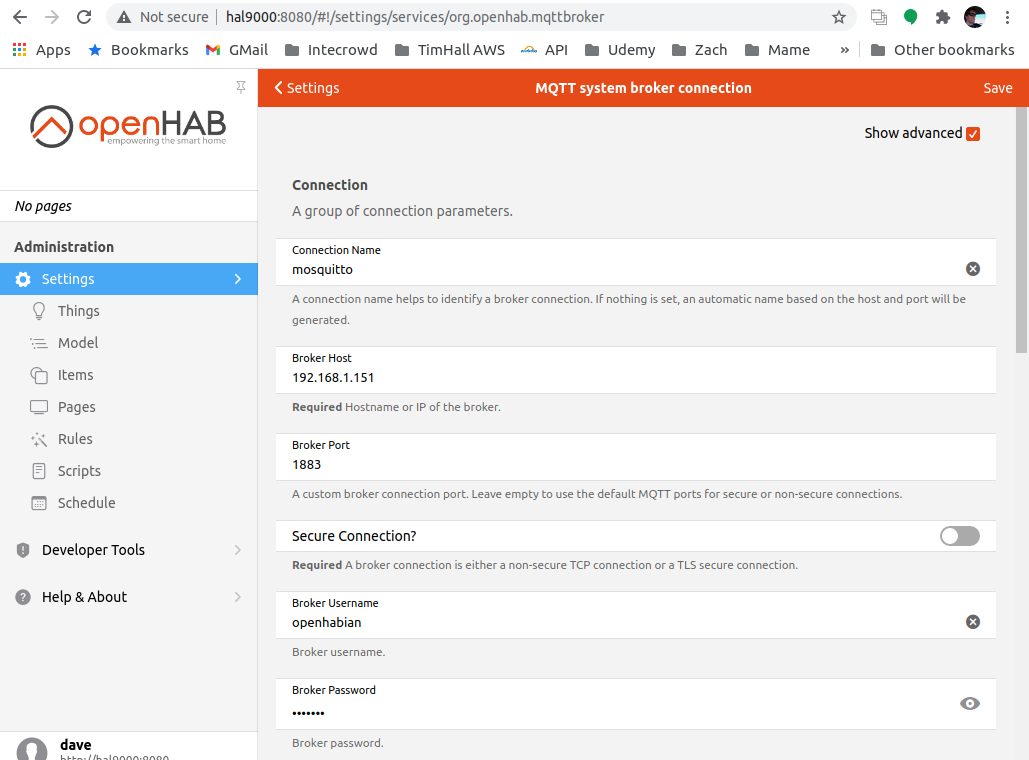
Addition to the Inbox:
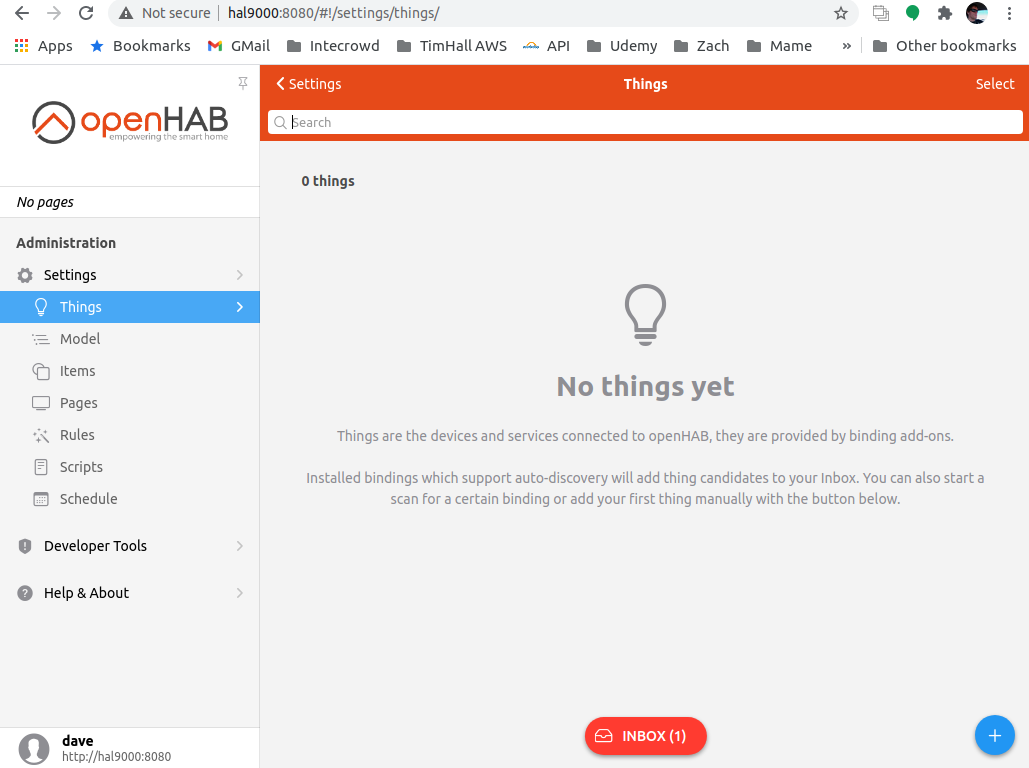
Clicking the inbox. This is where I have no clue as to how to proceed...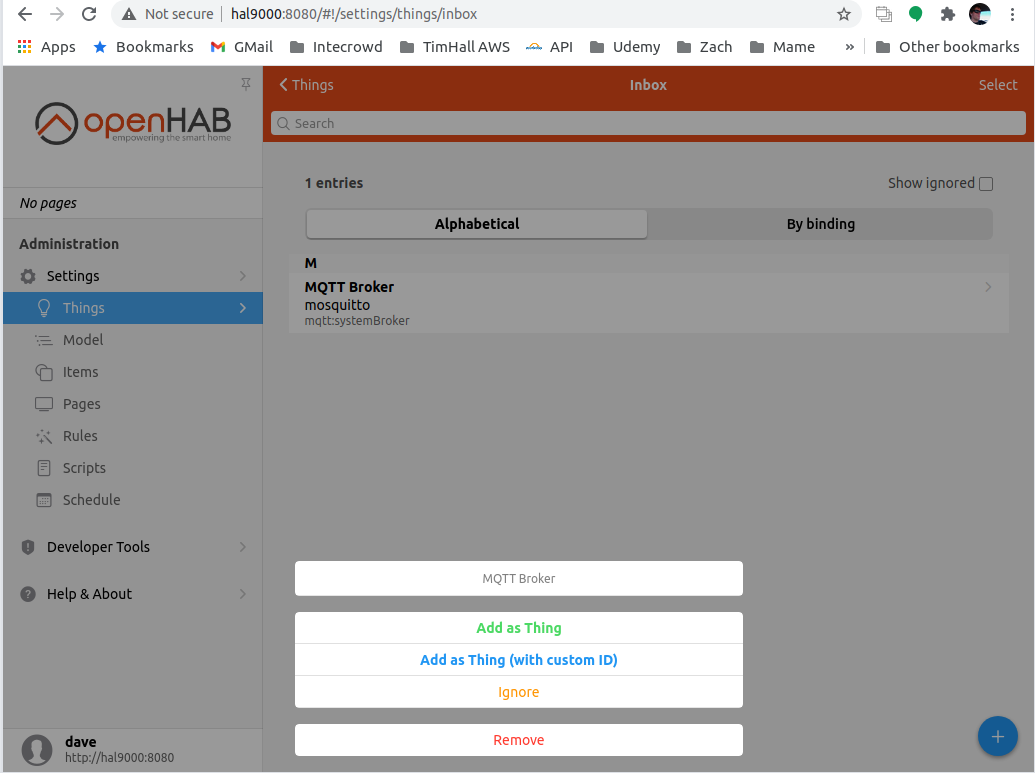
-
so to follow up:
Here is the log after adding the thing systembroker:
21:28:27.906 [INFO ] [o.transport.mqtt.MqttBrokerConnection] - Starting MQTT broker connection to '192.168.1.151' with clientid bd9a756d-5cf7-46b0-adaa-856d29f8b587
21:29:27.913 [INFO ] [t.reconnect.PeriodicReconnectStrategy] - Try to restore connection to '192.168.1.151'. Next attempt in 60000ms
21:29:27.920 [INFO ] [o.transport.mqtt.MqttBrokerConnection] - Starting MQTT broker connection to '192.168.1.151' with clientid bd9a756d-5cf7-46b0-adaa-856d29f8b587
21:30:27.925 [INFO ] [t.reconnect.PeriodicReconnectStrategy] - Try to restore connection to '192.168.1.151'. Next attempt in 60000ms
21:30:27.933 [INFO ] [o.transport.mqtt.MqttBrokerConnection] - Starting MQTT broker connection to '192.168.1.151' with clientid bd9a756d-5cf7-46b0-adaa-856d29f8b587
21:31:05.860 [INFO ] [openhab.event.InboxRemovedEvent      ] - Discovery Result with UID 'mqtt:systemBroker:mosquitto' has been removed.
21:31:06.015 [INFO ] [hab.event.ThingStatusInfoChangedEvent] - Thing 'mqtt:systemBroker:mosquitto' changed from UNINITIALIZED to INITIALIZING
21:31:06.072 [INFO ] [hab.event.ThingStatusInfoChangedEvent] - Thing 'mqtt:systemBroker:mosquitto' changed from INITIALIZING to OFFLINE
21:31:06.079 [INFO ] [o.transport.mqtt.MqttBrokerConnection] - Starting MQTT broker connection to '192.168.1.151' with clientid bd9a756d-5cf7-46b0-adaa-856d29f8b587
21:31:06.130 [INFO ] [hab.event.ThingStatusInfoChangedEvent] - Thing 'mqtt:systemBroker:mosquitto' changed from OFFLINE to OFFLINE (COMMUNICATION_ERROR): Timeout
21:31:06.135 [INFO ] [hab.event.ThingStatusInfoChangedEvent] - Thing 'mqtt:systemBroker:mosquitto' changed from OFFLINE (COMMUNICATION_ERROR): Timeout to OFFLINE (COMMUNICATION_ERROR): java.io.IOException: Connection reset by peer
21:31:27.938 [INFO ] [t.reconnect.PeriodicReconnectStrategy] - Try to restore connection to '192.168.1.151'. Next attempt in 60000ms
21:31:27.943 [INFO ] [hab.event.ThingStatusInfoChangedEvent] - Thing 'mqtt:systemBroker:mosquitto' changed from OFFLINE (COMMUNICATION_ERROR): java.io.IOException: Connection reset by peer to OFFLINE
21:31:27.951 [INFO ] [o.transport.mqtt.MqttBrokerConnection] - Starting MQTT broker connection to '192.168.1.151' with clientid bd9a756d-5cf7-46b0-adaa-856d29f8b587
21:31:27.986 [INFO ] [hab.event.ThingStatusInfoChangedEvent] - Thing 'mqtt:systemBroker:mosquitto' changed from OFFLINE to OFFLINE (COMMUNICATION_ERROR): java.io.IOException: Connection reset by peer
21:32:27.956 [INFO ] [t.reconnect.PeriodicReconnectStrategy] - Try to restore connection to '192.168.1.151'. Next attempt in 60000ms
21:32:27.967 [INFO ] [o.transport.mqtt.MqttBrokerConnection] - Starting MQTT broker connection to '192.168.1.151' with clientid bd9a756d-5cf7-46b0-adaa-856d29f8b587
21:32:27.968 [INFO ] [hab.event.ThingStatusInfoChangedEvent] - Thing 'mqtt:systemBroker:mosquitto' changed from OFFLINE (COMMUNICATION_ERROR): java.io.IOException: Connection reset by peer to OFFLINE
21:32:28.014 [INFO ] [hab.event.ThingStatusInfoChangedEvent] - Thing 'mqtt:systemBroker:mosquitto' changed from OFFLINE to OFFLINE (COMMUNICATION_ERROR): java.io.IOException: Connection reset by peer
Here is how I configured the thing:
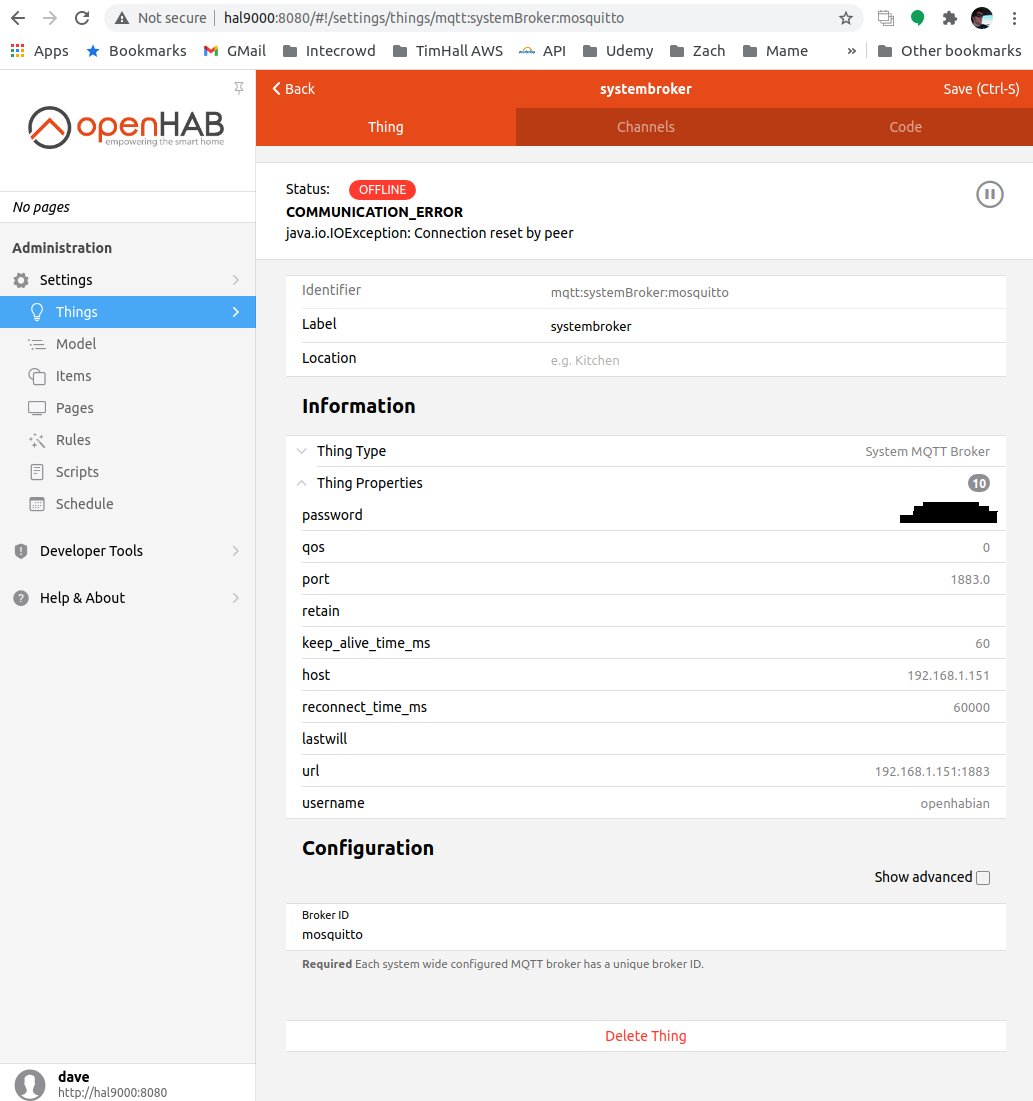

Hello! It looks like you're interested in this conversation, but you don't have an account yet.
Getting fed up of having to scroll through the same posts each visit? When you register for an account, you'll always come back to exactly where you were before, and choose to be notified of new replies (either via email, or push notification). You'll also be able to save bookmarks and upvote posts to show your appreciation to other community members.
With your input, this post could be even better 💗
Register Login