Skip to content
  • MySensors
  • OpenHardware.io
  • Categories
  • Recent
  • Tags
  • Popular
Skins
  • Light
  • Brite
  • Cerulean
  • Cosmo
  • Flatly
  • Journal
  • Litera
  • Lumen
  • Lux
  • Materia
  • Minty
  • Morph
  • Pulse
  • Sandstone
  • Simplex
  • Sketchy
  • Spacelab
  • United
  • Yeti
  • Zephyr
  • Dark
  • Cyborg
  • Darkly
  • Quartz
  • Slate
  • Solar
  • Superhero
  • Vapor

  • Default (No Skin)
  • No Skin
Collapse
Brand Logo
  1. Home
  2. General Discussion
  3. Problems uploading Serial Gateway on to Arduino Pro Micro

Problems uploading Serial Gateway on to Arduino Pro Micro

Scheduled Pinned Locked Moved General Discussion
19 Posts 3 Posters 7.1k Views 3 Watching
  • Oldest to Newest
  • Newest to Oldest
  • Most Votes
Reply
  • Reply as topic
Log in to reply
This topic has been deleted. Only users with topic management privileges can see it.
  • rvendrameR Offline
    rvendrameR Offline
    rvendrame
    Hero Member
    wrote on last edited by
    #6

    You must see 'Gateway started' or something like that in serial monitor. Otherwise your controller will not notice it.

    Home Assistant / Vera Plus UI7
    ESP8266 GW + mySensors 2.3.2
    Alexa / Google Home

    1 Reply Last reply
    0
    • D Offline
      D Offline
      den2k
      wrote on last edited by den2k
      #7

      I have a Pi Controller. Do you mean I need to see "Gateway started" in the serial monitor on the Arduino IDE when I have the Pro Micro gateway connected to the PC?

      Just trying to be extra clear, as it seems to be working for some many, so I'm trying to rule out stupid assumptions on my end.

      If yes. I dont see anything.

      I downloaded MySensor 1.5 API and believe I correctly followed the instructions....I've done this a few times already... Hmmm.

      SparkmanS 1 Reply Last reply
      0
      • D den2k

        I have a Pi Controller. Do you mean I need to see "Gateway started" in the serial monitor on the Arduino IDE when I have the Pro Micro gateway connected to the PC?

        Just trying to be extra clear, as it seems to be working for some many, so I'm trying to rule out stupid assumptions on my end.

        If yes. I dont see anything.

        I downloaded MySensor 1.5 API and believe I correctly followed the instructions....I've done this a few times already... Hmmm.

        SparkmanS Offline
        SparkmanS Offline
        Sparkman
        Hero Member
        wrote on last edited by Sparkman
        #8

        @den2k said:

        Do you mean I need to see "Gateway started" in the serial monitor on the Arduino IDE when I have the Pro Micro gateway connected to the PC?

        Yes, that's what you need to see. It's odd that you don't see anything. Are you sure it's programming correctly? I updated my serial gateway from 1.4 to 1.5 tonight and I had no issues. Which version of the Arduino IDE are you using? Did you delete the 1.4 libraries from the Arduino libraries section?

        Cheers
        Al

        1 Reply Last reply
        0
        • D Offline
          D Offline
          den2k
          wrote on last edited by
          #9

          I'm using Arduino IDE 1.6.5.

          SparkmanS 1 Reply Last reply
          0
          • D den2k

            I'm using Arduino IDE 1.6.5.

            SparkmanS Offline
            SparkmanS Offline
            Sparkman
            Hero Member
            wrote on last edited by
            #10

            @den2k That's what I used as well. If you downloaded the 1.5 zip file, delete all of the 1.4 files and drop all of the folders in the libraries folder in the zip file into your local Arduino libraries folder. Also, can you confirm which exact Arduino you are using (maybe provide a link).

            Cheers
            Al

            1 Reply Last reply
            0
            • D Offline
              D Offline
              den2k
              wrote on last edited by
              #11

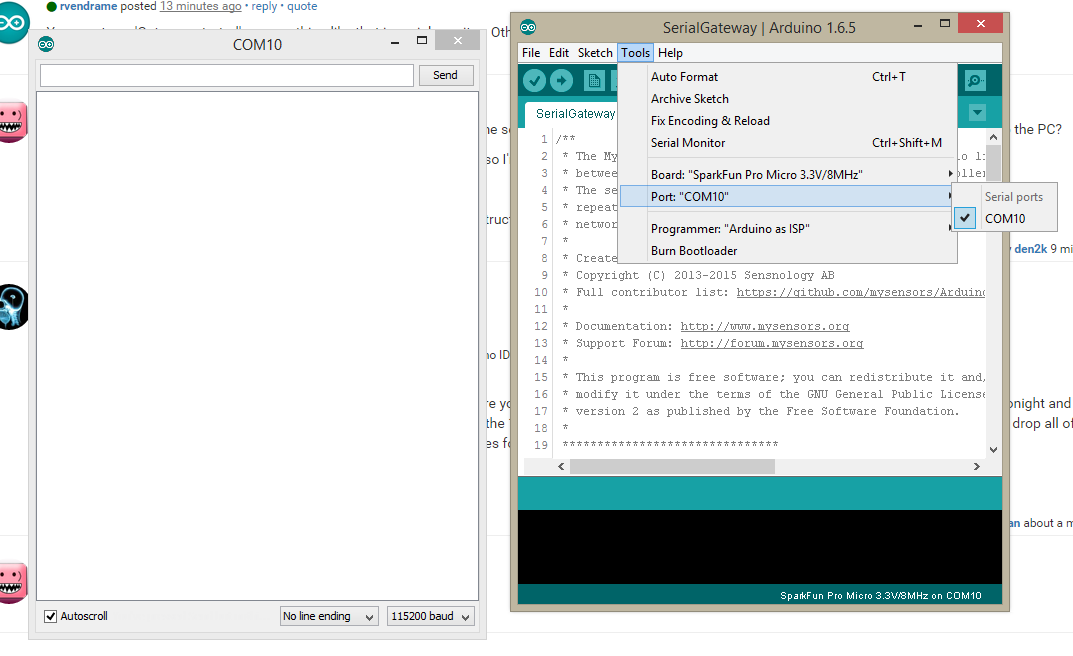
              This is what I see.
              upload-e2cd0ccc-1b64-40ea-913c-c7c34fc342d9

              1 Reply Last reply
              0
              • rvendrameR Offline
                rvendrameR Offline
                rvendrame
                Hero Member
                wrote on last edited by
                #12

                "Arduino as ISP"? Did you try the standard "AVR ISP mkII' instead?

                "Arduino as ISP" Means you are using an arduino to program another arduino (as described here). If you are connecting the target-arduno directly into an FTDI-USB adapter, use AVR ISP-like ....

                Even if you do have two arduinos, after uploading your program you must use an FTDI adapter directly between your target-arduino and your computer-usb. I'm saying that because I could never get serial monitor using 'ArduinoISP' programmer, maybe it works with some trick.

                Home Assistant / Vera Plus UI7
                ESP8266 GW + mySensors 2.3.2
                Alexa / Google Home

                1 Reply Last reply
                0
                • D Offline
                  D Offline
                  den2k
                  wrote on last edited by den2k
                  #13

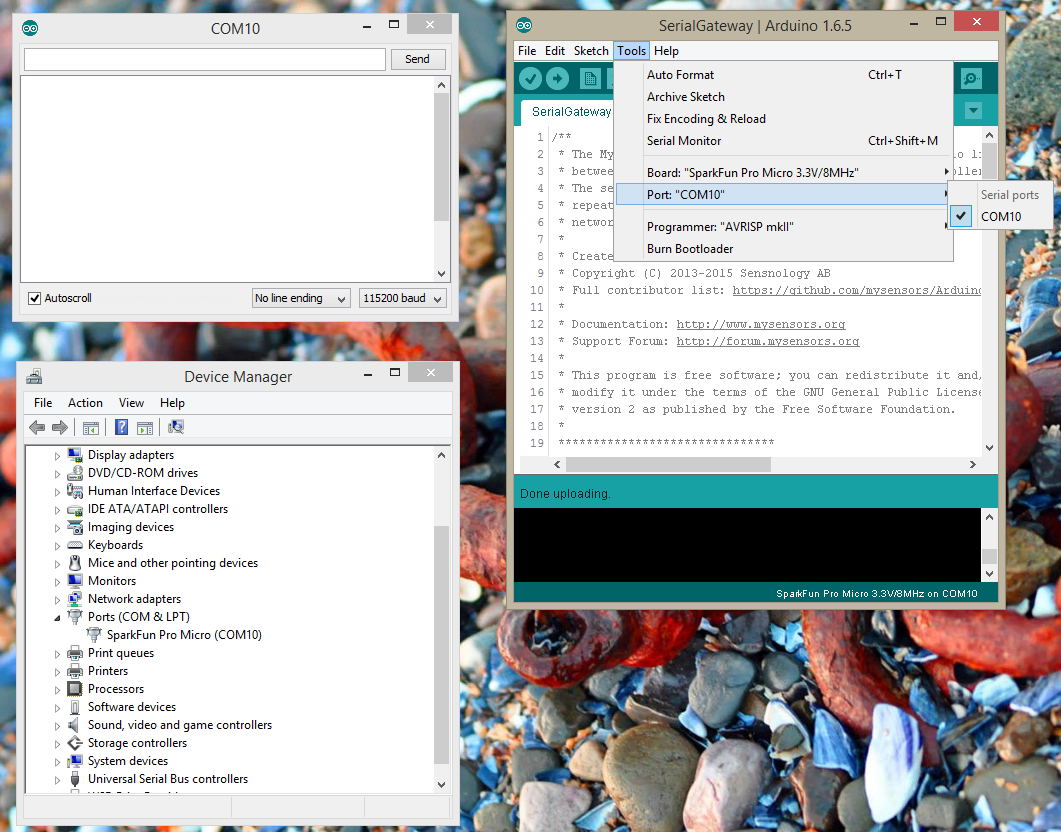
                  I changed it to AVRISP mkll, Arduino ISP, Arduino as ISP. Didn't seem to make a difference....

                  Still not seeing anything on the serial monitor. After programming it successfully.

                  I may try deleting all libraries and try the install of MySensors again. I've seen that suggested else.

                  I did upgrade from 1.4 previously to 1.5. Was having problems (posted on separate thread) so thought 1.5 might help...
                  upload-3bd3f1e5-1627-40b4-9605-5c31260dd8ee

                  1 Reply Last reply
                  0
                  • D Offline
                    D Offline
                    den2k
                    wrote on last edited by den2k
                    #14

                    Nope.

                    I just finished

                    • reinstalling the Arduino IDE 1.6.5.
                    • Reinstalled Pro Micro Drivers
                    • Reinstalled Pro Micro PlugIn for IDE
                    • Reinstalled MySensors 1.5 libraries into IDE libraries
                    • Uploaded the Serial gateway script to the Pro Micro.
                    • Successfully compiled and uploaded to the micro.

                    Not working....still. I still don't see anything on the Serial Monitor.

                    What am I suppose to see on the Monitor?

                    SparkmanS 2 Replies Last reply
                    0
                    • D den2k

                      Nope.

                      I just finished

                      • reinstalling the Arduino IDE 1.6.5.
                      • Reinstalled Pro Micro Drivers
                      • Reinstalled Pro Micro PlugIn for IDE
                      • Reinstalled MySensors 1.5 libraries into IDE libraries
                      • Uploaded the Serial gateway script to the Pro Micro.
                      • Successfully compiled and uploaded to the micro.

                      Not working....still. I still don't see anything on the Serial Monitor.

                      What am I suppose to see on the Monitor?

                      SparkmanS Offline
                      SparkmanS Offline
                      Sparkman
                      Hero Member
                      wrote on last edited by
                      #15

                      @den2k Do you have a different Arduino you can test with?

                      D 1 Reply Last reply
                      0
                      • D den2k

                        Nope.

                        I just finished

                        • reinstalling the Arduino IDE 1.6.5.
                        • Reinstalled Pro Micro Drivers
                        • Reinstalled Pro Micro PlugIn for IDE
                        • Reinstalled MySensors 1.5 libraries into IDE libraries
                        • Uploaded the Serial gateway script to the Pro Micro.
                        • Successfully compiled and uploaded to the micro.

                        Not working....still. I still don't see anything on the Serial Monitor.

                        What am I suppose to see on the Monitor?

                        SparkmanS Offline
                        SparkmanS Offline
                        Sparkman
                        Hero Member
                        wrote on last edited by Sparkman
                        #16

                        @den2k Also, try connecting and pressing a reset switch on the Pro Micro quickly twice in a row just before uploading. See https://learn.sparkfun.com/tutorials/pro-micro--fio-v3-hookup-guide/troubleshooting-and-faq#ts-reset.

                        1 Reply Last reply
                        0
                        • D Offline
                          D Offline
                          den2k
                          wrote on last edited by
                          #17

                          I tried to check if it has anything to do with my nRF24L01+ radios.

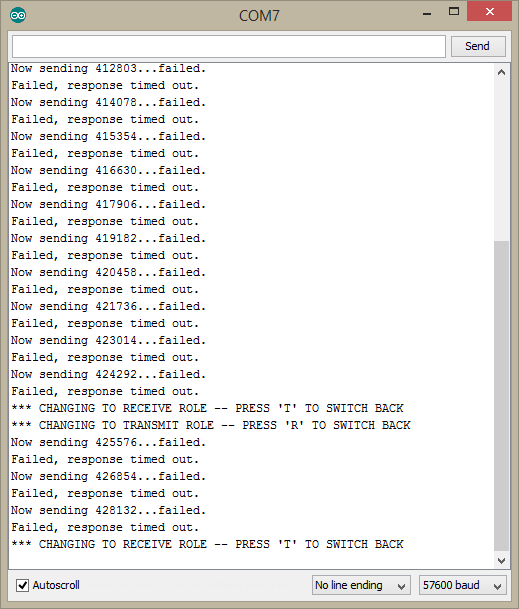
                          When I go back to basics and use the RF24 Getting Started example. this is what I get.

                          upload-f193aa6d-a6ea-481a-87b6-f3da60f61bde

                          Looking around I thought I was suppose to get a status register output on the serial monitor.

                          Does it mean the radios are not genuine?

                          I'm really pulling my hair out trying to figure this stuff out.

                          I know my radios works because I've used other examples to have different nRF radios send messages back and forth...

                          1 Reply Last reply
                          0
                          • SparkmanS Sparkman

                            @den2k Do you have a different Arduino you can test with?

                            D Offline
                            D Offline
                            den2k
                            wrote on last edited by den2k
                            #18

                            @Sparkman

                            I tried that. I'm pretty sure the radios and arduinos themselves work. I have several that I play with and have swapped out some - just to eliminate HW being the issue.

                            I'm guess it's a dumb problem that I caused....hmm

                            thanks for the help everyone! Just wished it was working!

                            1 Reply Last reply
                            0
                            • rvendrameR Offline
                              rvendrameR Offline
                              rvendrame
                              Hero Member
                              wrote on last edited by
                              #19

                              Maybe you can post a picture or schematics showing how you are connecting the radio to arduino? You last screenshot is showing only 'failed' for any radio operation.


                              Home Assistant / Vera Plus UI7
                              ESP8266 GW + mySensors 2.3.2
                              Alexa / Google Home

                              1 Reply Last reply
                              0
                              Reply
                              • Reply as topic
                              Log in to reply
                              • Oldest to Newest
                              • Newest to Oldest
                              • Most Votes


                              15

                              Online

                              11.7k

                              Users

                              11.2k

                              Topics

                              113.1k

                              Posts


                              Copyright 2025 TBD   |   Forum Guidelines   |   Privacy Policy   |   Terms of Service
                              • Login

                              • Don't have an account? Register

                              • Login or register to search.
                              • First post
                                Last post
                              0
                              • MySensors
                              • OpenHardware.io
                              • Categories
                              • Recent
                              • Tags
                              • Popular