Skip to content
  • MySensors
  • OpenHardware.io
  • Categories
  • Recent
  • Tags
  • Popular
Skins
  • Light
  • Brite
  • Cerulean
  • Cosmo
  • Flatly
  • Journal
  • Litera
  • Lumen
  • Lux
  • Materia
  • Minty
  • Morph
  • Pulse
  • Sandstone
  • Simplex
  • Sketchy
  • Spacelab
  • United
  • Yeti
  • Zephyr
  • Dark
  • Cyborg
  • Darkly
  • Quartz
  • Slate
  • Solar
  • Superhero
  • Vapor

  • Default (No Skin)
  • No Skin
Collapse
Brand Logo
  1. Home
  2. General Discussion
  3. Need some help to start....

Need some help to start....

Scheduled Pinned Locked Moved General Discussion
21 Posts 4 Posters 5.3k Views 1 Watching
  • Oldest to Newest
  • Newest to Oldest
  • Most Votes
Reply
  • Reply as topic
Log in to reply
This topic has been deleted. Only users with topic management privileges can see it.
  • M Offline
    M Offline
    mark76
    wrote on last edited by
    #1

    Hello together,

    Im "playing" with arduino since 1,5 years, but have not realy a deep understanding- so sorry when I am asking a lot to much... and sorry when my english is not the best one (would be great to get some hints to improve my english)

    I have allready built a little network for my lamps, based on Maniacbugs library- so most of the hardware is already built (4 Main- lamps, some lamps in furnitures and some wall lamps). Lamps are working with 12V or 36V... today I have built 9 additional Sensors incl. PIR, IR-remote sensor and 3 WS2812- LEDs for status-feedback.

    At the moment one node is sending programm-numbers (1-10) depending on time and sunlight. Lamps takes brightness and color depending on program received. That is only working with 1-way communication.

    So now I have found these great page with a lot off great ideas and I wanted to make my light a little bit smarter....

    what do I want to built:

    I would like to use my own Head-unit (Arduino Mega, DS3132, Nrf24, 3,2TFT) to handle datas...
    In every room I would like to use 2-4 sensor nodes receiving datas from IR-remote and PIR- sensor... these data should be sended to head-unit, to give order to lamps.
    So lamps only need to receive values for fading, brightness and color.

    I try to descibe function in short way: when moving is in room 1, light has to fade to values that are given. when moving stopps in room 1, but no moving in room 2, light has to be switched on. when moving in room 1 stopps and moving starts in room 2, light should be fading down in room 1 and up in room 2.... and so on...

    So, now I have read a lot and have download library and examples and have no idea how to start, cause there a such high number of information...

    I would please you to show me the right direction, would need some help to start communication from sensor-node to head-unit-node and to the lamp...
    I have no idea how to adress nodes and so on...

    1 Reply Last reply
    0
    • mfalkviddM Offline
      mfalkviddM Offline
      mfalkvidd
      Mod
      wrote on last edited by
      #2

      Welcome to MySensors @mark76, great to have you here.

      As for the English part, my guess is that most of us aren't native English speakers. I nice and easy way to improve spelling and grammar is to use a dictionary in your browser. Here is how to enable it in Firefox: https://support.mozilla.org/en-US/kb/how-do-i-use-firefox-spell-checker but I'm sure it can be done in other browsers as well.

      Have you read the getting started instructions? How far have you come so far?

      After that, you can probably build 1 lamp, for example using the relay instructions or the dimmer instruction and control it from your controller. Next step could be to build an IR sender/receiver.

      1 Reply Last reply
      0
      • M Offline
        M Offline
        mark76
        wrote on last edited by
        #3

        hello @mfalkvidd : thanks for quick feedback.... I have read a lot till now... but have not find all off that what you have linked... so, many thanks for that links, I will now start to read and come back with further questions when I am ready with my first "lesson" ... :-)

        1 Reply Last reply
        0
        • mfalkviddM Offline
          mfalkviddM Offline
          mfalkvidd
          Mod
          wrote on last edited by
          #4

          Great, good luck!

          1 Reply Last reply
          0
          • M Offline
            M Offline
            mark76
            wrote on last edited by
            #5

            OK, what I have understood till now is that 1. I do not need a controler like VEGA. 2. all Sensor can be done as described here: http://www.mysensors.org/download/sensor_api_15#create-repeating-nodes 3. all lamps and my "head-unit" should be done based on that one: http://www.mysensors.org/download/sensor_api_15#create-repeating-nodes

            Am I right?

            1 Reply Last reply
            0
            • mfalkviddM Offline
              mfalkviddM Offline
              mfalkvidd
              Mod
              wrote on last edited by
              #6

              Repeating nodes are good, yes. They strengthen the communication abilities between nodes.

              You can configure everything without a controller, but I think that will be a lot more work than if you use a controller.

              1 Reply Last reply
              0
              • M Offline
                M Offline
                mark76
                wrote on last edited by
                #7

                Hm.... So, if I am right- I has to make a plan and fix the adresses for each node... and everything else should be the same (?)
                I do not want to control something-it all should run full automaticly- only color chould be changed via IR- remote if necessary... in the same it is working in my old version... do you like to see the old sketches based on manacbugs libary? to get an impression of what the system should do...

                1 Reply Last reply
                0
                • M Offline
                  M Offline
                  mark76
                  wrote on last edited by
                  #8

                  I have now tested some examples... but get allways failure....

                  In file included from MotionSensor.ino:30:0:
                  /home/mark/sketchbook/libraries/MySensors/MySensor.h:158:70: error: expected type-specifier before ‘MyHwDriver’
                  MySensor(MyTransport &radio =*new MyTransportNRF24(), MyHw &hw=*new MyHwDriver()
                  ^
                  MotionSensor.ino:38:10: error: call to ‘MySensor::MySensor(MyTransport&, MyHw&)’ uses the default argument for parameter 2, which is not yet defined

                  1 Reply Last reply
                  0
                  • sundberg84S Offline
                    sundberg84S Offline
                    sundberg84
                    Hardware Contributor
                    wrote on last edited by sundberg84
                    #9

                    Hi Mark!

                    Which library do you run? Also upload the code so we can have a look.
                    Is it the normal motionsensor example? If so it looks like it cant find MySensors liberary.

                    (Line 30): #include <MySensor.h>
                    Have you downloaded and installed the liberary?

                    Controller: Proxmox VM - Home Assistant
                    MySensors GW: Arduino Uno - W5100 Ethernet, Gw Shield Nrf24l01+ 2,4Ghz
                    MySensors GW: Arduino Uno - Gw Shield RFM69, 433mhz
                    RFLink GW - Arduino Mega + RFLink Shield, 433mhz

                    1 Reply Last reply
                    0
                    • M Offline
                      M Offline
                      mark76
                      wrote on last edited by
                      #10

                      Yes, I have downloaded the last version of library- path is showing in failure... and it is the example code w/o changings...

                      1 Reply Last reply
                      0
                      • sundberg84S Offline
                        sundberg84S Offline
                        sundberg84
                        Hardware Contributor
                        wrote on last edited by
                        #11

                        @mark76 If you dont get it to work i would reinstall the library: http://www.mysensors.org/about/arduino#installing-the-sensor-libraries
                        Im not sure - but since its that line where you include mysensors it believe it cant find the lib.

                        Controller: Proxmox VM - Home Assistant
                        MySensors GW: Arduino Uno - W5100 Ethernet, Gw Shield Nrf24l01+ 2,4Ghz
                        MySensors GW: Arduino Uno - Gw Shield RFM69, 433mhz
                        RFLink GW - Arduino Mega + RFLink Shield, 433mhz

                        1 Reply Last reply
                        0
                        • M Offline
                          M Offline
                          mark76
                          wrote on last edited by
                          #12

                          I have now tried to re-install lib 3x.... I am stumbeling a little bit, cause I have allready a libraries folder and have copied all folders from MySensors- library folder to that folder... cause my understanding is that all libraries should be in the same folder....

                          1 Reply Last reply
                          0
                          • sundberg84S Offline
                            sundberg84S Offline
                            sundberg84
                            Hardware Contributor
                            wrote on last edited by
                            #13

                            That sounds right. When you open arduino ide do you find MySensors under the example menu?

                            Controller: Proxmox VM - Home Assistant
                            MySensors GW: Arduino Uno - W5100 Ethernet, Gw Shield Nrf24l01+ 2,4Ghz
                            MySensors GW: Arduino Uno - Gw Shield RFM69, 433mhz
                            RFLink GW - Arduino Mega + RFLink Shield, 433mhz

                            1 Reply Last reply
                            0
                            • E Offline
                              E Offline
                              ericvdb
                              wrote on last edited by
                              #14

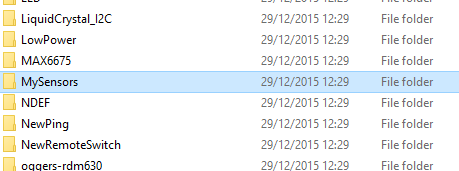
                              Your libraries folder should look like this:

                              upload-ebc1aaee-0c0f-4184-ad7d-3a54681bf9a7

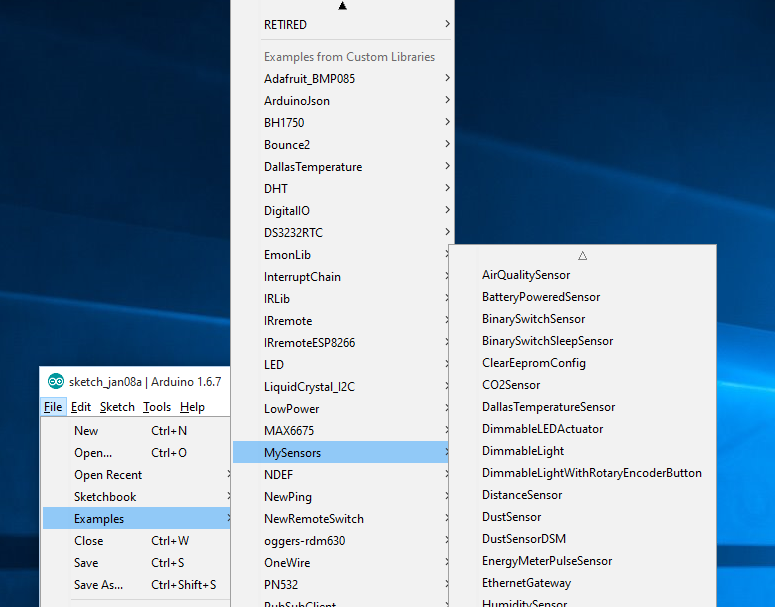
                              Then you should see in the arduino gui:

                              upload-c7796245-4038-4239-ad0f-54f367de54ab

                              1 Reply Last reply
                              0
                              • M Offline
                                M Offline
                                mark76
                                wrote on last edited by
                                #15

                                yes.... every thing seams to be correct...

                                1 Reply Last reply
                                0
                                • sundberg84S Offline
                                  sundberg84S Offline
                                  sundberg84
                                  Hardware Contributor
                                  wrote on last edited by
                                  #16

                                  Hi!
                                  Any luck @mark76 ? Only difference from me is that you run 1.6.7 arduino IDE... but that shouldnt make the errors... Can you post a code/screeshot of all the error? (Complete log).

                                  Controller: Proxmox VM - Home Assistant
                                  MySensors GW: Arduino Uno - W5100 Ethernet, Gw Shield Nrf24l01+ 2,4Ghz
                                  MySensors GW: Arduino Uno - Gw Shield RFM69, 433mhz
                                  RFLink GW - Arduino Mega + RFLink Shield, 433mhz

                                  1 Reply Last reply
                                  0
                                  • M Offline
                                    M Offline
                                    mark76
                                    wrote on last edited by
                                    #17

                                    No chance.... error is only that one I have postet... Could be that the IDE causes the problem?

                                    1 Reply Last reply
                                    0
                                    • sundberg84S Offline
                                      sundberg84S Offline
                                      sundberg84
                                      Hardware Contributor
                                      wrote on last edited by
                                      #18

                                      If nothing else works you could try download another version and try... but i doubt it.

                                      Controller: Proxmox VM - Home Assistant
                                      MySensors GW: Arduino Uno - W5100 Ethernet, Gw Shield Nrf24l01+ 2,4Ghz
                                      MySensors GW: Arduino Uno - Gw Shield RFM69, 433mhz
                                      RFLink GW - Arduino Mega + RFLink Shield, 433mhz

                                      1 Reply Last reply
                                      0
                                      • E Offline
                                        E Offline
                                        ericvdb
                                        wrote on last edited by
                                        #19

                                        As you can see in my screenshots, i'm also running 1.6.7 and i have no issues at all.

                                        1 Reply Last reply
                                        0
                                        • M Offline
                                          M Offline
                                          mark76
                                          wrote on last edited by
                                          #20

                                          One question regarding that issue.... Do I have to tell the Sketch that I am working with nrf24? That library is very big and it is not easy to get an overview what library is doing in the backround.... But from my point of view I should define the Radio I use... (?)


                                          1 Reply Last reply
                                          0
                                          Reply
                                          • Reply as topic
                                          Log in to reply
                                          • Oldest to Newest
                                          • Newest to Oldest
                                          • Most Votes


                                          19

                                          Online

                                          11.7k

                                          Users

                                          11.2k

                                          Topics

                                          113.1k

                                          Posts


                                          Copyright 2025 TBD   |   Forum Guidelines   |   Privacy Policy   |   Terms of Service
                                          • Login

                                          • Don't have an account? Register

                                          • Login or register to search.
                                          • First post
                                            Last post
                                          0
                                          • MySensors
                                          • OpenHardware.io
                                          • Categories
                                          • Recent
                                          • Tags
                                          • Popular