
[Newbie] Vera barometric sensor detection
-
Hi,
I think the Value is the pressure in Pa...
Maybe you can divide it by 100 to turn it in Hpa to let it working with Vera...
You can see the comment on the bottom of the page..
http://www.mysensors.org/build/pressure
BR. -
Hi,
thanks for the replies.
In fact, my problem is the detection of the sensor by my Veralite.
The 98828 number is the pressure, and on my pc connected by USB the sensors retrieve good values (temp + pressure) by the vera plugin doest not detect the sensor.Thanks.
-
Hi,
thanks for the replies.
In fact, my problem is the detection of the sensor by my Veralite.
The 98828 number is the pressure, and on my pc connected by USB the sensors retrieve good values (temp + pressure) by the vera plugin doest not detect the sensor.Thanks.
@javier said:
I actually looked at the code you posted above now.
You seem to have mixed up things a bit. For sensors you must use Sensor or Relay-classes. Not Gateway. Gateway should only be used for the the gateway.Please look at the provided examples on http://www.mysensors.org.
-
-
@hek you are right, because I thought it was necessary.
As I mentionned I'm newbie on arduino, so I don't really know what is necessary or not so I tried to make a mix of the sketchs.@hek sorry for my long absence but I did'nt have much time to spend on it.
I tried from scrash the inclusion of my baromtere sensor, following your tuto
1 = upload to my USB arduino the original ArduinoGateway sketch
2 = plug my arduino to my vera using USB hub
3 = upload files plugin to my vera
4 = create the device
5 = configure the serial port for the new module
6 = reload vera twice and then the module appear with the lib version (1.3b3)
At this time I'm able to click on the "Start" button but of course no sensor is detected
8 = unplug my arduino, plg my barometer sensor to my arduino,
9 = load the BMP085 Barometric Pressure & Temp Sensor sketch changing only the baud rate (9600 to 115200)
10 = test on my PC work fine (I get temp and barometer values)
11 = plug my arduino to the VERA
At this time the "Start" button doesn't work any more, even after many reload of my veraI guess I'm missing something but I don't see what.
Thanks for your help. -
@hek sorry for my long absence but I did'nt have much time to spend on it.
I tried from scrash the inclusion of my baromtere sensor, following your tuto
1 = upload to my USB arduino the original ArduinoGateway sketch
2 = plug my arduino to my vera using USB hub
3 = upload files plugin to my vera
4 = create the device
5 = configure the serial port for the new module
6 = reload vera twice and then the module appear with the lib version (1.3b3)
At this time I'm able to click on the "Start" button but of course no sensor is detected
8 = unplug my arduino, plg my barometer sensor to my arduino,
9 = load the BMP085 Barometric Pressure & Temp Sensor sketch changing only the baud rate (9600 to 115200)
10 = test on my PC work fine (I get temp and barometer values)
11 = plug my arduino to the VERA
At this time the "Start" button doesn't work any more, even after many reload of my veraI guess I'm missing something but I don't see what.
Thanks for your help.@javier Do you have a USB Gateway AND an Arduino Sensor with the BMP ... two separate devices linked by radio. It SOUNDS like you are trying to run the Baro sensor on the Gateway?
-
-
Hi,
I'm trying to make my vera lite detect my barometric sensor BMP085 (Bosch model).
the following skecth work fine using arduino ide but my vera refuse to detect it:/*
- Copyright (C) 2013 Henrik Ekblad henrik.ekblad@gmail.com
- This program is free software; you can redistribute it and/or
- modify it under the terms of the GNU General Public License
- version 2 as published by the Free Software Foundation.
- DESCRIPTION
- The ArduinoGateway prints data received from sensors on the serial link.
- The gateway accepts input on seral which will be sent out on radio network.
- The GW code is designed for Arduino Nano 328p / 16MHz
- Wire connections (OPTIONAL):
-
- Inclusion button should be connected between digital pin 3 and GND
-
- RX/TX/ERR leds need to be connected between +5V (anode) and digital ping 6/5/4 with resistor 270-330R in a series
- LED purposes:
-
- RX (green) - blink fast on radio message recieved. In inclusion mode will blink fast only on presentation recieved
-
- TX (yellow) - blink fast on radio message transmitted. In inclusion mode will blink slowly
-
- ERR (red) - fast blink on error during transmission error or recieve crc error
*/
- ERR (red) - fast blink on error during transmission error or recieve crc error
#include <SPI.h>
#include <EEPROM.h>
#include <RF24.h>
#include <MsTimer2.h>
#include <PinChangeInt.h>
#include <Gateway.h>
#include <stdarg.h>
#include <avr/progmem.h>
#include <Wire.h>
#include <Adafruit_BMP085.h>#define INCLUSION_MODE_TIME 1 // Number of minutes inclusion mode is enabled
#define INCLUSION_MODE_PIN 3 // Digital pin used for inclusion mode button// No blink or button functionality. Use the vanilla constructor.
//Gateway gw;// To start gateway with include button and led blinking functionality enabled use this instead!
Gateway gw(9, 10, INCLUSION_MODE_TIME, INCLUSION_MODE_PIN, 6, 5, 4);
float lastPressure = -1;
char inputString[MAX_RECEIVE_LENGTH] = ""; // A string to hold incoming commands from serial/ethernet interface
int inputPos = 0;
boolean commandComplete = false; // whether the string is complete
Adafruit_BMP085 bmp = Adafruit_BMP085(); // Digital Pressure Sensorvoid setup()
{
gw.begin();
Serial.begin(115200);
if (!bmp.begin()) {
Serial.println("Could not find a valid BMP085 sensor, check wiring!");
while (1) {}
}
// C++ classes and interrupts really sucks. Need to attach interrupt
// outside thw Gateway class due to language shortcomings! Gah!
gw.sendSensorPresentation(0, S_BARO);if (gw.isLedMode()) {
// Add led timer interrupt
MsTimer2::set(300, ledTimersInterrupt);
MsTimer2::start();
// Add interrupt for inclustion button to pin
PCintPort::attachInterrupt(INCLUSION_MODE_PIN, startInclusionInterrupt, RISING);
}
}void loop()
{Serial.print("Temperature = "); Serial.print(bmp.readTemperature()); Serial.println(" *C"); Serial.print("Pressure = "); Serial.print(bmp.readPressure()); Serial.println(" Pa");float pressure = bmp.readPressure();
if (pressure != lastPressure) {
gw.sendVariable(0, V_PRESSURE, pressure, 0);
lastPressure = pressure;
}// Calculate altitude assuming 'standard' barometric // pressure of 1013.25 millibar = 101325 Pascal Serial.print("Altitude = "); Serial.print(bmp.readAltitude()); Serial.println(" meters");// you can get a more precise measurement of altitude
// if you know the current sea level pressure which will
// vary with weather and such. If it is 1015 millibars
// that is equal to 101500 Pascals.
Serial.print("Real altitude = ");
Serial.print(bmp.readAltitude(101500));
Serial.println(" meters");Serial.println(); delay(500); checkSerialInput();}
void startInclusionInterrupt() {
gw.startInclusionInterrupt();
}void ledTimersInterrupt() {
gw.ledTimersInterrupt();
}void checkSerialInput() {
if (commandComplete) {
// A command wass issued from serial interface
// We will now try to send it to the actuator
gw.parseAndSend(inputString);
commandComplete = false;
inputPos = 0;
}
}/*
SerialEvent occurs whenever a new data comes in the
hardware serial RX. This routine is run between each
time loop() runs, so using delay inside loop can delay
response. Multiple bytes of data may be available.
*/
void serialEvent() {
while (Serial.available()) {
// get the new byte:
char inChar = (char)Serial.read();
// if the incoming character is a newline, set a flag
// so the main loop can do something about it:
if (inputPos<MAX_RECEIVE_LENGTH-1 && !commandComplete) {
if (inChar == '\n') {
inputString[inputPos] = 0;
commandComplete = true;
} else {
// add it to the inputString:
inputString[inputPos] = inChar;
inputPos++;
}
} else {
// Incoming message too long. Throw away
inputPos = 0;
}
}
}Here is my vera plugin
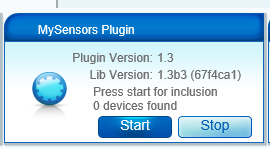
Thanks for your help !
@javierhttps://github.com/empierre/arduino
you can take mine which is pressure sensor
-
@epierre thanks but I guess I misunderstood some basics : I guessed I only needed ONE arduino nano USB + sensor pluged on it and the vera plugin to get sensor data retrieve by vera lite.
This is right ? or do I need more than one arduino ?sorry for my dummies questions :-)
-
@epierre thanks but I guess I misunderstood some basics : I guessed I only needed ONE arduino nano USB + sensor pluged on it and the vera plugin to get sensor data retrieve by vera lite.
This is right ? or do I need more than one arduino ?sorry for my dummies questions :-)
@javier clearly here your gateway has no radio... and all mysensors is about having wireless sensors speaking to a controller (e.g. the vera) through a wirelessgateway (the gateway).
I guess that if you don't want radio, you should write to the serial port the data in the form of the gateay, but don't need the gateway. That could be a bit complicated but not impossible.
-
@javier clearly here your gateway has no radio... and all mysensors is about having wireless sensors speaking to a controller (e.g. the vera) through a wirelessgateway (the gateway).
I guess that if you don't want radio, you should write to the serial port the data in the form of the gateay, but don't need the gateway. That could be a bit complicated but not impossible.
-
@clippermiami in fact I have my arduino nano and pluged in y pressure sensor.
The arduino nano is pluged into my Vera
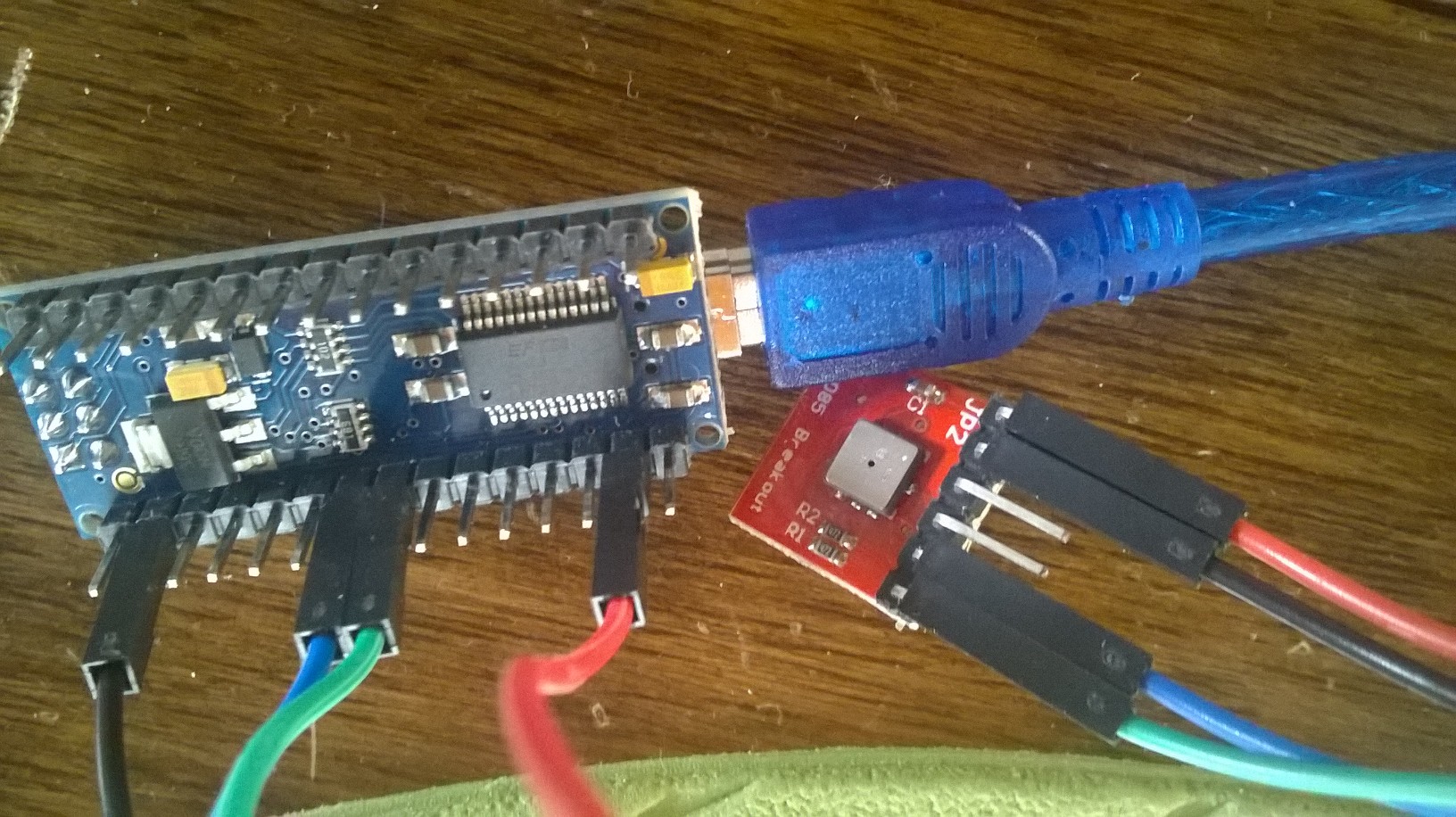
@javier the design principal is an
-
Arduino Gateway connected to the Vera, either directly over USB or indirectly via Ethernet; no sensors are attached to the Gateway;
-
Each Arduino Sensor Node has the various sensor devices and talks to the Gateway over a wireless connection
I vaguely recall there has been some discussion of attaching Sensor devices to the Gateway but don't recall that ever went anywhere.
-
-
@javier the design principal is an
-
Arduino Gateway connected to the Vera, either directly over USB or indirectly via Ethernet; no sensors are attached to the Gateway;
-
Each Arduino Sensor Node has the various sensor devices and talks to the Gateway over a wireless connection
I vaguely recall there has been some discussion of attaching Sensor devices to the Gateway but don't recall that ever went anywhere.
@clippermiami the conclusion was that the sensors may make the gateway miss some messages...
z-wave - Vera -> Domoticz
rfx - Domoticz <- MyDomoAtHome <- Imperihome
mysensors -> mysensors-gw -> Domoticz -
-
@clippermiami the conclusion was that the sensors may make the gateway miss some messages...
@epierre Thanks :)



Hello! It looks like you're interested in this conversation, but you don't have an account yet.
Getting fed up of having to scroll through the same posts each visit? When you register for an account, you'll always come back to exactly where you were before, and choose to be notified of new replies (either via email, or push notification). You'll also be able to save bookmarks and upvote posts to show your appreciation to other community members.
With your input, this post could be even better 💗
Register Login