
💬 Building a Raspberry Pi Gateway
-
Hi team,
First of all, thanks for this amazing project and this doc.
I'm trying to use arduino nanos with Raspberry Pi 2 as a gateway: I can get it working when I configure the Raspberry Pi using serial gateway, however, it does not work using MQTT with latest version from git.
The error message is:
"mysGateway: accept: Bad file descriptor"I followed all explanations given on this page.
Any idea?
Thanks again@manul Which MQTT broker are you using? Did you try to update it?
-
I wanted to use the mysGateway with a USB/RS485 converter.
Here is my config: ./configure --my-gateway=ethernet --my-port=5003 --my-transport=rs485 --my-rs485-serial-port=/dev/ttyUSB0 my-rs485-baudrate=57600
make does it's job, but after i start the gateway it says:
mysGateway: Starting gateway....
mysGateway: Protocol version - 2.0.1-beta
mysGateway: MCO:BGN:INIT GW,CP=RSNG---,VER=2.0.1-beta
mysGateway: TSM:INIT
mysGateway: TSM:INIT:TSP OK
mysGateway: TSM:INIT: GW Mode
mysGateway: TSM:READYafter that it stopped to work.
Whats wrong in my configuration?
-
I wanted to use the mysGateway with a USB/RS485 converter.
Here is my config: ./configure --my-gateway=ethernet --my-port=5003 --my-transport=rs485 --my-rs485-serial-port=/dev/ttyUSB0 my-rs485-baudrate=57600
make does it's job, but after i start the gateway it says:
mysGateway: Starting gateway....
mysGateway: Protocol version - 2.0.1-beta
mysGateway: MCO:BGN:INIT GW,CP=RSNG---,VER=2.0.1-beta
mysGateway: TSM:INIT
mysGateway: TSM:INIT:TSP OK
mysGateway: TSM:INIT: GW Mode
mysGateway: TSM:READYafter that it stopped to work.
Whats wrong in my configuration?
@hausinger Have you checked if /dev/ttyUSB0 is receiving any data?
-
The RPi port has just received a new update that changes some important things related to the location and name of the gateway binary and services:
mysGateway was renamed to mysgw
mysgateway service was renamed to mysgwNow, after successfully running the make command, you will find the gateway file under ./bin/mygw
Also, before installing the new version you need to manually remove the old one:
If you are using systemd
sudo systemctl disable mysgateway.service
sudo rm /etc/systemd/system/mysgateway.service
sudo rm /usr/local/bin/mysGateway
If you are using sysvinit
sudo update-rc.d -f mysgateway remove sudo rm /etc/init.d/mysgateway sudo rm /usr/local/bin/mysGateway -
@hausinger Have you checked if /dev/ttyUSB0 is receiving any data?
@marceloaqno said:
@hausinger Have you checked if /dev/ttyUSB0 is receiving any data?
Thank you for your answer. I don't know, how to check that? The wiring to my nodes is correct, the serial port is correct (dmesg says that).
Could you confirm, that my configuration from my last post is correct? -
@marceloaqno said:
@hausinger Have you checked if /dev/ttyUSB0 is receiving any data?
Thank you for your answer. I don't know, how to check that? The wiring to my nodes is correct, the serial port is correct (dmesg says that).
Could you confirm, that my configuration from my last post is correct?@hausinger
Your configuration is correct. To check the serial, install the screen package (if you haven't already done so) and run:screen /dev/ttyUSB0 57600You should see some strange characters being printed.
I did a quick test here with your setup and found out that there is a bug with the gateway when the rs485 baud rate is set to 57600. With 9600 it works fine. I'll try to fix this. -
@marceloaqno said:
@hausinger Have you checked if /dev/ttyUSB0 is receiving any data?
Thank you for your answer. I don't know, how to check that? The wiring to my nodes is correct, the serial port is correct (dmesg says that).
Could you confirm, that my configuration from my last post is correct?@hausinger You forgot "--" for my-rs485-baudrate=57600 in your configuration.
It should be:./configure --my-gateway=ethernet --my-port=5003 --my-transport=rs485 --my-rs485-serial-port=/dev/ttyUSB0 --my-rs485-baudrate=57600 -
@hausinger You forgot "--" for my-rs485-baudrate=57600 in your configuration.
It should be:./configure --my-gateway=ethernet --my-port=5003 --my-transport=rs485 --my-rs485-serial-port=/dev/ttyUSB0 --my-rs485-baudrate=57600@marceloaqno said:
@hausinger You forgot "--" for my-rs485-baudrate=57600 in your configuration.
It should be:./configure --my-gateway=ethernet --my-port=5003 --my-transport=rs485 --my-rs485-serial-port=/dev/ttyUSB0 --my-rs485-baudrate=57600Hi @marceloaqno
Thank you for your answers. Yes, i saw this, but I did the "--", i forgot it in the last post, because I can't use copy & paste on my raspberry (remote Desktop).Did this configuration work on your System?
Are you sure, that my configuration is ok? (with the "--")
Whats the normal behavior when i start the mysGateway with debug (mysGateway -d)? If i type the starting command in the terminal, the Gateway gives me the Messages (from my last post) and thats it (not more). I can now type a new commandI'm now not at home (Business trip), if I get home, i will try your "Screen" command
-
I followed the instruction above to make a mysgw file, but no file was generated.
-
I followed the instruction above to make a mysgw file, but no file was generated.
-
I reset everything and ran it again. It did generate the file this time. Thanks, - Now to test it.
-
Has anyone gotten the raspberry pi gateway to work with Openhab on the same raspberry pi? I have both the virtual and mqtt gateways working, but I can get either one to communicate with Openhab.
-
@marceloaqno said:
@hausinger You forgot "--" for my-rs485-baudrate=57600 in your configuration.
It should be:./configure --my-gateway=ethernet --my-port=5003 --my-transport=rs485 --my-rs485-serial-port=/dev/ttyUSB0 --my-rs485-baudrate=57600Hi @marceloaqno
Thank you for your answers. Yes, i saw this, but I did the "--", i forgot it in the last post, because I can't use copy & paste on my raspberry (remote Desktop).Did this configuration work on your System?
Are you sure, that my configuration is ok? (with the "--")
Whats the normal behavior when i start the mysGateway with debug (mysGateway -d)? If i type the starting command in the terminal, the Gateway gives me the Messages (from my last post) and thats it (not more). I can now type a new commandI'm now not at home (Business trip), if I get home, i will try your "Screen" command
@hausinger said:
@marceloaqno said:
@hausinger You forgot "--" for my-rs485-baudrate=57600 in your configuration.
It should be:./configure --my-gateway=ethernet --my-port=5003 --my-transport=rs485 --my-rs485-serial-port=/dev/ttyUSB0 --my-rs485-baudrate=57600Hi @marceloaqno
Thank you for your answers. Yes, i saw this, but I did the "--", i forgot it in the last post, because I can't use copy & paste on my raspberry (remote Desktop).Did this configuration work on your System?
Are you sure, that my configuration is ok? (with the "--")
Whats the normal behavior when i start the mysGateway with debug (mysGateway -d)? If i type the starting command in the terminal, the Gateway gives me the Messages (from my last post) and thats it (not more). I can now type a new commandI'm now not at home (Business trip), if I get home, i will try your "Screen" command
So I'm at home today and make some Test.
The screen comand gives me some strange characters, thats ok I think.But if i start the Gateway, I only get the same messages as shown in my other post.
Here are 2 Pics that show you, how it look like.
I also tried to make the gw with a baudrate of 9600, but still the same issues.!
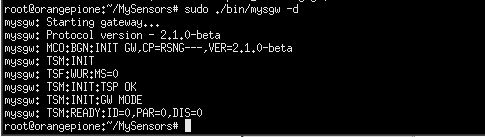
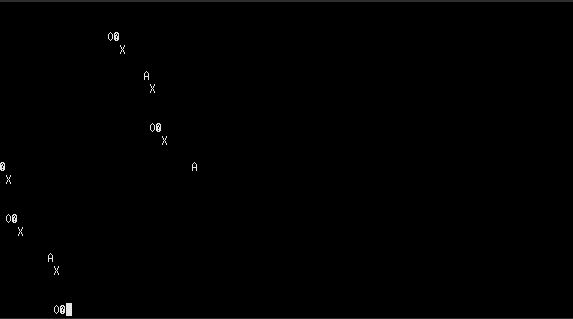
-
-
Have been running MySensors for some time now with a EthernetGW running on Arduino. To clean-up the installation, I'm trying to get the Gateway running on my Raspberry instead but something stops the make process.
pi@raspberrypi ~/MySensors $ ./configure --my-gateway=ethernet --my-port=5003 --my-transport=nrf24                       [SECTION] Detecting target machine.
[OK] machine detected: SoC=BCM2836, Type=Rpi2, CPU=armv7l, REV=a01041.
[OK] init system detected: sysvinit
[SECTION] Saving configuration.
[SECTION] Cleaning previous builds.
[OK] Finished.
pi@raspberrypi ~/MySensors $ make
gcc -MT build/drivers/Linux/log.o -MMD -MP -march=armv7-a -mtune=cortex-a7 -mfpu=neon-vfpv4 -mfloat-abi=hard -DMY_RADIO_NRF24 -DMY_GATEWAY_LINUX -DMY_DEBUG -DLINUX_ARCH_RASPBERRYPI -DMY_PORT=5003  -Ofast -g -Wall -Wextra  -I. -I./core -I./drivers/Linux -I./drivers/RPi -c drivers/Linux/log.c -o build/drivers/Linux/log.o
cc1: error: bad value (cortex-a7) for -mtune switch
Makefile:102: recipe for target 'build/drivers/Linux/log.o' failed
make: *** [build/drivers/Linux/log.o] Error 1
Any hints what I have done wrong ?
-
Issue solved, manual update of compiler from 4.6,3 -> 4.7.2 enables the make process. Similar problem also reported in post.
Using
- sudo apt-get update
- sudo apt-get upgrade
does not upgrade compiler. I used instruction according to How to upgrade GCC to 4.7+.
-
Have been running MySensors for some time now with a EthernetGW running on Arduino. To clean-up the installation, I'm trying to get the Gateway running on my Raspberry instead but something stops the make process.
pi@raspberrypi ~/MySensors $ ./configure --my-gateway=ethernet --my-port=5003 --my-transport=nrf24                       [SECTION] Detecting target machine.
[OK] machine detected: SoC=BCM2836, Type=Rpi2, CPU=armv7l, REV=a01041.
[OK] init system detected: sysvinit
[SECTION] Saving configuration.
[SECTION] Cleaning previous builds.
[OK] Finished.
pi@raspberrypi ~/MySensors $ make
gcc -MT build/drivers/Linux/log.o -MMD -MP -march=armv7-a -mtune=cortex-a7 -mfpu=neon-vfpv4 -mfloat-abi=hard -DMY_RADIO_NRF24 -DMY_GATEWAY_LINUX -DMY_DEBUG -DLINUX_ARCH_RASPBERRYPI -DMY_PORT=5003  -Ofast -g -Wall -Wextra  -I. -I./core -I./drivers/Linux -I./drivers/RPi -c drivers/Linux/log.c -o build/drivers/Linux/log.o
cc1: error: bad value (cortex-a7) for -mtune switch
Makefile:102: recipe for target 'build/drivers/Linux/log.o' failed
make: *** [build/drivers/Linux/log.o] Error 1
Any hints what I have done wrong ?
-
I created a virtual serial port using this ./configure --my-gateway=serial --my-serial-is-pty --my-serial-pty=/dev/ttyMySensorsGateway. I can see the port in the dev folder, but when I run dmesg I do not see it listed and therefore my openhab can not find it. How can I fix this?
-
@hausinger said:
@marceloaqno said:
@hausinger You forgot "--" for my-rs485-baudrate=57600 in your configuration.
It should be:./configure --my-gateway=ethernet --my-port=5003 --my-transport=rs485 --my-rs485-serial-port=/dev/ttyUSB0 --my-rs485-baudrate=57600Hi @marceloaqno
Thank you for your answers. Yes, i saw this, but I did the "--", i forgot it in the last post, because I can't use copy & paste on my raspberry (remote Desktop).Did this configuration work on your System?
Are you sure, that my configuration is ok? (with the "--")
Whats the normal behavior when i start the mysGateway with debug (mysGateway -d)? If i type the starting command in the terminal, the Gateway gives me the Messages (from my last post) and thats it (not more). I can now type a new commandI'm now not at home (Business trip), if I get home, i will try your "Screen" command
So I'm at home today and make some Test.
The screen comand gives me some strange characters, thats ok I think.But if i start the Gateway, I only get the same messages as shown in my other post.
Here are 2 Pics that show you, how it look like.
I also tried to make the gw with a baudrate of 9600, but still the same issues.!
@hausinger After the command:
sudo ./bin/mysgw -dIt wasn't supposed to go back to bash, the gateway would wait for new messages.
I'm not sure what's going on with your setup because I tested your configuration options here and it worked. -
I created a virtual serial port using this ./configure --my-gateway=serial --my-serial-is-pty --my-serial-pty=/dev/ttyMySensorsGateway. I can see the port in the dev folder, but when I run dmesg I do not see it listed and therefore my openhab can not find it. How can I fix this?
@jmmorgan83 You may need another name for the port, such as
./configure --my-gateway=serial --my-serial-is-pty --my-serial-pty=/dev/ttyUSB020



Hello! It looks like you're interested in this conversation, but you don't have an account yet.
Getting fed up of having to scroll through the same posts each visit? When you register for an account, you'll always come back to exactly where you were before, and choose to be notified of new replies (either via email, or push notification). You'll also be able to save bookmarks and upvote posts to show your appreciation to other community members.
With your input, this post could be even better 💗
Register Login