Skip to content
  • MySensors
  • OpenHardware.io
  • Categories
  • Recent
  • Tags
  • Popular
Skins
  • Light
  • Brite
  • Cerulean
  • Cosmo
  • Flatly
  • Journal
  • Litera
  • Lumen
  • Lux
  • Materia
  • Minty
  • Morph
  • Pulse
  • Sandstone
  • Simplex
  • Sketchy
  • Spacelab
  • United
  • Yeti
  • Zephyr
  • Dark
  • Cyborg
  • Darkly
  • Quartz
  • Slate
  • Solar
  • Superhero
  • Vapor

  • Default (No Skin)
  • No Skin
Collapse
Brand Logo
  1. Home
  2. Controllers
  3. Domoticz
  4. Serial Gateway connect problem ttyAMA0

Serial Gateway connect problem ttyAMA0

Scheduled Pinned Locked Moved Domoticz
11 Posts 4 Posters 5.8k Views 3 Watching
  • Oldest to Newest
  • Newest to Oldest
  • Most Votes
Reply
  • Reply as topic
Log in to reply
This topic has been deleted. Only users with topic management privileges can see it.
  • bjacobseB Offline
    bjacobseB Offline
    bjacobse
    wrote on last edited by
    #2

    how many different USB devices do you have connected to your RPI2?
    Mine using RPI3 is connected to dev/ttyUSB0
    what happens when you type in a command prompt dmesg | grep tty?

     dmesg |grep tty
    [    0.000000] Kernel command line: 8250.nr_uarts=0 dma.dmachans=0x7f35 bcm2708_fb.fbwidth=656 bcm2708_fb.fbheight=416 bcm2709.boardrev=0xa02082 bcm2709.serial=0x206ad9b smsc95xx.macaddr=B8:27:EB:06:AD:9B bcm2708_fb.fbswap=1 bcm2709.uart_clock=48000000 vc_mem.mem_base=0x3dc00000 vc_mem.mem_size=0x3f000000  dwc_otg.lpm_enable=0 console=tty1 root=/dev/mmcblk0p2 rootfstype=ext4 elevator=deadline fsck.repair=yes rootwait
    [    0.001343] console [tty1] enabled
    [    1.893707] 3f201000.uart: ttyAMA0 at MMIO 0x3f201000 (irq = 87, base_baud = 0) is a PL011 rev2
    [   21.511692] systemd[1]: Cannot add dependency job for unit getty-static.service, ignoring: Unit getty-static.service failed to load: No such file or directory.
    [   21.769044] systemd[1]: Starting system-getty.slice.
    [   21.775173] systemd[1]: Created slice system-getty.slice.
    [   33.592862] usb 1-1.4: cp210x converter now attached to ttyUSB1
    [   33.603346] usb 1-1.3: ch341-uart converter now attached to ttyUSB0


    You find something like this:
    ch341-uart converter now attached to ttyUSB0

    1 Reply Last reply
    0
    • lrtsenarL Offline
      lrtsenarL Offline
      lrtsenar
      wrote on last edited by lrtsenar
      #3

      This :
      0_1486332218660_upload-dc9673dc-b693-48f4-871c-5fbca09aa933

      But I'm not using USB to serial converter, I'm only using native serial GPIO Tx/Rx pins like I said in my 1st post.

      K bjacobseB 2 Replies Last reply
      0
      • lrtsenarL lrtsenar

        Hi all,

        Using Mysensors 2.11, latest version of Domoticz (3.58.77), Arduino pro mini 5V directly connected to RPI2 through Tx/Rx connection (having carefully made a voltage divider for 3.3 V Rx on RPI2), have compiled SerialGateway with following parameters :
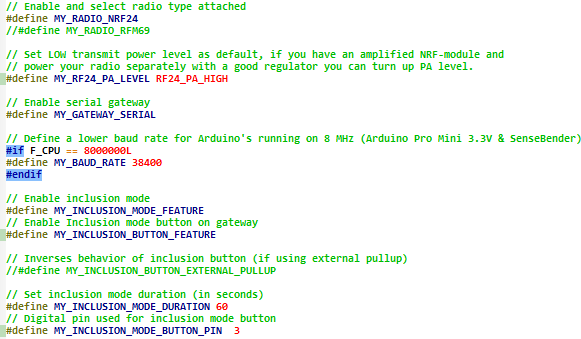
        0_1486163187143_upload-a7d023e6-ec73-428a-9a00-0936a051df99

        No connection to Serial Gateway (even after waiting for hours ) :

        0_1486163349709_upload-81bdad53-aa16-4e69-9907-b07e369c64dc

        So I tried to lock the ttyAMA0 in order to see if Domoticz is really tries to connect to ttyAMA0, so have locked ttyAMA0 :

        0_1486163122930_upload-3121397d-a0a6-4c8b-a944-573e869ad493

        And Domoticz is happy with this (as after a restart of Dmz service) !
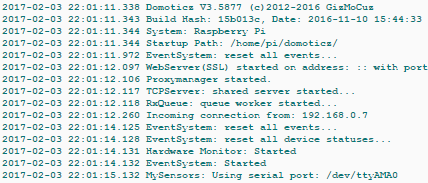
        0_1486163299460_upload-c5703d3c-8d71-4a9e-9775-39c8b9f6e452
        No error seen...

        I suspect Domoticz doesn't try to connect to ttyAMA0. I already fully disabled the serial boot ability and log on ttyAMA0 in RPI (systemctrl diasble,sudo systemctl stop getty.target, /boot/cmdline.txt does'nt contain any ttyAMA0 reference, disable serial-getty@ttyAMA0.service, ...)
        The same hardware is fully functional with my old SD Card (Rasbian/Mysensors installed 1 year ago) !

        Is anybody knows what's wrong

        K Offline
        K Offline
        kimot
        wrote on last edited by
        #4

        @lrtsenar
        By default ttyAMA0 is configured like system console for Linux on Raspberry.
        Do you disable it?
        http://www.instructables.com/id/Read-and-write-from-serial-port-with-Raspberry-Pi/

        1 Reply Last reply
        0
        • lrtsenarL lrtsenar

          This :
          0_1486332218660_upload-dc9673dc-b693-48f4-871c-5fbca09aa933

          But I'm not using USB to serial converter, I'm only using native serial GPIO Tx/Rx pins like I said in my 1st post.

          K Offline
          K Offline
          kimot
          wrote on last edited by
          #5

          @lrtsenar
          console [ttyAMA0] enabled

          I think, that this is issue.....
          It is used by system.

          lrtsenarL 1 Reply Last reply
          0
          • K kimot

            @lrtsenar
            console [ttyAMA0] enabled

            I think, that this is issue.....
            It is used by system.

            lrtsenarL Offline
            lrtsenarL Offline
            lrtsenar
            wrote on last edited by lrtsenar
            #6

            @kimot
            After folowing your link, dmesg displays :

            0_1486335983940_upload-d22dbac5-5ecd-4d50-9b44-ee70b7d64dd1

            And :
            0_1486336890405_upload-4226c005-294c-4c8d-9de7-27e26a6467bb

            Now, sems console uses only tty1 but problem persists :-(

            1 Reply Last reply
            0
            • lrtsenarL Offline
              lrtsenarL Offline
              lrtsenar
              wrote on last edited by
              #7
              This post is deleted!
              1 Reply Last reply
              0
              • lrtsenarL lrtsenar

                This :
                0_1486332218660_upload-dc9673dc-b693-48f4-871c-5fbca09aa933

                But I'm not using USB to serial converter, I'm only using native serial GPIO Tx/Rx pins like I said in my 1st post.

                bjacobseB Offline
                bjacobseB Offline
                bjacobse
                wrote on last edited by bjacobse
                #8

                @lrtsenar But I'm not using USB to serial converter, I'm only using native serial GPIO Tx/Rx pins like I said in my 1st post.
                I overlooked this info

                1 Reply Last reply
                0
                • pansenP Offline
                  pansenP Offline
                  pansen
                  wrote on last edited by
                  #9

                  Maybe it's a rights problem, can you sudo minicom it? Your domoticz user should be added to the group allowing access to ttys. For me it's group uucp.

                  Orange Pi Plus 2e connected to nrf24 PA via SPI running git-development MySensors gateway, OpenHAB2, mosquitto and MySQL persistence.

                  K 1 Reply Last reply
                  0
                  • pansenP pansen

                    Maybe it's a rights problem, can you sudo minicom it? Your domoticz user should be added to the group allowing access to ttys. For me it's group uucp.

                    K Offline
                    K Offline
                    kimot
                    wrote on last edited by
                    #10

                    @pansen
                    I Think, that it is "dialout" group.
                    Or try start Domoticz: sudo ./domoticz

                    But I found informations, that handle of "tty"s depends on Rapsbian version too.

                    "Because OS version jessie has changed to using systemd, the file /etc/initab no longer exists. You must use the systemd command systemctl to stop getty.target that is attached to /dev/ttyAMA0

                    pi@raspberrypi:~ $ sudo systemctl stop getty.target

                    NOTE: This will release ttyAMA0 until you reboot/restart the raspberry pi. After you reboot you will have to give the command again."

                    And for the best - on RPI3 ttyAMA0 is connected to Bluetooth and gpio is ttyS0 and is software emulated.

                    1 Reply Last reply
                    0
                    • bjacobseB Offline
                      bjacobseB Offline
                      bjacobse
                      wrote on last edited by
                      #11

                      Did you try to this?
                      sudo nano /boot/config.txt
                      Add to the end:

                      enable_uart=1
                      sudo nano /boot/cmdline.txt
                      Remove everything and add this:
                      dwc_otg.lpm_enable=0 console=tty1 elevator=deadline net.ifnames=0 root=/dev/mmcblk0p2 rootfsty

                      Taken from here:
                      https://community.openhab.org/t/has-anyone-gotten-razberry-working-with-openhab-2/12539/11

                      1 Reply Last reply
                      0
                      Reply
                      • Reply as topic
                      Log in to reply
                      • Oldest to Newest
                      • Newest to Oldest
                      • Most Votes


                      29

                      Online

                      11.7k

                      Users

                      11.2k

                      Topics

                      113.1k

                      Posts


                      Copyright 2025 TBD   |   Forum Guidelines   |   Privacy Policy   |   Terms of Service
                      • Login

                      • Don't have an account? Register

                      • Login or register to search.
                      • First post
                        Last post
                      0
                      • MySensors
                      • OpenHardware.io
                      • Categories
                      • Recent
                      • Tags
                      • Popular