Skip to content
  • MySensors
  • OpenHardware.io
  • Categories
  • Recent
  • Tags
  • Popular
Skins
  • Light
  • Brite
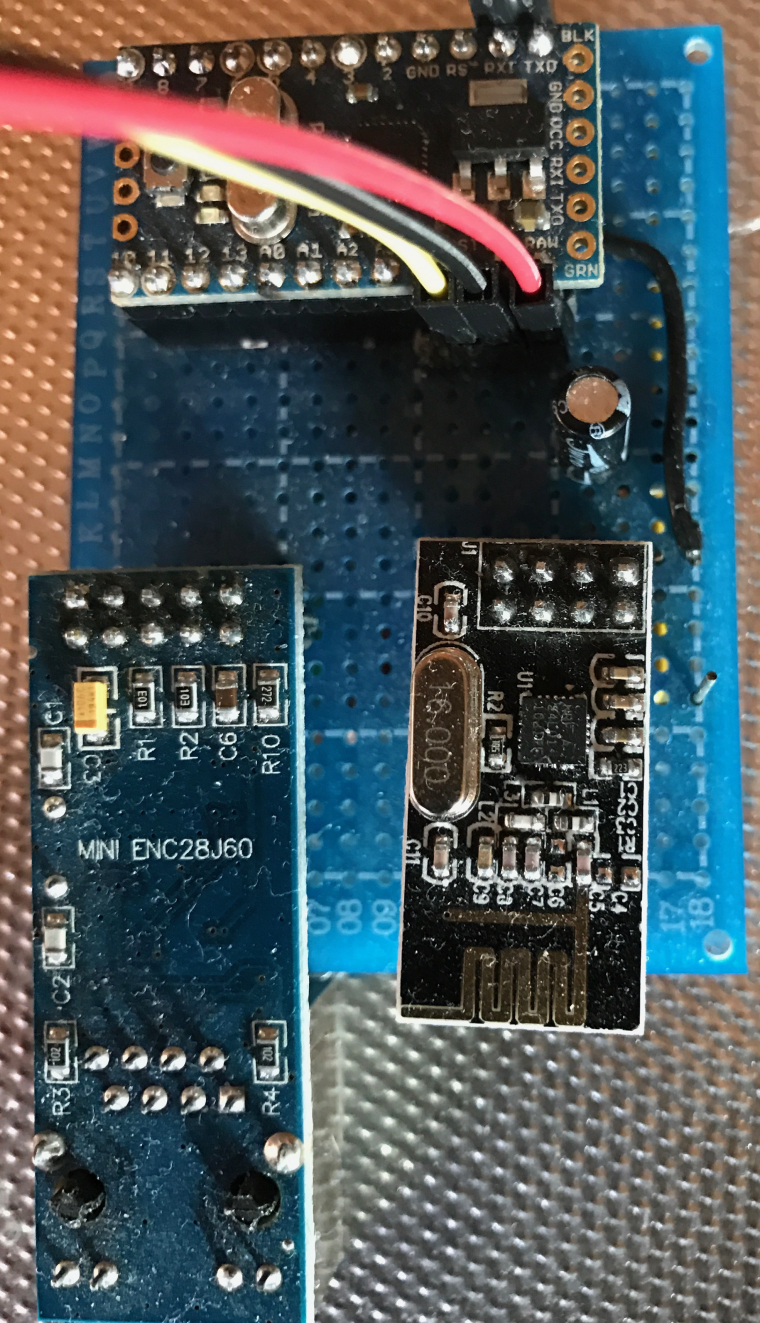
  • Cerulean
  • Cosmo
  • Flatly
  • Journal
  • Litera
  • Lumen
  • Lux
  • Materia
  • Minty
  • Morph
  • Pulse
  • Sandstone
  • Simplex
  • Sketchy
  • Spacelab
  • United
  • Yeti
  • Zephyr
  • Dark
  • Cyborg
  • Darkly
  • Quartz
  • Slate
  • Solar
  • Superhero
  • Vapor

  • Default (No Skin)
  • No Skin
Collapse
Brand Logo
  1. Home
  2. Troubleshooting
  3. Can't ping Ethernet Gateway ENC28J60 + Arduino Nano Clone

Can't ping Ethernet Gateway ENC28J60 + Arduino Nano Clone

Scheduled Pinned Locked Moved Troubleshooting
pingethernet gatewayenc28j60arduino nano
16 Posts 4 Posters 7.4k Views 4 Watching
  • Oldest to Newest
  • Newest to Oldest
  • Most Votes
Reply
  • Reply as topic
Log in to reply
This topic has been deleted. Only users with topic management privileges can see it.
  • M Offline
    M Offline
    MLs
    wrote on last edited by
    #5

    Hello I upload ENC28J60 Ethernet sample file from MySensors and it worked with MySensors Lib 2.1.1. And I used the Arduino Pro Mini, nRF24L01 Radio and ENC28J60 Ethernet. Do you use Arduino Pro Mini, you must disable debugging.

    //Mattias

    cadetC 1 Reply Last reply
    0
    • cadetC Offline
      cadetC Offline
      cadet
      wrote on last edited by cadet
      #6

      I was try with nano and shield and nrf24
      Also i was try uno
      I was comment all! Led, debug and no result
      Only comment nrf24 will help and ethernet will ping.
      Waiting for ftdi and w5100 (

      1 Reply Last reply
      0
      • M MLs

        Hello I upload ENC28J60 Ethernet sample file from MySensors and it worked with MySensors Lib 2.1.1. And I used the Arduino Pro Mini, nRF24L01 Radio and ENC28J60 Ethernet. Do you use Arduino Pro Mini, you must disable debugging.

        //Mattias

        cadetC Offline
        cadetC Offline
        cadet
        wrote on last edited by
        #7

        @MLs
        Please post the code

        M 1 Reply Last reply
        0
        • cadetC cadet

          @MLs
          Please post the code

          M Offline
          M Offline
          MLs
          wrote on last edited by MLs
          #8

          @cadet

          You need to 'change the IP addresses

          /**
           * The MySensors Arduino library handles the wireless radio link and protocol
           * between your home built sensors/actuators and HA controller of choice.
           * The sensors forms a self healing radio network with optional repeaters. Each
           * repeater and gateway builds a routing tables in EEPROM which keeps track of the
           * network topology allowing messages to be routed to nodes.
           *
           * Created by Henrik Ekblad <henrik.ekblad@mysensors.org>
           * Copyright (C) 2013-2015 Sensnology AB
           * Full contributor list: https://github.com/mysensors/Arduino/graphs/contributors
           *
           * Documentation: http://www.mysensors.org
           * Support Forum: http://forum.mysensors.org
           *
           * This program is free software; you can redistribute it and/or
           * modify it under the terms of the GNU General Public License
           * version 2 as published by the Free Software Foundation.
           *
           *******************************
           *
           * REVISION HISTORY
           * Version 1.0 - Henrik EKblad
           * Contribution by a-lurker and Anticimex,
           * Contribution by Norbert Truchsess <norbert.truchsess@t-online.de>
           * Contribution by Tomas Hozza <thozza@gmail.com>
           *
           *
           * DESCRIPTION
           * The EthernetGateway sends data received from sensors to the ethernet link.
           * The gateway also accepts input on ethernet interface, which is then sent out to the radio network.
           *
           * The GW code is designed for Arduino 328p / 16MHz.  ATmega168 does not have enough memory to run this program.
           *
           * LED purposes:
           * - To use the feature, uncomment WITH_LEDS_BLINKING in MyConfig.h
           * - RX (green) - blink fast on radio message recieved. In inclusion mode will blink fast only on presentation recieved
           * - TX (yellow) - blink fast on radio message transmitted. In inclusion mode will blink slowly
           * - ERR (red) - fast blink on error during transmission error or recieve crc error
           *
           * See http://www.mysensors.org/build/ethernet_gateway for wiring instructions.
           *
           */
          
          // Enable debug prints to serial monitor
          #define MY_DEBUG 
          
          // Enable and select radio type attached
          #define MY_RADIO_NRF24
          //#define MY_RADIO_RFM69
          
          // When ENC28J60 is connected we have to move CE/CSN pins for NRF radio
          #define MY_RF24_CE_PIN 5
          #define MY_RF24_CS_PIN 6
          
          // Enable gateway ethernet module type 
          #define MY_GATEWAY_ENC28J60
          
          // Gateway IP address
          #define MY_IP_ADDRESS 192,168,0,178 
          
          // The port to keep open on node server mode / or port to contact in client mode
          #define MY_PORT 5003   
          
          // Controller ip address. Enables client mode (default is "server" mode). 
          // Also enable this if MY_USE_UDP is used and you want sensor data sent somewhere. 
          #define MY_CONTROLLER_IP_ADDRESS 192, 168, 0, 201   
          
          // The MAC address can be anything you want but should be unique on your network.
          // Newer boards have a MAC address printed on the underside of the PCB, which you can (optionally) use.
          // Note that most of the Ardunio examples use  "DEAD BEEF FEED" for the MAC address.
          #define MY_MAC_ADDRESS 0xDE, 0xAD, 0xBE, 0xEF, 0xFE, 0xFE
          
          // Flash leds on rx/tx/err
          //#define MY_LEDS_BLINKING_FEATURE
          // Set blinking period
          #define MY_DEFAULT_LED_BLINK_PERIOD 300
          
          // Enable inclusion mode
          #define MY_INCLUSION_MODE_FEATURE
          // Enable Inclusion mode button on gateway
          #define MY_INCLUSION_BUTTON_FEATURE
          // Set inclusion mode duration (in seconds)
          #define MY_INCLUSION_MODE_DURATION 60 
          // Digital pin used for inclusion mode button
          #define MY_INCLUSION_MODE_BUTTON_PIN  3 
          
          #define MY_DEFAULT_ERR_LED_PIN 7  // Error led pin
          #define MY_DEFAULT_RX_LED_PIN  8  // Receive led pin
          #define MY_DEFAULT_TX_LED_PIN  9  // the PCB, on board LED
          
          #include <SPI.h>
          #include <UIPEthernet.h>
          #include <MySensors.h>
          
          
          void setup()
          {
          }
          
          void loop() {
          }
          

          //Mattias

          cadetC 1 Reply Last reply
          0
          • M MLs

            @cadet

            You need to 'change the IP addresses

            /**
             * The MySensors Arduino library handles the wireless radio link and protocol
             * between your home built sensors/actuators and HA controller of choice.
             * The sensors forms a self healing radio network with optional repeaters. Each
             * repeater and gateway builds a routing tables in EEPROM which keeps track of the
             * network topology allowing messages to be routed to nodes.
             *
             * Created by Henrik Ekblad <henrik.ekblad@mysensors.org>
             * Copyright (C) 2013-2015 Sensnology AB
             * Full contributor list: https://github.com/mysensors/Arduino/graphs/contributors
             *
             * Documentation: http://www.mysensors.org
             * Support Forum: http://forum.mysensors.org
             *
             * This program is free software; you can redistribute it and/or
             * modify it under the terms of the GNU General Public License
             * version 2 as published by the Free Software Foundation.
             *
             *******************************
             *
             * REVISION HISTORY
             * Version 1.0 - Henrik EKblad
             * Contribution by a-lurker and Anticimex,
             * Contribution by Norbert Truchsess <norbert.truchsess@t-online.de>
             * Contribution by Tomas Hozza <thozza@gmail.com>
             *
             *
             * DESCRIPTION
             * The EthernetGateway sends data received from sensors to the ethernet link.
             * The gateway also accepts input on ethernet interface, which is then sent out to the radio network.
             *
             * The GW code is designed for Arduino 328p / 16MHz.  ATmega168 does not have enough memory to run this program.
             *
             * LED purposes:
             * - To use the feature, uncomment WITH_LEDS_BLINKING in MyConfig.h
             * - RX (green) - blink fast on radio message recieved. In inclusion mode will blink fast only on presentation recieved
             * - TX (yellow) - blink fast on radio message transmitted. In inclusion mode will blink slowly
             * - ERR (red) - fast blink on error during transmission error or recieve crc error
             *
             * See http://www.mysensors.org/build/ethernet_gateway for wiring instructions.
             *
             */
            
            // Enable debug prints to serial monitor
            #define MY_DEBUG 
            
            // Enable and select radio type attached
            #define MY_RADIO_NRF24
            //#define MY_RADIO_RFM69
            
            // When ENC28J60 is connected we have to move CE/CSN pins for NRF radio
            #define MY_RF24_CE_PIN 5
            #define MY_RF24_CS_PIN 6
            
            // Enable gateway ethernet module type 
            #define MY_GATEWAY_ENC28J60
            
            // Gateway IP address
            #define MY_IP_ADDRESS 192,168,0,178 
            
            // The port to keep open on node server mode / or port to contact in client mode
            #define MY_PORT 5003   
            
            // Controller ip address. Enables client mode (default is "server" mode). 
            // Also enable this if MY_USE_UDP is used and you want sensor data sent somewhere. 
            #define MY_CONTROLLER_IP_ADDRESS 192, 168, 0, 201   
            
            // The MAC address can be anything you want but should be unique on your network.
            // Newer boards have a MAC address printed on the underside of the PCB, which you can (optionally) use.
            // Note that most of the Ardunio examples use  "DEAD BEEF FEED" for the MAC address.
            #define MY_MAC_ADDRESS 0xDE, 0xAD, 0xBE, 0xEF, 0xFE, 0xFE
            
            // Flash leds on rx/tx/err
            //#define MY_LEDS_BLINKING_FEATURE
            // Set blinking period
            #define MY_DEFAULT_LED_BLINK_PERIOD 300
            
            // Enable inclusion mode
            #define MY_INCLUSION_MODE_FEATURE
            // Enable Inclusion mode button on gateway
            #define MY_INCLUSION_BUTTON_FEATURE
            // Set inclusion mode duration (in seconds)
            #define MY_INCLUSION_MODE_DURATION 60 
            // Digital pin used for inclusion mode button
            #define MY_INCLUSION_MODE_BUTTON_PIN  3 
            
            #define MY_DEFAULT_ERR_LED_PIN 7  // Error led pin
            #define MY_DEFAULT_RX_LED_PIN  8  // Receive led pin
            #define MY_DEFAULT_TX_LED_PIN  9  // the PCB, on board LED
            
            #include <SPI.h>
            #include <UIPEthernet.h>
            #include <MySensors.h>
            
            
            void setup()
            {
            }
            
            void loop() {
            }
            

            //Mattias

            cadetC Offline
            cadetC Offline
            cadet
            wrote on last edited by
            #9

            @MLs
            I think you use enc28 ethernet module not shield

            I have same code but no ping if nrf not commented

            M 1 Reply Last reply
            0
            • cadetC cadet

              @MLs
              I think you use enc28 ethernet module not shield

              I have same code but no ping if nrf not commented

              M Offline
              M Offline
              MLs
              wrote on last edited by MLs
              #10

              @cadet

              Yes, I put together this some years ago. But now i uses W5100 instead.

              0_1488720717990_ENC.JPG

              //Mattias

              cadetC 1 Reply Last reply
              0
              • M MLs

                @cadet

                Yes, I put together this some years ago. But now i uses W5100 instead.

                0_1488720717990_ENC.JPG

                //Mattias

                cadetC Offline
                cadetC Offline
                cadet
                wrote on last edited by
                #11

                @MLs

                I'm also use W5100 now, but have two enc28 shield )

                M 1 Reply Last reply
                0
                • cadetC cadet

                  @MLs

                  I'm also use W5100 now, but have two enc28 shield )

                  M Offline
                  M Offline
                  MLs
                  wrote on last edited by MLs
                  #12

                  @cadet

                  Ok, you have linked NRF24 radio right?

                  https://www.mysensors.org/build/ethernet_gateway#enc28j60-ethernet-module

                  Also verified that the shield is properly attached?
                  //Mattias

                  cadetC 1 Reply Last reply
                  0
                  • M MLs

                    @cadet

                    Ok, you have linked NRF24 radio right?

                    https://www.mysensors.org/build/ethernet_gateway#enc28j60-ethernet-module

                    Also verified that the shield is properly attached?
                    //Mattias

                    cadetC Offline
                    cadetC Offline
                    cadet
                    wrote on last edited by
                    #13

                    @MLs
                    Nano with shield and no nrf24 ping only with commented nrf24
                    Then uncomment nrf24 GW has no connection over ethernet
                    No ping no telnet

                    M 1 Reply Last reply
                    0
                    • cadetC cadet

                      @MLs
                      Nano with shield and no nrf24 ping only with commented nrf24
                      Then uncomment nrf24 GW has no connection over ethernet
                      No ping no telnet

                      M Offline
                      M Offline
                      MLs
                      wrote on last edited by
                      #14

                      @cadet

                      There I can say is that the circuit ENC28J60 works with MySensors lib 2.1.1
                      Try to connect your components to breadboard.

                      cadetC 1 Reply Last reply
                      0
                      • M MLs

                        @cadet

                        There I can say is that the circuit ENC28J60 works with MySensors lib 2.1.1
                        Try to connect your components to breadboard.

                        cadetC Offline
                        cadetC Offline
                        cadet
                        wrote on last edited by
                        #15

                        @MLs
                        And that way I was tested
                        Connect via breadboard to nano and uno
                        With same results

                        M 1 Reply Last reply
                        0
                        • cadetC cadet

                          @MLs
                          And that way I was tested
                          Connect via breadboard to nano and uno
                          With same results

                          M Offline
                          M Offline
                          MLs
                          wrote on last edited by
                          #16

                          @cadet

                          I'm no expert but I would have looked at the data sheet and measured up to make sure that the hardware are not defective in any way.

                          http://ww1.microchip.com/downloads/en/DeviceDoc/39662c.pdf

                          Or the radio.

                          //Mattias

                          1 Reply Last reply
                          0
                          Reply
                          • Reply as topic
                          Log in to reply
                          • Oldest to Newest
                          • Newest to Oldest
                          • Most Votes


                          14

                          Online

                          11.7k

                          Users

                          11.2k

                          Topics

                          113.1k

                          Posts


                          Copyright 2025 TBD   |   Forum Guidelines   |   Privacy Policy   |   Terms of Service
                          • Login

                          • Don't have an account? Register

                          • Login or register to search.
                          • First post
                            Last post
                          0
                          • MySensors
                          • OpenHardware.io
                          • Categories
                          • Recent
                          • Tags
                          • Popular