Skip to content
  • MySensors
  • OpenHardware.io
  • Categories
  • Recent
  • Tags
  • Popular
Skins
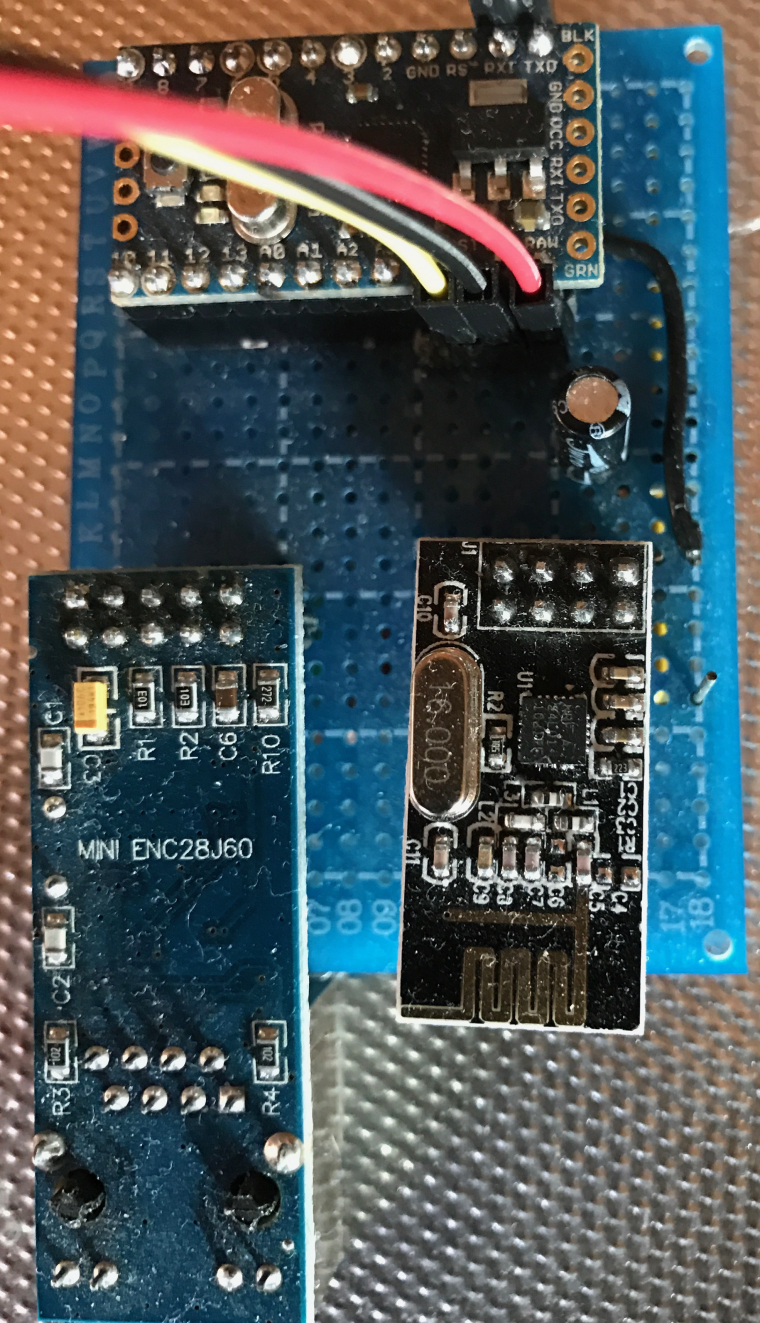
  • Light
  • Brite
  • Cerulean
  • Cosmo
  • Flatly
  • Journal
  • Litera
  • Lumen
  • Lux
  • Materia
  • Minty
  • Morph
  • Pulse
  • Sandstone
  • Simplex
  • Sketchy
  • Spacelab
  • United
  • Yeti
  • Zephyr
  • Dark
  • Cyborg
  • Darkly
  • Quartz
  • Slate
  • Solar
  • Superhero
  • Vapor

  • Default (No Skin)
  • No Skin
Collapse
Brand Logo
  1. Home
  2. Troubleshooting
  3. Can't ping Ethernet Gateway ENC28J60 + Arduino Nano Clone

Can't ping Ethernet Gateway ENC28J60 + Arduino Nano Clone

Scheduled Pinned Locked Moved Troubleshooting
pingethernet gatewayenc28j60arduino nano
16 Posts 4 Posters 8.7k Views 4 Watching
  • Oldest to Newest
  • Newest to Oldest
  • Most Votes
Reply
  • Reply as topic
Log in to reply
This topic has been deleted. Only users with topic management privileges can see it.
  • cadetC Offline
    cadetC Offline
    cadet
    wrote on last edited by
    #2

    This configuration is dead.
    try to comment NRF - and will ping.
    Use WI-Fi

    G 1 Reply Last reply
    0
    • cadetC cadet

      This configuration is dead.
      try to comment NRF - and will ping.
      Use WI-Fi

      G Offline
      G Offline
      gammlerstyle
      wrote on last edited by
      #3

      @cadet Sorry, but I don't get it.
      Why is the configuration dead?
      Or rather : what do you exactly mean? (Is the enc28j60 no longer supported by MySensors?)

      NRF wasn't activated while testing the enc28j60 with the Echo Server Sketch.

      I don't want to use Wi-Fi.

      1 Reply Last reply
      0
      • H Offline
        H Offline
        hek
        Admin
        wrote on last edited by
        #4

        Not sure anyone has bothered checking with the latest version of the library....

        My experience is that the enc-module is really unreliable (and CPU intensive). Save yourself a lot of problems and get the W5100 module which offloads much of the work.

        1 Reply Last reply
        0
        • M Offline
          M Offline
          MLs
          wrote on last edited by
          #5

          Hello I upload ENC28J60 Ethernet sample file from MySensors and it worked with MySensors Lib 2.1.1. And I used the Arduino Pro Mini, nRF24L01 Radio and ENC28J60 Ethernet. Do you use Arduino Pro Mini, you must disable debugging.

          //Mattias

          cadetC 1 Reply Last reply
          0
          • cadetC Offline
            cadetC Offline
            cadet
            wrote on last edited by cadet
            #6

            I was try with nano and shield and nrf24
            Also i was try uno
            I was comment all! Led, debug and no result
            Only comment nrf24 will help and ethernet will ping.
            Waiting for ftdi and w5100 (

            1 Reply Last reply
            0
            • M MLs

              Hello I upload ENC28J60 Ethernet sample file from MySensors and it worked with MySensors Lib 2.1.1. And I used the Arduino Pro Mini, nRF24L01 Radio and ENC28J60 Ethernet. Do you use Arduino Pro Mini, you must disable debugging.

              //Mattias

              cadetC Offline
              cadetC Offline
              cadet
              wrote on last edited by
              #7

              @MLs
              Please post the code

              M 1 Reply Last reply
              0
              • cadetC cadet

                @MLs
                Please post the code

                M Offline
                M Offline
                MLs
                wrote on last edited by MLs
                #8

                @cadet

                You need to 'change the IP addresses

                /**
                 * The MySensors Arduino library handles the wireless radio link and protocol
                 * between your home built sensors/actuators and HA controller of choice.
                 * The sensors forms a self healing radio network with optional repeaters. Each
                 * repeater and gateway builds a routing tables in EEPROM which keeps track of the
                 * network topology allowing messages to be routed to nodes.
                 *
                 * Created by Henrik Ekblad <henrik.ekblad@mysensors.org>
                 * Copyright (C) 2013-2015 Sensnology AB
                 * Full contributor list: https://github.com/mysensors/Arduino/graphs/contributors
                 *
                 * Documentation: http://www.mysensors.org
                 * Support Forum: http://forum.mysensors.org
                 *
                 * This program is free software; you can redistribute it and/or
                 * modify it under the terms of the GNU General Public License
                 * version 2 as published by the Free Software Foundation.
                 *
                 *******************************
                 *
                 * REVISION HISTORY
                 * Version 1.0 - Henrik EKblad
                 * Contribution by a-lurker and Anticimex,
                 * Contribution by Norbert Truchsess <norbert.truchsess@t-online.de>
                 * Contribution by Tomas Hozza <thozza@gmail.com>
                 *
                 *
                 * DESCRIPTION
                 * The EthernetGateway sends data received from sensors to the ethernet link.
                 * The gateway also accepts input on ethernet interface, which is then sent out to the radio network.
                 *
                 * The GW code is designed for Arduino 328p / 16MHz.  ATmega168 does not have enough memory to run this program.
                 *
                 * LED purposes:
                 * - To use the feature, uncomment WITH_LEDS_BLINKING in MyConfig.h
                 * - RX (green) - blink fast on radio message recieved. In inclusion mode will blink fast only on presentation recieved
                 * - TX (yellow) - blink fast on radio message transmitted. In inclusion mode will blink slowly
                 * - ERR (red) - fast blink on error during transmission error or recieve crc error
                 *
                 * See http://www.mysensors.org/build/ethernet_gateway for wiring instructions.
                 *
                 */
                
                // Enable debug prints to serial monitor
                #define MY_DEBUG 
                
                // Enable and select radio type attached
                #define MY_RADIO_NRF24
                //#define MY_RADIO_RFM69
                
                // When ENC28J60 is connected we have to move CE/CSN pins for NRF radio
                #define MY_RF24_CE_PIN 5
                #define MY_RF24_CS_PIN 6
                
                // Enable gateway ethernet module type 
                #define MY_GATEWAY_ENC28J60
                
                // Gateway IP address
                #define MY_IP_ADDRESS 192,168,0,178 
                
                // The port to keep open on node server mode / or port to contact in client mode
                #define MY_PORT 5003   
                
                // Controller ip address. Enables client mode (default is "server" mode). 
                // Also enable this if MY_USE_UDP is used and you want sensor data sent somewhere. 
                #define MY_CONTROLLER_IP_ADDRESS 192, 168, 0, 201   
                
                // The MAC address can be anything you want but should be unique on your network.
                // Newer boards have a MAC address printed on the underside of the PCB, which you can (optionally) use.
                // Note that most of the Ardunio examples use  "DEAD BEEF FEED" for the MAC address.
                #define MY_MAC_ADDRESS 0xDE, 0xAD, 0xBE, 0xEF, 0xFE, 0xFE
                
                // Flash leds on rx/tx/err
                //#define MY_LEDS_BLINKING_FEATURE
                // Set blinking period
                #define MY_DEFAULT_LED_BLINK_PERIOD 300
                
                // Enable inclusion mode
                #define MY_INCLUSION_MODE_FEATURE
                // Enable Inclusion mode button on gateway
                #define MY_INCLUSION_BUTTON_FEATURE
                // Set inclusion mode duration (in seconds)
                #define MY_INCLUSION_MODE_DURATION 60 
                // Digital pin used for inclusion mode button
                #define MY_INCLUSION_MODE_BUTTON_PIN  3 
                
                #define MY_DEFAULT_ERR_LED_PIN 7  // Error led pin
                #define MY_DEFAULT_RX_LED_PIN  8  // Receive led pin
                #define MY_DEFAULT_TX_LED_PIN  9  // the PCB, on board LED
                
                #include <SPI.h>
                #include <UIPEthernet.h>
                #include <MySensors.h>
                
                
                void setup()
                {
                }
                
                void loop() {
                }
                

                //Mattias

                cadetC 1 Reply Last reply
                0
                • M MLs

                  @cadet

                  You need to 'change the IP addresses

                  /**
                   * The MySensors Arduino library handles the wireless radio link and protocol
                   * between your home built sensors/actuators and HA controller of choice.
                   * The sensors forms a self healing radio network with optional repeaters. Each
                   * repeater and gateway builds a routing tables in EEPROM which keeps track of the
                   * network topology allowing messages to be routed to nodes.
                   *
                   * Created by Henrik Ekblad <henrik.ekblad@mysensors.org>
                   * Copyright (C) 2013-2015 Sensnology AB
                   * Full contributor list: https://github.com/mysensors/Arduino/graphs/contributors
                   *
                   * Documentation: http://www.mysensors.org
                   * Support Forum: http://forum.mysensors.org
                   *
                   * This program is free software; you can redistribute it and/or
                   * modify it under the terms of the GNU General Public License
                   * version 2 as published by the Free Software Foundation.
                   *
                   *******************************
                   *
                   * REVISION HISTORY
                   * Version 1.0 - Henrik EKblad
                   * Contribution by a-lurker and Anticimex,
                   * Contribution by Norbert Truchsess <norbert.truchsess@t-online.de>
                   * Contribution by Tomas Hozza <thozza@gmail.com>
                   *
                   *
                   * DESCRIPTION
                   * The EthernetGateway sends data received from sensors to the ethernet link.
                   * The gateway also accepts input on ethernet interface, which is then sent out to the radio network.
                   *
                   * The GW code is designed for Arduino 328p / 16MHz.  ATmega168 does not have enough memory to run this program.
                   *
                   * LED purposes:
                   * - To use the feature, uncomment WITH_LEDS_BLINKING in MyConfig.h
                   * - RX (green) - blink fast on radio message recieved. In inclusion mode will blink fast only on presentation recieved
                   * - TX (yellow) - blink fast on radio message transmitted. In inclusion mode will blink slowly
                   * - ERR (red) - fast blink on error during transmission error or recieve crc error
                   *
                   * See http://www.mysensors.org/build/ethernet_gateway for wiring instructions.
                   *
                   */
                  
                  // Enable debug prints to serial monitor
                  #define MY_DEBUG 
                  
                  // Enable and select radio type attached
                  #define MY_RADIO_NRF24
                  //#define MY_RADIO_RFM69
                  
                  // When ENC28J60 is connected we have to move CE/CSN pins for NRF radio
                  #define MY_RF24_CE_PIN 5
                  #define MY_RF24_CS_PIN 6
                  
                  // Enable gateway ethernet module type 
                  #define MY_GATEWAY_ENC28J60
                  
                  // Gateway IP address
                  #define MY_IP_ADDRESS 192,168,0,178 
                  
                  // The port to keep open on node server mode / or port to contact in client mode
                  #define MY_PORT 5003   
                  
                  // Controller ip address. Enables client mode (default is "server" mode). 
                  // Also enable this if MY_USE_UDP is used and you want sensor data sent somewhere. 
                  #define MY_CONTROLLER_IP_ADDRESS 192, 168, 0, 201   
                  
                  // The MAC address can be anything you want but should be unique on your network.
                  // Newer boards have a MAC address printed on the underside of the PCB, which you can (optionally) use.
                  // Note that most of the Ardunio examples use  "DEAD BEEF FEED" for the MAC address.
                  #define MY_MAC_ADDRESS 0xDE, 0xAD, 0xBE, 0xEF, 0xFE, 0xFE
                  
                  // Flash leds on rx/tx/err
                  //#define MY_LEDS_BLINKING_FEATURE
                  // Set blinking period
                  #define MY_DEFAULT_LED_BLINK_PERIOD 300
                  
                  // Enable inclusion mode
                  #define MY_INCLUSION_MODE_FEATURE
                  // Enable Inclusion mode button on gateway
                  #define MY_INCLUSION_BUTTON_FEATURE
                  // Set inclusion mode duration (in seconds)
                  #define MY_INCLUSION_MODE_DURATION 60 
                  // Digital pin used for inclusion mode button
                  #define MY_INCLUSION_MODE_BUTTON_PIN  3 
                  
                  #define MY_DEFAULT_ERR_LED_PIN 7  // Error led pin
                  #define MY_DEFAULT_RX_LED_PIN  8  // Receive led pin
                  #define MY_DEFAULT_TX_LED_PIN  9  // the PCB, on board LED
                  
                  #include <SPI.h>
                  #include <UIPEthernet.h>
                  #include <MySensors.h>
                  
                  
                  void setup()
                  {
                  }
                  
                  void loop() {
                  }
                  

                  //Mattias

                  cadetC Offline
                  cadetC Offline
                  cadet
                  wrote on last edited by
                  #9

                  @MLs
                  I think you use enc28 ethernet module not shield

                  I have same code but no ping if nrf not commented

                  M 1 Reply Last reply
                  0
                  • cadetC cadet

                    @MLs
                    I think you use enc28 ethernet module not shield

                    I have same code but no ping if nrf not commented

                    M Offline
                    M Offline
                    MLs
                    wrote on last edited by MLs
                    #10

                    @cadet

                    Yes, I put together this some years ago. But now i uses W5100 instead.

                    0_1488720717990_ENC.JPG

                    //Mattias

                    cadetC 1 Reply Last reply
                    0
                    • M MLs

                      @cadet

                      Yes, I put together this some years ago. But now i uses W5100 instead.

                      0_1488720717990_ENC.JPG

                      //Mattias

                      cadetC Offline
                      cadetC Offline
                      cadet
                      wrote on last edited by
                      #11

                      @MLs

                      I'm also use W5100 now, but have two enc28 shield )

                      M 1 Reply Last reply
                      0
                      • cadetC cadet

                        @MLs

                        I'm also use W5100 now, but have two enc28 shield )

                        M Offline
                        M Offline
                        MLs
                        wrote on last edited by MLs
                        #12

                        @cadet

                        Ok, you have linked NRF24 radio right?

                        https://www.mysensors.org/build/ethernet_gateway#enc28j60-ethernet-module

                        Also verified that the shield is properly attached?
                        //Mattias

                        cadetC 1 Reply Last reply
                        0
                        • M MLs

                          @cadet

                          Ok, you have linked NRF24 radio right?

                          https://www.mysensors.org/build/ethernet_gateway#enc28j60-ethernet-module

                          Also verified that the shield is properly attached?
                          //Mattias

                          cadetC Offline
                          cadetC Offline
                          cadet
                          wrote on last edited by
                          #13

                          @MLs
                          Nano with shield and no nrf24 ping only with commented nrf24
                          Then uncomment nrf24 GW has no connection over ethernet
                          No ping no telnet

                          M 1 Reply Last reply
                          0
                          • cadetC cadet

                            @MLs
                            Nano with shield and no nrf24 ping only with commented nrf24
                            Then uncomment nrf24 GW has no connection over ethernet
                            No ping no telnet

                            M Offline
                            M Offline
                            MLs
                            wrote on last edited by
                            #14

                            @cadet

                            There I can say is that the circuit ENC28J60 works with MySensors lib 2.1.1
                            Try to connect your components to breadboard.

                            cadetC 1 Reply Last reply
                            0
                            • M MLs

                              @cadet

                              There I can say is that the circuit ENC28J60 works with MySensors lib 2.1.1
                              Try to connect your components to breadboard.

                              cadetC Offline
                              cadetC Offline
                              cadet
                              wrote on last edited by
                              #15

                              @MLs
                              And that way I was tested
                              Connect via breadboard to nano and uno
                              With same results

                              M 1 Reply Last reply
                              0
                              • cadetC cadet

                                @MLs
                                And that way I was tested
                                Connect via breadboard to nano and uno
                                With same results

                                M Offline
                                M Offline
                                MLs
                                wrote on last edited by
                                #16

                                @cadet

                                I'm no expert but I would have looked at the data sheet and measured up to make sure that the hardware are not defective in any way.

                                http://ww1.microchip.com/downloads/en/DeviceDoc/39662c.pdf

                                Or the radio.

                                //Mattias

                                1 Reply Last reply
                                0

                                Hello! It looks like you're interested in this conversation, but you don't have an account yet.

                                Getting fed up of having to scroll through the same posts each visit? When you register for an account, you'll always come back to exactly where you were before, and choose to be notified of new replies (either via email, or push notification). You'll also be able to save bookmarks and upvote posts to show your appreciation to other community members.

                                With your input, this post could be even better 💗

                                Register Login
                                Reply
                                • Reply as topic
                                Log in to reply
                                • Oldest to Newest
                                • Newest to Oldest
                                • Most Votes


                                59

                                Online

                                12.0k

                                Users

                                11.2k

                                Topics

                                113.4k

                                Posts


                                Copyright 2025 TBD   |   Forum Guidelines   |   Privacy Policy   |   Terms of Service
                                • Login

                                • Don't have an account? Register

                                • Login or register to search.
                                • First post
                                  Last post
                                0
                                • MySensors
                                • OpenHardware.io
                                • Categories
                                • Recent
                                • Tags
                                • Popular