
Relay with finder and asc 712
-
Hello and good morning.
I discovered by accident Mysensors and I immediately buff (Ancra are at an early stage). And I wanted to make home automation for home, but while maintaining current systems.At the time at home, in Italy, I have this situation. A relay that receives a pulse and turns on and off the light ..... Carry scheme:
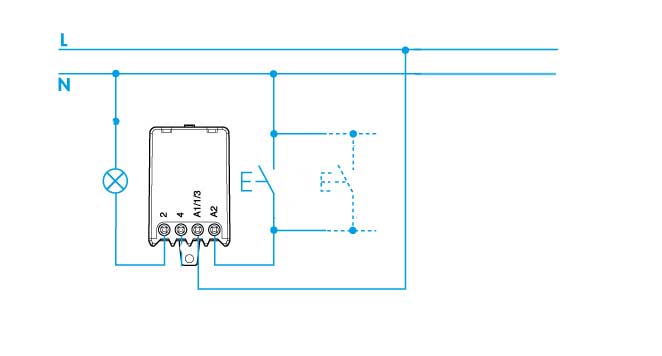
I would like to create something like that, in order to keep the system in case of failure Mysensors, but integrating home automation.
to the scheme:
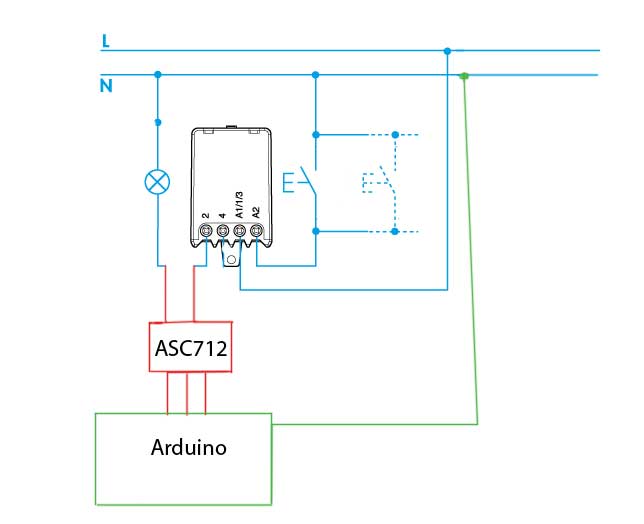
As we see, idea is to use a ASC712 to see if there current flow and update the controller (DOMOTICZ)
How do I communicate the change of state in Domoticz ??
Can anyone help me ??
-
Hello and good morning.
I discovered by accident Mysensors and I immediately buff (Ancra are at an early stage). And I wanted to make home automation for home, but while maintaining current systems.At the time at home, in Italy, I have this situation. A relay that receives a pulse and turns on and off the light ..... Carry scheme:
I would like to create something like that, in order to keep the system in case of failure Mysensors, but integrating home automation.
to the scheme:
As we see, idea is to use a ASC712 to see if there current flow and update the controller (DOMOTICZ)
How do I communicate the change of state in Domoticz ??
Can anyone help me ??
@sindrome73 - welcome!
Try the getting started https://www.mysensors.org/about.Exactly how the ASC712 works, I dont know but to answer your question "How do I communicate the change of state in Domoticz ??"
You need just a regular switch 1/0 for MySensors and use the binary sketch (https://www.mysensors.org/build/binary) or some other sketch sending On/off (Relay, Motion...). MySensors will send this to your gateway which your controller (Domoticz) listen to and updates the value. -
Hello thanks for the tip, but I've already tried qusto and creates unexpected result.
I left these sketches: https://www.mysensors.org/build/relay
If I understand, the logic is this: You press the button sull'arduino, the new state is sent with this line, the controller which updates their status.
send (msg.set (were? false: true), true); // Send new state and request ack back
Next comes this part sketch
void receive (const MyMessage & message) {
// We only expect one type of message from the controller. But we better check anyway.
if (message.isAck ()) {
Serial.println ( "This is an ack from gateway");
}if (message.type == V_LIGHT) {
// Change state relay
message.getBool state = ();
digitalWrite (RELAY_PIN, are you? RELAY_ON: RELAY_OFF);
// Store been in eeprom
saveState (CHILD_ID, state);// Write some debugging info
Serial.print ( "Incoming change for sensor:");
Serial.print (message.sensor);
Serial.print ( "New status");
Serial.println (message.getBool ());
}And the output changes state.
But if I do, we press an external switch, and change the status, and update the controller with this: send (msg.set (were? False: true), true);
It falls into a loop ???
-
Hello thanks for the tip, but I've already tried qusto and creates unexpected result.
I left these sketches: https://www.mysensors.org/build/relay
If I understand, the logic is this: You press the button sull'arduino, the new state is sent with this line, the controller which updates their status.
send (msg.set (were? false: true), true); // Send new state and request ack back
Next comes this part sketch
void receive (const MyMessage & message) {
// We only expect one type of message from the controller. But we better check anyway.
if (message.isAck ()) {
Serial.println ( "This is an ack from gateway");
}if (message.type == V_LIGHT) {
// Change state relay
message.getBool state = ();
digitalWrite (RELAY_PIN, are you? RELAY_ON: RELAY_OFF);
// Store been in eeprom
saveState (CHILD_ID, state);// Write some debugging info
Serial.print ( "Incoming change for sensor:");
Serial.print (message.sensor);
Serial.print ( "New status");
Serial.println (message.getBool ());
}And the output changes state.
But if I do, we press an external switch, and change the status, and update the controller with this: send (msg.set (were? False: true), true);
It falls into a loop ???
@sindrome73 - sorry i dont understand. What kind of error message do you get? Debug?
Do you want to be able to send a command FROM domoticz to the node? I didnt answer that above but the other way around. -
I beg your pardon, but my English is very bad.
In the evening load my sketch, so it is more clear ......
Thanks for your patience for now ......
Hello! It looks like you're interested in this conversation, but you don't have an account yet.
Getting fed up of having to scroll through the same posts each visit? When you register for an account, you'll always come back to exactly where you were before, and choose to be notified of new replies (either via email, or push notification). You'll also be able to save bookmarks and upvote posts to show your appreciation to other community members.
With your input, this post could be even better 💗
Register Login