Skip to content
  • MySensors
  • OpenHardware.io
  • Categories
  • Recent
  • Tags
  • Popular
Skins
  • Light
  • Brite
  • Cerulean
  • Cosmo
  • Flatly
  • Journal
  • Litera
  • Lumen
  • Lux
  • Materia
  • Minty
  • Morph
  • Pulse
  • Sandstone
  • Simplex
  • Sketchy
  • Spacelab
  • United
  • Yeti
  • Zephyr
  • Dark
  • Cyborg
  • Darkly
  • Quartz
  • Slate
  • Solar
  • Superhero
  • Vapor

  • Default (No Skin)
  • No Skin
Collapse
Brand Logo
  1. Home
  2. Troubleshooting
  3. Communication problem (maybe)

Communication problem (maybe)

Scheduled Pinned Locked Moved Troubleshooting
30 Posts 5 Posters 9.4k Views 3 Watching
  • Oldest to Newest
  • Newest to Oldest
  • Most Votes
Reply
  • Reply as topic
Log in to reply
This topic has been deleted. Only users with topic management privileges can see it.
  • H Offline
    H Offline
    Hausner
    wrote on last edited by Hausner
    #5

    Yes, I figured that out, but the problem is still there...

    Only 5-10 relay on/off, then it fails.

    It actually looks like the GW never sends the new status. I see faild on GW, but nothing on the node?

    1 Reply Last reply
    0
    • N Offline
      N Offline
      niccodemi
      wrote on last edited by
      #6

      @Hausner I've got same issues with relay nodes. Other sensor nodes work ok.

      See this post for my serial output. At first I thought this is because of ethernet gw but now I am having similar issues with serial gw. I can switch relay on/off few times but after that node stops responding.

      1 Reply Last reply
      0
      • hekH Offline
        hekH Offline
        hek
        Admin
        wrote on last edited by
        #7

        How do you power you relays?

        1 Reply Last reply
        0
        • H Offline
          H Offline
          Hausner
          wrote on last edited by
          #8

          I first tried with the nano, but (ofcause) that was insuffient.

          So now the 8-channel relay is powered externally, via JD-VCC and GND. The nano has a 5v to the 5v on the relay pin which is next to the INx pins. Nothing on the GND.

          1 Reply Last reply
          0
          • N Offline
            N Offline
            niccodemi
            wrote on last edited by
            #9

            Same here, relay is powered separately.

            H 1 Reply Last reply
            0
            • N niccodemi

              Same here, relay is powered separately.

              H Offline
              H Offline
              Hausner
              wrote on last edited by
              #10

              @niccodemi said:

              Same here, relay is powered separately.

              Do you have the arduino and relay on shared GND?

              1 Reply Last reply
              0
              • pgoP Offline
                pgoP Offline
                pgo
                wrote on last edited by pgo
                #11

                Do you use sleep in some of the nodes? I found with sleep(xxx) the messages get dropped across the mesh... I found that by making multiple sensors in one node - http://forum.mysensors.org/topic/115/implementing-multiple-sensors/59 and it gets worse with going through repeaters. For example the lux sensor could be very active and then the Relay ON/OFF messages get dropped... Interesting I did never see a temp or lux node message got dropped through the mesh.
                EDIT I am using MQTT broker gateway and open HAB, but will probably switch to MQTT client gateway<->mosquitto<->openHAB to check whether the message delivery gets more stable.

                1 Reply Last reply
                0
                • H Offline
                  H Offline
                  Hausner
                  wrote on last edited by
                  #12

                  @pgo

                  Yes, I have 3 temp nodes running on battery which uses the sleepmode.

                  But it doesn't matter if they are runnig or not, the result with the relay node is the same. With the battery nodes offline it does however seem more stable. At least I can get 3-4 times as many relay on/off before it fails.

                  I'm running the default MQTT GW, DallasTemperature Nodes and Relaynode sketches. OpenHAB as controller.

                  Something tells me, that I might have to go back to the serial GW on a Raspberry and then use the GPIO pins to control the relay. When that was running, I never had a single problem with messages getting dropped.

                  1 Reply Last reply
                  0
                  • N Offline
                    N Offline
                    niccodemi
                    wrote on last edited by
                    #13

                    @Hausner yes, arduino and relay share ground. I use this node solely as relay (not repeater) and still have issues.

                    1 Reply Last reply
                    0
                    • H Offline
                      H Offline
                      Hausner
                      wrote on last edited by
                      #14

                      I have now converted the 3 temp sensors to mains power and removed the sleep function, but the problem is still the same :(

                      I even let the temp nodes be repeaters! I looks like the GW can't SEND to the nodes, receiving is just fine. I'm getting "spammed" with temp readings atm.

                      I have already tried with a CAP on the GW radio, but still out of luck :(

                      Somehow this tells me, that mysensors is not for me :(

                      1 Reply Last reply
                      0
                      • H Offline
                        H Offline
                        Hausner
                        wrote on last edited by
                        #15

                        UPDATE:

                        I was getting a bit frustrated with the relay node not working, so as a last resort, i decided to reset all the nodes. Starting with the temp nodes and the relay at the end.

                        And I'll be damned! The system has now been running 3-4 hours with only a single hickup! (a relay failed on first request)

                        So this tells me, that if you only have "1-way send" battery nodes in the mesh eg. temp sensors, then the "intelligent" mesh works fine, but as soon as you introduce main powered "recieve" nodes to the setup, it starts to fail (big time!). So pgo, you were right! I have just seen the same as you.

                        At the temp sensors, I have removed the sleep command. The only problem now is that i'm getting flooded with temp readings! Anyone know of a simple solution to only have reading every 1 min without killing the radio?

                        1 Reply Last reply
                        0
                        • daulagariD Offline
                          daulagariD Offline
                          daulagari
                          Hero Member
                          wrote on last edited by
                          #16

                          So this tells me, that if you only have "1-way send" battery nodes in the mesh eg. temp sensors, then the "intelligent" mesh works fine, but as soon as you introduce main powered "recieve" nodes to the setup, it starts to fail (big time!).

                          Good observation but what is the difference between the "1-way send" battery nodes and the main powered "receive" nodes? Is it that the main powered nodes do send more often messages and therefore the network gets flooded?

                          I am not sure how this is related to "i decided to reset all the nodes. Starting with the temp nodes and the relay at the end."

                          On:

                          The only problem now is that i'm getting flooded with temp readings! Anyone know of a simple solution to only have reading every 1 min without killing the radio?

                          In there sketch there is:

                          // Fetch and round temperature to one decimal
                          float temperature = static_cast<float>(static_cast<int>((gw.getConfig().isMetric?sensors.getTempCByIndex(i):sensors.getTempFByIndex(i)) * 10.)) / 10.;
                          
                          // Only send data if temperature has changed and no error
                          if (lastTemperature[i] != temperature && temperature != -127.00) {
                          
                            // Send in the new temperature
                            gw.send(msg.setSensor(i).set(temperature,1));
                            lastTemperature[i]=temperature;
                          }
                          

                          Right?

                          Is the temperature changing every minute??

                          1 Reply Last reply
                          0
                          • H Offline
                            H Offline
                            Hausner
                            wrote on last edited by
                            #17

                            @daulagari

                            By 1-way node I mean a reporting node. It only reports a temperature, nothing else. So therefore 1 way traffic TO the GW/controller.

                            A relay node on the other hand has to receive also, else you can't flip on/off the relays.

                            This is roughly 1 minute worth of controller log:

                             2014-11-13 04:49:27 - Helena_temp_LastUpdate state updated to 2014-11-13T04:49:27
                             2014-11-13 04:49:28 - Temperature_GF_Helena state updated to 26.7
                             2014-11-13 04:49:28 - Helena_temp_LastUpdate state updated to 2014-11-13T04:49:28
                             2014-11-13 04:49:29 - Temperature_GF_Helena state updated to 26.6
                             2014-11-13 04:49:29 - Helena_temp_LastUpdate state updated to 2014-11-13T04:49:29
                             2014-11-13 04:49:30 - Temperature_GF_Helena state updated to 26.7
                             2014-11-13 04:49:30 - Helena_temp_LastUpdate state updated to 2014-11-13T04:49:30
                             2014-11-13 04:49:39 - Temperature_GF_Helena state updated to 26.6
                             2014-11-13 04:49:39 - Helena_temp_LastUpdate state updated to 2014-11-13T04:49:39
                             2014-11-13 04:50:07 - Temperature_GF_Living state updated to 24.3
                             2014-11-13 04:50:07 - Living_temp_LastUpdate state updated to 2014-11-13T04:50:07
                             2014-11-13 04:50:08 - Temperature_GF_Living state updated to 24.2
                             2014-11-13 04:50:08 - Living_temp_LastUpdate state updated to 2014-11-13T04:50:08
                             2014-11-13 04:50:12 - Temperature_GF_Living state updated to 24.3
                             2014-11-13 04:50:12 - Living_temp_LastUpdate state updated to 2014-11-13T04:50:12
                             2014-11-13 04:50:14 - Temperature_GF_Living state updated to 24.2
                             2014-11-13 04:50:14 - Living_temp_LastUpdate state updated to 2014-11-13T04:50:14
                             2014-11-13 04:50:15 - Temperature_GF_Helena state updated to 26.7
                             2014-11-13 04:50:15 - Helena_temp_LastUpdate state updated to 2014-11-13T04:50:15
                             2014-11-13 04:50:16 - Temperature_GF_Helena state updated to 26.6
                             2014-11-13 04:50:16 - Helena_temp_LastUpdate state updated to 2014-11-13T04:50:16
                             2014-11-13 04:50:16 - Temperature_GF_Living state updated to 24.3
                             2014-11-13 04:50:16 - Living_temp_LastUpdate state updated to 2014-11-13T04:50:16
                             2014-11-13 04:50:16 - Temperature_GF_Living state updated to 24.2
                             2014-11-13 04:50:16 - Living_temp_LastUpdate state updated to 2014-11-13T04:50:16
                             2014-11-13 04:50:18 - Temperature_GF_Living state updated to 24.3
                             2014-11-13 04:50:18 - Living_temp_LastUpdate state updated to 2014-11-13T04:50:18
                             2014-11-13 04:50:19 - Temperature_GF_Helena state updated to 26.7
                             2014-11-13 04:50:19 - Helena_temp_LastUpdate state updated to 2014-11-13T04:50:19
                             2014-11-13 04:50:20 - Temperature_GF_Helena state updated to 26.6
                             2014-11-13 04:50:20 - Helena_temp_LastUpdate state updated to 2014-11-13T04:50:20
                             2014-11-13 04:50:20 - Temperature_GF_Living state updated to 24.2
                             2014-11-13 04:50:20 - Living_temp_LastUpdate state updated to 2014-11-13T04:50:20
                             2014-11-13 04:50:20 - Temperature_GF_Helena state updated to 26.7
                             2014-11-13 04:50:20 - Helena_temp_LastUpdate state updated to 2014-11-13T04:50:20
                             2014-11-13 04:50:20 - Temperature_GF_Living state updated to 24.3
                             2014-11-13 04:50:20 - Living_temp_LastUpdate state updated to 2014-11-13T04:50:20
                             2014-11-13 04:50:22 - Temperature_GF_Helena state updated to 26.6
                             2014-11-13 04:50:22 - Helena_temp_LastUpdate state updated to 2014-11-13T04:50:22
                             2014-11-13 04:50:23 - Temperature_GF_Living state updated to 24.2
                             2014-11-13 04:50:23 - Living_temp_LastUpdate state updated to 2014-11-13T04:50:23
                             2014-11-13 04:50:24 - Temperature_GF_Living state updated to 24.3
                             2014-11-13 04:50:24 - Living_temp_LastUpdate state updated to 2014-11-13T04:50:24
                             2014-11-13 04:50:26 - Temperature_GF_Helena state updated to 26.7
                             2014-11-13 04:50:26 - Helena_temp_LastUpdate state updated to 2014-11-13T04:50:26
                             2014-11-13 04:50:26 - Temperature_GF_Living state updated to 24.2
                             2014-11-13 04:50:26 - Living_temp_LastUpdate state updated to 2014-11-13T04:50:26
                             2014-11-13 04:50:27 - Temperature_GF_Living state updated to 24.3
                             2014-11-13 04:50:27 - Living_temp_LastUpdate state updated to 2014-11-13T04:50:27
                             2014-11-13 04:50:29 - Temperature_GF_Helena state updated to 26.6
                             2014-11-13 04:50:29 - Helena_temp_LastUpdate state updated to 2014-11-13T04:50:29
                            

                            As you can see i'm getting way more than 1 reading a second. I think this is happening because of the rounding up/down of the temperature readings.

                            pgoP 1 Reply Last reply
                            0
                            • hekH Offline
                              hekH Offline
                              hek
                              Admin
                              wrote on last edited by hek
                              #18

                              Please post your sketch code. And to which pins you have connected sensors.

                              1 Reply Last reply
                              0
                              • H Offline
                                H Offline
                                Hausner
                                wrote on last edited by Hausner
                                #19

                                Temperatur sensor

                                 // Example sketch showing how to send in OneWire temperature readings
                                 #include <MySensor.h>  
                                 #include <SPI.h>
                                 #include <DallasTemperature.h>
                                 #include <OneWire.h>
                                 
                                 #define ONE_WIRE_BUS 3 // Pin where dallase sensor is connected 
                                 #define MAX_ATTACHED_DS18B20 16
                                 unsigned long SLEEP_TIME = 30000; // Sleep time between reads (in milliseconds)
                                 OneWire oneWire(ONE_WIRE_BUS);
                                 DallasTemperature sensors(&oneWire);
                                 MySensor gw;
                                 float lastTemperature[MAX_ATTACHED_DS18B20];
                                 int numSensors=0;
                                 boolean receivedConfig = false;
                                 boolean metric = true; 
                                 // Initialize temperature message
                                 MyMessage msg(0,V_TEMP);
                                 
                                 //int BATTERY_SENSE_PIN = A0; // select the input pin for the battery sense point
                                 //int oldBatteryPcnt = 0;
                                 
                                 void setup()  
                                 { 
                                   // Startup OneWire 
                                   sensors.begin();
                                 
                                   // Startup and initialize MySensors library. Set callback for incoming messages. 
                                   gw.begin(); 
                                 
                                   // Send the sketch version information to the gateway and Controller
                                   gw.sendSketchInfo("Temperature Sensor", "1.0");
                                 
                                   // Fetch the number of attached temperature sensors  
                                   numSensors = sensors.getDeviceCount();
                                 
                                   // Present all sensors to controller
                                   for (int i=0; i<numSensors && i<MAX_ATTACHED_DS18B20; i++) {   
                                      gw.present(i, S_TEMP);
                                   }
                                   
                                   // use the 1.1 V internal reference
                                   //analogReference(INTERNAL);
                                 }
                                 
                                 
                                 void loop()     
                                 {     
                                   // Process incoming messages (like config from server)
                                   gw.process(); 
                                 
                                   // Fetch temperatures from Dallas sensors
                                   sensors.requestTemperatures(); 
                                
                                   // Read temperatures and send them to controller 
                                   for (int i=0; i<numSensors && i<MAX_ATTACHED_DS18B20; i++) {
                                
                                   // Fetch and round temperature to one decimal
                                   float temperature = static_cast<float>(static_cast<int>  ((gw.getConfig().isMetric?sensors.getTempCByIndex(i):sensors.getTempFByIndex(i)) * 10.)) / 10.;
                                
                                // Only send data if temperature has changed and no error
                                if (lastTemperature[i] != temperature && temperature != -127.00) {
                                
                                  // Send in the new temperature
                                  gw.send(msg.setSensor(i).set(temperature,1));
                                  lastTemperature[i]=temperature;
                                }
                                   }
                                
                                // get the battery Voltage
                                //int sensorValue = analogRead(BATTERY_SENSE_PIN);
                                //Serial.println(sensorValue);
                                // 1M, 470K divider across battery and using internal ADC ref of 1.1V
                                // Sense point is bypassed with 0.1 uF cap to reduce noise at that point
                                 // ((1e6+470e3)/470e3)*1.1 = Vmax = 3.44 Volts
                                 // 3.44/1023 = Volts per bit = 0.003363075
                                //float batteryV = sensorValue * 0.004106;
                                //int batteryPcnt = sensorValue / 10;
                                 //Serial.print("Battery Voltage: ");
                                   //Serial.print(batteryV);
                                   //Serial.println(" V");
                                   //Serial.print("Battery percent: ");
                                   //Serial.print(batteryPcnt);
                                   //Serial.println(" %");
                                   //if (oldBatteryPcnt != batteryPcnt) {
                                   // Power up radio after sleep
                                   //gw.sendBatteryLevel(batteryPcnt);
                                   //oldBatteryPcnt = batteryPcnt;
                                   //}
                                
                                   //gw.sleep(SLEEP_TIME);
                                 }
                                

                                The temp sensor has been build according to this: http://mysensors.org/build/temp
                                1 small exception though. I have used 5v->3.3v aparters for the radios, but that shouldn't matter.
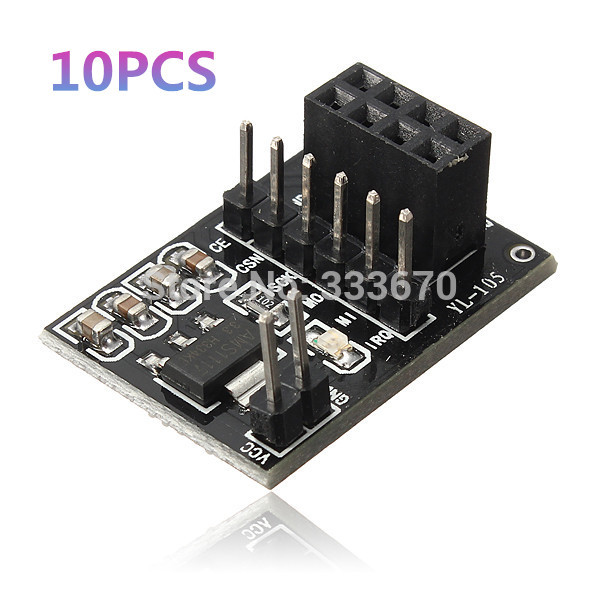
                                10Pcs-lot-Socket-Adapter-Plate-Board-For-8Pin-NRF24L01-Wireless-Transceive-Module-51-Free-Shipping.jpg

                                hekH 1 Reply Last reply
                                0
                                • H Hausner

                                  Temperatur sensor

                                   // Example sketch showing how to send in OneWire temperature readings
                                   #include <MySensor.h>  
                                   #include <SPI.h>
                                   #include <DallasTemperature.h>
                                   #include <OneWire.h>
                                   
                                   #define ONE_WIRE_BUS 3 // Pin where dallase sensor is connected 
                                   #define MAX_ATTACHED_DS18B20 16
                                   unsigned long SLEEP_TIME = 30000; // Sleep time between reads (in milliseconds)
                                   OneWire oneWire(ONE_WIRE_BUS);
                                   DallasTemperature sensors(&oneWire);
                                   MySensor gw;
                                   float lastTemperature[MAX_ATTACHED_DS18B20];
                                   int numSensors=0;
                                   boolean receivedConfig = false;
                                   boolean metric = true; 
                                   // Initialize temperature message
                                   MyMessage msg(0,V_TEMP);
                                   
                                   //int BATTERY_SENSE_PIN = A0; // select the input pin for the battery sense point
                                   //int oldBatteryPcnt = 0;
                                   
                                   void setup()  
                                   { 
                                     // Startup OneWire 
                                     sensors.begin();
                                   
                                     // Startup and initialize MySensors library. Set callback for incoming messages. 
                                     gw.begin(); 
                                   
                                     // Send the sketch version information to the gateway and Controller
                                     gw.sendSketchInfo("Temperature Sensor", "1.0");
                                   
                                     // Fetch the number of attached temperature sensors  
                                     numSensors = sensors.getDeviceCount();
                                   
                                     // Present all sensors to controller
                                     for (int i=0; i<numSensors && i<MAX_ATTACHED_DS18B20; i++) {   
                                        gw.present(i, S_TEMP);
                                     }
                                     
                                     // use the 1.1 V internal reference
                                     //analogReference(INTERNAL);
                                   }
                                   
                                   
                                   void loop()     
                                   {     
                                     // Process incoming messages (like config from server)
                                     gw.process(); 
                                   
                                     // Fetch temperatures from Dallas sensors
                                     sensors.requestTemperatures(); 
                                  
                                     // Read temperatures and send them to controller 
                                     for (int i=0; i<numSensors && i<MAX_ATTACHED_DS18B20; i++) {
                                  
                                     // Fetch and round temperature to one decimal
                                     float temperature = static_cast<float>(static_cast<int>  ((gw.getConfig().isMetric?sensors.getTempCByIndex(i):sensors.getTempFByIndex(i)) * 10.)) / 10.;
                                  
                                  // Only send data if temperature has changed and no error
                                  if (lastTemperature[i] != temperature && temperature != -127.00) {
                                  
                                    // Send in the new temperature
                                    gw.send(msg.setSensor(i).set(temperature,1));
                                    lastTemperature[i]=temperature;
                                  }
                                     }
                                  
                                  // get the battery Voltage
                                  //int sensorValue = analogRead(BATTERY_SENSE_PIN);
                                  //Serial.println(sensorValue);
                                  // 1M, 470K divider across battery and using internal ADC ref of 1.1V
                                  // Sense point is bypassed with 0.1 uF cap to reduce noise at that point
                                   // ((1e6+470e3)/470e3)*1.1 = Vmax = 3.44 Volts
                                   // 3.44/1023 = Volts per bit = 0.003363075
                                  //float batteryV = sensorValue * 0.004106;
                                  //int batteryPcnt = sensorValue / 10;
                                   //Serial.print("Battery Voltage: ");
                                     //Serial.print(batteryV);
                                     //Serial.println(" V");
                                     //Serial.print("Battery percent: ");
                                     //Serial.print(batteryPcnt);
                                     //Serial.println(" %");
                                     //if (oldBatteryPcnt != batteryPcnt) {
                                     // Power up radio after sleep
                                     //gw.sendBatteryLevel(batteryPcnt);
                                     //oldBatteryPcnt = batteryPcnt;
                                     //}
                                  
                                     //gw.sleep(SLEEP_TIME);
                                   }
                                  

                                  The temp sensor has been build according to this: http://mysensors.org/build/temp
                                  1 small exception though. I have used 5v->3.3v aparters for the radios, but that shouldn't matter.
                                  10Pcs-lot-Socket-Adapter-Plate-Board-For-8Pin-NRF24L01-Wireless-Transceive-Module-51-Free-Shipping.jpg

                                  hekH Offline
                                  hekH Offline
                                  hek
                                  Admin
                                  wrote on last edited by
                                  #20

                                  @Hausner said:

                                  //gw.sleep(SLEEP_TIME);

                                  Why did you comment away this line?

                                  H 1 Reply Last reply
                                  0
                                  • hekH hek

                                    @Hausner said:

                                    //gw.sleep(SLEEP_TIME);

                                    Why did you comment away this line?

                                    H Offline
                                    H Offline
                                    Hausner
                                    wrote on last edited by
                                    #21

                                    @hek

                                    Because it looks like that the sleep function is messing with the repeater function. With sleep enabled, almost all messages to the relay actuator node gets lost.

                                    1 Reply Last reply
                                    0
                                    • hekH Offline
                                      hekH Offline
                                      hek
                                      Admin
                                      wrote on last edited by hek
                                      #22

                                      Hmm.. shouldn't affect transmissions. When you removed this line you will get several hundreds of temp readings per second. It is a very big chance a few of them differs which means they will send it to gateway.

                                      You could try adding:
                                      gw.powerUp();
                                      delay(10)
                                      Just before gw.send() to add a small some additional delay after radio powers up.

                                      If you want to keep node awake another option is to use millis() keep track of send frequency. See here:
                                      https://github.com/mysensors/Arduino/blob/master/libraries/MySensors/examples/TimeAwareSensor/TimeAwareSensor.ino#L47

                                      H 1 Reply Last reply
                                      0
                                      • hekH hek

                                        Hmm.. shouldn't affect transmissions. When you removed this line you will get several hundreds of temp readings per second. It is a very big chance a few of them differs which means they will send it to gateway.

                                        You could try adding:
                                        gw.powerUp();
                                        delay(10)
                                        Just before gw.send() to add a small some additional delay after radio powers up.

                                        If you want to keep node awake another option is to use millis() keep track of send frequency. See here:
                                        https://github.com/mysensors/Arduino/blob/master/libraries/MySensors/examples/TimeAwareSensor/TimeAwareSensor.ino#L47

                                        H Offline
                                        H Offline
                                        Hausner
                                        wrote on last edited by
                                        #23

                                        @hek said:

                                        delay(10)

                                        I assume that is milliseconds, but does that mean that the radio will be powered on during that delay, and will the node repeat incoming messages during that?

                                        If so, I think a much bigger delay would be better, like 30000 or even more.

                                        hekH 1 Reply Last reply
                                        0
                                        • hekH Offline
                                          hekH Offline
                                          hek
                                          Admin
                                          wrote on last edited by
                                          #24

                                          This node isn't configured to be a repeater. So no, it won't.

                                          1 Reply Last reply
                                          0
                                          Reply
                                          • Reply as topic
                                          Log in to reply
                                          • Oldest to Newest
                                          • Newest to Oldest
                                          • Most Votes


                                          14

                                          Online

                                          11.7k

                                          Users

                                          11.2k

                                          Topics

                                          113.1k

                                          Posts


                                          Copyright 2025 TBD   |   Forum Guidelines   |   Privacy Policy   |   Terms of Service
                                          • Login

                                          • Don't have an account? Register

                                          • Login or register to search.
                                          • First post
                                            Last post
                                          0
                                          • MySensors
                                          • OpenHardware.io
                                          • Categories
                                          • Recent
                                          • Tags
                                          • Popular