Skip to content
  • MySensors
  • OpenHardware.io
  • Categories
  • Recent
  • Tags
  • Popular
Skins
  • Light
  • Brite
  • Cerulean
  • Cosmo
  • Flatly
  • Journal
  • Litera
  • Lumen
  • Lux
  • Materia
  • Minty
  • Morph
  • Pulse
  • Sandstone
  • Simplex
  • Sketchy
  • Spacelab
  • United
  • Yeti
  • Zephyr
  • Dark
  • Cyborg
  • Darkly
  • Quartz
  • Slate
  • Solar
  • Superhero
  • Vapor

  • Default (No Skin)
  • No Skin
Collapse
Brand Logo
  1. Home
  2. Controllers
  3. Vera
  4. [Solved] Support for S_MULTIMETER and V_VOLTAGE in Vera

[Solved] Support for S_MULTIMETER and V_VOLTAGE in Vera

Scheduled Pinned Locked Moved Vera
4 Posts 3 Posters 2.8k Views 3 Watching
  • Oldest to Newest
  • Newest to Oldest
  • Most Votes
Reply
  • Reply as topic
Log in to reply
This topic has been deleted. Only users with topic management privileges can see it.
  • W Offline
    W Offline
    Woodside
    wrote on last edited by Woodside
    #1

    Can anyone confirm if S_MULTIMETER and V_VOLTAGE are supported in Vera?

    L_Arduino.lua indicates it is supported

    Whereas Selecting a Controller, indicates it is not supported

    Using

    MyMessage msgVolt(CHILD_ID_VOLTAGE, V_VOLTAGE);
    

    and

    present(CHILD_ID_VOLTAGE, S_MULTIMETER);
    

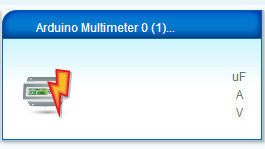
    The Multimeter device is created
    0_1497189592394_Multimeter blank.JPG
    but the values are blank.

    The Vera log shows the 'Voltage' value is being sent with the correct value

    50      06/11/17 14:25:48.875   luup_log:78: Arduino: Set variable: 1;0;1;0;38;4.79 <0x2ebbe680>
    50      06/11/17 14:25:48.876   luup_log:78: Arduino: Setting variable 'Voltage' to value '4.79' <0x2ebbe680>
    50      06/11/17 14:25:48.876   luup_log:78: Arduino: urn:micasaverde-com:serviceId:EnergyMetering1,Voltage, 4.79, 87 <0x2ebbe680>
    

    Is it possible to get this to appear in the Multimeter device?

    1 Reply Last reply
    1
    • I Offline
      I Offline
      itbeyond
      wrote on last edited by itbeyond
      #2

      I have loaded a Github repo to the Vera branch to fix this. The problem is the service references in the D_Multimeter1.json file. Edit this file and change all 6 references of urn:arduino-cc:serviceId: to urn:micasaverde-com:serviceId:

      Then reload the LUUP file (D_Multimeter1.json) in VERA - APPS - DEVELOP APPS - LUUP FILES. Restart the LUUP Engine and the values will now correctly appear.

      You can also see the pull request here: https://github.com/mysensors/Vera/pull/57/commits/695dfefaca0b3c7c3529242132a0902de9ec212f

      1 Reply Last reply
      0
      • W Offline
        W Offline
        Woodside
        wrote on last edited by
        #3

        @itbeyond said in Support for S_MULTIMETER and V_VOLTAGE in Vera:

        urn:micasaverde-com:serviceId:

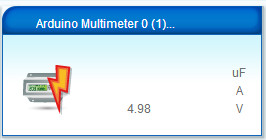
        Excellent, now working thanks
        0_1497265754361_Multimeter working.JPG

        I have commented accordingly on your pull request.

        1 Reply Last reply
        0
        • B Offline
          B Offline
          BartE
          Contest Winner
          wrote on last edited by BartE
          #4

          Does anyone know why the three value are not show in the "data_request?id=lu_sdata" output?

          It only outputs default values:

          {
                "name": "MyMulti",
                "altid": "12;1",
                "id": 346,
                "category": 12,
                "subcategory": -1,
                "room": 0,
                "parent": 64
              },
          

          While i would expect

          {
                "name": "MyMulti",
                "altid": "12;1",
                "id": 346,
                "category": 12,
                "subcategory": -1,
                "room": 0,
                "parent": 64,
                "Impedance": 0,
                "Current": 0,
                "Voltage": 4.89
              },
          

          I'm looking for a solution quite some time now, but I somehow miss a problem.
          1 Reply Last reply
          0

          Hello! It looks like you're interested in this conversation, but you don't have an account yet.

          Getting fed up of having to scroll through the same posts each visit? When you register for an account, you'll always come back to exactly where you were before, and choose to be notified of new replies (either via email, or push notification). You'll also be able to save bookmarks and upvote posts to show your appreciation to other community members.

          With your input, this post could be even better 💗

          Register Login
          Reply
          • Reply as topic
          Log in to reply
          • Oldest to Newest
          • Newest to Oldest
          • Most Votes


          28

          Online

          12.0k

          Users

          11.2k

          Topics

          113.4k

          Posts


          Copyright 2025 TBD   |   Forum Guidelines   |   Privacy Policy   |   Terms of Service
          • Login

          • Don't have an account? Register

          • Login or register to search.
          • First post
            Last post
          0
          • MySensors
          • OpenHardware.io
          • Categories
          • Recent
          • Tags
          • Popular