
Battery power sensor acting strange
-
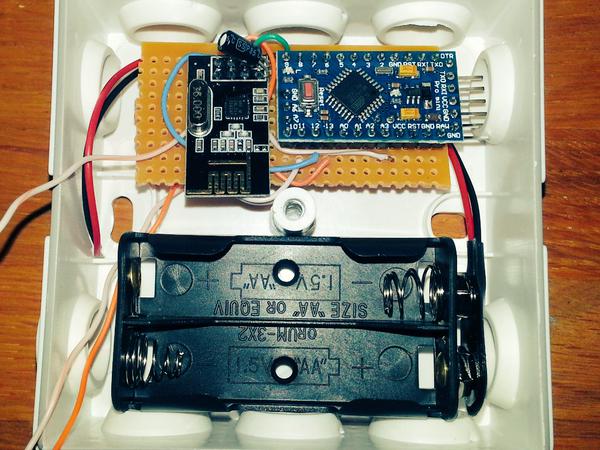
So, I hooked up a Pro Mini with a DS18B20 and Battery Sensor resistors from the guide here. I have not yet cut off the LED or regulator and the complete sensor is running on 2xAA batteries.
Everything is working just fine, but today I noticed some strange behaviour where the battery percentage bounched to 87%, back to 83% and up to 89%... is this normal? What could be the reasons behind it?
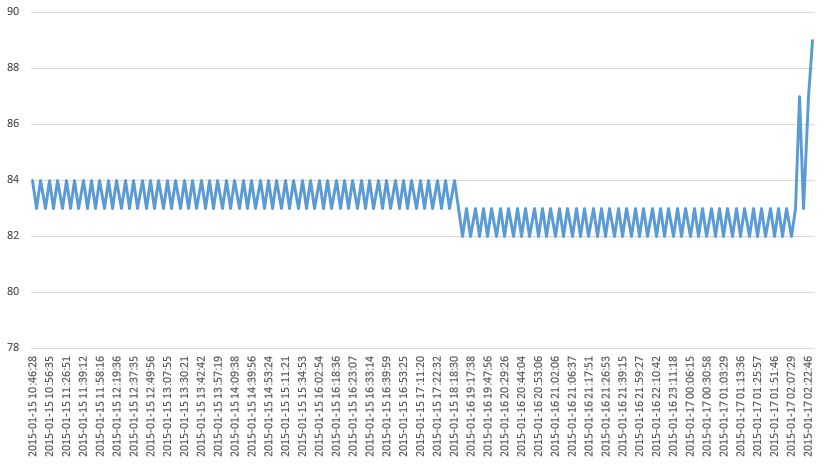
This is how it looks like
Code I'm using
#include <MySensor.h> #include <SPI.h> #include <DallasTemperature.h> #include <OneWire.h> #define ONE_WIRE_BUS 3 // Pin where dallase sensor is connected #define MAX_ATTACHED_DS18B20 16 unsigned long SLEEP_TIME = 60000; // Sleep time between reads (in milliseconds) OneWire oneWire(ONE_WIRE_BUS); DallasTemperature sensors(&oneWire); int BATTERY_SENSE_PIN = A0; // select the input pin for the battery sense point MySensor gw; int oldBatteryPcnt = 0; float lastTemperature[MAX_ATTACHED_DS18B20]; int numSensors=0; boolean receivedConfig = false; boolean metric = true; // Initialize temperature message MyMessage msg(0,V_TEMP); MyMessage msgvolt(1,V_VAR1); void setup() { // Startup OneWire sensors.begin(); // use the 1.1 V internal reference analogReference(INTERNAL); // Startup and initialize MySensors library. Set callback for incoming messages. gw.begin(); // Send the sketch version information to the gateway and Controller //gw.sendSketchInfo("Temperature Sensor", "1.0"); // Fetch the number of attached temperature sensors numSensors = sensors.getDeviceCount(); // Present all sensors to controller for (int i=0; i<numSensors && i<MAX_ATTACHED_DS18B20; i++) { gw.present(i, S_TEMP); } } void loop() { // Process incoming messages (like config from server) gw.process(); // Fetch temperatures from Dallas sensors sensors.requestTemperatures(); // Read temperatures and send them to controller for (int i=0; i<numSensors && i<MAX_ATTACHED_DS18B20; i++) { // Fetch and round temperature to one decimal float temperature = static_cast<float>(static_cast<int>((gw.getConfig().isMetric?sensors.getTempCByIndex(i):sensors.getTempFByIndex(i)) * 10.)) / 10.; // Only send data if temperature has changed and no error if (lastTemperature[i] != temperature && temperature != -127.00) { // Send in the new temperature gw.send(msg.setSensor(i).set(temperature,1)); lastTemperature[i]=temperature; } } // get the battery Voltage int sensorValue = analogRead(BATTERY_SENSE_PIN); //Serial.println(sensorValue); // 1M, 470K divider across battery and using internal ADC ref of 1.1V // Sense point is bypassed with 0.1 uF cap to reduce noise at that point // ((1e6+470e3)/470e3)*1.1 = Vmax = 3.44 Volts // 3.44/1023 = Volts per bit = 0.003363075 float batteryV = sensorValue * 0.003363075; int batteryPcnt = sensorValue / 10; Serial.print("Battery Voltage: "); Serial.print(batteryV); Serial.println(" V"); Serial.print("Battery percent: "); Serial.print(batteryPcnt); Serial.println(" %"); if (oldBatteryPcnt != batteryPcnt) { // Power up radio after sleep //gw.sendBatteryLevel(batteryPcnt); gw.send(msgvolt.set(batteryPcnt)); oldBatteryPcnt = batteryPcnt; } gw.sleep(SLEEP_TIME); } -
I see in your code that before the battery level is sent the temperature is sent:
 // Only send data if temperature has changed and no error
 if (lastTemperature[i] != temperature && temperature != -127.00) {
     // Send in the new temperature
     gw.send(msg.setSensor(i).set(temperature,1));
 }
Could it be that when measuring the battery voltage just after the temperature data has been sent the battery voltage is temporary lower?
A way to test that is to add a delay before sending the temperature.
-
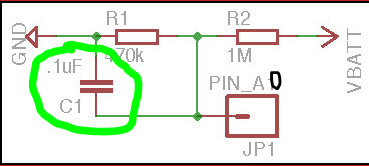
Maybe this is your problem, which also described at the building page.
"The tap point could be bypassed with a 0.1 uF capacitor to keep the noise level low, at this otherwise high impedance point. "
Hello! It looks like you're interested in this conversation, but you don't have an account yet.
Getting fed up of having to scroll through the same posts each visit? When you register for an account, you'll always come back to exactly where you were before, and choose to be notified of new replies (either via email, or push notification). You'll also be able to save bookmarks and upvote posts to show your appreciation to other community members.
With your input, this post could be even better 💗
Register Login