Skip to content
  • MySensors
  • OpenHardware.io
  • Categories
  • Recent
  • Tags
  • Popular
Skins
  • Light
  • Brite
  • Cerulean
  • Cosmo
  • Flatly
  • Journal
  • Litera
  • Lumen
  • Lux
  • Materia
  • Minty
  • Morph
  • Pulse
  • Sandstone
  • Simplex
  • Sketchy
  • Spacelab
  • United
  • Yeti
  • Zephyr
  • Dark
  • Cyborg
  • Darkly
  • Quartz
  • Slate
  • Solar
  • Superhero
  • Vapor

  • Default (No Skin)
  • No Skin
Collapse
Brand Logo
  1. Home
  2. Troubleshooting
  3. Problems with the Raspberry Pi gateway

Problems with the Raspberry Pi gateway

Scheduled Pinned Locked Moved Troubleshooting
16 Posts 4 Posters 3.5k Views 4 Watching
  • Oldest to Newest
  • Newest to Oldest
  • Most Votes
Reply
  • Reply as topic
Log in to reply
This topic has been deleted. Only users with topic management privileges can see it.
  • gohanG
    gohanG
    gohan
    Mod
    wrote on last edited by
    #3

    All configure parameters needs to be on the same line. In your case just use these
    ./configure --my-gateway=ethernet --my-port=5003 as the others are not needed

    vladimirV 1 Reply Last reply
    0
    • gohanG gohan

      All configure parameters needs to be on the same line. In your case just use these
      ./configure --my-gateway=ethernet --my-port=5003 as the others are not needed

      vladimirV
      vladimirV
      vladimir
      wrote on last edited by
      #4

      @gohan many thanks!:raised_hands:

      1 Reply Last reply
      0
      • gfinkG
        gfinkG
        gfink
        wrote on last edited by
        #5

        Hey @gohan I'm having a similiar issue, I've pasted my
        ./configure --my-transport=nrf24 --my-gateway=ethernet --my-port=5003 --my-gateway=ethernet --my-controller-ip-address=192.168.10.12 as a single line, then "make", and created the service, but I still get the same that Vladimir was getting.

        May 28 19:17:46 ERROR failed to connect
        May 28 19:17:46 DEBUG GWT:TPS:ETH OK
        May 28 19:17:46 ERROR connect: Connection refused
        May 28 19:17:46 ERROR failed to connect
        May 28 19:17:46 DEBUG GWT:TPS:ETH OK
        May 28 19:17:46 ERROR connect: Connection refused
        May 28 19:17:46 ERROR failed to connect
        May 28 19:17:46 DEBUG GWT:TPS:ETH OK
        May 28 19:17:46 ERROR connect: Connection refused
        ^CMay 28 19:17:46 NOTICE Received SIGINT

        I've tried the Master and development branch, and have triple checked the nrf24 wiring, made sure SPI was enabled on my pi, I'm at a loss of ideas, can anyone offer some suggestions?

        mfalkviddM 1 Reply Last reply
        0
        • gfinkG gfink

          Hey @gohan I'm having a similiar issue, I've pasted my
          ./configure --my-transport=nrf24 --my-gateway=ethernet --my-port=5003 --my-gateway=ethernet --my-controller-ip-address=192.168.10.12 as a single line, then "make", and created the service, but I still get the same that Vladimir was getting.

          May 28 19:17:46 ERROR failed to connect
          May 28 19:17:46 DEBUG GWT:TPS:ETH OK
          May 28 19:17:46 ERROR connect: Connection refused
          May 28 19:17:46 ERROR failed to connect
          May 28 19:17:46 DEBUG GWT:TPS:ETH OK
          May 28 19:17:46 ERROR connect: Connection refused
          May 28 19:17:46 ERROR failed to connect
          May 28 19:17:46 DEBUG GWT:TPS:ETH OK
          May 28 19:17:46 ERROR connect: Connection refused
          ^CMay 28 19:17:46 NOTICE Received SIGINT

          I've tried the Master and development branch, and have triple checked the nrf24 wiring, made sure SPI was enabled on my pi, I'm at a loss of ideas, can anyone offer some suggestions?

          mfalkviddM
          mfalkviddM
          mfalkvidd
          Mod
          wrote on last edited by mfalkvidd
          #6

          @gfink port 5003 on 192.168.10.12 isn't open for oncoming connections. What controller are you using? Does that controller support incoming connections from MySensors ethernet gateways? Most controllers prefer to connect to the gateway instead of having the gatewayconect to them.

          gfinkG 1 Reply Last reply
          0
          • gfinkG
            gfinkG
            gfink
            wrote on last edited by
            #7
            This post is deleted!
            1 Reply Last reply
            0
            • gfinkG
              gfinkG
              gfink
              wrote on last edited by
              #8

              @mfalkvidd Also, fyi, the drawing may need to be updated, as it's referencing pings 24/26 whereas the charts shows 22/24. If I'm reading it correctly: https://www.mysensors.org/build/raspberry

              mfalkviddM 1 Reply Last reply
              0
              • mfalkviddM mfalkvidd

                @gfink port 5003 on 192.168.10.12 isn't open for oncoming connections. What controller are you using? Does that controller support incoming connections from MySensors ethernet gateways? Most controllers prefer to connect to the gateway instead of having the gatewayconect to them.

                gfinkG
                gfinkG
                gfink
                wrote on last edited by
                #9

                @mfalkvidd I'm using openhab2.4 on the same pi, I'd initially tried it w/o port 5003, similiar to below to no avail. So am I mistaken to even try to run openhab2, and try to run the mySensor's ethernet gateway on the same pi? I was trying to conserve resources.

                ./configure --my-gateway=ethernet --my-controller-url-address=192.168.10.12 --my-transport=rf24 --my-rf24-irq-pin=15

                mfalkviddM 1 Reply Last reply
                0
                • gfinkG gfink

                  @mfalkvidd Also, fyi, the drawing may need to be updated, as it's referencing pings 24/26 whereas the charts shows 22/24. If I'm reading it correctly: https://www.mysensors.org/build/raspberry

                  mfalkviddM
                  mfalkviddM
                  mfalkvidd
                  Mod
                  wrote on last edited by
                  #10

                  @gfink I can't find a reference to 26 on that page. Could you explain what I'm missing?

                  gfinkG 1 Reply Last reply
                  0
                  • gfinkG gfink

                    @mfalkvidd I'm using openhab2.4 on the same pi, I'd initially tried it w/o port 5003, similiar to below to no avail. So am I mistaken to even try to run openhab2, and try to run the mySensor's ethernet gateway on the same pi? I was trying to conserve resources.

                    ./configure --my-gateway=ethernet --my-controller-url-address=192.168.10.12 --my-transport=rf24 --my-rf24-irq-pin=15

                    mfalkviddM
                    mfalkviddM
                    mfalkvidd
                    Mod
                    wrote on last edited by
                    #11

                    @gfinkrunning on the same pi is ok.
                    I don't have any experience with OpenHab but according to https://github.com/tobof/openhab2-addons/wiki/Configuration OpenHab connects to the gateway, not the other way around. Remove my-controller-url-address from the gateway configuration and re-run make and install.

                    gfinkG 1 Reply Last reply
                    0
                    • mfalkviddM mfalkvidd

                      @gfink I can't find a reference to 26 on that page. Could you explain what I'm missing?

                      gfinkG
                      gfinkG
                      gfink
                      wrote on last edited by mfalkvidd
                      #12

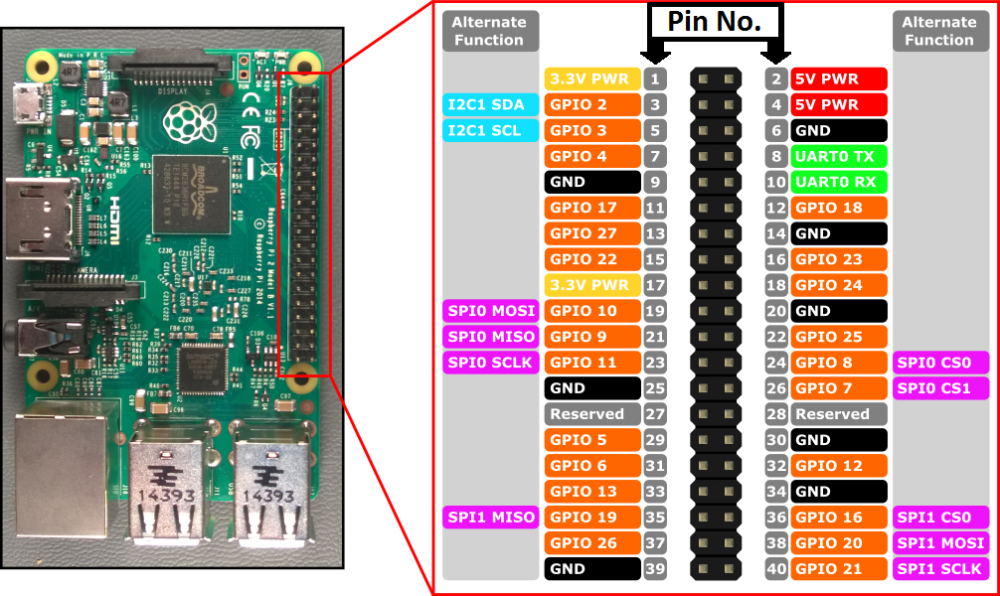
                      @mfalkvidd 0_1559221735037_338461b5-ff5c-45a3-a564-6b9478b01eed-image.png
                      This image is referencing (SPI0 CS0 = pin 24) and (SPI0 CS1 = pin 26). and below that image on the same URL, references this chart. I'm assuming that this is for the RPI (2-3)'s. So should the pic be updated to reference 22/24 and not 24/26 or the chart? Just asking to try to help others as I'd tripped over this for a short while. :)

                      Raspberry NRF24L01+ Color
                      GND GND Black
                      3.3V(*) VCC Red
                      22 CE Orange
                      24 CSN/CS Yellow
                      23 SCK Green
                      19 MOSI Blue
                      21 MISO Violet
                      15(**) IRQ Gray

                      mfalkviddM 1 Reply Last reply
                      0
                      • gfinkG gfink

                        @mfalkvidd 0_1559221735037_338461b5-ff5c-45a3-a564-6b9478b01eed-image.png
                        This image is referencing (SPI0 CS0 = pin 24) and (SPI0 CS1 = pin 26). and below that image on the same URL, references this chart. I'm assuming that this is for the RPI (2-3)'s. So should the pic be updated to reference 22/24 and not 24/26 or the chart? Just asking to try to help others as I'd tripped over this for a short while. :)

                        Raspberry NRF24L01+ Color
                        GND GND Black
                        3.3V(*) VCC Red
                        22 CE Orange
                        24 CSN/CS Yellow
                        23 SCK Green
                        19 MOSI Blue
                        21 MISO Violet
                        15(**) IRQ Gray

                        mfalkviddM
                        mfalkviddM
                        mfalkvidd
                        Mod
                        wrote on last edited by
                        #13

                        @gfink sorry, I don't see how it is referencing pin 26. Yes, pin 26 is present in the picture but so are pins 36, 39 and lots of other pins that are not used.

                        gfinkG 1 Reply Last reply
                        0
                        • mfalkviddM mfalkvidd

                          @gfink sorry, I don't see how it is referencing pin 26. Yes, pin 26 is present in the picture but so are pins 36, 39 and lots of other pins that are not used.

                          gfinkG
                          gfinkG
                          gfink
                          wrote on last edited by
                          #14

                          @mfalkvidd I guess I was under the impression that the purple labels signified the CE / CSN-CS pins for the nrf. That was a little confusing for a slow learner like myself. :)

                          1 Reply Last reply
                          0
                          • mfalkviddM mfalkvidd

                            @gfinkrunning on the same pi is ok.
                            I don't have any experience with OpenHab but according to https://github.com/tobof/openhab2-addons/wiki/Configuration OpenHab connects to the gateway, not the other way around. Remove my-controller-url-address from the gateway configuration and re-run make and install.

                            gfinkG
                            gfinkG
                            gfink
                            wrote on last edited by
                            #15

                            @mfalkvidd You're correct again sir. I ran "./configure --my-gateway=ethernet --my-transport=rf24 --my-rf24-irq-pin=15" and then make/install. and it now works. Thanks for all of your time, wisdom, and helping us along this journey.


                            mfalkviddM 1 Reply Last reply
                            1
                            • gfinkG gfink

                              @mfalkvidd You're correct again sir. I ran "./configure --my-gateway=ethernet --my-transport=rf24 --my-rf24-irq-pin=15" and then make/install. and it now works. Thanks for all of your time, wisdom, and helping us along this journey.

                              mfalkviddM
                              mfalkviddM
                              mfalkvidd
                              Mod
                              wrote on last edited by
                              #16

                              @gfink great work, thanks for reporting back

                              1 Reply Last reply
                              0

                              Hello! It looks like you're interested in this conversation, but you don't have an account yet.

                              Getting fed up of having to scroll through the same posts each visit? When you register for an account, you'll always come back to exactly where you were before, and choose to be notified of new replies (either via email, or push notification). You'll also be able to save bookmarks and upvote posts to show your appreciation to other community members.

                              With your input, this post could be even better 💗

                              Register Login
                              Reply
                              • Reply as topic
                              Log in to reply
                              • Oldest to Newest
                              • Newest to Oldest
                              • Most Votes


                              8

                              Online

                              12.4k

                              Users

                              11.2k

                              Topics

                              113.4k

                              Posts


                              Copyright 2025 TBD   |   Forum Guidelines   |   Privacy Policy   |   Terms of Service
                              • Login

                              • Don't have an account? Register

                              • Login or register to search.
                              • First post
                                Last post
                              0
                              • MySensors
                              • OpenHardware.io
                              • Categories
                              • Recent
                              • Tags
                              • Popular