
What makes a device controllable with the mobile app?
-
-
I mentioned mqtt because it's more widespread and so it's more probable you may find a more tested mqtt plug in rather than a mysensors one. I don't know anything about Vera, I'm just trying to approach the problem from a different perspective 😀
@gohan Thanks, I appreciate the help. I do understand that MQTT is more widespread, but as mentioned, I am mainly doing this to learn more about plugin development. That and once it is done, I can give back an option for people that may have a lot of devices set up with ESP Easy and want to switch to Vera, but don't want to re-flash all of their devices.
-
I don't know which app you are talking about but I guess the app must recognise the device type. The MySensors plugin mostly uses "standard" device types which probably shows up fine... but we also have a few custom once... like the distance sensor.
If the app doesn't recognise the type, you probably won't see it.
-
I don't know which app you are talking about but I guess the app must recognise the device type. The MySensors plugin mostly uses "standard" device types which probably shows up fine... but we also have a few custom once... like the distance sensor.
If the app doesn't recognise the type, you probably won't see it.
-
@hek
It seems that locally everything is working, but on the cloud service he can't interact with the mysensors devices. Could it be that plugins only work locally on the Vera? (I wouldn't be surprised as cloud services are usually not very flexible) -
-
Not sure, I haven't tried their cloud service. If you start modifying and create new devices their "cloud" must know how to create the layout... so they would need the locally stored device files (xml/json) which contain the presentation logic.
-
-
@hek ok, I am assuming that the device type has something to do with the urn:schemas. I am trying to understand the urn:schemas, because I had thought that that might have been part of the issue. In the D_HttpSwitch1.json file from the original creator uses "urn:mios-nullx8-com:serviceId:HttpSwitch1", where the D_BinaryLight1.json file uses "urn:upnp-org:serviceId:SwitchPower1"
Vera Plus running UI7 with MySensors, Sonoffs and 1-Wire devices
Visit my website for more Bits, Bytes and Ramblings from me: http://dan.bemowski.info/ -
@hek ok, I am assuming that the device type has something to do with the urn:schemas. I am trying to understand the urn:schemas, because I had thought that that might have been part of the issue. In the D_HttpSwitch1.json file from the original creator uses "urn:mios-nullx8-com:serviceId:HttpSwitch1", where the D_BinaryLight1.json file uses "urn:upnp-org:serviceId:SwitchPower1"
-
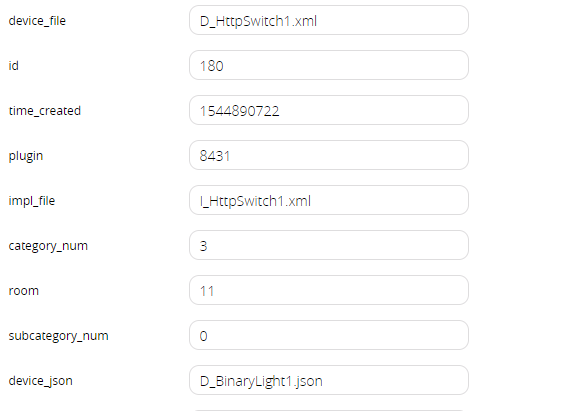
@dbemowsk I know this is a very old topic, but if you still need to control the device with the app, you can change:
device_json from D_HttpSwitch1.json to D_BinaryLight1.json




Hello! It looks like you're interested in this conversation, but you don't have an account yet.
Getting fed up of having to scroll through the same posts each visit? When you register for an account, you'll always come back to exactly where you were before, and choose to be notified of new replies (either via email, or push notification). You'll also be able to save bookmarks and upvote posts to show your appreciation to other community members.
With your input, this post could be even better 💗
Register Login