
Question about NRF24L01+ and signal issues
-
Hello,
I've started using NRF24L01+ radios some years ago., but then the project remained incomplete until today. When I've purchased these radio modules, they were sold as NRF24L01+. On the top of the chipset seems written NRF24L01+. The design is slighty different.
Now I'm noticing connections issues between the sensors and the gateway. The sensors are 3mt away from the GW and there is a little wall between. I don't think this shoud cause connection issues. BTW I would like to ask you if the radio modules I've used could be the cause of the range issues. I've already added a 10uF capacitor between GND and 3.3, directly on board.This is exactly the module:
http://www.ebay.com/itm/251099595360
And here a picture I've made on mine:
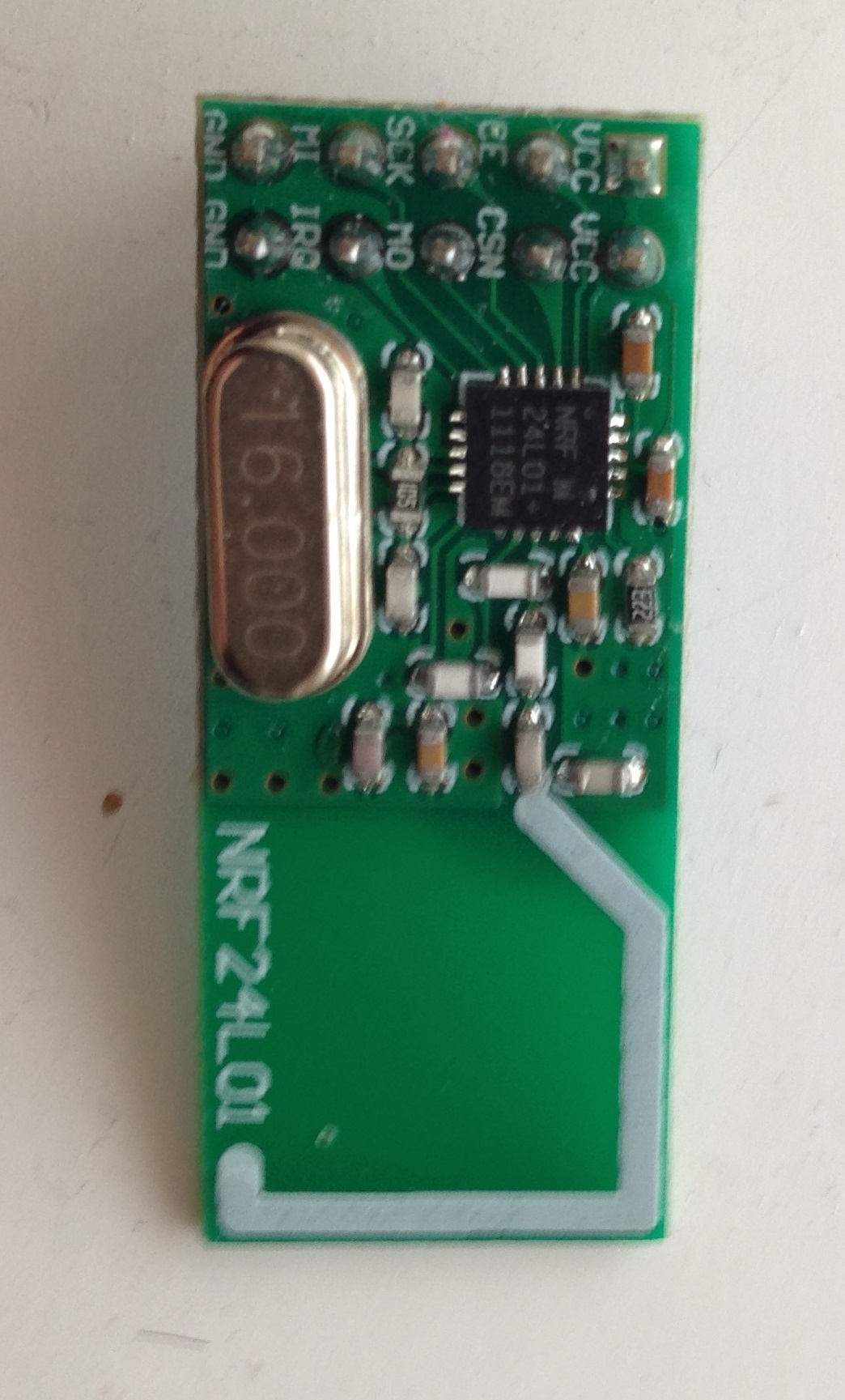
Any idea what could be the cause?
Thanks!
Simon
@xefil your module is fine
@ServiceXp said:
For whatever reason, I have had to add a 47uf (VVC and GND directly on the radio) cap to all my radios in order to get reliable transmissions.
I do the same, like this:
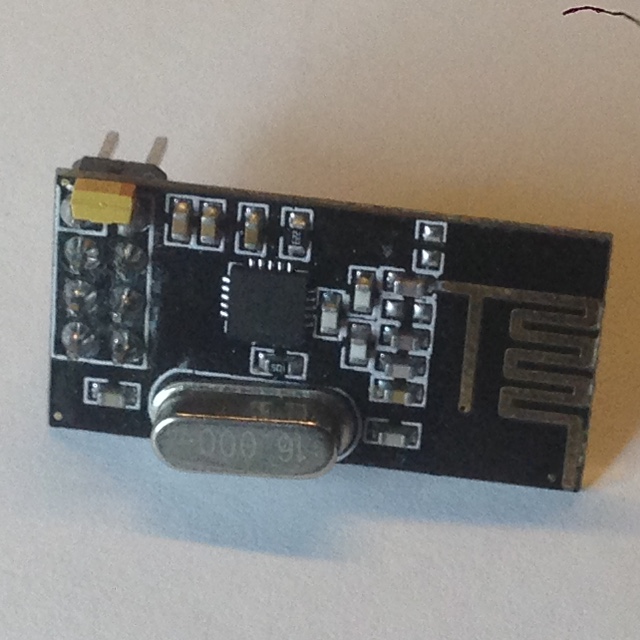
small yellow thing is a tantalum A capacitor 10uF soldered directory on top of VCC + GND pins
sense and drive
-
@xefil your module is fine
@ServiceXp said:
For whatever reason, I have had to add a 47uf (VVC and GND directly on the radio) cap to all my radios in order to get reliable transmissions.
I do the same, like this:
small yellow thing is a tantalum A capacitor 10uF soldered directory on top of VCC + GND pins
-
@axillent
I've used a normal 10uF electrolytic capacitor. Yours is a tanalum. I'm not an expert so I don't know the differences. Do you think it's not enough mine? Even the distance is some meters behind a little wall (there is an open door in the near). I was thinking the type of radio isn't so good as the last you've posted.Simon
-
@ServiceXp this is a smallest size A tantalum, it is 3.2 x 1.6 mm
@xefil said:
I've used a normal 10uF electrolytic capacitor. Yours is a tanalum. I'm not an expert so I don't know the differences. Do you think it's not enough mine? Even the distance is some meters behind a little wall (there is an open door in the near). I was thinking the type of radio isn't so good as the last you've posted.
electrolitic should be sufficient, but tantalum is better and ceramic is even better
try scanner from RF24 examples to find better radio channel
this could be the reason -
@ServiceXp this is a smallest size A tantalum, it is 3.2 x 1.6 mm
@xefil said:
I've used a normal 10uF electrolytic capacitor. Yours is a tanalum. I'm not an expert so I don't know the differences. Do you think it's not enough mine? Even the distance is some meters behind a little wall (there is an open door in the near). I was thinking the type of radio isn't so good as the last you've posted.
electrolitic should be sufficient, but tantalum is better and ceramic is even better
try scanner from RF24 examples to find better radio channel
this could be the reason@axillent said:
@ServiceXp this is a smallest size A tantalum, it is 3.2 x 1.6 mm
@xefil said:
I've used a normal 10uF electrolytic capacitor. Yours is a tanalum. I'm not an expert so I don't know the differences. Do you think it's not enough mine? Even the distance is some meters behind a little wall (there is an open door in the near). I was thinking the type of radio isn't so good as the last you've posted.
electrolitic should be sufficient, but tantalum is better and ceramic is even better
try scanner from RF24 examples to find better radio channel
this could be the reasonI'll try it and let you know, thank you!
Simon
-
A question for you in your setup...where is your antenna positioned relative to other nearby objects?
I've noticed that there are several examples here and elsewhere where the PCB antenna is positioned over a metallic object or over another PCB with copper traces or ground plane. After talking with an antenna expert, he commented that doing so can de-tune the antenna, from 2.4 GHz to something like 2.2 GHz, which will greatly reduce the efficiency (and therefore range).
-
A question for you in your setup...where is your antenna positioned relative to other nearby objects?
I've noticed that there are several examples here and elsewhere where the PCB antenna is positioned over a metallic object or over another PCB with copper traces or ground plane. After talking with an antenna expert, he commented that doing so can de-tune the antenna, from 2.4 GHz to something like 2.2 GHz, which will greatly reduce the efficiency (and therefore range).
@therik said:
A question for you in your setup...where is your antenna positioned relative to other nearby objects?
I've noticed that there are several examples here and elsewhere where the PCB antenna is positioned over a metallic object or over another PCB with copper traces or ground plane. After talking with an antenna expert, he commented that doing so can de-tune the antenna, from 2.4 GHz to something like 2.2 GHz, which will greatly reduce the efficiency (and therefore range).
This is an interesting part. I've one GW and two sensors for now.
The GW is over a wardrobe but in another room (room1). Nothing in the near.
One node is near a window and a TV (room2). Nothing really near.
The second node is near a stove in iron/ceramic (room2). This could be more the case. This is the antenna with the worst signal, even if it's between the GW and the forst antenna. Even if the first antenna is farther away from the GW is not near iron/copper. I'll try to place the second antenna a little more far away from the stoove.
Meanwhile I've moved the GW in room2 and now all works very well. This isn't a solution because in the near future I'll place more sensors around. All nodes are with simple nrf24l01 without the big antenna :)Thanks!
Simon
-
@therik said:
A question for you in your setup...where is your antenna positioned relative to other nearby objects?
I've noticed that there are several examples here and elsewhere where the PCB antenna is positioned over a metallic object or over another PCB with copper traces or ground plane. After talking with an antenna expert, he commented that doing so can de-tune the antenna, from 2.4 GHz to something like 2.2 GHz, which will greatly reduce the efficiency (and therefore range).
This is an interesting part. I've one GW and two sensors for now.
The GW is over a wardrobe but in another room (room1). Nothing in the near.
One node is near a window and a TV (room2). Nothing really near.
The second node is near a stove in iron/ceramic (room2). This could be more the case. This is the antenna with the worst signal, even if it's between the GW and the forst antenna. Even if the first antenna is farther away from the GW is not near iron/copper. I'll try to place the second antenna a little more far away from the stoove.
Meanwhile I've moved the GW in room2 and now all works very well. This isn't a solution because in the near future I'll place more sensors around. All nodes are with simple nrf24l01 without the big antenna :)Thanks!
Simon
@axillent
I've tested the code scanner:<pre><code>
/*
Copyright (C) 2011 J. Coliz maniacbug@ymail.comThis program is free software; you can redistribute it and/or
modify it under the terms of the GNU General Public License
version 2 as published by the Free Software Foundation.
*/#include <SPI.h>
#include "nRF24L01.h"
#include "RF24.h"
#include "printf.h"//
// Hardware configuration
//// Set up nRF24L01 radio on SPI bus plus pins 9 & 10
RF24 radio(9,10);
//
// Channel info
//const uint8_t num_channels = 128;
uint8_t values[num_channels];//
// Setup
//void setup(void)
{
//
// Print preamble
//Serial.begin(57600);
printf_begin();
printf("\n\rRF24/examples/scanner/\n\r");//
// Setup and configure rf radio
//radio.begin();
radio.setAutoAck(false);// Get into standby mode
radio.startListening();
radio.stopListening();// Print out header, high then low digit
int i = 0;
while ( i < num_channels )
{
printf("%x",i>>4);
++i;
}
printf("\n\r");
i = 0;
while ( i < num_channels )
{
printf("%x",i&0xf);
++i;
}
printf("\n\r");
}//
// Loop
//const int num_reps = 100;
void loop(void)
{
// Clear measurement values
memset(values,0,sizeof(values));// Scan all channels num_reps times
int rep_counter = num_reps;
while (rep_counter--)
{
int i = num_channels;
while (i--)
{
// Select this channel
radio.setChannel(i);// Listen for a little radio.startListening(); delayMicroseconds(128); radio.stopListening(); // Did we get a carrier? if ( radio.testCarrier() ) ++values[i]; }}
// Print out channel measurements, clamped to a single hex digit
int i = 0;
while ( i < num_channels )
{
printf("%x",min(0xf,values[i]&0xf));
++i;
}
printf("\n\r");
}// vim:ai:cin:sts=2 sw=2 ft=cpp
</code></pre>
and I've wired the board so:
CE 9
CSN 10
SCK 13
MOSI 11
MISO 12The output is always:
RF24/examples/scanner/
00000000000000001111111111111111222222222222222233333333333333334444444444444444555555555555555566666666666666667777777777777777
0123456789abcdef0123456789abcdef0123456789abcdef0123456789abcdef0123456789abcdef0123456789abcdef0123456789abcdef0123456789abcdef
44444444444444444444444444444444444444444444444444444444444444444444444444444444444444444444444444444444444444444444444444444444
44444444444444444444444444444444444444444444444444444444444444444444444444444444444444444444444444444444444444444444444444444444
44444444444444444444444444444444444444444444444444444444444444444444444444444444444444444444444444444444444444444444444444444444
44444444444444444444444444444444444444444444444444444444444444444444444444444444444444444444444444444444444444444444444444444444
44444444444444444444444444444444444444444444444444444444444444444444444444444444444444444444444444444444444444444444444444444444
44444444444444444444444444444444444444444444444444444444444444444444444444444444444444444444444444444444444444444444444444444444
44444444444444444444444444444444444444444444444444444444444444444444444444444444444444444444444444444444444444444444444444444444
44444444444444444444444444444444444444444444444444444444444444444444444444444444444444444444444444444444444444444444444444444444
44444444444444444444444444444444444444444444444444444444444444444444444444444444444444444444444444444444444444444444444444444444
44444444444444444444444444444444444444444444444444444444444444444444444444444444444444444444444444444444444444444444444444444444
44444444444444444444444444444444444444444444444444444444444444444444444444444444444444444444444444444444444444444444444444444444
44444444444444444444444444444444444444444444444444444444444444444444444444444444444444444444444444444444444444444444444444444444
44444444444444444444444444444444444444444444444444444444444444444444444444444444444444444444444444444444444444444444444444444444
44444444444444444444444444444444444444444444444444444444444444444444444444444444444444444444444444444444444444444444444444444444
44444444444444444444444444444444444444444444444444444444444444444444444444444444444444444444444444444444444444444444444444444444
44444444444444444444444444444444444444444444444444444444444444444444444444444444444444444444444444444444444444444444444444444444
44444444444444444444444444444444444444444444444444444444444444444444444444444444444444444444444444444444444444444444444444444444
44444444444444444444444444444444444444444444444444444444444444444444444444444444444444444444444444444444444444444444444444444444
44444444444444444444444444444444444444444444444444444444444444444444444444444444444444444444444444444444444444444444444444444444
44444444444444444444444444444444444444444444444444444444444444444444444444444444444444444444444444444444444444444444444444444444
44444444444444444444444444444444444444444444444444444444444444444444444444444444444444444444444444444444444444444444444444444444
44444444444444444444444444444444444444444444444444444444444444444444444444444444444444444444444444444444444444444444444444444444
44444444444444444444444444444444444444444444444444444444444444444444444444444444444444444444444444444444444444444444444444444444
44444444444444444444444444444444444444444444444444444444444444444444444444444444444444444444444444444444444444444444444444444444
44444444444444444444444444444444444444444444444444444444444444444444444444444444444444444444444444444444444444444444444444444444
44444444444444444444444444444444444444444444444444444444444444444444444444444444444444444444444444444444444444444444444444444444What does it mean??
f I disconnect the 3.3V the values are going to 000000000, also should be wired correctly.
Or do you have another sketch and wire instrctions?Thanks!
Simon
-
It was wired wrong, now it works with two scanners :)
I've turned OFF all my nodes and executed the scanner.Two examples I got:
RF24/examples/scanner/
00000000000000001111111111111111222222222222222233333333333333334444444444444444555555555555555566666666666666667777777777777777
0123456789abcdef0123456789abcdef0123456789abcdef0123456789abcdef0123456789abcdef0123456789abcdef0123456789abcdef0123456789abcdef
00000000000000000024222242223133132001000000000000000000000000000000000000000000000000000000000000000000000000000000000000000000
00000000000000000002221443324342431100000000000000000000000000000000000000000000000000000000000000000000000000000000000000000000
00000000000011101115543322223122222101100120000000000000000000000000000000000000000000000000000000000000000000000000000000000000
00000000000000000003231222222232221000110000000000000000000000000000000000000000000000000000000000000000000000000000000000000000
00000000000011100014132412323232323100000000000000000000000000000000000000000000000000000000000000000000000000000000000000000000
00000000000000001133231323124552222000000000000000000000000000000000000000000000000000000000000000000000000000000000000000000000
00000000001110112110112412233442322111001100200000000000000000000000000000000000000000000000000000000000000000000000000000000000
00000000000162333234223854374544443222222121100000000000000000000000000000000000000000000000000000000000000000000000000000000000
00000000000010100023322232231224332200012110000000000000000000000000000000000000000000000000000000000000000000000000000000000000
00000000000000001024243334333233343201000010000000000000000000000000000000000000000000000000000000000000000000000000000000000000
00000000000101101124422323243332233212011100000000000000000000000000000000000000000000000000000000000000000000000000000000000000
00000000000111102113233322333422222111110110000000000000000000000000000000000000000000000000000000000000000000000000000000000000
00000000000211011021212323222332131112011101000000000000000000000000000000000000000000000000000000000000000000000000000000000000
00000000000111011111314422222222220122111100000000000000000000000000000000000000000000000000000000000000000000000000000000000000
00000000000001110111322433222232121123111100000000000000000000000000000000000000000000000000000000000000000000000000000000000000
00000000000111011112222322233322101111121110000000000000000000000000000000000000000000000000000000000000000000000000000000000000
00000000000000110012223432124311121101110000000000000000000000000000000000000000000000000000000000000000000000000000000000000000
00000000000011011013222425423322211111111110000000000000000000000000000000000000000000000000000000000000000000000000000000000000
00000000000011110012344433132322222111122110000000000000000000000000000000000000000000000000000000000000000000000000000000000000
00000000000110111101122535431322311110111110000000000000000000000000000000000000000000000000000000000000000000000000000000000000
OR with wifi scanner:
1 2 3 4 5 6 7 8 9 10 11 12 13 14 <| *R=:WRWRRR=W===: | 5 | ..+--W*WRRR++---.. | 6 | ...:RRWWRR==:==== | 7 | +aaaa**WaWWR*+-:: | 8 | :==RRWRRR+::.: | 7 | .---RaWRWR*-: . | 8 | .++-WRRRRR*-*-- | 6 | .-.RR*WR*+-*.- | 6 | ...-:++aWRRa:-.. | 8 | ::=:aaaWaaa:=.: | 7 | .::aRRWRR+.:.. | 8 | ..+++RWRRWWR..--. | 6 | ..-RR+*WRR++R*+- | 6 | ..+RR+*WRR--+. | 6 > 1 2 3 4 5 6 7 8 9 10 11 12 13 14 < | :--WaRRRWa=-.: | 9 | .--=WR*++++...- | 9 | -WWR**RR*+.. | 6 | ....WRaa+Ra== . | 7 | . ::WaWRaR*== | 11 | :::=+WWRWWWR*+::: | 14 | ----aWRWRWWR**===. | 20 | .:++WWaWWa*+*... | 14 | .::++aWaWaRW*a.... . | 12 | .+*WWWWRWW*= | 12 | ::+:-RRWa-**:. . | 8 | ::=..RaWa=++:....= | 7 | --=:-*aWWaaa===*aW : | 9 | :==R*WRRWWR===== | 5 > 1 2 3 4 5 6 7 8 9 10 11 12 13 14 < | .:=RRRWaaa.: | 7I have default channels in my nodes.
Should I use as new channel @axillent and how to set it?Thanks!!
Simon
-
It was wired wrong, now it works with two scanners :)
I've turned OFF all my nodes and executed the scanner.Two examples I got:
RF24/examples/scanner/
00000000000000001111111111111111222222222222222233333333333333334444444444444444555555555555555566666666666666667777777777777777
0123456789abcdef0123456789abcdef0123456789abcdef0123456789abcdef0123456789abcdef0123456789abcdef0123456789abcdef0123456789abcdef
00000000000000000024222242223133132001000000000000000000000000000000000000000000000000000000000000000000000000000000000000000000
00000000000000000002221443324342431100000000000000000000000000000000000000000000000000000000000000000000000000000000000000000000
00000000000011101115543322223122222101100120000000000000000000000000000000000000000000000000000000000000000000000000000000000000
00000000000000000003231222222232221000110000000000000000000000000000000000000000000000000000000000000000000000000000000000000000
00000000000011100014132412323232323100000000000000000000000000000000000000000000000000000000000000000000000000000000000000000000
00000000000000001133231323124552222000000000000000000000000000000000000000000000000000000000000000000000000000000000000000000000
00000000001110112110112412233442322111001100200000000000000000000000000000000000000000000000000000000000000000000000000000000000
00000000000162333234223854374544443222222121100000000000000000000000000000000000000000000000000000000000000000000000000000000000
00000000000010100023322232231224332200012110000000000000000000000000000000000000000000000000000000000000000000000000000000000000
00000000000000001024243334333233343201000010000000000000000000000000000000000000000000000000000000000000000000000000000000000000
00000000000101101124422323243332233212011100000000000000000000000000000000000000000000000000000000000000000000000000000000000000
00000000000111102113233322333422222111110110000000000000000000000000000000000000000000000000000000000000000000000000000000000000
00000000000211011021212323222332131112011101000000000000000000000000000000000000000000000000000000000000000000000000000000000000
00000000000111011111314422222222220122111100000000000000000000000000000000000000000000000000000000000000000000000000000000000000
00000000000001110111322433222232121123111100000000000000000000000000000000000000000000000000000000000000000000000000000000000000
00000000000111011112222322233322101111121110000000000000000000000000000000000000000000000000000000000000000000000000000000000000
00000000000000110012223432124311121101110000000000000000000000000000000000000000000000000000000000000000000000000000000000000000
00000000000011011013222425423322211111111110000000000000000000000000000000000000000000000000000000000000000000000000000000000000
00000000000011110012344433132322222111122110000000000000000000000000000000000000000000000000000000000000000000000000000000000000
00000000000110111101122535431322311110111110000000000000000000000000000000000000000000000000000000000000000000000000000000000000
OR with wifi scanner:
1 2 3 4 5 6 7 8 9 10 11 12 13 14 <| *R=:WRWRRR=W===: | 5 | ..+--W*WRRR++---.. | 6 | ...:RRWWRR==:==== | 7 | +aaaa**WaWWR*+-:: | 8 | :==RRWRRR+::.: | 7 | .---RaWRWR*-: . | 8 | .++-WRRRRR*-*-- | 6 | .-.RR*WR*+-*.- | 6 | ...-:++aWRRa:-.. | 8 | ::=:aaaWaaa:=.: | 7 | .::aRRWRR+.:.. | 8 | ..+++RWRRWWR..--. | 6 | ..-RR+*WRR++R*+- | 6 | ..+RR+*WRR--+. | 6 > 1 2 3 4 5 6 7 8 9 10 11 12 13 14 < | :--WaRRRWa=-.: | 9 | .--=WR*++++...- | 9 | -WWR**RR*+.. | 6 | ....WRaa+Ra== . | 7 | . ::WaWRaR*== | 11 | :::=+WWRWWWR*+::: | 14 | ----aWRWRWWR**===. | 20 | .:++WWaWWa*+*... | 14 | .::++aWaWaRW*a.... . | 12 | .+*WWWWRWW*= | 12 | ::+:-RRWa-**:. . | 8 | ::=..RaWa=++:....= | 7 | --=:-*aWWaaa===*aW : | 9 | :==R*WRRWWR===== | 5 > 1 2 3 4 5 6 7 8 9 10 11 12 13 14 < | .:=RRRWaaa.: | 7I have default channels in my nodes.
Should I use as new channel @axillent and how to set it?Thanks!!
Simon
-
Take a look here http://www.mysensors.org/download/sensor_api_14#the-full-api
the default channel is 76 -
-
Sorry, but I'm not good to understand the debug of the scanners.
In the RF24/examples/scanner/ the range is between 0000->->->7777 I would expect a list of channels between 1 and 13.
In the second scanner (wiFi scanner found on arduino forum) It's more accurate. It seems noisy between channel 3 and 9.So, the questions are:
-
What does default channel 76 mean? 2476Mhz? Would mean above channel 13, on channel 14. In this case these channels are free, based on the results. I've seen I can use:
#define RF24_CHANNEL 76 //RF channel for the sensor net, 0-127 -
How to interpret the scanners result? Most of all the "RF24/examples/scanner/" which has an output I cannot identify in a channel.
I would like to understand the result and so choose the right channel, not only trying without knowing what I'm doing :)
Thanks a lot for the support!
Simon
-
-
Sorry, but I'm not good to understand the debug of the scanners.
In the RF24/examples/scanner/ the range is between 0000->->->7777 I would expect a list of channels between 1 and 13.
In the second scanner (wiFi scanner found on arduino forum) It's more accurate. It seems noisy between channel 3 and 9.So, the questions are:
-
What does default channel 76 mean? 2476Mhz? Would mean above channel 13, on channel 14. In this case these channels are free, based on the results. I've seen I can use:
#define RF24_CHANNEL 76 //RF channel for the sensor net, 0-127 -
How to interpret the scanners result? Most of all the "RF24/examples/scanner/" which has an output I cannot identify in a channel.
I would like to understand the result and so choose the right channel, not only trying without knowing what I'm doing :)
Thanks a lot for the support!
Simon
@xefil said:
Sorry, but I'm not good to understand the debug of the scanners.
In the RF24/examples/scanner/ the range is between 0000->->->7777Those are the high order nibble of the channel byte. The low order nibble is just below it.
The 125 channel numbers are printed "sideways" in hex.I would expect a list of channels between 1 and 13.
You're thinking of wi-fi. This isn't wi-fi.
In the second scanner (wiFi scanner found on arduino forum) It's more accurate. It seems noisy between channel 3 and 9.
So, the questions are:
- What does default channel 76 mean? 2476Mhz?
yes
Would mean above channel 13, on channel 14. In this case these channels are free, based on the results. I've seen I can use:
#define RF24_CHANNEL 76 //RF channel for the sensor net, 0-127- How to interpret the scanners result? Most of all the "RF24/examples/scanner/" which has an output I cannot identify in a channel.
The bigger the number below the channel, the more active it is.
I would like to understand the result and so choose the right channel, not only trying without knowing what I'm doing :)
Thanks a lot for the support!
Simon
-




Hello! It looks like you're interested in this conversation, but you don't have an account yet.
Getting fed up of having to scroll through the same posts each visit? When you register for an account, you'll always come back to exactly where you were before, and choose to be notified of new replies (either via email, or push notification). You'll also be able to save bookmarks and upvote posts to show your appreciation to other community members.
With your input, this post could be even better 💗
Register Login