
openHAB 2.2 binding
-
MySensors values not showing in openHAB
Hi all, newbie here - please could I ask you all to have a look at my configuration and let me know where I am going wrong on my first MySensors DHT node. I'm not able to view temperature or humidity from the node the standard DHT sketch here; https://www.mysensors.org/build/humidity.
I am using an ethernet gateway running on my Raspberry Pi running Openhabian - all installed well and gateway seems to be working from the logs below and I can see it's receiving the temperature and humidity values as expected. Problem is there are no values showing on the Paper UI control page or my sitemap (screen shots below). I have added a binding to openHAB for my solar panel inverter and that is receiving and displaying values ok.
Can anyone spot my mistake? Any suggestion very welcome ...
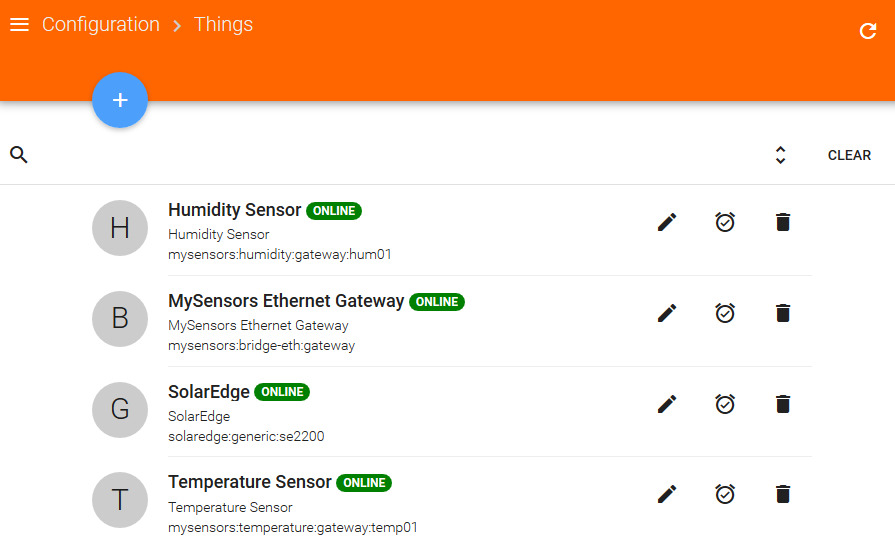
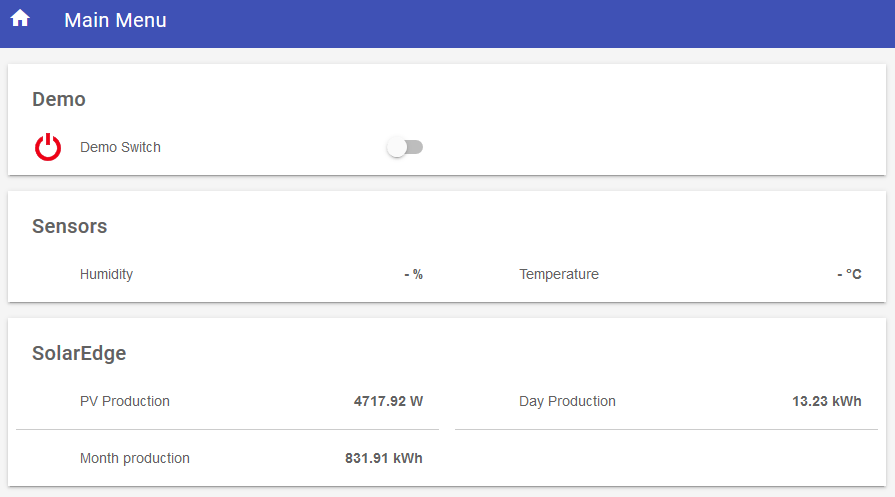
Here is my configuration;
$ lsb_release -a No LSB modules are available. Distributor ID: Raspbian Description: Raspbian GNU/Linux 9.6 (stretch) Release: 9.6 Codename: stretch $ cat /home/openhabian/MySensors/README.md MySensors Library v2.3.1 ... $ tail -f /var/log/openhab2/openhab.log 2019-03-30 11:40:11.637 [DEBUG] [rsAbstractConnection$MySensorsReader] - Message from gateway received: 1;0;1;0;1;35.4 2019-03-30 11:41:12.179 [DEBUG] [rsAbstractConnection$MySensorsReader] - Message from gateway received: 1;1;1;0;0;25.4 2019-03-30 11:41:12.303 [DEBUG] [rsAbstractConnection$MySensorsReader] - Message from gateway received: 1;0;1;0;1;35.0 2019-03-30 11:42:12.731 [DEBUG] [rsAbstractConnection$MySensorsReader] - Message from gateway received: 1;0;1;0;1;34.7 2019-03-30 11:43:13.295 [DEBUG] [rsAbstractConnection$MySensorsReader] - Message from gateway received: 1;0;1;0;1;34.6 2019-03-30 11:44:13.845 [DEBUG] [rsAbstractConnection$MySensorsReader] - Message from gateway received: 1;1;1;0;0;25.5 2019-03-30 11:44:13.859 [DEBUG] [rsAbstractConnection$MySensorsReader] - Message from gateway received: 1;0;1;0;1;34.4 2019-03-30 11:45:14.419 [DEBUG] [rsAbstractConnection$MySensorsReader] - Message from gateway received: 1;1;1;0;0;25.6 2019-03-30 11:45:14.433 [DEBUG] [rsAbstractConnection$MySensorsReader] - Message from gateway received: 1;0;1;0;1;34.6 2019-03-30 11:46:14.999 [DEBUG] [rsAbstractConnection$MySensorsReader] - Message from gateway received: 1;1;1;0;0;25.7 2019-03-30 11:47:15.567 [DEBUG] [rsAbstractConnection$MySensorsReader] - Message from gateway received: 1;1;1;0;0;25.8 2019-03-30 11:47:15.601 [DEBUG] [rsAbstractConnection$MySensorsReader] - Message from gateway received: 1;0;1;0;1;34.2 $ cat /etc/openhab2/things/mysensors.things // MySensors Ethernet Bridge Bridge mysensors:bridge-eth:gateway [ ipAddress="127.0.0.1", tcpPort=5003, sendDelay=200 , startupCheckEnabled=false ] { humidity hum01 [ nodeId=101, childId=0 ] temperature temp01 [ nodeId=101, childId=1 ] } // Solar Edge: Thing solaredge:generic:se2200 [ tokenOrApiKey="********", solarId="******"] $ cat /etc/openhab2/items/mysensors.items // MySensors Number hum01 "Humidity" { channel="mysensors:humidity:gateway:hum01:hum" } Number temp01 "Temperature" { channel="mysensors:temperature:gateway:temp01:temp" } // Solar Edge Number:Power SE2200_Live_Production "PV Production [%.2f %unit%]" {channel="solaredge:generic:se2200:live#production"} Number:Energy SE2200_Day_Production "Day Production [%.2f kWh]" {channel="solaredge:generic:se2200:aggregate_day#production"} Number:Energy SE2200_Month_Production "Month production [%.2f kWh]" {channel="solaredge:generic:se2200:aggregate_month#production"} //Demo Switch DEMOSW "Demo Switch" $ cat /etc/openhab2/sitemaps/home.sitemap sitemap home label="Main Menu" { Frame label="Demo" { Switch item=DEMOSW } Frame label="Sensors" { Text item=hum01 Text item=temp01 } Frame label="SolarEdge" { Text item=SE2200_Live_Production Text item=SE2200_Day_Production Text item=SE2200_Month_Production } } -
MySensors values not showing in openHAB
Hi all, newbie here - please could I ask you all to have a look at my configuration and let me know where I am going wrong on my first MySensors DHT node. I'm not able to view temperature or humidity from the node the standard DHT sketch here; https://www.mysensors.org/build/humidity.
I am using an ethernet gateway running on my Raspberry Pi running Openhabian - all installed well and gateway seems to be working from the logs below and I can see it's receiving the temperature and humidity values as expected. Problem is there are no values showing on the Paper UI control page or my sitemap (screen shots below). I have added a binding to openHAB for my solar panel inverter and that is receiving and displaying values ok.
Can anyone spot my mistake? Any suggestion very welcome ...
Here is my configuration;
$ lsb_release -a No LSB modules are available. Distributor ID: Raspbian Description: Raspbian GNU/Linux 9.6 (stretch) Release: 9.6 Codename: stretch $ cat /home/openhabian/MySensors/README.md MySensors Library v2.3.1 ... $ tail -f /var/log/openhab2/openhab.log 2019-03-30 11:40:11.637 [DEBUG] [rsAbstractConnection$MySensorsReader] - Message from gateway received: 1;0;1;0;1;35.4 2019-03-30 11:41:12.179 [DEBUG] [rsAbstractConnection$MySensorsReader] - Message from gateway received: 1;1;1;0;0;25.4 2019-03-30 11:41:12.303 [DEBUG] [rsAbstractConnection$MySensorsReader] - Message from gateway received: 1;0;1;0;1;35.0 2019-03-30 11:42:12.731 [DEBUG] [rsAbstractConnection$MySensorsReader] - Message from gateway received: 1;0;1;0;1;34.7 2019-03-30 11:43:13.295 [DEBUG] [rsAbstractConnection$MySensorsReader] - Message from gateway received: 1;0;1;0;1;34.6 2019-03-30 11:44:13.845 [DEBUG] [rsAbstractConnection$MySensorsReader] - Message from gateway received: 1;1;1;0;0;25.5 2019-03-30 11:44:13.859 [DEBUG] [rsAbstractConnection$MySensorsReader] - Message from gateway received: 1;0;1;0;1;34.4 2019-03-30 11:45:14.419 [DEBUG] [rsAbstractConnection$MySensorsReader] - Message from gateway received: 1;1;1;0;0;25.6 2019-03-30 11:45:14.433 [DEBUG] [rsAbstractConnection$MySensorsReader] - Message from gateway received: 1;0;1;0;1;34.6 2019-03-30 11:46:14.999 [DEBUG] [rsAbstractConnection$MySensorsReader] - Message from gateway received: 1;1;1;0;0;25.7 2019-03-30 11:47:15.567 [DEBUG] [rsAbstractConnection$MySensorsReader] - Message from gateway received: 1;1;1;0;0;25.8 2019-03-30 11:47:15.601 [DEBUG] [rsAbstractConnection$MySensorsReader] - Message from gateway received: 1;0;1;0;1;34.2 $ cat /etc/openhab2/things/mysensors.things // MySensors Ethernet Bridge Bridge mysensors:bridge-eth:gateway [ ipAddress="127.0.0.1", tcpPort=5003, sendDelay=200 , startupCheckEnabled=false ] { humidity hum01 [ nodeId=101, childId=0 ] temperature temp01 [ nodeId=101, childId=1 ] } // Solar Edge: Thing solaredge:generic:se2200 [ tokenOrApiKey="********", solarId="******"] $ cat /etc/openhab2/items/mysensors.items // MySensors Number hum01 "Humidity" { channel="mysensors:humidity:gateway:hum01:hum" } Number temp01 "Temperature" { channel="mysensors:temperature:gateway:temp01:temp" } // Solar Edge Number:Power SE2200_Live_Production "PV Production [%.2f %unit%]" {channel="solaredge:generic:se2200:live#production"} Number:Energy SE2200_Day_Production "Day Production [%.2f kWh]" {channel="solaredge:generic:se2200:aggregate_day#production"} Number:Energy SE2200_Month_Production "Month production [%.2f kWh]" {channel="solaredge:generic:se2200:aggregate_month#production"} //Demo Switch DEMOSW "Demo Switch" $ cat /etc/openhab2/sitemaps/home.sitemap sitemap home label="Main Menu" { Frame label="Demo" { Switch item=DEMOSW } Frame label="Sensors" { Text item=hum01 Text item=temp01 } Frame label="SolarEdge" { Text item=SE2200_Live_Production Text item=SE2200_Day_Production Text item=SE2200_Month_Production } } -
@zookazim From your openhab.log it seems that the sensor is sending messages with nodeId=1, but in your mysensors.things you mapped humidity and temperature channels to nodeId=101

Hello! It looks like you're interested in this conversation, but you don't have an account yet.
Getting fed up of having to scroll through the same posts each visit? When you register for an account, you'll always come back to exactly where you were before, and choose to be notified of new replies (either via email, or push notification). You'll also be able to save bookmarks and upvote posts to show your appreciation to other community members.
With your input, this post could be even better 💗
Register Login