Skip to content
  • MySensors
  • OpenHardware.io
  • Categories
  • Recent
  • Tags
  • Popular
Skins
  • Light
  • Brite
  • Cerulean
  • Cosmo
  • Flatly
  • Journal
  • Litera
  • Lumen
  • Lux
  • Materia
  • Minty
  • Morph
  • Pulse
  • Sandstone
  • Simplex
  • Sketchy
  • Spacelab
  • United
  • Yeti
  • Zephyr
  • Dark
  • Cyborg
  • Darkly
  • Quartz
  • Slate
  • Solar
  • Superhero
  • Vapor

  • Default (No Skin)
  • No Skin
Collapse
Brand Logo
  1. Home
  2. Troubleshooting
  3. ds18b20 on 2xAAA battery

ds18b20 on 2xAAA battery

Scheduled Pinned Locked Moved Troubleshooting
34 Posts 10 Posters 3.2k Views 8 Watching
  • Oldest to Newest
  • Newest to Oldest
  • Most Votes
Reply
  • Reply as topic
Log in to reply
This topic has been deleted. Only users with topic management privileges can see it.
  • pihomeP pihome

    further update:
    while playing with 1mhz bootloader and feeding arduino to raw pin from 18650 battery, sensors is successfully sending battery voltage and battery percentage but no temperature sensor reading. to prove that something isnt right with 1mhz bootloader i burned 8mhz default bootloader i get battery voltage, battery percentage and temperature reading. can not think of something obvious :(

    Link to 1mhz bootloader

    zboblamontZ Offline
    zboblamontZ Offline
    zboblamont
    wrote on last edited by
    #24

    @pihome No expert, but recall these one-wire devices have a digital communications protocol. As such they rely on accurate timing, hence your clock speed disrupts it?

    mfalkviddM 1 Reply Last reply
    0
    • zboblamontZ zboblamont

      @pihome No expert, but recall these one-wire devices have a digital communications protocol. As such they rely on accurate timing, hence your clock speed disrupts it?

      mfalkviddM Offline
      mfalkviddM Offline
      mfalkvidd
      Mod
      wrote on last edited by mfalkvidd
      #25

      @zboblamont might be on the right track. See https://github.com/arduino/Arduino/issues/7181 for a discussion on timing problems, especially at 1MHz

      1 Reply Last reply
      0
      • pihomeP Offline
        pihomeP Offline
        pihome
        wrote on last edited by
        #26

        Life is never easy and definitely not straight, there is always something wrong :( perhaps back to educating myself...

        PiHome - Smart Heating Control

        1 Reply Last reply
        0
        • bjacobseB Offline
          bjacobseB Offline
          bjacobse
          wrote on last edited by
          #27

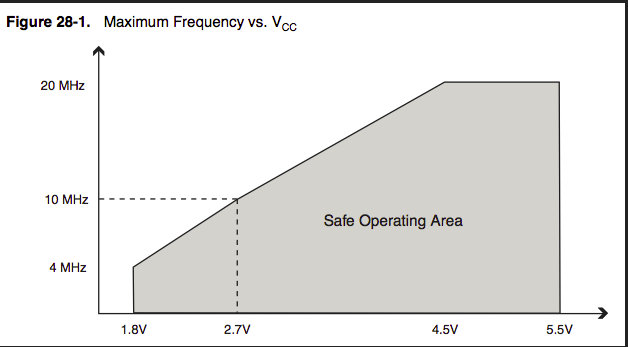
          It appears that you during runtime can change prescale, so you should be able to change clock frequency to 8MHz when reading DS18B20 and after reading change clock back to 1MHz

          https://forum.arduino.cc/index.php?topic=223771.0

          1 Reply Last reply
          1
          • pihomeP Offline
            pihomeP Offline
            pihome
            wrote on last edited by
            #28

            @bjacobse
            reason behind 1mhz mcu is to run it on lower voltage but switching between speed still need higher voltage. if i m not wrong!!!

            PiHome - Smart Heating Control

            mfalkviddM bjacobseB 2 Replies Last reply
            1
            • pihomeP pihome

              @bjacobse
              reason behind 1mhz mcu is to run it on lower voltage but switching between speed still need higher voltage. if i m not wrong!!!

              mfalkviddM Offline
              mfalkviddM Offline
              mfalkvidd
              Mod
              wrote on last edited by
              #29

              @pihome yes that’s correct

              1 Reply Last reply
              0
              • pihomeP pihome

                @bjacobse
                reason behind 1mhz mcu is to run it on lower voltage but switching between speed still need higher voltage. if i m not wrong!!!

                bjacobseB Offline
                bjacobseB Offline
                bjacobse
                wrote on last edited by bjacobse
                #30

                @pihome yes nothing is free;-)
                0_1561219510860_atmega328clockvoltage.png

                1 Reply Last reply
                0
                • bjacobseB Offline
                  bjacobseB Offline
                  bjacobse
                  wrote on last edited by bjacobse
                  #31

                  Well then another approach is not to use DS18B20 :-)
                  Have you checked TMP117 price seems to be 2USD in higher qty, and supply range: 1.8 V to 5.5 V

                  http://www.ti.com/product/TMP117

                  https://www.digikey.com/products/en/sensors-transducers/temperature-sensors-analog-and-digital-output/518?FV=ffe00206&quantity=0&ColumnSort=1000011&page=1&k=TMP117&pageSize=25

                  And someone have made a lib to Arduino: https://github.com/NilsMinor/TMP117-Arduino

                  1 Reply Last reply
                  1
                  • A Offline
                    A Offline
                    avelo
                    wrote on last edited by
                    #32

                    Hi, I'm on a somehow "comparable" (but very different scenario) project in terms of using same DS18B20 and arduino 3.3V, a mkr SAMD21 in my case, and trying to get the longer autonomy I can.

                    The best option I've seen so far seems to be to use the (best option) TPS61291 or (alternate option) TPS61221, as the first seems to be designed for this use cases, and the second has enable option to switch it off. All those seemed to me (newbie here) better than the TPS you indicate.

                    For my use case, the "low tech" option indicated by @mfalkvidd could fit very nicely, so I'll dig into that option.

                    1 Reply Last reply
                    2
                    • pihomeP Offline
                      pihomeP Offline
                      pihome
                      wrote on last edited by
                      #33

                      @avelo
                      thank you for suggestion, i have made prototype based on MIC5219-3.3
                      but sure TPS61291 / TPS61221 are good options. once i get pcb delivered i'll you know here.

                      PiHome - Smart Heating Control

                      1 Reply Last reply
                      2
                      • tbowmoT Offline
                        tbowmoT Offline
                        tbowmo
                        Admin
                        wrote on last edited by tbowmo
                        #34

                        just for reference, 4 out of 5 sensebender micros is still running strong, after 4 years on the same set of AA batteries, that they where deployed with.

                        The 5th sensebender is my outdoor sensor, that one eats a set of batteries within 48 hours.. But i suspect that it's the air humidity that has destroyed it.

                        I opted to use a Si7021 instead (there might be others that are better suited now), as it was better suited for low power operation, and runs down to 1.2V supply (if I remember right).

                        1 Reply Last reply
                        0
                        Reply
                        • Reply as topic
                        Log in to reply
                        • Oldest to Newest
                        • Newest to Oldest
                        • Most Votes


                        17

                        Online

                        11.7k

                        Users

                        11.2k

                        Topics

                        113.1k

                        Posts


                        Copyright 2025 TBD   |   Forum Guidelines   |   Privacy Policy   |   Terms of Service
                        • Login

                        • Don't have an account? Register

                        • Login or register to search.
                        • First post
                          Last post
                        0
                        • MySensors
                        • OpenHardware.io
                        • Categories
                        • Recent
                        • Tags
                        • Popular