Skip to content
  • MySensors
  • OpenHardware.io
  • Categories
  • Recent
  • Tags
  • Popular
Skins
  • Light
  • Brite
  • Cerulean
  • Cosmo
  • Flatly
  • Journal
  • Litera
  • Lumen
  • Lux
  • Materia
  • Minty
  • Morph
  • Pulse
  • Sandstone
  • Simplex
  • Sketchy
  • Spacelab
  • United
  • Yeti
  • Zephyr
  • Dark
  • Cyborg
  • Darkly
  • Quartz
  • Slate
  • Solar
  • Superhero
  • Vapor

  • Default (No Skin)
  • No Skin
Collapse
Brand Logo
  1. Home
  2. Controllers
  3. Raspberry GPIO NRF24l01+ make error

Raspberry GPIO NRF24l01+ make error

Scheduled Pinned Locked Moved Controllers
21 Posts 8 Posters 13.1k Views 2 Watching
  • Oldest to Newest
  • Newest to Oldest
  • Most Votes
Reply
  • Reply as topic
Log in to reply
This topic has been deleted. Only users with topic management privileges can see it.
  • S Offline
    S Offline
    sj44k
    wrote on last edited by sj44k
    #10

    Checked the wires 5 times .. all looks well. CE is on pin 15
    Arduino should also be ok, I get error messages (Check wires) when it's connected differently

    (Heres the Arduino mega pinout as I used it
    http://forum.mysensors.org/topic/249/arduino-mega-sensor-shield-2/2 )

    I have an Uno ordered but at this moment I am stuck to 1 arduino
    I do have an extra Pi which I could use ..

    By the way, where would I receive the information on my pi in this example (in case it would work)
    ?
    in the screen where I started the
    ./PiGatewaySerial

    Or in a cat /dev/pts/1 ?

    1 Reply Last reply
    0
    • V Offline
      V Offline
      Vladut Grecu
      wrote on last edited by
      #11

      Move the pin on 22. The actual 22 pin not gpio22. Full restart the pi.

      I think you can cat the /dev/ttyMySensorsGateway. In the way I use it(with pimatic) all the commands are logged.

      1 Reply Last reply
      0
      • S Offline
        S Offline
        sj44k
        wrote on last edited by sj44k
        #12

        Tried that too, not working. But I now see why you asked that my output when starting PiGatewaySerial shows :

        CE Pin           = Custom GPIO25
        

        So that needs to be harware pin 22

        This picture helped a lot and makes now that I am 100% sure my Rpi is hooked up correctly.
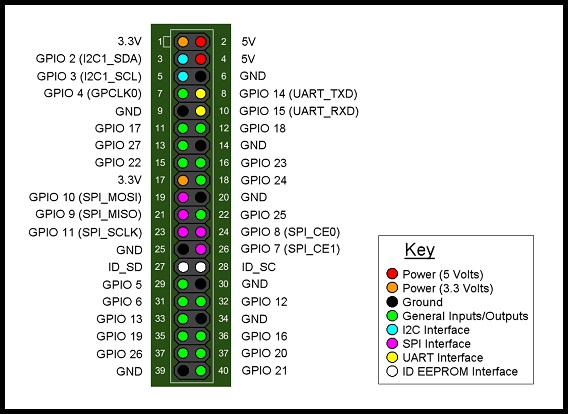
        GPIO B+.jpg

        :s: must be overseeing something realy simple / stupid .. :/s:

        Guess it must be the Arduino Mega causing the issue, back to my drawingboard .. will keep you posted

        [edit]

        Just found an interesting SPI reference picture for my Arduino Mega
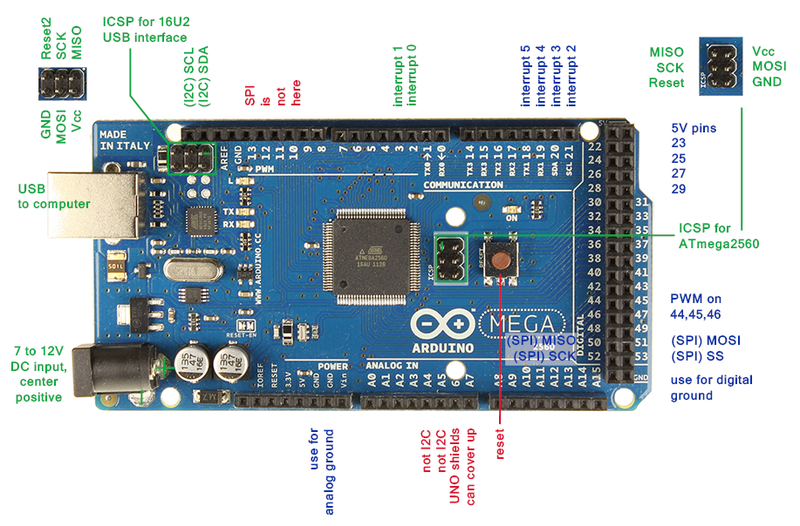
        Mega2560_R3_Label-small-v2 (2).png

        My Pinout seems to be ok on the SPI side, just need to check CE / SE in regard to the scketch/libraries I am using.

        Radio 1 GND Paars Arduino GND
        Radio 2 3v3 Blauw Arduino 3,3v
        Radio 3 CE Groen Arduino 48
        Radio 4 CS Geel Arduino 49
        Radio 5 SCK Oranje Arduino 52
        Radio 6 MOSI Rood Arduino 51
        Radio 7 MISO Bruin Arduino 50

        1 Reply Last reply
        0
        • S Offline
          S Offline
          sj44k
          wrote on last edited by sj44k
          #13

          YEAH !
          It works !! thanks for pointing me in the right direction !
          Arduino needed the right scketch uploade (I messed so much with it I needed to go back which I just did)

          As a reference for all who are trying to get this to work.

          Use this pinout for the RPI B+
          Radio 1 grijs GND Rpi 25
          Radio 2 paars 3v3 Rpi 17
          Radio 3 blauw CE Rpi 22
          Radio 4 groen CS Rpi 24
          Radio 5 Geel SCK Rpi 23
          Radio 6 oranje MOSI Rpi 19
          Radio 7 Rood MISO Rpi 21

          Arduino Mega
          Radio 1 GND Paars Arduino GND
          Radio 2 3v3 Blauw Arduino 3,3v
          Radio 3 CE Groen Arduino 48
          Radio 4 CS Geel Arduino 49
          Radio 5 SCK Oranje Arduino 52
          Radio 6 MOSI Rood Arduino 51
          Radio 7 MISO Bruin Arduino 50

          I used the Libs mentioned in the post above by Vladut Grecu :
          https://github.com/mysensors/Raspberry

          I used this Temperature sketch :
          http://www.mysensors.org/build/temp

          Before I did got the Temp sketch operational I needed to clear my EEprom :
          http://arduino.cc/en/Tutorial/EEPROMClear

          /*
           * EEPROM Clear
           *
           * Sets all of the bytes of the EEPROM to 0.
           * This example code is in the public domain.
          
           */
          
          #include <EEPROM.h>
          
          void setup()
          {
            // write a 0 to all 512 bytes of the EEPROM
            for (int i = 0; i < 512; i++)
              EEPROM.write(i, 0);
             
            // turn the LED on when we're done
            digitalWrite(13, HIGH);
          }
          
          void loop()
          {
          }
          

          Than we need to edit the sketch a bit due to the fact that the Rpi gateway DOES NOT hand out the Node ID's automaticly, and the Sketch is not Arduino Mega compatible so :

          Set the Node ID manualy add

          gw.begin(NULL,10,false);
          

          Make sure the sketch is compatible with the Arduino MEGA pins (as published abover here)
          Change Line 12 in the sketch :

          MySensor gw;
          

          into

          MySensor gw(48,49)
          

          Than compile and hook everything up and upload the compiled sketch and start the Rpi (SPI enabled) and start
          ./PiGatewaySerial

          Output should show on your Pi when you
          Cat /dev/ttyMySensorsGateway

          Big Thank you to @Vladut-Grecu !

          1 Reply Last reply
          2
          • H Offline
            H Offline
            hek
            Admin
            wrote on last edited by hek
            #14

            Just received a great pull request for the Rapsberry created by @Holger-Meyers .

            https://github.com/mysensors/Raspberry

            1 Reply Last reply
            0
            • SweebeeS Offline
              SweebeeS Offline
              Sweebee
              wrote on last edited by
              #15

              I had it finally working on my Pi2, but its very unstable. sometimes weird values, crashes and fails.

              switched to a usb serial arduino and that works great.

              1 Reply Last reply
              0
              • A Offline
                A Offline
                Andreas Maurer
                wrote on last edited by
                #16

                The original code on github is a bit buggy. Thats right. But the actual code after Holger has reworked it is running well.
                I am using it for nearly a month now. Nothing has crashed after Holger has looked after the reason why.

                Currently I am happy with the stability.

                Sander TeunissenS 1 Reply Last reply
                0
                • A Andreas Maurer

                  The original code on github is a bit buggy. Thats right. But the actual code after Holger has reworked it is running well.
                  I am using it for nearly a month now. Nothing has crashed after Holger has looked after the reason why.

                  Currently I am happy with the stability.

                  Sander TeunissenS Offline
                  Sander TeunissenS Offline
                  Sander Teunissen
                  wrote on last edited by
                  #17

                  @Andreas-Maurer Could you tell me which controller you are using for your setup ?

                  Thanks !

                  1 Reply Last reply
                  0
                  • A Offline
                    A Offline
                    Andreas Maurer
                    wrote on last edited by
                    #18

                    I am using fhem on the same PI. connected over the pseudo serial port.

                    1 Reply Last reply
                    0
                    • B Offline
                      B Offline
                      blksun813
                      wrote on last edited by
                      #19

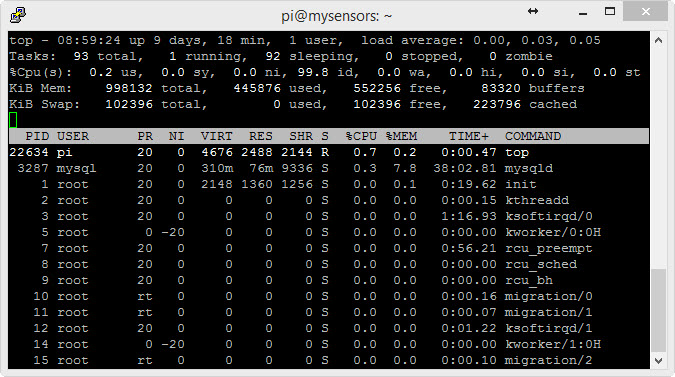
                      What is the CPU usage of PiGatewaySerial when you look at top? Mine is using 97%.

                      1 Reply Last reply
                      0
                      • A Offline
                        A Offline
                        Andreas Maurer
                        wrote on last edited by
                        #20

                        It isn´t on the list :)

                        05-04-2015 09-00-21.jpg

                        1 Reply Last reply
                        0
                        • B Offline
                          B Offline
                          blksun813
                          wrote on last edited by
                          #21

                          Thanks.. Looked again today and it has calmed down.. Maybe it's just at start-up before there are any messages received or maybe something reading the Serial Port.

                          1 Reply Last reply
                          0

                          Hello! It looks like you're interested in this conversation, but you don't have an account yet.

                          Getting fed up of having to scroll through the same posts each visit? When you register for an account, you'll always come back to exactly where you were before, and choose to be notified of new replies (either via email, or push notification). You'll also be able to save bookmarks and upvote posts to show your appreciation to other community members.

                          With your input, this post could be even better 💗

                          Register Login
                          Reply
                          • Reply as topic
                          Log in to reply
                          • Oldest to Newest
                          • Newest to Oldest
                          • Most Votes


                          62

                          Online

                          12.0k

                          Users

                          11.2k

                          Topics

                          113.4k

                          Posts


                          Copyright 2025 TBD   |   Forum Guidelines   |   Privacy Policy   |   Terms of Service
                          • Login

                          • Don't have an account? Register

                          • Login or register to search.
                          • First post
                            Last post
                          0
                          • MySensors
                          • OpenHardware.io
                          • Categories
                          • Recent
                          • Tags
                          • Popular