Skip to content
  • MySensors
  • OpenHardware.io
  • Categories
  • Recent
  • Tags
  • Popular
Skins
  • Light
  • Brite
  • Cerulean
  • Cosmo
  • Flatly
  • Journal
  • Litera
  • Lumen
  • Lux
  • Materia
  • Minty
  • Morph
  • Pulse
  • Sandstone
  • Simplex
  • Sketchy
  • Spacelab
  • United
  • Yeti
  • Zephyr
  • Dark
  • Cyborg
  • Darkly
  • Quartz
  • Slate
  • Solar
  • Superhero
  • Vapor

  • Default (No Skin)
  • No Skin
Collapse
Brand Logo
  1. Home
  2. Controllers
  3. Raspberry GPIO NRF24l01+ make error

Raspberry GPIO NRF24l01+ make error

Scheduled Pinned Locked Moved Controllers
21 Posts 8 Posters 11.5k Views 2 Watching
  • Oldest to Newest
  • Newest to Oldest
  • Most Votes
Reply
  • Reply as topic
Log in to reply
This topic has been deleted. Only users with topic management privileges can see it.
  • sj44kS Offline
    sj44kS Offline
    sj44k
    wrote on last edited by sj44k
    #10

    Checked the wires 5 times .. all looks well. CE is on pin 15
    Arduino should also be ok, I get error messages (Check wires) when it's connected differently

    (Heres the Arduino mega pinout as I used it
    http://forum.mysensors.org/topic/249/arduino-mega-sensor-shield-2/2 )

    I have an Uno ordered but at this moment I am stuck to 1 arduino
    I do have an extra Pi which I could use ..

    By the way, where would I receive the information on my pi in this example (in case it would work)
    ?
    in the screen where I started the
    ./PiGatewaySerial

    Or in a cat /dev/pts/1 ?

    1 Reply Last reply
    0
    • Vladut GrecuV Offline
      Vladut GrecuV Offline
      Vladut Grecu
      wrote on last edited by
      #11

      Move the pin on 22. The actual 22 pin not gpio22. Full restart the pi.

      I think you can cat the /dev/ttyMySensorsGateway. In the way I use it(with pimatic) all the commands are logged.

      1 Reply Last reply
      0
      • sj44kS Offline
        sj44kS Offline
        sj44k
        wrote on last edited by sj44k
        #12

        Tried that too, not working. But I now see why you asked that my output when starting PiGatewaySerial shows :

        CE Pin           = Custom GPIO25
        

        So that needs to be harware pin 22

        This picture helped a lot and makes now that I am 100% sure my Rpi is hooked up correctly.
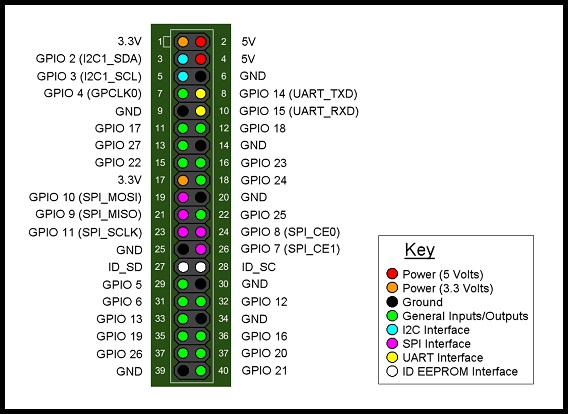
        GPIO B+.jpg

        :s: must be overseeing something realy simple / stupid .. :/s:

        Guess it must be the Arduino Mega causing the issue, back to my drawingboard .. will keep you posted

        [edit]

        Just found an interesting SPI reference picture for my Arduino Mega
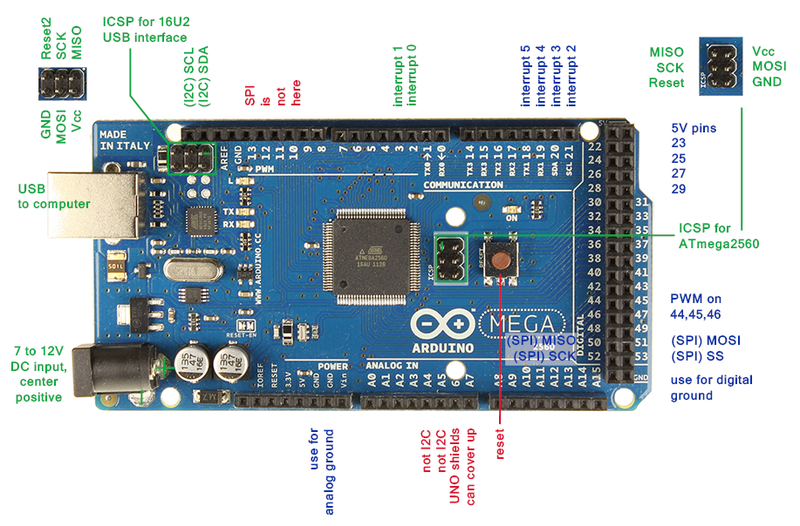
        Mega2560_R3_Label-small-v2 (2).png

        My Pinout seems to be ok on the SPI side, just need to check CE / SE in regard to the scketch/libraries I am using.

        Radio 1 GND Paars Arduino GND
        Radio 2 3v3 Blauw Arduino 3,3v
        Radio 3 CE Groen Arduino 48
        Radio 4 CS Geel Arduino 49
        Radio 5 SCK Oranje Arduino 52
        Radio 6 MOSI Rood Arduino 51
        Radio 7 MISO Bruin Arduino 50

        1 Reply Last reply
        0
        • sj44kS Offline
          sj44kS Offline
          sj44k
          wrote on last edited by sj44k
          #13

          YEAH !
          It works !! thanks for pointing me in the right direction !
          Arduino needed the right scketch uploade (I messed so much with it I needed to go back which I just did)

          As a reference for all who are trying to get this to work.

          Use this pinout for the RPI B+
          Radio 1 grijs GND Rpi 25
          Radio 2 paars 3v3 Rpi 17
          Radio 3 blauw CE Rpi 22
          Radio 4 groen CS Rpi 24
          Radio 5 Geel SCK Rpi 23
          Radio 6 oranje MOSI Rpi 19
          Radio 7 Rood MISO Rpi 21

          Arduino Mega
          Radio 1 GND Paars Arduino GND
          Radio 2 3v3 Blauw Arduino 3,3v
          Radio 3 CE Groen Arduino 48
          Radio 4 CS Geel Arduino 49
          Radio 5 SCK Oranje Arduino 52
          Radio 6 MOSI Rood Arduino 51
          Radio 7 MISO Bruin Arduino 50

          I used the Libs mentioned in the post above by Vladut Grecu :
          https://github.com/mysensors/Raspberry

          I used this Temperature sketch :
          http://www.mysensors.org/build/temp

          Before I did got the Temp sketch operational I needed to clear my EEprom :
          http://arduino.cc/en/Tutorial/EEPROMClear

          /*
           * EEPROM Clear
           *
           * Sets all of the bytes of the EEPROM to 0.
           * This example code is in the public domain.
          
           */
          
          #include <EEPROM.h>
          
          void setup()
          {
            // write a 0 to all 512 bytes of the EEPROM
            for (int i = 0; i < 512; i++)
              EEPROM.write(i, 0);
             
            // turn the LED on when we're done
            digitalWrite(13, HIGH);
          }
          
          void loop()
          {
          }
          

          Than we need to edit the sketch a bit due to the fact that the Rpi gateway DOES NOT hand out the Node ID's automaticly, and the Sketch is not Arduino Mega compatible so :

          Set the Node ID manualy add

          gw.begin(NULL,10,false);
          

          Make sure the sketch is compatible with the Arduino MEGA pins (as published abover here)
          Change Line 12 in the sketch :

          MySensor gw;
          

          into

          MySensor gw(48,49)
          

          Than compile and hook everything up and upload the compiled sketch and start the Rpi (SPI enabled) and start
          ./PiGatewaySerial

          Output should show on your Pi when you
          Cat /dev/ttyMySensorsGateway

          Big Thank you to @Vladut-Grecu !

          1 Reply Last reply
          2
          • hekH Offline
            hekH Offline
            hek
            Admin
            wrote on last edited by hek
            #14

            Just received a great pull request for the Rapsberry created by @Holger-Meyers .

            https://github.com/mysensors/Raspberry

            1 Reply Last reply
            0
            • SweebeeS Offline
              SweebeeS Offline
              Sweebee
              wrote on last edited by
              #15

              I had it finally working on my Pi2, but its very unstable. sometimes weird values, crashes and fails.

              switched to a usb serial arduino and that works great.

              1 Reply Last reply
              0
              • A Offline
                A Offline
                Andreas Maurer
                wrote on last edited by
                #16

                The original code on github is a bit buggy. Thats right. But the actual code after Holger has reworked it is running well.
                I am using it for nearly a month now. Nothing has crashed after Holger has looked after the reason why.

                Currently I am happy with the stability.

                Sander TeunissenS 1 Reply Last reply
                0
                • A Andreas Maurer

                  The original code on github is a bit buggy. Thats right. But the actual code after Holger has reworked it is running well.
                  I am using it for nearly a month now. Nothing has crashed after Holger has looked after the reason why.

                  Currently I am happy with the stability.

                  Sander TeunissenS Offline
                  Sander TeunissenS Offline
                  Sander Teunissen
                  wrote on last edited by
                  #17

                  @Andreas-Maurer Could you tell me which controller you are using for your setup ?

                  Thanks !

                  1 Reply Last reply
                  0
                  • A Offline
                    A Offline
                    Andreas Maurer
                    wrote on last edited by
                    #18

                    I am using fhem on the same PI. connected over the pseudo serial port.

                    1 Reply Last reply
                    0
                    • B Offline
                      B Offline
                      blksun813
                      wrote on last edited by
                      #19

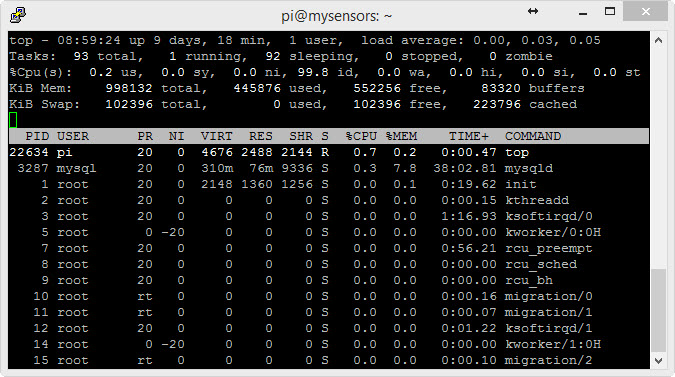
                      What is the CPU usage of PiGatewaySerial when you look at top? Mine is using 97%.

                      1 Reply Last reply
                      0
                      • A Offline
                        A Offline
                        Andreas Maurer
                        wrote on last edited by
                        #20

                        It isn´t on the list :)

                        05-04-2015 09-00-21.jpg

                        1 Reply Last reply
                        0
                        • B Offline
                          B Offline
                          blksun813
                          wrote on last edited by
                          #21

                          Thanks.. Looked again today and it has calmed down.. Maybe it's just at start-up before there are any messages received or maybe something reading the Serial Port.

                          1 Reply Last reply
                          0
                          Reply
                          • Reply as topic
                          Log in to reply
                          • Oldest to Newest
                          • Newest to Oldest
                          • Most Votes


                          14

                          Online

                          11.7k

                          Users

                          11.2k

                          Topics

                          113.1k

                          Posts


                          Copyright 2025 TBD   |   Forum Guidelines   |   Privacy Policy   |   Terms of Service
                          • Login

                          • Don't have an account? Register

                          • Login or register to search.
                          • First post
                            Last post
                          0
                          • MySensors
                          • OpenHardware.io
                          • Categories
                          • Recent
                          • Tags
                          • Popular