
RFM69HW & ATC not working
-
Hi,
I'm hoping someone can help me with ATC mode on my RFM69HW/Arduino Pro Mini nodes.
I've enabled it per the example sketch RFM69_RFM95_ATC_SignalReport.ino.I've updated the node & gateway to use the new RFM69 driver.
It doesn't seem to adjust the transmit power on my node and I get a TSF error as well.
A couple example debug outputs:BME280 - Sending the new humidity to the gateway. 55791 TSF:MSG:SEND,4-4-0-0,s=1,c=1,t=1,pt=7,l=5,sg=0,ft=0,st=OK:53.11 Uplink Qlty: 0, Xmit Level (dBm): 107, Xmit Level (%): 140 Xmit RSSI: -46, Recv RSSI: -54, Xmit SNR: -256, Recv SNR: -256 55805 TSF:MSG:READ,92-1-4,s=2,c=1,t=4,pt=0,l=6,sg=0:102.05 55816 !TSF:MSG:LEN=26,EXP=13 State: ST_SLEEP Uplink Qlty: 0, Xmit Level (dBm): 11, Xmit Level (%): 108 Xmit RSSI: -46, Recv RSSI: -53, Xmit SNR: -256, Recv SNR: -256 56082 TSF:MSG:READ,92-2-4,s=2,c=1,t=4,pt=0,l=6,sg=0:102.05 56094 !TSF:MSG:LEN=32,EXP=13 56096 TSF:MSG:READ,92-2-4,s=2,c=1,t=4,pt=0,l=6,sg=0:102.05 56102 !TSF:MSG:LEN=26,EXP=13 State: ST_SLEEPYou can see that the Xmit levels don't make sense.
The Xmit RSSI should be moving towards -70 dBm but never really changes.Here's the macros in the node's code:
// if you uncomment this, you can get test and debug updates about everything the sensor is doing by using the serial monitor tool.
#define MY_DEBUG

// Enable and select radio type attached
//#define MY_RADIO_RF24                            // A 2.4Ghz transmitter and receiver, often used with MySensors.
// #define MY_RF24_PA_LEVEL RF24_PA_MIN              // This sets a low-power mode for the radio. Useful if you use the version with the bigger antenna, but don't want to power that from a separate power source. It can also fix problems with fake Chinese versions of the radio.
#define MY_RADIO_RFM69                        // possible 434, 868, 915Mhz transmitter and reveiver.
#define MY_RFM69_NEW_DRIVER                   // ATC on RFM69 works only with the new driver (not compatible with old=default driver)
#define MY_IS_RFM69HW                         // high power version of radio
#define MY_RFM69_FREQUENCY  RFM69_915MHZ
#define MY_RFM69_ATC_TARGET_RSSI_DBM (-70)    // target RSSI -70dBm
#define MY_RFM69_MAX_POWER_LEVEL_DBM 10       // max. TX power 10dBm = 10mW

// Do you want this sensor to also be a repeater?
// #define MY_REPEATER_FEATURE                    // Just remove the two slashes at the beginning of this line to also enable this sensor to act as a repeater for other sensors. If this node is on battery power, you probably shouldn't enable this.

// Are you using this sensor on battery power?
#define BATTERY_POWERED

// Would you like to report humidity?
#define REPORT_HUMIDITY

// LIBRARIES
#include <SPI.h>                                  // A communication backbone, the Serial Peripheral Interface.
#include <MySensors.h>                            // The MySensors library. Hurray!
#include <Wire.h>                                 // Enables the Wire communication protocol.
#include <BME280_MOD-1022.h>                      // Bosch BME280 Embedded Adventures MOD-1022 weather multi-sensor Arduino code, written originally by Embedded Adventures. https://github.com/embeddedadventures/BME280
and later, in the loop()
#ifdef REPORT_HUMIDITY
      // Send humidity
      if (COMPARE_HUM == 1 && fabs(humidity - lastHumidity) < humThreshold) { // is the humidity difference bigger than the threshold?
//        Serial.print(humidity - lastHumidity);
//        Serial.println("- BME280 - Humidity difference too small, so not sending the new measurement to the gateway.");
      } else {
        Serial.println("BME280 - Sending the new humidity to the gateway.");
        send(humidityMsg.set(humidity, 2));
        lastHumidity = humidity; // Save new humidity to be able to compare in the next round.
      }
#endif
      // Send pressure
      if (COMPARE_PRES == 1 && fabs(pressure - lastPressure) < presThreshold) { // is the pressure difference bigger than the threshold?
//        Serial.print(pressure - lastPressure);
//        Serial.println("- BME280 - Pressure difference too small, so not sending the new measurement to the gateway.");
      } else {
        Serial.println("BME280 - Sending the new pressure to the gateway.");
        send(pressureMsg.set(pressure, 2));
        lastPressure = pressure; // Save new pressure to be able to compare in the next round.
      }

      ReportRfPower();
      state = ST_SLEEP;
      break;
and the report of ATC values:
void ReportRfPower()
{
  Serial.print("Uplink Qlty: ");  Serial.print(transportGetSignalReport(SR_UPLINK_QUALITY));
  Serial.print(", Xmit Level (dBm): ");  Serial.print(transportGetSignalReport(SR_TX_POWER_LEVEL));
  Serial.print(", Xmit Level (%): ");  Serial.println(transportGetSignalReport(SR_TX_POWER_PERCENT));

  Serial.print("Xmit RSSI: ");  Serial.print(transportGetSignalReport(SR_TX_RSSI));
  Serial.print(", Recv RSSI: ");  Serial.print(transportGetSignalReport(SR_RX_RSSI));
  Serial.print(", Xmit SNR: ");  Serial.print(transportGetSignalReport(SR_TX_SNR));
  Serial.print(", Recv SNR: ");  Serial.println(transportGetSignalReport(SR_RX_SNR));
}
Any ideas?
-
I've more information to share.
Seems I was running out of memory, when I turned off debug, which freed up some room, I started to get more reasonable results.
Uplink Qlty: 0, Xmit Level (dBm): -2, Xmit Level (%): 0
Xmit RSSI: -45, Recv RSSI: -39
Wondering if this is as low as it can go?
Looking at the datasheet,
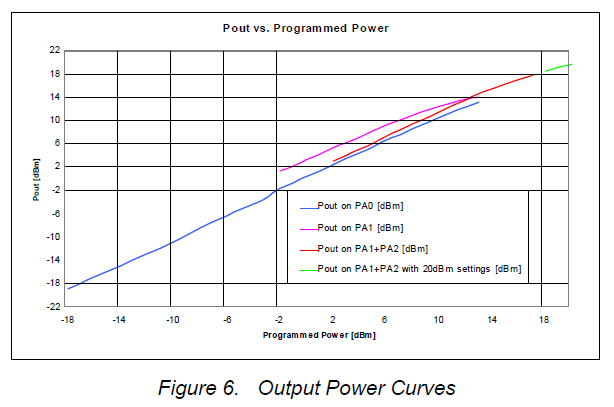
PA1 and PA2 combined on pin PA_BOOST: +2 to +17 dBm
and
PA1+PA2 on PA_BOOST with high output power +20dBm settings (see 3.3.7): +5 to +20 dBmI don't know what power level is selected when we enable #define MY_IS_RFM69HW
Can we simply run it as a low power RFM69 by commenting out the #define?
-
Documenting what I've found in the library code for the community.
When using #define MY_IS_RFM69HW:
The driver enables PA1 and PA2 and disables PA0 power amps. It automatically selects the right combination of PA1 and PA2 to achieve the target power level.
Power range is -2 to +20 dBmWhen NOT using #define MY_IS_RFM69HW:
Then only PA0 is enabled.
PA0 is identical between the RFM69W and RFM69HW.
Power range is -18 to +13 dBm
Basically, your RFM69HW operates as an RFM69W.Also, when using the new RFM69 driver, ATC mode is on by default, unless you explicitly turn it off using macro #define MY_RFM69_ATC_MODE_DISABLED
The default ATC target RSSI level is -80 dBm which you can change using #define MY_RFM69_ATC_TARGET_RSSI_DBMCheers
-
-
-
@KevinT
well, that's strange. Because lot of people experienced communication issues when missing the MY_IS_RFM69HW with RFM69H, very weak range or no comm. It's not about the library, it's about the module itself and its hardware implementation.of course MY_RADIO_RFM69 is mandatory :)
do you get a usable range when using RFM69H as a RFM69W? As good as a RFM69W??
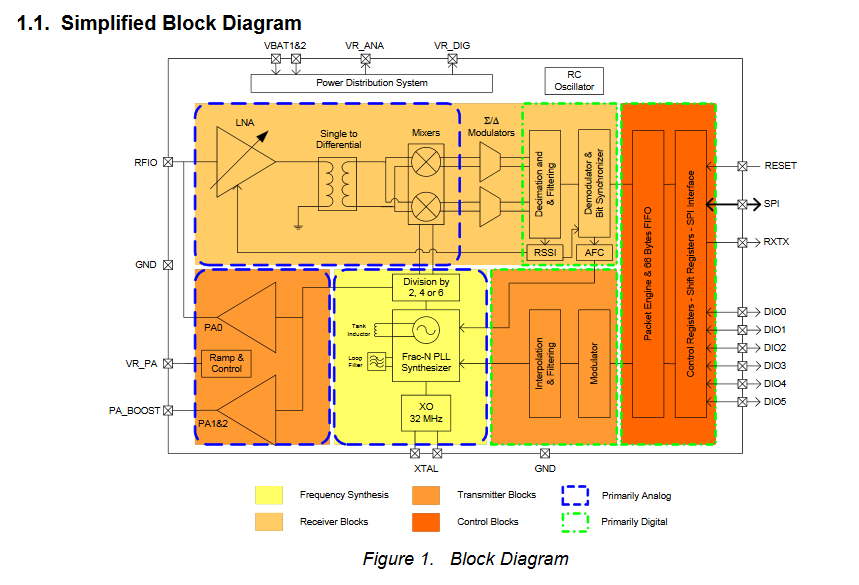
Here you can see PA0 is connected to RFIO pin which also handles the LNA, and PA1/2 to PA_BOOST pin
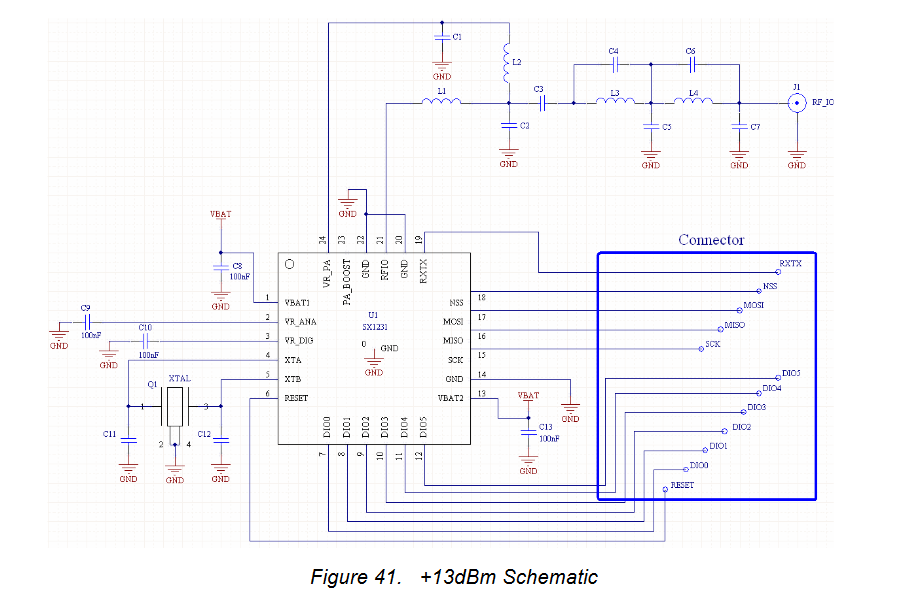
Here is how RFM69W works, it's just connected to RFIO, for PA0 and LNA
And, this is how RFM69H works. There is a RF Switch, which is controlled by the rxtx pin. So, in TX mode it uses PA_BOOST (PA1/2), and in RX mode it uses RFIO for LNA.
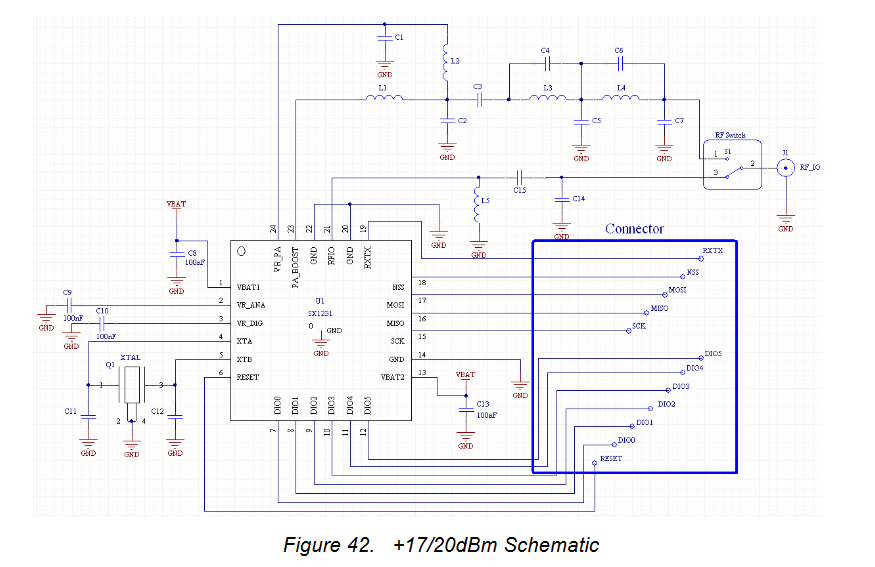
Note: all the tuning passives on both modules, on TX path, for tuning filtering etc.
So if you don't use the MY_IS_RFM69HW with a RFM69H, to only use PA0, then I doubt you can get same range as RFM69W.
Finally, I woud usually recommand to use MY_IS_RFM69HW if using RFM69HW/HCW and let ATC feature handles power level, or use a RFM69W/CW (with ATC too of course)
Here a few links which also explain this, but you can find more infos aboutthis on internet:
https://andrehessling.de/2015/02/07/figuring-out-the-power-level-settings-of-hoperfs-rfm69-hwhcw-modules/
https://lowpowerlab.com/forum/rf-range-antennas-rfm69-library/standardise-mote-configuration-using-rfm69hw-only/ -
@KevinT
well, that's strange. Because lot of people experienced communication issues when missing the MY_IS_RFM69HW with RFM69H, very weak range or no comm. It's not about the library, it's about the module itself and its hardware implementation.of course MY_RADIO_RFM69 is mandatory :)
do you get a usable range when using RFM69H as a RFM69W? As good as a RFM69W??
Here you can see PA0 is connected to RFIO pin which also handles the LNA, and PA1/2 to PA_BOOST pin
Here is how RFM69W works, it's just connected to RFIO, for PA0 and LNA
And, this is how RFM69H works. There is a RF Switch, which is controlled by the rxtx pin. So, in TX mode it uses PA_BOOST (PA1/2), and in RX mode it uses RFIO for LNA.
Note: all the tuning passives on both modules, on TX path, for tuning filtering etc.
So if you don't use the MY_IS_RFM69HW with a RFM69H, to only use PA0, then I doubt you can get same range as RFM69W.
Finally, I woud usually recommand to use MY_IS_RFM69HW if using RFM69HW/HCW and let ATC feature handles power level, or use a RFM69W/CW (with ATC too of course)
Here a few links which also explain this, but you can find more infos aboutthis on internet:
https://andrehessling.de/2015/02/07/figuring-out-the-power-level-settings-of-hoperfs-rfm69-hwhcw-modules/
https://lowpowerlab.com/forum/rf-range-antennas-rfm69-library/standardise-mote-configuration-using-rfm69hw-only/@scalz
This is my first attempt at using the lower power PA0. I am getting an RSSI of -75 with the radios about 5m apart and the radio using 10 dBm to achieve this. Quite disappointing. I was expecting the transmit power to be much lower, since in High Power mode I was getting an RSSI of -45 with transmit power of -2 dBm.
I thought that perhaps the radio was reporting the wrong transmit power, or that the library was not interpreting it correctly. I expected results similar to the data sheet.
But you say this is a common problem!
I was planning on standardising on the high power radio for all my nodes, but now I see I will have to switch to the RFM69W for many of them.Thanks very much for taking the time to bring me up to speed, its greatly appreciated.
-
@KevinT
Indeed, that's not very good range.
As a rough comparison (because it can depend on others factors), with rfm69cw and a short range of 10-12m, with 2 bricks walls obstacles, I set ATC RSSI target= -87, and power level is autoadjusted to -11So, regarding RFM69, for shorter ranges, RFM69W/CW can save power, and for others distances, RFM69H is better choice
I'm glad if I helped you :)
-
-
@KevinT
yes in general subghz radios have better range than 2.4ghz.
I might have farther nodes but for example, I have one rfm69cw at 55m from the GW and it's ok, with many obstacles on the path (7x rock walls, a part of the roof is metallic, metallic doors etc).
This depends on many factors of course

Hello! It looks like you're interested in this conversation, but you don't have an account yet.
Getting fed up of having to scroll through the same posts each visit? When you register for an account, you'll always come back to exactly where you were before, and choose to be notified of new replies (either via email, or push notification). You'll also be able to save bookmarks and upvote posts to show your appreciation to other community members.
With your input, this post could be even better 💗
Register Login