
MQTT & openhab
-
I'm not shure what your configuration is. You have:
- a sensor node
- a repeater Node
- a serial / MQTT Gateway node
3 nodes - is this OK?
Or is your sensor node the repeater too. I don't know if this is possible.
In case of a repeater node I'm not shure but I think the gateway is allways the "master" of all id's.
@Xander Thanks for the answer
For now, I have a MQTT controller, one repeater node with a BMP180 sensor (to do the forecast on a long time, as by definition the repeater never sleeps, with a modified sketch and a timer of 1 seconde), and an another node with temperature, luminance and hymidity sensors.
After some readings , i think that the gateway doesn't provide the Id, it's the role of the controller
=> in this discussion, you can read that, it's for Vera controller
Your going to want a controller in the long term. For testing you can either hard code the node ID in the sketch (you will want to flash the EEPROM clear sketch when you get a controller)

The reason your not seeing the temp on the gateway is because it doesn't get sent if there is no node ID.

Basically the node is asking the gateway/controller who am I and the controller isn't responding so it just keeps asking.
=> I use openHAb instead of Vera, and there is XXX.items file where you define the Ids for node and child
Number node1_temp  "Temp [%.1f °C]"     (node1,all)  {mqtt="<[mysensor:MyMQTT/20/10/V_TEMP:state:default]"}
Number node1_humid "Humid [%.1f %%Rh]" (node1,all)  {mqtt="<[mysensor:MyMQTT/20/11/V_HUM:state:default]"}
So I think that in this case, if the Ids are "constants" in openhab, they can't be randomly dealed by the gateway, and have to be fixed in each node
I just tested by giving Id to the nodes, and all seems correct
MQTT gateway
Started!
0;0;3;0;9;read: 20-20-0 s=255,c=0,t=18,pt=0,l=5:1.4.1
0;0;3;0;9;read: 20-20-0 s=255,c=3,t=6,pt=1,l=1:0
0;0;3;0;9;read: 20-20-0 s=255,c=3,t=12,pt=0,l=3:1.0
0;0;3;0;9;read: 20-20-0 s=0,c=0,t=8,pt=0,l=5:1.4.1
0;0;3;0;9;read: 20-20-0 s=0,c=1,t=4,pt=2,l=2:1012
0;0;3;0;9;read: 20-20-0 s=0,c=1,t=5,pt=0,l=7:inconnu
0;0;3;0;9;read: 21-21-0 s=255,c=0,t=17,pt=0,l=5:1.4.1
0;0;3;0;9;read: 21-21-0 s=255,c=3,t=6,pt=1,l=1:0
0;0;3;0;9;read: 21-21-0 s=255,c=3,t=11,pt=0,l=18:Temp, lumin, hygro
0;0;3;0;9;read: 21-21-0 s=255,c=3,t=12,pt=0,l=3:1.0
0;0;3;0;9;read: 21-21-0 s=0,c=0,t=6,pt=0,l=5:1.4.1
0;0;3;0;9;read: 21-21-0 s=1,c=0,t=16,pt=0,l=5:1.4.1
0;0;3;0;9;read: 21-21-0 s=2,c=0,t=7,pt=0,l=5:1.4.1
0;0;3;0;9;read: 21-21-0 s=0,c=1,t=0,pt=7,l=5:20.1
0;0;3;0;9;read: 21-21-0 s=1,c=1,t=23,pt=3,l=2:20
0;0;3;0;9;read: 21-21-0 s=2,c=1,t=1,pt=7,l=5:59.0
Repeater node
repeater started, id 20
send: 20-20-0-0 s=255,c=0,t=18,pt=0,l=5,st=ok:1.4.1
send: 20-20-0-0 s=255,c=3,t=6,pt=1,l=1,st=ok:0
send: 20-20-0-0 s=255,c=3,t=11,pt=0,l=17,st=fail:Repeter, pression
send: 20-20-0-0 s=255,c=3,t=12,pt=0,l=3,st=ok:1.0
BMP180 Initialisation OK
send: 20-20-0-0 s=0,c=0,t=8,pt=0,l=5,st=ok:1.4.1
Pression : 1012.27 hPa
send: 20-20-0-0 s=0,c=1,t=4,pt=2,l=2,st=ok:1012
send: 20-20-0-0 s=0,c=1,t=5,pt=0,l=7,st=ok:inconnu
Sensors node
sensor started, id 21 send: 21-21-0-0 s=255,c=0,t=17,pt=0,l=5,st=ok:1.4.1 send: 21-21-0-0 s=255,c=3,t=6,pt=1,l=1,st=ok:0 send: 21-21-0-0 s=255,c=3,t=11,pt=0,l=18,st=ok:Temp, lumin, hygro send: 21-21-0-0 s=255,c=3,t=12,pt=0,l=3,st=ok:1.0 send: 21-21-0-0 s=0,c=0,t=6,pt=0,l=5,st=ok:1.4.1 send: 21-21-0-0 s=1,c=0,t=16,pt=0,l=5,st=ok:1.4.1 send: 21-21-0-0 s=2,c=0,t=7,pt=0,l=5,st=ok:1.4.1 Temperature : 20.10 C send: 21-21-0-0 s=0,c=1,t=0,pt=7,l=5,st=ok:20.1 Luminosite : 20 lx send: 21-21-0-0 s=1,c=1,t=23,pt=3,l=2,st=ok:20 Temperature hygro : 19.00C send: 21-21-0-0 s=2,c=1,t=1,pt=7,l=5,st=ok:59.0 Hygrometrie : 59.00% Luminosite : 20 lx Temperature hygro : 19.00C -
Re,
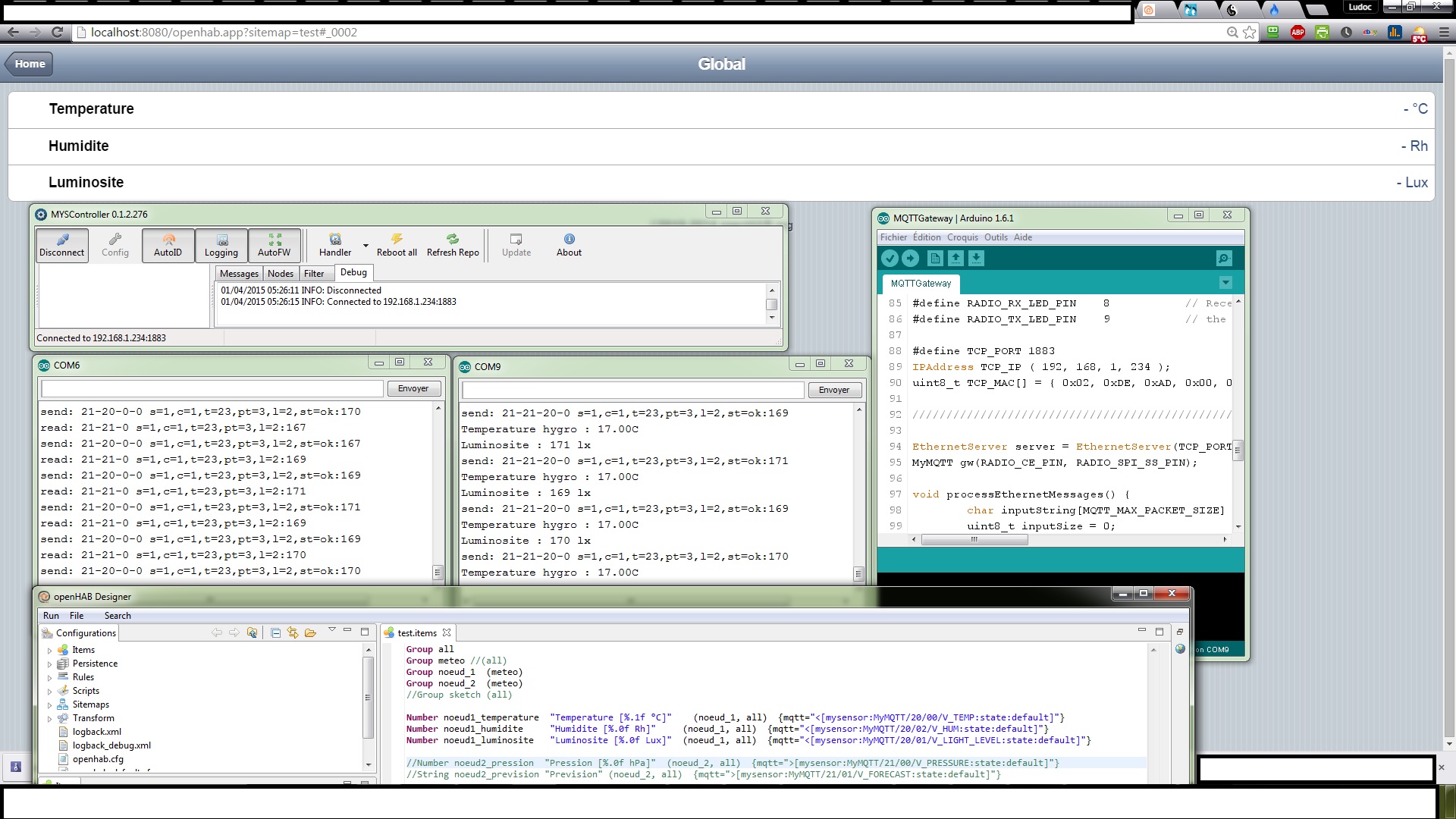
I tried to use MYSController without successThe IP is 192.168.1.234:1883 for the MQTT controller , but I can't read any values with the browser and MYSController.
And as you can see in the serial monitors, the nodes seem to discuss together.I don't know how to check the communication with the MQTT gateway, apparently the problem comes from him
Any tips, ?Thanks
-
I use a client ( MQTT.fx http://www.jensd.de/wordpress/?cat=50 ) to test the mqtt gateway. Please see my post: http://forum.mysensors.org/topic/953/how-to-know-the-node-ids-assigned-by-the-mqtt-gateway-to-the-sensors/2
With this tool I can see if the gateway is working and which id's are used. Then I configure OpenHAB accordingly.
-
I use a client ( MQTT.fx http://www.jensd.de/wordpress/?cat=50 ) to test the mqtt gateway. Please see my post: http://forum.mysensors.org/topic/953/how-to-know-the-node-ids-assigned-by-the-mqtt-gateway-to-the-sensors/2
With this tool I can see if the gateway is working and which id's are used. Then I configure OpenHAB accordingly.
@Xander Thanks ;)
Very great link, now I can see what is sent.
1)-
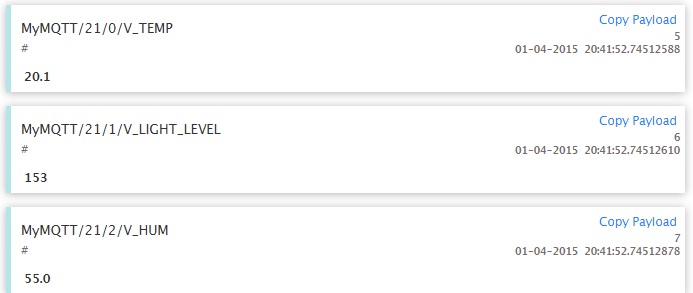
2- The ip in MQTT.fx is the same as in openhab.cfg
mqtt:mysensor.url=tcp://192.168.1.234:1883
 mqtt:mysensor.clientId=MQTT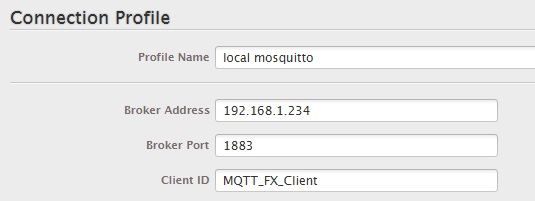
3- test.items
Group all
Group meteo //(all)
Group noeud_1  (meteo)
Group noeud_2  (meteo)
//Group sketch (all)

Number noeud1_temperature  "Temperature [%.1f °C]"    (noeud_1, all)  {mqtt="<[mysensor:MyMQTT/21/0/V_TEMP:state:default]"}
Number noeud1_luminosite   "Luminosite [%.0f Lux]"  (noeud_1, all)  {mqtt="<[mysensor:MyMQTT/21/1/V_LIGHT_LEVEL:state:default]"}
Number noeud1_humidite     "Humidite [%.0f Rh]"     (noeud_1, all)  {mqtt="<[mysensor:MyMQTT/21/2/V_HUM:state:default]"}
4- openHAB runtime
Launching the openHAB runtime...
osgi> 2015-04-01 20:28:05.432 [INFO ] [.o.core.internal.CoreActivator] - openHAB
 runtime has been started (v1.6.2).
2015-04-01 20:28:06.066 [INFO ] [o.o.i.s.i.DiscoveryServiceImpl] - mDNS service
has been started
2015-04-01 20:28:06.189 [INFO ] [o.o.i.s.i.DiscoveryServiceImpl] - Service Disco
very initialization completed.
2015-04-01 20:28:07.134 [INFO ] [penhab.io.rest.RESTApplication] - Started REST
API at /rest
2015-04-01 20:28:15.943 [INFO ] [c.internal.ModelRepositoryImpl] - Loading model
 'test.sitemap'
2015-04-01 20:28:16.055 [INFO ] [c.internal.ModelRepositoryImpl] - Loading model
 'test.items'
2015-04-01 20:28:16.653 [INFO ] [.o.u.w.i.servlet.WebAppServlet] - Started Class
ic UI at /openhab.app
And finally...........................

nothing :(
PS : i don't see the repeater with the barometer, I need to dissociate them so one nano more :(
-
Did you restart openHAB after you entered the MQTT gateway IP address in the configuration file? You don't need to restart when changing items, or sitemaps.
You should check that openHAB has made a connection to the MQTT gateway.
netstat -an |grep 1883
root@openHAB:~# netstat -an |grep 1883
tcp6       0      0 192.168.40.201:42199    192.168.40.200:1883     ESTABLISHED
root@openHAB:~#
Do you see it listed? If not restart the gateway, it should connect within a few minutes.
-
Did you restart openHAB after you entered the MQTT gateway IP address in the configuration file? You don't need to restart when changing items, or sitemaps.
You should check that openHAB has made a connection to the MQTT gateway.
netstat -an |grep 1883
root@openHAB:~# netstat -an |grep 1883
tcp6       0      0 192.168.40.201:42199    192.168.40.200:1883     ESTABLISHED
root@openHAB:~#
Do you see it listed? If not restart the gateway, it should connect within a few minutes.
-
-
-
-
that shows you have a listener, but nothing connected!
Are you running the gateway on this PC? if so the openhab configuration should be localhost or 127.0.0.1:1883.
-
And tonight, the weird is back
C:\Users\Totche>netstat -an|find "1883"
  TCP    0.0.0.0:1883           0.0.0.0:0              LISTENING
In openHAB.fx, I can see the msgs from the node, so I suppose that the ethernet connection is working
With MYSController, nothing displayed, no node network
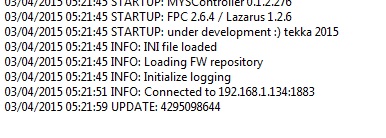
With the serial, I can see the exchanges between node and the MQTTgateway
So what's wrong ? The Gateway, a port redirection ????
-
And tonight, the weird is back
C:\Users\Totche>netstat -an|find "1883"
  TCP    0.0.0.0:1883           0.0.0.0:0              LISTENING
In openHAB.fx, I can see the msgs from the node, so I suppose that the ethernet connection is working
With MYSController, nothing displayed, no node network
With the serial, I can see the exchanges between node and the MQTTgateway
So what's wrong ? The Gateway, a port redirection ????
-
@Totche Just for clarification: MYSController is not compatible with MQTT gateways but with serial gw. .
@tekka Ah OK, it's better to know it, thanks; ;)
And I found the error this morning and it works great......
To create the configuration file for openHAB, I made a copy/paste of the Mysensors example., and I haven't seen it was a space character at the beginning of each lines.
I removed it, and it's working fine.now
So be carefull with the spaces, it was a stupid mistake and boring to find.
I have done this test 5 times, so I'm sure that it's the problem.
Thank you everybody....





Hello! It looks like you're interested in this conversation, but you don't have an account yet.
Getting fed up of having to scroll through the same posts each visit? When you register for an account, you'll always come back to exactly where you were before, and choose to be notified of new replies (either via email, or push notification). You'll also be able to save bookmarks and upvote posts to show your appreciation to other community members.
With your input, this post could be even better 💗
Register Login