Skip to content
  • MySensors
  • OpenHardware.io
  • Categories
  • Recent
  • Tags
  • Popular
Skins
  • Light
  • Brite
  • Cerulean
  • Cosmo
  • Flatly
  • Journal
  • Litera
  • Lumen
  • Lux
  • Materia
  • Minty
  • Morph
  • Pulse
  • Sandstone
  • Simplex
  • Sketchy
  • Spacelab
  • United
  • Yeti
  • Zephyr
  • Dark
  • Cyborg
  • Darkly
  • Quartz
  • Slate
  • Solar
  • Superhero
  • Vapor

  • Default (No Skin)
  • No Skin
Collapse
Brand Logo
  1. Home
  2. Troubleshooting
  3. GWT:TPC:CONNECTING

GWT:TPC:CONNECTING

Scheduled Pinned Locked Moved Troubleshooting
24 Posts 4 Posters 142 Views 2 Watching
  • Oldest to Newest
  • Newest to Oldest
  • Most Votes
Reply
  • Reply as topic
Log in to reply
This topic has been deleted. Only users with topic management privileges can see it.
  • D DenisJ

    Hi there all,
    after a lot of days that my Gateway work, today it stop connecting, and I don't understand why.
    It's still log a lot of:

    510139 GWT:TPC:CONNECTING...
    511143 GWT:TPC:CONNECTING...
    512147 GWT:TPC:CONNECTING...
    513151 GWT:TPC:CONNECTING...
    514155 GWT:TPC:CONNECTING...
    515159 GWT:TPC:CONNECTING...
    516163 GWT:TPC:CONNECTING...
    

    I try a WiFi connect to another router, but still same think.
    I try a connection to my mobile phone WiFi (thetering) and same think.
    Anyone can tell me why is not connecting anymore please ?

    Thanks all in advance
    Denis

    mfalkviddM Offline
    mfalkviddM Offline
    mfalkvidd
    Mod
    wrote on last edited by
    #2

    @DenisJ gwt:TPC:CONNECTING means the gateway tries to get an dynamic ip address from your dhcp server/router. Are other devices on the network able to get an ip address?

    1 Reply Last reply
    1
    • D Offline
      D Offline
      DenisJ
      wrote on last edited by
      #3

      @mfalkvidd said in GWT:TPC:CONNECTING:

      Are other devices on the network able to get an ip address?

      Yes I have a lot of device on my home lan, but not more than 50.
      and I have a DHCP IP from 200 to 250.
      I have try a fixed IP, but same think.

      Is there some command in order to have more debug info please ?

      Thanks a lot for the help.
      Denis

      1 Reply Last reply
      0
      • D Offline
        D Offline
        DenisJ
        wrote on last edited by
        #4

        Dear @mfalkvidd
        on the same ESP32 Gateway board I write a simply web server schetch from here.
        Then at the first reset the ESP32 take a new IP from DHCP server(router) without any problem.

        So I think that there is something wrong in my schetch... but what can be ???
        ...because this GTW was working for weeks until now.
        Just yesterday is stop working with always this error:

        323366 GWT:TPC:CONNECTING...
        324370 GWT:TPC:CONNECTING...
        325374 GWT:TPC:CONNECTING...
        326378 GWT:TPC:CONNECTING...
        327382 GWT:TPC:CONNECTING...
        328386 GWT:TPC:CONNECTING...
        329390 GWT:TPC:CONNECTING...
        330394 GWT:TPC:CONNECTING...
        ...
        

        The unique thinks that I have changed yesterday,
        it was the new PCB arrived for the sensor nodes:
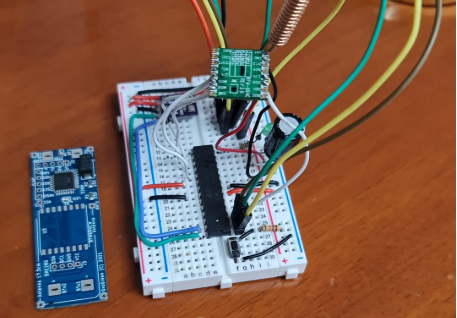
        3de3ff6b-dd62-4f0d-b105-431594963460-image.png

        I have mount one of this and test it for about one hour in order to understand better antenna.
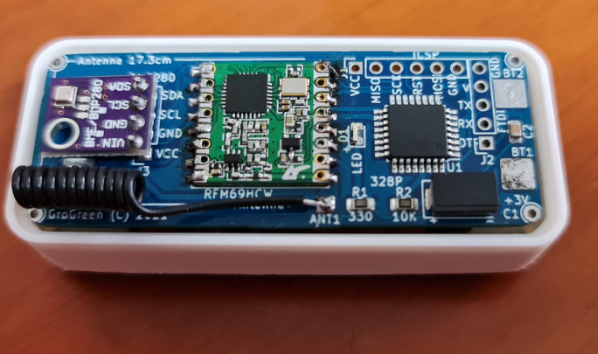
        2e54b8ab-8fe3-4964-b12a-39f65fafab25-image.png

        It worked for some rounds and then boom... nothing arrived on my MQTT broker.
        So I connect the gateway at the USB in order to debug and I so that the GTW can not take the IP.

        I paste here my GTW schetch... maybe there is something that I can add in order to understand the problem.

        /*
         * The MySensors Arduino library handles the wireless radio link and protocol
         * between your home built sensors/actuators and HA controller of choice.
         * The sensors forms a self healing radio network with optional repeaters. Each
         * repeater and gateway builds a routing tables in EEPROM which keeps track of the
         * network topology allowing messages to be routed to nodes.
         *
         * Created by Henrik Ekblad <henrik.ekblad@mysensors.org>
         * Copyright (C) 2013-2019 Sensnology AB
         * Full contributor list: https://github.com/mysensors/MySensors/graphs/contributors
         *
         * Documentation: http://www.mysensors.org
         * Support Forum: http://forum.mysensors.org
         *
         * This program is free software; you can redistribute it and/or
         * modify it under the terms of the GNU General Public License
         * version 2 as published by the Free Software Foundation.
         *
         *******************************
         *
         * REVISION HISTORY
         * Version 1.0 - tekka
         *
         * DESCRIPTION
         * The ESP32 gateway sends data received from sensors to the WiFi link.
         * The gateway also accepts input on ethernet interface, which is then sent out to the radio network.
         *
         * Make sure to fill in your ssid and WiFi password below.
         */
        
        /*
        denis:
        ESP32 pin out:
        https://circuits4you.com/2018/12/31/esp32-devkit-esp32-wroom-gpio-pinout/
        
        Radio wiring ESP32(GPIOxx): RFM69:
        | RFM69| ESP32 |
        |------|-------|
        | MOSI | 23    |
        | MISO | 19    |
        | SCK  | 18    |
        | NSS  | 5     | 
        | DIO0 | 16    | 
        
        */
        
        // Enable debug prints to serial monitor
        #define MY_DEBUG
        #define MY_BAUD_RATE 115200
        
        // radio type (al meu ii RFM69HCW) 
        #define MY_RFM69_NETWORKID (45)
        //#define MY_NODE_ID 39 // la gateway nu trebe node_id
        #define MY_RADIO_RFM69
        #define MY_IS_RFM69HW
        #define MY_RFM69_FREQUENCY RFM69_433MHZ
        #define MY_RFM69_NEW_DRIVER
        //astea is pt. puterea radioului
        #define MY_RFM69_ATC_TARGET_RSSI_DBM (-70) // target RSSI -70dBm
        #define MY_RFM69_MAX_POWER_LEVEL_DBM (20)   // max. TX power 10dBm = 10mW
        
        //#define MY_REPEATER_FEATURE // denis: what is this ? 
        
        #define MY_GATEWAY_MQTT_CLIENT
        #define MY_GATEWAY_ESP32
        
        // Set this node's subscribe and publish topic prefix
        #define MY_MQTT_PUBLISH_TOPIC_PREFIX "MySensors-out"
        #define MY_MQTT_SUBSCRIBE_TOPIC_PREFIX "MySensors-in"
        
        // Set WIFI SSID and password
        #define MY_WIFI_SSID "DaVinci"
        #define MY_WIFI_PASSWORD "xxxxxxxxxxxxxx"
        
        // Set the hostname for the WiFi Client. This is the hostname
        // passed to the DHCP server if not static.
        #define MY_HOSTNAME "MySensorsGTW"
        
        // Enable MY_IP_ADDRESS here if you want a static ip address (no DHCP)
        //#define MY_IP_ADDRESS 192,168,178,87
        
        // denis: If using static ip you can define Gateway and Subnet address as well
        //#define MY_IP_GATEWAY_ADDRESS 192,168,1,199
        //#define MY_IP_SUBNET_ADDRESS 255,255,255,0
        
        // MQTT broker
        #define MY_MQTT_CLIENT_ID "MySensorsGTW"
        #define MY_MQTT_USER "usr"
        #define MY_MQTT_PASSWORD "pass"
        #define MY_CONTROLLER_IP_ADDRESS 192, 168, 1, 168
        #define MY_PORT 1883
        
        #define   MY_SIGNAL_REPORT_ENABLED // denis: must undestand how is work
        
        
        // Flash leds on rx/tx/err (Led pin on ESP32) 
        #define MY_DEFAULT_ERR_LED_PIN 2  // Error led pin
        #define MY_DEFAULT_RX_LED_PIN  2  // Receive led pin
        #define MY_DEFAULT_TX_LED_PIN  2  // the PCB, on board LED
        
        // MySensors.h - must be after all #define
        #include <MySensors.h>
        
        void setup()
        {
        	// Setup locally attached sensors
        }
        
        void presentation()
        {
        	// Present locally attached sensors here
        }
        
        void loop()
        {
        	// Send locally attech sensors data here
        }
        

        Thanks a lot again
        Denis

        1 Reply Last reply
        0
        • D Offline
          D Offline
          DenisJ
          wrote on last edited by DenisJ
          #5

          I just discover that if I comment the:

          //#define MY_GATEWAY_MQTT_CLIENT
          

          ...then the Gateway is connect to the WiFi router.

          29 MCO:BGN:INIT GW,CP=RPNGF---,FQ=240,REL=255,VER=2.3.2
          34 TSF:LRT:OK
          35 TSM:INIT
          36 TSF:WUR:MS=0
          38 TSM:INIT:TSP OK
          40 TSM:INIT:GW MODE
          42 TSM:READY:ID=0,PAR=0,DIS=0
          44 MCO:REG:NOT NEEDED
          1160 GWT:TIN:CONNECTING...
          2162 GWT:TIN:CONNECTING...
          3164 GWT:TIN:CONNECTING...
          3166 GWT:TIN:IP: 192.168.1.199
          3216 GWT:TIN:ETH OK
          

          And then I have a lot of:

          4139 GWT:TSA:ETH OK
          4234 GWT:TSA:ETH OK
          4307 GWT:TSA:ETH OK
          4400 GWT:TSA:ETH OK
          

          In my MQTT broker I can see the log:

          1619521529: New connection from 192.168.1.199 on port 1883.
          1619521529: Socket error on client <unknown>, disconnecting.
          

          What this mean please ? ...can be a problem with my MQTT broker ?
          It is work with all other topics around my home :-(

          Thanks again
          Denis

          1 Reply Last reply
          0
          • D Offline
            D Offline
            DenisJ
            wrote on last edited by
            #6

            @DenisJ said in GWT:TPC:CONNECTING:

            Socket error on client

            I have try another time with commented out the define of MY_GATEWAY_MQTT_CLIENT.
            and I so that the GTW get the IP but after there is fail log on eth.

            Here is all log of connection with out MY_GATEWAY_MQTT_CLIENT

            29 MCO:BGN:INIT GW,CP=RPNGF---,FQ=240,REL=255,VER=2.3.2
            34 TSF:LRT:OK
            35 TSM:INIT
            36 TSF:WUR:MS=0
            38 TSM:INIT:TSP OK
            40 TSM:INIT:GW MODE
            42 TSM:READY:ID=0,PAR=0,DIS=0
            44 MCO:REG:NOT NEEDED
            1164 GWT:TIN:CONNECTING...
            2166 GWT:TIN:CONNECTING...
            3168 GWT:TIN:CONNECTING...
            3170 GWT:TIN:IP: 192.168.1.199
            3279 !GWT:TIN:ETH FAIL
            3281 MCO:BGN:STP
            3283 MCO:BGN:INIT OK,TSP=1
            3289 !GWT:TSA:ETH FAIL
            3291 TSM:READY:NWD REQ
            3797 ?TSF:MSG:SEND,0-0-255-255,s=255,c=3,t=20,pt=0,l=0,sg=0,ft=0,st=OK:
            3810 !GWT:TSA:ETH FAIL
            3815 !GWT:TSA:ETH FAIL
            

            !GWT:TIN:ETH FAIL is not parse, but I so in another page that is simply "ETH Connection failed"

            Anyone any idea on this please ?
            Thanks again
            Denis

            1 Reply Last reply
            0
            • D Offline
              D Offline
              DenisJ
              wrote on last edited by
              #7

              I take out the MySensors official distro
              and I put on line the 2.4.0-alpha version.

              Now I have the eth connect but I have a lot (too much and too quick) "GWT:TSA:ETH OK" messages

              28 MCO:BGN:INIT GW,CP=RPNGF---,FQ=240,REL=0,VER=2.4.0-alpha
              34 TSF:LRT:OK
              35 TSM:INIT
              36 TSF:WUR:MS=0
              38 TSM:INIT:TSP OK
              40 TSM:INIT:GW MODE
              41 TSM:READY:ID=0,PAR=0,DIS=0
              44 MCO:REG:NOT NEEDED
              1165 GWT:TIN:CONNECTING...
              2167 GWT:TIN:CONNECTING...
              3169 GWT:TIN:CONNECTING...
              3171 GWT:TIN:IP: 192.168.1.170
              3197 GWT:TIN:ETH OK
              3200 MCO:BGN:STP
              3202 MCO:BGN:INIT OK,TSP=1
              3205 TSM:READY:NWD REQ
              3217 ?TSF:MSG:SEND,0-0-255-255,s=255,c=3,t=20,pt=0,l=0,sg=0,ft=0,st=OK:
              3238 GWT:TSA:ETH OK
              3254 GWT:TSA:ETH OK
              3282 GWT:TSA:ETH OK
              3303 GWT:TSA:ETH OK
              3319 GWT:TSA:ETH OK
              3341 GWT:TSA:ETH OK
              3368 GWT:TSA:ETH OK
              3388 GWT:TSA:ETH OK
              3410 GWT:TSA:ETH OK
              3461 GWT:TSA:ETH OK
              3495 GWT:TSA:ETH OK
              3524 GWT:TSA:ETH OK
              3541 GWT:TSA:ETH OK
              3556 GWT:TSA:ETH OK
              3576 GWT:TSA:ETH OK
              3592 GWT:TSA:ETH OK
              3613 GWT:TSA:ETH OK
              3632 GWT:TSA:ETH OK
              

              Any help with this messages ?

              Thanks again
              Denis

              1 Reply Last reply
              0
              • D Offline
                D Offline
                DenisJ
                wrote on last edited by
                #8

                I understand that I forget the "#define MY_GATEWAY_MQTT_CLIENT" was commented out.

                So when I uncommented it, all return back with the:

                169206 GWT:TPC:CONNECTING...
                170210 GWT:TPC:CONNECTING...
                171214 GWT:TPC:CONNECTING...
                172218 GWT:TPC:CONNECTING...
                173222 GWT:TPC:CONNECTING...
                174226 GWT:TPC:CONNECTING...
                

                So if I take out all the MQTT story, the GTW is connect to WiFi and I can ping it.
                When I put back the MQTT rows the GTW is not connected and I always have the GWT:TPC:CONNECTING

                I try with another ESP32, I try with another MQTT broker... I don't know anymore what to try :-(

                A little help will be so appreciated

                Thanks again
                Denis

                1 Reply Last reply
                0
                • S Offline
                  S Offline
                  smilvert
                  wrote on last edited by
                  #9

                  @DenisJ I have the same problem. Works with

                  #define MY_GATEWAY_ESP32
                  

                  but with

                  #define MY_GATEWAY_ESP32
                  #define MY_GATEWAY_MQTT_CLIENT
                  

                  it dosen't. But when I changed the delay to 3000

                  bool gatewayTransportConnect(void)
                  {
                  #if defined(MY_GATEWAY_ESP8266) || defined(MY_GATEWAY_ESP32)
                  	if (WiFi.status() != WL_CONNECTED) {
                  		GATEWAY_DEBUG(PSTR("GWT:TPC:CONNECTING...\n"));
                  		delay(3000); // Was 1000
                  		return false;
                  	}
                  	GATEWAY_DEBUG(PSTR("GWT:TPC:IP=%s\n"), WiFi.localIP().toString().c_str());
                  

                  in MyGatewayTransportMQTTClient.cpp then it started to work! :)

                  1 Reply Last reply
                  1
                  • D Offline
                    D Offline
                    DenisJ
                    wrote on last edited by
                    #10

                    @smilvert said in GWT:TPC:CONNECTING:

                    in MyGatewayTransportMQTTClient.cpp then it started to work!

                    Thanks a lot @smilvert ...for me it's a big step forward, cause is 2 days that I'm so angry with this connections
                    I don't understand why I test a lot of Arduino schetch that use ETH+MQTT and was work all,
                    but MySensors use something that is not work always...

                    Now my GTW is connect (eth and mqtt) but then it goes in error:

                    E (46) psram: PSRAM ID read error: 0xffffffff
                    32 MCO:BGN:INIT GW,CP=RPNGF---,FQ=240,REL=0,VER=2.4.0-alpha
                    38 TSF:LRT:OK
                    39 TSM:INIT
                    40 TSF:WUR:MS=0
                    42 TSM:INIT:TSP OK
                    44 TSM:INIT:GW MODE
                    46 TSM:READY:ID=0,PAR=0,DIS=0
                    49 MCO:REG:NOT NEEDED
                    171 GWT:TPC:CONNECTING...
                    3173 MCO:BGN:STP
                    3175 MCO:BGN:INIT OK,TSP=1
                    3177 GWT:TPC:IP=192.168.1.170
                    3180 GWT:RMQ:CONNECTING...
                    3234 GWT:RMQ:OK
                    3235 GWT:TPS:TOPIC=MySensors-out/0/255/0/0/18,MSG SENT
                    
                    Stack smashing protect failure!
                    
                    abort() was called at PC 0x401353af on core 1
                    
                    ELF file SHA256: 0000000000000000
                    
                    Backtrace: 0x4008c6a8:0x3ffb1eb0 0x4008c921:0x3ffb1ed0 0x401353af:0x3ffb1ef0 0x400d2a56:0x3ffb1f10 0x400d2a91:0x3ffb1f50 0x400d2cb3:0x3ffb1f70 0x400d32f6:0x3ffb1f90 0x400d3429:0x3ffb1fb0 0x4008d926:0x3ffb1fd0
                    
                    Rebooting...
                    ets Jun  8 2016 00:22:57
                    
                    rst:0xc (SW_CPU_RESET),boot:0x13 (SPI_FAST_FLASH_BOOT)
                    configsip: 0, SPIWP:0xee
                    clk_drv:0x00,q_drv:0x00,d_drv:0x00,cs0_drv:0x00,hd_drv:0x00,wp_drv:0x00
                    mode:DIO, clock div:1
                    load:0x3fff0018,len:4
                    load:0x3fff001c,len:1216
                    ho 0 tail 12 room 4
                    load:0x40078000,len:10944
                    load:0x40080400,len:6388
                    entry 0x400806b4
                    E (46) psram: PSRAM ID read error: 0xffffffff
                    32 MCO:BGN:INIT GW,CP=RPNGF---,FQ=240,REL=0,VER=2.4.0-alpha
                    37 TSF:LRT:OK
                    39 TSM:INIT
                    40 TSF:WUR:MS=0
                    42 TSM:INIT:TSP OK
                    44 TSM:INIT:GW MODE
                    46 TSM:READY:ID=0,PAR=0,DIS=0
                    48 MCO:REG:NOT NEEDED
                    168 GWT:TPC:CONNECTING...
                    3170 MCO:BGN:STP
                    3172 MCO:BGN:INIT OK,TSP=1
                    3174 GWT:TPC:IP=192.168.1.170
                    3177 GWT:RMQ:CONNECTING...
                    11960 GWT:RMQ:OK
                    11962 GWT:TPS:TOPIC=MySensors-out/0/255/0/0/18,MSG SENT
                    
                    Stack smashing protect failure!
                    

                    Do you think is a hardware problem ?

                    Thank you so much for the help
                    Denis

                    1 Reply Last reply
                    0
                    • S Offline
                      S Offline
                      smilvert
                      wrote on last edited by
                      #11

                      No I have no idea. For me it seems to work.

                      Currently I don't have any sensors conncted so its hard to see if it works.

                      1 Reply Last reply
                      1
                      • electrikE Offline
                        electrikE Offline
                        electrik
                        wrote on last edited by
                        #12

                        Do you have the latest ESP32 framework installed?

                        1 Reply Last reply
                        1
                        • D Offline
                          D Offline
                          DenisJ
                          wrote on last edited by
                          #13

                          @electrik said in GWT:TPC:CONNECTING:

                          Do you have the latest ESP32 framework installed?

                          I use Ardiono IDE and I have Espressif Systems version 1.0.6 installed on boards manager.
                          It tell me that is the last.
                          Do I must install other please ?

                          Thanks a lot
                          Denis

                          1 Reply Last reply
                          0
                          • electrikE Offline
                            electrikE Offline
                            electrik
                            wrote on last edited by
                            #14

                            That should be okay. Maybe use the mysensors stable release 2.3.2?

                            1 Reply Last reply
                            1
                            • D Offline
                              D Offline
                              DenisJ
                              wrote on last edited by
                              #15

                              Thanks a lot @electrik ... but I was on stable release when the problem has began.
                              For this reason I download the DEV version, but I have the same problem.

                              There is surely something stupid think that is wrong, but I don't know what is it.
                              This gateway was working for more than a month.

                              Thanks again
                              Denis

                              1 Reply Last reply
                              0
                              • electrikE Offline
                                electrikE Offline
                                electrik
                                wrote on last edited by
                                #16

                                And if you change the lines like below now?

                                @smilvert said in GWT:TPC:CONNECTING:

                                it dosen't. But when I changed the delay to 3000
                                bool gatewayTransportConnect(void)
                                {
                                #if defined(MY_GATEWAY_ESP8266) || defined(MY_GATEWAY_ESP32)
                                if (WiFi.status() != WL_CONNECTED) {
                                GATEWAY_DEBUG(PSTR("GWT:TPC:CONNECTING...\n"));
                                delay(3000); // Was 1000
                                return false;
                                }
                                GATEWAY_DEBUG(PSTR("GWT:TPC:IP=%s\n"), WiFi.localIP().toString().c_str());

                                in MyGatewayTransportMQTTClient.cpp then it started to work!

                                1 Reply Last reply
                                1
                                • D Offline
                                  D Offline
                                  DenisJ
                                  wrote on last edited by
                                  #17

                                  @electrik said in GWT:TPC:CONNECTING:

                                  gatewayTransportConnect

                                  I changed it:

                                  bool gatewayTransportConnect(void)
                                  {
                                  #if defined(MY_GATEWAY_ESP8266) || defined(MY_GATEWAY_ESP32)
                                  	if (WiFi.status() != WL_CONNECTED) {
                                  		GATEWAY_DEBUG(PSTR("GWT:TPC:CONNECTING...\n"));
                                  		delay(3000); // denis: era 1000 dar l am schimbat pt. ca nu se lega la MQTT 
                                  		return false;
                                  	}
                                  	GATEWAY_DEBUG(PSTR("GWT:TPC:IP=%s\n"), WiFi.localIP().toString().c_str());
                                  #elif defined(MY_GATEWAY_LINUX)
                                  #if defined(MY_IP_ADDRESS)
                                  	_MQTT_ethClient.bind(_MQTT_clientIp);
                                  #endif /* End of MY_IP_ADDRESS */
                                  #elif defined(MY_GATEWAY_TINYGSM)
                                  	GATEWAY_DEBUG(PSTR("GWT:TPC:IP=%s\n"), modem.getLocalIP().c_str());
                                  #else
                                  #if defined(MY_IP_ADDRESS)
                                  	Ethernet.begin(_MQTT_clientMAC, _MQTT_clientIp);
                                  #else /* Else part of MY_IP_ADDRESS */
                                  	// Get IP address from DHCP
                                  	if (!Ethernet.begin(_MQTT_clientMAC)) {
                                  		GATEWAY_DEBUG(PSTR("!GWT:TPC:DHCP FAIL\n"));
                                  		_MQTT_connecting = false;
                                  		return false;
                                  	}
                                  #endif /* End of MY_IP_ADDRESS */
                                  	GATEWAY_DEBUG(PSTR("GWT:TPC:IP=%" PRIu8 ".%" PRIu8 ".%" PRIu8 ".%" PRIu8 "\n"),
                                  	              Ethernet.localIP()[0],
                                  	              Ethernet.localIP()[1], Ethernet.localIP()[2], Ethernet.localIP()[3]);
                                  	// give the Ethernet interface a second to initialize
                                  	delay(1000);
                                  #endif
                                  	return true;
                                  }
                                  

                                  But in this case I get this error:

                                  29 MCO:BGN:INIT GW,CP=RPNGF---,FQ=240,REL=0,VER=2.4.0-alpha
                                  34 TSF:LRT:OK
                                  35 TSM:INIT
                                  37 TSF:WUR:MS=0
                                  39 TSM:INIT:TSP OK
                                  40 TSM:INIT:GW MODE
                                  42 TSM:READY:ID=0,PAR=0,DIS=0
                                  45 MCO:REG:NOT NEEDED
                                  159 GWT:TPC:CONNECTING...
                                  3162 MCO:BGN:STP
                                  3164 MCO:BGN:INIT OK,TSP=1
                                  3166 GWT:TPC:IP=192.168.1.170
                                  3169 GWT:RMQ:CONNECTING...
                                  3371 GWT:RMQ:OK
                                  3372 GWT:TPS:TOPIC=MySensors-out/0/255/0/0/18,MSG SENT
                                  
                                  Stack smashing protect failure!
                                  
                                  abort() was called at PC 0x40134cef on core 1
                                  
                                  ELF file SHA256: 0000000000000000
                                  
                                  Backtrace: 0x40088620:0x3ffb1eb0 0x4008889d:0x3ffb1ed0 0x40134cef:0x3ffb1ef0 0x400d27e6:0x3ffb1f10 0x400d281e:0x3ffb1f50 0x400d2a23:0x3ffb1f70 0x400d2ff4:0x3ffb1f90 0x400d3105:0x3ffb1fb0 0x400898ae:0x3ffb1fd0
                                  
                                  Rebooting...
                                  ets Jun  8 2016 00:22:57
                                  
                                  rst:0xc (SW_CPU_RESET),boot:0x13 (SPI_FAST_FLASH_BOOT)
                                  configsip: 0, SPIWP:0xee
                                  clk_drv:0x00,q_drv:0x00,d_drv:0x00,cs0_drv:0x00,hd_drv:0x00,wp_drv:0x00
                                  mode:DIO, clock div:1
                                  load:0x3fff0018,len:4
                                  load:0x3fff001c,len:1216
                                  ho 0 tail 12 room 4
                                  load:0x40078000,len:10944
                                  load:0x40080400,len:6388
                                  entry 0x400806b4
                                  29 MCO:BGN:INIT GW,CP=RPNGF---,FQ=240,REL=0,VER=2.4.0-alpha
                                  34 TSF:LRT:OK
                                  36 TSM:INIT
                                  37 TSF:WUR:MS=0
                                  39 TSM:INIT:TSP OK
                                  40 TSM:INIT:GW MODE
                                  42 TSM:READY:ID=0,PAR=0,DIS=0
                                  45 MCO:REG:NOT NEEDED
                                  164 GWT:TPC:CONNECTING...
                                  3166 MCO:BGN:STP
                                  3168 MCO:BGN:INIT OK,TSP=1
                                  3170 GWT:TPC:IP=192.168.1.170
                                  3173 GWT:RMQ:CONNECTING...
                                  6058 GWT:RMQ:OK
                                  6059 GWT:TPS:TOPIC=MySensors-out/0/255/0/0/18,MSG SENT
                                  
                                  Stack smashing protect failure!
                                  
                                  abort() was called at PC 0x40134cef on core 1
                                  
                                  ELF file SHA256: 0000000000000000
                                  ...from here it goes in LOOP
                                  

                                  I'm near to become creasy :-(

                                  Thanks again
                                  Denis

                                  1 Reply Last reply
                                  0
                                  • electrikE Offline
                                    electrikE Offline
                                    electrik
                                    wrote on last edited by
                                    #18

                                    Yes, but now use the 2.3.2 release with this modification

                                    1 Reply Last reply
                                    1
                                    • D Offline
                                      D Offline
                                      DenisJ
                                      wrote on last edited by
                                      #19

                                      Yes... good idea :-)
                                      I'll try now.

                                      Thanks a lot
                                      Denis

                                      1 Reply Last reply
                                      0
                                      • D Offline
                                        D Offline
                                        DenisJ
                                        wrote on last edited by DenisJ
                                        #20

                                        @electrik said in GWT:TPC:CONNECTING:

                                        2.3.2 release

                                        I can't believe... IT'S WOOOOOOORK !!!
                                        Thanks a lot @electrik !!!

                                        I don't know why, and I don't understand... but with 2.3.2 release it's work if I make that modify in the MyGatewayTransportMQTTClient.cpp file.
                                        Also I don't like that I must modify that time... but for now it's ok.
                                        Also I don't understand why 2 days ago it's change same hardware and same soft,
                                        from work to no work (I don't know haw to tell this in english) :-)

                                        Thanks so much again :-)
                                        Denis

                                        1 Reply Last reply
                                        2
                                        • electrikE Offline
                                          electrikE Offline
                                          electrik
                                          wrote on last edited by
                                          #21

                                          Good to hear! Perhaps a GitHub issue should be raised for these points...

                                          1 Reply Last reply
                                          1
                                          Reply
                                          • Reply as topic
                                          Log in to reply
                                          • Oldest to Newest
                                          • Newest to Oldest
                                          • Most Votes


                                          13

                                          Online

                                          11.7k

                                          Users

                                          11.2k

                                          Topics

                                          113.1k

                                          Posts


                                          Copyright 2025 TBD   |   Forum Guidelines   |   Privacy Policy   |   Terms of Service
                                          • Login

                                          • Don't have an account? Register

                                          • Login or register to search.
                                          • First post
                                            Last post
                                          0
                                          • MySensors
                                          • OpenHardware.io
                                          • Categories
                                          • Recent
                                          • Tags
                                          • Popular
