Skip to content
  • MySensors
  • OpenHardware.io
  • Categories
  • Recent
  • Tags
  • Popular
Skins
  • Light
  • Brite
  • Cerulean
  • Cosmo
  • Flatly
  • Journal
  • Litera
  • Lumen
  • Lux
  • Materia
  • Minty
  • Morph
  • Pulse
  • Sandstone
  • Simplex
  • Sketchy
  • Spacelab
  • United
  • Yeti
  • Zephyr
  • Dark
  • Cyborg
  • Darkly
  • Quartz
  • Slate
  • Solar
  • Superhero
  • Vapor

  • Default (No Skin)
  • No Skin
Collapse
Brand Logo
  1. Home
  2. Troubleshooting
  3. Distance sensor messure strange values

Distance sensor messure strange values

Scheduled Pinned Locked Moved Troubleshooting
17 Posts 4 Posters 7.9k Views 1 Watching
  • Oldest to Newest
  • Newest to Oldest
  • Most Votes
Reply
  • Reply as topic
Log in to reply
This topic has been deleted. Only users with topic management privileges can see it.
  • C Offline
    C Offline
    crazy_penguin
    wrote on last edited by
    #2

    Oh, I forgot to mention that I use a DYP-ME007Y Ultrasonic Sensor Module.

    Th

    BulldogLowellB 1 Reply Last reply
    0
    • C crazy_penguin

      Oh, I forgot to mention that I use a DYP-ME007Y Ultrasonic Sensor Module.

      Th

      BulldogLowellB Offline
      BulldogLowellB Offline
      BulldogLowell
      Contest Winner
      wrote on last edited by
      #3

      @crazy_penguin

      post your code... let's see what kind of hysteresis you are using and how frequently you are measuring.

      it's hard to see from the values without knowing the timing of the program you are using

      1 Reply Last reply
      0
      • C Offline
        C Offline
        crazy_penguin
        wrote on last edited by
        #4

        Hi BulldogLowell,

        sorry for the delay I was over 2 weeks on vacation. but now I am back.

        I using the code from the distance sensore example (http://www.mysensors.org/build/distance).

        #include <SPI.h>
        #include <MySensor.h>  
        #include <NewPing.h>
        
        #define CHILD_ID 1
        #define TRIGGER_PIN  6  // Arduino pin tied to trigger pin on the ultrasonic sensor.
        #define ECHO_PIN     5  // Arduino pin tied to echo pin on the ultrasonic sensor.
        #define MAX_DISTANCE 300 // Maximum distance we want to ping for (in centimeters). Maximum sensor distance is rated at 400-500cm.
        unsigned long SLEEP_TIME = 5000; // Sleep time between reads (in milliseconds)
        
        MySensor gw;
        NewPing sonar(TRIGGER_PIN, ECHO_PIN, MAX_DISTANCE); // NewPing setup of pins and maximum distance.
        MyMessage msg(CHILD_ID, V_DISTANCE);
        int lastDist;
        boolean metric = true; 
        
        void setup()  
        { 
          gw.begin();
        
          // Send the sketch version information to the gateway and Controller
          gw.sendSketchInfo("Distance Sensor", "1.0");
        
          // Register all sensors to gw (they will be created as child devices)
          gw.present(CHILD_ID, S_DISTANCE);
          boolean metric = gw.getConfig().isMetric;
        }
        
        void loop()      
        {     
          int dist = metric?sonar.ping_cm():sonar.ping_in();
          Serial.print("Ping: ");
          Serial.print(dist); // Convert ping time to distance in cm and print result (0 = outside set distance range)
          Serial.println(metric?" cm":" in");
        
          if (dist != lastDist) {
              gw.send(msg.set(dist));
              lastDist = dist;
          }
        
          gw.sleep(SLEEP_TIME);
        }
        
        
        Moshe LivneM 1 Reply Last reply
        0
        • C crazy_penguin

          Hi BulldogLowell,

          sorry for the delay I was over 2 weeks on vacation. but now I am back.

          I using the code from the distance sensore example (http://www.mysensors.org/build/distance).

          #include <SPI.h>
          #include <MySensor.h>  
          #include <NewPing.h>
          
          #define CHILD_ID 1
          #define TRIGGER_PIN  6  // Arduino pin tied to trigger pin on the ultrasonic sensor.
          #define ECHO_PIN     5  // Arduino pin tied to echo pin on the ultrasonic sensor.
          #define MAX_DISTANCE 300 // Maximum distance we want to ping for (in centimeters). Maximum sensor distance is rated at 400-500cm.
          unsigned long SLEEP_TIME = 5000; // Sleep time between reads (in milliseconds)
          
          MySensor gw;
          NewPing sonar(TRIGGER_PIN, ECHO_PIN, MAX_DISTANCE); // NewPing setup of pins and maximum distance.
          MyMessage msg(CHILD_ID, V_DISTANCE);
          int lastDist;
          boolean metric = true; 
          
          void setup()  
          { 
            gw.begin();
          
            // Send the sketch version information to the gateway and Controller
            gw.sendSketchInfo("Distance Sensor", "1.0");
          
            // Register all sensors to gw (they will be created as child devices)
            gw.present(CHILD_ID, S_DISTANCE);
            boolean metric = gw.getConfig().isMetric;
          }
          
          void loop()      
          {     
            int dist = metric?sonar.ping_cm():sonar.ping_in();
            Serial.print("Ping: ");
            Serial.print(dist); // Convert ping time to distance in cm and print result (0 = outside set distance range)
            Serial.println(metric?" cm":" in");
          
            if (dist != lastDist) {
                gw.send(msg.set(dist));
                lastDist = dist;
            }
          
            gw.sleep(SLEEP_TIME);
          }
          
          
          Moshe LivneM Offline
          Moshe LivneM Offline
          Moshe Livne
          Hero Member
          wrote on last edited by
          #5

          @crazy_penguin is it battery powered?

          1 Reply Last reply
          0
          • C Offline
            C Offline
            crazy_penguin
            wrote on last edited by
            #6

            No.
            It is powerd with a 5V and 2A powersupply.

            Moshe LivneM 1 Reply Last reply
            0
            • C crazy_penguin

              No.
              It is powerd with a 5V and 2A powersupply.

              Moshe LivneM Offline
              Moshe LivneM Offline
              Moshe Livne
              Hero Member
              wrote on last edited by
              #7

              @crazy_penguin you can see all the failed transmissions. it might have to do with using the nrf and sensor at the same time? can you try it without the mysensor part? just clean arduino sketch?

              1 Reply Last reply
              0
              • C Offline
                C Offline
                crazy_penguin
                wrote on last edited by
                #8

                Hi Moshe Livne,

                I disconnect the radio device and keep the US-sensor connected and use the following code.

                #include <NewPing.h>
                
                #define TRIGGER_PIN  6  // Arduino pin tied to trigger pin on the ultrasonic sensor.
                #define ECHO_PIN     5  // Arduino pin tied to echo pin on the ultrasonic sensor.
                #define MAX_DISTANCE 500 // Maximum distance we want to ping for (in centimeters). Maximum sensor distance is rated at 400-500cm.
                
                NewPing sonar(TRIGGER_PIN, ECHO_PIN, MAX_DISTANCE); // NewPing setup of pins and maximum distance.
                
                void setup() {
                  Serial.begin(115200); // Open serial monitor at 115200 baud to see ping results.
                }
                
                void loop() {
                  delay(500);                      // Wait 50ms between pings (about 20 pings/sec). 29ms should be the shortest delay between pings.
                  unsigned int uS = sonar.ping(); // Send ping, get ping time in microseconds (uS).
                  Serial.print("Ping: ");
                  Serial.print(uS / US_ROUNDTRIP_CM); // Convert ping time to distance in cm and print result (0 = outside set distance range)
                  Serial.println("cm");
                }
                

                I got the following results:

                Ping: 306cm
                Ping: 0cm
                Ping: 308cm
                Ping: 0cm
                Ping: 308cm
                Ping: 0cm
                Ping: 308cm
                Ping: 0cm
                Ping: 307cm
                Ping: 0cm
                Ping: 307cm
                Ping: 0cm
                Ping: 307cm
                Ping: 0cm
                Ping: 307cm
                Ping: 0cm
                Ping: 307cm
                Ping: 0cm
                Ping: 307cm
                Ping: 0cm
                Ping: 307cm
                Ping: 0cm
                Ping: 307cm
                Ping: 0cm
                Ping: 307cm
                Ping: 0cm
                Ping: 307cm
                Ping: 0cm
                Ping: 307cm
                Ping: 0cm
                Ping: 307cm
                Ping: 0cm
                Ping: 307cm
                Ping: 0cm
                Ping: 307cm
                Ping: 0cm
                Ping: 307cm
                Ping: 0cm
                Ping: 307cm
                Ping: 0cm
                Ping: 307cm
                Ping: 0cm
                Ping: 307cm
                Ping: 0cm
                Ping: 307cm
                Ping: 0cm
                Ping: 307cm
                Ping: 0cm
                Ping: 307cm
                Ping: 0cm
                Ping: 307cm

                1 Reply Last reply
                0
                • C Offline
                  C Offline
                  crazy_penguin
                  wrote on last edited by crazy_penguin
                  #9

                  Hi all,

                  I am really wondering whats going wrong here. I made some changes to the code and now I get this result:

                  Ping: cm
                  Ping: 0cm
                  Ping: 0cm
                  Ping: 0cm
                  Ping: 2cm
                  Ping: 0cm
                  Ping: 0cm
                  Ping: 0cm
                  Ping: 1cm
                  Ping: 0cm
                  Ping: 0cm
                  Ping: 0cm
                  Ping: 0cm
                  Ping: 0cm
                  Ping: 0cm
                  Ping: 16cm
                  Ping: 0cm
                  Ping: 0cm
                  Ping: 0cm

                  The distance between sensor and wall is about 75cm.

                  I took back any chagnes I made. Without any effect.
                  I try now use the NewPing version 1.6 library. No effect.

                  Current code:

                  #include <NewPing.h>
                  
                  #define TRIGGER_PIN  6  // Arduino pin tied to trigger pin on the ultrasonic sensor.
                  #define ECHO_PIN     5  // Arduino pin tied to echo pin on the ultrasonic sensor.
                  #define MAX_DISTANCE 500 // Maximum distance we want to ping for (in centimeters). Maximum sensor distance is rated at 400-500cm.
                  
                  NewPing sonar(TRIGGER_PIN, ECHO_PIN, MAX_DISTANCE); // NewPing setup of pins and maximum distance.
                  
                  void setup() {
                    Serial.begin(115200); // Open serial monitor at 115200 baud to see ping results.
                  }
                  
                  void loop() {
                    delay(2000);                    // Wait 50ms between pings (about 20 pings/sec). 29ms should be the shortest delay between pings.
                    Serial.print("Ping: ");
                    Serial.print(sonar.ping_cm()); // Send ping, get distance in cm and print result (0 = outside set distance range)
                    Serial.println("cm");
                  }
                  

                  I there any way to check I the hardware is bad or may have some defects?
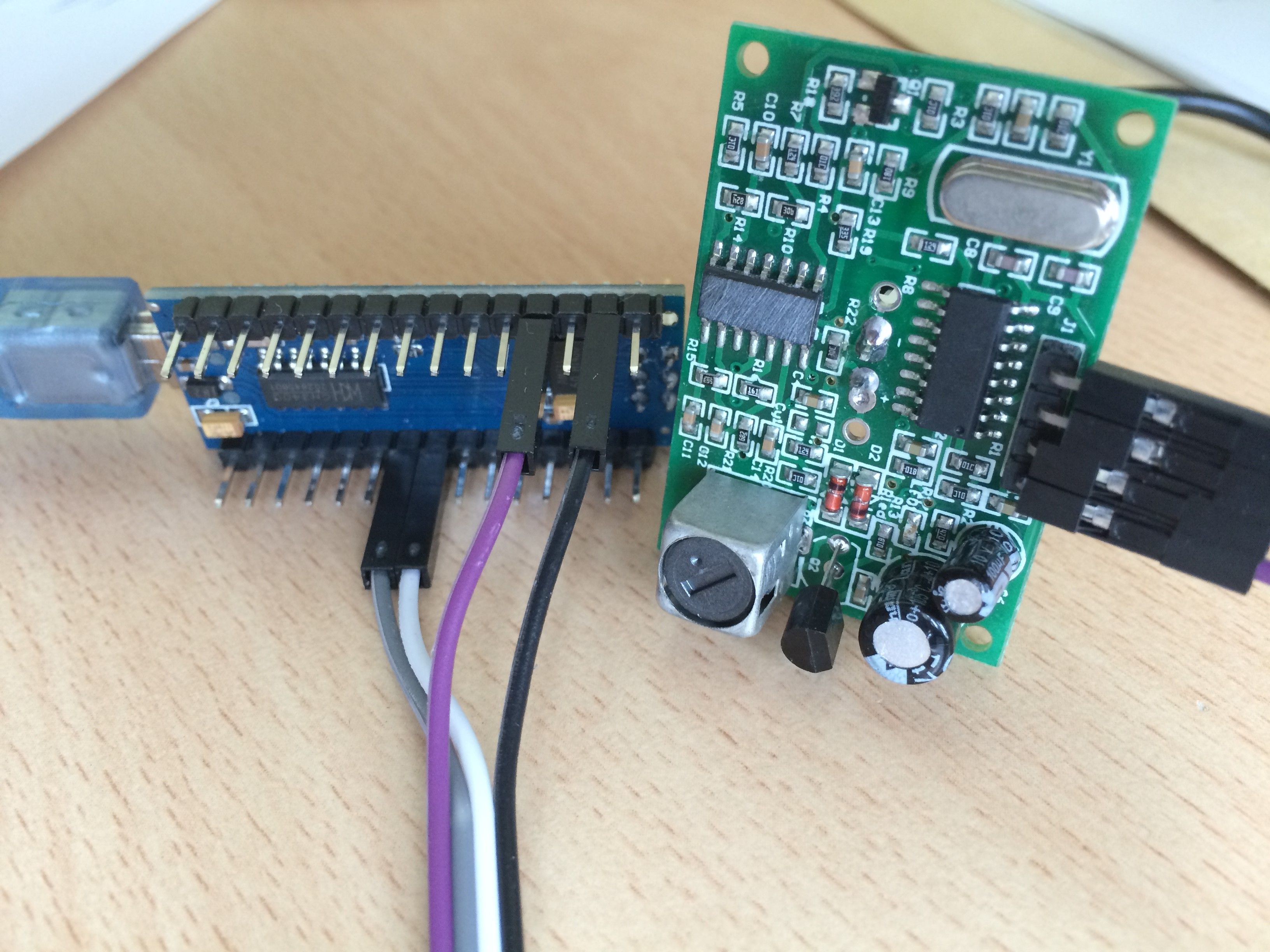
                  Front.jpg
                  Rear.jpg

                  Moshe LivneM 1 Reply Last reply
                  0
                  • C crazy_penguin

                    Hi all,

                    I am really wondering whats going wrong here. I made some changes to the code and now I get this result:

                    Ping: cm
                    Ping: 0cm
                    Ping: 0cm
                    Ping: 0cm
                    Ping: 2cm
                    Ping: 0cm
                    Ping: 0cm
                    Ping: 0cm
                    Ping: 1cm
                    Ping: 0cm
                    Ping: 0cm
                    Ping: 0cm
                    Ping: 0cm
                    Ping: 0cm
                    Ping: 0cm
                    Ping: 16cm
                    Ping: 0cm
                    Ping: 0cm
                    Ping: 0cm

                    The distance between sensor and wall is about 75cm.

                    I took back any chagnes I made. Without any effect.
                    I try now use the NewPing version 1.6 library. No effect.

                    Current code:

                    #include <NewPing.h>
                    
                    #define TRIGGER_PIN  6  // Arduino pin tied to trigger pin on the ultrasonic sensor.
                    #define ECHO_PIN     5  // Arduino pin tied to echo pin on the ultrasonic sensor.
                    #define MAX_DISTANCE 500 // Maximum distance we want to ping for (in centimeters). Maximum sensor distance is rated at 400-500cm.
                    
                    NewPing sonar(TRIGGER_PIN, ECHO_PIN, MAX_DISTANCE); // NewPing setup of pins and maximum distance.
                    
                    void setup() {
                      Serial.begin(115200); // Open serial monitor at 115200 baud to see ping results.
                    }
                    
                    void loop() {
                      delay(2000);                    // Wait 50ms between pings (about 20 pings/sec). 29ms should be the shortest delay between pings.
                      Serial.print("Ping: ");
                      Serial.print(sonar.ping_cm()); // Send ping, get distance in cm and print result (0 = outside set distance range)
                      Serial.println("cm");
                    }
                    

                    I there any way to check I the hardware is bad or may have some defects?
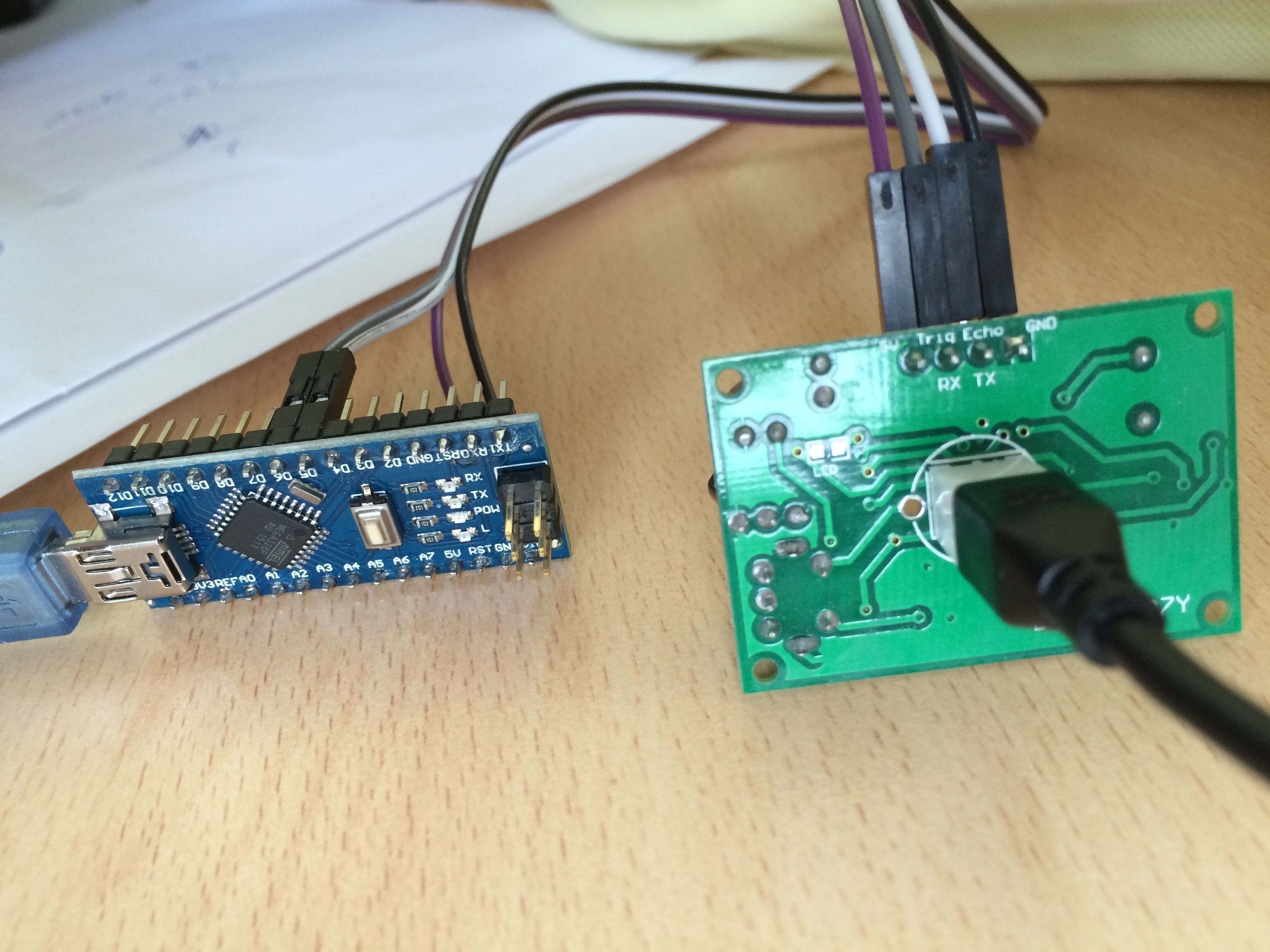
                    Front.jpg
                    Rear.jpg

                    Moshe LivneM Offline
                    Moshe LivneM Offline
                    Moshe Livne
                    Hero Member
                    wrote on last edited by
                    #10

                    @crazy_penguin can you please try to point the sensor straight at the wall (not down) and clear anything from the sides? you might get echoes. but this is a bit far fetched. mine is this one http://www.aliexpress.com/item/Free-shipping-1pcs-Ultrasonic-Module-HC-SR04-Distance-Measuring-Transducer-Sensor-for-Arduino-Samples-Best-prices/1967936408.html?aff_platform=aaf&aff_trace_key=34543821268212384&sk=bUBEAqbMv%3A&cpt=1435219216767
                    it works reasonably reliably

                    1 Reply Last reply
                    0
                    • C Offline
                      C Offline
                      crazy_penguin
                      wrote on last edited by
                      #11

                      @Moshe Livne I order the HC-SR04 Module as well to make sure where the problem is.
                      I also order aother Arduino Nano.

                      hekH 1 Reply Last reply
                      0
                      • C crazy_penguin

                        @Moshe Livne I order the HC-SR04 Module as well to make sure where the problem is.
                        I also order aother Arduino Nano.

                        hekH Offline
                        hekH Offline
                        hek
                        Admin
                        wrote on last edited by
                        #12

                        @crazy_penguin

                        Your module (on the pictures) looks really strange. What type is it?

                        1 Reply Last reply
                        0
                        • C Offline
                          C Offline
                          crazy_penguin
                          wrote on last edited by
                          #13

                          @hek DYP-ME007Y

                          1 Reply Last reply
                          0
                          • hekH Offline
                            hekH Offline
                            hek
                            Admin
                            wrote on last edited by
                            #14

                            Check out this:
                            http://forum.arduino.cc/index.php?topic=153700.0

                            C 1 Reply Last reply
                            0
                            • hekH hek

                              Check out this:
                              http://forum.arduino.cc/index.php?topic=153700.0

                              C Offline
                              C Offline
                              crazy_penguin
                              wrote on last edited by
                              #15

                              @hek Thanks. I will check out this and will tell you the result.

                              1 Reply Last reply
                              0
                              • C Offline
                                C Offline
                                crazy_penguin
                                wrote on last edited by
                                #16

                                OK. this threat (http://forum.arduino.cc/index.php?topic=153700.0) is very usefull. I will try out some hints and tell you my result.

                                Thank to all for now.

                                1 Reply Last reply
                                0
                                • C Offline
                                  C Offline
                                  crazy_penguin
                                  wrote on last edited by
                                  #17

                                  Hi there,
                                  it's me again.

                                  I tried some things which read in the arduino froum (http://forum.arduino.cc/index.php?topic=153700.0) without any good result.
                                  I also get a new sensor and there is still no change of it's behaviour.

                                  I read in the forum that it could be a sensor that uses RX/TX to send its information.
                                  Does any one know something about that?

                                  1 Reply Last reply
                                  0
                                  Reply
                                  • Reply as topic
                                  Log in to reply
                                  • Oldest to Newest
                                  • Newest to Oldest
                                  • Most Votes


                                  19

                                  Online

                                  11.7k

                                  Users

                                  11.2k

                                  Topics

                                  113.1k

                                  Posts


                                  Copyright 2025 TBD   |   Forum Guidelines   |   Privacy Policy   |   Terms of Service
                                  • Login

                                  • Don't have an account? Register

                                  • Login or register to search.
                                  • First post
                                    Last post
                                  0
                                  • MySensors
                                  • OpenHardware.io
                                  • Categories
                                  • Recent
                                  • Tags
                                  • Popular
