Skip to content
  • MySensors
  • OpenHardware.io
  • Categories
  • Recent
  • Tags
  • Popular
Skins
  • Light
  • Brite
  • Cerulean
  • Cosmo
  • Flatly
  • Journal
  • Litera
  • Lumen
  • Lux
  • Materia
  • Minty
  • Morph
  • Pulse
  • Sandstone
  • Simplex
  • Sketchy
  • Spacelab
  • United
  • Yeti
  • Zephyr
  • Dark
  • Cyborg
  • Darkly
  • Quartz
  • Slate
  • Solar
  • Superhero
  • Vapor

  • Default (No Skin)
  • No Skin
Collapse
Brand Logo
  1. Home
  2. My Project
  3. Irrigation Controller (up to 16 valves with Shift Registers)

Irrigation Controller (up to 16 valves with Shift Registers)

Scheduled Pinned Locked Moved My Project
371 Posts 56 Posters 248.8k Views 52 Watching
  • Oldest to Newest
  • Newest to Oldest
  • Most Votes
Reply
  • Reply as topic
Log in to reply
This topic has been deleted. Only users with topic management privileges can see it.
  • dbemowskD Offline
    dbemowskD Offline
    dbemowsk
    wrote on last edited by
    #155

    So I have been thinking of building one of these. I have just ordered an 8 channel relay board from ebay. http://www.ebay.com/itm/5V-8-Channel-Relay-Board-Module-for-Arduino-Raspberry-Pi-ARM-AVR-DSP-PIC-MUC-/262472832393?hash=item3d1c999589:g:sDEAAOSwnFZXVj2p . I have been trying to sift through this thread and am not seeing what I am looking for. Does this project take into account a pump start relay? If not, I am wondering the best way to handle this. I only have 4 zones in my irrigation setup, so I could certainly use one of the relay channels for that if it is written into the sketch. One thought I had to save extra processing on the sketch in dealing with the shift register would be to put a diode on each output that would funnel to a single point, so whenever any relay is turned on the pump start connection point would go active. I would assume that something has already been calculated in for this, but I din't see anything.

    Thanks for the great project. The Youtube video for this is actually what got me started with MySensors in the first place.

    Vera Plus running UI7 with MySensors, Sonoffs and 1-Wire devices
    Visit my website for more Bits, Bytes and Ramblings from me: http://dan.bemowski.info/

    1 Reply Last reply
    0
    • Mark JeffordM Offline
      Mark JeffordM Offline
      Mark Jefford
      wrote on last edited by
      #156

      I'm going down the diodes route... another channel to trigger it is tricky to deal with unless you use normally off relays and use the code earlier in this thread. I tried to use it but use normally on relays so going for diodes.

      K.I.S.S - keep it simple stupid ;) no point making it harder for you if you have a workaround on the table :)

      1 Reply Last reply
      0
      • dbemowskD Offline
        dbemowskD Offline
        dbemowsk
        wrote on last edited by
        #157

        @Mark Jefford I can go that route, I just didn't know if someone already had that factored in to the project already. After thinking about it since I posted this, I could also go the route of using another single digital channel and wire it to one of the relays. Going that route would give me a couple things:

        • One I could turn on the pump independent of a zone because I have a faucet connected to the setup that I can use. Currently I have to turn on a zone to use the faucet.
        • Two, I could poll the state of the pump by checking the state of the one channel.

        Vera Plus running UI7 with MySensors, Sonoffs and 1-Wire devices
        Visit my website for more Bits, Bytes and Ramblings from me: http://dan.bemowski.info/

        1 Reply Last reply
        0
        • Mark JeffordM Mark Jefford

          @Sergio-Rius no problem, i had plenty of issues trying to get this to work with openhab before i changed controller :)

          pr0slyte..P Offline
          pr0slyte..P Offline
          pr0slyte..
          wrote on last edited by pr0slyte..
          #158

          @Mark-Jefford I have the same issue. My system can't pass verifications for clock and valve data when I first plugged in because I don't know how to use this programs (Openhab, domoticz, etc.). Thank you!

          1 Reply Last reply
          0
          • L Offline
            L Offline
            Lars65
            wrote on last edited by
            #159

            Is it anybody who has this skecht in 24 hour format, instead of AM, PM?

            petewillP 1 Reply Last reply
            0
            • L Lars65

              Is it anybody who has this skecht in 24 hour format, instead of AM, PM?

              petewillP Offline
              petewillP Offline
              petewill
              Admin
              wrote on last edited by
              #160

              @Lars65 Take a look at lines 663-667. I haven't tested this but it should be something similar to this:

                        lcd.print(hour() < 10 ? F(" ") : F(""));
                        lcd.print(hour());
                        lcd.print(minute() < 10 ? F(":0") : F(":"));
                        lcd.print(minute());
                        //lcd.print(isAM() ? F("am") : F("pm"));
              

              My "How To" home automation video channel: https://www.youtube.com/channel/UCq_Evyh5PQALx4m4CQuxqkA

              L 1 Reply Last reply
              0
              • Sergio RiusS Offline
                Sergio RiusS Offline
                Sergio Rius
                wrote on last edited by
                #161

                Does anyone already made a pcb for this? My board keeps loosing it's "bridging" wires. They rot and fall near the solder.

                petewillP 1 Reply Last reply
                0
                • petewillP petewill

                  @Lars65 Take a look at lines 663-667. I haven't tested this but it should be something similar to this:

                            lcd.print(hour() < 10 ? F(" ") : F(""));
                            lcd.print(hour());
                            lcd.print(minute() < 10 ? F(":0") : F(":"));
                            lcd.print(minute());
                            //lcd.print(isAM() ? F("am") : F("pm"));
                  
                  L Offline
                  L Offline
                  Lars65
                  wrote on last edited by
                  #162

                  @petewill I did try this, and it worked just fine. Thank you!
                  😄

                  1 Reply Last reply
                  0
                  • Sergio RiusS Sergio Rius

                    Does anyone already made a pcb for this? My board keeps loosing it's "bridging" wires. They rot and fall near the solder.

                    petewillP Offline
                    petewillP Offline
                    petewill
                    Admin
                    wrote on last edited by
                    #163

                    @Sergio-Rius Where do you have your controller located? I have had mine running for over a year now and haven't had any issues. Maybe you need to put it into a waterproof case?

                    To answer your question though, no, I don't believe anyone has created a PCB for this.

                    My "How To" home automation video channel: https://www.youtube.com/channel/UCq_Evyh5PQALx4m4CQuxqkA

                    1 Reply Last reply
                    0
                    • L Offline
                      L Offline
                      Lars65
                      wrote on last edited by
                      #164

                      I will have mine in the greenhouse. Boxes is made of waxed oak,and it will be 3 modules, each one seald with a sillicone gasket.
                      I have some trash wood in the garage, so I thought I could use it to something. :)

                      1 Reply Last reply
                      0
                      • L Offline
                        L Offline
                        Lars65
                        wrote on last edited by
                        #165

                        Have anyone compiled it with the 2.0.0?

                        1 Reply Last reply
                        0
                        • ? Offline
                          ? Offline
                          A Former User
                          wrote on last edited by
                          #166

                          Hello Gentlemen, new to this board as well as new to micro electrics. Started this Irrigation Controller about a two weeks ago, after finding Pete B’s U tube video on this project. Got all the parts and have started building by following Pete B’s video. Have a few part questions and am not very literal with the nomenclature.

                          1. This 4.7uF 50V 20% Axial-Lead Electrolytic Capacitor goes on which end or pins on the
                          2. Have a FT232RL FTDI USB 3.3V 5.5V to TTL Serial Adapter Module for Mini Port that is different than Pete’s.
                            Not sure how to post JPEG's so this is the problem I am having.
                            0_1468546122072_7-14-16 Hello Gentlemen help.docx
                            The Pins on the ftdi are different than on Pete’s board, in that I cannot find the info for the double GND on the Arduino Pro Mini.

                          Any guidance of will be appreciated.
                          Respectfully RJ Myers

                          petewillP 1 Reply Last reply
                          0
                          • ? A Former User

                            Hello Gentlemen, new to this board as well as new to micro electrics. Started this Irrigation Controller about a two weeks ago, after finding Pete B’s U tube video on this project. Got all the parts and have started building by following Pete B’s video. Have a few part questions and am not very literal with the nomenclature.

                            1. This 4.7uF 50V 20% Axial-Lead Electrolytic Capacitor goes on which end or pins on the
                            2. Have a FT232RL FTDI USB 3.3V 5.5V to TTL Serial Adapter Module for Mini Port that is different than Pete’s.
                              Not sure how to post JPEG's so this is the problem I am having.
                              0_1468546122072_7-14-16 Hello Gentlemen help.docx
                              The Pins on the ftdi are different than on Pete’s board, in that I cannot find the info for the double GND on the Arduino Pro Mini.

                            Any guidance of will be appreciated.
                            Respectfully RJ Myers

                            petewillP Offline
                            petewillP Offline
                            petewill
                            Admin
                            wrote on last edited by
                            #167

                            @Lars65 No, not yet. It's on the list but it will probably be a little while before I get to it.

                            @Ngwpower To add pictures you just have to drag and drop into the edit window. They will automatically upload.

                            1. Can you provide more info here? I'm not sure what you're asking.

                            2. Both of my FTDI adapters connect into the Pro Mini straight across (the wires don't get crossed when connecting. The key thing is TX on one side should go to RX on the other (and vice versa) then the other 4 wires line up from there. So, you almost have it correct in your picture but the TX and RX are switched. Just start from the DTR and go straight across.

                            My "How To" home automation video channel: https://www.youtube.com/channel/UCq_Evyh5PQALx4m4CQuxqkA

                            1 Reply Last reply
                            0
                            • ? Offline
                              ? Offline
                              A Former User
                              wrote on last edited by
                              #168

                              Thank You, petewill I adjusted the wiring!
                              0_1468603030032_upload-e9f66bab-6c30-42eb-80b2-da87857849e7
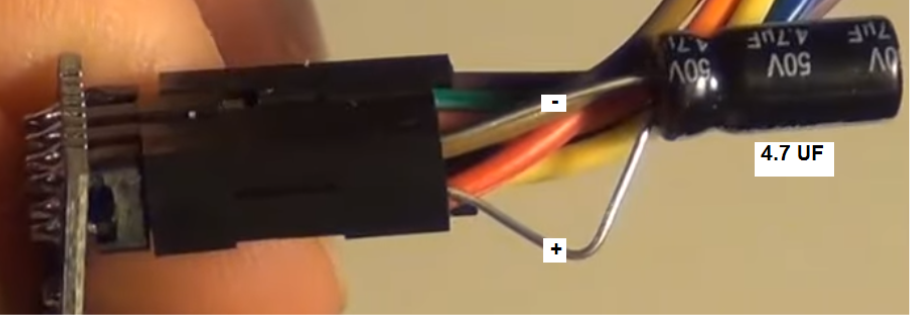
                              This is the picture for the 4.7 UF that has me baffled of where to insert into the radio. Being color blind really hurts with wiring. And rather ask than fry another project....
                              RJ

                              Sergio RiusS 1 Reply Last reply
                              0
                              • ? A Former User

                                Thank You, petewill I adjusted the wiring!
                                0_1468603030032_upload-e9f66bab-6c30-42eb-80b2-da87857849e7
                                This is the picture for the 4.7 UF that has me baffled of where to insert into the radio. Being color blind really hurts with wiring. And rather ask than fry another project....
                                RJ

                                Sergio RiusS Offline
                                Sergio RiusS Offline
                                Sergio Rius
                                wrote on last edited by Sergio Rius
                                #169

                                @Ngwpower
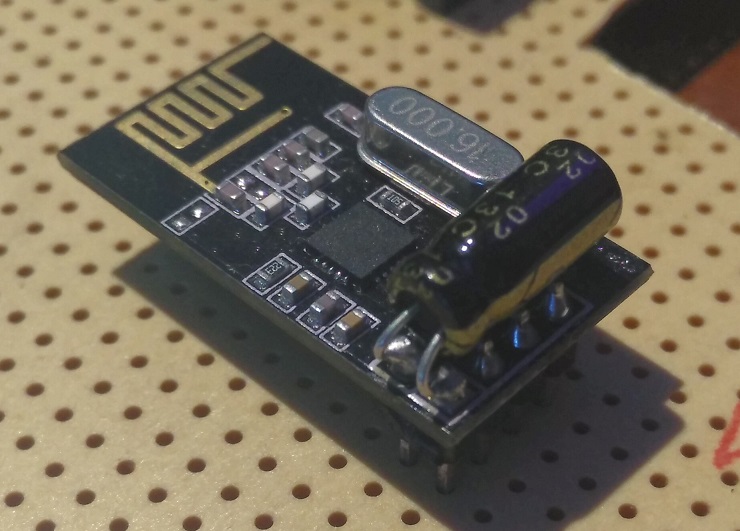
                                0_1468612399972_20160715_214322.jpg

                                EDIT: My condenser is 10uF / 63v

                                ? 1 Reply Last reply
                                0
                                • Sergio RiusS Offline
                                  Sergio RiusS Offline
                                  Sergio Rius
                                  wrote on last edited by
                                  #170

                                  Does this sketch still work with the current Mysensors libraries?
                                  I lost my working environment so I had to build a new one. I downloaded the MySensors libraries and the sketch throws me an error not finding MySensor.h. The file is not at the libraries folder, but MySensorS.h
                                  If adding this later (used at the samples) the compilation throws an error:

                                  W:\....\MySensors_Arduino\arduino-1.6.9\portable\sketchbook\libraries\MySensors/MySensors.h:287:4: error: #error No forward link or gateway feature activated. This means nowhere to send messages! Pretty pointless.
                                  
                                     #error No forward link or gateway feature activated. This means nowhere to send messages! Pretty pointless.
                                  
                                      ^
                                  
                                  exit status 1
                                  Error compilación en tarjeta Arduino Nano.```
                                  
                                  Does make sense for anyone?
                                  petewillP 1 Reply Last reply
                                  0
                                  • Sergio RiusS Sergio Rius

                                    @Ngwpower
                                    0_1468612399972_20160715_214322.jpg

                                    EDIT: My condenser is 10uF / 63v

                                    ? Offline
                                    ? Offline
                                    A Former User
                                    wrote on last edited by
                                    #171

                                    @Sergio-Rius
                                    Than You for the clarfication & picture worth thousands of words.
                                    RJ

                                    1 Reply Last reply
                                    0
                                    • Sergio RiusS Sergio Rius

                                      Does this sketch still work with the current Mysensors libraries?
                                      I lost my working environment so I had to build a new one. I downloaded the MySensors libraries and the sketch throws me an error not finding MySensor.h. The file is not at the libraries folder, but MySensorS.h
                                      If adding this later (used at the samples) the compilation throws an error:

                                      W:\....\MySensors_Arduino\arduino-1.6.9\portable\sketchbook\libraries\MySensors/MySensors.h:287:4: error: #error No forward link or gateway feature activated. This means nowhere to send messages! Pretty pointless.
                                      
                                         #error No forward link or gateway feature activated. This means nowhere to send messages! Pretty pointless.
                                      
                                          ^
                                      
                                      exit status 1
                                      Error compilación en tarjeta Arduino Nano.```
                                      
                                      Does make sense for anyone?
                                      petewillP Offline
                                      petewillP Offline
                                      petewill
                                      Admin
                                      wrote on last edited by
                                      #172

                                      @Sergio-Rius Hmm. Are you using the 2.0 release? If so then it's not compatible yet. It still needs to be upgraded.

                                      My "How To" home automation video channel: https://www.youtube.com/channel/UCq_Evyh5PQALx4m4CQuxqkA

                                      1 Reply Last reply
                                      0
                                      • ? Offline
                                        ? Offline
                                        A Former User
                                        wrote on last edited by
                                        #173

                                        Got the controller all ready to test like petewill shows in his presentation. Get this error
                                        MySensors-1.5.4 loaded it onto my board Arduino Pro Mini and get this error -*** F:\Arduino Programs\My sensors downloads\upload-9cc672c5-a5a3-4711-9e38-8f3f7da898a5\upload-9cc672c5-a5a3-4711-9e38-8f3f7da898a5.ino:33:19: fatal error: Relay.h: No such file or directory***
                                        Can I see this operate on my screen, without all the advanced technology? Found the Domoticz site and no sure if this is for me anymore than the Vera that is being used by petewill. Way out of my knowledge base with this project, just to stubborn to quit or give up.

                                        L 1 Reply Last reply
                                        0
                                        • ? A Former User

                                          Got the controller all ready to test like petewill shows in his presentation. Get this error
                                          MySensors-1.5.4 loaded it onto my board Arduino Pro Mini and get this error -*** F:\Arduino Programs\My sensors downloads\upload-9cc672c5-a5a3-4711-9e38-8f3f7da898a5\upload-9cc672c5-a5a3-4711-9e38-8f3f7da898a5.ino:33:19: fatal error: Relay.h: No such file or directory***
                                          Can I see this operate on my screen, without all the advanced technology? Found the Domoticz site and no sure if this is for me anymore than the Vera that is being used by petewill. Way out of my knowledge base with this project, just to stubborn to quit or give up.

                                          L Offline
                                          L Offline
                                          Lars65
                                          wrote on last edited by
                                          #174

                                          @Ngwpower which sketch are you using?

                                          ? 1 Reply Last reply
                                          0
                                          Reply
                                          • Reply as topic
                                          Log in to reply
                                          • Oldest to Newest
                                          • Newest to Oldest
                                          • Most Votes


                                          24

                                          Online

                                          11.7k

                                          Users

                                          11.2k

                                          Topics

                                          113.1k

                                          Posts


                                          Copyright 2025 TBD   |   Forum Guidelines   |   Privacy Policy   |   Terms of Service
                                          • Login

                                          • Don't have an account? Register

                                          • Login or register to search.
                                          • First post
                                            Last post
                                          0
                                          • MySensors
                                          • OpenHardware.io
                                          • Categories
                                          • Recent
                                          • Tags
                                          • Popular