Irrigation Controller (up to 16 valves with Shift Registers)
-
Got the controller all ready to test like petewill shows in his presentation. Get this error
MySensors-1.5.4 loaded it onto my board Arduino Pro Mini and get this error -*** F:\Arduino Programs\My sensors downloads\upload-9cc672c5-a5a3-4711-9e38-8f3f7da898a5\upload-9cc672c5-a5a3-4711-9e38-8f3f7da898a5.ino:33:19: fatal error: Relay.h: No such file or directory***
Can I see this operate on my screen, without all the advanced technology? Found the Domoticz site and no sure if this is for me anymore than the Vera that is being used by petewill. Way out of my knowledge base with this project, just to stubborn to quit or give up. -
@Lars65 Thanks
June 2, 2014 12:00 Version 1.0 Arduino Multi-Zone Sprinkler Control -
@Lars65 Thanks
June 2, 2014 12:00 Version 1.0 Arduino Multi-Zone Sprinkler Control@Ngwpower I use this one which is earlier in this thread, an it works with my domoticz.
/* MySprinkler for MySensors Arduino Multi-Zone Sprinkler Control May 31, 2015 *** Version 2.0 *** Upgraded to http://MySensors.org version 1.4.1 *** Expanded for up to 16 Valves *** Setup for active low relay board or comment out #define ACTIVE_LOW to switch to active high *** Switch to bitshift method vs byte arrays *** Changed RUN_ALL_ZONES Vera device to 0 (was highest valve) *** Added optional LCD display featuring remaining time, date last ran & current time *** Features 'raindrop' and 'clock' icons which indicate sensor is updating valve data and clock respectively *** Added single pushbutton menu to manually select which program to run (All Zones or a Single Zone) *** Added option of naming your Zones programmatically or with Vera (V_VAR3 used to store names) Utilizing your Vera home automation controller and the MySensors.org gateway you can control up to a sixteen zone irrigation system with only three digital pins. This sketch will create NUMBER_OF_VALVES + 1 devices on your Vera controller This sketch features the following: * Allows you to cycle through All zones (RUN_ALL_ZONES) or individual zone (RUN_SINGLE_ZONE) control. * Use the 0th controller to activate RUN_ALL_ZONES (each zone in numeric sequence 1 to n) using Variable1 as the "ON" time in minutes in each of the vera devices created. * Use the individual zone controller to activate a single zone. This feature uses Variable2 as the "ON" time for each individual device/zone. * Connect according to pinout below and uses Shift Registers as to allow the MySensors standard radio configuration and still leave available digital pins * Turning on any zone will stop the current process and begin that particular process. * Turning off any zone will stop the current process and turn off all zones. * To push your new time intervals for your zones, simply change the variable on your Vera and your arduino will call to Vera once a minute and update accordingly. Variables will also be requested when the device is first powered on. * Pushbutton activation to RUN_ALL_ZONES, RUN_SINGLE_ZONE or halt the current program * LED status indicator PARTS LIST: Available from the MySensors store - http://www.mysensors.org/store/ * Relays (8 channel) * Female Pin Header Connector Strip * Prototype Universal Printed Circuit Boards (PCB) * NRF24L01 Radio * Arduino (I used a Pro Mini) * FTDI USB to TTL Serial Adapter * Capacitors (10uf and .1uf) * 3.3v voltage regulator * Resistors (270 & 10K) * Female Dupont Cables * 1602 LCD (with I2C Interface) * LED * Push button * Shift Register (SN74HC595) * 2 Pole 5mm Pitch PCB Mount Screw Terminal Block * 3 Pole 5mm Pitch PCB Mount Screw Terminal Block * 22-24 gauge wire or similar (I used Cat5/Cat6 cable) * 18 gauge wire (for relay) * Irrigation Power Supply (24-Volt/750 mA Transformer) INSTRUCTIONS: * A step-by-step setup video is available here: http://youtu.be/l4GPRTsuHkI * After assembling your arduino, radio, decoupling capacitors, shift register(s), status LED, pushbutton LCD (I2C connected to A4 and A5) and relays, and load the sketch. * Following the instructions at https://MySensors.org include the device to your MySensors Gateway. * Verify that each new device has a Variable1, Variable2 and Variable3. Populate data accordingly with whole minutes for the RUN_ALL_ZONES routine (Variable1) and the RUN_SINGLE_ZONE routines (Variable 2). The values entered for times may be zero and you may use the defaulet zone names by leaving Variable3 blank. * Once you have entered values for each zone and each variable, save the settings by pressing the red save button on your Vera. * Restart your arduino; verify the settings are loaded into your arduino with the serial monitor; the array will be printed on the serial monitor. * Your arduino should slow-flash, indicating that it is in ready mode. * There are multiple debug serial prints that can be monitored to assure that it is operating properly. * ***THIS SHOULD NO LONGER BE NEEDED*** The standard MySensors library now works. https://bitbucket.org/fmalpartida/new-liquidcrystal/downloads for the I2C library, or use yours Contributed by Jim (BulldogLowell@gmail.com) with much contribution from Pete (pete.will@mysensors.org) and is released to the public domain */ // #include <Wire.h> #include <Time.h> #include <MySensor.h> #include <SPI.h> #include <LiquidCrystal.h> #include <LiquidCrystal_I2C.h> // #define NUMBER_OF_VALVES 4 // Change this to set your valve count up to 16. #define VALVE_RESET_TIME 7500UL // Change this (in milliseconds) for the time you need your valves to hydraulically reset and change state #define RADIO_ID AUTO // Change this to fix your Radio ID or use Auto #define SKETCH_NAME "MySprinkler Domoticz" #define SKETCH_VERSION "2.0" // #define CHILD_ID_SPRINKLER 0 // //#define ACTIVE_LOW // comment out this line if your relays are active high // #define DEBUG_ON // comment out to supress serial monitor output // #ifdef ACTIVE_LOW #define BITSHIFT_VALVE_NUMBER ~(1U << (valveNumber-1)) #define ALL_VALVES_OFF 0xFFFF #else #define BITSHIFT_VALVE_NUMBER (1U << (valveNumber-1)) #define ALL_VALVES_OFF 0U #endif // #ifdef DEBUG_ON #define DEBUG_PRINT(x) Serial.print(x) #define DEBUG_PRINTLN(x) Serial.println(x) #define SERIAL_START(x) Serial.begin(x) #else #define DEBUG_PRINT(x) #define DEBUG_PRINTLN(x) #define SERIAL_START(x) #endif // typedef enum { STAND_BY_ALL_OFF, RUN_SINGLE_ZONE, RUN_ALL_ZONES, CYCLE_COMPLETE, ZONE_SELECT_MENU } SprinklerStates; // SprinklerStates state = STAND_BY_ALL_OFF; SprinklerStates lastState; byte menuState = 0; unsigned long menuTimer; byte countDownTime = 10; // int allZoneTime [NUMBER_OF_VALVES + 1]= {0, 1, 1, 1, 1}; // Insert values in min, 0 = all zone (always 0) this is a 4 chan relay int valveSoloTime [NUMBER_OF_VALVES + 1]= {0, 1, 1, 1, 1}; // Insert values in min, 0 = all zone (always 0) this is a 4 chan relay int valveNumber; int lastValve; unsigned long startMillis; const int ledPin = 5; const int waterButtonPin = 3; boolean buttonPushed = false; boolean showTime = true; boolean clockUpdating = false; boolean recentUpdate = true; const char *dayOfWeek[] = { "Null", "Sunday ", "Monday ", "Tuesday ", "Wednesday ", "Thursday ", "Friday ", "Saturday " }; // Name your Zones here or use Vera to edit them by adding a name in Variable3... String valveNickName[17] = { "All Zones", "Zone 1", "Zone 2", "Zone 3", "Zone 4", "Zone 5", "Zone 6", "Zone 7", "Zone 8", "Zone 9", "Zone 10", "Zone 11", "Zone 12", "Zone 13", "Zone 14", "Zone 15", "Zone 16" }; // time_t lastTimeRun = 0; //Setup Shift Register... const int latchPin = 8; const int clockPin = 4; const int dataPin = 7; // byte clock[8] = {0x0, 0xe, 0x15, 0x17, 0x11, 0xe, 0x0}; // fetching time indicator byte raindrop[8] = {0x4, 0x4, 0xA, 0xA, 0x11, 0xE, 0x0,}; // fetching Valve Data indicator // Set the pins on the I2C chip used for LCD connections: // addr, en,rw,rs,d4,d5,d6,d7,bl,blpol LiquidCrystal_I2C lcd(0x27, 2, 1, 0, 4, 5, 6, 7, 3, POSITIVE); // Set the LCD I2C address to 0x27 MySensor gw; // MyMessage msg1valve(CHILD_ID_SPRINKLER, V_LIGHT); MyMessage var1valve(CHILD_ID_SPRINKLER, V_VAR1); MyMessage var2valve(CHILD_ID_SPRINKLER, V_VAR2); // void setup() { SERIAL_START(115200); DEBUG_PRINTLN(F("Initialising...")); pinMode(latchPin, OUTPUT); pinMode(clockPin, OUTPUT); pinMode(dataPin, OUTPUT); pinMode(ledPin, OUTPUT); pinMode(waterButtonPin, INPUT_PULLUP); //pinMode(waterButtonPin, INPUT); attachInterrupt(1, PushButton, RISING); //May need to change for your Arduino model digitalWrite (ledPin, HIGH); DEBUG_PRINTLN(F("Turning All Valves Off...")); updateRelays(ALL_VALVES_OFF); //delay(5000); lcd.begin(16, 2); //(16 characters and 2 line display) lcd.clear(); lcd.backlight(); lcd.createChar(0, clock); lcd.createChar(1, raindrop); // //check for saved date in EEPROM DEBUG_PRINTLN(F("Checking EEPROM for stored date:")); delay(500); if (gw.loadState(0) == 0xFF); // EEPROM flag { DEBUG_PRINTLN(F("Retreiving last run time from EEPROM...")); for (int i = 0; i < 4 ; i++) { lastTimeRun = lastTimeRun << 8; lastTimeRun = lastTimeRun | gw.loadState(i + 1); // assemble 4 bytes into an ussigned long epoch timestamp } } gw.begin(getVariables, RADIO_ID, false); // Change 'false' to 'true' to create a Radio repeating node gw.sendSketchInfo(SKETCH_NAME, SKETCH_VERSION); for (byte i = 0; i <= NUMBER_OF_VALVES; i++) { gw.present(i, S_LIGHT); } DEBUG_PRINTLN(F("Sensor Presentation Complete")); // digitalWrite (ledPin, LOW); DEBUG_PRINTLN(F("Ready...")); // lcd.setCursor(0, 0); lcd.print(F(" Syncing Time ")); lcd.setCursor(15, 0); lcd.write(byte(0)); lcd.setCursor(0, 1); int clockCounter = 0; while (timeStatus() == timeNotSet && clockCounter < 21) { gw.process(); gw.requestTime(receiveTime); DEBUG_PRINTLN(F("Requesting time from Gateway:")); delay(1000); lcd.print("."); clockCounter++; if (clockCounter > 16) { DEBUG_PRINTLN(F("Failed initial clock synchronization!")); lcd.clear(); lcd.print(F(" Failed Clock ")); lcd.setCursor(0, 1); lcd.print(F(" Syncronization ")); delay(2000); break; } } // lcd.clear(); /* //Update valve data when first powered on for (byte i = 0; i <= NUMBER_OF_VALVES; i++) { lcd.print(F(" Updating ")); lcd.setCursor(0, 1); lcd.print(F(" Valve Data: ")); lcd.print(i); boolean flashIcon = false; DEBUG_PRINT(F("Calling for Valve ")); DEBUG_PRINT(i); DEBUG_PRINTLN(F(" Data...")); while (gw.process() == false) { lcd.setCursor(15, 0); flashIcon = !flashIcon; flashIcon ? lcd.write(byte(1)) : lcd.print(F(" ")); gw.request(i, V_VAR1); delay(100); } while (gw.process() == false) { lcd.setCursor(15, 0); flashIcon = !flashIcon; flashIcon ? lcd.write(byte(1)) : lcd.print(F(" ")); gw.request(i, V_VAR2); delay(100); } while (gw.process() == false) { lcd.setCursor(15, 0); flashIcon = !flashIcon; flashIcon ? lcd.write(byte(1)) : lcd.print(F(" ")); gw.request(i, V_VAR3); delay(100); } } */ lcd.clear(); } // void loop() { gw.process(); updateClock(); updateDisplay(); //goGetValveTimes(); // if (buttonPushed) { menuTimer = millis(); DEBUG_PRINTLN(F("Button Pressed")); if (state == STAND_BY_ALL_OFF) { state = ZONE_SELECT_MENU; menuState = 0; } else if (state == ZONE_SELECT_MENU) { menuState++; if (menuState > NUMBER_OF_VALVES) { menuState = 0; } } else { state = STAND_BY_ALL_OFF; } buttonPushed = false; } if (state == STAND_BY_ALL_OFF) { slowToggleLED (); if (state != lastState) { updateRelays(ALL_VALVES_OFF); DEBUG_PRINTLN(F("State Changed... all Zones off")); for (byte i = 0; i <= NUMBER_OF_VALVES; i++) { delay(50); gw.send(msg1valve.setSensor(i).set(false), false); } lcd.clear(); lcd.setCursor(0,0); lcd.print(F("** Irrigation **")); lcd.setCursor(0,1); lcd.print(F("** Halted **")); delay(2000); lastValve = -1; } } // else if (state == RUN_ALL_ZONES) { if (lastValve != valveNumber) { for (byte i = 0; i <= NUMBER_OF_VALVES; i++) { if (i == 0 || i == valveNumber) { gw.send(msg1valve.setSensor(i).set(true), false); } else { gw.send(msg1valve.setSensor(i).set(false), false); } } } lastValve = valveNumber; fastToggleLed(); if (state != lastState) { valveNumber = 1; updateRelays(ALL_VALVES_OFF); DEBUG_PRINTLN(F("State Changed, Running All Zones...")); } unsigned long nowMillis = millis(); if (nowMillis - startMillis < VALVE_RESET_TIME) { updateRelays(ALL_VALVES_OFF); } else if (nowMillis - startMillis < (allZoneTime[valveNumber] * 60000UL)) { updateRelays(BITSHIFT_VALVE_NUMBER); } else { DEBUG_PRINTLN(F("Changing Valves...")); updateRelays(ALL_VALVES_OFF); startMillis = millis(); valveNumber++; if (valveNumber > NUMBER_OF_VALVES) { state = CYCLE_COMPLETE; startMillis = millis(); lastValve = -1; lastTimeRun = now(); saveDateToEEPROM(lastTimeRun); for (byte i = 0; i <= NUMBER_OF_VALVES; i++) { gw.send(msg1valve.setSensor(i).set(false), false); } DEBUG_PRINT(F("State = ")); DEBUG_PRINTLN(state); } } } // else if (state == RUN_SINGLE_ZONE) { fastToggleLed(); if (state != lastState) { for (byte i = 0; i <= NUMBER_OF_VALVES; i++) { if (i == 0 || i == valveNumber) { gw.send(msg1valve.setSensor(i).set(true), false); } else { gw.send(msg1valve.setSensor(i).set(false), false); } } DEBUG_PRINTLN(F("State Changed, Single Zone Running...")); DEBUG_PRINT(F("Zone: ")); DEBUG_PRINTLN(valveNumber); } unsigned long nowMillis = millis(); if (nowMillis - startMillis < VALVE_RESET_TIME) { updateRelays(ALL_VALVES_OFF); } else if (nowMillis - startMillis < (valveSoloTime [valveNumber] * 60000UL)) { updateRelays(BITSHIFT_VALVE_NUMBER); } else { updateRelays(ALL_VALVES_OFF); for (byte i = 0; i <= NUMBER_OF_VALVES; i++) { gw.send(msg1valve.setSensor(i).set(false), false); } state = CYCLE_COMPLETE; startMillis = millis(); DEBUG_PRINT(F("State = ")); DEBUG_PRINTLN(state); } lastTimeRun = now(); } else if (state == CYCLE_COMPLETE) { if (millis() - startMillis < 30000UL) { fastToggleLed(); } else { state = STAND_BY_ALL_OFF; } } else if (state = ZONE_SELECT_MENU) { displayMenu(); } lastState = state; } // void displayMenu(void) { static byte lastMenuState = -1; static int lastSecond; if (menuState != lastMenuState) { lcd.clear(); lcd.setCursor(0, 0); lcd.print(valveNickName[menuState]); lcd.setCursor(0, 1); lcd.print(F("Starting")); DEBUG_PRINT(valveNickName[menuState]); Serial.print(F(" Starting Shortly")); } int thisSecond = (millis() - menuTimer) / 1000UL; if (thisSecond != lastSecond && thisSecond < 8) { lcd.print(F(".")); Serial.print("."); } lastSecond = thisSecond; if (millis() - menuTimer > 10000UL) { startMillis = millis(); if (menuState == 0) { valveNumber = 1; state = RUN_ALL_ZONES; } else { valveNumber = menuState; state = RUN_SINGLE_ZONE; } } else { } lastMenuState = menuState; } // void updateRelays(int value) { digitalWrite(latchPin, LOW); shiftOut(dataPin, clockPin, MSBFIRST, highByte(value)); shiftOut(dataPin, clockPin, MSBFIRST, lowByte(value)); digitalWrite(latchPin, HIGH); } // void PushButton() //interrupt with debounce { static unsigned long last_interrupt_time = 0; unsigned long interrupt_time = millis(); if (interrupt_time - last_interrupt_time > 200) { buttonPushed = true; } last_interrupt_time = interrupt_time; } // void fastToggleLed() { static unsigned long fastLedTimer; if (millis() - fastLedTimer >= 100UL) { digitalWrite(ledPin, !digitalRead(ledPin)); fastLedTimer = millis (); } } // void slowToggleLED () { static unsigned long slowLedTimer; if (millis() - slowLedTimer >= 1250UL) { digitalWrite(ledPin, !digitalRead(ledPin)); slowLedTimer = millis (); } } // void getVariables(const MyMessage &message) { boolean zoneTimeUpdate = false; if (message.isAck()) { DEBUG_PRINTLN(F("This is an ack from gateway")); } for (byte i = 0; i <= NUMBER_OF_VALVES; i++) { if (message.sensor == i) { if (message.type == V_LIGHT) { int switchState = atoi(message.data); if (switchState == 0) { state = STAND_BY_ALL_OFF; DEBUG_PRINTLN(F("Recieved Instruction to Cancel...")); } else { if (i == 0) { state = RUN_ALL_ZONES; valveNumber = 1; DEBUG_PRINTLN(F("Recieved Instruction to Run All Zones...")); } else { state = RUN_SINGLE_ZONE; valveNumber = i; DEBUG_PRINT(F("Recieved Instruction to Activate Zone: ")); DEBUG_PRINTLN(i); } } startMillis = millis(); } else if (message.type == V_VAR1) { int variable1 = atoi(message.data);// RUN_ALL_ZONES time DEBUG_PRINT(F("Recieved variable1 valve:")); DEBUG_PRINT(i); DEBUG_PRINT(F(" = ")); DEBUG_PRINTLN(variable1); if (variable1 != allZoneTime[i]) { allZoneTime[i] = variable1; zoneTimeUpdate = true; } } else if (message.type == V_VAR2) { int variable2 = atoi(message.data);// RUN_SINGLE_ZONE time DEBUG_PRINT(F("Recieved variable2 valve:")); DEBUG_PRINT(i); DEBUG_PRINT(F(" = ")); DEBUG_PRINTLN(variable2); if (variable2 != valveSoloTime[i]) { valveSoloTime[i] = variable2; zoneTimeUpdate = true; } } else if (message.type == V_VAR3) { String newMessage = String(message.data); if (newMessage.length() == 0) { DEBUG_PRINT(F("No Name Recieved for zone ")); DEBUG_PRINTLN(i); break; } if (newMessage.length() > 16) { newMessage.substring(0, 16); } valveNickName[i] = ""; valveNickName[i] += newMessage; DEBUG_PRINT(F("Recieved new name for zone ")); DEBUG_PRINT(i); DEBUG_PRINT(F(" and it is now called: ")); DEBUG_PRINTLN(valveNickName[i]); } } } if (zoneTimeUpdate) { // DEBUG_PRINTLN(F("New Zone Times Recieved...")); for (byte i = 0; i <= NUMBER_OF_VALVES; i++) { if (i != 0) { DEBUG_PRINT(F("Zone ")); DEBUG_PRINT(i); DEBUG_PRINT(F(" individual time: ")); DEBUG_PRINT(valveSoloTime[i]); DEBUG_PRINT(F(" group time: ")); DEBUG_PRINTLN(allZoneTime[i]); recentUpdate = true; } } } else { recentUpdate = false; } } // void updateDisplay() { static unsigned long lastUpdateTime; static boolean displayToggle = false; //static byte toggleCounter = 0; static SprinklerStates lastDisplayState; if (state != lastDisplayState || millis() - lastUpdateTime >= 3000UL) { displayToggle = !displayToggle; switch (state) { case STAND_BY_ALL_OFF: // fastClear(); lcd.setCursor(0, 0); if (displayToggle) { lcd.print(F(" System Ready ")); if (clockUpdating) { lcd.setCursor(15, 0); lcd.write(byte(0)); } lcd.setCursor(0, 1); lcd.print(hourFormat12() < 10 ? F(" ") : F("")); lcd.print(hourFormat12()); lcd.print(minute() < 10 ? F(":0") : F(":")); lcd.print(minute()); lcd.print(isAM() ? F("am") : F("pm")); lcd.print(month() < 10 ? F(" 0") : F(" ")); lcd.print(month()); lcd.print(day() < 10 ? F("/0") : F("/")); lcd.print(day()); lcd.print(F("/")); lcd.print(year() % 100); } else { lcd.print(F(" Last Watered ")); if (clockUpdating) { lcd.setCursor(15, 0); lcd.write(byte(0)); } lcd.setCursor(0, 1); lcd.print(dayOfWeek[weekday(lastTimeRun)]); lcd.setCursor(11, 1); lcd.print(month(lastTimeRun) < 10 ? F(" ") : F("")); lcd.print(month(lastTimeRun)); lcd.print(day(lastTimeRun) < 10 ? F("/0") : F("/")); lcd.print(day(lastTimeRun)); } break; case RUN_SINGLE_ZONE: // fastClear(); lcd.setCursor(0, 0); if (displayToggle) { lcd.print(F("Single Zone Mode")); lcd.setCursor(0, 1); lcd.print(F(" Zone:")); if (valveNumber < 10) lcd.print(F("0")); lcd.print(valveNumber); lcd.print(F(" Active")); } else { lcd.print(F(" Time Remaining ")); lcd.setCursor(0, 1); if (valveSoloTime[valveNumber] == 0) { lcd.print(F(" No Valve Time ")); } else { unsigned long timeRemaining = (valveSoloTime[valveNumber] * 60) - ((millis() - startMillis) / 1000); lcd.print(timeRemaining / 60 < 10 ? " 0" : " "); lcd.print(timeRemaining / 60); lcd.print("min"); lcd.print(timeRemaining % 60 < 10 ? " 0" : " "); lcd.print(timeRemaining % 60); lcd.print("sec "); } } break; case RUN_ALL_ZONES: // fastClear(); lcd.setCursor(0, 0); if (displayToggle) { lcd.print(F(" All-Zone Mode ")); lcd.setCursor(0, 1); lcd.print(F(" Zone:")); if (valveNumber < 10) lcd.print(F("0")); lcd.print(valveNumber); lcd.print(F(" Active ")); } else { lcd.print(F(" Time Remaining ")); lcd.setCursor(0, 1); int timeRemaining = (allZoneTime[valveNumber] * 60) - ((millis() - startMillis) / 1000); lcd.print((timeRemaining / 60) < 10 ? " 0" : " "); lcd.print(timeRemaining / 60); lcd.print("min"); lcd.print(timeRemaining % 60 < 10 ? " 0" : " "); lcd.print(timeRemaining % 60); lcd.print("sec "); } break; case CYCLE_COMPLETE: // if (displayToggle) { lcd.setCursor(0, 0); lcd.print(F(" Watering Cycle ")); lcd.setCursor(0, 1); lcd.print(F(" Complete ")); } else { int totalTimeRan = 0; for (int i = 1; i < NUMBER_OF_VALVES + 1; i++) { totalTimeRan += allZoneTime[i]; } lcd.setCursor(0, 0); lcd.print(F(" Total Time Run ")); lcd.setCursor(0, 1); lcd.print(totalTimeRan < 10 ? " 0" : " "); lcd.print(totalTimeRan); lcd.print(" Minutes "); } } lastUpdateTime = millis(); } lastDisplayState = state; } void receiveTime(time_t newTime) { DEBUG_PRINTLN(F("Time value received and updated...")); int lastSecond = second(); int lastMinute = minute(); int lastHour = hour(); setTime(newTime); if (((second() != lastSecond) || (minute() != lastMinute) || (hour() != lastHour)) || showTime) { DEBUG_PRINTLN(F("Clock updated....")); DEBUG_PRINT(F("Sensor's time currently set to:")); DEBUG_PRINT(hourFormat12() < 10 ? F(" 0") : F(" ")); DEBUG_PRINT(hourFormat12()); DEBUG_PRINT(minute() < 10 ? F(":0") : F(":")); DEBUG_PRINT(minute()); DEBUG_PRINTLN(isAM() ? F("am") : F("pm")); DEBUG_PRINT(month()); DEBUG_PRINT(F("/")); DEBUG_PRINT(day()); DEBUG_PRINT(F("/")); DEBUG_PRINTLN(year()); DEBUG_PRINTLN(dayOfWeek[weekday()]); showTime = false; } else { DEBUG_PRINTLN(F("Sensor's time did NOT need adjustment greater than 1 second.")); } clockUpdating = false; } void fastClear() { lcd.setCursor(0, 0); lcd.print(F(" ")); lcd.setCursor(0, 1); lcd.print(F(" ")); } // void updateClock() { static unsigned long lastVeraGetTime; if (millis() - lastVeraGetTime >= 3600000UL) // updates clock time and gets zone times from vera once every hour { DEBUG_PRINTLN(F("Requesting time and valve data from Gateway...")); lcd.setCursor(15, 0); lcd.write(byte(0)); clockUpdating = true; gw.requestTime(receiveTime); lastVeraGetTime = millis(); } } // void saveDateToEEPROM(unsigned long theDate) { DEBUG_PRINTLN(F("Saving Last Run date")); if (gw.loadState(0) != 0xFF) { gw.saveState(0, 0xFF); // EEPROM flag for last date saved stored in EEPROM (location zero) } // for (int i = 1; i < 5; i++) { gw.saveState(5 - i, byte(theDate >> 8 * (i - 1))); // store epoch datestamp in 4 bytes of EEPROM starting in location one } } // void goGetValveTimes() { static unsigned long valveUpdateTime; static byte valveIndex = 1; if (millis() - valveUpdateTime >= 300000UL / NUMBER_OF_VALVES)// update each valve once every 5 mins (distributes the traffic) { DEBUG_PRINTLN(F("Calling for Valve Data...")); lcd.setCursor(15, 0); lcd.write(byte(1)); //lcd.write(1); gw.request(valveIndex, V_VAR1); gw.request(valveIndex, V_VAR2); gw.request(valveIndex, V_VAR3); valveUpdateTime = millis(); valveIndex++; if (valveIndex > NUMBER_OF_VALVES + 1) { valveIndex = 1; } } }``` Take away the three dots in the bottom. -
Does anyone have a working portable Arduino IDE for that sketch that would want to share with me? I lost my installation and so many things changed in the built in scripts when you do a new installation. I can compile the project even using 1.4.5 mysensors libraries.
Thanks a lot. -
@Ngwpower Don't give up! It is a learning curve for sure but totally worth it when you finally get it. Try the irrigation controller sketch from the MySensors 1.5 library example. All the required stuff should be there.
@Sergio-Rius I'm not sure what you're looking for. Do you need the 1.5 version?
-
Thanks, I envy you young people at 67 just opening the wide world of tech - do't have to do this sitting on a motor grader or Bull Dozer in the high desert. I have tried from 1.3 to 2.0 and thought I saw a flicker of LED in the string of switches, as in your example. Had my 5V on the wrong pin, so back to square one.
I am having fun attempting to learn the terminology as well as the application! -
Thanks, I envy you young people at 67 just opening the wide world of tech - do't have to do this sitting on a motor grader or Bull Dozer in the high desert. I have tried from 1.3 to 2.0 and thought I saw a flicker of LED in the string of switches, as in your example. Had my 5V on the wrong pin, so back to square one.
I am having fun attempting to learn the terminology as well as the application!@Ngwpower I am 55 and still learning. I don't know anything about programming. But I spend a lot of time on forums, and reading.
I would love to learn programming, but I have a slow learning curve now.
I work as a processengineer,so I guess I can understand some logic.
But this is really fun stuff.
Started up a couple of years ago, reading about a home made CNC mill.
Now I have my own, and it got pretty big can mill surfaces about 1100x800mm.
And I use it most to mill PCB boards. Hahaha. -
@Ngwpower Don't give up! It is a learning curve for sure but totally worth it when you finally get it. Try the irrigation controller sketch from the MySensors 1.5 library example. All the required stuff should be there.
@Sergio-Rius I'm not sure what you're looking for. Do you need the 1.5 version?
@petewill
The problem are the new libraries that come with newer arduino ide. My attempts fail about the wire.h library location or a wrong "positive" variable at liquiddisplay.
I think it's not compatible with newer libraries. -
Thanks, I envy you young people at 67 just opening the wide world of tech - do't have to do this sitting on a motor grader or Bull Dozer in the high desert. I have tried from 1.3 to 2.0 and thought I saw a flicker of LED in the string of switches, as in your example. Had my 5V on the wrong pin, so back to square one.
I am having fun attempting to learn the terminology as well as the application!@Ngwpower said:
I envy you young people at 67 just opening the wide world of tech
I was just thinking the other day I can't wait until I retire so I'll have more time to work on this stuff ;)
I'm glad you're not giving up. It took me a while to get it too but eventually it all started to make a little sense. Unfortunately you're starting at a harder time because we are all still getting comfortable with 2.0@Sergio-Rius Ok, I haven't updated my libraries for a while so hopefully these will work for you. 0_1468884836658_Libraries.zip
My "How To" home automation video channel: https://www.youtube.com/channel/UCq_Evyh5PQALx4m4CQuxqkA
-
@Ngwpower said:
I envy you young people at 67 just opening the wide world of tech
I was just thinking the other day I can't wait until I retire so I'll have more time to work on this stuff ;)
I'm glad you're not giving up. It took me a while to get it too but eventually it all started to make a little sense. Unfortunately you're starting at a harder time because we are all still getting comfortable with 2.0@Sergio-Rius Ok, I haven't updated my libraries for a while so hopefully these will work for you. 0_1468884836658_Libraries.zip
@petewill
Thank you very much. Unfortunately those are not the libraries I've problems with. The problem are the built-in ones. The ones that come with the Arduino IDE.
What version of the IDE are you running? I guess you use the Mysensors 1.4.2 libs.I installed Arduino IDE 1.6.9 and using your libraries, those are the errors shown:
WARNING: Category '' in library UIPEthernet is not valid. Setting to 'Uncategorized'
W:\Domotica\MySensors_Arduino\arduino-1.6.9\portable\sketchbook\libraries\LiquidCrystal\I2CIO.cpp:35:26: fatal error: ../Wire/Wire.h: No such file or directory

 #include <../Wire/Wire.h>

                          ^

compilation terminated.

Multiple libraries were found for "Wire.h"
 Used: W:\Domotica\MySensors_Arduino\arduino-1.6.9\portable\sketchbook\libraries\Wire
 Not used: W:\Domotica\MySensors_Arduino\arduino-1.6.9\hardware\arduino\avr\libraries\Wire
Multiple libraries were found for "LiquidCrystal.h"
 Used: W:\Domotica\MySensors_Arduino\arduino-1.6.9\portable\sketchbook\libraries\LiquidCrystal
 Not used: W:\Domotica\MySensors_Arduino\arduino-1.6.9\libraries\LiquidCrystal
exit status 1
Error compiling for board Arduino Nano.
As you can appreciate, the Wire library is at the ../Wire path, so that error is meaningless.
I told you that I hate java environments? I still haven't found one that works out of the developer computer without issues. X)EDIT: So the problem is that the Wire library has been updated, but we are still using an old version of the LiquidCrystal. This last one expects the .h files been on the root library folder but this has been changed in newer versions. Built-in libraries have their code in "src" subfolder.
I moved it to parent folder and it compiles, but I don't know what will happen with other dependencies.
Better would be updating the sketch. -
@Ngwpower I use this one which is earlier in this thread, an it works with my domoticz.
/* MySprinkler for MySensors Arduino Multi-Zone Sprinkler Control May 31, 2015 *** Version 2.0 *** Upgraded to http://MySensors.org version 1.4.1 *** Expanded for up to 16 Valves *** Setup for active low relay board or comment out #define ACTIVE_LOW to switch to active high *** Switch to bitshift method vs byte arrays *** Changed RUN_ALL_ZONES Vera device to 0 (was highest valve) *** Added optional LCD display featuring remaining time, date last ran & current time *** Features 'raindrop' and 'clock' icons which indicate sensor is updating valve data and clock respectively *** Added single pushbutton menu to manually select which program to run (All Zones or a Single Zone) *** Added option of naming your Zones programmatically or with Vera (V_VAR3 used to store names) Utilizing your Vera home automation controller and the MySensors.org gateway you can control up to a sixteen zone irrigation system with only three digital pins. This sketch will create NUMBER_OF_VALVES + 1 devices on your Vera controller This sketch features the following: * Allows you to cycle through All zones (RUN_ALL_ZONES) or individual zone (RUN_SINGLE_ZONE) control. * Use the 0th controller to activate RUN_ALL_ZONES (each zone in numeric sequence 1 to n) using Variable1 as the "ON" time in minutes in each of the vera devices created. * Use the individual zone controller to activate a single zone. This feature uses Variable2 as the "ON" time for each individual device/zone. * Connect according to pinout below and uses Shift Registers as to allow the MySensors standard radio configuration and still leave available digital pins * Turning on any zone will stop the current process and begin that particular process. * Turning off any zone will stop the current process and turn off all zones. * To push your new time intervals for your zones, simply change the variable on your Vera and your arduino will call to Vera once a minute and update accordingly. Variables will also be requested when the device is first powered on. * Pushbutton activation to RUN_ALL_ZONES, RUN_SINGLE_ZONE or halt the current program * LED status indicator PARTS LIST: Available from the MySensors store - http://www.mysensors.org/store/ * Relays (8 channel) * Female Pin Header Connector Strip * Prototype Universal Printed Circuit Boards (PCB) * NRF24L01 Radio * Arduino (I used a Pro Mini) * FTDI USB to TTL Serial Adapter * Capacitors (10uf and .1uf) * 3.3v voltage regulator * Resistors (270 & 10K) * Female Dupont Cables * 1602 LCD (with I2C Interface) * LED * Push button * Shift Register (SN74HC595) * 2 Pole 5mm Pitch PCB Mount Screw Terminal Block * 3 Pole 5mm Pitch PCB Mount Screw Terminal Block * 22-24 gauge wire or similar (I used Cat5/Cat6 cable) * 18 gauge wire (for relay) * Irrigation Power Supply (24-Volt/750 mA Transformer) INSTRUCTIONS: * A step-by-step setup video is available here: http://youtu.be/l4GPRTsuHkI * After assembling your arduino, radio, decoupling capacitors, shift register(s), status LED, pushbutton LCD (I2C connected to A4 and A5) and relays, and load the sketch. * Following the instructions at https://MySensors.org include the device to your MySensors Gateway. * Verify that each new device has a Variable1, Variable2 and Variable3. Populate data accordingly with whole minutes for the RUN_ALL_ZONES routine (Variable1) and the RUN_SINGLE_ZONE routines (Variable 2). The values entered for times may be zero and you may use the defaulet zone names by leaving Variable3 blank. * Once you have entered values for each zone and each variable, save the settings by pressing the red save button on your Vera. * Restart your arduino; verify the settings are loaded into your arduino with the serial monitor; the array will be printed on the serial monitor. * Your arduino should slow-flash, indicating that it is in ready mode. * There are multiple debug serial prints that can be monitored to assure that it is operating properly. * ***THIS SHOULD NO LONGER BE NEEDED*** The standard MySensors library now works. https://bitbucket.org/fmalpartida/new-liquidcrystal/downloads for the I2C library, or use yours Contributed by Jim (BulldogLowell@gmail.com) with much contribution from Pete (pete.will@mysensors.org) and is released to the public domain */ // #include <Wire.h> #include <Time.h> #include <MySensor.h> #include <SPI.h> #include <LiquidCrystal.h> #include <LiquidCrystal_I2C.h> // #define NUMBER_OF_VALVES 4 // Change this to set your valve count up to 16. #define VALVE_RESET_TIME 7500UL // Change this (in milliseconds) for the time you need your valves to hydraulically reset and change state #define RADIO_ID AUTO // Change this to fix your Radio ID or use Auto #define SKETCH_NAME "MySprinkler Domoticz" #define SKETCH_VERSION "2.0" // #define CHILD_ID_SPRINKLER 0 // //#define ACTIVE_LOW // comment out this line if your relays are active high // #define DEBUG_ON // comment out to supress serial monitor output // #ifdef ACTIVE_LOW #define BITSHIFT_VALVE_NUMBER ~(1U << (valveNumber-1)) #define ALL_VALVES_OFF 0xFFFF #else #define BITSHIFT_VALVE_NUMBER (1U << (valveNumber-1)) #define ALL_VALVES_OFF 0U #endif // #ifdef DEBUG_ON #define DEBUG_PRINT(x) Serial.print(x) #define DEBUG_PRINTLN(x) Serial.println(x) #define SERIAL_START(x) Serial.begin(x) #else #define DEBUG_PRINT(x) #define DEBUG_PRINTLN(x) #define SERIAL_START(x) #endif // typedef enum { STAND_BY_ALL_OFF, RUN_SINGLE_ZONE, RUN_ALL_ZONES, CYCLE_COMPLETE, ZONE_SELECT_MENU } SprinklerStates; // SprinklerStates state = STAND_BY_ALL_OFF; SprinklerStates lastState; byte menuState = 0; unsigned long menuTimer; byte countDownTime = 10; // int allZoneTime [NUMBER_OF_VALVES + 1]= {0, 1, 1, 1, 1}; // Insert values in min, 0 = all zone (always 0) this is a 4 chan relay int valveSoloTime [NUMBER_OF_VALVES + 1]= {0, 1, 1, 1, 1}; // Insert values in min, 0 = all zone (always 0) this is a 4 chan relay int valveNumber; int lastValve; unsigned long startMillis; const int ledPin = 5; const int waterButtonPin = 3; boolean buttonPushed = false; boolean showTime = true; boolean clockUpdating = false; boolean recentUpdate = true; const char *dayOfWeek[] = { "Null", "Sunday ", "Monday ", "Tuesday ", "Wednesday ", "Thursday ", "Friday ", "Saturday " }; // Name your Zones here or use Vera to edit them by adding a name in Variable3... String valveNickName[17] = { "All Zones", "Zone 1", "Zone 2", "Zone 3", "Zone 4", "Zone 5", "Zone 6", "Zone 7", "Zone 8", "Zone 9", "Zone 10", "Zone 11", "Zone 12", "Zone 13", "Zone 14", "Zone 15", "Zone 16" }; // time_t lastTimeRun = 0; //Setup Shift Register... const int latchPin = 8; const int clockPin = 4; const int dataPin = 7; // byte clock[8] = {0x0, 0xe, 0x15, 0x17, 0x11, 0xe, 0x0}; // fetching time indicator byte raindrop[8] = {0x4, 0x4, 0xA, 0xA, 0x11, 0xE, 0x0,}; // fetching Valve Data indicator // Set the pins on the I2C chip used for LCD connections: // addr, en,rw,rs,d4,d5,d6,d7,bl,blpol LiquidCrystal_I2C lcd(0x27, 2, 1, 0, 4, 5, 6, 7, 3, POSITIVE); // Set the LCD I2C address to 0x27 MySensor gw; // MyMessage msg1valve(CHILD_ID_SPRINKLER, V_LIGHT); MyMessage var1valve(CHILD_ID_SPRINKLER, V_VAR1); MyMessage var2valve(CHILD_ID_SPRINKLER, V_VAR2); // void setup() { SERIAL_START(115200); DEBUG_PRINTLN(F("Initialising...")); pinMode(latchPin, OUTPUT); pinMode(clockPin, OUTPUT); pinMode(dataPin, OUTPUT); pinMode(ledPin, OUTPUT); pinMode(waterButtonPin, INPUT_PULLUP); //pinMode(waterButtonPin, INPUT); attachInterrupt(1, PushButton, RISING); //May need to change for your Arduino model digitalWrite (ledPin, HIGH); DEBUG_PRINTLN(F("Turning All Valves Off...")); updateRelays(ALL_VALVES_OFF); //delay(5000); lcd.begin(16, 2); //(16 characters and 2 line display) lcd.clear(); lcd.backlight(); lcd.createChar(0, clock); lcd.createChar(1, raindrop); // //check for saved date in EEPROM DEBUG_PRINTLN(F("Checking EEPROM for stored date:")); delay(500); if (gw.loadState(0) == 0xFF); // EEPROM flag { DEBUG_PRINTLN(F("Retreiving last run time from EEPROM...")); for (int i = 0; i < 4 ; i++) { lastTimeRun = lastTimeRun << 8; lastTimeRun = lastTimeRun | gw.loadState(i + 1); // assemble 4 bytes into an ussigned long epoch timestamp } } gw.begin(getVariables, RADIO_ID, false); // Change 'false' to 'true' to create a Radio repeating node gw.sendSketchInfo(SKETCH_NAME, SKETCH_VERSION); for (byte i = 0; i <= NUMBER_OF_VALVES; i++) { gw.present(i, S_LIGHT); } DEBUG_PRINTLN(F("Sensor Presentation Complete")); // digitalWrite (ledPin, LOW); DEBUG_PRINTLN(F("Ready...")); // lcd.setCursor(0, 0); lcd.print(F(" Syncing Time ")); lcd.setCursor(15, 0); lcd.write(byte(0)); lcd.setCursor(0, 1); int clockCounter = 0; while (timeStatus() == timeNotSet && clockCounter < 21) { gw.process(); gw.requestTime(receiveTime); DEBUG_PRINTLN(F("Requesting time from Gateway:")); delay(1000); lcd.print("."); clockCounter++; if (clockCounter > 16) { DEBUG_PRINTLN(F("Failed initial clock synchronization!")); lcd.clear(); lcd.print(F(" Failed Clock ")); lcd.setCursor(0, 1); lcd.print(F(" Syncronization ")); delay(2000); break; } } // lcd.clear(); /* //Update valve data when first powered on for (byte i = 0; i <= NUMBER_OF_VALVES; i++) { lcd.print(F(" Updating ")); lcd.setCursor(0, 1); lcd.print(F(" Valve Data: ")); lcd.print(i); boolean flashIcon = false; DEBUG_PRINT(F("Calling for Valve ")); DEBUG_PRINT(i); DEBUG_PRINTLN(F(" Data...")); while (gw.process() == false) { lcd.setCursor(15, 0); flashIcon = !flashIcon; flashIcon ? lcd.write(byte(1)) : lcd.print(F(" ")); gw.request(i, V_VAR1); delay(100); } while (gw.process() == false) { lcd.setCursor(15, 0); flashIcon = !flashIcon; flashIcon ? lcd.write(byte(1)) : lcd.print(F(" ")); gw.request(i, V_VAR2); delay(100); } while (gw.process() == false) { lcd.setCursor(15, 0); flashIcon = !flashIcon; flashIcon ? lcd.write(byte(1)) : lcd.print(F(" ")); gw.request(i, V_VAR3); delay(100); } } */ lcd.clear(); } // void loop() { gw.process(); updateClock(); updateDisplay(); //goGetValveTimes(); // if (buttonPushed) { menuTimer = millis(); DEBUG_PRINTLN(F("Button Pressed")); if (state == STAND_BY_ALL_OFF) { state = ZONE_SELECT_MENU; menuState = 0; } else if (state == ZONE_SELECT_MENU) { menuState++; if (menuState > NUMBER_OF_VALVES) { menuState = 0; } } else { state = STAND_BY_ALL_OFF; } buttonPushed = false; } if (state == STAND_BY_ALL_OFF) { slowToggleLED (); if (state != lastState) { updateRelays(ALL_VALVES_OFF); DEBUG_PRINTLN(F("State Changed... all Zones off")); for (byte i = 0; i <= NUMBER_OF_VALVES; i++) { delay(50); gw.send(msg1valve.setSensor(i).set(false), false); } lcd.clear(); lcd.setCursor(0,0); lcd.print(F("** Irrigation **")); lcd.setCursor(0,1); lcd.print(F("** Halted **")); delay(2000); lastValve = -1; } } // else if (state == RUN_ALL_ZONES) { if (lastValve != valveNumber) { for (byte i = 0; i <= NUMBER_OF_VALVES; i++) { if (i == 0 || i == valveNumber) { gw.send(msg1valve.setSensor(i).set(true), false); } else { gw.send(msg1valve.setSensor(i).set(false), false); } } } lastValve = valveNumber; fastToggleLed(); if (state != lastState) { valveNumber = 1; updateRelays(ALL_VALVES_OFF); DEBUG_PRINTLN(F("State Changed, Running All Zones...")); } unsigned long nowMillis = millis(); if (nowMillis - startMillis < VALVE_RESET_TIME) { updateRelays(ALL_VALVES_OFF); } else if (nowMillis - startMillis < (allZoneTime[valveNumber] * 60000UL)) { updateRelays(BITSHIFT_VALVE_NUMBER); } else { DEBUG_PRINTLN(F("Changing Valves...")); updateRelays(ALL_VALVES_OFF); startMillis = millis(); valveNumber++; if (valveNumber > NUMBER_OF_VALVES) { state = CYCLE_COMPLETE; startMillis = millis(); lastValve = -1; lastTimeRun = now(); saveDateToEEPROM(lastTimeRun); for (byte i = 0; i <= NUMBER_OF_VALVES; i++) { gw.send(msg1valve.setSensor(i).set(false), false); } DEBUG_PRINT(F("State = ")); DEBUG_PRINTLN(state); } } } // else if (state == RUN_SINGLE_ZONE) { fastToggleLed(); if (state != lastState) { for (byte i = 0; i <= NUMBER_OF_VALVES; i++) { if (i == 0 || i == valveNumber) { gw.send(msg1valve.setSensor(i).set(true), false); } else { gw.send(msg1valve.setSensor(i).set(false), false); } } DEBUG_PRINTLN(F("State Changed, Single Zone Running...")); DEBUG_PRINT(F("Zone: ")); DEBUG_PRINTLN(valveNumber); } unsigned long nowMillis = millis(); if (nowMillis - startMillis < VALVE_RESET_TIME) { updateRelays(ALL_VALVES_OFF); } else if (nowMillis - startMillis < (valveSoloTime [valveNumber] * 60000UL)) { updateRelays(BITSHIFT_VALVE_NUMBER); } else { updateRelays(ALL_VALVES_OFF); for (byte i = 0; i <= NUMBER_OF_VALVES; i++) { gw.send(msg1valve.setSensor(i).set(false), false); } state = CYCLE_COMPLETE; startMillis = millis(); DEBUG_PRINT(F("State = ")); DEBUG_PRINTLN(state); } lastTimeRun = now(); } else if (state == CYCLE_COMPLETE) { if (millis() - startMillis < 30000UL) { fastToggleLed(); } else { state = STAND_BY_ALL_OFF; } } else if (state = ZONE_SELECT_MENU) { displayMenu(); } lastState = state; } // void displayMenu(void) { static byte lastMenuState = -1; static int lastSecond; if (menuState != lastMenuState) { lcd.clear(); lcd.setCursor(0, 0); lcd.print(valveNickName[menuState]); lcd.setCursor(0, 1); lcd.print(F("Starting")); DEBUG_PRINT(valveNickName[menuState]); Serial.print(F(" Starting Shortly")); } int thisSecond = (millis() - menuTimer) / 1000UL; if (thisSecond != lastSecond && thisSecond < 8) { lcd.print(F(".")); Serial.print("."); } lastSecond = thisSecond; if (millis() - menuTimer > 10000UL) { startMillis = millis(); if (menuState == 0) { valveNumber = 1; state = RUN_ALL_ZONES; } else { valveNumber = menuState; state = RUN_SINGLE_ZONE; } } else { } lastMenuState = menuState; } // void updateRelays(int value) { digitalWrite(latchPin, LOW); shiftOut(dataPin, clockPin, MSBFIRST, highByte(value)); shiftOut(dataPin, clockPin, MSBFIRST, lowByte(value)); digitalWrite(latchPin, HIGH); } // void PushButton() //interrupt with debounce { static unsigned long last_interrupt_time = 0; unsigned long interrupt_time = millis(); if (interrupt_time - last_interrupt_time > 200) { buttonPushed = true; } last_interrupt_time = interrupt_time; } // void fastToggleLed() { static unsigned long fastLedTimer; if (millis() - fastLedTimer >= 100UL) { digitalWrite(ledPin, !digitalRead(ledPin)); fastLedTimer = millis (); } } // void slowToggleLED () { static unsigned long slowLedTimer; if (millis() - slowLedTimer >= 1250UL) { digitalWrite(ledPin, !digitalRead(ledPin)); slowLedTimer = millis (); } } // void getVariables(const MyMessage &message) { boolean zoneTimeUpdate = false; if (message.isAck()) { DEBUG_PRINTLN(F("This is an ack from gateway")); } for (byte i = 0; i <= NUMBER_OF_VALVES; i++) { if (message.sensor == i) { if (message.type == V_LIGHT) { int switchState = atoi(message.data); if (switchState == 0) { state = STAND_BY_ALL_OFF; DEBUG_PRINTLN(F("Recieved Instruction to Cancel...")); } else { if (i == 0) { state = RUN_ALL_ZONES; valveNumber = 1; DEBUG_PRINTLN(F("Recieved Instruction to Run All Zones...")); } else { state = RUN_SINGLE_ZONE; valveNumber = i; DEBUG_PRINT(F("Recieved Instruction to Activate Zone: ")); DEBUG_PRINTLN(i); } } startMillis = millis(); } else if (message.type == V_VAR1) { int variable1 = atoi(message.data);// RUN_ALL_ZONES time DEBUG_PRINT(F("Recieved variable1 valve:")); DEBUG_PRINT(i); DEBUG_PRINT(F(" = ")); DEBUG_PRINTLN(variable1); if (variable1 != allZoneTime[i]) { allZoneTime[i] = variable1; zoneTimeUpdate = true; } } else if (message.type == V_VAR2) { int variable2 = atoi(message.data);// RUN_SINGLE_ZONE time DEBUG_PRINT(F("Recieved variable2 valve:")); DEBUG_PRINT(i); DEBUG_PRINT(F(" = ")); DEBUG_PRINTLN(variable2); if (variable2 != valveSoloTime[i]) { valveSoloTime[i] = variable2; zoneTimeUpdate = true; } } else if (message.type == V_VAR3) { String newMessage = String(message.data); if (newMessage.length() == 0) { DEBUG_PRINT(F("No Name Recieved for zone ")); DEBUG_PRINTLN(i); break; } if (newMessage.length() > 16) { newMessage.substring(0, 16); } valveNickName[i] = ""; valveNickName[i] += newMessage; DEBUG_PRINT(F("Recieved new name for zone ")); DEBUG_PRINT(i); DEBUG_PRINT(F(" and it is now called: ")); DEBUG_PRINTLN(valveNickName[i]); } } } if (zoneTimeUpdate) { // DEBUG_PRINTLN(F("New Zone Times Recieved...")); for (byte i = 0; i <= NUMBER_OF_VALVES; i++) { if (i != 0) { DEBUG_PRINT(F("Zone ")); DEBUG_PRINT(i); DEBUG_PRINT(F(" individual time: ")); DEBUG_PRINT(valveSoloTime[i]); DEBUG_PRINT(F(" group time: ")); DEBUG_PRINTLN(allZoneTime[i]); recentUpdate = true; } } } else { recentUpdate = false; } } // void updateDisplay() { static unsigned long lastUpdateTime; static boolean displayToggle = false; //static byte toggleCounter = 0; static SprinklerStates lastDisplayState; if (state != lastDisplayState || millis() - lastUpdateTime >= 3000UL) { displayToggle = !displayToggle; switch (state) { case STAND_BY_ALL_OFF: // fastClear(); lcd.setCursor(0, 0); if (displayToggle) { lcd.print(F(" System Ready ")); if (clockUpdating) { lcd.setCursor(15, 0); lcd.write(byte(0)); } lcd.setCursor(0, 1); lcd.print(hourFormat12() < 10 ? F(" ") : F("")); lcd.print(hourFormat12()); lcd.print(minute() < 10 ? F(":0") : F(":")); lcd.print(minute()); lcd.print(isAM() ? F("am") : F("pm")); lcd.print(month() < 10 ? F(" 0") : F(" ")); lcd.print(month()); lcd.print(day() < 10 ? F("/0") : F("/")); lcd.print(day()); lcd.print(F("/")); lcd.print(year() % 100); } else { lcd.print(F(" Last Watered ")); if (clockUpdating) { lcd.setCursor(15, 0); lcd.write(byte(0)); } lcd.setCursor(0, 1); lcd.print(dayOfWeek[weekday(lastTimeRun)]); lcd.setCursor(11, 1); lcd.print(month(lastTimeRun) < 10 ? F(" ") : F("")); lcd.print(month(lastTimeRun)); lcd.print(day(lastTimeRun) < 10 ? F("/0") : F("/")); lcd.print(day(lastTimeRun)); } break; case RUN_SINGLE_ZONE: // fastClear(); lcd.setCursor(0, 0); if (displayToggle) { lcd.print(F("Single Zone Mode")); lcd.setCursor(0, 1); lcd.print(F(" Zone:")); if (valveNumber < 10) lcd.print(F("0")); lcd.print(valveNumber); lcd.print(F(" Active")); } else { lcd.print(F(" Time Remaining ")); lcd.setCursor(0, 1); if (valveSoloTime[valveNumber] == 0) { lcd.print(F(" No Valve Time ")); } else { unsigned long timeRemaining = (valveSoloTime[valveNumber] * 60) - ((millis() - startMillis) / 1000); lcd.print(timeRemaining / 60 < 10 ? " 0" : " "); lcd.print(timeRemaining / 60); lcd.print("min"); lcd.print(timeRemaining % 60 < 10 ? " 0" : " "); lcd.print(timeRemaining % 60); lcd.print("sec "); } } break; case RUN_ALL_ZONES: // fastClear(); lcd.setCursor(0, 0); if (displayToggle) { lcd.print(F(" All-Zone Mode ")); lcd.setCursor(0, 1); lcd.print(F(" Zone:")); if (valveNumber < 10) lcd.print(F("0")); lcd.print(valveNumber); lcd.print(F(" Active ")); } else { lcd.print(F(" Time Remaining ")); lcd.setCursor(0, 1); int timeRemaining = (allZoneTime[valveNumber] * 60) - ((millis() - startMillis) / 1000); lcd.print((timeRemaining / 60) < 10 ? " 0" : " "); lcd.print(timeRemaining / 60); lcd.print("min"); lcd.print(timeRemaining % 60 < 10 ? " 0" : " "); lcd.print(timeRemaining % 60); lcd.print("sec "); } break; case CYCLE_COMPLETE: // if (displayToggle) { lcd.setCursor(0, 0); lcd.print(F(" Watering Cycle ")); lcd.setCursor(0, 1); lcd.print(F(" Complete ")); } else { int totalTimeRan = 0; for (int i = 1; i < NUMBER_OF_VALVES + 1; i++) { totalTimeRan += allZoneTime[i]; } lcd.setCursor(0, 0); lcd.print(F(" Total Time Run ")); lcd.setCursor(0, 1); lcd.print(totalTimeRan < 10 ? " 0" : " "); lcd.print(totalTimeRan); lcd.print(" Minutes "); } } lastUpdateTime = millis(); } lastDisplayState = state; } void receiveTime(time_t newTime) { DEBUG_PRINTLN(F("Time value received and updated...")); int lastSecond = second(); int lastMinute = minute(); int lastHour = hour(); setTime(newTime); if (((second() != lastSecond) || (minute() != lastMinute) || (hour() != lastHour)) || showTime) { DEBUG_PRINTLN(F("Clock updated....")); DEBUG_PRINT(F("Sensor's time currently set to:")); DEBUG_PRINT(hourFormat12() < 10 ? F(" 0") : F(" ")); DEBUG_PRINT(hourFormat12()); DEBUG_PRINT(minute() < 10 ? F(":0") : F(":")); DEBUG_PRINT(minute()); DEBUG_PRINTLN(isAM() ? F("am") : F("pm")); DEBUG_PRINT(month()); DEBUG_PRINT(F("/")); DEBUG_PRINT(day()); DEBUG_PRINT(F("/")); DEBUG_PRINTLN(year()); DEBUG_PRINTLN(dayOfWeek[weekday()]); showTime = false; } else { DEBUG_PRINTLN(F("Sensor's time did NOT need adjustment greater than 1 second.")); } clockUpdating = false; } void fastClear() { lcd.setCursor(0, 0); lcd.print(F(" ")); lcd.setCursor(0, 1); lcd.print(F(" ")); } // void updateClock() { static unsigned long lastVeraGetTime; if (millis() - lastVeraGetTime >= 3600000UL) // updates clock time and gets zone times from vera once every hour { DEBUG_PRINTLN(F("Requesting time and valve data from Gateway...")); lcd.setCursor(15, 0); lcd.write(byte(0)); clockUpdating = true; gw.requestTime(receiveTime); lastVeraGetTime = millis(); } } // void saveDateToEEPROM(unsigned long theDate) { DEBUG_PRINTLN(F("Saving Last Run date")); if (gw.loadState(0) != 0xFF) { gw.saveState(0, 0xFF); // EEPROM flag for last date saved stored in EEPROM (location zero) } // for (int i = 1; i < 5; i++) { gw.saveState(5 - i, byte(theDate >> 8 * (i - 1))); // store epoch datestamp in 4 bytes of EEPROM starting in location one } } // void goGetValveTimes() { static unsigned long valveUpdateTime; static byte valveIndex = 1; if (millis() - valveUpdateTime >= 300000UL / NUMBER_OF_VALVES)// update each valve once every 5 mins (distributes the traffic) { DEBUG_PRINTLN(F("Calling for Valve Data...")); lcd.setCursor(15, 0); lcd.write(byte(1)); //lcd.write(1); gw.request(valveIndex, V_VAR1); gw.request(valveIndex, V_VAR2); gw.request(valveIndex, V_VAR3); valveUpdateTime = millis(); valveIndex++; if (valveIndex > NUMBER_OF_VALVES + 1) { valveIndex = 1; } } }``` Take away the three dots in the bottom.@Lars65
As you also use it from Domoticz, your controller notices the changes in valves? I mean, when the IC is cycling through zones, Domoticz correctly changes states or you must refresh the page for it to show? -
@Lars65
As you also use it from Domoticz, your controller notices the changes in valves? I mean, when the IC is cycling through zones, Domoticz correctly changes states or you must refresh the page for it to show?@Sergio-Rius yes, I can turn them on/off, and the switch is also shifting from on/off.
-
@petewill
Thank you very much. Unfortunately those are not the libraries I've problems with. The problem are the built-in ones. The ones that come with the Arduino IDE.
What version of the IDE are you running? I guess you use the Mysensors 1.4.2 libs.I installed Arduino IDE 1.6.9 and using your libraries, those are the errors shown:
WARNING: Category '' in library UIPEthernet is not valid. Setting to 'Uncategorized'
W:\Domotica\MySensors_Arduino\arduino-1.6.9\portable\sketchbook\libraries\LiquidCrystal\I2CIO.cpp:35:26: fatal error: ../Wire/Wire.h: No such file or directory

 #include <../Wire/Wire.h>

                          ^

compilation terminated.

Multiple libraries were found for "Wire.h"
 Used: W:\Domotica\MySensors_Arduino\arduino-1.6.9\portable\sketchbook\libraries\Wire
 Not used: W:\Domotica\MySensors_Arduino\arduino-1.6.9\hardware\arduino\avr\libraries\Wire
Multiple libraries were found for "LiquidCrystal.h"
 Used: W:\Domotica\MySensors_Arduino\arduino-1.6.9\portable\sketchbook\libraries\LiquidCrystal
 Not used: W:\Domotica\MySensors_Arduino\arduino-1.6.9\libraries\LiquidCrystal
exit status 1
Error compiling for board Arduino Nano.
As you can appreciate, the Wire library is at the ../Wire path, so that error is meaningless.
I told you that I hate java environments? I still haven't found one that works out of the developer computer without issues. X)EDIT: So the problem is that the Wire library has been updated, but we are still using an old version of the LiquidCrystal. This last one expects the .h files been on the root library folder but this has been changed in newer versions. Built-in libraries have their code in "src" subfolder.
I moved it to parent folder and it compiles, but I don't know what will happen with other dependencies.
Better would be updating the sketch.@Sergio-Rius Those can you download from internet. About Liquidcrystal is there a newer version called NewLiquidCrystal, that is also possible to download.
That one worked for me.
I deleted all my duplicates, it is anoying when you get those messeges in the arduino ide.
Also the fatal error you get is ../wire/wire.h.
seems like you have #include <../Wire/Wire.h
What happens if you just write #include Wire.hWhat happens if you just
-
@Sergio-Rius Those can you download from internet. About Liquidcrystal is there a newer version called NewLiquidCrystal, that is also possible to download.
That one worked for me.
I deleted all my duplicates, it is anoying when you get those messeges in the arduino ide.
Also the fatal error you get is ../wire/wire.h.
seems like you have #include <../Wire/Wire.h
What happens if you just write #include Wire.hWhat happens if you just
@Lars65
Thanks. No, I finally made it work.
I only have to find why my Domoticz don't update the switch status. -
@petewill
Thank you very much. Unfortunately those are not the libraries I've problems with. The problem are the built-in ones. The ones that come with the Arduino IDE.
What version of the IDE are you running? I guess you use the Mysensors 1.4.2 libs.I installed Arduino IDE 1.6.9 and using your libraries, those are the errors shown:
WARNING: Category '' in library UIPEthernet is not valid. Setting to 'Uncategorized'
W:\Domotica\MySensors_Arduino\arduino-1.6.9\portable\sketchbook\libraries\LiquidCrystal\I2CIO.cpp:35:26: fatal error: ../Wire/Wire.h: No such file or directory

 #include <../Wire/Wire.h>

                          ^

compilation terminated.

Multiple libraries were found for "Wire.h"
 Used: W:\Domotica\MySensors_Arduino\arduino-1.6.9\portable\sketchbook\libraries\Wire
 Not used: W:\Domotica\MySensors_Arduino\arduino-1.6.9\hardware\arduino\avr\libraries\Wire
Multiple libraries were found for "LiquidCrystal.h"
 Used: W:\Domotica\MySensors_Arduino\arduino-1.6.9\portable\sketchbook\libraries\LiquidCrystal
 Not used: W:\Domotica\MySensors_Arduino\arduino-1.6.9\libraries\LiquidCrystal
exit status 1
Error compiling for board Arduino Nano.
As you can appreciate, the Wire library is at the ../Wire path, so that error is meaningless.
I told you that I hate java environments? I still haven't found one that works out of the developer computer without issues. X)EDIT: So the problem is that the Wire library has been updated, but we are still using an old version of the LiquidCrystal. This last one expects the .h files been on the root library folder but this has been changed in newer versions. Built-in libraries have their code in "src" subfolder.
I moved it to parent folder and it compiles, but I don't know what will happen with other dependencies.
Better would be updating the sketch.@Sergio-Rius you can change the reference in the display library files. Just remove the path to the wire.h library.
-
@Ngwpower I use this one which is earlier in this thread, an it works with my domoticz.
/* MySprinkler for MySensors Arduino Multi-Zone Sprinkler Control May 31, 2015 *** Version 2.0 *** Upgraded to http://MySensors.org version 1.4.1 *** Expanded for up to 16 Valves *** Setup for active low relay board or comment out #define ACTIVE_LOW to switch to active high *** Switch to bitshift method vs byte arrays *** Changed RUN_ALL_ZONES Vera device to 0 (was highest valve) *** Added optional LCD display featuring remaining time, date last ran & current time *** Features 'raindrop' and 'clock' icons which indicate sensor is updating valve data and clock respectively *** Added single pushbutton menu to manually select which program to run (All Zones or a Single Zone) *** Added option of naming your Zones programmatically or with Vera (V_VAR3 used to store names) Utilizing your Vera home automation controller and the MySensors.org gateway you can control up to a sixteen zone irrigation system with only three digital pins. This sketch will create NUMBER_OF_VALVES + 1 devices on your Vera controller This sketch features the following: * Allows you to cycle through All zones (RUN_ALL_ZONES) or individual zone (RUN_SINGLE_ZONE) control. * Use the 0th controller to activate RUN_ALL_ZONES (each zone in numeric sequence 1 to n) using Variable1 as the "ON" time in minutes in each of the vera devices created. * Use the individual zone controller to activate a single zone. This feature uses Variable2 as the "ON" time for each individual device/zone. * Connect according to pinout below and uses Shift Registers as to allow the MySensors standard radio configuration and still leave available digital pins * Turning on any zone will stop the current process and begin that particular process. * Turning off any zone will stop the current process and turn off all zones. * To push your new time intervals for your zones, simply change the variable on your Vera and your arduino will call to Vera once a minute and update accordingly. Variables will also be requested when the device is first powered on. * Pushbutton activation to RUN_ALL_ZONES, RUN_SINGLE_ZONE or halt the current program * LED status indicator PARTS LIST: Available from the MySensors store - http://www.mysensors.org/store/ * Relays (8 channel) * Female Pin Header Connector Strip * Prototype Universal Printed Circuit Boards (PCB) * NRF24L01 Radio * Arduino (I used a Pro Mini) * FTDI USB to TTL Serial Adapter * Capacitors (10uf and .1uf) * 3.3v voltage regulator * Resistors (270 & 10K) * Female Dupont Cables * 1602 LCD (with I2C Interface) * LED * Push button * Shift Register (SN74HC595) * 2 Pole 5mm Pitch PCB Mount Screw Terminal Block * 3 Pole 5mm Pitch PCB Mount Screw Terminal Block * 22-24 gauge wire or similar (I used Cat5/Cat6 cable) * 18 gauge wire (for relay) * Irrigation Power Supply (24-Volt/750 mA Transformer) INSTRUCTIONS: * A step-by-step setup video is available here: http://youtu.be/l4GPRTsuHkI * After assembling your arduino, radio, decoupling capacitors, shift register(s), status LED, pushbutton LCD (I2C connected to A4 and A5) and relays, and load the sketch. * Following the instructions at https://MySensors.org include the device to your MySensors Gateway. * Verify that each new device has a Variable1, Variable2 and Variable3. Populate data accordingly with whole minutes for the RUN_ALL_ZONES routine (Variable1) and the RUN_SINGLE_ZONE routines (Variable 2). The values entered for times may be zero and you may use the defaulet zone names by leaving Variable3 blank. * Once you have entered values for each zone and each variable, save the settings by pressing the red save button on your Vera. * Restart your arduino; verify the settings are loaded into your arduino with the serial monitor; the array will be printed on the serial monitor. * Your arduino should slow-flash, indicating that it is in ready mode. * There are multiple debug serial prints that can be monitored to assure that it is operating properly. * ***THIS SHOULD NO LONGER BE NEEDED*** The standard MySensors library now works. https://bitbucket.org/fmalpartida/new-liquidcrystal/downloads for the I2C library, or use yours Contributed by Jim (BulldogLowell@gmail.com) with much contribution from Pete (pete.will@mysensors.org) and is released to the public domain */ // #include <Wire.h> #include <Time.h> #include <MySensor.h> #include <SPI.h> #include <LiquidCrystal.h> #include <LiquidCrystal_I2C.h> // #define NUMBER_OF_VALVES 4 // Change this to set your valve count up to 16. #define VALVE_RESET_TIME 7500UL // Change this (in milliseconds) for the time you need your valves to hydraulically reset and change state #define RADIO_ID AUTO // Change this to fix your Radio ID or use Auto #define SKETCH_NAME "MySprinkler Domoticz" #define SKETCH_VERSION "2.0" // #define CHILD_ID_SPRINKLER 0 // //#define ACTIVE_LOW // comment out this line if your relays are active high // #define DEBUG_ON // comment out to supress serial monitor output // #ifdef ACTIVE_LOW #define BITSHIFT_VALVE_NUMBER ~(1U << (valveNumber-1)) #define ALL_VALVES_OFF 0xFFFF #else #define BITSHIFT_VALVE_NUMBER (1U << (valveNumber-1)) #define ALL_VALVES_OFF 0U #endif // #ifdef DEBUG_ON #define DEBUG_PRINT(x) Serial.print(x) #define DEBUG_PRINTLN(x) Serial.println(x) #define SERIAL_START(x) Serial.begin(x) #else #define DEBUG_PRINT(x) #define DEBUG_PRINTLN(x) #define SERIAL_START(x) #endif // typedef enum { STAND_BY_ALL_OFF, RUN_SINGLE_ZONE, RUN_ALL_ZONES, CYCLE_COMPLETE, ZONE_SELECT_MENU } SprinklerStates; // SprinklerStates state = STAND_BY_ALL_OFF; SprinklerStates lastState; byte menuState = 0; unsigned long menuTimer; byte countDownTime = 10; // int allZoneTime [NUMBER_OF_VALVES + 1]= {0, 1, 1, 1, 1}; // Insert values in min, 0 = all zone (always 0) this is a 4 chan relay int valveSoloTime [NUMBER_OF_VALVES + 1]= {0, 1, 1, 1, 1}; // Insert values in min, 0 = all zone (always 0) this is a 4 chan relay int valveNumber; int lastValve; unsigned long startMillis; const int ledPin = 5; const int waterButtonPin = 3; boolean buttonPushed = false; boolean showTime = true; boolean clockUpdating = false; boolean recentUpdate = true; const char *dayOfWeek[] = { "Null", "Sunday ", "Monday ", "Tuesday ", "Wednesday ", "Thursday ", "Friday ", "Saturday " }; // Name your Zones here or use Vera to edit them by adding a name in Variable3... String valveNickName[17] = { "All Zones", "Zone 1", "Zone 2", "Zone 3", "Zone 4", "Zone 5", "Zone 6", "Zone 7", "Zone 8", "Zone 9", "Zone 10", "Zone 11", "Zone 12", "Zone 13", "Zone 14", "Zone 15", "Zone 16" }; // time_t lastTimeRun = 0; //Setup Shift Register... const int latchPin = 8; const int clockPin = 4; const int dataPin = 7; // byte clock[8] = {0x0, 0xe, 0x15, 0x17, 0x11, 0xe, 0x0}; // fetching time indicator byte raindrop[8] = {0x4, 0x4, 0xA, 0xA, 0x11, 0xE, 0x0,}; // fetching Valve Data indicator // Set the pins on the I2C chip used for LCD connections: // addr, en,rw,rs,d4,d5,d6,d7,bl,blpol LiquidCrystal_I2C lcd(0x27, 2, 1, 0, 4, 5, 6, 7, 3, POSITIVE); // Set the LCD I2C address to 0x27 MySensor gw; // MyMessage msg1valve(CHILD_ID_SPRINKLER, V_LIGHT); MyMessage var1valve(CHILD_ID_SPRINKLER, V_VAR1); MyMessage var2valve(CHILD_ID_SPRINKLER, V_VAR2); // void setup() { SERIAL_START(115200); DEBUG_PRINTLN(F("Initialising...")); pinMode(latchPin, OUTPUT); pinMode(clockPin, OUTPUT); pinMode(dataPin, OUTPUT); pinMode(ledPin, OUTPUT); pinMode(waterButtonPin, INPUT_PULLUP); //pinMode(waterButtonPin, INPUT); attachInterrupt(1, PushButton, RISING); //May need to change for your Arduino model digitalWrite (ledPin, HIGH); DEBUG_PRINTLN(F("Turning All Valves Off...")); updateRelays(ALL_VALVES_OFF); //delay(5000); lcd.begin(16, 2); //(16 characters and 2 line display) lcd.clear(); lcd.backlight(); lcd.createChar(0, clock); lcd.createChar(1, raindrop); // //check for saved date in EEPROM DEBUG_PRINTLN(F("Checking EEPROM for stored date:")); delay(500); if (gw.loadState(0) == 0xFF); // EEPROM flag { DEBUG_PRINTLN(F("Retreiving last run time from EEPROM...")); for (int i = 0; i < 4 ; i++) { lastTimeRun = lastTimeRun << 8; lastTimeRun = lastTimeRun | gw.loadState(i + 1); // assemble 4 bytes into an ussigned long epoch timestamp } } gw.begin(getVariables, RADIO_ID, false); // Change 'false' to 'true' to create a Radio repeating node gw.sendSketchInfo(SKETCH_NAME, SKETCH_VERSION); for (byte i = 0; i <= NUMBER_OF_VALVES; i++) { gw.present(i, S_LIGHT); } DEBUG_PRINTLN(F("Sensor Presentation Complete")); // digitalWrite (ledPin, LOW); DEBUG_PRINTLN(F("Ready...")); // lcd.setCursor(0, 0); lcd.print(F(" Syncing Time ")); lcd.setCursor(15, 0); lcd.write(byte(0)); lcd.setCursor(0, 1); int clockCounter = 0; while (timeStatus() == timeNotSet && clockCounter < 21) { gw.process(); gw.requestTime(receiveTime); DEBUG_PRINTLN(F("Requesting time from Gateway:")); delay(1000); lcd.print("."); clockCounter++; if (clockCounter > 16) { DEBUG_PRINTLN(F("Failed initial clock synchronization!")); lcd.clear(); lcd.print(F(" Failed Clock ")); lcd.setCursor(0, 1); lcd.print(F(" Syncronization ")); delay(2000); break; } } // lcd.clear(); /* //Update valve data when first powered on for (byte i = 0; i <= NUMBER_OF_VALVES; i++) { lcd.print(F(" Updating ")); lcd.setCursor(0, 1); lcd.print(F(" Valve Data: ")); lcd.print(i); boolean flashIcon = false; DEBUG_PRINT(F("Calling for Valve ")); DEBUG_PRINT(i); DEBUG_PRINTLN(F(" Data...")); while (gw.process() == false) { lcd.setCursor(15, 0); flashIcon = !flashIcon; flashIcon ? lcd.write(byte(1)) : lcd.print(F(" ")); gw.request(i, V_VAR1); delay(100); } while (gw.process() == false) { lcd.setCursor(15, 0); flashIcon = !flashIcon; flashIcon ? lcd.write(byte(1)) : lcd.print(F(" ")); gw.request(i, V_VAR2); delay(100); } while (gw.process() == false) { lcd.setCursor(15, 0); flashIcon = !flashIcon; flashIcon ? lcd.write(byte(1)) : lcd.print(F(" ")); gw.request(i, V_VAR3); delay(100); } } */ lcd.clear(); } // void loop() { gw.process(); updateClock(); updateDisplay(); //goGetValveTimes(); // if (buttonPushed) { menuTimer = millis(); DEBUG_PRINTLN(F("Button Pressed")); if (state == STAND_BY_ALL_OFF) { state = ZONE_SELECT_MENU; menuState = 0; } else if (state == ZONE_SELECT_MENU) { menuState++; if (menuState > NUMBER_OF_VALVES) { menuState = 0; } } else { state = STAND_BY_ALL_OFF; } buttonPushed = false; } if (state == STAND_BY_ALL_OFF) { slowToggleLED (); if (state != lastState) { updateRelays(ALL_VALVES_OFF); DEBUG_PRINTLN(F("State Changed... all Zones off")); for (byte i = 0; i <= NUMBER_OF_VALVES; i++) { delay(50); gw.send(msg1valve.setSensor(i).set(false), false); } lcd.clear(); lcd.setCursor(0,0); lcd.print(F("** Irrigation **")); lcd.setCursor(0,1); lcd.print(F("** Halted **")); delay(2000); lastValve = -1; } } // else if (state == RUN_ALL_ZONES) { if (lastValve != valveNumber) { for (byte i = 0; i <= NUMBER_OF_VALVES; i++) { if (i == 0 || i == valveNumber) { gw.send(msg1valve.setSensor(i).set(true), false); } else { gw.send(msg1valve.setSensor(i).set(false), false); } } } lastValve = valveNumber; fastToggleLed(); if (state != lastState) { valveNumber = 1; updateRelays(ALL_VALVES_OFF); DEBUG_PRINTLN(F("State Changed, Running All Zones...")); } unsigned long nowMillis = millis(); if (nowMillis - startMillis < VALVE_RESET_TIME) { updateRelays(ALL_VALVES_OFF); } else if (nowMillis - startMillis < (allZoneTime[valveNumber] * 60000UL)) { updateRelays(BITSHIFT_VALVE_NUMBER); } else { DEBUG_PRINTLN(F("Changing Valves...")); updateRelays(ALL_VALVES_OFF); startMillis = millis(); valveNumber++; if (valveNumber > NUMBER_OF_VALVES) { state = CYCLE_COMPLETE; startMillis = millis(); lastValve = -1; lastTimeRun = now(); saveDateToEEPROM(lastTimeRun); for (byte i = 0; i <= NUMBER_OF_VALVES; i++) { gw.send(msg1valve.setSensor(i).set(false), false); } DEBUG_PRINT(F("State = ")); DEBUG_PRINTLN(state); } } } // else if (state == RUN_SINGLE_ZONE) { fastToggleLed(); if (state != lastState) { for (byte i = 0; i <= NUMBER_OF_VALVES; i++) { if (i == 0 || i == valveNumber) { gw.send(msg1valve.setSensor(i).set(true), false); } else { gw.send(msg1valve.setSensor(i).set(false), false); } } DEBUG_PRINTLN(F("State Changed, Single Zone Running...")); DEBUG_PRINT(F("Zone: ")); DEBUG_PRINTLN(valveNumber); } unsigned long nowMillis = millis(); if (nowMillis - startMillis < VALVE_RESET_TIME) { updateRelays(ALL_VALVES_OFF); } else if (nowMillis - startMillis < (valveSoloTime [valveNumber] * 60000UL)) { updateRelays(BITSHIFT_VALVE_NUMBER); } else { updateRelays(ALL_VALVES_OFF); for (byte i = 0; i <= NUMBER_OF_VALVES; i++) { gw.send(msg1valve.setSensor(i).set(false), false); } state = CYCLE_COMPLETE; startMillis = millis(); DEBUG_PRINT(F("State = ")); DEBUG_PRINTLN(state); } lastTimeRun = now(); } else if (state == CYCLE_COMPLETE) { if (millis() - startMillis < 30000UL) { fastToggleLed(); } else { state = STAND_BY_ALL_OFF; } } else if (state = ZONE_SELECT_MENU) { displayMenu(); } lastState = state; } // void displayMenu(void) { static byte lastMenuState = -1; static int lastSecond; if (menuState != lastMenuState) { lcd.clear(); lcd.setCursor(0, 0); lcd.print(valveNickName[menuState]); lcd.setCursor(0, 1); lcd.print(F("Starting")); DEBUG_PRINT(valveNickName[menuState]); Serial.print(F(" Starting Shortly")); } int thisSecond = (millis() - menuTimer) / 1000UL; if (thisSecond != lastSecond && thisSecond < 8) { lcd.print(F(".")); Serial.print("."); } lastSecond = thisSecond; if (millis() - menuTimer > 10000UL) { startMillis = millis(); if (menuState == 0) { valveNumber = 1; state = RUN_ALL_ZONES; } else { valveNumber = menuState; state = RUN_SINGLE_ZONE; } } else { } lastMenuState = menuState; } // void updateRelays(int value) { digitalWrite(latchPin, LOW); shiftOut(dataPin, clockPin, MSBFIRST, highByte(value)); shiftOut(dataPin, clockPin, MSBFIRST, lowByte(value)); digitalWrite(latchPin, HIGH); } // void PushButton() //interrupt with debounce { static unsigned long last_interrupt_time = 0; unsigned long interrupt_time = millis(); if (interrupt_time - last_interrupt_time > 200) { buttonPushed = true; } last_interrupt_time = interrupt_time; } // void fastToggleLed() { static unsigned long fastLedTimer; if (millis() - fastLedTimer >= 100UL) { digitalWrite(ledPin, !digitalRead(ledPin)); fastLedTimer = millis (); } } // void slowToggleLED () { static unsigned long slowLedTimer; if (millis() - slowLedTimer >= 1250UL) { digitalWrite(ledPin, !digitalRead(ledPin)); slowLedTimer = millis (); } } // void getVariables(const MyMessage &message) { boolean zoneTimeUpdate = false; if (message.isAck()) { DEBUG_PRINTLN(F("This is an ack from gateway")); } for (byte i = 0; i <= NUMBER_OF_VALVES; i++) { if (message.sensor == i) { if (message.type == V_LIGHT) { int switchState = atoi(message.data); if (switchState == 0) { state = STAND_BY_ALL_OFF; DEBUG_PRINTLN(F("Recieved Instruction to Cancel...")); } else { if (i == 0) { state = RUN_ALL_ZONES; valveNumber = 1; DEBUG_PRINTLN(F("Recieved Instruction to Run All Zones...")); } else { state = RUN_SINGLE_ZONE; valveNumber = i; DEBUG_PRINT(F("Recieved Instruction to Activate Zone: ")); DEBUG_PRINTLN(i); } } startMillis = millis(); } else if (message.type == V_VAR1) { int variable1 = atoi(message.data);// RUN_ALL_ZONES time DEBUG_PRINT(F("Recieved variable1 valve:")); DEBUG_PRINT(i); DEBUG_PRINT(F(" = ")); DEBUG_PRINTLN(variable1); if (variable1 != allZoneTime[i]) { allZoneTime[i] = variable1; zoneTimeUpdate = true; } } else if (message.type == V_VAR2) { int variable2 = atoi(message.data);// RUN_SINGLE_ZONE time DEBUG_PRINT(F("Recieved variable2 valve:")); DEBUG_PRINT(i); DEBUG_PRINT(F(" = ")); DEBUG_PRINTLN(variable2); if (variable2 != valveSoloTime[i]) { valveSoloTime[i] = variable2; zoneTimeUpdate = true; } } else if (message.type == V_VAR3) { String newMessage = String(message.data); if (newMessage.length() == 0) { DEBUG_PRINT(F("No Name Recieved for zone ")); DEBUG_PRINTLN(i); break; } if (newMessage.length() > 16) { newMessage.substring(0, 16); } valveNickName[i] = ""; valveNickName[i] += newMessage; DEBUG_PRINT(F("Recieved new name for zone ")); DEBUG_PRINT(i); DEBUG_PRINT(F(" and it is now called: ")); DEBUG_PRINTLN(valveNickName[i]); } } } if (zoneTimeUpdate) { // DEBUG_PRINTLN(F("New Zone Times Recieved...")); for (byte i = 0; i <= NUMBER_OF_VALVES; i++) { if (i != 0) { DEBUG_PRINT(F("Zone ")); DEBUG_PRINT(i); DEBUG_PRINT(F(" individual time: ")); DEBUG_PRINT(valveSoloTime[i]); DEBUG_PRINT(F(" group time: ")); DEBUG_PRINTLN(allZoneTime[i]); recentUpdate = true; } } } else { recentUpdate = false; } } // void updateDisplay() { static unsigned long lastUpdateTime; static boolean displayToggle = false; //static byte toggleCounter = 0; static SprinklerStates lastDisplayState; if (state != lastDisplayState || millis() - lastUpdateTime >= 3000UL) { displayToggle = !displayToggle; switch (state) { case STAND_BY_ALL_OFF: // fastClear(); lcd.setCursor(0, 0); if (displayToggle) { lcd.print(F(" System Ready ")); if (clockUpdating) { lcd.setCursor(15, 0); lcd.write(byte(0)); } lcd.setCursor(0, 1); lcd.print(hourFormat12() < 10 ? F(" ") : F("")); lcd.print(hourFormat12()); lcd.print(minute() < 10 ? F(":0") : F(":")); lcd.print(minute()); lcd.print(isAM() ? F("am") : F("pm")); lcd.print(month() < 10 ? F(" 0") : F(" ")); lcd.print(month()); lcd.print(day() < 10 ? F("/0") : F("/")); lcd.print(day()); lcd.print(F("/")); lcd.print(year() % 100); } else { lcd.print(F(" Last Watered ")); if (clockUpdating) { lcd.setCursor(15, 0); lcd.write(byte(0)); } lcd.setCursor(0, 1); lcd.print(dayOfWeek[weekday(lastTimeRun)]); lcd.setCursor(11, 1); lcd.print(month(lastTimeRun) < 10 ? F(" ") : F("")); lcd.print(month(lastTimeRun)); lcd.print(day(lastTimeRun) < 10 ? F("/0") : F("/")); lcd.print(day(lastTimeRun)); } break; case RUN_SINGLE_ZONE: // fastClear(); lcd.setCursor(0, 0); if (displayToggle) { lcd.print(F("Single Zone Mode")); lcd.setCursor(0, 1); lcd.print(F(" Zone:")); if (valveNumber < 10) lcd.print(F("0")); lcd.print(valveNumber); lcd.print(F(" Active")); } else { lcd.print(F(" Time Remaining ")); lcd.setCursor(0, 1); if (valveSoloTime[valveNumber] == 0) { lcd.print(F(" No Valve Time ")); } else { unsigned long timeRemaining = (valveSoloTime[valveNumber] * 60) - ((millis() - startMillis) / 1000); lcd.print(timeRemaining / 60 < 10 ? " 0" : " "); lcd.print(timeRemaining / 60); lcd.print("min"); lcd.print(timeRemaining % 60 < 10 ? " 0" : " "); lcd.print(timeRemaining % 60); lcd.print("sec "); } } break; case RUN_ALL_ZONES: // fastClear(); lcd.setCursor(0, 0); if (displayToggle) { lcd.print(F(" All-Zone Mode ")); lcd.setCursor(0, 1); lcd.print(F(" Zone:")); if (valveNumber < 10) lcd.print(F("0")); lcd.print(valveNumber); lcd.print(F(" Active ")); } else { lcd.print(F(" Time Remaining ")); lcd.setCursor(0, 1); int timeRemaining = (allZoneTime[valveNumber] * 60) - ((millis() - startMillis) / 1000); lcd.print((timeRemaining / 60) < 10 ? " 0" : " "); lcd.print(timeRemaining / 60); lcd.print("min"); lcd.print(timeRemaining % 60 < 10 ? " 0" : " "); lcd.print(timeRemaining % 60); lcd.print("sec "); } break; case CYCLE_COMPLETE: // if (displayToggle) { lcd.setCursor(0, 0); lcd.print(F(" Watering Cycle ")); lcd.setCursor(0, 1); lcd.print(F(" Complete ")); } else { int totalTimeRan = 0; for (int i = 1; i < NUMBER_OF_VALVES + 1; i++) { totalTimeRan += allZoneTime[i]; } lcd.setCursor(0, 0); lcd.print(F(" Total Time Run ")); lcd.setCursor(0, 1); lcd.print(totalTimeRan < 10 ? " 0" : " "); lcd.print(totalTimeRan); lcd.print(" Minutes "); } } lastUpdateTime = millis(); } lastDisplayState = state; } void receiveTime(time_t newTime) { DEBUG_PRINTLN(F("Time value received and updated...")); int lastSecond = second(); int lastMinute = minute(); int lastHour = hour(); setTime(newTime); if (((second() != lastSecond) || (minute() != lastMinute) || (hour() != lastHour)) || showTime) { DEBUG_PRINTLN(F("Clock updated....")); DEBUG_PRINT(F("Sensor's time currently set to:")); DEBUG_PRINT(hourFormat12() < 10 ? F(" 0") : F(" ")); DEBUG_PRINT(hourFormat12()); DEBUG_PRINT(minute() < 10 ? F(":0") : F(":")); DEBUG_PRINT(minute()); DEBUG_PRINTLN(isAM() ? F("am") : F("pm")); DEBUG_PRINT(month()); DEBUG_PRINT(F("/")); DEBUG_PRINT(day()); DEBUG_PRINT(F("/")); DEBUG_PRINTLN(year()); DEBUG_PRINTLN(dayOfWeek[weekday()]); showTime = false; } else { DEBUG_PRINTLN(F("Sensor's time did NOT need adjustment greater than 1 second.")); } clockUpdating = false; } void fastClear() { lcd.setCursor(0, 0); lcd.print(F(" ")); lcd.setCursor(0, 1); lcd.print(F(" ")); } // void updateClock() { static unsigned long lastVeraGetTime; if (millis() - lastVeraGetTime >= 3600000UL) // updates clock time and gets zone times from vera once every hour { DEBUG_PRINTLN(F("Requesting time and valve data from Gateway...")); lcd.setCursor(15, 0); lcd.write(byte(0)); clockUpdating = true; gw.requestTime(receiveTime); lastVeraGetTime = millis(); } } // void saveDateToEEPROM(unsigned long theDate) { DEBUG_PRINTLN(F("Saving Last Run date")); if (gw.loadState(0) != 0xFF) { gw.saveState(0, 0xFF); // EEPROM flag for last date saved stored in EEPROM (location zero) } // for (int i = 1; i < 5; i++) { gw.saveState(5 - i, byte(theDate >> 8 * (i - 1))); // store epoch datestamp in 4 bytes of EEPROM starting in location one } } // void goGetValveTimes() { static unsigned long valveUpdateTime; static byte valveIndex = 1; if (millis() - valveUpdateTime >= 300000UL / NUMBER_OF_VALVES)// update each valve once every 5 mins (distributes the traffic) { DEBUG_PRINTLN(F("Calling for Valve Data...")); lcd.setCursor(15, 0); lcd.write(byte(1)); //lcd.write(1); gw.request(valveIndex, V_VAR1); gw.request(valveIndex, V_VAR2); gw.request(valveIndex, V_VAR3); valveUpdateTime = millis(); valveIndex++; if (valveIndex > NUMBER_OF_VALVES + 1) { valveIndex = 1; } } }``` Take away the three dots in the bottom.@Lars65
Tried your sketch as well as a few of my own adjustments, still getting
Yard_Sprinklers_revised_7-20.ino:85:18: fatal error: Time.h: No such file or directory.
At a loss of where I missed this in the library!
Rather be riding my scooter! got to get it done! -
@Sergio-Rius you can change the reference in the display library files. Just remove the path to the wire.h library.
@AWI
I'll try it.@Ngwpower
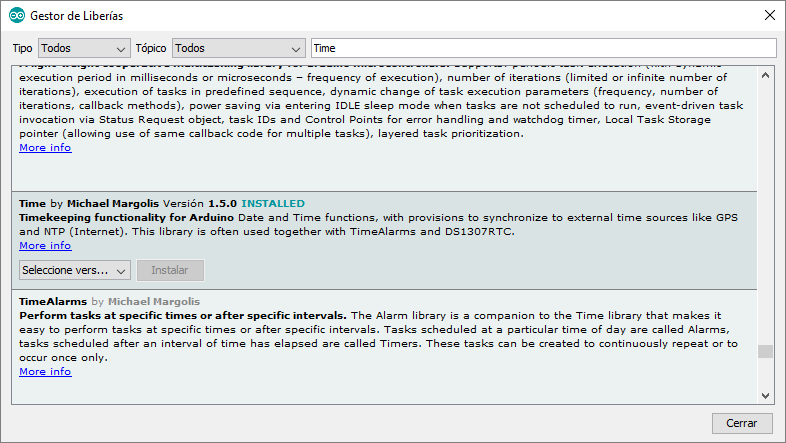
Don't drop the towel. Just install the library from the libraries manager. -
@AWI
I'll try it.@Ngwpower
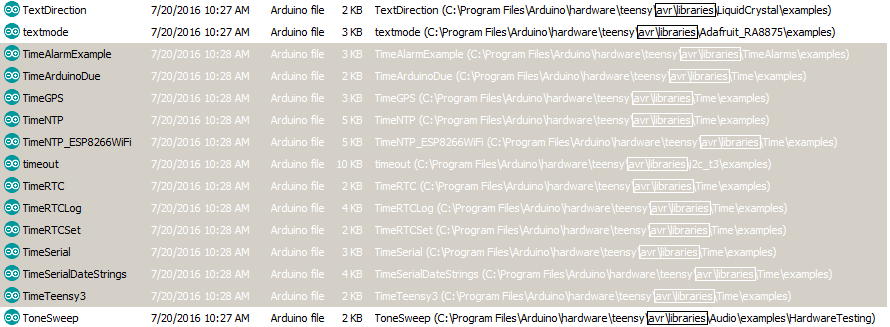
Don't drop the towel. Just install the library from the libraries manager.@Sergio-Rius Really confused found these in AVR libraries on my computer.
Am I looking in the wrong place?
Thank You for the help! -
@Sergio-Rius Really confused found these in AVR libraries on my computer.
Am I looking in the wrong place?
Thank You for the help!@Ngwpower
ArduinoIDE Menu->Program->Include Library->Library manager
I'm currently looking at converting the sketch to v2.0
-
This post is deleted!