
Boiler control from MAX! Cube to Drayton Boiler via Raspberry Pi/Vera/Mysensors.
-
Hi, This is all very interesting. I bought the MAX! System 2 months ago and only one thing is missing is to control my boiler when there is no heating demand from my zones. What do I need to do to make it all work and is there any way I can access your system to control it ? What do I need to buy to make it all work like you have, please?
@Lawrence-Helm they are not noisy to me but you can hear them if there's silence in the house. Noise it's very subjective of course. It sounds like a small motor turning for say 3 or 4 seconds. Once a week when they run the de-scale program, but you can set it at any point in the week. At that time they make the same noise, but for a longer time.
-
Hi, This is all very interesting. I bought the MAX! System 2 months ago and only one thing is missing is to control my boiler when there is no heating demand from my zones. What do I need to do to make it all work and is there any way I can access your system to control it ? What do I need to buy to make it all work like you have, please?
@sebgudek
At the very minimum you need to buy a Raspberry Pi (around £ 30 ), a charger and an SD card and follow the instructions on www.raspberrypi.org/downloads/ to install Raspbian on the Raspberry PI, then follow Stephen's instructions on the file installation.txt:
https://github.com/stephenmhall/PiHeating/blob/master/PiHeating/src/heating/installation.txtYou need to know a little bit how to work on Linux do to so. If you have even a very limited linux experience, the instructions are enough, although they are very very condensed.
When the code is running you can control it simply with a browser within the same network, again this is explained in installation.txt . It is in fact nicer (and easier) to use this interface than the MAX! Cube application, although they are not exactly the same thing and you still need the official application (I believe) to set the weekly program and other things.
-
Thanks for all that @p_battino , Any recent updates have been in the Neopixel branch rather than the master, I have added direct relay support in that branch for those with no Vera. The main changes have been to change the local display from individual led's to a neopixel ring controlled by a WeMos D1 mini ESP2866 board. I only use the serial and I2C connections on the GPIO to talk to the ESP and an I2C real time clock board (which is not necessary if the RPi can see the interwebs ) All the buttons and outputs are done by the ESP. The neopixel Libraries are much better for the Arduino based boards.
I will post some pictures when I remember how to do that :(
ah got it :)
The connector by the WeMos is for the Relay.
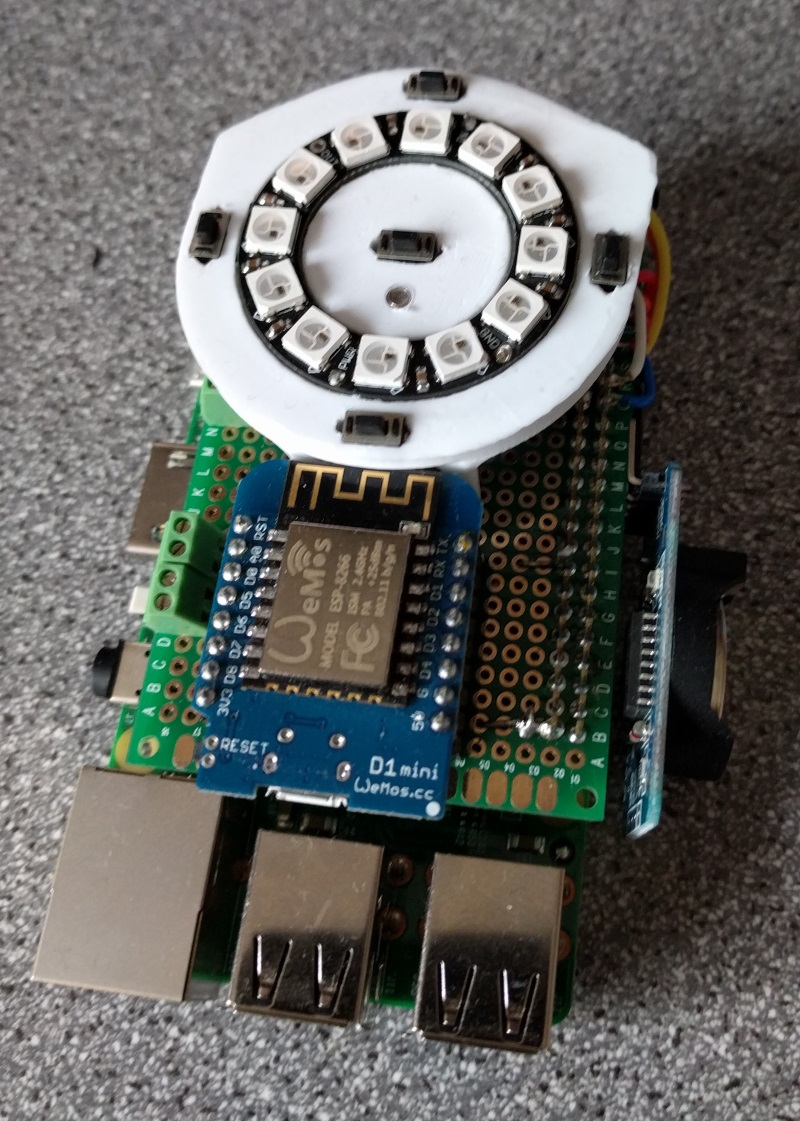
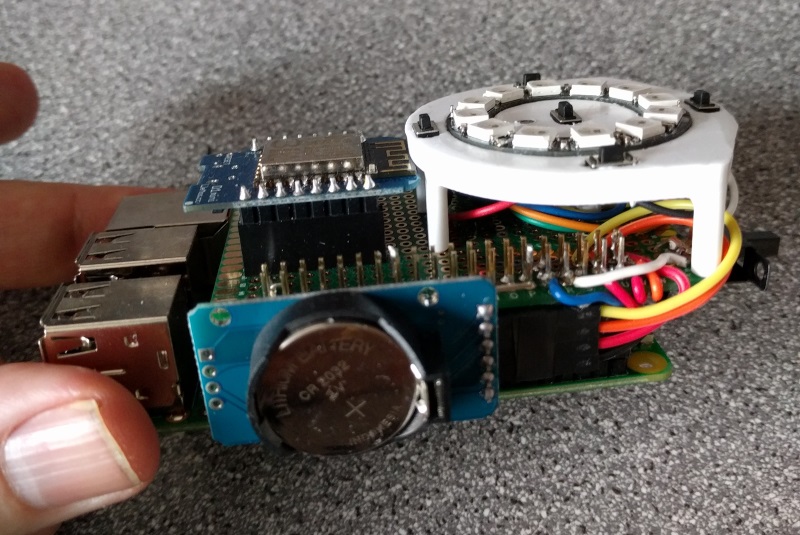
-
Thanks for all that @p_battino , Any recent updates have been in the Neopixel branch rather than the master, I have added direct relay support in that branch for those with no Vera. The main changes have been to change the local display from individual led's to a neopixel ring controlled by a WeMos D1 mini ESP2866 board. I only use the serial and I2C connections on the GPIO to talk to the ESP and an I2C real time clock board (which is not necessary if the RPi can see the interwebs ) All the buttons and outputs are done by the ESP. The neopixel Libraries are much better for the Arduino based boards.
I will post some pictures when I remember how to do that :(
ah got it :)
The connector by the WeMos is for the Relay.
@stephenmhall what I still don't get is the purpose of the Neopixel ! what's for? what are you displaying with that led wheel?
-
North is Boiler function On/Off, East is Max Cube state, West is Vera state, South is heating normal/On/Off. The others are a Red-Heating on, Blue Heating off heartbeat.
An update to the Mk1 version. as in this link
-
So, I finally got most of my bits and I have this up and running. This is quite simply awesome, but tbh I am now looking to see if there is some way to get this into node-red. I could be wrong but I am starting to see my home automation fracture into multiple different systems and my original plan was to try and keep everything to one interface where possible. Therefore I am starting to see node-red as maybe being my glue between each of them, the benefit of this is I might be able to drag in emoncms and better data analysis.
-
@twisted Glad to be of service :) I was unaware of node-red before your post, It may have brushed past my awareness but not stuck. I don't see why you could not use it if you can create decoders for the MAX messages as the Cube is happy to spit out data all day. How are you physically switching your boiler?
-
THANK YOU THANK YOU THANK YOU!
I've got a system running that does exactly what you've got here, but I've not had time to finish it up, make it pretty and write the web interface. THANK YOU!
:satisfied:
-
Thanks for that Stuart, always good to see it is getting used. Here is my latest live unit in its natural environment.

and a link to a video of it running on my gdrive
The video does not pick it up that good, it is less glowie than the film.
-
its programmed never to apologise, but I make sure it has no connection to the doors.
-
THANK YOU THANK YOU THANK YOU!
I've got a system running that does exactly what you've got here, but I've not had time to finish it up, make it pretty and write the web interface. THANK YOU!
:satisfied:
@Stuart-Middleton Just to let you know I have updated the master branch on Github I found an error in the MAX code I borrowed that messed up the reported temps if the actual temperature went over 25.5 as you can understand in Scotland we don't see that very often. Anyway it's fixed in the Master. Also cleaned up some errors that popped up if not using the neopixel display.
-
Ah, excellent thanks. I've noticed some of the temps have been reporting zero on the hot days. I'll grab it and give it a go.
-
I'm seeing 0.0 readings from radiators for some reason. They were all valid last night but just seem to drop out randomly. Do you know if this is a bug or just the MAX system being a bit crappy? I've not had time to look at the code yet, just thought someone may know.
And while I'm here, I can't get to the graphs on any rooms with a ' in them (i.e. Luke's Room) due to a database error (I'm guessing the DB lookup isn't escaped. :) I'll try and take a look at this at some point over the weekend.
 image url)
 -
I'm seeing 0.0 readings from radiators for some reason. They were all valid last night but just seem to drop out randomly. Do you know if this is a bug or just the MAX system being a bit crappy? I've not had time to look at the code yet, just thought someone may know.
And while I'm here, I can't get to the graphs on any rooms with a ' in them (i.e. Luke's Room) due to a database error (I'm guessing the DB lookup isn't escaped. :) I'll try and take a look at this at some point over the weekend.
BTW, I fixed the ' issue by changing graphing.py to use urllib.unquote() on the room name then replaced a single ' with a double ''. I then had to replace the single ' again for the html print or the page just came out empty.
-
If they are radiators without wall thermostats 0.0's are usual. It only seems to know when it is at temperature as it crosses the preset threshold. Then it will send out a correct temp.
I have tried to save a copy of the last correct temperature to use until a new one comes in but not managed to get it working yet. I was doing a backward search through the database to find a good temperature but it was taking upwards of 3 seconds a room as my DB is about 56MB now. I tried creating a global dictionary to save them but ended up getting lost in the code :)
I might create a new text file like the variables to save them in as it does annoy me also. If you have wall thermostats its not a problem.
-
BTW, I fixed the ' issue by changing graphing.py to use urllib.unquote() on the room name then replaced a single ' with a double ''. I then had to replace the single ' again for the html print or the page just came out empty.
@Stuart-Middleton said:
BTW, I fixed the ' issue by changing graphing.py to use urllib.unquote() on the room name then replaced a single ' with a double ''. I then had to replace the single ' again for the html print or the page just came out empty.
Good find Stuart I will get that into the files on Github.
If you are interested I have a new branch that sends temperatures to Vera if you have one, to populate "Virtual" Thermometers, i.e ones with no hardware. It's pretty easy to add them from the developer page. You can turn the feature on and off in the variables so it will become the main branch at some point.
Stephen
-
BTW, I fixed the ' issue by changing graphing.py to use urllib.unquote() on the room name then replaced a single ' with a double ''. I then had to replace the single ' again for the html print or the page just came out empty.
@Stuart-Middleton said:
BTW, I fixed the ' issue by changing graphing.py to use urllib.unquote() on the room name then replaced a single ' with a double ''. I then had to replace the single ' again for the html print or the page just came out empty.
Stuart, I have made changes could you backup your graphing.py and try my one. This should be a link.
This shows you never know what you don't know about Python :) I was manually removing the html %20 spaces and never thought of other non text characters. And didn't know about the urllib functions. Old dog learning new tricks.
Stephen




Hello! It looks like you're interested in this conversation, but you don't have an account yet.
Getting fed up of having to scroll through the same posts each visit? When you register for an account, you'll always come back to exactly where you were before, and choose to be notified of new replies (either via email, or push notification). You'll also be able to save bookmarks and upvote posts to show your appreciation to other community members.
With your input, this post could be even better 💗
Register Login