Skip to content
  • MySensors
  • OpenHardware.io
  • Categories
  • Recent
  • Tags
  • Popular
Skins
  • Light
  • Brite
  • Cerulean
  • Cosmo
  • Flatly
  • Journal
  • Litera
  • Lumen
  • Lux
  • Materia
  • Minty
  • Morph
  • Pulse
  • Sandstone
  • Simplex
  • Sketchy
  • Spacelab
  • United
  • Yeti
  • Zephyr
  • Dark
  • Cyborg
  • Darkly
  • Quartz
  • Slate
  • Solar
  • Superhero
  • Vapor

  • Default (No Skin)
  • No Skin
Collapse
Brand Logo
  1. Home
  2. Announcements
  3. 💬 Building a Raspberry Pi Gateway

💬 Building a Raspberry Pi Gateway

Scheduled Pinned Locked Moved Announcements
1.1k Posts 173 Posters 428.1k Views 131 Watching
  • Oldest to Newest
  • Newest to Oldest
  • Most Votes
Reply
  • Reply as topic
Log in to reply
This topic has been deleted. Only users with topic management privileges can see it.
  • TeknorT Teknor

    When using RPI as a GW for MySensors, the CPU load increases from 18% to around 80 %. I am using a RPI II model B. I'd love the have the GW running on the Raspberry, and avoid a USB connected Arduino.

    Does somebody else experience the same?

    carlylerC Offline
    carlylerC Offline
    carlyler
    wrote on last edited by
    #359

    @Teknor I tend to agree something is wrong, but I think it really on depends how many nodes and how often you're sending data.
    rpi3 + GPIO nrf24l01 + openhab2 + 8 nodes + packet received, on average 1 / 5s :

    top - 06:29:37 up 2 days, 22:33,  2 users,  load average: 0.26, 0.24, 0.19
    KiB Mem:    947732 total,   903420 used,    44312 free,   175364 buffers
    KiB Swap:   102396 total,     4496 used,    97900 free.   391360 cached Mem
    
      PID USER      PR  NI    VIRT    RES    SHR S  %CPU %MEM     TIME+ COMMAND                                                               
      681 root      20   0  208840  56532  23684 S   8.9  6.0 214:23.60 Xorg                                                                  
      527 root      20   0   39448  21532  11264 S   4.3  2.3  69:34.28 vncserver-x11-c                                                       
     1154 pi        20   0   50548  17628  12196 S   3.0  1.9  64:05.96 lxterminal                                                            
    30426 openhab   20   0  441764 197592  14960 S   1.6 20.8 284:18.70 java                                                                  
     2467 root      20   0   20024   2456   2300 S   1.3  0.3  62:55.17 mysgw                                                                 
    25634 root      20   0       0      0      0 S   1.0  0.0   0:00.21 kworker/u8:0                                                          
      688 root      20   0   13720   9432   8828 S   0.7  1.0   2:04.96 vncagent                                                              
    25855 pi        20   0    5232   2584   2140 R   0.7  0.3   0:00.49 top                                                                   
        7 root      20   0       0      0      0 S   0.3  0.0   9:15.35 rcu_sched                                                             
       78 root     -51   0       0      0      0 S   0.3  0.0   5:16.50 irq/92-mmc1                                                           
      967 pi        20   0   95656  17716  12028 S   0.3  1.9   6:41.87 lxpanel                                                               
        1 root      20   0   24620   4688   2716 S   0.0  0.5   0:13.08 systemd                                                               
        2 root      20   0       0      0      0 S   0.0  0.0   0:00.27 kthreadd                                                              
    
    1 Reply Last reply
    1
    • M macvictor

      @gohan edit configure file and add this code:

      --my-mqtt-user=*)
          CPPFLAGS="-DMY_MQTT_USER=\\\"${optarg}\\\" $CPPFLAGS"
          ;;
      --my-mqtt-password=*)
          CPPFLAGS="-DMY_MQTT_PASSWORD=\\\"${optarg}\\\" $CPPFLAGS"
          ;;
      

      after this code:

      --my-signing-request-gw-signatures-from-all*)
              signing_request_signatures=true
              CPPFLAGS="-DMY_SIGNING_GW_REQUEST_SIGNATURES_FROM_ALL $CPPFLAGS"
              ;;
      

      this is about 408 number line and use flag --my-mqtt-password and --my-mqtt-client-id when you run configure, thats all. =)

      gohanG Offline
      gohanG Offline
      gohan
      Mod
      wrote on last edited by
      #360

      @macvictor
      That worked, thanks. But to configure channel, power, AES key, and so on, do you think it is better to use command line like you posted above or customize myconfig.h?

      M 1 Reply Last reply
      0
      • gohanG gohan

        @macvictor
        That worked, thanks. But to configure channel, power, AES key, and so on, do you think it is better to use command line like you posted above or customize myconfig.h?

        M Offline
        M Offline
        marceloaqno
        Code Contributor
        wrote on last edited by
        #361

        @gohan You can also set mqtt username and password in examples_linux/mysgw.cpp

        gohanG 1 Reply Last reply
        0
        • M marceloaqno

          @gohan You can also set mqtt username and password in examples_linux/mysgw.cpp

          gohanG Offline
          gohanG Offline
          gohan
          Mod
          wrote on last edited by
          #362

          @marceloaqno
          I'm trying to understand where is the best place to avoid file gets overwritten in case of upgrades

          M 1 Reply Last reply
          0
          • gohanG gohan

            @marceloaqno
            I'm trying to understand where is the best place to avoid file gets overwritten in case of upgrades

            M Offline
            M Offline
            marceloaqno
            Code Contributor
            wrote on last edited by
            #363

            @gohan There is a open github pull request very similar to what @macvictor proposed, but for now I recommend using the examples_linux/mysgw.cpp file.

            gohanG 1 Reply Last reply
            2
            • M marceloaqno

              @gohan There is a open github pull request very similar to what @macvictor proposed, but for now I recommend using the examples_linux/mysgw.cpp file.

              gohanG Offline
              gohanG Offline
              gohan
              Mod
              wrote on last edited by
              #364

              @marceloaqno
              Ok I can you that file, but where is the best place to set Power Level and channel ?

              M 1 Reply Last reply
              0
              • gohanG gohan

                @marceloaqno
                Ok I can you that file, but where is the best place to set Power Level and channel ?

                M Offline
                M Offline
                marceloaqno
                Code Contributor
                wrote on last edited by
                #365

                @gohan There isn't exactly the best place to set things, it really depends on your preferences.

                1 Reply Last reply
                0
                • gohanG Offline
                  gohanG Offline
                  gohan
                  Mod
                  wrote on last edited by
                  #366

                  I just copied the myconfig file from the arduino and set the rest from the command line and from debug it looks like it's working, the problem is now to get domoticz talk to the mqtt.

                  1 Reply Last reply
                  0
                  • gohanG Offline
                    gohanG Offline
                    gohan
                    Mod
                    wrote on last edited by
                    #367

                    After updating domoticz to beta version I finally have the MQTT working with controller and I can see the sensor node seding in data: my question now is how to I debug the gateway if it is running as a service on the RPI without messing things up?

                    G 1 Reply Last reply
                    0
                    • M marceloaqno

                      @hawk_2050 same for you guys who helped, thank you for all the feedback.

                      @jerseyguy1996 I don't see anything wrong with your config.Try to add a small delay() after the first send() and before the sendBattery().

                      @annegerben This looks like a wire problem. I updated the guide, check the wire section again.

                      M Offline
                      M Offline
                      marlin
                      wrote on last edited by
                      #368

                      @marceloaqno I am trying to get a Pi 3 working with MySensors 2.1.1 and nrf24l01 and using your updated wire guide, but all I get as output is the following:
                      mysgw: Starting gateway...
                      mysgw: Protocol version - 2.1.1
                      mysgw: MCO:BGN:INIT GW,CP=RNNG--Q,VER=2.1.1
                      mysgw: TSF:LRT:OK
                      mysgw: TSM:INIT
                      mysgw: TSF:WUR:MS=0
                      mysgw: !TSM:INIT:TSP FAIL
                      mysgw: TSM:FAIL:CNT=1
                      mysgw: TSM:FAIL:PDT
                      [The output repeats itself, increasing the CNT every time, while at the same time one of the cores on the Pi 3 is running at full CPU utilization.]

                      By reading earlier comments I assume this is a wiring problem. One possible cause is inconsistency between
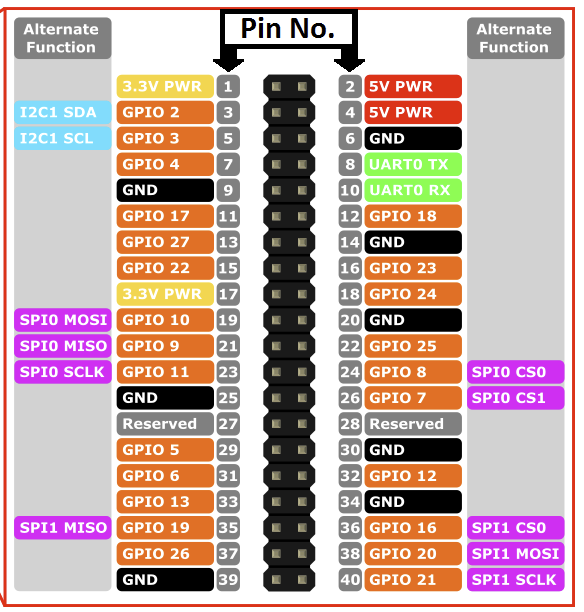
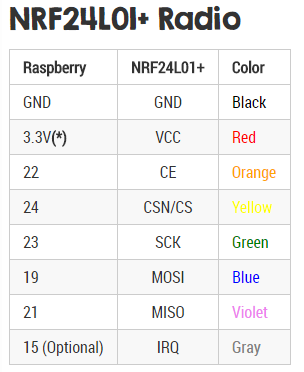
                      0_1488723559852_upload-e3165792-1f42-4663-8e68-efd96bd275f8

                      and

                      0_1488723638471_upload-d7048ef8-8a33-4214-9935-0356cf9291c2

                      where the first picture indicates that pin 24 and pin 26 should be used, while the second indicates pins 22 and 24 should be used. However, I have tried both options but I still get the same output (I used different nrf24's for the different setups, in case the nrf24 got burned from the first setup).

                      I have VCC from nrf24 connected to pin 17 on the Pi 3 and GND connect to pin 25.

                      Any suggestions on what to try next?
                      [The Pi 3 is running Raspbian with Pixel. For information, I already have a running Arduino with MySensors MQTT GW and a simple node with MySensors and DHT22. From this I know that by nrf24 chips works when being fed with 3.3V.]

                      G keldandorinK 2 Replies Last reply
                      0
                      • gohanG Offline
                        gohanG Offline
                        gohan
                        Mod
                        wrote on last edited by
                        #369

                        I have connected my nrf24 like the secon table you posted and it is working but I am using an "adapter" for nrf24 with a socket and has voltage regulator + capacitors, so if you don't have any cap on the radio module, I'd suggest you put one on (try from a 4.7 uF up to 47 and see if anything changes)

                        M 1 Reply Last reply
                        1
                        • gohanG gohan

                          I have connected my nrf24 like the secon table you posted and it is working but I am using an "adapter" for nrf24 with a socket and has voltage regulator + capacitors, so if you don't have any cap on the radio module, I'd suggest you put one on (try from a 4.7 uF up to 47 and see if anything changes)

                          M Offline
                          M Offline
                          marlin
                          wrote on last edited by
                          #370

                          @gohan Thanks! You were correct. I also had one of those "adapters" lying around which I did not need for my Arduino nodes with MySensors, though it came into use for the Rp3.

                          1 Reply Last reply
                          2
                          • gohanG gohan

                            After updating domoticz to beta version I finally have the MQTT working with controller and I can see the sensor node seding in data: my question now is how to I debug the gateway if it is running as a service on the RPI without messing things up?

                            G Offline
                            G Offline
                            Grubstake
                            wrote on last edited by
                            #371

                            @gohan said in 💬 Building a Raspberry Pi Gateway:

                            After updating domoticz to beta version I finally have the MQTT working with controller and I can see the sensor node seding in data: my question now is how to I debug the gateway if it is running as a service on the RPI without messing things up?

                            I have my gateway on a headless pi 3, no monitor, GUI or keyboard. (I don't care for the nest of wires connection to the pi.) I also use MQTT which is very reliable.

                            An easy way to see the full MQTT traffic is to not start (or kill if it starts on boot) the MQTT server in the background, and start it in the console you can monitor. This won't impact Domotics one bit. In my case I do this by invoking "mosquitto -d" in the terminal

                            A simple way to monitor MQTT once its up and running is to look at the Domotics Log on the Setup menu.

                            Another way to watch it is to, in a terminal window such as running ssh from your computer, use MQTT "sub" in your terminal to see the MQTT traffic both ways to and from Domotics. If this isn't familiar, you need to learn it, (read the MQTT docs) and it's quite simple. Example might be "ssh pi@rpi.local" or "ssh <IP address>" from a computer on the local network, assuming the user is named pi and the pi is named "rpi"

                            Your MQTT topic must match what is in the sensor node sketch, the gateway sketch, and the domotics MQTT config. In my case I use "mosquitto_sub -d -v -t domoticz" and everything starts showing in real time in the terminal window.

                            MQTT is a bit more fiddly to set up but it's nice that different environments can push sensor data into the same MQTT server, in my case MySensors and ESP Easy.

                            Tim

                            gohanG 1 Reply Last reply
                            0
                            • M marlin

                              @marceloaqno I am trying to get a Pi 3 working with MySensors 2.1.1 and nrf24l01 and using your updated wire guide, but all I get as output is the following:
                              mysgw: Starting gateway...
                              mysgw: Protocol version - 2.1.1
                              mysgw: MCO:BGN:INIT GW,CP=RNNG--Q,VER=2.1.1
                              mysgw: TSF:LRT:OK
                              mysgw: TSM:INIT
                              mysgw: TSF:WUR:MS=0
                              mysgw: !TSM:INIT:TSP FAIL
                              mysgw: TSM:FAIL:CNT=1
                              mysgw: TSM:FAIL:PDT
                              [The output repeats itself, increasing the CNT every time, while at the same time one of the cores on the Pi 3 is running at full CPU utilization.]

                              By reading earlier comments I assume this is a wiring problem. One possible cause is inconsistency between
                              0_1488723559852_upload-e3165792-1f42-4663-8e68-efd96bd275f8

                              and

                              0_1488723638471_upload-d7048ef8-8a33-4214-9935-0356cf9291c2

                              where the first picture indicates that pin 24 and pin 26 should be used, while the second indicates pins 22 and 24 should be used. However, I have tried both options but I still get the same output (I used different nrf24's for the different setups, in case the nrf24 got burned from the first setup).

                              I have VCC from nrf24 connected to pin 17 on the Pi 3 and GND connect to pin 25.

                              Any suggestions on what to try next?
                              [The Pi 3 is running Raspbian with Pixel. For information, I already have a running Arduino with MySensors MQTT GW and a simple node with MySensors and DHT22. From this I know that by nrf24 chips works when being fed with 3.3V.]

                              G Offline
                              G Offline
                              Grubstake
                              wrote on last edited by
                              #372

                              @marlin said in 💬 Building a Raspberry Pi Gateway:

                              where the first picture indicates that pin 24 and pin 26 should be used, while the second indicates pins 22 and 24 should be used.

                              Be careful because the wiring page shows two pinout diagrams, one for the Pi 1, another for the Pi 2&3, but which is which is not inside the graphic itself. Please don't ask how I know. ;-)

                              Tim

                              1 Reply Last reply
                              0
                              • G Grubstake

                                @gohan said in 💬 Building a Raspberry Pi Gateway:

                                After updating domoticz to beta version I finally have the MQTT working with controller and I can see the sensor node seding in data: my question now is how to I debug the gateway if it is running as a service on the RPI without messing things up?

                                I have my gateway on a headless pi 3, no monitor, GUI or keyboard. (I don't care for the nest of wires connection to the pi.) I also use MQTT which is very reliable.

                                An easy way to see the full MQTT traffic is to not start (or kill if it starts on boot) the MQTT server in the background, and start it in the console you can monitor. This won't impact Domotics one bit. In my case I do this by invoking "mosquitto -d" in the terminal

                                A simple way to monitor MQTT once its up and running is to look at the Domotics Log on the Setup menu.

                                Another way to watch it is to, in a terminal window such as running ssh from your computer, use MQTT "sub" in your terminal to see the MQTT traffic both ways to and from Domotics. If this isn't familiar, you need to learn it, (read the MQTT docs) and it's quite simple. Example might be "ssh pi@rpi.local" or "ssh <IP address>" from a computer on the local network, assuming the user is named pi and the pi is named "rpi"

                                Your MQTT topic must match what is in the sensor node sketch, the gateway sketch, and the domotics MQTT config. In my case I use "mosquitto_sub -d -v -t domoticz" and everything starts showing in real time in the terminal window.

                                MQTT is a bit more fiddly to set up but it's nice that different environments can push sensor data into the same MQTT server, in my case MySensors and ESP Easy.

                                Tim

                                gohanG Offline
                                gohanG Offline
                                gohan
                                Mod
                                wrote on last edited by
                                #373

                                @Grubstake
                                I am using mqtt fx from pc and subscribing to topic # so I get the full traffic of what is going on, but I haven't had time lately to compare if you get same log details as the myscontroller connected to ethernet gateway or starting the gateway on rpi with debug flag

                                1 Reply Last reply
                                0
                                • M marlin

                                  @marceloaqno I am trying to get a Pi 3 working with MySensors 2.1.1 and nrf24l01 and using your updated wire guide, but all I get as output is the following:
                                  mysgw: Starting gateway...
                                  mysgw: Protocol version - 2.1.1
                                  mysgw: MCO:BGN:INIT GW,CP=RNNG--Q,VER=2.1.1
                                  mysgw: TSF:LRT:OK
                                  mysgw: TSM:INIT
                                  mysgw: TSF:WUR:MS=0
                                  mysgw: !TSM:INIT:TSP FAIL
                                  mysgw: TSM:FAIL:CNT=1
                                  mysgw: TSM:FAIL:PDT
                                  [The output repeats itself, increasing the CNT every time, while at the same time one of the cores on the Pi 3 is running at full CPU utilization.]

                                  By reading earlier comments I assume this is a wiring problem. One possible cause is inconsistency between
                                  0_1488723559852_upload-e3165792-1f42-4663-8e68-efd96bd275f8

                                  and

                                  0_1488723638471_upload-d7048ef8-8a33-4214-9935-0356cf9291c2

                                  where the first picture indicates that pin 24 and pin 26 should be used, while the second indicates pins 22 and 24 should be used. However, I have tried both options but I still get the same output (I used different nrf24's for the different setups, in case the nrf24 got burned from the first setup).

                                  I have VCC from nrf24 connected to pin 17 on the Pi 3 and GND connect to pin 25.

                                  Any suggestions on what to try next?
                                  [The Pi 3 is running Raspbian with Pixel. For information, I already have a running Arduino with MySensors MQTT GW and a simple node with MySensors and DHT22. From this I know that by nrf24 chips works when being fed with 3.3V.]

                                  keldandorinK Offline
                                  keldandorinK Offline
                                  keldandorin
                                  wrote on last edited by
                                  #374

                                  @marlin Got the same issue, Did you solve yours and if so how?

                                  M gohanG 2 Replies Last reply
                                  0
                                  • keldandorinK keldandorin

                                    @marlin Got the same issue, Did you solve yours and if so how?

                                    M Offline
                                    M Offline
                                    marlin
                                    wrote on last edited by
                                    #375

                                    @keldandorin Yes. See the response by @gohan. I used a "adapter" with a voltage regulator on it etc. Though, at the moment I don't recall the model number.

                                    1 Reply Last reply
                                    1
                                    • keldandorinK keldandorin

                                      @marlin Got the same issue, Did you solve yours and if so how?

                                      gohanG Offline
                                      gohanG Offline
                                      gohan
                                      Mod
                                      wrote on last edited by
                                      #376

                                      @keldandorin just add a capacitor between vcc and gnd on the radio module as I suggested above.

                                      keldandorinK 2 Replies Last reply
                                      1
                                      • C Offline
                                        C Offline
                                        ccy
                                        wrote on last edited by ccy
                                        #377

                                        I am trying to connect NRF24L01+ and Raspberry Pi 2 (Model B+). I am confuse about pin 22/24 too. In the diagram it shows "SPI0 CS0" and "SPI0 CS1" but these two pins aren't exist in NRF24L01+. How should I connect the pin? I connect Pi2 pin 24 to CS and Pi2 pin 26 to CE (Not sure it is correct)? Here is the message from mysgw:

                                        [root@alarmpi bin]# ./mysgw -d
                                        mysgw: Starting gateway...
                                        mysgw: Protocol version - 2.1.1
                                        mysgw: MCO:BGN:INIT GW,CP=RNNG---,VER=2.1.1
                                        mysgw: TSM:INIT
                                        mysgw: TSF:WUR:MS=0
                                        mysgw: !TSM:INIT:TSP FAIL
                                        mysgw: TSM:FAIL:CNT=1
                                        mysgw: TSM:FAIL:PDT
                                        mysgw: TSM:FAIL:RE-INIT
                                        mysgw: TSM:INIT
                                        mysgw: !TSM:INIT:TSP FAIL
                                        mysgw: TSM:FAIL:CNT=2
                                        mysgw: TSM:FAIL:PDT
                                        mysgw: TSM:FAIL:RE-INIT
                                        mysgw: TSM:INIT
                                        mysgw: !TSM:INIT:TSP FAIL
                                        mysgw: TSM:FAIL:CNT=3
                                        mysgw: TSM:FAIL:PDT
                                        
                                        G 1 Reply Last reply
                                        0
                                        • C ccy

                                          I am trying to connect NRF24L01+ and Raspberry Pi 2 (Model B+). I am confuse about pin 22/24 too. In the diagram it shows "SPI0 CS0" and "SPI0 CS1" but these two pins aren't exist in NRF24L01+. How should I connect the pin? I connect Pi2 pin 24 to CS and Pi2 pin 26 to CE (Not sure it is correct)? Here is the message from mysgw:

                                          [root@alarmpi bin]# ./mysgw -d
                                          mysgw: Starting gateway...
                                          mysgw: Protocol version - 2.1.1
                                          mysgw: MCO:BGN:INIT GW,CP=RNNG---,VER=2.1.1
                                          mysgw: TSM:INIT
                                          mysgw: TSF:WUR:MS=0
                                          mysgw: !TSM:INIT:TSP FAIL
                                          mysgw: TSM:FAIL:CNT=1
                                          mysgw: TSM:FAIL:PDT
                                          mysgw: TSM:FAIL:RE-INIT
                                          mysgw: TSM:INIT
                                          mysgw: !TSM:INIT:TSP FAIL
                                          mysgw: TSM:FAIL:CNT=2
                                          mysgw: TSM:FAIL:PDT
                                          mysgw: TSM:FAIL:RE-INIT
                                          mysgw: TSM:INIT
                                          mysgw: !TSM:INIT:TSP FAIL
                                          mysgw: TSM:FAIL:CNT=3
                                          mysgw: TSM:FAIL:PDT
                                          
                                          G Offline
                                          G Offline
                                          Grubstake
                                          wrote on last edited by Grubstake
                                          #378

                                          @ccy Look at the chart below "NRF24L01+ Radio". That shows the PIN numbers on the Pi and the pin labels on the radio to interconnect. Pay no attention to the labels on the RPi generic pinout diagram except the PIN numbers. The RPi SPIO labels are not what you are looking for. And be sure to use the chart for the correct RPi model.


                                          1 Reply Last reply
                                          1
                                          Reply
                                          • Reply as topic
                                          Log in to reply
                                          • Oldest to Newest
                                          • Newest to Oldest
                                          • Most Votes


                                          23

                                          Online

                                          11.7k

                                          Users

                                          11.2k

                                          Topics

                                          113.1k

                                          Posts


                                          Copyright 2025 TBD   |   Forum Guidelines   |   Privacy Policy   |   Terms of Service
                                          • Login

                                          • Don't have an account? Register

                                          • Login or register to search.
                                          • First post
                                            Last post
                                          0
                                          • MySensors
                                          • OpenHardware.io
                                          • Categories
                                          • Recent
                                          • Tags
                                          • Popular