
Moisture sensing + relay. Please help with software.
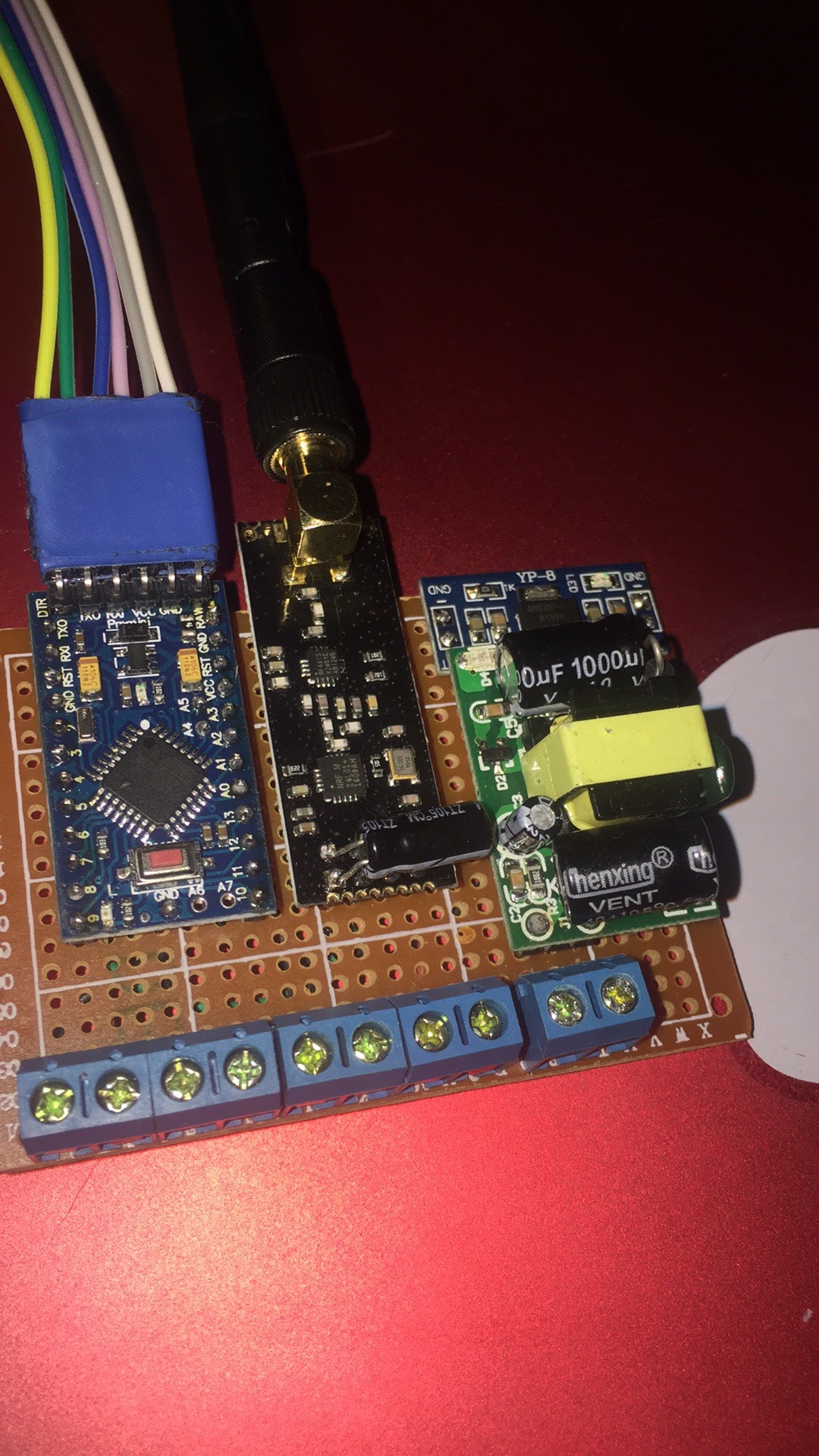
-
-
-
-
Arduino/libraries/MySensors/MySensors.h:328:2: error: #error No forward link or gateway feature activated. This means nowhere to send messages! Pretty pointless.
I want this for Arduino Nano.
and code is here
#include <SPI.h>
#include <MySensors.h>
#define MY_RADIO_NRF24
#define MY_GATEWAY_SERIAL#define round(x) ((x)>=0?(long)((x)+0.5):(long)((x)-0.5))
#define MY_DEBUG
#define CHILD_ID_BATTERY 0
#define SLEEP_TIME 600000 // Sleep time between reads (in milliseconds)
#define STABILIZATION_TIME 500 // Let the sensor stabilize 0.5 seconds before reading
#define BATTERY_FULL 3000 // 3,000 millivolts when battery is full (assuming 2xAA)
#define BATTERY_ZERO 1700 // 1,700 millivolts when battery is empty (reqires blown brownout detection fuse, use 2,800 otherwise)
// This sketch assumes power from 2xAA on Vcc (not RAW). Remove the power led and the voltage regulator for better battery life.
// Sensors shall be connected to GND and their analog pin. Throw away the middle chip, just use the pitchfork.
// Number of analog pins for each Arduino model can be seen at https://www.arduino.cc/en/Products/Compare
// A5 and A6 on most Arduinos cannot be used because they don't have internal pullups
const int SENSORS[] = {A0, A1, A2, A3, A4, A5}; // Remove the pins that you don't want to use
#define N_ELEMENTS(array) (sizeof(array)/sizeof((array)[0]))
long oldvoltage = 0;#define RELAY_1 3 // Arduino Digital I/O pin number for first relay (second on pin+1 etc)
#define NUMBER_OF_RELAYS 1 // Total number of attached relays
#define RELAY_ON 1 // GPIO value to write to turn on attached relay
#define RELAY_OFF 0 // GPIO value to write to turn off attached relayMyMessage moisture_messages[N_ELEMENTS(SENSORS)];
MyMessage voltage_msg(CHILD_ID_BATTERY, V_VOLTAGE);void before()
{
for (int sensor = 1, pin = RELAY_1; sensor <= NUMBER_OF_RELAYS; sensor++, pin++) {
// Then set relay pins in output mode
pinMode(pin, OUTPUT);}
}void setup()
{
//gw.begin();
sendSketchInfo("Plants moisture w bat", "1.2");
present(CHILD_ID_BATTERY, S_CUSTOM);
sendSketchInfo("Relay", "1.0");for (int sensor = 0; sensor < N_ELEMENTS(SENSORS); sensor++) {
moisture_messages[sensor].sensor = sensor + 1; // Battery uses child ID 0 so sensors start at 1
moisture_messages[sensor].type = V_HUM;
delay(250);
gw.present(sensor + 1, S_HUM);
}
for (int i = 0; i < N_ELEMENTS(SENSORS); i++) {
pinMode(SENSORS[i], OUTPUT);
digitalWrite(SENSORS[i], LOW);
}for (int sensor = 1, pin = RELAY_1; sensor <= NUMBER_OF_RELAYS; sensor++, pin++) {
}
}void receive(const MyMessage &message)
{
{
// We only expect one type of message from controller. But we better check anyway.
if (message.type == V_STATUS) {
// Change relay state
digitalWrite(message.sensor - 1 + RELAY_1, message.getBool() ? RELAY_ON : RELAY_OFF);
// Store state in eeprom
saveState(message.sensor, message.getBool());
// Write some debug info
Serial.print("Incoming change for sensor:");
Serial.print(message.sensor);
Serial.print(", New status: ");
Serial.println(message.getBool());
}void loop() for (int sensor = 0; sensor < N_ELEMENTS(SENSORS); sensor++) { pinMode(SENSORS[sensor], INPUT_PULLUP); // "Power on" the sensor and activate the internal pullup resistor analogRead(SENSORS[sensor]); // Read once to let the ADC capacitor start charging sleep(STABILIZATION_TIME); int moistureLevel = (1023 - analogRead(SENSORS[sensor])) / 10.23; // Turn off the sensor to conserve battery and minimize corrosion pinMode(SENSORS[sensor], OUTPUT); digitalWrite(SENSORS[sensor], LOW); send(moisture_messages[sensor].set(moistureLevel)); } long voltage = readVcc(); if (oldvoltage != voltage) { // Only send battery information if voltage has changed, to conserve battery. send(voltage_msg.set(voltage / 1000.0, 3)); // redVcc returns millivolts and set wants volts and how many decimals (3 in our case) sendBatteryLevel(round((voltage - BATTERY_ZERO) * 100.0 / (BATTERY_FULL - BATTERY_ZERO))); oldvoltage = voltage; } sleep(SLEEP_TIME);}
long readVcc()
}
// From http://provideyourown.com/2012/secret-arduino-voltmeter-measure-battery-voltage/
// Read 1.1V reference against AVcc
// set the reference to Vcc and the measurement to the internal 1.1V reference
#if defined(AVR_ATmega32U4) || defined(AVR_ATmega1280) || defined(AVR_ATmega2560)
ADMUX = _BV(REFS0) | _BV(MUX4) | _BV(MUX3) | _BV(MUX2) | _BV(MUX1);
#elif defined (AVR_ATtiny24) || defined(AVR_ATtiny44) || defined(AVR_ATtiny84)
ADMUX = _BV(MUX5) | _BV(MUX0);
#elif defined (AVR_ATtiny25) || defined(AVR_ATtiny45) || defined(AVR_ATtiny85)
ADMUX = _BV(MUX3) | _BV(MUX2);
#else
ADMUX = _BV(REFS0) | _BV(MUX3) | _BV(MUX2) | _BV(MUX1);
#endifdelay(2); // Wait for Vref to settle
ADCSRA |= _BV(ADSC); // Start conversion
while (bit_is_set(ADCSRA, ADSC)); // measuringuint8_t low = ADCL; // must read ADCL first - it then locks ADCH
uint8_t high = ADCH; // unlocks bothlong result = (high << 8) | low;
result = 1125300L / result; // Calculate Vcc (in mV); 1125300 = 1.110231000
return result; // Vcc in millivolts
} -
-
-
-
I think you forgot to close a parenthesis in the receive function. If you like a more helping programming interface, you can install visual studio and the extension Visual Micro that are much better than Arduino IDE and help you also visually with parenthesis and auto completion of functions and variables names.
-
@gohan said in Moisture sensing + relay. Please help with software.:
I think you forgot to close a parenthesis in the receive function. If you like a more helping programming interface, you can install visual studio and the extension Visual Micro that are much better than Arduino IDE and help you also visually with parenthesis and auto completion of functions and variables names.
I use linux. Ubuntu. For linux what software ?
-
-
I think you forgot to close a parenthesis in the receive function. If you like a more helping programming interface, you can install visual studio and the extension Visual Micro that are much better than Arduino IDE and help you also visually with parenthesis and auto completion of functions and variables names.
-
Here is some code that does exactly what was asked for:
https://github.com/createcandle/Devices/tree/master/Plant_health


Hello! It looks like you're interested in this conversation, but you don't have an account yet.
Getting fed up of having to scroll through the same posts each visit? When you register for an account, you'll always come back to exactly where you were before, and choose to be notified of new replies (either via email, or push notification). You'll also be able to save bookmarks and upvote posts to show your appreciation to other community members.
With your input, this post could be even better 💗
Register Login