Skip to content
  • MySensors
  • OpenHardware.io
  • Categories
  • Recent
  • Tags
  • Popular
Skins
  • Light
  • Brite
  • Cerulean
  • Cosmo
  • Flatly
  • Journal
  • Litera
  • Lumen
  • Lux
  • Materia
  • Minty
  • Morph
  • Pulse
  • Sandstone
  • Simplex
  • Sketchy
  • Spacelab
  • United
  • Yeti
  • Zephyr
  • Dark
  • Cyborg
  • Darkly
  • Quartz
  • Slate
  • Solar
  • Superhero
  • Vapor

  • Default (No Skin)
  • No Skin
Collapse
Brand Logo
  1. Home
  2. Troubleshooting
  3. Ethernet Gateway connection to Raspberry Pi

Ethernet Gateway connection to Raspberry Pi

Scheduled Pinned Locked Moved Troubleshooting
21 Posts 2 Posters 4.1k Views 3 Watching
  • Oldest to Newest
  • Newest to Oldest
  • Most Votes
Reply
  • Reply as topic
Log in to reply
This topic has been deleted. Only users with topic management privileges can see it.
  • urbanusU Offline
    urbanusU Offline
    urbanus
    wrote on last edited by urbanus
    #1

    I'm new to this and have constructed an Ethernet Gateway with Arduino UNO and Nrf24+ and an Ethernet shield.. The sketch loads and the serial port shows no errors however it fails to get an IP address and then shows DHCP failure. I've tried a different cable, different Raspberry Pi, etc. but no matter what I get the same problem. I have tested the shield by loading the arduino printer sketch from the examples page and it works. It simply can't get an address via the Pi. I'm running Domoticz as the controller.
    Any pointers gratefully appreciated.
    David

    mfalkviddM 1 Reply Last reply
    0
    • urbanusU urbanus

      I'm new to this and have constructed an Ethernet Gateway with Arduino UNO and Nrf24+ and an Ethernet shield.. The sketch loads and the serial port shows no errors however it fails to get an IP address and then shows DHCP failure. I've tried a different cable, different Raspberry Pi, etc. but no matter what I get the same problem. I have tested the shield by loading the arduino printer sketch from the examples page and it works. It simply can't get an address via the Pi. I'm running Domoticz as the controller.
      Any pointers gratefully appreciated.
      David

      mfalkviddM Offline
      mfalkviddM Offline
      mfalkvidd
      Mod
      wrote on last edited by mfalkvidd
      #2

      Welcome to the MySensors community @urbanus!
      How are the ethernet sield and the raspberry pi connected?
      What other devices are on the network?
      Do you have a router as dhcp server? Can other devices get an ip address from it?
      Could you post the debug output from the gateway?
      Did you #define MY_MAC_ADDRESS to the mac address printed on the ethernet module?

      1 Reply Last reply
      0
      • urbanusU Offline
        urbanusU Offline
        urbanus
        wrote on last edited by
        #3

        Hi and thank you for the warm welcome and quick response.
        The ethernet shield piggybacks on to the Arduino and connects to the Pi by a standard RJ45 cable.
        Its my home wifi fed by a Virgin Superb. No sensors etc. connected on the network yet.
        The router issues DHCP commands as if I connect the ethernet shield direct to my laptop and load an example sketch it is issued an IP address without issue.
        Cannot seem to copy the debug code from the gateway serial output so I will have to type it in.
        I set the mac address based on the output I got from the example sketch serial output.

        Many thanks

        mfalkviddM 1 Reply Last reply
        0
        • urbanusU urbanus

          Hi and thank you for the warm welcome and quick response.
          The ethernet shield piggybacks on to the Arduino and connects to the Pi by a standard RJ45 cable.
          Its my home wifi fed by a Virgin Superb. No sensors etc. connected on the network yet.
          The router issues DHCP commands as if I connect the ethernet shield direct to my laptop and load an example sketch it is issued an IP address without issue.
          Cannot seem to copy the debug code from the gateway serial output so I will have to type it in.
          I set the mac address based on the output I got from the example sketch serial output.

          Many thanks

          mfalkviddM Offline
          mfalkviddM Offline
          mfalkvidd
          Mod
          wrote on last edited by mfalkvidd
          #4

          @urbanus hreat info, thanks! Seem you got the mac address right. It can be easily forgotten so I wanted to check :)

          Just so I understand this right: when you load the example print sketch, the ethernet shield is connected to your laptop and gets an ip address?
          What happens if you load the example print sketch and connect the ethernet shield to the raspberry pi?
          What happens if you load the mysensor gateway sketch and connect the ethernet shield to your laptop?
          When you connect the ethernet shield to the raspberry pi, do the leds for the link light up?

          1 Reply Last reply
          0
          • urbanusU Offline
            urbanusU Offline
            urbanus
            wrote on last edited by urbanus
            #5
            1. Correct
              2)Good idea, haven't tried that! Will get onto that now.
              3)Assuming you mean connect by ethernet, as above, will try that after 2)
            2. Yes they do.
              debug code is as below:

            0;255;3;0;9;MC0:BGN:INIT GW,CP=RNNGA--,VER=2.1.1
            0;255;3;0;9;TSM:INIT
            0;255;3;0;9;TSF:WUR:MS=0
            0;255;3;0;9;TSM;INIT:TSP OK
            0;255;3;0;9;TSM:INIT:GW MODE
            0;255;3;0;9;TSM:READY:ID=0,PAR=0,DIS=0
            0;255;3;0;9;MC0:REG:NOT NEEDED
            DHCP FAILURE...0;255;3;0;9;!MC0:BGN:TSP FAIL

            1 Reply Last reply
            0
            • urbanusU Offline
              urbanusU Offline
              urbanus
              wrote on last edited by
              #6

              Sorry, not sure why my bullet numbers are wrong, they are correct on the reply section. I think you get which answer is for which point though.
              thanks

              mfalkviddM 1 Reply Last reply
              0
              • urbanusU urbanus

                Sorry, not sure why my bullet numbers are wrong, they are correct on the reply section. I think you get which answer is for which point though.
                thanks

                mfalkviddM Offline
                mfalkviddM Offline
                mfalkvidd
                Mod
                wrote on last edited by mfalkvidd
                #7

                @urbanus I do, thanks!
                My guess is that your laptop is configured to share the wireless network with its ethernet port, but the raspberry pi is not configured that way.

                EDIT: Does the "Virgin Superb" have ethernet ports? If so, can you connect the ethernet shield directly to the "Virgin Superb" and see if that works?

                urbanusU 1 Reply Last reply
                0
                • urbanusU Offline
                  urbanusU Offline
                  urbanus
                  wrote on last edited by
                  #8

                  Hi. If I connect the gateway to my laptop by cable it picks up an IP address without issue (using the gateway sketch). I guess this points to the problem being at the PI end. I came to this conclusion last night (around midnight!!) and checked the /etc/interfaces on the pi but it seemed okay.

                  1 Reply Last reply
                  0
                  • mfalkviddM mfalkvidd

                    @urbanus I do, thanks!
                    My guess is that your laptop is configured to share the wireless network with its ethernet port, but the raspberry pi is not configured that way.

                    EDIT: Does the "Virgin Superb" have ethernet ports? If so, can you connect the ethernet shield directly to the "Virgin Superb" and see if that works?

                    urbanusU Offline
                    urbanusU Offline
                    urbanus
                    wrote on last edited by
                    #9

                    @mfalkvidd Yes, it does. Didn't realise I could do that. Will try that as soon as Question Time finishes (I know thats sad but what can I say...)
                    Will also search for the raspberry pi configuration you pointed to - thanks a lot. I learn a great deal from forums but sometimes you just need a second pair of eyes to point you in the right direction

                    mfalkviddM 1 Reply Last reply
                    0
                    • urbanusU urbanus

                      @mfalkvidd Yes, it does. Didn't realise I could do that. Will try that as soon as Question Time finishes (I know thats sad but what can I say...)
                      Will also search for the raspberry pi configuration you pointed to - thanks a lot. I learn a great deal from forums but sometimes you just need a second pair of eyes to point you in the right direction

                      mfalkviddM Offline
                      mfalkviddM Offline
                      mfalkvidd
                      Mod
                      wrote on last edited by mfalkvidd
                      #10

                      @urbanus have you considered wiring the nrf24 directly to the gpio ports on your raspberry pi (instructions: https://www.mysensors.org/build/raspberry ) ?
                      That would eliminate the need for the ethernet shield and you can use your Uno for other stuff.

                      1 Reply Last reply
                      0
                      • urbanusU Offline
                        urbanusU Offline
                        urbanus
                        wrote on last edited by
                        #11

                        Hi. I did originally do that but thought I had misunderstood the instructions as my understanding is that I need a host for the control software (the pi) and a separate gateway (arduino) to relay info from the nodes so I stopped and constructed the ethernet gateway

                        1 Reply Last reply
                        0
                        • urbanusU Offline
                          urbanusU Offline
                          urbanus
                          wrote on last edited by
                          #12

                          connecting the gateway direct to the Superhub doesn't work:(

                          1 Reply Last reply
                          0
                          • urbanusU Offline
                            urbanusU Offline
                            urbanus
                            wrote on last edited by
                            #13

                            I'm seriously thinking of taking up knitting! This is driving me bananas.

                            So, as I'm unable to get the ethernet gateway working I thought I would follow the advise given and connect the radio direct to the pi and set it as a serial gateway following the instruction on this site.
                            Software installs okay. Using a RPi 2 and a NRF24+. Connections triple checked and as per the drawing.
                            When I run the sudo ./bin/mysgw -d command to test the link I get:

                            mysgw: Starting gateway...
                            mysgw: Protocol version - 2.1.1
                            mysgw: MCO:BGN:INIT GW,CP=RNNG---,VER=2.1.1
                            mysgw: TSM:INIT
                            mysgw: TSF:WUR:MS=0
                            mysgw: !TSM:INIT:TSP FAIL
                            mysgw: TSM:FAIL:CNT=1
                            mysgw: TSM:FAIL:PDT

                            I have checked the radio using the UNO/Ethernet shield as above and it works but no matter what I do on the pi I cannot get past the above error.

                            Help or directions to a nearby wool shop please!

                            mfalkviddM 1 Reply Last reply
                            0
                            • urbanusU urbanus

                              I'm seriously thinking of taking up knitting! This is driving me bananas.

                              So, as I'm unable to get the ethernet gateway working I thought I would follow the advise given and connect the radio direct to the pi and set it as a serial gateway following the instruction on this site.
                              Software installs okay. Using a RPi 2 and a NRF24+. Connections triple checked and as per the drawing.
                              When I run the sudo ./bin/mysgw -d command to test the link I get:

                              mysgw: Starting gateway...
                              mysgw: Protocol version - 2.1.1
                              mysgw: MCO:BGN:INIT GW,CP=RNNG---,VER=2.1.1
                              mysgw: TSM:INIT
                              mysgw: TSF:WUR:MS=0
                              mysgw: !TSM:INIT:TSP FAIL
                              mysgw: TSM:FAIL:CNT=1
                              mysgw: TSM:FAIL:PDT

                              I have checked the radio using the UNO/Ethernet shield as above and it works but no matter what I do on the pi I cannot get past the above error.

                              Help or directions to a nearby wool shop please!

                              mfalkviddM Offline
                              mfalkviddM Offline
                              mfalkvidd
                              Mod
                              wrote on last edited by
                              #14

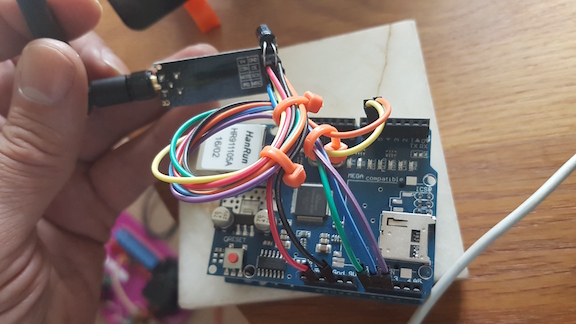
                              @urbanus could you post a photo (or two) of your wiring?

                              1 Reply Last reply
                              0
                              • urbanusU Offline
                                urbanusU Offline
                                urbanus
                                wrote on last edited by
                                #15

                                Hi, Thanks in advance for the help.
                                This is what I get from asmod on the pi:
                                Module Size Used by
                                8192cu 582217 0
                                cfg80211 543027 1 8192cu
                                rfkill 20851 2 cfg80211
                                evdev 12423 1
                                joydev 9988 0
                                spidev 7373 0
                                snd_bcm2835 24427 0
                                snd_pcm 98501 1 snd_bcm2835
                                snd_timer 23904 1 snd_pcm
                                snd 70032 3 snd_timer,snd_bcm2835,snd_pcm
                                spi_bcm2835 7596 0
                                bcm2835_gpiomem 3940 0
                                uio_pdrv_genirq 3923 0
                                rpi_ft5406 4783 0
                                uio 10204 1 uio_pdrv_genirq
                                rpi_backlight 2632 0
                                fixed 3285 0
                                i2c_dev 6913 0
                                fuse 99603 1
                                ipv6 406751 30

                                attached are two photos. One shows the arduino with ethernet and NRF and the other shows the RPi with the NRF. I have several NRF units, both types- and they all show on the Arduino running the given sketch so I know the radio modules are ok. I have a slightly different capacitor on the 2 units shown but I have tried with the same cap and the result is the same.
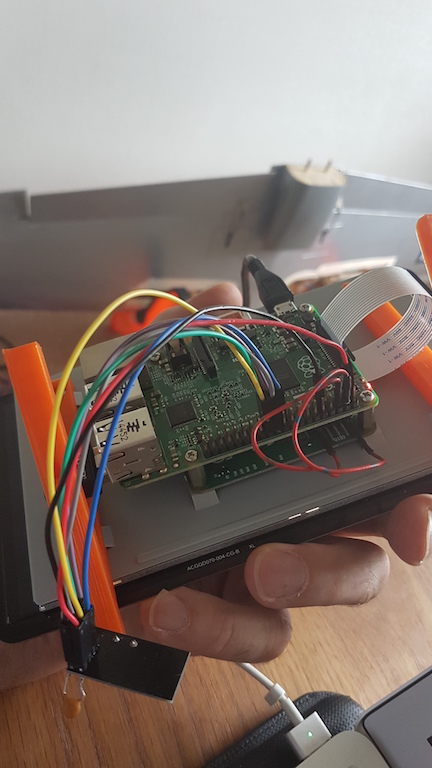
                                0_1499431013310_RPi_NRF24.jpg
                                0_1499431035552_Arduino_NRF24.jpg

                                1 Reply Last reply
                                0
                                • urbanusU Offline
                                  urbanusU Offline
                                  urbanus
                                  wrote on last edited by
                                  #16

                                  I should point out that grey has been used instead of orange on the RPi connection - I ran out of Dupont leads!

                                  mfalkviddM 1 Reply Last reply
                                  0
                                  • urbanusU urbanus

                                    I should point out that grey has been used instead of orange on the RPi connection - I ran out of Dupont leads!

                                    mfalkviddM Offline
                                    mfalkviddM Offline
                                    mfalkvidd
                                    Mod
                                    wrote on last edited by mfalkvidd
                                    #17

                                    @urbanus wiring on the rpi looks good (didn't check the uno, troubleshooting two things at the same time is too hard)
                                    Could you post the ./configure command you used?

                                    1 Reply Last reply
                                    0
                                    • urbanusU Offline
                                      urbanusU Offline
                                      urbanus
                                      wrote on last edited by urbanus
                                      #18

                                      Hi,
                                      I used
                                      ./configure --my-transport=nrf24
                                      and./configure --my-gateway=serial --my-serial-is-pty --my-serial-pty=/dev/ttyMySensorsGateway
                                      The Uno is working fine but I can't get the ethernet connection to the pi to work on that, hence why I took the advise to use the pi as both gateway and controller. It does work as a good testbed for the radio modules though!

                                      mfalkviddM 1 Reply Last reply
                                      0
                                      • urbanusU urbanus

                                        Hi,
                                        I used
                                        ./configure --my-transport=nrf24
                                        and./configure --my-gateway=serial --my-serial-is-pty --my-serial-pty=/dev/ttyMySensorsGateway
                                        The Uno is working fine but I can't get the ethernet connection to the pi to work on that, hence why I took the advise to use the pi as both gateway and controller. It does work as a good testbed for the radio modules though!

                                        mfalkviddM Offline
                                        mfalkviddM Offline
                                        mfalkvidd
                                        Mod
                                        wrote on last edited by
                                        #19

                                        @urbanus only the last configure command will be considered, so the first command will be completely ignored.

                                        That doesn't matter in this case though, since nrf24 is the default transport.

                                        I'm out of ideas. It is time to go to http://www.ebay.com/itm/New-Knitting-Tools-Kit-Crochet-Needle-Hook-Accessories-Supplies-With-Case-/291870313249

                                        1 Reply Last reply
                                        0
                                        • urbanusU Offline
                                          urbanusU Offline
                                          urbanus
                                          wrote on last edited by
                                          #20

                                          What do you think, should i go straight for a jumper or start with a sock pattern?

                                          1 Reply Last reply
                                          1
                                          Reply
                                          • Reply as topic
                                          Log in to reply
                                          • Oldest to Newest
                                          • Newest to Oldest
                                          • Most Votes


                                          23

                                          Online

                                          11.7k

                                          Users

                                          11.2k

                                          Topics

                                          113.1k

                                          Posts


                                          Copyright 2025 TBD   |   Forum Guidelines   |   Privacy Policy   |   Terms of Service
                                          • Login

                                          • Don't have an account? Register

                                          • Login or register to search.
                                          • First post
                                            Last post
                                          0
                                          • MySensors
                                          • OpenHardware.io
                                          • Categories
                                          • Recent
                                          • Tags
                                          • Popular