
PIzeroW + RFM69HW + arduino node connection problem
-
-
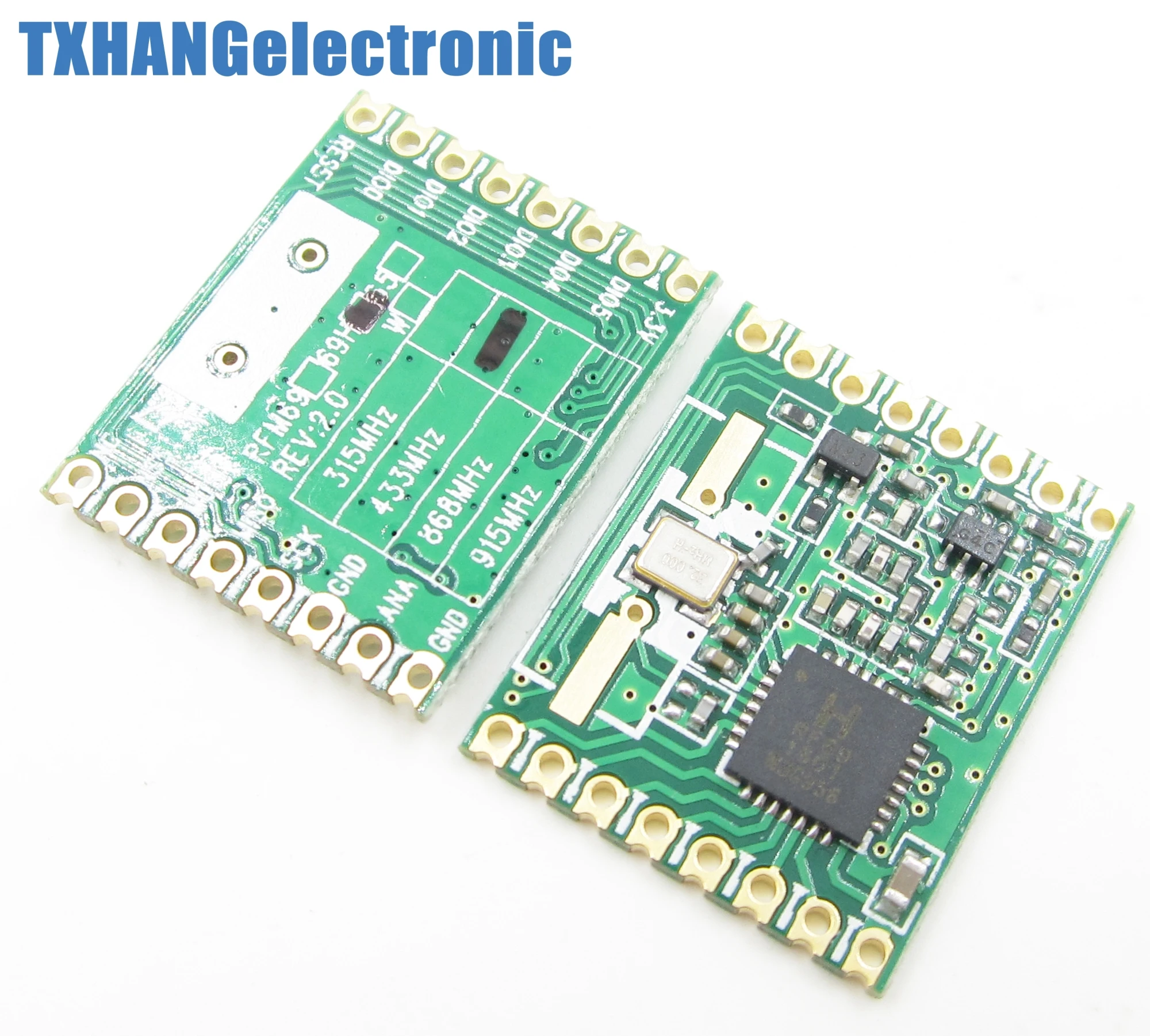
Are you sure the radios are hw and not w only? Make sure you have the irq pin connected on gateway and nodes.
-
-
The HW are the high power version, w are the standard. I'm asking because I got the w delivered instead of the hw and I lost so much time because the code wasn't working since I enabled the define for the hw version
-
-
-
-
-
An other update:
Did a radio test:
Test program (only difference is the node id):
// ***************************************************************************************
// Sample RFM69 sketch for Moteino to illustrate:
//   - sending
//   - receiving
//   - automatic transmission control
//   - button reading/interrupts
// ***************************************************************************************
// When you press the button on the SENDER Moteino, it will send a short message to the
// RECEIVER Moteino and wait for an ACK (acknowledgement that message was received) from
// the RECEIVER Moteino. If the ACK was received, the SENDER will blink the onboard LED
// a few times. The RECEIVER listens to a specific token, and it alternates the onboard LED
// state from HIGH to LOW or vice versa whenever this token is received.
// ***************************************************************************************
// Hardware setup:
// ***************************************************************************************
// On the sender, hook up a momentary tactile button to D3 like this:
//          __-__
//        __|   |___
// GND ----> BTN ----> D3 (D11 on MoteinoMEGA)
// Load this sketch on the RECEIVER with NODEID=RECEIVER (adjust in config section below)
// Load this sketch on the SENDER with NODEID=SENDER (adjust in config section below)
// RFM69 library and code by Felix Rusu - felix@lowpowerlab.com
// Get libraries at: https://github.com/LowPowerLab/
// Make sure you adjust the settings in the configuration section below !!!
// **********************************************************************************
// Copyright Felix Rusu 2016, http://www.LowPowerLab.com/contact
// **********************************************************************************
// License
// **********************************************************************************
// This program is free software; you can redistribute it
// and/or modify it under the terms of the GNU General
// Public License as published by the Free Software
// Foundation; either version 3 of the License, or
// (at your option) any later version.
//
// This program is distributed in the hope that it will
// be useful, but WITHOUT ANY WARRANTY; without even the
// implied warranty of MERCHANTABILITY or FITNESS FOR A
// PARTICULAR PURPOSE. See the GNU General Public
// License for more details.
//
// Licence can be viewed at
// http://www.gnu.org/licenses/gpl-3.0.txt
//
// Please maintain this license information along with authorship
// and copyright notices in any redistribution of this code
// **********************************************************************************
#include <RFM69.h>         //get it here: https://www.github.com/lowpowerlab/rfm69
#include <RFM69_ATC.h>     //get it here: https://github.com/lowpowerlab/RFM69
#include <SPI.h>           //included with Arduino IDE (www.arduino.cc)
#include <LowPower.h>      //get library from: https://github.com/lowpowerlab/lowpower

//****************************************************************************************************************
//**** IMPORTANT RADIO SETTINGS - YOU MUST CHANGE/CONFIGURE TO MATCH YOUR HARDWARE TRANSCEIVER CONFIGURATION! ****
//****************************************************************************************************************
#define NETWORKID     100  //the same on all nodes that talk to each other
#define RECEIVER      1    //unique ID of the gateway/receiver
#define SENDER        2
#define NODEID        SENDER  //change to "SENDER" if this is the sender node (the one with the button)
//Match frequency to the hardware version of the radio on your Moteino (uncomment one):
#define FREQUENCY     RF69_433MHZ
//#define FREQUENCY     RF69_868MHZ
//#define FREQUENCY     RF69_915MHZ
#define ENCRYPTKEY    "sampleEncryptKey" //exactly the same 16 characters/bytes on all nodes!
#define IS_RFM69HW_HCW  //uncomment only for RFM69HW/HCW! Leave out if you have RFM69W/CW!
//*****************************************************************************************************************************
#define ENABLE_ATC      //comment out this line to disable AUTO TRANSMISSION CONTROL
#define ATC_RSSI        -75
//*********************************************************************************************
#define SERIAL_BAUD   115200
#ifdef __AVR_ATmega1284P__
  #define LED           15 // Moteino MEGAs have LEDs on D15
  #define BUTTON_INT    1 //user button on interrupt 1 (D3)
  #define BUTTON_PIN    11 //user button on interrupt 1 (D3)
#else
  #define LED           13 // Moteinos have LEDs on D9
  #define BUTTON_INT    1 //user button on interrupt 1 (D3)
  #define BUTTON_PIN    3 //user button on interrupt 1 (D3)
#endif

#define LED_GREEN       4 //GREEN LED on the SENDER
#define LED_RED         5 //RED LED on the SENDER
#define RX_TOGGLE_PIN   7 //GPIO to toggle on the RECEIVER

#ifdef ENABLE_ATC
  RFM69_ATC radio;
#else
  RFM69 radio;
#endif

void setup() {
  Serial.begin(SERIAL_BAUD);
  radio.initialize(FREQUENCY,NODEID,NETWORKID);
#ifdef IS_RFM69HW_HCW
  radio.setHighPower(); //must include this only for RFM69HW/HCW!
#endif
  radio.encrypt(ENCRYPTKEY);

#ifdef ENABLE_ATC
  radio.enableAutoPower(ATC_RSSI);
#endif

  char buff[50];
  sprintf(buff, "\nListening at %d Mhz...", FREQUENCY==RF69_433MHZ ? 433 : FREQUENCY==RF69_868MHZ ? 868 : 915);
  Serial.println(buff);
  Serial.flush();
  pinMode(BUTTON_PIN, INPUT_PULLUP);
  pinMode(LED, OUTPUT);
  attachInterrupt(BUTTON_INT, handleButton, FALLING);

  pinMode(LED_GREEN, OUTPUT);
  pinMode(LED_RED, OUTPUT);
  pinMode(RX_TOGGLE_PIN, OUTPUT);
  digitalWrite(LED_GREEN, LOW);
  digitalWrite(LED_RED, HIGH);
}

//******** THIS IS INTERRUPT BASED DEBOUNCING FOR BUTTON ATTACHED TO D3 (INTERRUPT 1)
#define FLAG_INTERRUPT 0x01
volatile int mainEventFlags = 0;
boolean buttonPressed = false;
void handleButton()
{
  mainEventFlags |= FLAG_INTERRUPT;
}

byte LEDSTATE=LOW; //LOW=0
void loop() {
  //******** THIS IS INTERRUPT BASED DEBOUNCING FOR BUTTON ATTACHED TO D3 (INTERRUPT 1)
  if (mainEventFlags & FLAG_INTERRUPT)
  {
    LowPower.powerDown(SLEEP_120MS, ADC_OFF, BOD_ON);
    mainEventFlags &= ~FLAG_INTERRUPT;
    if (!digitalRead(BUTTON_PIN)) {
      buttonPressed=true;
    }
  }

  if (buttonPressed)
  {
    Serial.println("Button pressed!");
    buttonPressed = false;

    if(LEDSTATE==LOW)
    {
      LEDSTATE=HIGH;
      digitalWrite(LED_GREEN, HIGH);
      digitalWrite(LED_RED, LOW);
    }
    else
    {
      LEDSTATE=LOW;
      digitalWrite(LED_GREEN, LOW);
      digitalWrite(LED_RED, HIGH);
    }

    if (radio.sendWithRetry(RECEIVER, "Hi", 2)) //target node Id, message as string or byte array, message length
      Blink(LED, 40, 3); //blink LED 3 times, 40ms between blinks
  }

  //check if something was received (could be an interrupt from the radio)
  if (radio.receiveDone())
  {
    //print message received to serial
    Serial.print('[');Serial.print(radio.SENDERID);Serial.print("] ");
    Serial.print((char*)radio.DATA);
    Serial.print("   [RX_RSSI:");Serial.print(radio.RSSI);Serial.print("]");
    Serial.println();

    //check if received message is 2 bytes long, and check if the message is specifically "Hi"
    if (radio.DATALEN==2 && radio.DATA[0]=='H' && radio.DATA[1]=='i')
    {
      if(LEDSTATE==LOW)
        LEDSTATE=HIGH;
      else LEDSTATE=LOW;
      digitalWrite(LED, LEDSTATE);
      digitalWrite(RX_TOGGLE_PIN, LEDSTATE);
    }

    //check if sender wanted an ACK
    if (radio.ACKRequested())
    {
      radio.sendACK();
      Serial.print(" - ACK sent");
    }
  }

  radio.receiveDone(); //put radio in RX mode
  Serial.flush(); //make sure all serial data is clocked out before sleeping the MCU
  LowPower.powerDown(SLEEP_8S, ADC_OFF, BOD_ON); //sleep Moteino in low power mode (to save battery)
}

void Blink(byte PIN, byte DELAY_MS, byte loops)
{
  for (byte i=0; i<loops; i++)
  {
    digitalWrite(PIN,HIGH);
    delay(DELAY_MS);
    digitalWrite(PIN,LOW);
    delay(DELAY_MS);
  }
}
which results in:
Listening at 433 Mhz...
[2] Hi   [RX_RSSI:-56]
 - ACK sent[2] Hi   [RX_RSSI:-58]
 - ACK sent[2] Hi   [RX_RSSI:-58]
 - ACK sent[2] Hi   [RX_RSSI:-57]
 - ACK sent[2] Hi   [RX_RSSI:-57]
 - ACK sent[2] Hi   [RX_RSSI:-59]
 - ACK sent[2] Hi   [RX_RSSI:-59]
 - ACK sent[2] Hi   [RX_RSSI:-59]
 - ACK sent[2] Hi   [RX_RSSI:-59]
 - ACK sent[2] Hi   [RX_RSSI:-59]
 - ACK sent[2] Hi   [RX_RSSI:-60]
 - ACK sent[2] Hi   [RX_RSSI:-60]
 - ACK sent[2] Hi   [RX_RSSI:-61]
 - ACK sent[2] Hi   [RX_RSSI:-62]
 - ACK sent[2] Hi   [RX_RSSI:-62]
 - ACK sent[2] Hi   [RX_RSSI:-62]
 - ACK sent[2] Hi   [RX_RSSI:-63]
 - ACK sent[2] Hi   [RX_RSSI:-62]
 - ACK sent[2] Hi   [RX_RSSI:-64]
 - ACK sent[2] Hi   [RX_RSSI:-64]
 - ACK sent[2] Hi   [RX_RSSI:-65]
So my radio"s and arduino"s are fine.
Which brings me to the question is the Raspberry pi zero w not supported? Will try the RPI3 tomorrow.
-
-


Hello! It looks like you're interested in this conversation, but you don't have an account yet.
Getting fed up of having to scroll through the same posts each visit? When you register for an account, you'll always come back to exactly where you were before, and choose to be notified of new replies (either via email, or push notification). You'll also be able to save bookmarks and upvote posts to show your appreciation to other community members.
With your input, this post could be even better 💗
Register Login