Skip to content
  • MySensors
  • OpenHardware.io
  • Categories
  • Recent
  • Tags
  • Popular
Skins
  • Light
  • Brite
  • Cerulean
  • Cosmo
  • Flatly
  • Journal
  • Litera
  • Lumen
  • Lux
  • Materia
  • Minty
  • Morph
  • Pulse
  • Sandstone
  • Simplex
  • Sketchy
  • Spacelab
  • United
  • Yeti
  • Zephyr
  • Dark
  • Cyborg
  • Darkly
  • Quartz
  • Slate
  • Solar
  • Superhero
  • Vapor

  • Default (No Skin)
  • No Skin
Collapse
Brand Logo
  1. Home
  2. Development
  3. Node to Node communication

Node to Node communication

Scheduled Pinned Locked Moved Development
15 Posts 6 Posters 10.9k Views 5 Watching
  • Oldest to Newest
  • Newest to Oldest
  • Most Votes
Reply
  • Reply as topic
Log in to reply
This topic has been deleted. Only users with topic management privileges can see it.
  • H hek

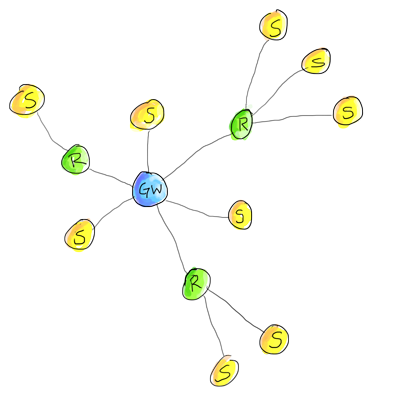
    Yes, messages follow this routing:

    network.png

    Just use setDestination on the MyMessage before sending.

    On the receiving node you have to add a callback method for incoming messages and call gw.process() in loop().

    F Offline
    F Offline
    funky81
    wrote on last edited by
    #6

    @hek does it mean that the radio in repeater side has to be always in awake position?

    1 Reply Last reply
    0
    • H Offline
      H Offline
      hek
      Admin
      wrote on last edited by
      #7

      @funky81
      Yes, that is probably best. :)

      F 1 Reply Last reply
      0
      • H hek

        @funky81
        Yes, that is probably best. :)

        F Offline
        F Offline
        funky81
        wrote on last edited by
        #8

        @hek noted... Thanks

        1 Reply Last reply
        0
        • G Offline
          G Offline
          gigi
          wrote on last edited by gigi
          #9

          I made a sketch that sends a V_VAR1 from node 7 to node 8

          send sketch

          int cval_use, cval_gen;#define CHILD_ID_WATT 0
          MyMessage msgVar1(CHILD_ID_WATT,V_VAR1);
          MyMessage msgVar2(CHILD_ID_WATT,V_VAR2);

          .......

          gw.send(msgVar1.setDestination(8).set(cval_use) );
          gw.send(msgVar2.setDestination(8).set(cval_gen) );

          receive sketch

          void incomingMessage(const MyMessage &message)
          {
          // We only expect one type of message from controller. But we better check anyway.
          if (message.isAck())
          {
          Serial.println("This is an ack from gateway");
          }
          //read: 7-0-8 s=1,c=1,t=25,pt=2,l=2:486
          if (message.type==V_VAR1)
          {
          int Var1;
          Var1= atoi(message.data);
          Serial.println("#########V_VAR1#########");
          Serial.println("Var1");
          Serial.println(Var1);
          Serial.println("##########V_VAR1########");
          }
          if (message.type==V_VAR2)
          {
          int Var2;
          Var2 = atoi(message.data);
          Serial.println("########V_VAR2##########");
          Serial.println("Var2");
          Serial.println(Var2);
          Serial.println("########V_VAR2##########");
          }

          My problem:

          Var1 and var2 ia alway 0.

          send sketch serial
          send: 7-7-0-8 s=1,c=1,t=24,pt=2,l=2,st=ok:580
          send: 7-7-0-8 s=1,c=1,t=25,pt=2,l=2,st=ok:0

          receiver sketch
          ########V_VAR2##########
          read: 7-0-8 s=1,c=1,t=24,pt=2,l=2:580
          #########V_VAR1#########
          Var1: 0
          ##########V_VAR1########
          read: 7-0-8 s=1,c=1,t=25,pt=2,l=2:0
          ########V_VAR2##########
          Var2: 0
          ########V_VAR2##########

          Vera lite - mysensors Ethernet gateway - AirWik sensor - Relay Module

          1 Reply Last reply
          0
          • H Offline
            H Offline
            hek
            Admin
            wrote on last edited by
            #10

            You'll probably have to use message.getInt() in the receiving node (because this data is transmitted in binary format).

            1 Reply Last reply
            0
            • K Offline
              K Offline
              krayola
              wrote on last edited by
              #11

              Earlier today, I was fiddling with using setDestination() and always got st=fail showing up on the gateway, and the message never got to the node I wanted it to... And all the nodes were in my office at the time. I was running trunk for all libs.

              Any ideas what to look at? The gateway's error led never flashed, either.

              H 1 Reply Last reply
              0
              • K krayola

                Earlier today, I was fiddling with using setDestination() and always got st=fail showing up on the gateway, and the message never got to the node I wanted it to... And all the nodes were in my office at the time. I was running trunk for all libs.

                Any ideas what to look at? The gateway's error led never flashed, either.

                H Offline
                H Offline
                hek
                Admin
                wrote on last edited by
                #12

                @krayola

                How did your network topology look like?
                Possible to show the debug log on gateway/repeater node (that should relay message)?

                1 Reply Last reply
                0
                • K Offline
                  K Offline
                  krayola
                  wrote on last edited by
                  #13

                  It seems #define DEBUG is on by default in master :)

                  https://github.com/mysensors/Arduino/blob/9192da3a7d99171c2f42436a0a4ab8c72463119d/libraries/MySensors/MyConfig.h

                  My topology seems to be flat right now. I only have 3 nodes + gateway at present.
                  I did try having combination repeater+sensor nodes, but they were using sleep() which may have been part of the problem.

                  When I use gw.request() I'm able to get messages from the gateway to the node in question (with appropriate controller logic).

                  Here's the code on the test sensor:
                  gw.send(msg.setSensor(i).set(temperature, 2).setDestination(1));

                  Here's the sensor connecting and trying to send a message to node 1 (which is
                  <- 0;0;3;0;9;send: 0-0-2-2 s=255,c=3,t=6,pt=0,l=1,st=fail:M
                  <- 0;0;3;0;9;read: 2-2-0 s=255,c=3,t=11,pt=0,l=18:Temperature Sensor
                  <- 2;255;3;0;11;Temperature Sensor
                  <- 0;0;3;0;9;read: 2-2-0 s=255,c=3,t=12,pt=0,l=3:1.0
                  <- 2;255;3;0;12;1.0
                  <- 0;0;3;0;9;read: 2-2-0 s=0,c=0,t=6,pt=0,l=5:1.4.1
                  <- 2;0;0;0;6;1.4.1
                  <- 0;0;3;0;9;read: 2-2-1 s=0,c=1,t=0,pt=7,l=5:24.00
                  <- 0;0;3;0;9;send: 2-0-1-1 s=0,c=1,t=0,pt=7,l=5,st=fail:24.00

                  Node 1 was initialized:
                  gw.begin(incomingMessage, AUTO, false);
                  and uses
                  gw.sleep(SLEEP_TIME);

                  I thought I'd mention that having a request in the code makes it so i can reliably receives up to 2 messages from the gw (via the controller). Any more than that get lost.
                  gw.request(outdoorTempSensorId, V_TEMP, outdoorTempNodeId);

                  I clearly need to go read all the code :-) There's not that much of it.

                  1 Reply Last reply
                  0
                  • H Offline
                    H Offline
                    hek
                    Admin
                    wrote on last edited by
                    #14

                    If your node expects messages you cannot sleep it. It must call gw.process() as often as possible.

                    1 Reply Last reply
                    0
                    • K Offline
                      K Offline
                      krayola
                      wrote on last edited by
                      #15

                      I figured that out from the other thread :)

                      I added this little helper to my copy of MySensors.cpp:

                          void MySensor::wait(unsigned long ms) {
                                  bool slept_enough = false;
                                  unsigned long start = millis();
                                  unsigned long now;
                      
                                  // Let serial prints finish (debug, log etc)
                                  Serial.flush();
                      
                                  while (!slept_enough) {
                                          MySensor::process();
                                          now = millis();
                                          if (now - start > ms) {
                                                  slept_enough = true;
                                          }
                                  }
                          }
                      

                      In theory it'll handle the millis() rollover, but I haven't verified yet.

                      I'm now able to send messages between nodes with and without being in repeater mode. I have yet to test repeater mode, as i haven't convinced a sensor it can't see the gw yet :)


                      1 Reply Last reply
                      0

                      Hello! It looks like you're interested in this conversation, but you don't have an account yet.

                      Getting fed up of having to scroll through the same posts each visit? When you register for an account, you'll always come back to exactly where you were before, and choose to be notified of new replies (either via email, or push notification). You'll also be able to save bookmarks and upvote posts to show your appreciation to other community members.

                      With your input, this post could be even better 💗

                      Register Login
                      Reply
                      • Reply as topic
                      Log in to reply
                      • Oldest to Newest
                      • Newest to Oldest
                      • Most Votes


                      18

                      Online

                      12.0k

                      Users

                      11.2k

                      Topics

                      113.4k

                      Posts


                      Copyright 2025 TBD   |   Forum Guidelines   |   Privacy Policy   |   Terms of Service
                      • Login

                      • Don't have an account? Register

                      • Login or register to search.
                      • First post
                        Last post
                      0
                      • MySensors
                      • OpenHardware.io
                      • Categories
                      • Recent
                      • Tags
                      • Popular