
Door sensor make USB disconnect while reading serial output?
-
Hello,
I have two Arduino Nano and I just want to build a domotic system with Home Assistant and MySensors.
So, I build a serial gateway with one Arduino, just by copy/pasting the documentation example. By reading the debug, I think it's quite good.For the sensor, my code is:
// Enable debug prints to serial monitor
#define MY_DEBUG
#define MY_BAUD_RATE 9600

// Enable and select radio type attached
#define MY_RADIO_NRF24
//#define MY_RADIO_RFM69

#define MY_NODE_ID 10

#include <SPI.h>
#include <MySensors.h>

#define CHILD_ID 3

const int buttonPin = 3;    // the number of the pushbutton pin
const int ledPin = 13;      // the number of the LED pin

// Variables will change:
int ledState = HIGH;         // the current state of the output pin
int buttonState;             // the current reading from the input pin
int lastButtonState = LOW;   // the previous reading from the input pin

// the following variables are unsigned longs because the time, measured in
// milliseconds, will quickly become a bigger number than can be stored in an int.
unsigned long lastDebounceTime = 0;  // the last time the output pin was toggled
unsigned long debounceDelay = 50;    // the debounce time; increase if the output flickers

MyMessage msg(CHILD_ID, V_TRIPPED);

void setup() {
  pinMode(buttonPin, INPUT);
  pinMode(ledPin, OUTPUT);

  // set initial LED state
  digitalWrite(ledPin, ledState);

  Serial.begin(MY_BAUD_RATE);
}

void presentation() {
  //sendSketchInfo("TestSketch",  "1.0");
  // Register binary input sensor to gw (they will be created as child devices)
  // You can use S_DOOR, S_MOTION or S_LIGHT here depending on your usage.
  // If S_LIGHT is used, remember to update variable type you send in. See "msg" above.
  present(CHILD_ID, S_DOOR);
}

void loop() {
  // read the state of the switch into a local variable:
  int reading = digitalRead(buttonPin);

  // check to see if you just pressed the button
  // (i.e. the input went from LOW to HIGH), and you've waited long enough
  // since the last press to ignore any noise:

  // If the switch changed, due to noise or pressing:
  if (reading != lastButtonState) {
    // reset the debouncing timer
    lastDebounceTime = millis();
  }

  if ((millis() - lastDebounceTime) > debounceDelay) {
    // whatever the reading is at, it's been there for longer than the debounce
    // delay, so take it as the actual current state:

    // if the button state has changed:
    if (reading != buttonState) {
      buttonState = reading;

      // only toggle the LED if the new button state is HIGH
      if (buttonState == HIGH) {
        //send(msg.set(buttonState == HIGH ? 1 : 0));

        delay(1000);
        ledState = !ledState;
        Serial.print("State = ");
        Serial.println(ledState);
        send(msg.set(ledState));
      }
    }
  }

  // set the LED:
  digitalWrite(ledPin, ledState);

  // save the reading. Next time through the loop, it'll be the lastButtonState:
  lastButtonState = reading;
}
The serial output is like this.
But something weird happens just after this serial reading. The USB seems to be disconnected and then reconnect to another ttyUSB. So I can't read all the serial at once. I tried to lower the baud rate, as you can see, but there is still the bug.
I tried to swap Arduino, change USB port, change USB cable and there is still this strange behaviour.
Do you know why? -
Hello,
I have two Arduino Nano and I just want to build a domotic system with Home Assistant and MySensors.
So, I build a serial gateway with one Arduino, just by copy/pasting the documentation example. By reading the debug, I think it's quite good.For the sensor, my code is:
// Enable debug prints to serial monitor
#define MY_DEBUG
#define MY_BAUD_RATE 9600

// Enable and select radio type attached
#define MY_RADIO_NRF24
//#define MY_RADIO_RFM69

#define MY_NODE_ID 10

#include <SPI.h>
#include <MySensors.h>

#define CHILD_ID 3

const int buttonPin = 3;    // the number of the pushbutton pin
const int ledPin = 13;      // the number of the LED pin

// Variables will change:
int ledState = HIGH;         // the current state of the output pin
int buttonState;             // the current reading from the input pin
int lastButtonState = LOW;   // the previous reading from the input pin

// the following variables are unsigned longs because the time, measured in
// milliseconds, will quickly become a bigger number than can be stored in an int.
unsigned long lastDebounceTime = 0;  // the last time the output pin was toggled
unsigned long debounceDelay = 50;    // the debounce time; increase if the output flickers

MyMessage msg(CHILD_ID, V_TRIPPED);

void setup() {
  pinMode(buttonPin, INPUT);
  pinMode(ledPin, OUTPUT);

  // set initial LED state
  digitalWrite(ledPin, ledState);

  Serial.begin(MY_BAUD_RATE);
}

void presentation() {
  //sendSketchInfo("TestSketch",  "1.0");
  // Register binary input sensor to gw (they will be created as child devices)
  // You can use S_DOOR, S_MOTION or S_LIGHT here depending on your usage.
  // If S_LIGHT is used, remember to update variable type you send in. See "msg" above.
  present(CHILD_ID, S_DOOR);
}

void loop() {
  // read the state of the switch into a local variable:
  int reading = digitalRead(buttonPin);

  // check to see if you just pressed the button
  // (i.e. the input went from LOW to HIGH), and you've waited long enough
  // since the last press to ignore any noise:

  // If the switch changed, due to noise or pressing:
  if (reading != lastButtonState) {
    // reset the debouncing timer
    lastDebounceTime = millis();
  }

  if ((millis() - lastDebounceTime) > debounceDelay) {
    // whatever the reading is at, it's been there for longer than the debounce
    // delay, so take it as the actual current state:

    // if the button state has changed:
    if (reading != buttonState) {
      buttonState = reading;

      // only toggle the LED if the new button state is HIGH
      if (buttonState == HIGH) {
        //send(msg.set(buttonState == HIGH ? 1 : 0));

        delay(1000);
        ledState = !ledState;
        Serial.print("State = ");
        Serial.println(ledState);
        send(msg.set(ledState));
      }
    }
  }

  // set the LED:
  digitalWrite(ledPin, ledState);

  // save the reading. Next time through the loop, it'll be the lastButtonState:
  lastButtonState = reading;
}
The serial output is like this.
But something weird happens just after this serial reading. The USB seems to be disconnected and then reconnect to another ttyUSB. So I can't read all the serial at once. I tried to lower the baud rate, as you can see, but there is still the bug.
I tried to swap Arduino, change USB port, change USB cable and there is still this strange behaviour.
Do you know why?@guilou First, I can not see the serial output you tried to link, the log parser page remains blank.
Do you also see this kind of rebooting behaviour, if you diconnect the arduino and then reconnect it without reflashing the sketch? If it then works and the Nano is equipped with a FTDI USB-serial-chip, it could be a not connected PIN of the FTDI.
Otherwise this could be a powering issue (not enough juice for sending).
In case this doesn't help, you might add info about IDE Version and Board Definition Version (IDE: Board Manager) of the Nano you use.
-
@rejoe2 said in Door sensor make USB disconnect while reading serial output?:
@guilou First, I can not see the serial output you tried to link, the log parser page remains blank.
That is weird, on my computer all links are ok.
Anyway, I tried to disconnect/reconnect the Arduino without reflashing the sketch, and I have still the same behaviour: the output stops, and at the same time the Arduino change its port…
26773 TSF:MSG:SEND,10-10-255-2550 MCO:BGN:INIT NODE,CP=RNNNA--,VER=2.1.1
41 TSM:INIT
55 TSF:WUR:MS=0
76 TSM:INIT:TSP OK
97 TSM:INIT:STATID=10
119 TSF:SID:OK,ID=10
14
The "14" on a single like lets me think the serial communication is interrupted at this exact point.
I tried other cables and power source without any success.
-
@rejoe2 said in Door sensor make USB disconnect while reading serial output?:
@guilou First, I can not see the serial output you tried to link, the log parser page remains blank.
That is weird, on my computer all links are ok.
Anyway, I tried to disconnect/reconnect the Arduino without reflashing the sketch, and I have still the same behaviour: the output stops, and at the same time the Arduino change its port…
26773 TSF:MSG:SEND,10-10-255-2550 MCO:BGN:INIT NODE,CP=RNNNA--,VER=2.1.1
41 TSM:INIT
55 TSF:WUR:MS=0
76 TSM:INIT:TSP OK
97 TSM:INIT:STATID=10
119 TSF:SID:OK,ID=10
14
The "14" on a single like lets me think the serial communication is interrupted at this exact point.
I tried other cables and power source without any success.
@guilou I would suspect a power issue, when the node draws to much current (ie. radio transmits) there is a voltage drop and reboot/freeze. Do you have capacitors installed on the radio and/or voltage regulator? What kind of hardware do you use?
The Nano is also 5v so you need to regulate voltage down for VCC and datalines if you use a nrf or rfm radio.
-
-
@guilou I would suspect a power issue, when the node draws to much current (ie. radio transmits) there is a voltage drop and reboot/freeze. Do you have capacitors installed on the radio and/or voltage regulator? What kind of hardware do you use?
The Nano is also 5v so you need to regulate voltage down for VCC and datalines if you use a nrf or rfm radio.
@sundberg84 I use Arduino Nano V3, breadboards and NRF24L01+ with a 4.7 µF capacitor. For debugging, a use USB port from my computer or RaspberryPI. I tried with a USB charger for cellphones, and nothing seems to change (but I am blind without serial :smile: )
About software, I use Arduino IDE v1.8.5 and MySensors v2.1.1.
-
@sundberg84 I use Arduino Nano V3, breadboards and NRF24L01+ with a 4.7 µF capacitor. For debugging, a use USB port from my computer or RaspberryPI. I tried with a USB charger for cellphones, and nothing seems to change (but I am blind without serial :smile: )
About software, I use Arduino IDE v1.8.5 and MySensors v2.1.1.
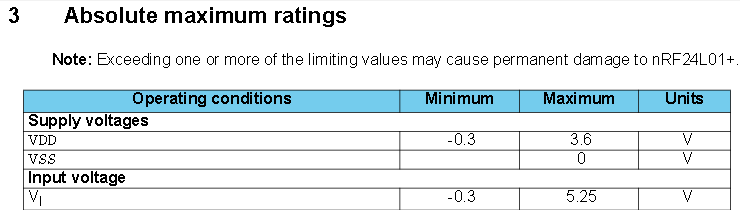
@guilou - everything seems fine except that nrf24l01+ is not 5v tolerant (according to specs - sometimes it works!). I recommend to exclude this problem by using a logic level converter for the datalines since the nano sends 5v over all datalines and the nrf accepts 3.3 this could be a problem.
-
@sundberg84 I use Arduino Nano V3, breadboards and NRF24L01+ with a 4.7 µF capacitor. For debugging, a use USB port from my computer or RaspberryPI. I tried with a USB charger for cellphones, and nothing seems to change (but I am blind without serial :smile: )
About software, I use Arduino IDE v1.8.5 and MySensors v2.1.1.
Sorry, brainfreeze - 5v dataline should be fine... confused with the RFM radio...
-
-
@guilou - should work just fine..!
But still the behaviour smells like a power issue if you use the standard sketch... did you try another radio and or nano? -
@guilou - should work just fine..!
But still the behaviour smells like a power issue if you use the standard sketch... did you try another radio and or nano?@sundberg84 I swapped Nano between the gateway and the sensor and this bug always occurs with the sensor sketch. I have spare radio modules, so I will try with another one, thank you for this suggestion ;)
-
-
-
@hek said in Door sensor make USB disconnect while reading serial output?:
Did you try adding a larger capacitor on the radio?
Yes, but still the same.
I grab another Arduino Nano (not sure it's a guenuine one) and the serial output is correct! The sensor can not find the gateway, but this is another story :)
Do you know why some Arduino Nano V3 "compatible" will not work?
-
Hey there,
How can I know which Arduino Nano are good for MySensors?
Mine are from Banggood and the serial output seems to be chaotic.I have one from Gravitech and it seems to be ok…
How to choose? In the MySensors store, this is clone form Asia like mine from Banggood…
-
So far, most of the cheap clones I use (or used) seemed to work fine on USB side, so most likely there is no real "rule".
In case your problem is related to powering, you may replace the nano by a combination of CP2102 USB-to-serial converter and a pro mini or use a Pro Micro. The CP2102 also provides more current@3.3V (up to 100mA) and (similar to original FTDI's) allows programming of serial numbers and Product ID's to uniquely identify them in /dev/serial/by-id.Your problem report also reminds me to problems other users had with their LAN-GW's. For them afaik downgrading the board definition for the nanos (not the IDE) to version <=1.6.11 helped a lot. You might give that a try...
-
So far, most of the cheap clones I use (or used) seemed to work fine on USB side, so most likely there is no real "rule".
In case your problem is related to powering, you may replace the nano by a combination of CP2102 USB-to-serial converter and a pro mini or use a Pro Micro. The CP2102 also provides more current@3.3V (up to 100mA) and (similar to original FTDI's) allows programming of serial numbers and Product ID's to uniquely identify them in /dev/serial/by-id.Your problem report also reminds me to problems other users had with their LAN-GW's. For them afaik downgrading the board definition for the nanos (not the IDE) to version <=1.6.11 helped a lot. You might give that a try...
@rejoe2 said in Door sensor make USB disconnect while reading serial output?:
Your problem report also reminds me to problems other users had with their LAN-GW's. For them afaik downgrading the board definition for the nanos (not the IDE) to version <=1.6.11 helped a lot. You might give that a try...
Ok, I don't really understand yet what is the board definition version, but I will try. Thank you :)
-
@rejoe2 said in Door sensor make USB disconnect while reading serial output?:
Your problem report also reminds me to problems other users had with their LAN-GW's. For them afaik downgrading the board definition for the nanos (not the IDE) to version <=1.6.11 helped a lot. You might give that a try...
Ok, I don't really understand yet what is the board definition version, but I will try. Thank you :)
@guilou said in Door sensor make USB disconnect while reading serial output?:
Ok, I don't really understand yet what is the board definition version, but I will try. Thank you :)
See Tools - Board - Boards Manager. If you click on the Board Definitions listed (here: for Arduino Nano), a dropdown with all the versions available will appear - the function is similar to the Library Manager.
-



Hello! It looks like you're interested in this conversation, but you don't have an account yet.
Getting fed up of having to scroll through the same posts each visit? When you register for an account, you'll always come back to exactly where you were before, and choose to be notified of new replies (either via email, or push notification). You'll also be able to save bookmarks and upvote posts to show your appreciation to other community members.
With your input, this post could be even better 💗
Register Login